1
11
Chapter 4: Getting Started
This chapter shows you how to connect up, switch on, set up and configure the DL461
Router.
Note: The DL461 Router is operated from the XL8 Control Centre only. For more
information, see the XL8 Live Performance System Owner’s Manual (part number
DOC02-XL8).
Connecting up (XL8 system)
There are two DL461 Routers, X and Y, in the standard XL8 system configuration. As
the routers form the hub of the XL8 Live Performance System, system set-up involves
connecting up both DL461 Routers with the DL471 DSPs, DL431 Mic Splitters, DL451
Modular I/Os and the XL8 Control Centre.
>> To connect up the X router
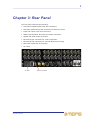
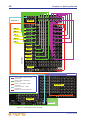
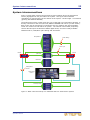
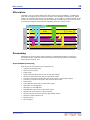
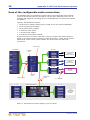
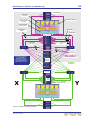
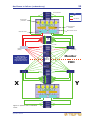
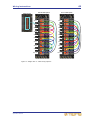
Refer to Figure 1 on page 12.
1
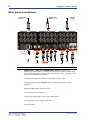
In AES50 audio - bank 0, connect the 10 sockets to the X AES50 audio socket
on the 10 DSP units.
2
In AES50 audio - bank 1, connect socket 1 to the X AES50 audio socket (A or
B, depending on mic amp selection) on Mic splitter 1. Similarly, connect sockets
2, 3 and 4 in this bank to the other three mic splitters.
3
In AES50 audio - bank 1, connect socket 5 to the X AES50 audio socket on the
I/O unit.
4
In the Ethernet control bank of connectors, connect the 10 sockets to the X
Ethernet control socket on the 10 DSP units.
5
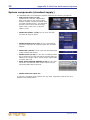
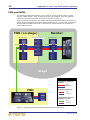
Connect the AES50 synchronisation (word clock or AES3 sync), if required (see
“Rear panel connections” on page 8).
6
Connect the snake (optical or CAT6e) to rear of control centre (see “Rear panel
connections” on page 8).
7
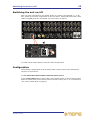
Mains power supply - insert the IEC connector of the mains cable into the rear
of the unit and then plug it into the mains power outlet.
The connection configuration for AES50 audio banks 0 and 1 has been derived for
optimum accessibility and convenience. However, these connections are flexible,
so you can swap the bank connections over or reallocate the mic splitter and I/O
connections within their respective bank, if you want.
>> To connect up the Y router
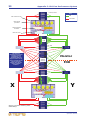
Follow the procedure for connecting the X router, but use the Y connections where
available.
>> To connect the X and Y routers together
In the control expansion section (rear panel) of the X router, connect the router/
router interconnection cable to the Ethernet socket. Then, connect the other end of
the cable to the equivalent socket on the Y router.
DL461 Router
Operator Manual