1
Unlocking the Scanner
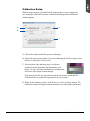
Before you can operate the scanner, you will need to unlock the scanner. To unlock
the scanner, follow the steps below:
1. Remove the yellow “Step 3” sticker
from your scanner.
2. Look for the unlocking screw at the
bottom of the scanner.
3. Using a screwdriver, push and turn
the locking screw counterclockwise
to the unlock position.
When successfully unlocked, the
screw will push out a little,
protruding slightly from the bottom
of the scanner.
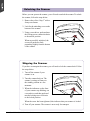
Shipping the Scanner
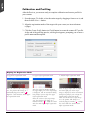
If you have to transport the scanner, you will need to lock the scanner back. Follow
the steps below:
1. Turn off the scanner if your
scanner is on.
2. Turn the scanner back on. The
scanner’s carriage will move to
the standby position in a few
moments.
3. When the indicators on the front
of your scanner stop blinking, use
a screwdriver, and then push and
turn the locking screw clockwise
to the locked position.
When the screw has been tightened, this indicates that your scanner is locked.
4. Turn off your scanner. The scanner is now ready for transport.
4
ScanMaker 9800XL Plus User Guide