1
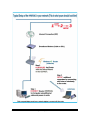
1) POWER ON: After you have correctly connected your router to your PC and Cable/DSL
modem, please power on all units.
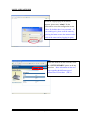
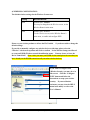
2) INSERT THE SETUP CD: Find the Setup-CD in your package and insert it into your CD-Rom
drive. Wait for the Auto-Load Page to load. If the page does not load, please click on the “My
Computer” icon of you PC and find your CD-Rom Drive. Right-Click on the CD-Rom drive
icon and choose “Explore.” Find the file titled “autorun” and execute it.
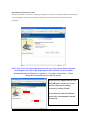
3) SETUP WIZARD: Click on the “Setup Wizard” tab to begin configuration of your Router. If
your web-browser does not auto-load or cannot find the page, please skip to STEP 4, the PC
Configuration page. You may return to this step after you have correctly configured your PC.
HWR54G
Hawking Technologies, Inc.
P4