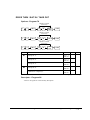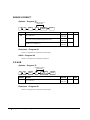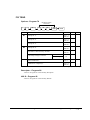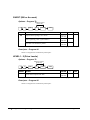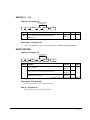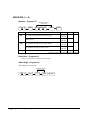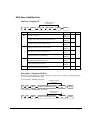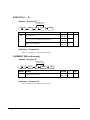
1
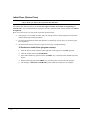
ER-380 / ER-380M Electronic Cash Register AU
Operation and
Program Manual
ly
TZ
_
ls
lj
{y
W
vup
Gj
hz
oGy
ln
pz{l
y
All specifications are subject to change without notice
JK68-60962Q(Rev.03)
From ER-380 v1.0, ER-380M v1.0
Up to ER-380 v4.1, ER-380M v4.1
ATTENTION
The product that you have purchased contains a rechargeable Ni-MH battery. This battery is recyclable. At the end of its useful life, under
various state and local laws, it may be illegal to dispose of the battery into the municipal waste system.
Check with your local solid waste officials for details concerning recycling options or proper disposal.
WARNING
This is a Class A product. In a domestic environment this product may cause radio interference in which case the user may be required to
take adequate measures.
Precaution Statements
Follow these safety, servicing and ESD precautions to prevent damage and to protect against potential hazards such as
electrical shock.
1-1
Safety Precautions
1. Be sure that all built-in protective devices are
replaced. Restore any missing protective shields.
2. When reinstalling the chassis and its assemblies, be
sure to restore all protective devices, including
nonmetallic control knobs and compartment covers.
3. Make sure there are no cabinet openings through
which people - particularly children - might insert
fingers and contact dangerous voltages. Such
openings include excessively wide cabinet
ventilation slots and improperly fitted covers and
drawers.
4. Design Alteration Warning:
Never alter or add to the mechanical or electrical
design of the SECR. Unauthorized alterations
might create a safety hazard. Also, any design
changes or additions will void the manufacturer’s
warranty.
5. Components, parts and wiring that appear to have
overheated or that are otherwise damaged should
be replaced with parts that meet the original
specifications. Always determine the cause of
damage or over- heating, and correct any potential
hazards.
6. Observe the original lead dress, especially near the
following areas: sharp edges, and especially the AC
and high voltage supplies. Always inspect for
pinched, out-of-place, or frayed wiring. Do not
change the spacing between components and the
printed circuit board. Check the AC power cord for
damage. Make sure that leads and components do
not touch thermally hot parts.
7. Product Safety Notice:
Some electrical and mechanical parts have special
safety-related characteristics that might not be
obvious from visual inspection. These safety
features and the protection they give might be lost
if the replacement component differs from the
original - even if the replacement is rated for higher
voltage, wattage, etc.
Components that are critical for safety are indicated
in the circuit diagram by shading, ( ) or ( ).
Use replacement components that have the same
ratings, especially for flame resistance and
dielectric strength specifications. A replacement
part that does not have the same safety
characteristics as the original might create shock,
fire or other hazards.
CAUTION
There is the danger of explosion if battery is incorrectly
replaced.
ATTENTION
ll y a danger d’explosion s’il y a remplacement
incorrect de la batterie.
Remplacer uniquement avec une batterie du même type
ou d’un type équivalent recommandé par le
constructeur.
Mettre au rebut les batteries usagées conformément aux
instructions du fabricant.
Replace only with the same or equivalent type
recommended by the manufacturer.
Dispose used batteries according to the manufacturer’s
instructions.
SAFETY NOTICE: "For pluggable equipment, the socket-outlet shall be installed near
the equipment and shall be easily accessible."
1-2
Servicing Precautions
WARNING: First read the-Safety Precautions-section of this manual. If some unforeseen circumstance creates a
conflict between the servicing and safety precautions, always follow the safety precautions.
WARNING: An electrolytic capacitor installed with the wrong polarity might explode.
1. Servicing precautions are printed on the cabinet.
Follow them.
2. Always unplug the units AC power cord from the
AC power source before attempting to:
(a) Remove or reinstall any component or assembly
(b) Disconnect an electrical plug or connector
(c) Connect a test component in parallel with an
electrolytic capacitor
3. Some components are raised above the printed
circuit board for safety. An insulation tube or tape
is sometimes used. The internal wiring is
sometimes clamped to prevent contact with
thermally hot components. Reinstall all such
elements to their original position.
4. After servicing, always check that the screws,
components and wiring have been correctly
reinstalled. Make sure that the portion around the
serviced part has not been damaged.
1-3
5. Check the insulation between the blades of the AC
plug and accessible conductive parts (examples:
metal panels and input terminals).
6. Insulation Checking Procedure: Disconnect the
power cord from the AC source and turn the power
switch ON. Connect an insulation resistance meter
(500V) to the blades of AC plug.
The insulation resistance between each blade of the
AC plug and accessible conductive parts (see
above) should be greater than 1 megohm.
7. Never defeat any of the B+ voltage interlocks Do
not apply AC power to the unit (or any of its
assemblies) unless all solid-state heat sinks are
correctly installed.
8. Always connect an instrument’s ground lead to the
instrument chassis ground before connecting the
positive lead; always remove the instrument’s
ground lead last.
Precautions for Electrostatic Sensitive Devices (ESDs)
1. Some semiconductor (solid state) devices are easily
damaged by static electricity. Such components are
called Electrostatic Sensitive Devices (ESDs);
examples include integrated circuits and some fieldeffect transistors. The following techniques will
reduce the occurrence of component damage caused
by static electricity.
2. Immediately before handling any semiconductor
components or assemblies, drain the electrostatic
charge from your body by touching a known earth
ground. Alternatively, wear a discharging wriststrap device. (Be sure to remove it prior to applying
power - this is an electric shock precaution.)
3. After removing an ESD-equipped assembly, place
it on a conductive surface such as aluminum foil to
prevent accumulation of electrostatic charge.
4. Do not use Freon-propelled chemicals. These can
generate electrical charges that damage ESDs.
5. Use only a grounded-tip soldering iron when
soldering or unsoldering ESDs.
6. Use only an anti-static solder removal device. Many
solder removal devices are not rated as anti-static;
these can accumulate sufficient electrical charge to
damage ESDs.
7. Do not remove a replacement ESD from its
protective package until you are ready to install it.
Most replacement ESDs are packaged with leads
that are electrically shorted together by conductive
foam, aluminum foil or other conductive materials.
8. Immediately before removing the protective
material from the leads of a replacement ESD,
touch the protective material to the chassis or
circuit assembly into which the device will be
installed.
9. Minimize body motions when handling unpackaged
replacement ESDs. Motions such as brushing
clothes together, or lifting a foot from a carpeted
floor can generate enough static electricity to
damage an ESD.Contents
Contents
Getting Started
1
About the ER-380 / ER-380M ................................................................................................... 1
Unpacking.................................................................................................................................. 2
Installing the Paper .................................................................................................................... 2
Basic Features and Functions .................................................................................................... 6
Standard Hardware ...................................................................................................... 6
Optional Hardware ...................................................................................................... 6
Software Features ........................................................................................................ 6
Front Display............................................................................................................... 7
Rear Display - VFD................................................................................................... 10
Error Code Table....................................................................................................... 12
Control Lock ............................................................................................................. 13
Keyboards.................................................................................................................. 14
Memory Clear.......................................................................................................................... 15
Memory All Clear (RAM Clear) ............................................................................... 15
Initial Clear (Status Clear)......................................................................................... 16
Operating Instructions
17
Function Key Descriptions ...................................................................................................... 17
Clerk Sign-On/Sign-Off .......................................................................................................... 21
Direct Sign-On .......................................................................................................... 21
Coded Sign-On.......................................................................................................... 21
Receipt On and Off.................................................................................................................. 22
Program 99 - Receipt ON/OFF Programming........................................................... 22
Item Registrations.................................................................................................................... 23
Keyboard PLU Entry - Open Price / Preset Price Override ...................................... 24
Keyboard PLU Entry - Preset Price........................................................................... 24
Keyboard PLU Entry - Repeat .................................................................................. 25
Keyboard PLU Entry - Multiplication....................................................................... 26
Keyboard PLU Entry - Direct Multiplication with Preset Price................................ 26
Keyboard PLU Entry - Multiplication with Decimal Point....................................... 27
Keyboard PLU Entry - Split Pricing ......................................................................... 28
Keyboard PLU Entry - Single Item ........................................................................... 28
Code PLU Entry - Open Price................................................................................... 29
Code PLU Entry - Preset Price / Single Item ............................................................ 29
Code PLU Entry - Preset Price Override................................................................... 30
Code PLU Entry - Repeat.......................................................................................... 30
ER-380 / ER-380M Electronic Cash Register AU
Contents •
i
Code PLU Entry - Multiplication ..............................................................................31
Code PLU Entry - Multiplication with Decimal Point ..............................................31
Code PLU Entry - Split Pricing.................................................................................32
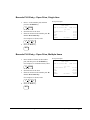
Barcode PLU Entry - Open Price, Single Item..........................................................33
Barcode PLU Entry - Open Price, Multiple Items.....................................................33
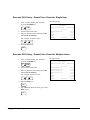
Barcode PLU Entry - Preset Price Override, Single Item..........................................34
Barcode PLU Entry - Preset Price Override, Multiple Items ....................................34
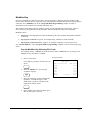
Modifier Key .............................................................................................................35
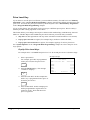
Price Level Key .........................................................................................................36
Promo ........................................................................................................................37
Waste .........................................................................................................................38
Percent Key Operations ...........................................................................................................39
Preset Percent Discount on an Item...........................................................................40
Enter a Percent Discount on an Item .........................................................................40
Preset Percent Discount on Sale Total.......................................................................41
Enter a Percent Discount on Sale Total .....................................................................41
For Surcharge Operation ...........................................................................................41
Dollar Amount Discount on Sale...............................................................................42
Dollar Amount Discount on Item ..............................................................................42
Return Merchandise Registrations...........................................................................................43
Voids and Corrections .............................................................................................................44
Error Correction (Void Last Item).............................................................................44
Void Previous Item....................................................................................................44
Cancel........................................................................................................................45
Void Mode Operations ..............................................................................................45
No Sale Operations ..................................................................................................................46
Open Drawer .............................................................................................................46
Non Add Number ......................................................................................................46
Received On Account Operations............................................................................................47
Paid Out Operations.................................................................................................................48
Subtotaling a Sale ....................................................................................................................49
Eat In/Take Out/Drive Thru Sales ...........................................................................................49
Totaling and Tendering............................................................................................................50
Totaling a Cash Sale ..................................................................................................50
Totaling a Check Sale................................................................................................50
Tendering a Cash Sale ...............................................................................................51
Tendering a Check Sale.............................................................................................51
Totaling a Charge (EFTPOS) Sale ............................................................................52
Tendering a Charge (EFTPOS) Sale .........................................................................52
Cash Out within a Charge (EFTPOS) Sale................................................................53
Check Cashing...........................................................................................................54
Split Tender ...............................................................................................................54
Post Tender................................................................................................................55
Currency Conversion.................................................................................................55
Table Management and Clerk Interrupt Operations ................................................................56
Overview ...................................................................................................................56
Soft Check - Restaurant Style Billing........................................................................57
Hard Check - Monthly Account Style Billing ...........................................................62
Scale Entry...............................................................................................................................66
Direct Scale Entry......................................................................................................66
Automatic Scale Entry...............................................................................................67
Tare Weight Entry .....................................................................................................67
Manual Tare Weight Entry ........................................................................................68
Manual Weight Entry ................................................................................................69
ii
•
Contents
ER-380 / ER-380M Electronic Cash Register AU
X/Z Mode
71
Introduction ............................................................................................................................. 71
X/Z Reports ............................................................................................................................. 72
Running a Report - General Instructions................................................................... 72
Report Table.............................................................................................................. 73
Electronic Journal Table............................................................................................ 74
Reset Hard Check (Slip) Line # (EPROM v3.1 & Later) ........................................................ 75
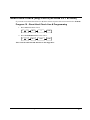
Program 10 - Reset Hard Check Line # Programming.............................................. 75
Cash Declaration...................................................................................................................... 76
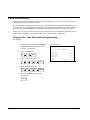
Program 90 - Cash Declaration Programming .......................................................... 76
Service Mode Programming
77
Overview ................................................................................................................................. 77
Memory Allocation Scan .........................................................................................................78
PC Online Mode ...................................................................................................................... 78
Memory Allocation.................................................................................................................. 79
Program 60 - Memory Allocation Programming....................................................... 79
Clear All Sales Totals .............................................................................................................. 80
Program 20 - Clear All Sales Totals.......................................................................... 80
Clear Grand Total .................................................................................................................... 80
Program 30 - Clear Grand Total................................................................................ 80
Clear / Delete PLU File ........................................................................................................... 80
Program 40 - Clear / Delete PLU File ....................................................................... 80
EPROM Information ............................................................................................................... 80
Program 50 - EPROM Information ........................................................................... 80
Function Key Assignment Programming ................................................................................ 81
Program 70 - Function Key Assignment Programming ............................................ 81
Function Key Codes - New Version (ER-380 EPROM v2.1 & later / ER-380M
EPROM v1.8 & later)................................................................................................ 82
Function Key Codes - Old Version (ER-380 EPROM v2.0 & earlier / ER-380M
EPROM v1.7 & earlier) ............................................................................................ 83
RS232C Serial Port #1 Communication Options..................................................................... 84
Program 80 - RS232C Serial Port #1 Communication Options ................................ 84
ER-380M RS232C Serial Port #2 Communication Options .................................................... 86
Program 81 - RS232C Serial Port #2 Communication Options ................................ 86
Program Mode Programming
87
Default Programming .............................................................................................................. 87
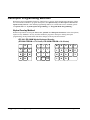
Descriptor Programming Methods........................................................................................... 88
Alpha Overlay Method.............................................................................................. 88
Descriptor Code Method ........................................................................................... 89
Tax Programming .................................................................................................................... 90
Straight Percentage Tax Rate Programming ............................................................. 90
PLU Programming................................................................................................................... 92
Program 100 - PLU Status Programming.................................................................. 93
Program 110 - PLU Auto Tare Programming ........................................................... 96
Program 150 - PLU Group Assignment Programming ............................................. 97
Program 200 - PLU Price/HALO Programming ....................................................... 98
Program 250 - PLU Stock Amount Programming .................................................... 99
Program 300 - PLU Description Programming....................................................... 100
Program 350 - PLU Link Programming.................................................................. 101
Program 400 - PLU Delete Programming ............................................................... 102
Program 450 - PLU MIX & MATCH Programming .............................................. 103
ER-380 / ER-380M Electronic Cash Register AU
Contents •
iii
System Option Programming.................................................................................................104
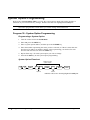
Program 30 - System Option Programming ............................................................104
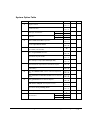
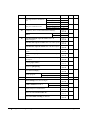
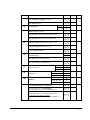
System Option Table ...............................................................................................105
Note: Price Embedded Barcode Format ..................................................................108
Print Option Programming.....................................................................................................109
Program 40 - Print Option Programming ................................................................109
Print Option Table ...................................................................................................110
Function Key Programming...................................................................................................114
Program 70 - Function Key Options Programming.................................................115
Program 80 - Function Key Descriptor Programming ............................................116
Program 90 - Function Key HALO or Percentage Rate Programming ...................117
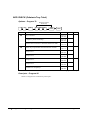
ADD CHECK (Cafeteria Tray Total)......................................................................118
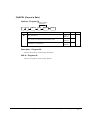
CANCEL (Cancel a Sale)........................................................................................119
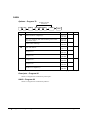
CASH ......................................................................................................................120
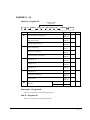
CHARGE (1 ~ 8).....................................................................................................121
CHECK (CHEQUE)................................................................................................122
CHECK (CHEQUE) CASHING .............................................................................123
CHECK (CHEQUE) ENDORSEMENT .................................................................124
CHECK # (Bill or Account No.) .............................................................................125
CURRENCY CONVERSION.................................................................................126
DRIVE THRU / EAT IN / TAKE OUT ..................................................................127
ERROR CORRECT ................................................................................................128
F/S SUB...................................................................................................................128
F/S TEND................................................................................................................129
GUEST (Bill or Account)........................................................................................130
LEVEL1 - 2 (Price Levels)......................................................................................130
MACRO (1 ~ 10).....................................................................................................131
MDSE RETURN .....................................................................................................131
MODIFIER (1 ~ 5)..................................................................................................132
#/NS (Non Add#/No Sale).......................................................................................133
PAID OUT (1 ~ 3)...................................................................................................134
PAYMENT (Bill or Account) .................................................................................134
PBAL.......................................................................................................................135
PRINT CHECK (Bill or Account)...........................................................................135
PROMO...................................................................................................................136
RECD ON ACCT (1 ~ 3) ........................................................................................137
SCALE ....................................................................................................................138
SERVICE (Bill or Account) ....................................................................................139
SUBTOTAL ............................................................................................................140
TABLE (Bill or Account)........................................................................................140
TARE.......................................................................................................................141
TAX EXEMPT........................................................................................................142
TIP (Bill or Account)...............................................................................................143
VALIDATE.............................................................................................................144
VOID .......................................................................................................................144
WASTE ...................................................................................................................145
% (1 ~ 5) (Discounts or Surcharges) .......................................................................146
Clerk Programming................................................................................................................149
Program 800 - Secret Code Programming...............................................................150
Program 801 - Drawer Assignment & Training Clerk Programming......................151
Program 810 - Clerk Description Programming......................................................152
Mix & Match Programming...................................................................................................153
Program 600 - Trip Level Programming .................................................................154
Program 601 - Price Programming ..........................................................................154
Program 610 - Mix & Match Description Programming.........................................155
iv •
Contents
ER-380 / ER-380M Electronic Cash Register AU
Group Programming ..............................................................................................................156
Program 900 - Group Status Programming ............................................................. 156
Program 910 - Group Descriptors Programming .................................................... 157
Miscellaneous Programming ................................................................................................. 158
Program 1500 - Macro Key Sequence Programming.............................................. 158
Program 700 - Logo Description Programming ...................................................... 159
Program 701 - Financial Report Message Programming ........................................ 160
Program 710 - Clerk Report Message Programming .............................................. 162
Program 711 - Macro Name Programming ............................................................. 164
Program 1000 - NLU (Number Look Up) Code Number Programming ................ 165
Program 1100 - Cash-In-Drawer Limit Programming ............................................ 166
Program 1200 - Check Change Limit Programming............................................... 167
Program 1300 - Date and Time Programming ........................................................ 168
Program 1400 - Scale Tare Weight Programming .................................................. 169
Program 1600 - Machine Number Programming .................................................... 170
Program Scans ....................................................................................................................... 171
Program 15 - Program Scans................................................................................... 171
Sample Reports
173
Financial ................................................................................................................................ 173
Time....................................................................................................................................... 177
PLU........................................................................................................................................ 178
Clerk ...................................................................................................................................... 179
Individual Clerk..................................................................................................................... 180
Groups ................................................................................................................................... 181
Stock ...................................................................................................................................... 182
Open Check ........................................................................................................................... 183
ER-380 / ER-380M Electronic Cash Register AU
Contents
•
v
Getting Started
About the ER-380 / ER-380M
The ER-380 / ER-380M is offered in two different versions.
•
The ER-380 / ER-380M features a 44-position keyboard with traditional raised keys. This
keyboard will accommodate up to 12/16 NLU keys and works best in retail stores, or shops
where it is not necessary to place a large number of preset item keys on the keyboard..
•
A standard allocation of 300 PLUs and 20 Groups allows for easy item management.
Approximately 1000 PLUs can be allocated. For expansion to 5000 PLUs, please contact
your dealer.
•
The ER-380 / ER-380M is an excellent low cost solution for a wide range of retail
environments.
•
The ER-380 / ER-380M, with its superb thermal printing system, always provides the
fastest in transaction speeds.
•
The ER-380 / ER-380M is preset with 10% GST and Australian rounding as well as a
number of other useful functions.
ER-380 / ER-380M Electronic Cash Register AU
Getting Started
•
1
Unpacking
1. Unpack and unwrap the cash register.
2. Located in the packing are the following items:
•
1 roll of paper,
•
2 sets of control keys,
•
Operation and Program Manual,
3. Remove the cardboard protectors from the cash drawer.
4. Plug the register into a grounded outlet (three prong), insert a control key and turn the key to
the REG control lock position.
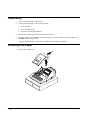
*A paper takeup spindle + motor kit is available if Jornal mode is required.
Installing the Paper
1. Remove the printer cover.
2
•
Getting Started
ER-380 / ER-380M Electronic Cash Register AU
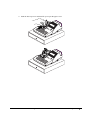
2. Push the blue cap lever and then lift up to open the paper cover.
ER-380 / ER-380M Electronic Cash Register AU
Getting Started
•
3
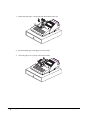
3. Ensure that the paper is being fed from the bottom of the roll.
4. Put the leading edge of the paper over the printer
5. Close the paper cover slowly until it locks firmly
4
•
Getting Started
ER-380 / ER-380M Electronic Cash Register AU
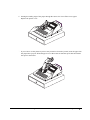
6. Passing the leading edge of the paper through the cutter slot. Tear off the excess paper.
Replace the printer cover.
※ If you wish to use the printer to print a sales journal or electronic journal, insert the paper into
the paper take-up spool. Wind the paper two or three turns around the spool shaft and install
the spool in the mount.
ER
EL
ER-380 / ER-380M Electronic Cash Register AU
-3
EC
TRO
N
I CA
SH
80
REG
IS
TER
Getting Started
•
5
Basic Features and Functions
Standard Hardware
•
Display
=> ER-380M LCD model: 2 line, 16 character liquid crystal display and ten position rear
displays with a rear pop up display standard.
=> ER-380 VFD model:
Ten position front and rear displays with a rear pop up display
standard.
•
44-position keyboard.
•
1 station Thermal 32-column printer with drop-and-print mechanism.
•
Sturdy Metal Cash Drawer with removable 4 Bill/8 Coin drawer insert.
•
7-position control lock.
•
Standard customer pole display.
•
Communications ports:
=> ER-380: 1 RS232C.
=> ER-380M: 2 RS232C.
Optional Hardware
•
PC Link.
•
Load cell scale.
•
Kitchen printer / Bill Printer / Slip Printer / Journal Printer.
•
Barcode scanner.
•
Pole Display.
•
EFTPOS Terminal.
Software Features
6
•
•
Up to 2 price levels for each PLU.
•
Up to 5 PLU modifier keys.
•
300 Price Look Ups (PLUs) default (expandable up to 5,000 with an extend memory chip)
for open or preset item registration. 117 PLUs standard for open or preset item registration.
For direct registrations, 12/16 PLU keys are on the keyboard.
•
18 character programmable descriptors for PLUs and functions.
•
Up to 99 PLU Group totals.
•
Up to 99 clerks with separate report totals.
Getting Started
ER-380 / ER-380M Electronic Cash Register AU
Front Display
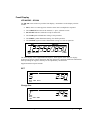
VFD MODEL - ER-380
The ER-380 comes with a ten position front display. Annotations on the display window
include:
•
RPT, where a counter appears when the same item is multiplied or repeated.
•
The AMOUNT area shows the amount, i.e. price, subtotal or total.
•
RCPT OFF indicates when the receipt is turned off.
•
The VOID symbol illuminates during Void operations.
•
The SHIFT symbol illuminates during Tax Shift operations
•
The CLERK segment remains illuminated as long as a clerk is signed on.
RPT
AMOUNT
RCPT VOID SHIFT
OFF
CLERK
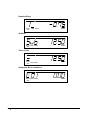
The front display offers supplemental descriptors, which appear in the first two display
positions (as shown). These descriptors help the operator by supplying additional information
while operating the register, and may be accompanied by an error tone.
Supplemental descriptors include:
RPT
RPT
AMOUNT
RC PT VOID SH IFT
OFF
CLERK
Change Due
RPT
RCPT VOID SHIFT
OFF
ER-380 / ER-380M Electronic Cash Register AU
AMOUNT
CLERK
Getting Started
•
7
Negative Entry
RPT
RCPT
OFF
AMOUNT
VOID SHIFT
CLERK
Subtotal
RPT
AMOUNT
RCPT VOID SHIFT
OFF
CLERK
Total of Sale
RPT
AMOUNT
RCPT VOID SH IFT
OFF
CLERK
Numbered Error Conditions
RPT
RCPT VOID SHIFT
OFF
8
•
Getting Started
AMOUNT
CLERK
ER-380 / ER-380M Electronic Cash Register AU
LCD MODEL - ER-380M
The ER-380M comes with a liquid crystal screen, allowing you to view up to 2 lines of
information with up to 16 characters per line. The display is backlit to provide excellent
visibility, regardless of lighting conditions.
When the control lock is in the OFF position, the register cannot be operated. When the
control lock in the REG, VOID, X, Z, PGM or S positions the appropriate message, there are
displayed with the message “CLOSED”. You must sign on a clerk to remove the
“CLOSED” message and begin operation.
REG
_REGISTER_MODE
__________CLOSED
VOID
___VOID_MODE
__________CLOSED
Operator Display Example
Press 1 0 0 0, then PLU12 to register a sale of $10.00 to PLU 12
PLU12
1__________10.00
Press 5 0 0 0, then CASH to tender a sale and change will be shown
CASH_______50.00
CHANGE_____40.00
Displayed Error Conditions
_**_WARNING!_**
__SEQUENCE_ERR
ER-380 / ER-380M Electronic Cash Register AU
Getting Started
•
9
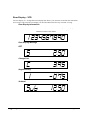
Rear Display - VFD
The rear display is a 10 digit florescent display that allows your customer to monitor the transaction
and view the sale total. The rear display can be lifted and turned for easy customer viewing.
Rear Display Information
Item Count
Amount
The number of times an item has been repeated is displayed
The amount of the item, subtotal or total, is displayed in the
rightmost portion of the display
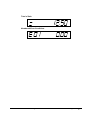
Rear Display Message
RPT
Change Due
Negative Entry
Subtotal
10
•
Getting Started
ER-380 / ER-380M Electronic Cash Register AU
Total of Sale
Numbered Error Conditions
ER-380 / ER-380M Electronic Cash Register AU
Getting Started •
11
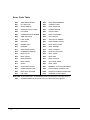
Error Code Table
E00
SEQUENCE ERROR
E22
REQ. ENDORSEMENT
E01
PLU NO DATA
E23
CONSOL OVER
E02
CLERK ERROR
E24
REQ. SUBTOTAL
E03
AMOUNT COUNT OVER
E25
PROMO ERROR
E04
LAN TRAN
E26
CHECK OPEN
E05
COMMUNICATION ERROR
E27
REQ. PASSWORD
E06
TIME AND DATE
E28
NO VOID PLU
E07
LIMIT OVER
E29
232C SETUP ERROR
E08
INACTIVE
E30
REQ. PRESET VALUE
E09
XMODE ONLY
E31
REQ. OPEN VALUE
E10
NONADD
E32
REQ. AMOUNT
E11
ADDCHECK ERROR
E33
REQ. PAYMENT
E12
CONDIMENT ERROR
E34
INVALID FUNCTION
E13
REQ. EAT IN
E35
REQ. TABLE
E14
REQ. STOCK
E36
REQ. PBAL
E15
REQ. DRAWER
E37
REQ. CHECK #
E16
REQ. GUEST
E38
ONLY ONE TABLE
E17
SCALE
E39
REQ. VALID
E18
CLERK NOT MATCH
E43
MEMORY ALLOCATION ERROR
E19
COMPULSORY TARE
E44
ELECTRONIC JOURNAL FULL
E20
REQ. DECLARATION
PER
RECEIPT PRINTER PAPER END
E21
OFF LINE
PCO
PRINTER COVER OPEN
SLIP CHG SLIP PAPER END. CHANGE NEW SLIP PAPER (When using slip printer.)
PFP
12
•
SYSTEM ERROR (If this problem occurs, call the service engineer.)
Getting Started
ER-380 / ER-380M Electronic Cash Register AU
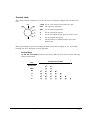
Control Lock
The control lock has 7 positions, accessed with 5 keys. Each ECR is shipped with two full sets of
keys.
OFF
VOID Use to void (correct) items outside of a sale.
VOID
REG
OFF
The register is inoperable.
X
REG
Use for normal registrations.
Z
X
Use to read register reports.
Z
Use to read register reports and reset totals to zero.
P
Use to program the register.
S
The S position is a hidden position reserved for
dealer access.
P
S
Before performing any operations in Register Mode a clerk must be signed on. See “Clerk SignOn/Sign-Off” for a description of clerk operations.
Control Keys
The ER-380 / ER-380M includes two sets of keys that may be used to access the following
control lock positions.
Positions Accessible
Key
VOID
OFF
REG
Removable
√
√
REG
√
√
X
Z
PGM
VD
√
√
√
√
Z
√
√
√
√
√
P
√
√
√
√
√
√
C
√
√
√
√
√
√
ER-380 / ER-380M Electronic Cash Register AU
S
√
Getting Started •
13
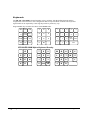
Keyboards
The ER-380 / ER-380M keyboard includes 44 key positions with the default legends and key
assignments as shown below. This configuration has 16 keyboard NLU locations. The keyboard
legend label can be replaced by removing the protective plastic key cap.
Programmable key locations are shown with a bold border.
G
FEED
C
%1
B
M
CLERK
X/TM
7
8
9
F
RECEIP
T On/Off
I
M OD 1/
4
5
6
E
H
VOID
1
2
3
CLEAR
0
00
.
CANCEL RETURN
A
L
P
X
12
T
7
Y
14
16
W
Z
11
13
15
10
SUB
TOTAL
SHIFT
K
O
2
J
PLU
U
8
3
D
#/NS
Q
4
N
1
Y
S
6
CHECK
R
5
CASH
9
ER-380/ER-380M Alpha Keyboard Overlay
G
14
•
7
8
9
M
Q
U
X
V
W
Z
C
F
I
4
5
6
L
P
T
B
E
H
1
2
3
K
O
S
A
D
J
N
R
Getting Started
0
SPACE DOUBLE
SIZE
Y
ER-380 / ER-380M Electronic Cash Register AU
Memory Clear
Memory All Clear (RAM Clear)
CAUTION: The procedures described in this area are security sensitive. Clearing all or parts of
the ER-380/ER-380M memory may cause damage or loss to the program. Do not
share this information with unauthorized users and distribute the special
SERVICE-Mode key (C-Key) only to those you may want to perform these
functions.
Perform "Clear All Totals", or "Clear PLU File" if you wish to clear only parts of ER-380/ER380M memory. Complete clearing of all memory areas and installation of the default program can be
done through the following special procedure:
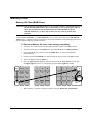
To Perform a Memory All Clear (reset memory completely):
1. Turn the power switch located on the right side of the register to the OFF position.
2. Turn the control lock to the S-Mode (one passed PGM-Mode as a hidden position).
3. Press and hold the key position where the CHECK key is located on the default
keyboard layout.
4. Continue to hold the CHECK key while turning the power switch to the ON position.
5. After hear BEEP, release CASH key.
6. Press the upper left key (FEED) of the keyboard, then the lower left key (#/NS), then
the upper right key (PLU 16), and finally press the lower right key (CASH).
G
FEED
C
%1
B
M
8
9
4
5
6
VOID
1
2
3
CLEAR
0
X/TM
F
I
RECEIPT MOD 1/
On/Off
SHIFT
E
CAN CEL
7
CLERK
L
H
RETURN
#/NS
Space
PLU
00
D bl Size
.
U
8
P
3
K
D
A
Q
4
T
O
J
16
Z
11
13
15
10
SUB
TOTAL
S
6
N
1
Y
14
W
7
2
X
12
Y
CHECK
R
5
9
C ASH
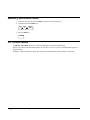
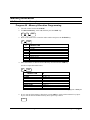
7. When memory is cleared, the register prints a message “RAM ALL CLEAR OK!”
ER-380 / ER-380M Electronic Cash Register AU
Getting Started •
15
Initial Clear (Status Clear)
CAUTION: Do not share this information with unauthorized users. Distribute the P-Mode key
only to those you may want to perform this function.
The initial clear function allows you to exit any register activity and return to a beginning or
cleared state. Any transaction that is in progress will be exited and totals for that transaction will not
be updated.
Here are some reasons you may want to perform an initial clear:
•
The register is in an unknown state, and you wish to exit the current program or transaction
without following normal procedures.
•
You have performed a function that includes a compulsory activity and you wish to bypass
the compulsion.
•
An initial clear may be necessary as part of servicing, or troubleshooting.
To Perform an Initial Clear (program restart):
1. Turn the power switch located on the right side of the register to the OFF position.
2. Turn the control lock to the PGM-Mode.
3. Press and hold the key position where the SBTL key is located on the default keyboard
layout.
4. While continuing to hold the SBTL key, turn the power switch to the ON position.
5. The message "INITIAL CLEAR OK!” prints when the initial clear is complete.
16
•
Getting Started
ER-380 / ER-380M Electronic Cash Register AU
Operating Instructions
Function Key Descriptions
Keys are listed in alphabetical order. Some of the keys described below are not included on the
default keyboard. See “Function Key Assignment Programming” to add or change programmable
keys.
Keyboard Legend
Description
#/NS
(NONADD# /
NO SALE)
Use as a non-add key to print up to an 8-digit numeric entry on the receipt. This entry will not
add to any sales totals. The #/NS key is also used to open the cash drawer without making a sale.
X/TIME
Use to a multiply a quantity of items or calculate split pricing on PLU entries. Also use to display
time.
00, 0 - 9, Decimal
Use to make numeric entries in REG, X, Z, VOID, or P positions. The decimal key is used for
decimal or scale multiplication, when setting or entering fractional percentage discounts, or when
programming fractional tax rates. Do not use the decimal key when making amount entries into
PLUs.
ADD CHECK
Use to combine individual trays (in a cafeteria situation) that will be paid together. Each tray
subtotal can advance the consecutive number, depending on programming.
CANCEL
Cancels a transaction without updating PLU, or function key totals. The Cancel function may
only be used prior to tendering. Once tendering begins, the Cancel function may no longer be
used. The CANCEL key corrects the appropriate totals and counters and the Financial report
records total of transactions canceled.
CASH
Calculates the sale total including tax, finalizes the sale, and opens the cash drawer.
Change computation is allowed by entering an amount before pressing the CASH key. The
cash drawer will open only if the amount tendered is equal to or greater than the total amount
of the sale. Post tendering is also available should a second change calculation be
necessary. Re-enter the tendered amount and press the CASH key to show the new change
computation.
Press the CASH key a second time to issue a buffered receipt (up to 200 lines) when the receipt
on/off function is OFF.
CASH OUT
Use to allow cash out function when EFTPOS terminal is connected and activated. 0(zero)
amount cash out will generate a sequence error. This function only allowed within a sale.
ER-380 / ER-380M Electronic Cash Register AU
Operating Instructions •
17
Keyboard Legend
Description
CHARGE (1 - 8) or
EFTPOS
Use to finalize charge sales. Calculates the sale total including tax, finalizes the sale, and
opens the cash drawer. Change computation is allowed by entering an amount before
pressing the CHARGE key. The cash drawer will open only if the amount tendered is equal
to or greater than the total amount of the sale. Change issued will be subtracted from the
cash-in-drawer total.
CHECK (CHEQUE)
Use to finalize check sales. Calculates the sale total including tax, finalizes the sale, and
opens the cash drawer. Change computation is allowed by entering an amount before
pressing the CHECK key. The cash drawer will open only if the amount tendered is equal to
or greater than the total amount of the sale. Change issued will be subtracted from the cashin-drawer total.
CHECK (CHEQUE)
CASHING
Use to exchange a check for cash. Cash-in-drawer and check-in-drawer totals are adjusted.
CHECK (CHEQUE)
ENDORSEMENT
Use to print a check endorsement message on an optional slip printer to program an endorsement
message.
CHECK #
The CHECK # key is used to begin a new, or access an existing balance (hard check) or
itemized bill (soft check.)
Check track numbers that are entered manually may be set at a fixed length of one to nine
digits. Check track numbers assigned automatically will begin with #1.
Existing checks are accessed by entering the check track number and pressing the CHECK
# key.
CLEAR (Esc)
Use to clear entries made into the 10 key numeric pad or X/TIME key before they are printed.
Also used to clear error conditions.
CLERK
The register will not operate in register mode unless a clerk has been signed on. Clerk sign-on is
accomplished by “direct” or “secret code” sign-on.
All entries made on the register will report to one of the 15 clerk totals. When a clerk is signed
on, all entries following will add to that clerk’s total until another clerk is signed on. However, a
clerk cannot be changed in the middle of a transaction.
To sign a clerk off, thereby displaying the “CLOSED” message on the display, enter 0, and then
press the CLERK key. This disables the register until another clerk is signed on. The current
clerk must first be signed off before another clerk may be signed on.
CONV (1 - 4)
The currency conversion function, allowed after subtotal, converts and displays the new subtotal
at a preprogrammed exchange rate. Tendering is allowed after using the currency conversion
function. Change is calculated and issued in home currency. The amount of foreign currency
tendered is stored in a separate total on the Financial report, but not added to the drawer total.
EAT-IN
TAKE OUT
DRIVE THRU
Eat-In, Take Out and Drive Thru are subtotal functions. In areas that have different tax rules
for eat-in and take out sales, the EAT-IN, TAKE OUT and DRIVE THRU keys can be
programmed to automatically charge or exempt taxes. Sales may not be split between Eat-In,
Take Out and Drive Thru. The EAT-IN, TAKE OUT and DRIVE THRU keys maintain
separate totals on the Financial report.
ERROR CORR
Use to correct the last entry. The ERROR CORR key corrects the appropriate totals and
counters.
F/S SHIFT
When pressed before a PLU entry, the F/S SHIFT key reverses the preprogrammed food stamp
status of the PLU. For example, an item not food stamp eligible can be made food stamp eligible.
F/S SUB
Displays the amount of the sale that is food stamp eligible.
F/S TEND
Use to tender food stamps for eligible sales.
18
•
Operating Instructions
ER-380 / ER-380M Electronic Cash Register AU
Keyboard Legend
Description
GUEST #
Use to enter the count of guests served as part of a guest check.
INACTIVE
Use to inactivate the key on the keyboard with warning/error message.
LEVEL (1 - 2)
Use to switch between different price levels if the price level 2 is activated.
MACRO (1 - 10)
Macro keys may be programmed to record, and then later perform, up to 50 keystrokes.
For example, a macro key could be set to tender (preset tender) a common currency, such as $5
into the cash key.
MODIFIER (1 - 5)
Shift
The Modifier key alters the next PLU registered, either by changing the Code number of the
PLU so that a different item is registered, or by adding the modifier descriptor.
Use one of the Modifier key as Shift key to access additional 16 PLUs directly from
keyboard.
P/BAL
Use to enter the amount of an outstanding balance.
PAID OUT (1 - 3)
Use to record money taken from the register to pay invoices, etc. The paid out amount subtracts
from the cash-in-drawer total. Paid outs are allowed outside of a sale only.
PAYMENT
Allows part payment of bill.
PFEED
(RECEIPT FEED)
Advances the receipt printer paper one line, or continuously until the key is released.
PLU
The PLU key is used to register price look-ups by number entry. PLUs can be programmed open
or preset, and positive or negative.
PRICE INQUIRY
Used to check the price of PLU.
PRINT CHECK
Use to print a guest check. The check can be printed on an optional (RS-232C) printer, or can be
printed on the receipt printer. The PRINT CHECK key can be set to automatically service the
check.
PROMO
The PROMO key allows you to account for promotional items, as in "buy two, get one free".
Pressing this key will remove an item's cost from the sale, but will include the sale of the item in
the item's sales counter.
RCPT ON/OFF
(RECEIPT ON/OFF)
Use to switch receipt printer on/off.
RECD ACCT (1 – 3)
The RECD ACCT (received on account) key is used to record media loaned to the cash drawer,
or payments received outside of a sale. The cash drawer will open. The amount received adds to
the cash-in-drawer total.
RETURN
Used to return or refund merchandise. Returning an item will also return any tax that may
have been applied.
SCALE
Use to make weight entries. When a scale is attached, press the scale key to show the weight in
the display, then press (or enter) a PLU to multiple the weight times the price. When a scale is
not attached, you can enter the weight (using the decimal key for fractions). PLUs may be
programmed to require an entry through the scale key.
SERVICE
(New Balance)
Use to temporarily finalize Previous Balance or Table tracking transactions.
SUBTOTAL
Displays subtotal of sale including tax. Must be pressed prior to a sale discount or sale surcharge.
TABLE #
Tracks the current balance for a guest check or table.
ER-380 / ER-380M Electronic Cash Register AU
Operating Instructions •
19
Keyboard Legend
Description
TARE
Tares are container weights. If you are using the scale function, you can preset up to 5 different
tare weights. The tare can be subtracted automatically when a specific PLU is registered, or
manually inputting the tare number and pressing the TARE key can subtract the tare. Tare #5 can
be programmed for entering tare weights manually.
TAX EXEMPT
Press the TAX EXEMPT key to exempt tax 1, tax 2, tax 3, and/or tax 4 from the entire sale.
TAX SHIFT (1 - 4)
When pressed before a PLU entry, the tax shift keys reverse the tax status of the PLU, i.e., a PLU
with non-tax status would become taxable or a PLU with tax status would become non-taxable.
TIP
The TIP key allows a gratuity to be added to a guest check before payment. The tip amount
is deducted from the Cash-in-Drawer amount for the Clerk/Cashier closing the guest check.
The TIP key may be programmed as either a percentage or amount. If programmed as a
percentage, tax programming defines whether the percentage is calculated on the net amount,
or the amount after taxes.
VALID
Press the VALID key to print a one-line validation on a separate form or piece of paper. Any
item registration, discount or payment may be validated.
VOID
Use to correct an item entered earlier within a sale. The VOID key corrects the appropriate totals
and counters. To correct the last item, use the ERROR CORR key. For void operations outside
of a sale (Transaction Void), use the VOID position on the control lock. The Financial report
records totals for each type of void separately.
WASTE
The WASTE key allows control of inventory by accounting for items that must be removed
from stock due to spoilage, breakage or mistakes. Press the WASTE key before entering wasted
items, and then press the WASTE key again to finalize. The WASTE key may be under
manager control, requiring the control lock to be in the X position. The WASTE key is not
allowed within a sale.
% (1 - 5)
(percentage or
dollar amount; and
discount or
surcharge)
Up to five % keys may be placed on the keyboard. Each % key is set with a specific function,
such as item discount or surcharge, or sale discount or surcharge.
20
•
The percent rate may be entered or preprogrammed, or the percent keys can be programmed with
a negative open or preset price, thus acting as coupon keys.
A percentage key may also be set up to accept charge tip entries.
Operating Instructions
ER-380 / ER-380M Electronic Cash Register AU
Clerk Sign-On/Sign-Off
See "System Option Programming” to review your clerk options:
•
System option #2 allows you to select direct or code entry sign on.
•
System option #3 allows you to select stay-down or pop-up operation.
Depending on how your machine has been programmed, sign-on will take place only at the
beginning of a shift (stay-down), or may have to be repeated for each transaction (pop-up). If
your machine has been programmed for stay-down clerks, the clerk currently signed on must
be signed off before another clerk may be signed on.
Check with your store manager to see which options have been selected for your register.
Before any transaction may take place, a clerk must be signed on. Clerk sign-on is
accomplished in one of two ways:
To sign On/Off Clerk, need to turn control lock to REG-Mode.
Direct Sign-On
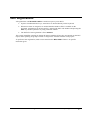
To sign on a clerk, enter the clerk number and press the CLERK key.
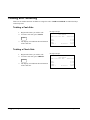
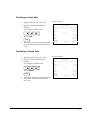
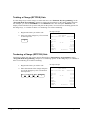
1
CLERK
Cl erk # (1 - 15)
To sign the clerk off, enter 0 (Zero) and press the CLERK key.
0
CLERK
Coded Sign-On
To sign on a clerk, press the CLERK key, enter the clerk code, and then press the CLERK key
again.
CLERK
CLERK
Clerk Code (up to 6 digits)
When Clerk Interrupt is activated (please see “Table Management and Clerk Interrupt
Operations” in Operation Instructions), to sign on a clerk is enter the clerk code then press the
CLERK key.
CLERK
Clerk Code (up to 6 digits)
To sign the clerk off, enter 0 (Zero) and press the CLERK key.
0
CLERK
ER-380 / ER-380M Electronic Cash Register AU
Operating Instructions •
21
Receipt On and Off
The RECEIPT ON/OFF function key may or may not be located on your keyboard.
If the RECEIPT ON/OFF Key is located on the keyboard
1. Press the RECEIPT ON/OFF key once to turn the receipt off.
2. Press the RECEIPT ON/OFF key again to turn the receipt on.
Please refer to “S-Mode Programming - Function Key Assignment” for detail.
OR
If The RECEIPT ON/OFF Key is NOT located on the keyboard
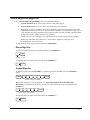
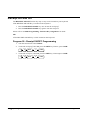
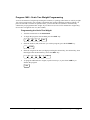
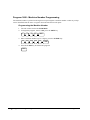
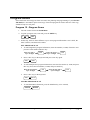
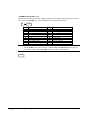
Program 99 - Receipt ON/OFF Programming
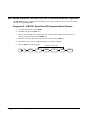
1. Turn the control lock to the X-Mode.
2. To turn the receipt off, enter 9 9, press the SBTL key. Enter 1, press CASH.
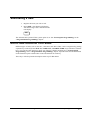
9
9
SBTL
1
CASH
3. To turn the receipt on, enter 9 9, press the SBTL key. Enter 0, press CASH.
9
22
•
9
Operating Instructions
SBTL
0
CASH
ER-380 / ER-380M Electronic Cash Register AU
Item Registrations
All registrations on ER-380/ER-380M are made into open or preset PLUs.
•
In place of traditional PLU keys, some PLUs are located directly on the keyboard.
•
When more items or categories are needed than the number of PLUs available on the
keyboard, registrations can be into PLUs by entering the PLU code number and pressing the
PLU key on the keyboard or by using a barcode scanner.
•
The buffer for item registration is fixed 100 lines.
This system simplifies reporting by listing all items (regardless of how they are entered) on the PLU
report, while reporting for groups of items or categories is available from the Group report.
To perform a item registration, need to turn control lock to REG-Mode if there is no specific
instruction given.
ER-380 / ER-380M Electronic Cash Register AU
Operating Instructions •
23
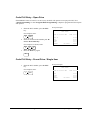
Keyboard PLU Entry - Open Price / Preset Price Override
1. Enter an amount on the number pad. Do
not use the decimal key.
For example, for $2.99, enter:
2
9
9
Receipt Example:
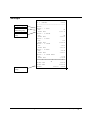
THANK-YOU
CALL AGAIN
DATE 15/01/2003 WED
TIME 08:33
PLU1 T1
GST
2. Press a PLU.
For example, press PLU 1:
TOTAL
CASH
CLERK 1
No.000011
$2.99
$0.18
$3.17
$3.17
00001
1
Keyboard PLU Entry - Preset Price
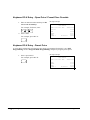
A preset PLU registers the price that was previously programmed for the PLU. See "PLU
Programming" in the "Program Mode Programming" chapter to program preset prices.
1. Press a preset PLU.
For example, press PLU 5:
5
24
•
Operating Instructions
Receipt Example:
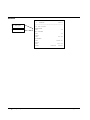
THANK-YOU
CALL AGAIN
DATE 15/01/2003 WED
TIME 08:33
PLU5
TOTAL
CASH
CLERK 1
No.000011
$1.29
$1.29
$1.29
00001
ER-380 / ER-380M Electronic Cash Register AU
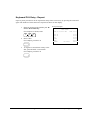
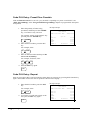
Keyboard PLU Entry - Repeat
Open or preset price PLUs can be repeated as many times as necessary by pressing the same PLU
again. The number of times the item is repeated is shown on the display.
1. Enter an amount on the number pad. Do
not use the decimal key.
For example, for $2.99, enter:
2
9
9
2. Press a PLU.
For example, press PLU 1:
Receipt Example:
THANK-YOU
CALL AGAIN
DATE 15/01/2003 WED
TIME 08:33
PLU1 T1
PLU1 T1
GST
TOTAL
CASH
CLERK 1
No.000011
$2.99
$2.99
$0.36
$6.34
$6.34
00001
1
3. To register a second item exactly as the
first, press the PLU a second time.
For example, press PLU 1:
1
ER-380 / ER-380M Electronic Cash Register AU
Operating Instructions •
25
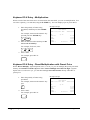
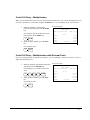
Keyboard PLU Entry - Multiplication
When several of the same items are to be entered into the same PLU, you can use multiplication. You
can enter a quantity (1 to 999.999) using the X/TIME key. You can multiply open or preset PLUs.
1. Enter the quantity of items being
purchased, and then press the X/TIME
key.
For example, enter 4 on the numeric key
pad and press the X/TIME key:
4
X/T IME
2. Enter an amount on the number pad. Do
not use the decimal key.
Receipt Example:
THANK-YOU
CALL AGAIN
DATE 15/01/2003 WED
TIME 08:33
4X
PLU1 T1
GST
TOTAL
CASH
CLERK 1
@1.99
No.000011
$7.96
$0.48
$8.44
$8.44
00001
For example, for $1.99, enter:
1
9
9
3. Press a PLU.
For example, press PLU 1:
1
Keyboard PLU Entry - Direct Multiplication with Preset Price
When “Direct Multiply” (System Option #18-1) is set to yes, you can multiply the preset price PLU
directly when number of item is up to 9. When “Direct Multiply more than one digit” (System
Option #20-1) is also set to yes, you can then multiply more than 9 items directly when PLU is
preset price.
1. Enter the quantity of items being
purchased.
For example, enter 4 on the numeric key
pad:
4
2. Press a PLU.
For example, press PLU 1:
Receipt Example:
THANK-YOU
CALL AGAIN
DATE 15/01/2003 WED
TIME 08:33
4X
PLU1 T1
GST
TOTAL
CASH
CLERK 1
@1.99
No.000011
$7.96
$0.48
$8.44
$8.44
00001
1
26
•
Operating Instructions
ER-380 / ER-380M Electronic Cash Register AU
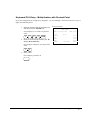
Keyboard PLU Entry - Multiplication with Decimal Point
If you are selling items by weight or by length etc., you can multiply a fraction of a unit. It is up to 3
digits after decimal places.
1. Enter the amount with the decimal point,
and then press the X/TIME key.
For example, for 3.75 kilos of produce,
enter:
3
.
7
5
X/TIME
2. Enter an amount on the number pad. Do
not use the decimal key.
Receipt Example:
THANK-YOU
CALL AGAIN
DATE 15/01/2003 WED
TIME 08:33
3.75X
PLU1 T1
GST
TOTAL
CASH
CLERK 1
@0.99
No.000011
$3.71
$0.22
$3.93
$3.93
00001
For example, if the price is $.99 per kilo,
enter:
9
9
3. Press a PLU.
For example, press PLU 1:
1
ER-380 / ER-380M Electronic Cash Register AU
Operating Instructions •
27
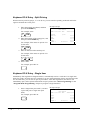
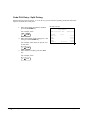
Keyboard PLU Entry - Split Pricing
When items are priced in groups, i.e. 3 for $1.00, you can enter the quantity purchased and let the
register calculate the correct price.
1. Enter the quantity purchased, and then
press the X/TIME key.
For example, enter:
2
X/T IME
2. Enter the quantity of the group price, and
then press the X/TIME key.
For example, if the items are priced 3 for
$1.00, enter:
3
Receipt Example:
THANK-YOU
CALL AGAIN
DATE 15/01/2003 WED
TIME 08:33
2@3FOR
PLU1 T1
GST
TOTAL
CASH
CLERK 1
@1.00
No.000011
$0.67
$0.04
$0.71
$0.71
00001
X/T IME
3. Enter an amount on the number pad.
For example, if the items are priced 3 for
$1.00, enter:
1
0
0
4. Press a PLU.
For example, press PLU 1:
1
Keyboard PLU Entry - Single Item
Immediately after registration Single Item PLUs automatically total as a cash sale. Use single item
PLUs for speedy one item sales. For example if you are selling admission tickets, and all ticket sales
are one item sales, you can use an open or preset PLU. After each registration, the drawer will
immediately open, and a separate transaction receipt is printed. See "PLU Programming" in the
"Program Mode Programming" chapter to program a single item PLU.
1. Press a single item preset PLU. (Or enter
a price and press a single item open
PLU.)
Receipt Example:
THANK-YOU
CALL AGAIN
DATE 15/01/2003 WED
TIME 08:33
For example, press PLU 6:
6
28
•
Operating Instructions
PLU6
TOTAL
CASH
CLERK 1
No.000011
$1.29
$1.29
$1.29
00001
ER-380 / ER-380M Electronic Cash Register AU
Code PLU Entry - Open Price
If the PRESET status of a PLU is set to N (no), the PLU will operate as an open price PLU. See
"PLU Programming" in the "Program Mode Programming" chapter to program PLU descriptors
and options.
1. Enter the PLU number; press the PLU
key.
Receipt Example:
THANK-YOU
CALL AGAIN
For example, enter:
DATE 15/01/2003 WED
2
2. Enter an amount on the number pad. Do
not use the decimal key.
For example, for $2.99, enter:
2
TIME 08:33
PLU
9
PLU2 T1
GST
TOTAL
CASH
CLERK 1
No.000011
$2.99
$0.18
$3.17
$3.17
00001
9
3. Press the PLU key again.
PLU
Code PLU Entry - Preset Price / Single Item
1. Enter the PLU number; press the PLU
key.
Receipt Example:
THANK-YOU
CALL AGAIN
For example, enter:
DATE 15/01/2003 WED
1
TIME 08:33
PLU
PLU1
TOTAL
CASH
CLERK 1
ER-380 / ER-380M Electronic Cash Register AU
No.000011
$1.29
$1.29
$1.29
00001
Operating Instructions •
29
Code PLU Entry - Preset Price Override
If the OVERRIDE PRESET is set to Y (yes), the PLU is operating as a preset override PLU. See
"PLU Programming" in the "Program Mode Programming" chapter to program PLU descriptors
and options.
1. Enter the quantity of items being
purchased, and then press the X/TIME
key, even there is only one item.
For example, enter 1 on the numeric key
pad and press the X/TIME key:
1
X/TIME
2. Enter the PLU number; press the PLU
key.
Receipt Example:
THANK-YOU
CALL AGAIN
DATE 15/01/2003 WED
TIME 08:33
1
PLU2 T1
GST
TOTAL
CASH
CLERK 1
@$2.99
No.000011
$2.99
$0.18
$3.17
$3.17
00001
For example, enter:
2
PLU
3. Enter an amount on the number pad. Do
not use the decimal key.
For example, for $2.99, enter:
2
9
9
4. Press the PLU key again.
PLU
Code PLU Entry - Repeat
Open or preset price PLUs can be repeated as many times as necessary by pressing PLU function key
again. The number of times the item is repeated is shown on the display.
1. Enter the PLU number; press the PLU
key.
For example, enter:
1
PLU
2. To register a second item exactly as the
first, press the PLU key again.
Receipt Example:
THANK-YOU
CALL AGAIN
DATE 15/01/2003 WED
TIME 08:33
PLU1 T1
PLU1 T1
GST
TOTAL
CASH
CLERK 1
No.000011
$2.99
$2.99
$0.36
$6.34
$6.34
00001
PLU
30
•
Operating Instructions
ER-380 / ER-380M Electronic Cash Register AU
Code PLU Entry - Multiplication
When several of the same items are to be entered into the same PLU, you can use multiplication. You
can enter a quantity (1 to 999.999) using the X/TIME key. You can multiply open or preset PLUs.
1. Enter the quantity of items being
purchased, and then press the X/TIME
key.
For example, enter 4 on the numeric key
pad and press the X/TIME key:
4
X/T IME
2. Enter the PLU number; press the PLU
key.
Receipt Example:
THANK-YOU
CALL AGAIN
DATE 15/01/2003 WED
TIME 08:33
4X
PLU1 T1
GST
TOTAL
CASH
CLERK 1
@1.99
No.000011
$7.96
$0.48
$8.44
$8.44
00001
For example, enter:
1
PLU
Code PLU Entry - Multiplication with Decimal Point
If you are selling items by weight or by length etc., you can multiply a fraction of a unit. It is up to 3
digits after decimal places.
1. Enter the quantity with the decimal point,
and then press the X/TIME key.
For example, for 3.75 kilos of produce,
enter:
3
.
7
5
X/TIME
2. Enter the PLU number; press the PLU
key.
Receipt Example:
THANK-YOU
CALL AGAIN
DATE 15/01/2003 WED
TIME 08:33
3.75X
PLU3 T1
GST
TOTAL
CASH
CLERK 1
@2.99
No.000011
$11.21
$0.67
$11.88
$11.88
00001
For example, enter:
3
PLU
ER-380 / ER-380M Electronic Cash Register AU
Operating Instructions •
31
Code PLU Entry - Split Pricing
When items are priced in groups, i.e. 3 for $1.00, you can enter the quantity purchased and let the
register calculate the correct price.
1. Enter the quantity purchased, and then
press the X/TIME key.
For example, enter:
2
X/T IME
2. Enter the quantity of the group price, and
then press the X/TIME key.
For example, if the items are priced 3 for
$1.00, enter:
3
Receipt Example:
THANK-YOU
CALL AGAIN
DATE 15/01/2003 WED
TIME 08:33
2@3FOR
PLU3 T1
GST
TOTAL
CASH
CLERK 1
@2.99
No.000011
$1.99
$0.12
$2.11
$2.11
00001
X/T IME
3. Enter the PLU number; press the PLU
key.
For example, enter:
3
32
•
PLU
Operating Instructions
ER-380 / ER-380M Electronic Cash Register AU
Barcode PLU Entry - Open Price, Single Item
1. Press 1 on the number pad, and then
press the X/TIME key.
1
X/TIME
2. Scan barcode of the item.
3. Enter an amount on the number pad. Do
not use the decimal key.
For example, for $2.99, enter:
2
9
Receipt Example:
THANK-YOU
CALL AGAIN
DATE 15/01/2003 WED
TIME 08:33
1______________@ $ 2.99
#1234567890123 T1
GST
TOTAL
CASH
CLERK 1
No.000011
$2.99
$0.18
$3.17
$3.17
00001
9
4. Press the PLU key.
PLU
Barcode PLU Entry - Open Price, Multiple Items
1. Press number of items on the number
pad, and then press the X/TIME key.
For example, for 4 identical items, enter:
4
X/TIME
2. Scan barcode of the item.
3. Enter an amount on the number pad. Do
not use the decimal key.
Receipt Example:
THANK-YOU
CALL AGAIN
DATE 15/01/2003 WED
TIME 08:33
4______________@ $ 2.99
#1234567890123 T1
GST
TOTAL
CASH
CLERK 1
No.000011
$11.96
$0.72
$12.68
$12.68
00001
For example, for $2.99, enter:
2
9
9
4. Press the PLU key.
PLU
ER-380 / ER-380M Electronic Cash Register AU
Operating Instructions •
33
Barcode PLU Entry - Preset Price Override, Single Item
1. Press 1 on the number pad, and then
press the X/TIME key.
1
X/ TI ME
2. Scan barcode of the item.
3. Enter an amount on the number pad. Do
not use the decimal key.
For example, for $2.99, enter:
2
9
Receipt Example:
THANK-YOU
CALL AGAIN
DATE 15/01/2003 WED
TIME 08:33
1______________@ $ 2.99
#3210987654321 T1
GST
TOTAL
CASH
CLERK 1
No.000011
$2.99
$0.18
$3.17
$3.17
00001
9
4. Press the PLU key.
PLU
Barcode PLU Entry - Preset Price Override, Multiple Items
1. Press 1 on the number pad, and then
press the X/TIME key.
1
X/ TI ME
2. Scan barcode of the item.
3. Enter an amount on the number pad. Do
not use the decimal key.
For example, for $2.99, enter:
2
9
9
Receipt Example:
THANK-YOU
CALL AGAIN
DATE 15/01/2003 WED
TIME 08:33
1______________@ $ 2.99
#3210987654321 T1
#3210987654321 T1
#3210987654321 T1
#3210987654321 T1
GST
TOTAL
CASH
CLERK 1
No.000011
$2.99
$2.99
$2.99
$2.99
$0.72
$12.68
$12.68
00001
4. Press the PLU key.
PLU
5. For additional identical items, press more
PLU key(s).
PLU
34
•
Operating Instructions
ER-380 / ER-380M Electronic Cash Register AU
Modifier Key
Pressing a modifier key alters the next PLU registered, either by changing the code number of the
PLU so that a different item is registered, or by just adding the modifier descriptor and registering the
same PLU. See "Modifier 1-5" in the "Program Mode Programming" chapter in order to
determine how the modifier key will affect the PLU entry.
This is often used to change the size, package, pricing or even eatin/takeaway, hot/cold etc., status of
PLUs. Discuss your requirements with your dealer. The PLU Report lists these items separately.
Modifiers can be:
•
Stay down so that registrations will be modified by the same modifier until another modifier
is selected,
•
Pop-up after each item to register, for example large, medium or small soft drink,
•
Pop-up after each transaction to register, for example, toppings of various pizza sizes.
See "System Options" in the "Program Mode Programming" chapter to select stay down/pop-up
status.
Pop-Up Modifier Key Affecting PLU Code
For example: PLU 1 is DRINK for $1.00 and PLU#1001 is DRINK for $1.25 as large. The
Modifier 1 Key descriptor is LARGE.
1. Press a preset PLU.
For example, press PLU 1 with a price of
$1.00.
1
2. Press the MOD 1 key. The message
"LARGE" displays.
MOD
1
Receipt Example:
THANK-YOU
CALL AGAIN
DATE 15/01/2003 WED
TIME 08:33
DRINK
LARGE
DRINK
PLU2
TOTAL
CASH
CLERK 1
$1.00
No.000011
$1.25
$1.50
$3.75
$3.75
00001
3. Press the same PLU. In this example the
modifier 1 will add the digit 1 to the
fourth PLU # position, resulting in the
registration of PLU #1001.
1
4. Press another PLU. In this example press
PLU 2 with a price of $1.50.
ER-380 / ER-380M Electronic Cash Register AU
Operating Instructions •
35
Price Level Key
If you choose to use the price level feature, you must allocate memory for each level. See "Memory
Allocation" in the "Service Mode Programming" chapter. Note that the default program selects one
price level. You must also place price level keys on the keyboard. See "Function Key Assignment"
in the "Program Mode Programming" chapter.
If you use this feature, the same PLU can be given up to 2 different preset prices. Price Level keys
shift the price that is being registered. Levels can be:
This feature allows you to change on item price. Often used for medium/large, eatin/takeaway, hot/cold
drinks etc. The PLU Report will combine the price levels. Discuss your needs with your dealer.
•
Stay down so that registrations will stay in the selected level until another level is selected,
•
Pop-up after each item to register, for example large, medium or small soft drink,
•
Pop-up after each transaction to register, for example, toppings of various pizza sizes.
See "System Options" in the "Program Mode Programming" chapter to set how the price level
keys operate.
Pop-Up Price Level Keys
For example: PLU 1 is DRINK and price level 1 is $1.00 and price level 2 is $2.00 as large.
1. Press a preset PLU.
For example, press PLU 1 programmed
with a price of $1.00 for price level 1.
1
2. Press the LEVEL 2 key. The message
"LEVEL 2" displays.
LEVEL
2
Receipt Example:
THANK-YOU
CALL AGAIN
DATE 15/01/2003 WED
TIME 08:33
DRINK
DRINK
PLU2
TOTAL
CASH
CLERK 1
No.000011
$1.00
$2.00
$1.50
$4.50
$4.50
00001
3. Press the same PLU. In this example the
PLU 1 key is programmed with a price of
$2.00 for price level 2.
1
4. Press another PLU. In this example press
PLU 2 programmed to register PLU #2
with price level 1. Note that the level 1
price is registered.
36
•
Operating Instructions
ER-380 / ER-380M Electronic Cash Register AU
Promo
The PROMO key allows you to account for promotional items, as in "buy two, get one free". Pressing
this key will remove an item's cost from the sale, and the promo item will not be added to the PLU sales
total, but it is added to the item sales counter. If stock (inventory) reporting is used, the item will be
subtracted from inventory.
1. Register an item.
For example, press PLU 1 programmed
with a price of $1.00 for price level 1.
Receipt Example:
THANK-YOU
CALL AGAIN
DATE 15/01/2003 WED
TIME 08:33
PLU1
1
2. Press the PROMO key. The message
"PROMO" displays.
$1.00
***PROMO***
PLU1
TOTAL
CASH
CLERK 1
No.000011
$0.00
$0.00
00001
PROMO
3. Press PLU 1 again. You cannot enter an
item that has not been already registered
in this transaction.
1
ER-380 / ER-380M Electronic Cash Register AU
Operating Instructions •
37
Waste
The WASTE key allows control of inventory by accounting for items that must be removed from stock
due to spoilage, breakage or mistakes. Press the WASTE key before entering wasted items, and then press
the WASTE key again to finalize. The WASTE key may be under manager control, requiring the control
lock to be in the X position. The WASTE key is not allowed within a sale.
1. Press the WASTE key. The message
"WASTE" displays at the top of the
screen.
Receipt Example:
THANK-YOU
CALL AGAIN
DATE 15/01/2003 WED
TIME 08:33
WAST E
***WASTE***
2. Enter the item or items that are wasted.
PLU1
PLU2
3. Press the WASTE key again to total the
wasted items:
TOTAL
CLERK 1
$1.25
$1.50
***WASTE***
No.000011
$2.75
00001
WAST E
38
•
Operating Instructions
ER-380 / ER-380M Electronic Cash Register AU
Percent Key Operations
A total of five % functions are available. %1 is located on the default keyboard. Your keyboard may
be different. More or less % keys may be located on the keyboard, or they may be located on one of
the function look up menu keys.
Each function is individually programmable to add or subtract, from an individual item or from a sale
total, amounts or percentages. You can also program the percentage key taxable or non-taxable, so
that sales taxes are calculated on the net, or the gross amount of the item or sale. You can also
program preset prices or percentages.
The operation examples in this section show the percentage key in a variety of configurations. See
"Function Key Programming" in the "Program Mode Programming" chapter to assign a specific
function to each percentage key.
These keys will be pre-programmed to operate on EITHER PLUs (item) OR SUBTOTALs (sale),
but not both; EITHER MINUS (discount) OR PLUS (surcharges), but not both; EITHER RATE
(percentage) OR AMOUNT (Dollar), but not both.
So, if you want to discount items but not every item in a sale, you will need two % keys. To discount
on the whole sale, you will need to press SUBTOTAL first.
ER-380 / ER-380M Electronic Cash Register AU
Operating Instructions •
39
Preset Percent Discount on an Item
In this example the %1 function is programmed with Percentage, Negative, Item, Preset and
Overridable with a rate of 10%. Please refer to % (1 ~ 5) (Discounts or Surcharges) in Function
Key Programming in Program Mode Programming for more detail.
Receipt Example:
1. Register the item.
THANK-YOU
CALL AGAIN
DATE 15/01/2003 WED
TIME 08:33
2. Press the %1 key:
%1
3. The discount is automatically subtracted.
PLU2
% 1
AMOUNT
TOTAL
CASH
CLERK 1
$10.00
-10.000%
-1.00
$9.00
$9.00
No.000011
00001
Enter a Percent Discount on an Item
You can also operate the percentage functions by entering the percentage of the discount or surcharge.
You can enter a fractional percentage up two 3 digits beyond the decimal (i.e. 99.999%) if necessary.
Receipt Example:
1. Register the discounted item.
2. Enter the percentage. If you are entering
a fraction of a percent, you must use the
decimal key.
For example, for one third off enter:
3
3
.
3
3
3
3. Press the %1 key:
THANK-YOU
CALL AGAIN
DATE 15/01/2003 WED
TIME 08:33
PLU2
% 1
AMOUNT
TOTAL
CASH
CLERK 1
$10.00
-33.333%
-3.33
$6.67
$6.67
No.000011
00001
%1
4. The discount is automatically subtracted.
40
•
Operating Instructions
ER-380 / ER-380M Electronic Cash Register AU
Preset Percent Discount on Sale Total
In this example the %1 function is programmed with Percentage, Negative, Sale, Preset and
Overridable with a rate of 10%. Please refer to % (1 ~ 5) (Discounts or Surcharges) in Function
Key Programming in Program Mode Programming for more detail.
1. Register the item.
2. Press the SBTL key:
Receipt Example:
THANK-YOU
CALL AGAIN
DATE 15/01/2003 WED
TIME 08:33
SBTL
3. Press the %1 key:
%1
PLU2
% 1
AMOUNT
TOTAL
CASH
CLERK 1
$10.00
-10.000%
-1.00
$9.00
$9.00
No.000011
00001
4. The discount is automatically subtracted.
Enter a Percent Discount on Sale Total
You can also operate the percentage functions by entering the percentage of the discount or surcharge.
You can enter a fractional percentage up to 3 digits beyond the decimal (i.e. 99.999%) if necessary.
1. Register the items you wish to sell.
2. Press the SBTL key:
Receipt Example:
THANK-YOU
CALL AGAIN
DATE 15/01/2003 WED
TIME 08:33
SBTL
3. Enter the percentage, and then press the
appropriate discount key.
For example, for 15% enter:
1
5
PLU2
% 1
AMOUNT
TOTAL
CASH
CLERK 1
No.000011
$10.00
15.000%
$1.50
$11.50
$11.50
00001
%1
4. The surcharge is automatically added.
For Surcharge Operation
When a % function is preset with “Percentage, Positive, Item, Preset and Overridable” or
“Percentage, Positive, Sale, Preset and Overridable” with a preset percentage ratre, the % function
key will perform as a Surcharge on Item or Sale. Of course a override rate can be put in manually.
Please refer to operation sequences on previous.
For setting, please refer to % (1 ~ 5) (Discounts or Surcharges) in Function Key Programming in
Program Mode Programming for more detail.
ER-380 / ER-380M Electronic Cash Register AU
Operating Instructions •
41
Dollar Amount Discount on Sale
When programmed as "amount", "sale", "open" and "negative", a % key will deduct an amount from
a sale. Also, depending upon programming:
•
You may be allowed to enter only one discount in a sale, after the SBTL key is pressed,
•
You may be allowed to enter multiple discounts, but you must press the SBTL key before
each discount entry, or
•
You may be allowed to enter multiple discounts, without first pressing SBTL.
In this example, a discount may be entered only once, and you must first press SBTL.
1. Register the items you wish to sell.
Receipt Example:
THANK-YOU
CALL AGAIN
DATE 15/01/2003 WED
TIME 08:33
2. Press the SBTL key:
SBTL
3. Enter the amount of the discount, and
then press the appropriate % key.
For example:
2
0
0
PLU2
% 1
TOTAL
CASH
CLERK 1
No.000011
$10.00
-2.00
$8.00
$8.00
00001
%1
4. The discount is subtracted.
Dollar Amount Discount on Item
When programmed as "amount", "item", "open" and "negative", a % key will reduce a discount
amount against an item. In this case, you must press the PLU (or enter the PLU number) of the PLU
you wish the discount to be subtracted from.
1. Register the items you wish to sell.
2. Enter the amount of the discount, and
then press the appropriate % key.
For example:
2
0
0
%1
3. The discount is automatically subtracted.
42
•
Operating Instructions
Receipt Example:
THANK-YOU
CALL AGAIN
DATE 15/01/2003 WED
TIME 08:33
PLU1
% 1
TOTAL
CASH
CLERK 1
No.000011
$10.00
-2.00
$8.00
$8.00
00001
ER-380 / ER-380M Electronic Cash Register AU
Return Merchandise Registrations
If you wish to return or refund an item press RETURN, then re-enter any item. You can return
merchandise as part of a sale, or you can return merchandise as a separate transaction and return cash
to the customer.
Receipt Example:
1. Press RETURN:
THANK-YOU
CALL AGAIN
DATE 15/01/2003 WED
TIME 08:33
RETUR N
2. Enter the price of the item you wish to
return, and then press the PLU where it
was registered originally.
2
9
9
2
RETURN **************************
PLU2 T1
-2.99
GST AMT
-0.18
TOTAL
-3.17
CASH
-3.17
CLERK 1
No.000011
00001
3. Total the sale with CASH, CHECK, or a
CHARGE function.
ER-380 / ER-380M Electronic Cash Register AU
Operating Instructions •
43
Voids and Corrections
Error Correction (Void Last Item)
This function corrects the last item entered.
1. Register the item you wish to sell.
2. Press the ERROR CORR key:
ERROR
CORR
Receipt Example:
THANK-YOU
CALL AGAIN
DATE 15/01/2003 WED
TIME 08:33
PLU1 T1
$2 29
PLU2
$1.29
ERR CORR -----------------------PLU2
-1.29
GST AMT
$0.14
TOTAL
$2.43
CASH
$2.43
CLERK 1
No.000011
00001
Void Previous Item
This function allows you to correct an item registered previously in a transaction.
1. Register an item. Then register a second
item.
2. To correct the first item, press VOID:
VOID
3. Enter the price of the first item, and then
press the PLU where it was registered
originally.
1
44
•
2
Operating Instructions
9
2
Receipt Example:
THANK-YOU
CALL AGAIN
DATE 15/01/2003 WED
TIME 08:33
PLU2
$1.29
PLU1 T1
$2.29
VOID ---------------------------PLU2
-1.29
GST AMT
$0.14
TOTAL
$2.43
CASH
$2.43
CLERK 1
No.000011
00001
ER-380 / ER-380M Electronic Cash Register AU
Cancel
The CANCEL key allows you to stop any transaction. Anything registered within the transaction
before the CANCEL key is pressed is automatically corrected. The CANCEL key can be inactivated
through programming, see "Function Key Programming" in the "Program Mode Programming"
chapter, or the key can be programmed to require manager control.
1. Register the items you wish to sell.
2. Press the CANCEL key
Receipt Example:
THANK-YOU
CALL AGAIN
DATE 15/01/2003 WED
TIME 08:33
CANCEL
PLU1 T1
$2.29
PLU2
-0.50
CANCEL **************************
CLERK 1
No.000011
00001
Void Mode Operations
You can use the VOID Mode to correct any complete transaction. To correct any transaction:
1. Turn the control lock to the VOIDMode.
2. Enter the transaction you wish to correct
exactly as it was entered originally in the
REG Mode. You can enter discounts,
voids, returns, tax exemptions or any
other function.
3. All totals and counters are corrected as if
the original transaction did not take
place.
THANK-YOU
CALL AGAIN
DATE 15/01/2003 WED
TIME 08:33
VOID MODE ***********************
PLU1 T1
-2.29
PLU2
-1.00
GST AMT
-0.14
TOTAL
-3.43
CASH
-3.43
CLERK 1
No.000011
00001
NB. Be sure to turn the key back when finished.
ER-380 / ER-380M Electronic Cash Register AU
Operating Instructions •
45
No Sale Operations
Open Drawer
The #/NO SALE key will open the cash drawer when you have not already started a transaction. The
no sale function can be disabled or placed under manager control through programming, see
"Function Key Programming" in the "Program Mode Programming" chapter.
Receipt Example:
1. Press #/NS:
THANK-YOU
CALL AGAIN
DATE 15/01/2003 WED
TIME 08:33
#/NS
2. The drawer will open and the receipt will
print as in the example on the right.
NO SALE ------------------------CLERK 1
No.000011
00001
Non Add Number
You can also use the #/NO SALE key to print any number (up to 9 digits) on the printer paper. You
can enter the number any time during a transaction. For example, if you wish to record a checking
account number, enter the number and press the #/NO SALE key before totaling the sale with the
CHECK key.
1. Register the items you wish to sell.
2. Enter the number you wish to record.
For example enter:
1
2
3
3. Press #/NS:
#/NS
4
Receipt Example:
THANK-YOU
CALL AGAIN
DATE 15/01/2003 WED
TIME 08:33
PLU1 T1
NON-ADD#
GST AMT
TOTAL
CHECK
CLERK 1
No.000011
$2.99
1234
$0.18
$3.17
$3.17
00001
4. Press CHECK:
CHEC K
46
•
Operating Instructions
ER-380 / ER-380M Electronic Cash Register AU
Received On Account Operations
You can use one of the received on account functions (RA1-RA3) to accept cash or checks into the
cash drawer when you are not actually selling merchandise. For example, use received on account to
accept payments for previously sold merchandise or record loans to the cash drawer.
1. Press one of the received on account keys
(RA1-RA3)
RA1
2. Enter the amount of cash received, press
CASH.
1
0
0
0
C ASH
Receipt Example:
THANK-YOU
CALL AGAIN
DATE 15/01/2003 WED
TIME 08:33
RA1
CASH
CHECK
CHARGE1
RA1
CLERK 1
No.000011
$10.00
$10.00
$10.00
$30.00
00001
3. Enter the check amount received, and
press CHECK.
1
0
0
0
CH ECK
4. Enter the charge amount received, press
CHARGE1
1
0
0
0
CHARGE
1
5. You can continue to itemize receipts, or
you can finalize by pressing or selecting
the same received on account key.
RA1
ER-380 / ER-380M Electronic Cash Register AU
Operating Instructions •
47
Paid Out Operations
You can use the paid out function (PO1-PO3) to track cash or checks paid out or to record loans from
the cash drawer.
1. Press one of the paid out keys
(PO1-PO3)
PO1
2. Enter the amount of cash paid out, press
CASH.
1
0
0
0
C ASH
Receipt Example:
THANK-YOU
CALL AGAIN
DATE 15/01/2003 WED
TIME 08:33
PO1
CASH
CHECK
CHARGE1
PO1
CLERK 1
No.000011
-10.00
-10.00
-10.00
-30.00
00001
3. Enter the check amount paid out, and
press CHECK.
1
0
0
0
CH ECK
4. Enter the charge amount received, press
CHARGE1
1
0
0
0
CHARGE
1
5. You can continue to itemize paid outs, or
you can finalize by pressing or selecting
the same paid out key.
PO1
48
•
Operating Instructions
ER-380 / ER-380M Electronic Cash Register AU
Subtotaling a Sale
1. Register the items you wish to sell.
2. Press SBTL. The subtotal will display
with the message "Sub" indicated on the
rear display.
SBT L
The subtotal can be printed if the system option is set. See "Print Option Programming" in the
"Program Mode Programming" chapter.
Eat In/Take Out/Drive Thru Sales
Different types of sales, such as "Eat In", "Take Out" and "Drive Thru" can be categorized by placing
separate keys on the keyboard. EAT IN, TAKE OUT, and DRIVE THRU keys function as subtotal
keys. You can force the operator to press one of the keys before tendering. See "System Option
Programming" in the "Program Mode Programming" chapter. Separate totals will be maintained
on the financial report to detail sales counts and amounts for each key.
These keys will also print the description at the top of a KP docket.
ER-380 / ER-380M Electronic Cash Register AU
Operating Instructions •
49
Totaling and Tendering
There are ten tender functions available to categorize sales. CASH and CHECK are individual keys
on the keyboard
Totaling a Cash Sale
1. Register the items you wish to sell.
2. To total a cash sale, press CASH:
Receipt Example:
THANK-YOU
CALL AGAIN
DATE 15/01/2003 WED
TIME 08:33
CASH
3. The display will indicate the total amount
of the cash sale.
PLU2
TOTAL
CASH
CLERK 1
No.000011
$7.96
$7.96
$7.96
00001
Totaling a Check Sale
1. Register the items you wish to sell.
2. To total a cash sale, press CHECK:
Receipt Example:
THANK-YOU
CALL AGAIN
DATE 15/01/2003 WED
TIME 08:33
CHECK
3. The display will indicate the total amount
of the cash sale.
50
•
Operating Instructions
PLU2
TOTAL
CHECK
CLERK 1
No.000011
$7.96
$7.96
$7.96
00001
ER-380 / ER-380M Electronic Cash Register AU
Tendering a Cash Sale
1. Register the items you wish to sell.
2. Enter the amount tendered by the
customer.
For example, for $20.00 enter:
2
0
0
0
3. Press CASH:
CASH
Receipt Example:
THANK-YOU
CALL AGAIN
DATE 15/01/2003 WED
TIME 08:33
PLU1 T1
PLU1 T1
4X
PLU2
GST
TOTAL
CASH
CHANGE
CLERK 1
$2.99
$2.99
$1.99
No.000011
$7.96
$0.36
$14.30
$20.00
$5.70
00001
4. The display will indicate the total amount
of the cash tendered and the change due,
if any.
Tendering a Check Sale
1. Register the items you wish to sell.
2. Enter the amount tendered by the
customer.
For example, for $20.00 enter:
2
0
0
0
3. Press CHECK:
CHECK
Receipt Example:
THANK-YOU
CALL AGAIN
DATE 15/01/2003 WED
TIME 08:33
PLU1 T1
PLU1 T1
4X
PLU2
GST
TOTAL
CHECK
CHANGE
CLERK 1
$2.99
$2.99
$1.99
No.000011
$7.96
$0.36
$14.30
$20.00
$5.70
00001
4. The display will indicate the total amount
of the check tendered and the change
due, if any.
ER-380 / ER-380M Electronic Cash Register AU
Operating Instructions •
51
Totaling a Charge (EFTPOS) Sale
Use the charge keys to track charge or credit card sales. See "Function Key Programming" in the
"Program Mode Programming" chapter to change the descriptors for the charge tender functions.
For example, you can use CHARGE 1 to track EFTPOS sales. The descriptor "EFTPOS" will
display on the function look up menu and print on the printer. You can also set tendering options for
the charge keys, i.e. whether to allow over tendering or to enforce tendering.
1. Register the items you wish to sell.
2. Press one of the charge key if it is located
on the keyboard:
CHARGE
1
Receipt Example:
THANK-YOU
CALL AGAIN
DATE 15/01/2003 WED
TIME 08:33
PLU1 T1
PLU1 T1
4X
PLU2
GST
TOTAL
CHARGE1
CLERK 1
$2.99
$2.99
$1.99
No.000011
$7.96
$0.36
$14.30
$14.30
00001
Tendering a Charge (EFTPOS) Sale
Tendering a charge sale may or may not be allowed. See "Function Key Programming" in the
"Program Mode Programming" chapter to set tendering options for the charge keys, i.e. whether to
allow over tendering or to enforce tendering.
1. Register the items you wish to sell.
2. Enter the amount of the charge and press
one of the charge keys if it is located on
the keyboard:
2
52
•
0
Operating Instructions
0
0
CHARGE
1
Receipt Example:
THANK-YOU
CALL AGAIN
DATE 15/01/2003 WED
TIME 08:33
PLU1 T1
PLU1 T1
4X
PLU2
GST
TOTAL
CHARGE1
CHANGE
CLERK 1
$2.99
$2.99
$1.99
No.000011
$7.96
$0.36
$14.30
$20.00
$5.70
00001
ER-380 / ER-380M Electronic Cash Register AU
Cash Out within a Charge (EFTPOS) Sale
CASH OUT within a charge (EFTPOS) sale may or may not be allowed. See "Function Key
Assignment Programming" in the "Service Mode Programming" chapter to assign CASH OUT
key.
1. Register the items you wish to sell.
2. Enter the amount of cash for cash out
then press CASH OUT key.
2
0
0
0
3. Press EFTPOS key.
EFTPOS
ER-380 / ER-380M Electronic Cash Register AU
CAS H OUT
Receipt Example:
THANK-YOU
CALL AGAIN
DATE 15/01/2003 WED
TIME 08:33
PLU1 T1
PLU1 T1
4X
PLU2
GST
SUBTOTAL
CASH OUT
EFTPOS
CHANGE
CLERK 1
$2.99
$2.99
$1.99
No.000011
$7.96
$0.36
$14.30
$20.00
$34.30
$20.00
00001
Operating Instructions •
53
Check Cashing
Check cashing means exchanging cash for a check. If you wish to cash checks, you must place a
CHKCASH key on the keyboard. See "Function Key Assignment" in the "Program Mode
Programming" chapter.
1. Enter the amount of the check tendered
by the customer.
For example, for $20.00 enter:
2
0
0
Receipt Example:
THANK-YOU
CALL AGAIN
DATE 15/01/2003 WED
TIME 08:33
0
***CHKCASH***
CHECK
CASH
CLERK 1
2. Press CHKCASH:
CHK
CASH
No.000011
$20.00
-20.00
00001
3. The display will indicate the amount of
the check and the cash change.
Split Tender
Split tendering is paying for one transaction by more than one payment method. For example, a
$20.00 sale could be split so $10.00 is paid in cash, and the remaining $10.00 is paid by a check. If
necessary, you can make several different payments.
1. Register the items you wish to sell.
2. Enter the amount of cash tendered by the
customer.
For example, enter $10.00 and press
CASH:
1
0
0
0
C ASH
3. The display will indicate the $10.00 cash
tender and the $10.00 total still due.
Receipt Example:
THANK-YOU
CALL AGAIN
DATE 15/01/2003 WED
TIME 08:33
PLU2
TOTAL
CASH
TOTAL
CHECK
CLERK 1
No.000011
$20 00
$20.00
$10.00
$10.00
$10.00
00001
4. Enter the amount of check tendered by
the customer.
For example, enter $10.00 and press
CHECK:
1
0
0
0
CH ECK
5. When the total tendered equals or
exceeds the total due, the receipt will
print and the transaction is complete.
54
•
Operating Instructions
ER-380 / ER-380M Electronic Cash Register AU
Post Tender
Post tendering means computing change after the sale has been totaled and the drawer is open. This
feature is useful when a customer changes the amount of the tender or when a "quick change artist"
confuses a clerk. Normally, this function is not allowed. If you wish to allow post tendering, you must
set the appropriate system option.
1. Register the items you wish to sell.
Receipt Example:
THANK-YOU
CALL AGAIN
DATE 15/01/2003 WED
TIME 08:33
2. Press CASH:
C AS H
3. The display will indicate the total of the
cash sale.
PLU1 T1
GST
CASH
CLERK 1
No.000011
$2.00
$0.12
$2.12
00001
4. Enter the amount of the new tender, Press
CASH:
2
0
0
0
CAS H
5. The display will indicate the change due.
Currency Conversion
If you normally accept currency from neighboring nations, you can program to convert the subtotal of
a sale to the equivalent cost in the foreign currency. You can set up four separate conversion functions
for different foreign currencies. To do this, you need to program the conversion factor. For example,
if the US dollar (home currency) is worth 1.3720 Canadian dollars (foreign currency), the conversion
factor is 1.3720. See "Function Key Programming" in the "Program Mode Programming" chapter to
set a conversion factor.
1. Register the items you wish to sell.
2. Press the CONV1 key if it is located on
the keyboard:
CONV1
3. Enter the amount of the foreign currency
tender, Press CASH:
1
0
0
0
CAS H
4. The display will indicate the amount of
foreign currency tendered and display
$5.17 change due. The change due is
computed in home currency!
ER-380 / ER-380M Electronic Cash Register AU
Receipt Example:
THANK-YOU
CALL AGAIN
DATE 15/01/2003 WED
TIME 08:33
PLU1 T1
GST
TOTAL
CONV 1
CHANGE RATE
HOME AMT.
CHANGE
CLERK 1
No.000011
$2.00
$0.12
$2.12
¥2.90
@1.3720
$10.00
$5.17
00001
The currency symbol you program
will display here. See "Print Option
Programming" in the "Program
Mode Programming" chapter.
Operating Instructions •
55
Table Management and Clerk Interrupt Operations
Overview
The ER-380 / ER-380M can employ a manual previous balance, hard check (Monthly Accounts), or
soft check (Restaurant Bill) system. (You must select hard or soft check posting in Memory
Allocation Programming - the default selection is soft.)
There are two methods in ER-380 / ER-380M to manage check track. One is table management
system and the other is clerk interrupt system. If you want to use clerk interrupt system.
First, Program as below.
To Enter Clerk Interrupt System (To Exit Table Management system)
1. Program Clerk Secret Code.
Please check Memory Allocation in Service Mode for numbers of Clerks in the system.
Also see “Secret Code Programming” to program Clerk Secret Code.
2. Set system option #2 to a value of 1. See "System Option Programming".
3. Set system option #26 to a value of 1. See "System Option Programming“.
To Exit Clerk Interrupt System (To Enter Table Management system)
1. Set system option #26 to a value of 0. See "System Option Programming".
2. Set system option #2 to a value of 0. See "System Option Programming".
56
•
Operating Instructions
ER-380 / ER-380M Electronic Cash Register AU
Soft Check - Restaurant Style Billing
Opening a Soft Check
1. Enter the number of the guest check,
press the CHECK # key:
1
2
3
CHECK#
or, press the CHECK # key to
automatically assign a check:
CHECK#
2. If required, enter the table number and
press the TABLE key:
3
Receipt Example:
THANK-YOU
CALL AGAIN
DATE 15/01/2003 WED
TIME 08:33
CHECK #
PBAL
TABLE
GUEST
CHICKEN
STEAK
SERVICE
BFWD
CLERK 1
#123
$0.00
#3
#2
$7.00
$10.00
$17.00
$17.00
No.000011
00001
T ABLE
3. If required, enter the number of guests
and press the GUEST key:
2
GUEST
4. Register the items you wish to sell.
5. To total the posting, press SERVICE:
SERVICE
NOTE: If a table number entry is required for all guest checks, and checks are assigned by
register, the check will be assigned by the register when the table # is entered.
ER-380 / ER-380M Electronic Cash Register AU
Operating Instructions •
57
Adding to a Soft Check
Receipt Example:
1. Enter the number of the guest check,
press the CHECK # key:
1
2
3
THANK-YOU
CALL AGAIN
DATE 15/01/2003 WED
TIME 08:33
CHECK#
or, if you entered a table number, enter
the table number and press the TABLE
key:
3
T ABLE
CHECK #
PBAL
TABLE
GARLIC BREAD
SERVICE
BFWD
CLERK 1
#123
$17.00
#3
$2.00
$2.00
$19.00
No.000012
00001
2. Register the next items you wish to sell.
3. To total the posting, press SERVICE:
SERVIC E
Printing a Soft Check
Receipt Example:
1. Enter the number of the guest check,
press the CHECK # key:
1
2
3
THANK-YOU
CALL AGAIN
DATE 15/01/2003 WED
TIME 08:33
CHECK#
or, if you entered a table number, enter
the table number and press the TABLE
key:
3
T ABLE
2. Press PRINT CHECK to print the
complete check. If programmed to do so,
the PRINT CHECK key will
automatically service the check:
CHECK #
PBAL
TABLE
CHICKEN
STEAK
GARLIC BREAD
SERVICE
BFWD
CLERK 1
#123
$19.00
#3
$7.00
$10.00
$2.00
$0.00
$19.00
CHK # : 1
No.000012
00001
PRINT
CHECK
The number of times each check
has been printed is counted and
printed on the check
58
•
Operating Instructions
ER-380 / ER-380M Electronic Cash Register AU
Paying a Soft Check without Payment Key required to Close Check
1. Enter the number of the guest check,
press the CHECK # key:
1
2
3
CHECK#
or, if you entered a table number, enter
the table number and press the TABLE
key:
3
T ABLE
2. If necessary, add additional items. If you
wish to add a tip, press SBTL, then enter
the tip amount and press the TIP key:
Receipt Example:
THANK-YOU
CALL AGAIN
DATE 15/01/2003 WED
TIME 08:33
CHECK #
PBAL
TABLE
TIP
CHECKS PAID
CASH
CHANGE
CLERK 1
#123
$19.00
#3
$3.00
$22.00
$25.00
$3.00
CHK # : 2
No.000013
00001
SBT L
3
0
0
T IP
3. Pay the balance, as you would normally
tender a transaction, with CASH,
CHECK, or one of the CHARGE keys.
If the tender is greater than the balance
due, change is displayed.
2
5
0
0
ER-380 / ER-380M Electronic Cash Register AU
CAS H
Operating Instructions •
59
Taking Deposits or Account Payments with Payment Key required to
Close Check
Taking Deposits or Account Payments, can only be done when the Payment key is
programmed as “Required to Close Check=YES”. See “Function Key Programming Payment” in “Program Mode Programming”.
1. Enter the number of the guest check,
press the CHECK # key:
1
2
3
CHECK#
or, if you entered a table number, enter
the table number and press the TABLE
key:
3
Receipt Example:
THANK-YOU
CALL AGAIN
DATE 15/01/2003 WED
TIME 08:33
CHECK #
PBAL
TABLE
CASH
BFWD
T ABLE
CLERK 1
#123
$19.00
#3
$15.00
$4.00
CHK # : 2
No.000013
00001
2. To enter a Deposit or Account payment,
simply enter the amount given and press
the tender type followed by the
SERVICE key:
1
5
0
0
CASH
SE RVIC E
60
•
Operating Instructions
ER-380 / ER-380M Electronic Cash Register AU
Paying a Soft Check with Payment Key required to Close Check
Taking Deposits or Account Payments, can only be done when the Payment key is
programmed as “Required to Close Check=YES”. See “Function Key Programming Payment” in “Program Mode Programming”.
1. Enter the number of the guest check,
press the CHECK # key:
1
2
3
CHECK#
or, if you entered a table number, enter
the table number and press the TABLE
key:
3
T ABLE
2. If necessary, add additional items. If you
wish to add a tip, press SBTL, then enter
the tip amount and press the TIP key:
Receipt Example:
THANK-YOU
CALL AGAIN
DATE 15/01/2003 WED
TIME 08:33
CHECK #
PBAL
TABLE
TIP
CHECKS PAID
CASH
CHANGE
CLERK 1
#123
$4.00
#3
$3.00
$22.00
$7.00
$3.00
CHK # : 2
No.000013
00001
SBT L
3
0
0
T IP
3. Press the PAYMENT key then enter
amount tendered as you would normally
tender a transaction, with CASH,
CHECK, or one of the CHARGE keys.
If the tender is greater than the balance
due, change is displayed.
P AY ME NT
7
0
0
CASH
ER-380 / ER-380M Electronic Cash Register AU
Operating Instructions •
61
Hard Check - Monthly Account Style Billing
Opening a Hard Check
1. Enter the number of the guest check,
press the CHECK # key:
1
2
3
CHECK#
or, press the CHECK # key to
automatically assign a check:
CHECK#
2. Register the items you wish to sell.
Receipt Example:
THANK-YOU
CALL AGAIN
DATE 15/01/2003 WED
TIME 08:33
CHECK #
PBAL
CHICKEN
STEAK
SERVICE
BFWD
CLERK 1
#123
$0.00
$7.00
$10.00
$17.00
$17.00
No.000011
00001
3. Place a slip in an optional slip printer, the
check will print automatically when you
press SERVICE:
SERVICE
NOTE: If a table number entry is required for all guest checks, and checks are assigned by
register, the check will be assigned by the register when the table # is entered.
Adding to a Hard Check
1. Enter the number of the guest check,
press the CHECK # key:
1
2
3
CHECK#
2. Register the next items you wish to sell.
3. To total the posting, press SERVICE:
SERVICE
62
•
Operating Instructions
Receipt Example:
THANK-YOU
CALL AGAIN
DATE 15/01/2003 WED
TIME 08:33
CHECK #
PBAL
GARLIC BREAD
SERVICE
BFWD
CLERK 1
#123
$17.00
$2.00
$2.00
$19.00
No.000012
00001
ER-380 / ER-380M Electronic Cash Register AU
Paying a Hard Check without Payment Key required to Close Check
1. Enter the number of the guest check,
press the CHECK # key:
1
2
3
CHECK#
2. Pay the balance, as you would normally
tender a transaction, with CASH,
CHECK, or one of the CHARGE keys.
If the tender is greater than the balance
due, change is displayed.
2
5
0
0
Receipt Example:
THANK-YOU
CALL AGAIN
DATE 15/01/2003 WED
TIME 08:33
CHECK #
PBAL
CHECKS PAID
CASH
CHANGE
CLERK 1
#123
$19.00
$22.00
$25.00
$3.00
CHK # : 2
No.000013
00001
CAS H
Taking Deposits or Account Payments with Payment Key required to
Close Check
Taking Deposits or Account Payments, can only be done when the Payment key is
programmed as “Required to Close Check=YES”. See “Function Key Programming Payment” in “Program Mode Programming”.
1. Enter the number of the guest check,
press the CHECK # key:
1
2
3
CHECK#
2. Enter the amount given and press the
tender type followed by the SERVICE
key.
1
5
0
0
CASH
Receipt Example:
THANK-YOU
CALL AGAIN
DATE 15/01/2003 WED
TIME 08:33
CHECK #
PBAL
CASH
BFWD
CLERK 1
#123
$19.00
$15.00
$4.00
CHK # : 2
No.000013
00001
SERVICE
ER-380 / ER-380M Electronic Cash Register AU
Operating Instructions •
63
Paying a Hard Check with Payment Key required to Close Check
Taking Deposits or Account Payments, can only be done when the Payment key is
programmed as “Required to Close Check=YES”. See “Function Key Programming Payment” in “Program Mode Programming”.
1. Enter the number of the guest check,
press the CHECK # key:
1
2
3
CHECK#
2. Press the PAYMENT key then enter
amount tendered as you would normally
tender a transaction, with CASH,
CHECK, or one of the CHARGE
functions. If the tender is greater than the
balance due, change is displayed.
Receipt Example:
THANK-YOU
CALL AGAIN
DATE 15/01/2003 WED
TIME 08:33
CHECK #
PBAL
CHECKS PAID
CASH
CHANGE
CLERK 1
#123
$4.00
$22.00
$7.00
$3.00
CHK # : 2
No.000013
00001
PAYM E NT
7
64
•
0
Operating Instructions
0
CASH
ER-380 / ER-380M Electronic Cash Register AU
Sample of Hard Check postings printed on an optional CBM-820 printer
Example without Payment Key Required to Close
Check:
DATE___________15/01/2003____________WED
____CHECK #_________________#123
____PBAL_______________________$0.00
____CHICKEN____________________$7.00
____STEAK_____________________$10.00
____SERVICE___________________$17.00
____BFWD________________#17.00
No.000011_REG_01_CLERK_1______TIME_08:33
DATE___________15/01/2003____________WED
____CHECK #_________________#123
____PBAL______________________$17.00
____GARLIC_BREAD_______________$2.00
____SERVICE____________________$2.00
____BFWD________________#19.00
No.000012_REG_01_CLERK_1______TIME_08:33
DATE___________15/01/2003____________WED
____CHECK #_________________#123
____PBAL______________________$19.00
____CHECKS_PAID_______________$22.00
____CASH______________________$25.00
____CHANGE_____________________$3.00
No.000013_REG_01_CLERK_1______TIME_08:33
Example with Payment Key Required to Close
Check (Allows Part Payment):
DATE___________15/01/2003____________WED
____CHECK #_________________#123
____PBAL_______________________$0.00
____CHICKEN____________________$7.00
____STEAK_____________________$10.00
____SERVICE___________________$17.00
____BFWD________________#17.00
No.000011_REG_01_CLERK_1______TIME_08:33
DATE___________15/01/2003____________WED
____CHECK #_________________#123
____PBAL______________________$17.00
____GARLIC_BREAD_______________$2.00
____SERVICE____________________$2.00
____BFWD________________#19.00
No.000012_REG_01_CLERK_1______TIME_08:33
DATE___________15/01/2003____________WED
____CHECK #_________________#123
____PBAL______________________$19.00
____CASH______________________$15.00
____SERVICE____________________$0.00
____BFWD__________________#4.00
No.000013_REG_01_CLERK_1______TIME_08:33
DATE___________15/01/2003____________WED
____CHECK #_________________#123
____PBAL_______________________$4.00
____CHECKS_PAID_______________$22.00
____CASH______________________$25.00
____CHANGE_____________________$3.00
No.000014_REG_01_CLERK_1______TIME_08:33
NOTE: If Date is not printing on the slip, please refer to “Print Option Programming”
option #27-2 in “Program Mode Programming”.
ER-380 / ER-380M Electronic Cash Register AU
Operating Instructions •
65
Scale Entry
Direct Scale Entry
Place a product on the scale and access the SCALE function to display the weight on the cash
register. Then make the appropriate entry; the PLU must have "scaleable" status.
1. Place an item on the scale.
2. Press the SCALE key.
Receipt Example:
THANK-YOU
CALL AGAIN
DATE 15/01/2003 WED
TIME 08:33
SCALE
3. Note that the weight is displayed on the
screen. Enter the price per kilo on the
number pad. Do not use the decimal key.
For example, for $3.00, enter:
3
0
1.50 kg
PLU1
GST
TOTAL
CASH
CLERK 1
@3.00/kg
No.000011
$4.50
$0.27
$4.77
$4.77
00001
0
4. Press a PLU.
For example, press PLU 1:
1
66
•
Operating Instructions
ER-380 / ER-380M Electronic Cash Register AU
Automatic Scale Entry
Place a product on the scale and make the appropriate PLU entry. The PLU must be set with "auto
scale status" & “Scalable”.
1. Place an item on the scale.
2. Press a PLU key, if the item is a preset
item, or enter the price per kilo on the
number pad. Do not use the decimal key.
For example, for $3.00, enter:
3
0
0
3. Press a PLU.
Receipt Example:
THANK-YOU
CALL AGAIN
DATE 15/01/2003 WED
TIME 08:33
1.50 kg
PLU1
GST
TOTAL
CASH
CLERK 1
@3.00/kg
No.000011
$4.50
$0.27
$4.77
$4.77
00001
For example, press PLU 1:
1
Tare Weight Entry
1. Place an item on the scale.
2. Enter the preprogrammed tare number.
Press the TARE key.
1
T ARE
3. Press the SCALE key.
SCALE
Receipt Example:
THANK-YOU
CALL AGAIN
DATE 15/01/2003 WED
TIME 08:33
1.50 kg
PLU1
GST
TOTAL
CASH
CLERK 1
@3.00/kg
No.000011
$4.50
$0.27
$4.77
$4.77
00001
4. Note that the weight, less the tare weight,
is displayed on the screen. Enter the price
per kilo on the number pad. Do not use
the decimal key.
For example, for $3.00, enter:
3
0
0
5. Press a PLU.
For example, press PLU 1:
1
ER-380 / ER-380M Electronic Cash Register AU
Operating Instructions •
67
Manual Tare Weight Entry
1. Place an item on the scale.
2. Enter the manual tare number, 5. Press
the TARE key:
5
T ARE
3. Enter the weight of the tare.
For example, enter .01, press the tare
key:
.
0
1
Receipt Example:
THANK-YOU
CALL AGAIN
DATE 15/01/2003 WED
TIME 08:33
1.50 kg
PLU1
GST
TOTAL
CASH
CLERK 1
@3.00/kg
No.000011
$4.50
$0.27
$4.77
$4.77
00001
T ARE
4. Press the SCALE key.
SCALE
5. Note that the weight, less the tare weight,
is displayed on the screen. Enter the price
per kilo on the number pad. Do not use
the decimal key.
For example, for $3.00, enter:
3
0
0
6. Press a PLU.
For example, press PLU 1:
1
68
•
Operating Instructions
ER-380 / ER-380M Electronic Cash Register AU
Manual Weight Entry
Operators can make manual weight entries if the item has been programmed to accept them. You must
use the decimal key to enter fractional manual weights.
1. Place an item on the scale.
2. Enter the weight using the decimal key
for fractional weights. Press the SCALE
key:
1
.
5
SCALE
3. Enter the price per kilo on the number
pad. Do not use the decimal key.
Receipt Example:
THANK-YOU
CALL AGAIN
DATE 15/01/2003 WED
TIME 08:33
1.50 kg
PLU1
GST
TOTAL
CASH
CLERK 1
MANUAL WT. @ @3.00
No.000011
$4.50
$0.27
$4.77
$4.77
00001
For example, for $3.00, enter:
3
0
0
4. Press a PLU.
For example, press PLU 1:
1
ER-380 / ER-380M Electronic Cash Register AU
Operating Instructions •
69
X/Z Mode
Introduction
All Management Functions take place with the control lock in the X position. In this way only those
with the correct key will have access to these functions. Some register operations may be programmed
to require the control lock in the X position in order to operate. All reports require a key that will
access the X or Z position.
ER-380 / ER-380M Electronic Cash Register AU
X/Z Mode •
71
X/Z Reports
System reports are divided into two basic categories:
•
X reports (include X1 and X2 reports) in X Mode, which read totals without resetting
•
Z reports (include Z1 and Z2 reports) in Z Mode, which read totals and reset them to zero
Most reports are available in both categories. Some reports, such as the Cash-in-Drawer report and the
From-To PLU report are available only as X1 reports.
Some reports also provide identical but separate period to date (X2 and Z2) reports. These reports
maintain a separate set of totals which may be allowed to accumulate over a period of days, weeks,
months, or even years. X2 reports read period to date totals without resetting, and Z2 reports read
period to date totals and reset them to zero. Period to date report (X2 and Z2) totals are updated each
time a Z1 report is completed.
When register is operating, X1 and Z1 reports are updated at the same time, after Z1 reports are made,
the records are forwarded and updated to X2 and Z2 reports at the same time, and X1 and Z1 reports
are reset to zero. When Z2 reports are made, the records in X2 and Z2 reports are reset to zero.
A complete list of available reports is presented in a chart on the following page.
An example is given for each of these reports in the pages that follow. Those reports that may be
optionally abbreviated through register programming are represented twice. They are first shown with
the option off, giving all totals, and again with the option turned on, showing the abbreviated version
of the same report.
Registers programmed with pop-up clerks must be signed on in the REG control lock position prior to
taking reports.
Running a Report - General Instructions
1. Refer to the “Report Table“ and “Electronic Journal Table”.
2. Select a report type and the report mode.
3. Turn the control lock to the position indicated.
4. Enter the key sequence for the report you have selected.
72
•
X/Z Mode
ER-380 / ER-380M Electronic Cash Register AU
Report Table
Report Type
Financial
Time
All PLU
All Clerk
Group
Report
Number
1
2
3
4
5
All STOCK
6
Daily Sales
8
Individual Clerk
Report
9
Open Table
REPORT TABLE
11
Report
Mode
Control Lock
Position
Key Sequence
X1
X
1 – SBTL
Z1
Z
1 – SBTL
X2
X
201 – SBTL
Z2
Z
201 – SBTL
X1
X
2 – SBTL
Z1
Z
2 – SBTL
X2
X
202 – SBTL
Z2
Z
202 – SBTL
X1
X
3 – SBTL
Z1
Z
3 – SBTL
X2
X
203 – SBTL
Z2
Z
203 – SBTL
X1
X
4 – SBTL
Z1
Z
4 – SBTL
X2
X
204 – SBTL
Z2
Z
204 – SBTL
X1
X
5 – SBTL
Z1
Z
5 – SBTL
X2
X
205 – SBTL
Z2
Z
205 – SBTL
X1
X
6 – SBTL
Z1
Z
6 – SBTL
X2
X
208 – SBTL
Z2
Z
208 – SBTL
X1
X
9 – SBTL - # - CLERK - # - CLERK
X2
X
209 – SBTL - # - CLERK - # - CLERK
X1
X
11 – SBTL
Z1
Z
11 – SBTL
13-SBTL XXXX – PLU – XXXX – PLU
From/To PLU
13
X1
X2
X
X
213-SBTL XXXX – PLU – XXXX – PLU
From/To STOCK
14
X1
X
14-SBTL XXXX –PLU – XXXX – PLU
DRAWER TOTAL
111
X1
X
111-SBTL
ER-380 / ER-380M Electronic Cash Register AU
X/Z Mode •
73
Electronic Journal Table
74
Report Type
Report
Number
Report
Mode
Control Lock
Position
Key Sequence
PRINT ALL EJ
300
X
X
300 -SBTL
PRINT EJ CASH
301
X
X
301 -SBTL
PRINT EJ CHECK
302
X
X
302 -SBTL
PRINT EJ MISC/T
303
X
X
303 -SBTL
PRINT EJ %
304
X
X
304 -SBTL
PRINT EJ RA/PO
PRINT EJ
RETURN
PRINT EJ
EC/VOID
PRINT EJ
NO SALE
PRINT EJ
CANCEL
PRINT EJ BY
CLERK
EJ RESET
(No Printing)
305
X
X
305 -SBTL
306
X
X
306 -SBTL
307
X
X
307 -SBTL
308
X
X
308 -SBTL
309
X
X
309 –SBTL
401 – 15
X
X/Z
401-415(depends on Max Clerk)-SBTL
399
Z
Z
399- SBTL
•
X/Z Mode
ER-380 / ER-380M Electronic Cash Register AU
Reset Hard Check (Slip) Line # (EPROM v3.1 & Later)
If you want to reset hard check line # to 0, follow below sequence after turn control lock to Z-Mode.
Program 10 - Reset Hard Check Line # Programming
1. Reset All Hard Check Line #.
1
0
SBTL
0
CASH
2. Reset an Individual Hard Check Line #.
1
0
SBTL
Chk#
CASH
This resets the auto line find function on the slip printer.
ER-380 / ER-380M Electronic Cash Register AU
X/Z Mode •
75
Cash Declaration
If compulsory cash declaration is required, you must declare the count of the cash drawer prior to
taking X or Z financial and clerk reports.
You can enter the cash drawer total in one step, or to facilitate the counting of the cash drawer, you
can enter each type of bill/coin and checks separately and let the register act as an adding machine.
You can also use the X/TIME key to multiply the denomination of currency times your count.
Either way you choose to enter cash, the register will compare your declaration with the expected
cash and check in drawer totals and print the over or short amounts on the report.
Program 90 - Cash Declaration Programming
For example:
1. Turn the control lock to the X-Mode or
Z-Mode (depending upon the type of
report you are taking.)
2. Press the SBTL key.
9
0
SBTL
3. Enter the total of cash.
9
8
7
6
Receipt Example:
DATE 15/01/2003 WED
TIME 08:33
*** CASH DECLARATION
C A S H
C H E C K
INPUT AMT
DRAWER TTL
DIFFERENCE
CLERK 1
No.000001
***
$98.76
$20.00
$118.76
$118.76
$0.00
00000
C ASH
4. Enter the total of checks.
2
0
0
0
CHECK
5. Press the CASH key to total the
declaration.
CASH
76
•
X/Z Mode
ER-380 / ER-380M Electronic Cash Register AU
Service Mode Programming
Overview
The following procedures are done from the Service Mode menu:
•
Program 20 - Clear All Sales Totals
•
Program 30 - Clear Grand Total
•
Program 40 - Clear / Delete PLU File
•
Program 50 - EPROM Information
•
Program 60 - Memory Allocation Programming / Scan
•
Program 70 - Function Key Assignment Programming
•
Program 80 - RS232C Serial Port #1 Communication Options
•
Program 81 - ER-380M RS232C Serial Port #2 Communication Options
ER-380 / ER-380M Electronic Cash Register AU
Service Mode Programming
•
77
Memory Allocation Scan
1. Turn the control lock to the S-Mode to scan the allocated memory.
2. Enter 6 0, press the SBTL key.
6
0
SBT L
3. Press CASH key.
CASH
PC Online Mode
In ER-380 / ER-380M, there are no special commands to enter PC Online Mode.
When you want to enter PC Online mode, all you have to do is to set 232 Communication Option in
Programming.
When PC sends commands to ECR, The ECR will be automatically Online Mode if connected.
78
•
Service Mode Programming
ER-380 / ER-380M Electronic Cash Register AU
Memory Allocation
NB. This will clear the Memory!
Program 60 - Memory Allocation Programming
1. Turn the control lock to the S-Mode.
2. To Allocate Memory, enter 6 0, and then press the SBTL key.
6
0
SBT L
3. Refer to the chart below. Enter the index number and press the X/TIME key.
X
X/TIME
X
MEMORY ITEM
1
2
3
4
5
6
7
8
9
PLU
CLERK
GROUP
CHECK#
SOFT CHECK LINE
CHECK TYPE : Hard (1), Soft (0)
PRICE LEVEL
MIX AND MATCH
ELECTRONIC JOURNAL
4. Enter the Number to allocate for the Memory Item and Press CASH key.
See the example data table below
N
CASH
MEMORY ITEM
PLU
CLERK
GROUP
CHECK #
SOFT CHECK LINE
CHECK TYPE
PRICE LEVEL
MIX AND MATCH
ELECTRONIC JOURNAL
N
300 (Max.5000)
15 (Max. 99)
20 (Max. 99)
15 (Max. 500)
30 (Max. 100)
0(Soft Check), 1(Hard Check)
1 (Max. 2)
10 (Max. 100)
3000(Max. 15000)
ÚDefault values have been highlighted in bold print
5. If you want to finish memory allocation, press CASH key again with no numeric key input.
If you want to allocate another memory area, repeat step 3 and 4.
CASH
ER-380 / ER-380M Electronic Cash Register AU
Service Mode Programming •
79
Clear All Sales Totals
Program 20 - Clear All Sales Totals
1. Turn the control lock to the S-Mode.
2. To Clear All Sale Totals, enter 2 0, and then press the SBTL key.
2
0
SBT L
Clear Grand Total
Program 30 - Clear Grand Total
1. Turn the control lock to the S-Mode.
2. To Clear Grand Total, enter 3 0, and then press the SBTL key.
3
0
SBT L
Clear / Delete PLU File
Program 40 - Clear / Delete PLU File
1. Turn the control lock to the S-Mode.
2. To Clear / Delete PLU File, enter 4 0, and then press the SBTL key.
4
0
SBT L
EPROM Information
Program 50 - EPROM Information
1. Turn the control lock to the S-Mode.
2. To Scan EPROM Information, enter 5 0, and then press the SBTL key.
5
80
•
0
SBT L
Service Mode Programming
ER-380 / ER-380M Electronic Cash Register AU
Function Key Assignment Programming
Function keys may be relocated, inactivated or changed with this program. For example, you may
wish to place functions, such as PREVIOUS BALANCE and SERVICE that are not placed on the
default keyboard. Or perhaps, you may wish to remove a function, such as CANCEL, for security
reasons.
Program 70 - Function Key Assignment Programming
Please note the following limitations:
•
If you assign a duplicate of a function code, the duplicate will function exactly as the original
- you will not get separate totals and counters on reports for the duplicated key.
•
You can reassign keys only in locations that are programmable. See "Keyboards“, where the
key locations that may be programmed are identified.
To Assign a Function Key to a Location:
1. Turn the control lock to the S-Mode.
2. Enter 7 0, and then press the SBTL key.
7
0
SBT L
3. Refer to Function Key Codes to find the code for the key you wish to assign, press the
location you wish to program. Repeat this step to assign another key.
Key
Location
Key Code
4. Press CASH key to finalize key assignment program.
CASH
ER-380 / ER-380M Electronic Cash Register AU
Service Mode Programming •
81
Function Key Codes - New Version
(ER-380 EPROM v2.1 & later / ER-380M EPROM v1.8 & later)
82
Code
Function
Code
Function
Code
Function
Code
Function
1
NLU 1
142
CHARGE 1
168
LEVEL 1
194
REC ON ACCT 2
~117
NLU 117
143
CHARGE 2
169
LEVEL 2
195
REC ON ACCT 3
118
RESERVED
144
CHARGE 3
170
MACRO 1
196
SBTL
119
RESERVED
145
CHARGE 4
171
MACRO 2
197
SCALE
120
Numeric 1
146
CHARGE 5
172
MACRO 3
198
SERVICE
121
Numeric 2
147
CHARGE 6
173
MACRO 4
199
TABLE #
122
Numeric 3
148
CHARGE 7
174
MACRO 5
200
TARE
123
Numeric 4
149
CHARGE 8
175
MACRO 6
201
TAKE OUT
124
Numeric 5
150
CHECK CASHING
176
MACRO 7
202
TAX EXEMPT
125
Numeric 6
151
ENDORSE
177
MACRO 8
203
TAX SHIFT 1
126
Numeric 7
152
CHECK TEND
178
MACRO 9
204
TAX SHIFT 2
127
Numeric 8
153
CHECK #
179
MACRO 10
205
TAX SHIFT 3
128
Numeric 9
154
CLEAR (ESC)
180
RETURN
206
TAX SHIFT 4
129
Numeric 0
155
CLERK #
181
MOD 1
207
TIP
130
Numeric 00
156
CURR. CONV. 1
182
MOD 2
208
VOID
131
DECIMAL
157
CURR. CONV. 2
183
MOD 3
209
WASTE
132
#/NS
158
CURR. CONV. 3
184
MOD 4
210
VALIDATION
133
%1
159
CURR. CONV. 4
185
MOD 5
211
PAYMENT
134
%2
160
DRIVE THRU
186
P/BAL
212
RECEIPT ON/OFF
135
%3
161
EAT-IN
187
PAID OUT 1
213
n/a
136
%4
162
ERR CORRECT
188
PAID OUT 2
214
INACTIVE
137
%5
163
F/S SHIFT
189
PAID OUT 3
215
NON ADD
138
XTIME
164
F/S SUB
190
RECEIPT FEED
216
PRICE ENQUIRY
(ER-380 v1.2)
(ER-380M v1.0)
217
CASH OUT
(EPROM v2.6)
139
ADD CHECK
165
F/S TEND
191
PRINT CHECK
140
CANCEL
166
GUEST
192
PROMO
141
CASH
167
PLU
193
REC ON ACCT 1
•
Service Mode Programming
ER-380 / ER-380M Electronic Cash Register AU
Function Key Codes - Old Version
(ER-380 EPROM v2.0 & earlier / ER-380M EPROM v1.7 & earlier)
Code
Function
Code
Function
Code
Function
Code
Function
1
NLU 1
37
CHARGE 1
63
LEVEL 1
89
REC ON ACCT 2
~12
NLU 12
38
CHARGE 2
64
LEVEL 2
90
REC ON ACCT 3
13
RESERVED
39
CHARGE 3
65
MACRO 1
91
SBTL
14
RESERVED
40
CHARGE 4
66
MACRO 2
92
SCALE
15
Numeric 1
41
CHARGE 5
67
MACRO 3
93
SERVICE
16
Numeric 2
42
CHARGE 6
68
MACRO 4
94
TABLE #
17
Numeric 3
43
CHARGE 7
69
MACRO 5
95
TARE
18
Numeric 4
44
CHARGE 8
70
MACRO 6
96
TAKE OUT
19
Numeric 5
45
CHECK CASHING
71
MACRO 7
97
TAX EXEMPT
20
Numeric 6
46
ENDORSE
72
MACRO 8
98
TAX SHIFT 1
21
Numeric 7
47
CHECK TEND
73
MACRO 9
99
TAX SHIFT 2
22
Numeric 8
48
CHECK #
74
MACRO 10
100
TAX SHIFT 3
23
Numeric 9
49
CLEAR (ESC)
75
RETURN
101
TAX SHIFT 4
24
Numeric 0
50
CLERK #
76
MOD 1
102
TIP
25
Numeric 00
51
CURR. CONV. 1
77
MOD 2
103
VOID
26
DECIMAL
52
CURR. CONV. 2
78
MOD 3
104
WASTE
27
#/NS
53
CURR. CONV. 3
79
MOD 4
105
VALIDATION
28
%1
54
CURR. CONV. 4
80
MOD 5
106
PAYMENT
29
%2
55
DRIVE THRU
81
P/BAL
107
RECEIPT ON/OFF
30
%3
56
EAT-IN
82
PAID OUT 1
108
INACTIVE
31
%4
57
ERR CORRECT
83
PAID OUT 2
109
NON ADD
32
%5
58
F/S SHIFT
84
PAID OUT 3
110
PRICE ENQUIRY
(ER-380 v1.2)
(ER-380M v1.0)
33
XTIME
59
F/S SUB
85
RECEIPT FEED
34
ADD CHECK
60
F/S TEND
86
PRINT CHECK
35
CANCEL
61
GUEST
87
PROMO
36
CASH
62
PLU
88
REC ON ACCT 1
ER-380 / ER-380M Electronic Cash Register AU
Service Mode Programming •
83
RS232C Serial Port #1 Communication Options
You must define the device that is attached to the RS-232C communications port, and the options for
the device. The Default is Comm1 is set to PC Polling
Program 80 - RS232C Serial Port #1 Communication Options
1. Turn the control lock to the S-Mode.
2. Enter 8 0 and press the SBTL key.
3. Refer to the chart RS-232C option chart that follows and enter the number of the address
you wish to program and press the X/TIME key.
4. Enter the value that represents your selection and press the CASH key.
5. Repeat from step 2 for any additional options you wish to program.
6. Press CASH to exit the program
Repeat for another Index
8
0
N1
1
2
OPTION
Baud Rate
Parity
XTIME
N2
CASH
CASH
N2
VALUE
0
9600 BPS
1
1200 BPS
2
2400 BPS
3
4800 BPS
4
19200 BPS
0
NONE
1
ODD
2
EVEN
Data Bits
0
8 BITS
1
7 BITS
4
Stop Bits
0
1 BIT
1
2 BIT
0
NONE
6
•
N1
3
5
84
SBTL
Device Function
(Port #1 preset for 1 (PC) on
both ER-380 and ER-380M;
Port #2 preset for 0 (NONE)
on ER-380M)
Initial Feeding Line KP
Service Mode Programming
1
PC
2
SCALE
3
RJ* / CCTV (EPROM v2.3)
4
RECEIPT PRINTER
6
SCANNER
7
COIN
8
EFT
9
POLE
0 - 20
0
ER-380 / ER-380M Electronic Cash Register AU
N1
OPTION
N2
VALUE
7
End Feeding Line KP
0 - 20
7
8
Initial Feeding Line Slip
0 - 20
0
9
Print Line On Guest Check
0 - 50
0
(Preset “0” is equivalant to 30
lines)
0
NCI
1
CAS
10
11
12
13
Scale Type
Printer Type
Pole Display
EFT TYPE
14
EFT CONFIG BYTE
15
EFT CURRENCY
16
EFT PASSWORD
ER-380 / ER-380M Electronic Cash Register AU
0
NONE
1
SAM4S ELLIX10
2
SAM4S ELLIX20
3
SRP-270
4
SRP-350
5
CITIZEN3550/3551
6
CITIZEN810
7
CITIZEN230
8
EPSON TMT88-2
9
EPSON U200
10
EPSON U295
11
EPSON U300
12
EPSON U325
13
EPSON U375
14
STAR SP-200
15
STAR SP-298
16
STAR SP-300
17
STAR TSP-200
0
EPSON
1
ICD
0
EFT GLED
1
EFT INGE
2
EFT ZVT700
3
TYRO EFTPOS
(EPROM v2.5)
4
EFT NZINGE
(EPROM v4.0)
0 - 127
0 (Default)
0
NONE
1
DM
2
EURO
0- 99999999
0 (Default)
ÚDefault values have been highlighted in bold print
*Remote Journal Printer
Service Mode Programming •
85
ER-380M RS232C Serial Port #2 Communication Options
The ER-380M includes a standard second RS-232C port. The second port is set in the same manner
as the first, using Program 81:
Program 81 - RS232C Serial Port #2 Communication Options
1. Turn the control lock to the S-Mode.
2. Enter 8 1 and press the SBTL key.
3. Refer to the chart RS-232C option chart above and enter the number of the address you
wish to program and press the X/TIME key.
4. Enter the value that represents your selection and press the CASH key.
5. Repeat from step 2 for any additional options you wish to program.
6. Press CASH to exit the program.
Repeat for another Index
8
86
•
1
SBTL
Service Mode Programming
N1
XTIME
N2
CASH
CASH
ER-380 / ER-380M Electronic Cash Register AU
Program Mode Programming
Default Programming
•
All keyboard PLUs are Taxable, Preset and Override, without entry limits by default
status programming of "400000000".
•
All system options are set to 0 in default programming, unless otherwise noted. Change only
the options that will deviate from default programming. There is no need to re-enter an
option status of 0, since 0 is its original setting.
•
All programming (unless otherwise noted) is done with the control lock in the PGM-Mode.
Each section details a specific area of register programming.
•
The Default program is set to 10.000% VAT on Tax 1 and the description is set to GST
already.
ER-380 / ER-380M Electronic Cash Register AU
Program Mode Programming
•
87
Descriptor Programming Methods
Descriptors are programmable for PLUs, function keys, groups, clerks and the logo/messages. There
are two methods available to program descriptors, the Alpha Overlay and Descriptor Code Methods.
Alpha Overlay Method is the default programming method, to switch between two methods, please
see Option #30-3 of “System Option Programming” in “Program Mode Programming”.
Alpha Overlay Method
Without requirement of using the lower case, symbols and European characters in the descriptions,
Alpha Overlay Method is an easy and fast method to program a descriptor. During descriptor
programming, the keyboard button functions changes to the layout shown below.
ER-380 / ER-380M Alpha Keyboard Overlay
(ER-380 EPROM v1.7 & Later; ER-380M EPROM v1.4 & Later)
G
88
•
7
8
9
M
Q
U
X
V
W
Z
C
F
I
4
5
6
L
P
T
B
E
H
1
2
3
K
O
S
A
D
J
N
R
Program Mode Programming
0
SPACE DOUBL
E SIZE
Y
ER-380 / ER-380M Electronic Cash Register AU
Descriptor Code Method
If you customize your keyboard by covering key locations, or by installing double or quad size keys,
or need lower case characters, symbles in the description, you will need to program descriptors using
the Descriptor Code Method.
Descriptor Code Chart
CHAR
Ç
ü
é
â
ä
à
å
Ç
ê
ë
CODE
001
002
003
004
005
006
007
008
009
010
CHAR
è
ï
î
ì
Ä
Å
É
Æ
Æ
ô
CODE
011
012
013
014
015
016
017
018
019
020
CHAR
ö
ò
û
ù
ÿ
Ö
Ü
¢
£
¥
CODE
021
022
023
024
0250
026
027
028
029
030
CHAR
€
SPACE
!
"
#
$
%
&
'
(
040
CODE
031
032
033
034
035
036
037
038
039
CHAR
)
*
+
,
-
.
/
0
1
2
CODE
041
042
043
044
045
046
047
048
049
050
CHAR
3
4
5
6
7
8
9
:
;
<
CODE
051
052
053
054
055
056
057
058
059
060
CHAR
=
>
?
@
A
B
C
D
E
F
CODE
061
062
063
064
065
066
067
068
069
070
CHAR
G
H
I
J
K
L
M
N
O
P
CODE
071
072
073
074
075
076
077
078
079
080
CHAR
Q
R
S
T
U
V
W
X
Y
Z
CODE
081
082
083
084
085
086
087
088
089
090
a
B
c
d
097
098
099
100
CHAR
CODE
091
092
093
094
095
096
CHAR
e
f
g
h
i
j
k
L
m
n
CODE
101
102
103
104
105
106
107
108
109
110
CHAR
o
p
q
r
s
t
u
V
w
x
CODE
111
112
113
114
115
116
117
118
119
120
CHAR
y
z
BACK SPACE
Double
CODE
121
122
123
999
ER-380 / ER-380M Electronic Cash Register AU
Program Mode Programming
•
89
Tax Programming
The ER-380 / ER-380M has the capability to support four separate taxes.
Taxes can be calculated as either a straight percentage rate of between .001% and 99.999%, or a 60
break point tax table. Each tax may be either an add-on tax (added to the cost of a taxable item), or a
value added tax (VAT) that is included in the price of the item.
Tax rate 4 may be set to function as the Canadian Goods & Services Tax (GST). Definitions for tax
rates 1, 2, 3 & 4 are made as part of tax programming.
•
The Default program is set to 10.000% VAT on Tax 1 and the description is set to GST
already. (ER-380 EPROM v2.1; ER-380M EPROM v1.8)
•
If you are entering a tax rate (add-on or VAT), see "Straight Percentage Tax Rate
Programming" to enter the percentage rate.
•
If you are entering a Canadian Goods and Services Tax (GST), use tax rate 4 for the GST
tax, and use tax rates 1, 2 and/or 3 for any other provincial tax or taxes. See "Straight
Percentage Tax Rate Programming" to enter the GST status and percentage rate.
Important Note: After you have entered your tax program(s), test for accuracy by entering several
transactions of different dollar amounts. Carefully check to make sure the tax charged by the cash
register matches the tax on the printed tax chart for your area. As a merchant, you are responsible for
accurate tax collection. If the cash register is not calculating tax accurately, contact your dealer for
assistance.
Descriptor - Program 80
- Refer to “Program 80 – Function Key Descriptor”
Straight Percentage Tax Rate Programming
When tax requirements may be met using a straight percentage rate, use the following method to
program a tax as a straight percentage.
Programming Straight Percentage Tax Rates and Status
1. Turn the control lock to the PGM-Mode.
2. If the tax is a percentage rate, with a decimal. (0.000-99.999). It is not necessary to enter
preceding zeros. For example, for 6%, enter 06.000 or 6.000.
3. For the type of tax:
90
•
If the tax is a percentage added to the sale (normal add on tax), enter:
0
If the tax is a percentage value added tax (VAT; calculated as part of the
sale), enter:
2
Program Mode Programming
ER-380 / ER-380M Electronic Cash Register AU
4. Enter 0 here for all taxes, unless if you are programming tax 4 as a Canadian GST. If tax
4 is a Canadian GST, enter the sum of the options below:
OPTION
VALUE
GST
(tax 4) is taxable by rate 1?
Yes = 1
No = 0
GST
(tax 4) is taxable by rate 2?
Yes = 2
No = 0
GST
(tax 4) is taxable by rate 3?
Yes = 4
No = 0
=
SUM
5. Press the Tax Shift key for the tax you are programming.
6. Press the CASH key to end programming.
Tax Rate Programming Flowchart
TAX
(1/2/3/4)
.
Tax Rate
You must enter decimal
Tax
type
CASH
GST
tax
Info
The Default program is set to 10.000% VAT on Tax 1 and the description is set to GST
already. (ER-380 EPROM v2.1; ER-380M EPROM v1.8)
ER-380 / ER-380M Electronic Cash Register AU
Program Mode Programming
•
91
PLU Programming
All PLUs, whether they are registered by pressing a PLU key on the keyboard, or by entering the
PLU number and pressing the PLU key, have the same programming options. These options are set
through separate programs:
92
•
•
Program 100 - PLU Status Programming determines whether the PLU is open, preset or
inactive. Also selected here are tax, food stamp, scale, negative, single item, hash,
gallonage, compulsory number entry, compulsory validation, compulsory condiment and
print options.
•
Program 110 - PLU Auto Tare Programming.
•
Program 150 - PLU Group Assignment Programming allows you to select up to three
groups where each PLUs sales will accumulate.
•
Program 200 - PLU Price/HALO Programming determines the PLU price if the PLU is
preset or the high amount lock out (HALO) if the PLU is open.
•
Program 250 - PLU Stock Amount Programming allows you to add stock to the PLU
sales counters for PLUs you have designated as stock keeping PLUs.
•
Program 300 - PLU Description Programming allows you to set a unique, up to 18 character descriptor for each PLU.
•
Program 350 - PLU Link Programming allows you to link a PLU to another PLU, so that
registration of the first PLU will automatically trigger registration of the linked PLU.
•
Program 400 - PLU Delete Programming allows you to delete the PLU.
•
Program 450 - PLU Mix & Match Programming.
Program Mode Programming
ER-380 / ER-380M Electronic Cash Register AU
Program 100 - PLU Status Programming
PLUs default to Taxable by Rate 1. i.e GST
1. Turn the control lock to the PGM-Mode.
2. To begin the program, enter 1 0 0, press the SBTL key.
1
0
0
SBTL
3. Select the PLU or PLUs you wish to program in one of the following ways:
•
Press a PLU on the keyboard, or
PLU
•
Press the first PLU in a range of PLUs that are to receive the same setting then press the
last PLU, or
PLU
•
PLU
Enter up to 15 digit number of the PLU and press the PLU key, or
Enter the PLU#,
up to 15 digits
•
PLU
Enter the number of the first PLU in a range of PLUs that are to receive the same
setting; press the PLU key. Enter the last PLU number in the range; press the PLU key,
or
Enter the PLU#,
up to 15 digits
•
Enter the PLU#,
up to 15 digits
PLU
PLU
For a barcode item, scan the barcode.
4. Refer to the "PLU Status Chart" to determine the values for N1 through N9. (If an address
offers more than one option, add the values for each option and enter the sum. For example, if
you wish the PLU to be taxable by rates 1 and 3, add the values for your choices, 1 + 4, and
enter the sum "5" for address N5.) Enter the values you have selected, press the X/TIME key.
(You do not need to enter preceding zeros. For example, if you are only selecting a value
for N9, i.e. auto tare by number 1, just enter 1.)
Australian GST status is preset by default.
N1
N2
N3
N4
N5
N6
N7
N8
N9
X/TIME
5. To program additional PLUs, repeat from step 3, or press the CASH key to finalize the
program.
CASH
ER-380 / ER-380M Electronic Cash Register AU
Program Mode Programming
•
93
PLU Status Chart
Address
N1
Value
Program Option
PLU is preset price?
PLU allows override of preset ?
PLU is taxable by rate 1(GST)?
N2
PLU is taxable by rate 2?
PLU is taxable by rate 3?
PLU is taxable by rate 4?
N3
PLU is food stamp eligible?
PLU is a negative item?
PLU is hash?
N4
PLU is single item?
Compulsory non-add number entry?
PLU is gallonage?
N5
PLU keeps inventory?
PLU is inactive?
PLU is scalable? (Also make N6 +1)
N6
PLU is auto-scale entry? (Also make N5 +4)
PLU is a condiment?
Compulsory condiment entry?
N7
Print PLU on receipt?
=
Sum
Yes = 0
No = 1
Yes = 0
No = 2
Yes = 4
No = 0
Yes = 1
No = 0
Yes = 2
No = 0
Yes = 4
No = 0
Yes = 1
No = 0
Yes = 2
No = 0
Yes = 4
No = 0
Yes = 1
No = 0
Yes = 2
No = 0
Yes = 4
No = 0
Yes = 1
No = 0
Yes = 2
No = 0
Yes = 4
No = 0
Yes = 1
No = 0
Yes = 2
No = 0
Yes = 4
No = 0
Yes = 0
No = 1
NOT USED
Print PLU on check?
N8
Print item’s price on receipt?
Print item’s price on check?
PLU is disabled PROMO function?
94
•
Program Mode Programming
Yes = 0
No = 4
Yes = 0
No = 1
Yes = 0
No = 2
Yes = 4
No = 0
ER-380 / ER-380M Electronic Cash Register AU
Address
N9
Program Option
PLU counter is not reset when a PLU Z report is
done?
PLU is preset override in MGR control?
Value
=
Sum
Yes = 1
No = 0
Yes = 2
No = 0
ÚDefault values have been highlighted in bold print
ER-380 / ER-380M Electronic Cash Register AU
Program Mode Programming
•
95
Program 110 - PLU Auto Tare Programming
NOTE: If this program has been performed, please also see Program 1400 - Scale Tare Weight
Programming in Program Mode Programming - Miscellaneous Programming for more
detail.
1. Turn the control lock to the PGM-Mode.
2. To begin the program, enter 1 1 0, press the SBTL key
1
1
0
SBT L
3. Select the PLU or PLUs you wish to program in one of the following ways:
•
Press a PLU on the keyboard, or
PLU
•
Press the first PLU in a range of PLUs that are to receive the same setting then press the
last PLU, or
PLU
•
PLU
Enter up to 15 digit number of the PLU and press the PLU key, or
Enter the PLU#,
up to 15 digits
•
PLU
Enter the number of the first PLU in a range of PLUs that are to receive the same
setting; press the PLU key. Enter the last PLU number in the range; press the PLU key,
or
Enter the PLU#,
up to 15 digits
•
PLU
Enter the PLU#,
up to 15 digits
PLU
For a barcode item, scan the barcode.
4. Enter a value (1-5) to indicate the number of the preprogrammed tare weight you want to
automatically subtract when the PLU is used for scale entry (using an optional scale). Enter
0 to disable automatic tare subtraction, follow with X/TIME key.
N
X/TIME
5. Program additional PLUs, repeat from step 3, or press the CASH key to finalize the
program
CASH
96
•
Program Mode Programming
ER-380 / ER-380M Electronic Cash Register AU
Program 150 - PLU Group Assignment Programming
Each PLU may report to any three levels of 20 groups. Group totals appear on reports, so that you can
track sales of different types of items. A group can also be used to designate items that are to print on
an optional kitchen printer.
NOTE: The PLU will report to group "0", if not programmed to report to groups 1-20.
1. Turn the control lock to the PGM-Mode.
2. To begin the program, enter 1 5 0, press the SBTL key.
1
5
0
SBTL
3. Select the PLU or PLUs you wish to program in one of the following ways:
•
Press a PLU on the keyboard, or
PLU
•
Press the first PLU in a range of PLUs that are to receive the same setting then press the
last PLU, or
PLU
•
PLU
Enter up to 15 digit number of the PLU and press the PLU key, or
Enter the PLU#,
up to 15 digits
•
Enter the number of the first PLU in a range of PLUs that are to receive the same
setting; press the PLU key. Enter the last PLU number in the range; press the PLU key,
or
Enter the PLU#,
up to 15 digits
•
PLU
PLU
Enter the PLU#,
up to 15 digits
PLU
For a barcode item, scan the barcode.
4. Enter up to three 2-digit numbers representing the groups where you wish to add the PLUs
sales, i.e. enter 1 0 for group 10 or enter 0 4 for group four. If a PLU is link to group 03 as
1st group only, please enter 0 3 0 0 0 0. Then press the X/TIME key.
X/TIME
1st Group
2n d Group
3rd Group
5. To program additional PLUs, repeat from step 3, or press the CASH key to finalize the
program.
CASH
ER-380 / ER-380M Electronic Cash Register AU
Program Mode Programming
•
97
Program 200 - PLU Price/HALO Programming
NOTE: IF Price Level in the Memory Allocation is set to 2, the 2nd price level must be set as
well. Price of level 2 may be $0.00. Before changing price of one of the level, original
prices has to be checked. Unchanged price of its level has to be entered as well.
If a PLU is set open, the number entered will be a HALO (high amount lock out). If a PLU is set
preset, the amount entered will be a preset price. If a PLU is set with gallonage status, enter the price
per liter here. (Enter price per liter in tenths of a cent, i.e. 1299 for $1.29 9/10 per liter.)
1. Turn the control lock to the PGM-Mode.
2. To begin the program, enter 2 0 0, press the SBTL key.
2
0
0
SBT L
3. Select the PLU or PLUs you wish to program in one of the following ways:
•
Press a PLU on the keyboard, or
PLU
•
Press the first PLU in a range of PLUs that are to receive the same setting then press the
last PLU, or
PLU
•
PLU
Enter up to 15 digit number of the PLU and press the PLU key, or
Enter the PLU#,
up to 15 digits
•
Enter the number of the first PLU in a range of PLUs that are to receive the same setting;
press the PLU key. Enter the last PLU number in the range; press the PLU key, or
Enter the PLU#,
up to 15 digits
•
PLU
PLU
Enter the PLU#,
up to 15 digits
PLU
For a barcode item, scan the barcode.
4. If the PLU is open, enter a HALO of up to 7 digits. If the PLU is preset, enter a preset price.
Press X/TIME key.
X/TIME
st
1 Price/HALO
If the PLU Price Level is 2, repeat this with level 2 price again (or enter $0.00 price).
X/TIME
2
nd
Price/HALO
5. To program additional PLUs, repeat from step 3, or press the CASH key to finalize the
program.
CASH
98
•
Program Mode Programming
ER-380 / ER-380M Electronic Cash Register AU
Program 250 - PLU Stock Amount Programming
With this program, you can add stock to the PLU sales counters for PLUs you have designated as
stock keeping PLUs. See “Program 100 - PLU Status Programming”. The stock number set here
can be the amount of stock that is being added to the current level, or optionally, it can be the new
total stock level. See option #18 in "System Option Programming" to set this option.
1. Turn the control lock to the PGM-Mode.
2. To begin the program, enter 2 5 0, press the SBTL key.
2
5
0
SBTL
3. Select the PLU or PLUs you wish to program in one of the following ways:
•
Press a PLU on the keyboard, or
PLU
•
Press the first PLU in a range of PLUs that are to receive the same setting then press the
last PLU, or
PLU
•
PLU
Enter up to 15 digit number of the PLU and press the PLU key, or
Enter the PLU#,
up to 15 digits
•
Enter the number of the first PLU in a range of PLUs that are to receive the same
setting; press the PLU key. Enter the last PLU number in the range; press the PLU key,
or
Enter the PLU#,
up to 15 digits
•
PLU
PLU
Enter the PLU#,
up to 15 digits
PLU
For a barcode item, scan the barcode.
4. Enter the stock amount you wish to add (up to six digits), press the X/TIME key.
X/T IME
Stock Amount
5. To program additional PLUs, repeat from step 3, or press the CASH key to finalize the
program.
CASH
ER-380 / ER-380M Electronic Cash Register AU
Program Mode Programming
•
99
Program 300 - PLU Description Programming
Program descriptions by typing description on the alpha keyboard overlay or by entering three digit
alpha character codes. To use three digit alpha character codes you must select ‘No’ in system
option #30 (See “System Option Programming). Also see Descriptor Programming Methods for
Alpha Overlay and/or Descriptor Code Table.
1. Turn the control lock to the PGM-Mode.
2. To begin the program, enter 3 0 0, press the SBTL key.
3
0
0
SBTL
3. Select the PLU you wish to program in one of the following ways:
•
Press a PLU on the keyboard, or
PLU
•
Enter up to 15 digit number of the PLU and press the PLU key, or
Enter the PLU#,
up to 15 digits
•
PLU
For a barcode item, scan the barcode.
4. If you are programming using alpha overlay;
Type up to 18
descriptor keys
X/TIME
or,
Enter up to 18
three-character codes
X/T IME
5. To program additional PLUs, repeat from step 3, or press the CASH key to finalize the
program.
CASH
100 •
Program Mode Programming
ER-380 / ER-380M Electronic Cash Register AU
Program 350 - PLU Link Programming
PLU link programming allows you to link a PLU to another PLU, so that registration of the first PLU
will automatically trigger registration of the linked PLU. For example, you may wish to link a bottle
deposit with the sale of beverages, or you may wish to register a group of items normally sold
together.
1. Turn the control lock to the PGM-Mode.
2. To begin the program, enter 3 5 0, press the SBTL key.
3
5
0
SBTL
3. Select the PLU you wish to program in one of the following ways:
•
Press a PLU on the keyboard, or
PLU
•
Enter up to 15 digit number of the PLU then press the PLU key, or
Enter the PLU#,
up to 15 digits
•
PLU
For a barcode item, scan the barcode.
4. Enter the number of the PLU you wish the PLU linked to; press the PLU key. Or press the
PLU key on the keyboard you wish the PLU linked to.
Enter the PLU#,
up to 15 digits
PLU
or,
PLU
If you want to unlink,
0
PLU
5. To program additional PLUs, repeat from step 3, or press the CASH key to finalize the
program.
CASH
ER-380 / ER-380M Electronic Cash Register AU
Program Mode Programming
•
101
Program 400 - PLU Delete Programming
NOTE: To delete a PLU, all totals for the PLU must be cleared from Z reports (including Stock and
PLU reports.)
1. Turn the control lock to the PGM-Mode.
2. To begin the program, enter 4 0 0, press the SBTL key.
4
0
0
SBTL
3. Select the PLU or PLUs you wish to program in one of the following ways:
•
Press a PLU on the keyboard, or
PLU
•
Press the first PLU in a range of PLUs that are to delete then press the last PLU, or
PLU
•
PLU
Enter up to 15 digit number of the PLU and press the PLU key, or
Enter the PLU#,
up to 15 digits
•
Enter the number of the first PLU in a range of PLUs that are to delete and press the
PLU key. Enter the last PLU number in the range; press the PLU key, or
Enter the PLU#,
up to 15 digits
•
PLU
PLU
Enter the PLU#,
up to 15 digits
PLU
For a barcode item, scan the barcode.
4. Press X/TIME key.
X/TIME
5. To program additional PLUs, repeat from step 3, or press the CASH key to finalize the
program.
CASH
102 •
Program Mode Programming
ER-380 / ER-380M Electronic Cash Register AU
Program 450 - PLU MIX & MATCH Programming
1. Turn the control lock to the PGM-Mode.
2. To begin the program, enter 4 5 0, press the SBTL key.
4
5
0
SBT L
3. Select the PLU you wish to program in one of the following ways:
•
Press a PLU on the keyboard, or
PLU
•
Press the first PLU in a range of PLUs that are to receive the same setting then press the
last PLU, or
PLU
•
PLU
Enter up to 15 digit number of the PLU and press the PLU key, or
Enter the PLU#,
up to 15 digits
•
Enter the number of the first PLU in a range of PLUs that are to receive the same
setting; press the PLU key. Enter the last PLU number in the range; press the PLU key,
or
Enter the PLU#,
up to 15 digits
•
PLU
PLU
Enter the PLU#,
up to 15 digits
PLU
For a barcode item, scan the barcode.
4. Enter the number of the Mix & Match Table (1-20); press the X/TIME key.
X/TIME
5. To program additional PLUs, repeat from step 3, or press the CASH key to finalize the
program.
CASH
ER-380 / ER-380M Electronic Cash Register AU
Program Mode Programming
•
103
System Option Programming
Refer to the “System Option Table” to review the system options. Read each option carefully to
determine if you wish to make any changes. Default value has been highlighted in bold print.
NOTE: Because after Memory All Clear all options settings are automatically set to default, you do
not need to program this section unless you wish to change the default status.
Program 30 - System Option Programming
Programming a System Option:
1. Turn the control lock to the PGM-Mode.
2. Enter 3 0, press the SBTL key.
3. Enter a system option address, and then press the X/TIME key.
4. Enter the number representing the status you have selected, or if there is more than one
decision to be made in an address, add the values representing your choices for each
decision and enter the sum. Press the SBTL key.
5. Repeat from step 3 for each system option you wish to change.
6. Press the CASH key to end system option programming.
System Option Flowchart
Repeat for each
System Option
3
0
SBT L
X/T IME
Option #
SBTL
CASH
Status
ÚDefault values have been highlighted in bold print
104 •
Program Mode Programming
ER-380 / ER-380M Electronic Cash Register AU
System Option Table
Address
1
2
SYSTEM OPTION
VALUE
Beeper is active?
Yes = 0
No = 1
% affect net sale?
Yes = 0
No = 2
Clerk sign on method is:
Direct entry =
Code entry =
Pop-up =
Stay down =
Clerks are:
4
Drawer needs to be shut to operate?
Yes = 0
No = 1
Activate open drawer alarm?
Yes = 2
No = 0
5
The number of seconds before the open drawer warning
tone sounds (1-99 seconds).
6
Allow the post tender function?
Yes = 1
No = 0
Open drawer on post tender?
Yes = 0
No = 2
Allow multiple receipts? (See Print Opt. #24)
Yes = 4
No = 0
Cash Declaration required before Z Financial report?
Yes = 1
No = 0
Allow negative balance sales in the X control lock
position only?
Yes = 2
No = 0
Allow zero balance sales in the X control lock position
only?
Yes = 1
No = 0
Reset consecutive transaction number after Z financial
report?
Yes = 2
No = 0
Reset grand total after Z financial Report?
Yes = 1
No = 0
Cash drawer will open when reports are run?
Yes = 0
No = 2
Open drawer during training mode?
Yes = 0
No = 4
8
9
10
Decimal place: (0,1,2,3)
11
Date format is:
ER-380 / ER-380M Electronic Cash Register AU
SUM
0
1
1
0
3
7
=
30
2
MMDDYY =
DDMMYY =
YYMMDD =
0
1
2
Program Mode Programming
•
105
Address
12
SYSTEM OPTION
VALUE
Percentage and Tax calculations
will:
13
Split price calculations will:
14
Round up at 0.005 =
Always round up =
Always round down =
Round up at 0.005 =
Always round up =
Always round down =
Compulsory Eat in T-out D-thru before tendering?
Normal =
Non-add =
Hash is
15
16
17
18
Yes = 2
No = 0
Reset the PLU report Z counter after a Z1 PLU report?
Yes = 4
No = 0
Reset the Clerk report Z counter after a Z1 Clerk
report?
Yes = 1
No = 0
Reset the Group report Z counter after a Z1 Group
report?
Yes = 2
No = 0
Reset the Daily sale report Z counter after a Z2 Daily
sale report?
Yes = 1
No = 0
Activate paper sensor?
Yes = 0
No = 2
Deactivate split pricing?
Yes = 4
No = 0
Allow direct multiply?
Yes = 1
No = 0
The number of numeric digits: (0-14; 0 is no limit)
20
Direct multiply more than one digit?
Tender validation amount is:
106 •
0
2
Reset the Time report Z counter after a Z1 Time report?
19
21
0
1
2
Yes = 1
No = 0
Yes = 1
No = 0
Add to current level =
Counter replaces current level =
2
0
0
Yes = 1
No = 0
Amount tendered =
Amount of sale =
2
0
Display add-price of linked item?
Yes = 1
No = 0
Allow sale when stock reaches “0”?
Yes = 0
No = 2
Allow Australian rounding on subtotal?
Yes = 4
No = 0
Program Mode Programming
SUM
0
1
2
Reset the Financial report Z counter after a Z1
Financial report?
Inventory (stock)
counter program
=
ER-380 / ER-380M Electronic Cash Register AU
Address
22
23
24
25
26
SYSTEM OPTION
Allow Australian rounding on cash?
Yes = 1
No = 0
Allow Z stock report?
Yes = 0
No = 2
Enter =
Exit =
Training mode
Yes = 1
No = 0
Prompt operator when Electronic Journal is full
Yes = 0
No = 2
Stop operations when Electronic Journal is full
Yes = 4
No = 0
Send only negative entries to Electronic Journal
Yes = 1
No = 0
Send reset report to Electronic Journal
Yes = 2
No = 0
Disable cash declaration?
Yes = 4
No = 0
VAT shift affect the whole receipt?
Yes = 2
No = 0
Not count in memory in void mode?
Yes = 4
No = 0
28
Price level is:
29
Modifier is:
Neither =
Level1 =
Level2 =
Pop-up after item =
Pop-up after sale =
Stay-down =
Pop-up after item =
Pop-up after sale =
Stay-down =
0
1
2
0
1
2
0
1
2
Yes = 1
No = 0
Use Journal Takeup Spool? (Option)
Reset GST after service on hard check?
(ER-380 EPROM v1.3; ER-380M EPROM v1.1)
Alpha overlay descriptor
(ER-380 EPROM v1.7; ER-380M EPROM v1.4)
Use standard Check Digit Calculation
(ER-380 EPROM v1.6 - v1.7; ER-380M EPROM v1.3 v1.4)
ER-380 / ER-380M Electronic Cash Register AU
SUM
0
1
Table Management =
Clerk Interrupt =
Disable level keys:
=
1
0
Enable Electronic Journal?
27
30
VALUE
Yes = 2
No = 0
Yes = 4
No = 0
Program Mode Programming
•
107
Address
SYSTEM OPTION
VALUE
Price Embedded Barcode type? (0/1/2/3/4/7)
(See note below)
(ER-380 EPROM v1.6; ER-380M EPROM v1.3)
New Zealand Round on SubTotal
(NB Turn AU Rounding OFF first)
(ER-380 EPROM v2.1; ER-380M EPROM v1.8)
New Zealand Round on CASH
(NB Turn AU Rounding OFF first)
(ER-380 EPROM v2.1; ER-380M EPROM v1.8)
Allow Z fin report with Open Clerk Interrupt Sales
(EPROM v3.1)
Allow Z fin report with Open Check
(ER-380 EPROM v2.1 - v3.0; ER-380M EPROM v1.8 v3.0)
Disable Line Find on Slip Printer
(EPROM v3.1)
31
32
33
=
SUM
0
Yes = 1
No = 0
Yes = 2
No = 0
Yes = 4
No = 0
Yes = 1
No = 0
Note: Price Embedded Barcode Format
D1, D2
I1 ~ I6
P1 ~ P5
W1 ~ W5
S
C
Barcode
Format
1st
2nd
3rd
4th
5th
6th
7th
Type 1
Type 2
Type 3
Type 4
Type 7
D1
D1
D1
D1
D1
D2
D2
D2
D2
D2
I1
I1
I1
I1
I1
I2
I2
I2
I2
I2
I3
I3
I3
I3
I3
I4
I4
I4
I4
I4
I5 S P1 P2 P3
S P1 P2 P3 P4
I5 I6 P1 P2 P3
I5 P1 P2 P3 P4
I5 W1 W2 W3 W4
8th
9th
10th 11th 12th 13th
P4
P5
P4
P5
W5
C
C
C
C
C
(5 and 4)
(4 and 5)
(6 and 4)
(5 and 5)
(5 and 5)
= Department Number (02, 20 ~ 29)
= Item Code digits
= Price digits
= Weight digits
= Check sum digit for price
= Check sum digit for all characters
Type 0:
Type 1:
Type 2:
Type 3:
Type 4:
Type 7:
Price Embedded Barcode not used
2 digits Department Number, 5 digits Item Code, 1 digit Price Checksum, 4 digits Price, and 1 digit Checksum.
2 digits Department Number, 4 digits Item Code, 1 digit Price Checksum, 5 digits Price, and 1 digit Checksum.
2 digits Department Number, 6 digits Item Code, 4 digits Price, and 1 digit Checksum.
2 digits Department Number, 5 digits Item Code, 5 digits Price, and 1 digit Checksum.
2 digits Department Number, 5 digits Item Code, 5 digits Weight, and 1 digit Checksum.
108 •
Program Mode Programming
ER-380 / ER-380M Electronic Cash Register AU
Print Option Programming
Refer to the “Print Option Table” to review the print options. Read each option carefully to
determine if you wish to make any changes. Default value has been highlighted in bold print.
NOTE: Because after Memory All Clear all options settings are automatically set to default, you do
not need to program this section unless you wish to change the default status.
Program 40 - Print Option Programming
Programming a Print Option:
1. Turn the control lock to the PGM-Mode.
2. Enter 4 0, press the SBTL key.
3. Enter a print option address, and then press the X/TIME key.
4. Enter the number representing the status you have selected, or if there is more than one
decision to be made in an address, add the values representing your choices for each
decision and enter the sum. Press the SBTL key.
5. Repeat from step 3 for each print option you wish to change.
6. Press the CASH key to end print option programming.
Print Option Flowchart
Repeat for each
Print Option
4
0
SBT L
X/T IME
Option #
SBTL
CASH
Status
ÚDefault values have been highlighted in bold print
ER-380 / ER-380M Electronic Cash Register AU
Program Mode Programming
•
109
Print Option Table
Address PRINT OPTION
1
2
3
4
5
6
7
110 •
VALUE
Print media totals on clerk report?
Yes = 1
No = 0
Print tax symbol?
Yes = 0
No = 2
Void/Return totals will print on the Financial report?
Yes = 0
No = 1
Audaction total will print on the Financial report?
Yes = 2
No = 0
Skip media totals with zero activity on the Financial
report?
Yes = 0
No = 1
Skip media totals with zero activity on the Clerk report?
Yes = 0
No = 2
Print Clerk report at the end of the Financial report?
Yes = 4
No = 0
Print sale item number (PLU number)?
Yes = 1
No = 0
Print PLU with zero totals on report?
Yes = 2
No = 0
Subtotal is printed when the SBTL key is pressed?
Yes = 4
No = 0
Print percentage of sales on the PLU report?
Yes = 1
No = 0
Print consecutive number counter on receipt?
Yes = 0
No = 2
Print date on receipt?
Yes = 0
No = 1
Print time on receipt?
Yes = 0
No = 2
Print machine number on receipt?
Yes = 0
No = 4
Print clerk name on receipt?
Yes = 0
No = 1
Print Z counter on reports?
Yes = 0
No = 2
8
Home Currency symbol (See note1 below)
9
Print receipt when sign on/off?
Yes = 0
No = 1
Print Grand total on the X Financial report?
Yes = 0
No = 2
Print Grand total on the Z Financial report?
Yes = 0
No = 4
Program Mode Programming
=
SUM
$
ER-380 / ER-380M Electronic Cash Register AU
Address PRINT OPTION
10
11
Print Gross total on the X Financial report?
Yes = 0
No = 1
Print Gross total on the Z Financial report?
Yes = 0
No = 2
Print the subtotal without tax on the receipt?
Yes = 1
No = 0
Tax amount to print on receipt is:
12
13
16
19
20
Itemized =
0
Print taxable totals?
Yes = 2
No = 0
Print the tax rate?
Yes = 4
No = 0
Print a breakdown of the VAT eligible sale?
Yes = 1
No = 0
Print training mode message on the receipt during training
mode operations?
Yes = 2
No = 0
Currency Symbol:
(See note2 below)
CONV. #1 =
.
CONV. #2 =
.
CONV. #3 =
.
CONV. #4 =
.
Print the kitchen printer order number on receipt?
Yes = 0
No = 1
Print the item’s price on the kitchen printer / requisition?
Yes = 2
No = 0
Send/print order to the kitchen printer / requisition in void
mode?
Yes = 0
No = 1
Send/print order to the kitchen printer / requisition in
training mode?
Yes = 2
No = 0
Print round amount on the kitchen printer / requisition?
Yes = 4
No = 0
Combine like items on the kitchen printer / requisition?
Yes = 0
No = 1
Consolidation of like items on check track?
Yes = 0
No = 2
Chooses volume unit when the PLU is
gallonage.
21
2
Yes = 0
No = 1
17
18
Combined =
Print the tax amount on receipt?
14
15
VALUE
Gallons =
0
Liters =
4
Print preamble message on receipt?
Yes = 0
No = 1
Print postamble message on receipt?
Yes = 0
No = 2
ER-380 / ER-380M Electronic Cash Register AU
=
SUM
Program Mode Programming
•
111
Address PRINT OPTION
22
23
24
25
VALUE
Print preamble message on the guest check?
Yes = 1
No = 0
Print postamble message on the guest check?
Yes = 2
No = 0
Print average items per customer on the Financial
report?
Yes = 0
No = 1
Print average sales per customer on the Financial report?
Yes = 0
No = 2
Issue a second receipt for the same transaction?
(Buffer receipt issue when receipt printer is on)
(Also see Sys Opt #6)
Yes = 1
No = 0
Priority print by group on the kitchen printer?
Yes = 2
No = 0
Print PLU number on the receipt?
Yes = 4
No = 0
Not print when polling reports?
(Note: this setting is equivalent to ‘print when polling
reports – Yes’
Yes = 1
No = 0
Print PLU number on PLU report?
Yes = 2
No = 0
Grand total is:
4
Gross sale =
0
26
NOT USED
27
Send order to the kitchen printer when the SBTL key is
pressed?
Yes = 1
No = 0
Print date on hard check?
Yes = 2
No = 0
Print preamble graphic logo on receipt?
Yes = 1
No = 0
Print postamble graphic logo on receipt?
Yes = 2
No = 0
Print preamble graphic logo on the guest check?
Yes = 1
No = 0
Print postamble graphic logo on the guest check?
Yes = 2
No = 0
28
29
30
112 •
Net sale =
Print preamble graphic logo
Default =
0
User =
1
31
Number of Pre-feeding lines (0-5) on receipt
0
32
Number of Post-feeding lines (0-5) on receipt
0
33
Print Format
(ER-380 EPROM v1.1)
Program Mode Programming
Receipt =
0
Journal =
1
=
SUM
ER-380 / ER-380M Electronic Cash Register AU
Address PRINT OPTION
34
Print check# line on the guest check
(EPROM v3.3)
VALUE
=
SUM
Yes = 1
No = 0
ÚDefault values have been highlighted in bold print
NOTE 1: Print Option# 8 - Users outside of the USA can designate a different currency symbol. To
select a different symbol, type descriptors on the alpha keyboard overlay or enter three digit
alpha character codes. To use three digit alpha character codes you must select ‘No’ in
system option #30 (See “System Option Programming”). Also see Descriptor
Programming Methods for Alpha Overlay and/or Descriptor Code Table.
NOTE 2: Print Option# 14,15,16,17 - If you are using the currency conversion feature, you can select
the appropriate symbol for each foreign currency you are accepting. To select a different
symbol, type descriptors on the alpha keyboard overlay or enter three digit alpha character
codes. To use three digit alpha character codes you must select ‘No’ in system option
#30 (See “System Option Programming). Also see Descriptor Programming Methods
for Alpha Overlay and/or Descriptor Code Table.
ER-380 / ER-380M Electronic Cash Register AU
Program Mode Programming
•
113
Function Key Programming
Three programs are used to program function keys:
•
Program 70 - Function Key Options Programming is used to set each keys individual
options
•
Program 80 - Function Key Descriptor Programming is used to program a 18 character
alpha numeric descriptor
•
Program 90 - Function Key HALO or Percentage Rate Programming is used to set a high
amount limit (HALO)
(for percentage key is discount/surcharge rate.)
In this chapter you will find:
•
General instructions for programs 70, 80 and 90.
•
Specific programming instructions for each function key.
To change descriptors on reports see:
“Program 701 - Financial Report Message Programming” and
“Program 710 - Clerk Report Message Programming” also.
114 •
Program Mode Programming
ER-380 / ER-380M Electronic Cash Register AU
Program 70 - Function Key Options Programming
Use Program 70 to set options for function keys. Because of the differences inherent in function keys,
individual options will be different. See the specific instructions for each key in this chapter to find
the options for each key.
1. Turn the control lock to the PGM-Mode.
2. To begin the program, enter 7 0, press the SBTL key.
7
0
SBT L
3. Enter the values for the option digit or digits. Depending on the function key you are
programming, you may enter up to six digits N1 through N6. Determine the values for N1
through N6 by referring to the specific function key information that follows. (You do not
need to enter preceding zeros. For example, if the function key offers six digits, N1
through N6 and you are only selecting a value for N6, just enter the value for N6.) Press the
function key you wish to program.
N1
N2
N3
N4
N5
N6
FUNCTION
KEY
4. To program additional function keys, repeat from step 3, or press the CASH key to finalize
the program.
CASH
ER-380 / ER-380M Electronic Cash Register AU
Program Mode Programming
•
115
Program 80 - Function Key Descriptor Programming
Program descriptions by typing description on the alpha keyboard overlay or by entering three digit
alpha character codes. To use three digit alpha character codes you must select ‘No’ in system
option #30 (See “System Option Programming). Also see Descriptor Programming Methods for
Alpha Overlay and/or Descriptor Code Table.
1. Turn the control lock to the PGM-Mode.
2. To begin the program, enter 8 0, press the SBTL key.
8
0
SBT L
3. If you are programming alpha overlay
Type up to 18
descriptor keys
X/TIME
FUNCTION
KEY
or,
Enter up to 18
three-character codes
FUNCT ION
KEY
4. To program additional function keys, repeat from step 3, or press the CASH key to finalise
the program.
CASH
NOTE: The MACRO (1 - 10) function keys descriptor is programmed with Programmed 711.
Please refer to Miscellaneous Programming - Macro Name Programming.
116 •
Program Mode Programming
ER-380 / ER-380M Electronic Cash Register AU
Program 90 - Function Key HALO or Percentage Rate Programming
Use Program 90 to program a high amount lock out (HALO) for a function key. Only specific keys
require this program. For example, you can set a HALO for the CASH, CHECK or CHARGE keys.
Refer to the specific function key programming information in this chapter to determine when the
HALO option is available.
1. Turn the control lock to the PGM-Mode.
2. To begin the program, enter 9 0, press the SBTL key.
9
0
SBTL
3. Enter a HALO of up to eight digits, (or "0" for no HALO).
Enter 1-8 digit
HALO
4. Press the function key on the keyboard you wish to program.
FUNCTION
KEY
5. To program additional function keys, repeat from step 2, or press the CASH key to finalize
the program.
CASH
ER-380 / ER-380M Electronic Cash Register AU
Program Mode Programming
•
117
ADD CHECK (Cafeteria Tray Total)
Options - Program 70
Repeat for another
function key
7
0
Address
N1
N2
N3
SBT L
N1
N2
N3
ADD
CEHCK
CASH
OPTION
VALUE
Key is inactive?
Yes = 1
No = 0
Compulsory before tendering?
Yes = 2
No = 0
Advance the consecutive # when this function is used?
Yes = 0
No = 4
Delete the pre/postamble when this function is used?
Yes = 0
No = 1
Exempt tax 1?
Yes = 2
No = 0
Exempt tax 2?
Yes = 4
No = 0
Exempt tax 3?
Yes = 1
No = 0
Exempt tax 4?
Yes = 2
No = 0
Validation is compulsory?
=
SUM
Yes = 4
No = 0
ÚDefault values have been highlighted in bold print
Descriptor - Program 80
- Refer to “Program 80 - Function Key Descriptor”
118 •
Program Mode Programming
ER-380 / ER-380M Electronic Cash Register AU
CANCEL (Cancel a Sale)
Options - Program 70
Repeat for another
function key
7
0
Address
N1
SBT L
N1
CANCEL
CASH
OPTION
VALUE
Key is inactive?
Yes = 1
No = 0
Key is active in X control lock position only?
Yes = 2
No = 0
Validation is compulsory?
=
SUM
Yes = 4
No = 0
ÚDefault values have been highlighted in bold print
Descriptor - Program 80
- Refer to “Program 80 - Function Key Descriptor”
HALO - Program 90
- Refer to “Program 90 - Function Key HALO ”
ER-380 / ER-380M Electronic Cash Register AU
Program Mode Programming
•
119
CASH
Options - Program 70
Repeat for another
function key
7
0
SBT L
N1
N2
N3
CASH
CASH
Address OPTION
N1
N2
N3
VALUE
Amount tender is compulsory?
Yes = 1
No = 0
Allow over tendering and under tendering in X control
lock position only?
Yes = 2
No = 0
Disable under tendering?
Yes = 4
No = 0
Open cash drawer?
Yes = 0
No = 1
Exempt tax 1?
Yes = 2
No = 0
Exempt tax 2?
Yes = 4
No = 0
Exempt tax 3?
Yes = 1
No = 0
Exempt tax 4?
Yes = 2
No = 0
Validation is compulsory?
=
SUM
Yes = 4
No = 0
ÚDefault values have been highlighted in bold print
Descriptor - Program 80
- Refer to “Program 80 - Function Key Descriptor”
HALO - Program 90
- Refer to “Program 90 - Function Key HALO”
120 •
Program Mode Programming
ER-380 / ER-380M Electronic Cash Register AU
CHARGE (1 ~ 8)
Options - Program 70
Repeat for another
function key
7
0
SBT L
N1
N2
N3
N4
N5
CHARGE
Address OPTION
N1
N2
N3
N4
N5
CASH
VALUE
Amount tender is compulsory?
Yes = 1
No = 0
Allow over tendering and under tendering in X control
lock position only?
Yes = 2
No = 0
Disable under tendering?
Yes = 4
No = 0
Open cash drawer?
Yes = 0
No = 1
Allow over tendering?
Yes = 2
No = 0
Non-add # entry compulsory?
Yes = 4
No = 0
Exempt tax 1?
Yes = 1
No = 0
Exempt tax 2?
Yes = 2
No = 0
Exempt tax 3?
Yes = 4
No = 0
Exempt tax 4?
Yes = 1
No = 0
Validation compulsory?
Yes = 2
No = 0
Send to EFT?
Yes = 4
No = 0
EFT Port
ER-380 (0-1)
=
SUM
0
ER-380M (0-2)
0
ÚDefault values have been highlighted in bold print
Descriptor - Program 80
- Refer to “Program 80 - Function Key Descriptor”
HALO - Program 90
- Refer to “Program 90 - Function Key HALO”
ER-380 / ER-380M Electronic Cash Register AU
Program Mode Programming
•
121
CHECK (CHEQUE)
Options - Program 70
Repeat for another
function key
7
0
SBT L
N1
N2
N3
N4
CHECK
Address OPTION
N1
N2
N3
N4
CASH
VALUE
Amount tender is compulsory?
Yes = 1
No = 0
Allow over tendering and under tendering in X control
lock position only?
Yes = 2
No = 0
Disable under tendering?
Yes = 4
No = 0
Open cash drawer?
Yes = 0
No = 1
Exempt tax 1?
Yes = 2
No = 0
Exempt tax 2?
Yes = 4
No = 0
Exempt tax 3?
Yes = 1
No = 0
Exempt tax 4?
Yes = 2
No = 0
Check endorsement compulsory?
Yes = 1
No = 0
Validation is compulsory?
=
SUM
Yes = 2
No = 0
ÚDefault values have been highlighted in bold print
Descriptor - Program 80
- Refer to “Program 80 - Function Key Descriptor”
HALO - Program 90
- Refer to “Program 90 - Function Key HALO”
122 •
Program Mode Programming
ER-380 / ER-380M Electronic Cash Register AU
CHECK (CHEQUE) CASHING
Options - Program 70
Repeat for another
function key
7
0
SBT L
N1
CHECK
CASH
CASH
Address OPTION
N1
VALUE
Key is inactive?
Yes = 1
No = 0
Key is active in X control lock position only?
Yes = 2
No = 0
Validation is compulsory?
=
SUM
Yes = 4
No = 0
ÚDefault values have been highlighted in bold print
Descriptor - Program 80
- Refer to “Program 80 - Function Key Descriptor”
HALO - Program 90
- Refer to “Program 90 - Function Key HALO”
ER-380 / ER-380M Electronic Cash Register AU
Program Mode Programming
•
123
CHECK (CHEQUE) ENDORSEMENT
Options - Program 70
Repeat for another
function key
7
0
SBT L
N1
N2
CHECK
ENDORSE
CASH
Address OPTION
N1
N2
VALUE
Key is inactive?
Yes = 1
No = 0
Print the amount of the check and endorsement message?
Yes = 2
No = 0
Print date?
Yes = 4
No = 0
Print time?
Yes = 1
No = 0
Print clerk?
Yes = 2
No = 0
Print consecutive number?
=
SUM
Yes = 4
No = 0
ÚDefault values have been highlighted in bold print
Descriptor - Program 80
- Refer to “Program 80 - Function Key Descriptor”
124 •
Program Mode Programming
ER-380 / ER-380M Electronic Cash Register AU
CHECK # (Bill or Account No.)
Options - Program 70
Repeat for another
function key
7
0
SBT L
N1
N2
N3
N4
CHECK#
Address OPTION
N1
N2
N3
N4
CASH
VALUE
Key is inactive?
Yes = 1
No = 0
Required at Start of Sale? (Compulsory for all sales?)
Yes = 2
No = 0
Opening clerk has exclusive access?
Yes = 4
No = 0
Check track # and balance will print on receipt?
Yes = 0
No = 1
Check track # and balance will print on remote?
Yes = 0
No = 2
Allow only one check per table?
Yes = 4
No = 0
Check# is automatically assigned by register?
Yes = 1
No = 0
PBAL Key is used as Drive thru recall key?
Yes = 2
No = 0
Length of Check (0-9)
=
SUM
0
ÚDefault values have been highlighted in bold print
Descriptor - Program 80
- Refer to “Program 80 - Function Key Descriptor”
ER-380 / ER-380M Electronic Cash Register AU
Program Mode Programming
•
125
CURRENCY CONVERSION
Currency Conversion Rate - Program 90
1. Turn the control lock to the PGM-Mode.
2. To begin the program, enter 9 0, press the SBTL key.
9
0
SBT L
3. Enter the exchange rate of up to 7 digits (do not enter the decimal point), and then enter
a number from 0 to 7 to indicate the decimal position. See "Currency Exchange Rate
Programming Examples" below.
Exchange Rate
Decimal
Position
4. Press the function key on the keyboard you wish to program.
FUNCTION
KEY
5. To program additional function keys, repeat from step 2, or press the CASH key to
finalize the program.
CASH
Currency Exchange Rate Programming Examples
NOTE: Foreign currency exchange rates may be stated as “foreign currency in dollars”, or
“dollars in foreign currency”. Use the rate stated in “dollars in foreign currency”
when you are programming this section.
The US dollar (home currency) is worth 1.3720 Canadian dollars (foreign currency).
1
3
7
2
0
4
Decimal
Position
Exchange Rate
The US dollar (home currency) is worth 110.24 Japanese Yen (foreign currency).
1
1
0
2
Exchange Rate
126 •
Program Mode Programming
4
2
Decimal
Position
ER-380 / ER-380M Electronic Cash Register AU
DRIVE THRU / EAT IN / TAKE OUT
Options - Program 70
Repeat for another
function key
7
0
SBT L
N1
N2
DR IVE
T HRU
CASH
Repeat for another
function key
7
0
SBT L
N1
N2
EAT IN
CASH
Repeat for another
function key
7
0
SBT L
N1
N2
T AKE
OUT
Address OPTION
N1
N2
CASH
VALUE
Exempt tax 1?
Yes = 1
No = 0
Exempt tax 2?
Yes = 2
No = 0
Exempt tax 3?
Yes = 4
No = 0
Exempt tax 4?
Yes = 1
No = 0
Validation is compulsory?
=
SUM
Yes = 2
No = 0
ÚDefault values have been highlighted in bold print
Descriptor - Program 80
- Refer to “Program 80 - Function Key Descriptor”
ER-380 / ER-380M Electronic Cash Register AU
Program Mode Programming
•
127
ERROR CORRECT
Options - Program 70
Repeat for another
function key
7
0
SBT L
N1
ERROR
CORRECT
CASH
Address OPTION
N1
VALUE
Key is inactive?
Yes = 1
No = 0
Key is active in X control lock position only?
Yes = 2
No = 0
=
SUM
Yes = 4
No = 0
ÚDefault values have been highlighted in bold print
Validation is compulsory?
Descriptor - Program 80
- Refer to “Program 80 - Function Key Descriptor”
HALO - Program 90
- Refer to “Program 90 - Function Key HALO”
F/S SUB
Options - Program 70
Repeat for another
function key
7
0
SBT L
N1
F/S
SUBTOTAL
CASH
Address OPTION
N1
Key is inactive?
VALUE
=
SUM
Yes = 1
No = 0
ÚDefault values have been highlighted in bold print
Descriptor - Program 80
- Refer to “Program 80 - Function Key Descriptor”
128 •
Program Mode Programming
ER-380 / ER-380M Electronic Cash Register AU
F/S TEND
Options - Program 70
Repeat for another
function key
7
0
SBT L
N1
N2
F/S
TEND
N3
CASH
Address OPTION
N1
N2
VALUE
Exempt tax 1?
Yes = 1
No = 0
Exempt tax 2?
Yes = 2
No = 0
Exempt tax 3?
Yes = 4
No = 0
Exempt tax 4?
Yes = 1
No = 0
The tender is allowed in any amount?
Yes = 2
No = 0
Food stamp change is issued in
N3
Cash =
4
Food stamps =
0
SUM
Yes = 0
No = 1
Open cash drawer?
Validation is compulsory?
=
Yes = 2
No = 0
ÚDefault values have been highlighted in bold print
Descriptor - Program 80
- Refer to “Program 80 - Function Key Descriptor”
HALO - Program 90
- Refer to “Program 90 - Function Key HALO”
ER-380 / ER-380M Electronic Cash Register AU
Program Mode Programming
•
129
GUEST (Bill or Account)
Options - Program 70
Repeat for another
function key
7
0
SBT L
N1
GUEST
C ASH
Address OPTION
N1
VALUE
Required when opening a new check?
Yes = 1
No = 0
Before registering, enter a guest number?
Yes = 2
No = 0
Print Guest # at the kitchen printer?
=
SUM
Yes = 4
No = 0
ÚDefault values have been highlighted in bold print
Descriptor - Program 80
- Refer to “Program 80 - Function Key Descriptor”
LEVEL1 - 2 (Price Levels)
Options - Program 70
Repeat for another
function key
7
0
SBT L
N1
LEVEL
C ASH
Address OPTION
N1
Print level description at the KP?
VALUE
=
SUM
Yes = 1
No = 0
ÚDefault values have been highlighted in bold print
Descriptor - Program 80
- Refer to “Program 80 - Function Key Descriptor”
130 •
Program Mode Programming
ER-380 / ER-380M Electronic Cash Register AU
MACRO (1 ~ 10)
Options - Program 70
Repeat for another
function key
7
0
SBT L
N1
MACRO
C ASH
Address OPTION
VALUE
Key is active in X control lock position only?
N1
(EPROM v3.3)
=
SUM
Yes = 1
No = 0
ÚDefault values have been highlighted in bold print
Descriptor - Program 711
- Refer to “Program 711 – Macro Name Programming” in Macro Name Programming
MDSE RETURN
Options - Program 70
Repeat for another
function key
7
0
SBT L
N1
RETURN
CASH
Address OPTION
N1
VALUE
Key is inactive?
Yes = 1
No = 0
Key is active in X control lock position only?
Yes = 2
No = 0
Validation is compulsory?
=
SUM
Yes = 4
No = 0
ÚDefault values have been highlighted in bold print
Descriptor - Program 80
- Refer to “Program 80 - Function Key Descriptor”
HALO - Program 90
- Refer to “Program 90 - Function Key HALO”
ER-380 / ER-380M Electronic Cash Register AU
Program Mode Programming
•
131
MODIFIER (1 ~ 5)
Options - Program 70
Repeat for another
function key
7
0
SBT L
N1
N2
N3
MOD
Address OPTION
N1
N2
N3
CASH
VALUE
Key is active in X control lock position only?
Yes = 1
No = 0
Modify PLU#?
Yes = 2
No = 0
Print modifier descriptor on the guest check?
Yes = 1
No = 0
Print modifier descriptor on the receipt?
Yes = 2
No = 0
Value of affected digit (0-9)
=
SUM
0
ÚDefault values have been highlighted in bold print
Descriptor - Program 80
- Refer to “Program 80 - Function Key Descriptor”
Affect Digit - Program 90
Affect Digit (1-14) of PLU#
Repeat for another
function key
9
132 •
0
SBT L
Program Mode Programming
1-14
MOD
CASH
ER-380 / ER-380M Electronic Cash Register AU
#/NS (Non Add#/No Sale)
Options - Program 70
Repeat for another
function key
7
0
SBT L
N1
N2
N3
N4
#/NS
Address OPTION
N1
N2
N3
CASH
VALUE
No Sale is inactive?
Yes = 1
No = 0
No Sale active in X control lock position only?
Yes = 2
No = 0
No Sale inactive after non-add # entry?
Yes = 4
No = 0
Enforce non-add # entry at start of sale?
Yes = 1
No = 0
Print when a NO SALE is performed?
Yes = 0
No = 2
Non-add # entries are prohibited?
Yes = 4
No = 0
Compulsory non-add entry must match number of digits
set in the MAX DIGIT flag below?
Yes = 1
No = 0
Print non-add on guest check?
Yes = 2
No = 0
=
SUM
Enter maximum number of digits for non-add number
0
entry. (0-8; Zero (0) means no limit).
ÚDefault values have been highlighted in bold print
N4
Descriptor - Programs 80 & 81
Since two distinct functions, # entry and no sale, reside on the same key, different programs
are used to program each descriptor.
To program the ‘no sale’ descriptor:
Repeat for another
function key
8
0
SBT L
Enter up to 18 descriptor codes
FUNCTION
KEY
CASH
FUNCTION
KEY
CASH
To program the ‘#(non add)’ descriptor:
Repeat for another
function key
8
1
SBT L
Enter up to 18 descriptor codes
ER-380 / ER-380M Electronic Cash Register AU
Program Mode Programming
•
133
PAID OUT (1 ~ 3)
Options - Program 70
Repeat for another
function key
7
0
SBT L
N1
P/O
CASH
Address OPTION
N1
VALUE
Key is inactive?
Yes = 1
No = 0
Key is active in X control lock position only
Yes = 2
No = 0
=
SUM
Yes = 4
No = 0
ÚDefault values have been highlighted in bold print
Validation is compulsory?
Descriptor - Program 80
- Refer to “Program 80 - Function Key Descriptor”
PAYMENT (Bill or Account)
Options - Program 70
Repeat for another
function key
7
0
SBT L
N1
PAYMENT
CASH
Address OPTION
N1
Required to close check?
VALUE
=
SUM
Yes = 1
No = 0
ÚDefault values have been highlighted in bold print
Descriptor - Program 80
- Refer to “Program 80 - Function Key Descriptor”
134 •
Program Mode Programming
ER-380 / ER-380M Electronic Cash Register AU
PBAL
Options - Program 70
Repeat for another
function key
7
0
SBT L
N1
PREVIOUS
BALANCE
CASH
Address OPTION
N1
VALUE
=
SUM
Yes = 1
No = 0
Previous balance may be entered at any time?
Yes = 2
No = 0
ÚDefault values have been highlighted in bold print
Previous balance required at the start of the sale?
Descriptor - Program 80
- Refer to “Program 80 - Function Key Descriptor”
PRINT CHECK (Bill or Account)
Options - Program 70
Repeat for another
function key
7
0
SBT L
N1
N2
PRINT
CHECK
CASH
Address OPTION
N1
N2
VALUE
Enter Port Number. (Zero if the check will ER-380 (0-1)
print on the receipt printer)
ER-380M (0-2)
Automatically Service Check?
=
SUM
0
0
Yes = 1
No = 0
Yes = 2
No = 0
Yes = 4
Skip printing consecutive # on the guest check?
No = 0
ÚDefault values have been highlighted in bold print
Print Check on Receipt
Descriptor - Program 80
- Refer to “Program 80 - Function Key Descriptor”
ER-380 / ER-380M Electronic Cash Register AU
Program Mode Programming
•
135
PROMO
Options - Program 70
Repeat for another
function key
7
0
SBT L
N1
N2
PROMO
CASH
Address OPTION
N1
N2
VALUE
Key is inactive?
Yes = 1
No = 0
Key is active in X control lock position only?
Yes = 2
No = 0
Taxable by tax 1?
Yes = 4
No = 0
Taxable by tax 2?
Yes = 1
No = 0
Taxable by tax 3?
Yes = 2
No = 0
Taxable by tax 4?
=
SUM
Yes = 4
No = 0
ÚDefault values have been highlighted in bold print
Descriptor - Program 80
- Refer to “Program 80 - Function Key Descriptor”
136 •
Program Mode Programming
ER-380 / ER-380M Electronic Cash Register AU
RECD ON ACCT (1 ~ 3)
Options - Program 70
Repeat for another
function key
7
0
SBT L
N1
R/A
CASH
Address OPTION
N1
VALUE
Key is inactive?
Yes = 1
No = 0
Key is active in X control lock position only?
Yes = 2
No = 0
Validation is compulsory?
=
SUM
Yes = 4
No = 0
ÚDefault values have been highlighted in bold print
Descriptor - Program 80
- Refer to “Program 80 - Function Key Descriptor”
HALO - Program 90
- Refer to “Program 90 - Function Key HALO”
ER-380 / ER-380M Electronic Cash Register AU
Program Mode Programming
•
137
SCALE
Options - Program 70
Repeat for another
function key
7
0
Address
N1
N2
SBT L
N1
N2
SCALE
CASH
OPTION
VALUE
Key is inactive?
Yes = 1
No = 0
Key is active in X control lock position only?
Yes = 2
No = 0
Allow manual entry of weight?
Yes = 4
No = 0
Subtract tare weight on the scale entry?
Yes = 1
No = 0
Weight symbol for manual entry is:
Kg =
2
Lb =
0
=
SUM
Allow register scalable items by weight extension or by
Yes = 4
price entry?
No = 0
ÚDefault values have been highlighted in bold print
Descriptor - Program 80
- Refer to “Program 80 - Function Key Descriptor”
138 •
Program Mode Programming
ER-380 / ER-380M Electronic Cash Register AU
SERVICE (Bill or Account)
Options - Program 70
Repeat for another
function key
7
0
SBT L
N1
N2
N3
N4
SERVICE
Address OPTION
N1
N2
N3
N4
CASH
VALUE
Compulsory non-add number before this key is used?
Yes = 1
No = 0
Print on receipt?
Yes = 0
No = 2
Allow negative balance in X control lock position only?
Yes = 4
No = 0
Calculate tax 1?
Yes = 0
No = 1
Calculate tax 2?
Yes = 0
No = 2
Calculate tax 3?
Yes = 0
No = 4
Calculate tax 4?
Yes = 0
No = 1
Validation is compulsory?
Yes = 2
No = 0
Enter the port number if you are using a
hard check system.
ER-380 (0-1)
=
SUM
0
0
ER-380M (0-2)
ÚDefault values have been highlighted in bold print
Descriptor - Program 80
- Refer to “Program 80 - Function Key Descriptor”
ER-380 / ER-380M Electronic Cash Register AU
Program Mode Programming
•
139
SUBTOTAL
Options - Program 70
Repeat for another
function key
7
0
SBT L
N1
SUBTOTAL
CASH
Address OPTION
N1
VALUE
=
SUM
Yes = 1
No = 0
ÚDefault values have been highlighted in bold print
Key is inactive?
Descriptor - Program 80
- Refer to “Program 80 - Function Key Descriptor”
TABLE (Bill or Account)
Options - Program 70
Repeat for another
function key
7
0
SBT L
N1
TABLE #
CASH
Address OPTION
N1
VALUE
Table number entry compulsory before opening a new
check?
Yes = 1
No = 0
Table number entry compulsory for all sales?
Yes = 2
No = 0
Print table# at the remote printer?
=
SUM
Yes = 4
No = 0
ÚDefault values have been highlighted in bold print
Descriptor - Program 80
- Refer to “Program 80 - Function Key Descriptor”
140 •
Program Mode Programming
ER-380 / ER-380M Electronic Cash Register AU
TARE
Options - Program 70
Repeat for another
function key
7
0
SBT L
N1
T ARE
CASH
Address OPTION
N1
VALUE
Key is inactive?
Yes = 1
No = 0
Key is active in X control lock position only?
Yes = 2
No = 0
=
SUM
Yes = 4
No = 0
ÚDefault values have been highlighted in bold print
Using tare number five to manually enter a tare weight?
Descriptor - Program 80
- Refer to “Program 80 - Function Key Descriptor”
ER-380 / ER-380M Electronic Cash Register AU
Program Mode Programming
•
141
TAX EXEMPT
Options - Program 70
Repeat for another
function key
7
0
SBT L
N1
N2
TAX
EXEMPT
CASH
Address OPTION
N1
N2
VALUE
Exempt tax 1?
Yes = 1
No = 0
Exempt tax 2?
Yes = 2
No = 0
Exempt tax 3?
Yes = 4
No = 0
Exempt tax 4?
Yes = 1
No = 0
Compulsory non-add number before this key is used?
Yes = 2
No = 0
Validation is compulsory?
=
SUM
Yes = 4
No = 0
ÚDefault values have been highlighted in bold print
Descriptor - Program 80
- Refer to “Program 80 - Function Key Descriptor”
142 •
Program Mode Programming
ER-380 / ER-380M Electronic Cash Register AU
TIP (Bill or Account)
Options - Program 70
Repeat for another
function key
7
0
SBT L
N1
N2
N3
N4
T IP
Address OPTION
N1
N2
N3
N4
CASH
VALUE
Type of tip is:
Percentage =
1
Amount =
0
Key is inactive?
Yes = 1
No = 0
Key is active in X control lock position only?
Yes = 2
No = 0
Add tax rate 1?
Yes = 4
No = 0
Add tax rate 2?
Yes = 1
No = 0
Add tax rate 3?
Yes = 2
No = 0
Add tax rate 4?
Yes = 4
No = 0
=
SUM
Yes = 1
No = 0
ÚDefault values have been highlighted in bold print
Add the tip total to the NET and GROSS sales total?
Descriptor - Program 80
- Refer to “Program 80 - Function Key Descriptor”
ER-380 / ER-380M Electronic Cash Register AU
Program Mode Programming
•
143
VALIDATE
Options - Program 70
Repeat for another
function key
7
0
SBT L
N1
N2
VALID
CASH
Address OPTION
N1
VALUE
Enter Port Number. Enter 0 (zero) if
validation is not used.
N2
ER-380 (0-1)
0
ER-380M (0-2)
0
=
SUM
Yes = 1
No = 0
Key is inactive?
Yes = 2
No = 0
ÚDefault values have been highlighted in bold print
Allow multiple validations?
Descriptor - Program 80
- Refer to “Program 80 - Function Key Descriptor”
VOID
Options - Program 70
Repeat for another
function key
7
0
SBT L
N1
VOID
CASH
Address OPTION
N1
VALUE
Key is inactive?
Yes = 1
No = 0
Key is active in X control lock position only?
Yes = 2
No = 0
Validation is compulsory?
=
SUM
Yes = 4
No = 0
ÚDefault values have been highlighted in bold print
Descriptor - Program 80
- Refer to “Program 80 - Function Key Descriptor”
HALO - Program 90
- Refer to “Program 90 - Function Key HALO”
144 •
Program Mode Programming
ER-380 / ER-380M Electronic Cash Register AU
WASTE
Options - Program 70
Repeat for another
function key
7
0
SBT L
N1
WAST E
CASH
Address OPTION
N1
VALUE
Key is inactive?
Yes = 1
No = 0
Key is active in X control lock position only?
Yes = 2
No = 0
Validation is compulsory?
=
SUM
Yes = 4
No = 0
ÚDefault values have been highlighted in bold print
Descriptor - Program 80
- Refer to “Program 80 - Function Key Descriptor”
HALO - Program 90
- Refer to “Program 90 - Function Key HALO”
ER-380 / ER-380M Electronic Cash Register AU
Program Mode Programming
•
145
% (1 ~ 5) (Discounts or Surcharges)
Options - Program 70
Repeat for another
function key
7
0
SBT L
N1
N2
N3
N4
N6
N5
Address OPTION
N1
N2
Apply an:
VALUE
Amount =
1
Percentage =
0
Key is inactive?
Yes = 2
No = 0
% Key is active in X control lock position only?
Yes = 4
No = 0
% Key is:
% Key is:
Open =
1
Preset =
0
Sale =
2
Item =
0
N4
N5
N6
% Key is:
146 •
Positive =
1
Negative =
0
% Amount taxable tax 1?
Yes = 2
No = 0
% Amount taxable tax 2?
Yes = 1
No = 0
% Amount taxable tax 3?
Yes = 2
No = 0
% Amount taxable tax 4?
Yes = 4
No = 0
Reduce (or increase) the food stamp subtotal by % entry?
Yes = 1
No = 0
Allow only one time subtotal entry?
Yes = 2
No = 0
Allow multiple amount discounts (coupons) without
pressing subtotal?
Yes = 4
No = 0
Allow % key preset override active in X control lock
position only?
Yes = 1
No = 0
Validation is compulsory?
Program Mode Programming
CASH
=
SUM
Yes = 4
No = 0
Allow % key override preset?
N3
%
Yes = 2
No = 0
ÚDefault values have been highlighted in bold print
ER-380 / ER-380M Electronic Cash Register AU
Descriptor - Program 80
- Refer to “Program 80 - Function Key Descriptor”
Preset % Rate - Program 90
Repeat for another
function key
9
0
SBT L
Enter 5 digit rate or
amount (see note below)
%
CASH
NOTE: If key is amount, enter 5 digit HALO, or 0 for no HALO. If key is percentage enter
the percentage in a five-digit format, without the decimal (XX.XXX). For
example: for 10%, enter 10000; for 5.55%, enter 05550; for 99.999%, enter
99999.
ER-380 / ER-380M Electronic Cash Register AU
Program Mode Programming
•
147
Clerk Programming
Clerks (which may be used as cashiers), have the following programming options. These options are
set through separate programs:
•
Program 800 - Secret Code programming determines the code that is used for clerk sign on
if a code entry sign on method is selected in system option #2 (See "System Option
Programming")
•
Program 801 - Drawer Assignment & Training Clerk Programming
•
Program 810 - Clerk Description Programming allows you to set a unique, up to 18
character, descriptor for each clerk
ER-380 / ER-380M Electronic Cash Register AU
Program Mode Programming
•
149
Program 800 - Secret Code Programming
1. Turn the control lock to the PGM-Mode.
2. To begin the program, enter 8 0 0, press the SBTL key.
8
0
0
SBTL
3. Enter the number of the clerk you wish to program; press the X/TIME key.
X/T IME
4. Enter a secret code (up to 6 digits); press the SBTL key.
Enter the secret code,
up to 6 digits
SBTL
5. Repeat from step 3 for each clerk you wish to program. Press the CASH key to finalize the
program.
CASH
150 •
Program Mode Programming
ER-380 / ER-380M Electronic Cash Register AU
Program 801 - Drawer Assignment & Training Clerk Programming
1. Turn the control lock to the PGM-Mode.
2. To begin the program, enter 8 0 1, press the SBTL key.
8
0
1
SBT L
3. Enter the number of the clerk you wish to program; press the X/TIME key.
X/T IME
4. Enter an option digit from the table below, press the SBTL key.
N1
N2
SBT L
Address OPTION
N1
Drawer assignment
(0: default drawer, 1: no drawer)
N2
Train Clerk
VALUE
=
SUM
1
Yes = 1
No = 0
ÚDefault values have been highlighted in bold print
5. Repeat from step 3 for each clerk you wish to program. Press the CASH key to finalize the
program.
CASH
NOTE: When set to ‘0’ for default drawer, will show ‘1’ on the Program Scan - Clerk Scan,
‘1’ will show ‘2’, ‘2’ will show ‘0’.
ER-380 / ER-380M Electronic Cash Register AU
Program Mode Programming
•
151
Program 810 - Clerk Description Programming
Program descriptions by typing description on the alpha keyboard overlay or by entering three digit
alpha character codes. To use three digit alpha character codes you must select ‘No’ in system
option #30 (See “System Option Programming). Also see Descriptor Programming Methods for
Alpha Overlay and/or Descriptor Code Table.
1. Turn the control lock to the PGM-Mode.
2. To begin the program, enter 8 1 0, press the SBTL key.
8
1
0
SBT L
3. Enter the number of the clerk you wish to program; press the X/TIME key.
X/T IME
4. If you are programming using alpha overlay;
Type up to 18
descriptor keys
SBTL
or,
Enter up to 18
three-character codes
SBTL
5. Press the CASH key to finalize the program.
CASH
152 •
Program Mode Programming
ER-380 / ER-380M Electronic Cash Register AU
Mix & Match Programming
Mix & Match Tables have the following programming options. These options are set through separate
programs:
•
Program 600 - Trip Level Programming
•
Program 601 - Price Programming
•
Program 610 - Mix & Match Description Programming allows you to set a unique, up to
18 characters, descriptor for Mix & Match Table.
ER-380 / ER-380M Electronic Cash Register AU
Program Mode Programming
•
153
Program 600 - Trip Level Programming
1. Turn the control lock to the PGM-Mode.
2. To begin the program, enter 6 0 0, press the SBTL key.
6
0
0
SBT L
3. Enter the number of the M&M table you wish to program; press the X/TIME key.
X/TIME
4. Enter a level of up to 5 digits (The Maximum Level you can enter is 30000) press the SBTL
key.
Enter the level up
to 5 digits
SBT L
5. Repeat from step 3 for each table you wish to program. Press the CASH key to finalize the
program.
CASH
Program 601 - Price Programming
1. Turn the control lock to the PGM-Mode.
2. To begin the program, enter 6 0 1, press the SBTL key.
6
0
1
SBT L
3. Enter the number of the M&M table you wish to program; press the X/TIME key.
X/TIME
4. Enter a price (up to 7 digits); press the SBTL key.
SBT L
Price/HALO
5. Repeat from step 3 for each table you wish to program. Press the CASH key to finalize the
program.
CASH
154 •
Program Mode Programming
ER-380 / ER-380M Electronic Cash Register AU
Program 610 - Mix & Match Description Programming
Program descriptions by typing description on the alpha keyboard overlay or by entering three digit
alpha character codes. To use three digit alpha character codes you must select ‘No’ in system
option #30 (See “System Option Programming). Also see Descriptor Programming Methods for
Alpha Overlay and/or Descriptor Code Table.
1. Turn the control lock to the PGM-Mode.
2. To begin the program, enter 6 1 0, press the SBTL key.
6
1
0
SBT L
3. Enter the number of the M&M table you wish to program; press the X/TIME key.
X/TIME
4. If you are programming using alpha overlay,
Type up to 18
descriptor keys
SBTL
or,
Enter up to 18
three-character codes
SBTL
5. Press the CASH key to finalize the program.
CASH
ER-380 / ER-380M Electronic Cash Register AU
Program Mode Programming
•
155
Group Programming
20 Group totals are available to accumulate totals of individual PLUs that are assigned to each group.
Each PLU can be assigned to one, two or three different groups.
•
Program 900 - Group Status Programming allows to assign a group status, i.e. a group
can be set to not add to the total of all groups, or a group can be used to designate like
items for kitchen printer assignment.
•
Program 910 - Group Descriptors Programming to assign a unique descriptor for each
group, so that the group may be easily understood on the group report.
Program 900 - Group Status Programming
1. Turn the control lock to the PGM-Mode.
2. To begin the program, enter 9 0 0, press the SBTL key.
9
0
0
SBT L
3. Enter the number of the group you wish to program; press the X/TIME key.
X/T IME
4. Enter an option digit from the table below, press the SBTL key.
N1
Address
N1
N2
N3
N2
N3
SBTL
OPTION
VALUE
Group total is added to the total of all groups on the
Group report?
Yes = 0
No = 1
Send to kitchen printer?
Yes = 2
No = 0
No Choice
0
KP PORT#: R (print a kitchen requisition)
1
KP PORT#: 1
2
KP PORT#: 2 (ER-380M Only)
4
Print RED on KP?
=
SUM
Yes = 1
No = 0
ÚDefault values have been highlighted in bold print
5. To program additional groups, repeat from step 3, or press the CASH key to finalize the
program.
CASH
156 •
Program Mode Programming
ER-380 / ER-380M Electronic Cash Register AU
Program 910 - Group Descriptors Programming
Program descriptions by typing description on the alpha keyboard overlay or by entering three digit
alpha character codes. To use three digit alpha character codes you must select ‘No’ in system
option #25 (See “System Option Programming). Also see Descriptor Programming Methods for
Alpha Overlay and/or Descriptor Code Table.
1. Turn the control lock to the PGM-Mode.
2. To begin the program, enter 9 1 0, press the SBTL key.
9
1
0
SBT L
3. Enter the number of the group you wish to program; press the X/TIME key.
X/T IME
4. If you are programming using alpha overlay,
Type up to 18
descriptor keys
SBTL
or,
Enter up to 18
three-character codes
SBTL
5. To program additional groups, repeat from step 3, or press the CASH key to finalize the
program.
CASH
ER-380 / ER-380M Electronic Cash Register AU
Program Mode Programming
•
157
Miscellaneous Programming
Program 1500 - Macro Key Sequence Programming
Macros are special function keys that are used to execute a sequence of key depressions. For example,
a macro might be used to execute a string of reports or to automatically tender a preset amount. Up to
ten different macros may be placed on the keyboard. (See "Function Key Assignment
Programming” to place macros on the keyboard.)
To Program a Macro
1. Turn the control lock to the PGM-Mode.
2. To begin the program, enter 1 5 0 0, press the SBTL key.
1
5
0
0
SB TL
3. Press the Macro key that you wish to program.
MAC RO
4. First, you must change the Mode Key. Default Mode is PGM Mode.
Therefore, if you want to start in REG Mode, you must change Mode key to REG Mode.
Type up to 50 key stokes
Ty pe up to 5 0 key strokes
5. Turn the control lock to the PGM-Mode. Press the same Macro key to end the sequence
MAC RO
6. Repeat from step 3 - 5 to program additional macros. Press the CASH key to finalize
the program.
CASH
To removing a Macro
If you wish to remove a keystroke from a macro, replace the current function with the
INACTIVE function.
158 •
Program Mode Programming
ER-380 / ER-380M Electronic Cash Register AU
Program 700 - Logo Description Programming
Program descriptions by typing description on the alpha keyboard overlay or by entering three digit
alpha character codes. To use three digit alpha character codes you must select ‘No’ in system
option #30 (See “System Option Programming). Also see Descriptor Programming Methods for
Alpha Overlay and/or Descriptor Code Table.
Programming the Receipt/Check/Endorsement Message
A preamble message of up to six lines can be printed at the top of each receipt; a postamble
message of up to six lines can be printed at the bottom of each receipt: a endorsement
message of up to ten lines can be printed when a check is endorsed on an optional slip printer.
Each line can consist of up to 32 characters.
1. Turn the control lock to the PGM-Mode.
2. To begin the program, enter 7 0 0, press the SBTL key.
7
0
0
SBTL
3. Refer to the chart below and enter the number that represents the line you wish to
program; press the X/TIME key.
X
X/TIME
X
Message Line
X
Message Line
1
2
3
4
5
6
7
8
9
10
11
1st line of Preamble
2nd line of Preamble
3rd line of Preamble
4th line of Preamble
5th line of Preamble
6th line of Preamble
1st line of Postamble
2nd line of Postamble
3rd line of Postamble
4th line of Postamble
5th line of Postamble
12
13
14
15
16
17
18
19
20
21
22
6th line of Postamble
1st line of Endorsement
2nd line of Endorsement
3rd line of Endorsement
4th line of Endorsement
5th line of Endorsement
6th line of Endorsement
7th line of Endorsement
8th line of Endorsement
9th line of Endorsement
10th line of Endorsement
4. If you are programming using alpha overlay,
Type up to 32
descriptor keys
SBTL
or,
Enter up to 32
three-character codes
SBTL
5. Press the CASH key to finalize the program.
CASH
ER-380 / ER-380M Electronic Cash Register AU
Program Mode Programming
•
159
Program 701 - Financial Report Message Programming
Program descriptions by typing description on the alpha keyboard overlay or by entering three digit
alpha character codes. To use three digit alpha character codes you must select ‘No’ in system
option #30 (See “System Option Programming). Also see Descriptor Programming Methods for
Alpha Overlay and/or Descriptor Code Table.
Programming the Financial Report Message
The Financial Report selection allows you to reprogram the descriptors that appear with the
Financial Report totals and counters. For example, the first total on the financial report
"+PLU TTL" represents the total of all positive PLU entries. You might wish to re-label this
total to say "FOOD SALES". You can reprogram any of the Financial Report totals listed
here with any 18-character descriptor. (See “Financial Report Message”).
1. Turn the control lock to the PGM-Mode.
2. To begin the program, enter 7 0 1, press the SBTL key.
7
0
1
SBTL
3. Refer to the chart below and enter the number that represents the line you wish to
program; press the X/TIME key.
X
X/TIME
4. If you are programming using alpha overlay,
Type up to 18
descriptor keys
SBTL
or,
Enter up to 18
three-character codes
SBTL
5. Press the CASH key to finalize the program.
CASH
160 •
Program Mode Programming
ER-380 / ER-380M Electronic Cash Register AU
Financial Report Message
X
Message Line
X
Message Line
X
Message Line
1
+PLU TTL
29
CREDIT TAX4
57
CHG7-IN-D
2
-PLU TTL
30
FD/S CREDIT
58
CHG8-IN-D
3
ADJST TTL
31
RETURN
59
CHG1 SALES
4
NONTAX
32
ERROR CORR
60
CHG2 SALES
5
GST
SALES
33
PREVIOUS VD
61
CHG3 SALES
6
TAX2 SALES
34
VOID MODE
62
CHG4 SALES
7
TAX3 SALES
35
CANCEL
63
CHG5 SALES
8
TAX4 SALES
36
GROSS SALES
64
CHG6 SALES
9
GST
37
CASH SALES
65
CHG7 SALES
10
TAX2
38
CHECK SALES
66
CHG8 SALES
11
TAX3
39
R/A 1
67
FOREIGN 1
12
TAX4
40
R/A 2
68
FOREIGN 2
13
XMPT1 SALES
41
R/A 3
69
FOREIGN 3
14
XMPT2 SALES
42
P/O 1
70
FOREIGN 4
15
XMPT3 SALES
43
P/O 2
71
DRWR TTL
16
XMPT4 SALES
44
P/O 3
72
PROMO
17
EATIN TTL
45
HASH TTL
73
WASTE
18
TAKEOUT TTL
46
AUDACTION
74
TIP
19
DRTHRU TTL
47
NOSALE
75
TRAIN TTL
20
%1
48
CASH-IN-D
76
BAL FORWARD
21
%2
49
CHECK-IN-D
77
GUESTS
22
%3
50
FD/S-IN-D
78
P/BAL
23
%4
51
CHG1-IN-D
79
CHECKS PAID
24
%5
52
CHG2-IN-D
80
SERVICE
25
NET SALE
53
CHG3-IN-D
81
MIX&MATCH
26
CREDIT GST
54
CHG4-IN-D
82
ROUND TTL
27
CREDIT TAX2
55
CHG5-IN-D
83
CASH OUT
28
CREDIT TAX3
56
CHG6-IN-D
ER-380 / ER-380M Electronic Cash Register AU
Program Mode Programming
•
161
Program 710 - Clerk Report Message Programming
Program descriptions by typing description on the alpha keyboard overlay or by entering three digit
alpha character codes. To use three digit alpha character codes you must select ‘No’ in system
option #30 (See “System Option Programming). Also see Descriptor Programming Methods for
Alpha Overlay and/or Descriptor Code Table.
Programming the Clerk Report Message
The Clerk Report selection allows you to reprogram the descriptors that appear with the Clerk
Report totals and counters. For example, the first total on the clerk report "NET SALES"
might be re-labeled to say "GROSS SALES". You can reprogram any of the Financial Report
totals listed here with any 18-character descriptor. (See “Clerk Report Message”).
1. Turn the control lock to the PGM-Mode.
2. To begin the program, enter 7 1 0, press the SBTL key.
7
1
0
SBTL
3. Refer to the chart below and enter the number that represents the line you wish to
program; press the X/TIME key.
X
X/TIME
4. If you are programming using alpha overlay,
Type up to 18
descriptor keys
SBTL
or,
Enter up to 18
three-character codes
SBTL
5. Press the CASH key to finalize the program.
CASH
162 •
Program Mode Programming
ER-380 / ER-380M Electronic Cash Register AU
Clerk Report Message
X
Message Line
X
Message Line
X
Message Line
1
NET SALE
25
CREDIT TAX3
49
CHG4 SALES
2
NONTAX
26
CREDIT TAX4
50
CHG5 SALES
3
GST
SALES
27
FD/S CREDIT
51
CHG6 SALES
4
TAX2 SALES
28
RETURN
52
CHG7 SALES
5
TAX3 SALES
29
ERROR CORR
53
CHG8 SALES
6
TAX4 SALES
30
PREVIOUS VD
54
FOREIGN 1
7
GST
31
VOID MODE
55
FOREIGN 2
8
TAX2
32
CANCEL
56
FOREIGN 3
9
TAX3
33
GROSS SALES
57
FOREIGN 4
10
TAX4
34
CASH SALES
58
DRWR TTL
11
XMPT1 SALES
35
CHECK SALES
59
PROMO
12
XMPT2 SALES
36
R/A 1
60
WASTE
13
XMPT3 SALES
37
R/A 2
61
TIP
14
XMPT4 SALES
38
R/A 3
62
TRAIN TTL
15
EATIN TTL
39
P/O 1
63
BAL FORWARD
16
TAKEOUT TTL
40
P/O 2
64
GUESTS
17
DRTHRU TTL
41
P/O 3
65
P/BAL
18
%1
42
HASH TTL
66
CHECKS PAID
19
%2
43
CASH-IN-D
67
SERVICE
20
%3
44
CHECK-IN-D
68
CASH OUT
21
%4
45
FD/S-IN-D
69
NOSALE
22
%5
46
CHG1 SALES
70
MIX&MATCH
23
CREDIT GST
47
CHG2 SALES
24
CREDIT TAX2
48
CHG3 SALES
ER-380 / ER-380M Electronic Cash Register AU
Program Mode Programming
•
163
Program 711 - Macro Name Programming
Program descriptions by typing description on the alpha keyboard overlay or by entering three digit
alpha character codes. To use three digit alpha character codes you must select ‘No’ in system
option #30 (See “System Option Programming). Also see Descriptor Programming Methods for
Alpha Overlay and/or Descriptor Code Table.
Programming the Macro Name
Up to ten function locations may be designated as Macro keys. You may wish to program a
name for a macro. For example if a macro executes a series of commands to produce daily
reports, you can program the descriptor “DAILY”, so the macro can easily be identified.
Macro names can also be helpful when looking at keyboard layout information with the PC
communication utility.
1. Turn the control lock to the PGM-Mode.
2. To begin the program, enter 7 1 1, press the SBTL key.
7
1
1
SBTL
3. Refer to the chart below and enter the number that represents the Macro key Macro 1
you wish to program; press the X/TIME key.
X
X/T IME
X
Macro Key
X
Macro Key
1
2
3
4
5
Macro 1
Macro 2
Macro 3
Macro 4
Macro 5
6
7
8
9
10
Macro 6
Macro 7
Macro 8
Macro 9
Macro 10
4. If you are programming using alpha overlay,
Type up to 18
descriptor keys
SBTL
or,
Enter up to 18
three-character codes
SBTL
5. Press the CASH key to finalize the program.
CASH
164 •
Program Mode Programming
ER-380 / ER-380M Electronic Cash Register AU
Program 1000 - NLU (Number Look Up) Code Number
Programming
NLU (Number Look Up) are fixed keys on the keyboard (like traditional department keys) that access
specific PLUs.
On the default keyboard, there are 12/16 NLU keys and the PLU# assigned to the NLU key is
the same, i.e. NLU key #1 is assigned by PLU #1. However, with this program, you can assign any
PLU number you wish to any one of the 12/16 possible NLU keys.
Programming the NLU Code Number
1. Turn the control lock to the PGM-Mode.
2. To begin the program, enter 1 0 0 0, press the SBTL key.
1
0
0
0
SB TL
3. Type the new PLU code number you wish to use for this NLU key, and Press the NLU
key on the keyboard you wish to program, and Press the NLU key again.
NLU KEY
Same
Key
NLU Code
4. Press CASH to finalize the program
CASH
ER-380 / ER-380M Electronic Cash Register AU
Program Mode Programming
•
165
Program 1100 - Cash-In-Drawer Limit Programming
You can set a limit for cash in drawer. When cash in drawer exceeds the limit you program here, a
warning will display on the screen. You must press CLEAR to remove the warning and continue
operations. The warning will continue to appear at the completion of every transaction with the limit
exceeded, until you use the PAID OUT function to remove cash from the drawer.
Programming the Drawer Limit
1. Turn the control lock to the PGM-Mode.
2. To begin the program, enter 1 1 0 0, press the SBTL key.
1
1
0
0
SBT L
3. Enter a cash-in-drawer limit (up to 8 digits or 0 for no limit); press the X/TIME key.
Enter the cash limit,
up to 8 digits
X/T IME
4. Press the CASH key to finalize the program.
CASH
166 •
Program Mode Programming
ER-380 / ER-380M Electronic Cash Register AU
Program 1200 - Check Change Limit Programming
Use this program to set the maximum amount of cash that can be returned when a check is tendered
for an amount greater than the amount of the sale. For example, if the check change limit is $10.00 the
maximum amount that can be tendered into the check key on a $5.00 sale is $15.00.
Programming the Check Change Limit
1. Turn the control lock to the PGM-Mode.
2. To begin the program, enter 1 2 0 0, press the SBTL key.
1
2
0
0
SB TL
3. Enter a cash-in-drawer limit (up to 8 digits or 0 for no limit); press the X/TIME key.
Enter the cash limit,
up to 8 digits
X/T IME
4. Press the CASH key to finalize the program.
CASH
ER-380 / ER-380M Electronic Cash Register AU
Program Mode Programming
•
167
Program 1300 - Date and Time Programming
Use this program to set the clock and calendar on your ER-380 / ER-380M. The date changes
automatically. After initial setting, time changing will probably be required only for beginning and
ending daylight savings time.
Programming the Date and Time
1. Turn the control lock to the PGM-Mode.
2. To begin the program, enter 1 3 0 0, press the SBTL key.
1
3
0
0
SB TL
3. Enter time in military standard time (based on 24 hours), must be four digits (i.e. 1300
hours = 1:00 PM); press the X/TIME key.
H
H
M
M
X/TIME
4. Enter the date in MM (month) DD (day) and YY (year) format. Press the X/TIME key:
M
M
D
D
Y
Y
X/TIME
5. Press the CASH key to finalize the program.
CASH
168 •
Program Mode Programming
ER-380 / ER-380M Electronic Cash Register AU
Program 1400 - Scale Tare Weight Programming
A tare is the amount of weight representing the container, or package when items are sold by weight.
You can pre-program five tare weights, representing the weight of different containers. When you
place an item and a container on optional scale, you can enter the tare number to automatically
subtract the pre-programmed tare weight. If you choose to use tare #5 for manual tare weight entry,
do not enter a weight for tare #5. (See TARE.)
Programming the Scale Tare Weight
1. Turn the control lock to the PGM-Mode.
2. To begin the program, enter 1 4 0 0, press the SBTL key.
1
4
0
0
SB TL
3. Enter the number (1-5) of the tare you wish to program; press the X/TIME key.
X/TIME
4. Enter the weight of the tare (one digit preceding the decimal key, the decimal key, then
three digits after the decimal key). Press the SBTL key.
.
SBT L
5. To program additional tare weights, repeat from step 3, or press the CASH key to
finalize the program.
CASH
ER-380 / ER-380M Electronic Cash Register AU
Program Mode Programming
•
169
Program 1600 - Machine Number Programming
The machine number is printed on the register receipt. Program a machine number so that any receipt
can be identified with the store or register where the transaction took place.
Programming the Machine Number
1. Turn the control lock to the PGM-Mode.
2. To begin the program, enter 1 6 0 0, press the SBTL key.
1
6
0
0
SBT L
3. Enter a machine number (up to 5 digits); press the X/TIME key.
X/TIME
4. Press the CASH key to finalize the program.
CASH
170 •
Program Mode Programming
ER-380 / ER-380M Electronic Cash Register AU
Program Scans
Since much time and energy has been invested in the planning and programming of your ER-380 /
ER-380M, it is advisable to print a hard copy of the final program for future reference. This copy
should be kept in a safe place.
Program 15 - Program Scans
1. Turn the control lock to the PGM-Mode.
2. To print a program scan, enter 1 5, press the SBTL key.
1
5
SBTL
3. In this step, there are three different ways to scan program information. One is PLU, the
other is Macro, and the third is Others.
PLU PROGRAM SCAN
•
To read single PLU program information, enter the number (1-1000) of the PLU and
press the same number and PLU key.
Enter the PLU#,
up to 15 digits
•
PLU
PLU 1
To read multiple PLU program information, enter the first number (1-1000) and press
PLU key. Press the last number (1-1000) and press PLU key
Enter the first PLU#,
up to 15 digits
•
Enter the PLU#,
up to 15 digits
Press a PLU key on the keyboard and press same key again.
PLU 1
•
PLU
PLU
Enter the last PLU#,
up to 15 digits
PLU
Press a PLU key on the keyboard.
PLU 1
PLU 10
MACRO PROGRAM SCAN
•
To read MACRO information, press the MACRO key to be scanned,
MACRO#
MACRO#
ER-380 / ER-380M Electronic Cash Register AU
Program Mode Programming
•
171
OTHERS PROGRAM SCAN
Refer to the chart below and enter a digit to represent the segment of the program you wish to
print; press the X/TIME key. To see additional scan, repeat this operation.
X
X/T IME
X
Program
X
Program
0
1
2
3
4
5
6
7
8
Group
Tax
System option
Print option
Function keys
Clerk
Preamble message
Postamble message
Endorsement message
9
10
11
12
13
14
15
16
17
Financial Report message
Clerk Report message
Macro Name
Drawer Limit
Check Change Limit
Time & Date
Tare Weight
Machine Number
Mix & Match
NOTE: When X is 4 for function key scan, please press the function key you want to scan
after X/TIME button. When features on more than one function keys are going to
be scanned, repeat “4 then X/TIME” followed with next function key.
4. Press the CASH key to finalize the program.
CASH
172 •
Program Mode Programming
ER-380 / ER-380M Electronic Cash Register AU
Sample Reports
Financial
WARNING!!
X or Z Report
Total and count of
all positive PLUs
Total and count of
all Negative PLUs
Total of +PLU and
–PLU sales
Total of Nontaxable sales
PLU number
Number of items
sold in all groups.
Total exempted
sales for each tax
Total sales for each
type of destination
DATE 15/01/2003 WED
TIME 13:32
X 1
REPORT
00001
-------------------------------FINANCIAL
+PLU TTL
179.56
$288.60
-PLU TTL
10
-20.00
ADJST TTL
189.56
$268.60
-------------------------------NONTAX
$30.47
GST SALES
$153.60
TAX2 SALES
$11.92
TAX3 SALES
$16.77
TAX4 SALES
$31.89
GST
$10.00
TAX2
$1.21
TAX3
$1.18
TAX4
$2.18
XMPT1 SALES
$7.00
XMPT2 SALES
$1.50
XMPT3 SALES
$7.95
XMPT4 SALES
$7.50
EATIN TTL
1
$10.12
TAKEOUT TTL
2
$40.77
Current Stock count
continued . . .
ER-380 / ER-380M Electronic Cash Register AU
Sample Reports •
173
Total sales for each
type of destination
Total and count for
each % function key
(i.e. discounts &
coupons)
continued from previous page
DRTHRU TTL
ITEM DISC.
SALE DISC.
SALE SURCH.
% 4
% 5
Net Sales
Credited tax for
each tax. (Tax is
credited for negative
taxable sales, i.e.
mdse return
transactions.)
NET SALE
CREDIT GST
CREDIT TAX2
CREDIT TAX3
CREDIT TAX4
Food stamp change
credited to sales
FD/S CREDIT
RETURN
Total and count for
each type of
transaction
correction.
ERROR CORR
PREVIOUS VD
VOID MODE
CANCEL
Gross Sales
Totals and counters
for CASH and
CHECK sales
GROSS SALES
CASH SALES
CHECK SALES
R/A 1
Total and count for
each type R/A
(received on
account) and P/O
(paid out) key.
174 •
Sample Reports
R/A 2
1
$3.04
3
-0.48
2
-5.22
3
$3.23
0
$0.00
0
$0.00
26
$281.18
4
-1.11
1
-0.23
2
-0.89
1
-0.39
0
$0.23
33
-59.73
2
-4.00
1
-1.50
-2
-6.40
2
$16.00
$375.63
13
$133.49
1
$23.05
1
$145.00
0
$0.00
continued . . .
ER-380 / ER-380M Electronic Cash Register AU
Total and count for
each type R/A
(received on
account) and P/O
(paid out) key.
continued from previous page
R/A 3
P/O 1
P/O 2
Total and count of
items sold with
HASH status.
Count of No Sales.
Total of numbers
entered into the nonadd key
Total and count of
expected CASH,
CHECK in drawer
P/O 3
HASH TTL
NOSALE
NON ADD #
CASH-IN-D
CHECK-IN-D
FD/S-IN-D
CHG1-IN-D
Total and count for
each CHARGE in
drawer.
CHG2-IN-D
CHG3-IN-D
CHG4-IN-D
CHG5-IN-D
CHG6-IN-D
CHG7-IN-D
CHG8-IN-D
Total and count for
each CHARGE key.
CHG1 SALES
CHG2 SALES
CHG3 SALES
CHG4 SALES
CHG5 SALES
0
$0.00
1
-140.00
0
$0.00
0
$0.00
0
$0.00
4
547
14
$269.99
3
-108.45
2
$21.00
0
$0.00
1
$8.43
1
$8.52
2
-1.60
1
$2.67
2
$13.09
0
$0.00
1
$0.00
0
$0.00
1
$8.43
1
$8.52
2
-1.60
1
$2.67
continued . . .
ER-380 / ER-380M Electronic Cash Register AU
Sample Reports •
175
continued from previous page
Total and count for
each CHARGE key.
CHG6 SALES
CHG7 SALES
Total for each
Foreign currency in
drawer.
Total of CASH,
CHECKS and
CHARGES in
drawer.
Total and count for
PROMO,WASTE
and TIPS.
CHG8 SALES
FOREIGN 1
FOREIGN 2
FOREIGN 3
FOREIGN 4
DRWR TTL
PROMO
WASTE
TIPS
Number of
transactions and
total activity in
Training Mode
TRAIN TTL
BAL FORWARD
Total and count of
all balances serviced
GUESTS
P/BAL
Total number of
guests served
CHECKS PAID
Total and count of
balances entered
into PBAL key
Total and count of
balances paid
Total and count of
items serviced
Total and count of
mix & match disc.
SERVICE
MIX&MATCH
2
$13.09
0
$0.00
1
$3.04
0.00
0.00
0.00
0.00
$216.69
1
$1.50
8
$12.50
0
$0.00
5
$62.59
4
$88.13
5
4
$0.00
2
$18.64
4
$88.13
0
$0.00
AVG ITEM/CUST
7.29
AVG $/CUST
$10.81
¾¾¾¾¾¾¾¾¾¾¾¾¾¾¾¾¾¾¾¾¾¾¾¾¾¾¾¾¾¾¾
¾
GRAND
$375.63
ETHAN
000209
00000
Average number if
items per customer,
and average dollar
sales per customer
Grand total
176 •
Sample Reports
ER-380 / ER-380M Electronic Cash Register AU
Time
Time Period
Number of
Transactions
Net sales in this
period.
Percentage of total
sales
Net sales in all
periods.
DATE 15/01/2003 WED
TIME 15:48
X 1
REPORT
00001
-------------------------------TIME
13:00-13:59
CNT
17
SALES AMT
$183.85
SALES RATE
65.39%
14:00-14:59
CNT
9
SALES AMT
$97.33
SALES RATE
34.61%
¾¾¾¾¾¾¾¾¾¾¾¾¾¾¾¾¾¾¾¾¾¾¾¾¾¾¾¾¾¾¾
¾
TOTAL CNT
26
TOTAL AMT
$281.18
ETHAN
00236
00000
ER-380 / ER-380M Electronic Cash Register AU
Sample Reports •
177
PLU
PLU number or
PLU descriptor
Count and sales
total.
Percentage of total
sales (optional)
Total activity for all
PLUs
Total sales for all
PLUs.
178 •
Sample Reports
DATE 15/01/2003 WED
TIME 15:33
X 1
REPORT
00001
-------------------------------ALL PLU
HAMBURGER
CNT 28
$42.00
SALES RATE
15.64%
DBL BURGER
CNT 40
$99.75
SALES RATE
37.14%
COKE
CNT 26
$38.85
SALES RATE
14.46%
SPRITE
CNT 18
$13.42
SALES RATE
5.00%
ROAST
CNT 19.16
$30.47
SALES RATE
11.34%
UNLEADED
CNT 32.85
$39.39
SALES RATE
14.66%
RETURNS
CNT 10
-20.00
SALES RATE
-7.44%
PLU#33
CNT 15.55
$24.72
SALES RATE
9.20%
¾¾¾¾¾¾¾¾¾¾¾¾¾¾¾¾¾¾¾¾¾¾¾¾¾¾¾¾¾¾¾
¾
TOTAL CNT
189.56
TOTAL AMT
$268.60
ETHAN
000213
00000
ER-380 / ER-380M Electronic Cash Register AU
Clerk
NOTE: Media totals can be printed for each clerk, if selected in System Option Programming.
Clerk Name
Number of
Transactions
Net sales for this
clerk
Drawer total for this
clerk
DATE 15/01/2003 WED
TIME 15:36
X 1
REPORT
00001
-------------------------------ALL CLERK
ETHAN
NET SALE
10
$155.23
DRWR TTL
$109.81
-------------------------------ZACH
NET SALE
5
$45.14
DRWR TTL
$43.22
-------------------------------ANNA
NET SALE
4
$78.75
DRWR TTL
$67.03
-------------------------------LAURA
NET SALE
2
$0.00
DRWR TTL
$18.64
-------------------------------PEGGY
-------------------------------MOLLY
NET SALE
5
$2.06
DRWR TTL
-22.01
-------------------------------ETHAN
000218
00000
ER-380 / ER-380M Electronic Cash Register AU
Sample Reports •
179
Individual Clerk
Clerk Name
Number of
Transactions
Net sales for this
clerk
Drawer total for this
clerk
180 •
Sample Reports
DATE 15/01/2003 WED
TIME 15:36
X 1
REPORT
00001
-------------------------------INDIVIDUAL CLERK
ETHAN
NET SALE
10
$155.23
DRWR TTL
$109.81
-------------------------------ETHAN
000218
00000
ER-380 / ER-380M Electronic Cash Register AU
Groups
Group Descriptor
Number of items
sold in this group
Net sales for this
group
Net sales for all
groups.
DATE 15/01/2003 WED
TIME 15:34
X 1
REPORT
00001
-------------------------------GROUP
GROUP : 1 FOOD
CNT
68
SALES AMT
$141.75
GROUP : 2 DRINK
CNT
44
SALES AMT
$52.27
GROUP : 3 REST.
CNT
112
SALES AMT
$194.02
GROUP : 5 STORE
CNT
19.16
SALES AMT
$30.47
GROUP : 8 MDSE
CNT
58.40
SALES AMT
$44.11
GROUP : 9 STORE MDSE
CNT
77.56
SALES AMT
$74.58
¾¾¾¾¾¾¾¾¾¾¾¾¾¾¾¾¾¾¾¾¾¾¾¾¾¾¾¾¾¾¾
¾
TOTAL CNT
189.56
TOTAL AMT
$268.60
ETHAN
000237
00000
ER-380 / ER-380M Electronic Cash Register AU
Sample Reports •
181
Stock
PLU number or
PLU descriptor
Current Stock count
182 •
Sample Reports
DATE 15/01/2003 WED
TIME 15:47
X 1
REPORT
00001
-------------------------------ALL PLU STOCK
HAMBURGER
CNT
26
DBL BURGER
CNT
15
ROAST
CNT
25.96
UNLEADED
CNT
1488.47
PLU33
CNT
161.25
ETHAN
000228
00000
ER-380 / ER-380M Electronic Cash Register AU
Open Check
Open check number
and balance.
Clerk responsible
for the check.
DATE 15/01/2003 WED
TIME 15:59
X 1
REPORT
00001
-------------------------------OPEN CHECK
CHECK : 3
$24.07
TABLE : 15
MOLLY
CHECK : 4
$45.42
TABLE : 8
ETHAN
CHECK : 5
$24.50
TABLE : 2
ETHAN
CHECK : 6
$28.33
TABLE : 6
ETHAN
ETHAN
ER-380 / ER-380M Electronic Cash Register AU
000243
00000
Sample Reports •
183