1
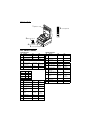
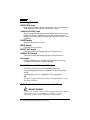
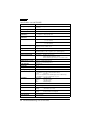
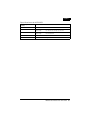
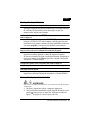
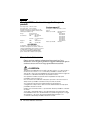
Printer Parts
1 printer cover
POWER
ERROR
RECEIPT
OUT
2 control panel
JOURNAL
OUT
SLIP
RECEIPT
FEED
JOURNAL/
SLIP FEED
3 take-up spool
14
1
25
8
1
2
6
3
1
1
13
4 power switch
5 cover open button
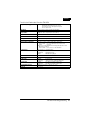
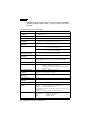
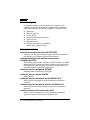
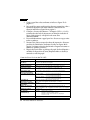
DIP Switch Tables
Serial interface
Parallel interface
SW
Function
ON
OFF
SW
Function
ON
OFF
1-1
Data word length
7 bits
8 bits
Undefined
—
—
1-2
Parity
Enabled
Disabled
1-1 ~
1-5
1-3
Parity selection
Even
Odd
1-6
Internal use
—
Fixed
1-7 ~
1-8
Undefined
—
—
SW
Function
ON
OFF
2-1
Auto line feed
Always
enabled
Always
disabled
2-2
Receive buffer
32 bytes
2048 bytes
2-3
Font selection
(default)
9×9
7×9
2-4
Carriage speed
default
Low
High
2-5
Handshaking
(BUSY)
Receive
buffer full
Offline or
receive
buffer full
1-4 ~ Transmission speed (see table below)
1-5
1-6
Display module
connection
Connected
1-7
Data receive error Ignored
Prints “?”
1-8
Handshaking
DTR/DSR
XON/XOFF
Not
connected
Transmission speed
Speed
1-4
1-5
1200
ON
ON
2400
OFF
ON
4800
ON
OFF
9600
OFF
OFF
2-6
Internal use
Fixed
—
SW
Function
ON
OFF
2-7
Undefined
—
—
2-1
Auto line feed
Always
enabled
Always
disabled
2-8
Internal use
Fixed
—
2-2
Receive buffer
32 bytes
2048 bytes
2-3
Font selection
(default)
9×9
7×9
2-4
Carriage speed
default
Low
High
2-5
Handshaking
(BUSY)
Receive
buffer full
Offline or
receive
buffer full
2-6
Internal use
Fixed
—
2-7
I/F pin 6 reset
Enabled
Disabled
2-8
I/F pin 25 reset
Enabled
Disabled