1
Chapter 5
34
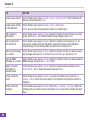
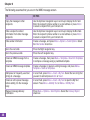
TO
DO THIS
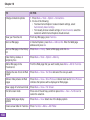
Create a new contact
On the Home screen, press Contacts > New > Outlook Contact. Enter information for
the new contact and press Done.
Create a new contact
on the SIM card
On the Home screen, press Contacts > New > SIM Contact.
NOTE: You can only store one phone number for a SIM contact.
Edit a contact’s
information
On the Home screen, press Contacts. Select the contact whose information you want
to edit. Press Menu > Edit. When finished making changes, press Done.
Call a contact from
the contact list
On the Home screen, press Contacts. Select the contact to call and press Call. To
call a phone number other than the default, select the contact, use the Up/Down
navigation keys to scroll to the number you want to call, and press Call.
Send a text message
to a contact
On the Home screen, press Contacts. Select the contact to which you want to send a
text message and press Action. Scroll to Send Text Message, then press Text.
Send an MMS
message to a contact
On the Home screen, press Contacts. Select the contact to which you want to send an
MMS message and press Menu > Send MMS.
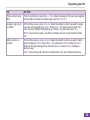
Beam a contact’s
information to
another device
On the Home screen, press Contacts. Select the contact to beam and press Menu >
Send Contact > Beam. Select the device and press Beam.
Find a contact by
name
On the Home screen, press Contacts. If you are not in Name view, press Menu >
View By > Name. Enter the first few letters of the contact’s name until the contact is
displayed.
Find a contact by
company
On the Home screen, press Contacts. Press Menu > View By > Company. Select the
company that your contact works at and press Action to see all the contacts who work
there.