1
Operating the XM910
USING AN EXTERNAL EFFECT
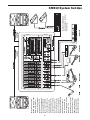
If you prefer to use an external device for effects processing, you can easily connect the unit using the XM910 EFX
bus. Follow the simple steps below to interface your
processor:
1. Set the MONITOR section MASTER control to the "0"
position. Press the EXFX BYPASS switch to disable the
internal DSP.
2. Raise the AUX 2 EFX controls for the channels to which
you want the external effect to be applied.
3. Now adjust the EFX LEVEL to about half way.
4. Set the input level of the external effect so that the
sound is not distorted and so that the effect’s input meter
does not indicate a clipped signal.
5. Use the EFX TO MON control to adjust the level of the
effects processed by the external effects device.
USING THE MAIN OUTPUTS AND AMP INPUTS
AS AN EFFECTS LOOP
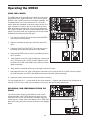
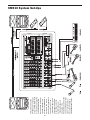
You can use the XM910’s MAIN Left and Right outputs
along with the Left and Right AMP inputs as a stereo insert
point, or effects loop, for connecting an external signal
processor. This will allow you to apply an effect on the
entire main stereo mix. You may want to use an external
dynamics processor like a compressor. The following section details the hook up.
1. Using standard 1/4-inch shielded cables, connect the
MAIN Left and Right outputs to the left and right inputs of
a stereo compressor like a Samson C com 16 or S com
plus.
2. Using standard 1/4-inch shielded cables, connect the left
and right outputs of your compressor to the Left and
Right AMP IN connectors.
3. Now, follow the directions in your compressor users
manual to set the correct gain structure and to adjust the
parameters for compressing your signal.
19