1
Text Conventions
This manual provides condensed information about how to
use your phone, including these conventions:
Highlight
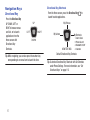
Use the Directional Key
to focus on items.
Press
Use the Directional Key to highlight an item,
then press the Center Select Key
. The
function of the Center Select Key changes.
➔
Arrows represent the “highlight, then press”
steps in longer, or repetitive procedures:
From the Home screen, press
MENU
Settings & Tools ➔ Memory.
➔
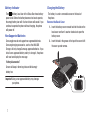
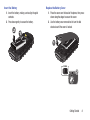
The Battery
Your phone is powered by a rechargeable, standard Li-Ion
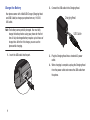
battery. A Wall/USB Charger (Charging Head and USB cable)
are included with the phone, for charging the battery.
Note: The battery comes partially charged. You must fully
charge the battery before using your phone for the first
time. A fully discharged battery requires up to 4 hours of
charge time.
Warning! Use only Samsung-approved charging devices and
batteries. Samsung accessories are designed to
maximize battery life. Using other accessories may
invalidate your warranty and may cause damage.
Getting Started
6