1
WARNING
UNINTENDED EQUIPMENT OPERATION OR LOSS OF CONTROL
• Do not make switches using the switches on the touch panels which may cause operator injury and
machine damage. An output may remain either ON or OFF and a major accident can occur. To prevent
this, set up circuits such as limiters that will monitor vital output signals. Design switches for important
operations to be performed by separate devices. An incorrect output or malfunction can occur and thereby
cause an accident.
• Do not create GP touch panel switches to control machine safety operations, such as an emergency stop
switch. Install these switches as separate hardware switches, otherwise severe bodily injury or equipment
damage can occur.
• Do not use the GP as a warning device for critical alarms that can cause serious operator injury, machine
damage or can halt system operation. Critical alarm indicators and their control/activator units must be
designed using stand-alone hardware and/or mechanical interlocks.
• Be sure to design your system so that a communication interruption between the GP and its host controller
will not cause equipment to malfunction. This is to prevent any possibility of bodily injury or equipment
damage.
• Do not use the GP with aircraft control devices, aerospace equipment, central trunk data transmission
(communication) devices, nuclear power control devices, or medical life support equipment, due to these
devices' inherent requirements of extremely high levels of safety and reliability.
• When using the GP with transportation vehicles (trains, cars, and ships), disaster and crime prevention
devices, various types of safety equipment, and medical devices that are not life-support related, use
redundant and/or failsafe system designs to ensure proper reliability and safety.
• After the GP unit's backlight burns out the touch panel is still active, unlike the GP unit's "Standby Mode".
If the operator fails to notice that the backlight is burned out and touches the panel, a potentially dangerous machine operation error can occur. Therefore, do not create GP unit touch panel switches that may
cause injury and/or equipment damage. If your GP unit's backlight suddenly turns OFF, use the following
steps to determine if the backlight is actually burned out.
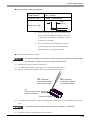
1) If the GP unit's "Backlight Control" is not set and the screen has gone blank, your backlight is
burned out.
2) If the GP unit's "Backlight Control" is set to Standby Mode and the screen has gone blank, and
touching the screen or performing another input operation does not cause the display to reappear,
your backlight is burned out.
• To prevent a GP unit malfunction due to excessive noise, isolate all GP input/output signal lines from all
power wiring or power cables via a separate wiring duct.
Failure to follow these instructions can result in death, serious injury, or equipment damage.
4