1
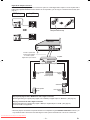
Digital Audio Output Connectors: For the best sound, the player can be connected via optical or coaxial digital audio outputs to an AV amplifier with a built-in Dolby Digital/DTS/MPEG decoder. With the use of six speakers, you can enjoy 5.1-channel surround sound. (See page 33.) DVD player Amplifier IN OR Dust protection cap IN DVD player Coaxial or optical cable (commercially available) to coaxial or optical digital audio input connector Amplifier Front speaker (Left) Front speaker (Right) Centre speaker Subwoofer Rear speaker (Left) Rear speaker (Right) Playing Dolby Digital, DTS or MPEG audio with a digital connection Set the applicable type of signal (Dolby Digital, DTS or MPEG) in “Digital Output” to “Bitstream”. (See page 33.) Playing 2 channel audio with a digital connection Set the applicable type of signal (Dolby Digital or MPEG) in “Digital Output” to “LPCM”. (See page 33.) For DTS, LPCM is not applicable. NOTE: • When the player is connected to a separate decoder box or amplifier through the DIGITAL AUDIO OUT connector, you may sometimes hear a short noise when selecting the sound system in the DVD menu. This is not a malfunction. Downloaded From Disc-Player.com Sharp Manuals - 13 - EN