1
1. Introduction
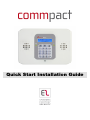
Thank you for choosing CommPact wireless intruder Control Panel. This quick start
guide manual describes the main steps for installing and programming the CommPact
Control Panel using the keypad on the main unit. To download the full version of the
CommPact Installation Manual go to www.riscogroup.co.uk, enter the Downloads menu
and select Electronics Line Manuals.
2. System Installation
1.
Place the drilling template against the wall and mark the mounting holes.
2.
Install wall anchors in the appropriate positions.
3.
Open the main unit housing.
4.
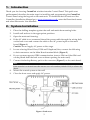
If the AC cable is not connected thread the power cable through the wiring hole
on the back cover and connect the cable to the AC power input on the main
board (Figure 1).
Caution: Do not apply AC power at this stage.
5.
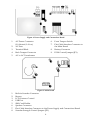
In case of using Wired Zone, PGM and Telephone/Line, connect the following
to their connectors on the Main Board terminal block (Figure 2)
6.
If your system supports GPRS communication, insert a SIM card (the SIM card
can be placed from the back cover without opening the main unit).
7.
Connect the backup Battery pack to the connector (Figure 3) on the main board.
Note:
If the sounder is activated enter the master user code number (default '1234') to silence the
alarm.
8.
Mount the control system to the wall
9.
Close the front cover and apply AC power.
Figure 1: Back cover
3