1
Aeroflex Operation Manual
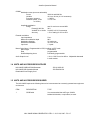
DISPLAY REGION: Status Line
The status line enunciates certain NAV 2000R status conditions by using status flags. These
flags are made from grouped alphanumeric characters. In some cases the annunciation involves
flashing to attract attention. The flags, and their description, are detailed in this section.
EDIT ENUNCIATOR
The EDIT flag is enunciated whenever the user is editing a field.
VAL FLAG
The VAL flag is displayed whenever field values are set to a non-standard value, as defined by
the current system mode of operation. For example, it would be set during VOR mode when the
user requests an audio frequency deviating from the standard VOR frequencies.
REGXX or DEFLT FLAG
The REGXX flag is displayed whenever the user has stored or recalled a NAV 2000R setup
register. For example, after the user has recalled setup #1, the status line would display the
setup register flag REG01. When register # 00 is recalled, DEFLT is displayed indicating that the
NAV 2000R has been set to its factory default settings.
REMOTE FLAG
This flag is set anytime a remote application program has commanded the NAV 2000R via the
GPIB bus. During remote operation all front panel keyboard controls are locked out. The
CLR/LCL key, the only key recognized during remote mode, will force the system back to local
control.
EM∑
Indicates that an audio signal applied to the EXTERNAL MOD INPUT will be summed with
internal audio and applied to the AM modulator.
DISPLAY REGION: Prompt line
The prompt line region is located directly below the status line and displays special warnings or
errors that may arise during editing and controlling of the NAV 2000R.
3.5.3 GETTING AROUND IN THE MENUS
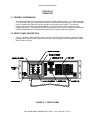
All front panel user inputs to the NAV 2000R are entered through selection of menu page fields. Each
mode of operation has a set of pre-defined user programmable items. These items are programmed
through the menu page display fields. VOR, LOC, G/S, and ADF generator modes have multiple menu
pages which provide access to all modifiable items. To access the next page, a "NEXT PAGE" menu
field is provided.
To display pages of the VOR, LOC, G/S, ADF, MKR, or COM menus, the appropriate mode select key is
pressed. (The mode select keypad is aligned along the right side of display). To move between different
mode pages for VOR, LOC, G/S and ADF use the cursor keypad to highlight the "NEXT PAGE" field and
press SEL (select).
NAV 2000R SIGNAL GENERATOR - REV. 0 – JULY 26, 2007 - PG 3-4