1
CPS3500&CPS5000 Series
INSTALLING YOUR EPS
Installing your EPS
UNPACKING
Inspect the EPS upon receipt. The box should contain the following:
EPS unit x1; Installation Guide x1; User manual x1; Battery Wiring Arrangement manual x 1;
AUTOMATIC VOLTAGE REGULATOR
When utility power is inconsistent, the EPS would increases low voltage or decrease high voltage to safe
220 volts. The EPS automatically provides battery backup (External battery connection required) if the
voltage drops below 140 volts or exceeds 300 volts.
HARDWARE INSTALLATION GUIDE
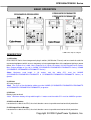
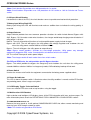
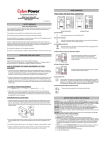
1. Your new EPS may be used immediately upon receipt. However, recharging the external battery for at
least 8 hours is recommended to ensure that the battery’s maximum charge capacity is achieved
(Charging time varies with capacity and a 100Ah or great battery is recommended). To recharge the
external battery, simply leave the unit plugged into an AC outlet. Your EPS is equipped with an
auto-charge feature. When the EPS is plugged into an AC outlet, the external battery will automatically
recharge. The unit will charge in both the ON and OFF positions.
2. DO NOT plug a laser printer, paper shredder, copier, space heater, vacuum or other large
electrical device into the EPS. The power demand of these devices may overload and damage
the unit. DO NOT use with medical or life support equipment. DO NOT use with or near
aquariums as condensation may cause the unit to short.
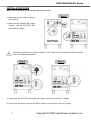
3. After connecting the hard wires, plug the EPS into a 2 pole, 3 wire grounded receptacle (wall outlet).
Make sure the wall branch outlet is protected by a fuse or circuit breaker and does not service
equipment with large electrical demands (e.g. refrigerator, copier, etc…). The warranty prohibits the
use of extension cords, outlet strips, and surge strips.
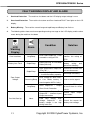
4. Press the power switch to turn the unit on. The power on indicator light will illuminate and the unit will
beep once.
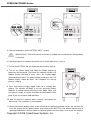
5. If an overload is detected, an audible alarm will sound and the unit will emit one long beep. To correct
this, turn the EPS off and unplug at least one piece of equipment from the battery power supplied
outlets. Wait 10 seconds. Make sure the circuit breaker is depressed and then turn the EPS on.
6. To maintain optimum battery charge performance, make the EPS plugged into an AC outlet at all times.
Enabling the switch provides the bypass for charge only.
Copyright © 2009 CyberPower Systems, Inc.
4