1
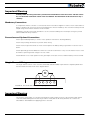
Power Wires Identifications and Connection
Power Wires Identifications and Connection
Power connections are made through a 6 position screw terminal.
Battery and Motor Connections
M1+ M1- VMot GND M2+ M2-
P2
50V
Jumper
P4
P3
J2
GND
PwrCtrl
8
P1
J1
1
15
USB Connector
Spektrum
Radio Connector
9
IO Connector
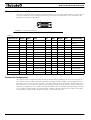
FIGURE 8. Controller layout
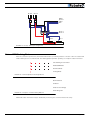
The diagram below shows how to wire the dual-channel controller and how to turn power On and Off.
F2
1A
SW1 Main
On/Off Switch 1A
PwrCtrl
Note 1
M1+
Ground
Motor 1
Backup
Battery
M1Diode
>10A
Resistor
1K, 0.5W
Note 3
M2+
Note 2
VMot
F1
Note 4
Motor 2
SW2
Emergency
Cut-off Switch
M2-
Ground
+
I/O Connector
Main
Battery
Note 5
Do not Connect!
FIGURE 9. Powering the controller. Thick lines identify MANDATORY connections
SDC2130/SDC2150 Motor Controller Datasheet
3