1
Notice for Users in the USA
FCC Statement
WARNING - FCC Regulations state that any unauthorized changes or modifications
to this equipment not expressly approved by the manufacturer could void the user’s
authority to operate this equipment.
Note: This equipment has been tested and found to comply with the limits for a
Class B digital device pursuant to Part 15 of the FCC Rules.
These limits are designed to provide reasonable protection against harmful interference in
a residential installation. This equipment generates, uses and can radiate radio frequency
energy and, if not installed and used in accordance with the instructions, may cause
harmful interference to radio communications. However, there is no guarantee that
interference will not occur in a particular installation. If this equipment does cause
harmful interference to radio or television reception, which can be determined by turning
the equipment off and on, the user is encouraged to try to correct the interference by one
or more of the following measures:
Reorient or relocate the receiving antenna.
Increase the distance between the equipment and receiver.
Connect the equipment into an outlet on a circuit different from that to which the
receiver is connected.
Consult the dealer or an experienced radio/TV technician for help.
A shielded I/F cable and included cables with ferrite cores are required to insure
compliance with FCC regulation for Class B computing equipment.
* As an ENERGY STAR® Partner, SHARP has determined that this product meets
the ENERGY STAR® guidelines for energy efficiency.
Declaration of Conformity
SHARP PERSONAL COMPUTER, PC-A200 Series
This device complies with part 15 of the FCC rules. Operation is subject to the following
conditions:(1)this device may not cause harmful interference, and (2) this device must accept
any interference received, including interference that may cause undesired operation.
Responsible Party: SHARP ELECTRONICS CORPORATION
Sharp Plaza, Mahwah, New Jersey 07430-2135
TEL: 1-800-BE-SHARP
i
About the Modem
This equipment complies with Part 68 of FCC rules. On the bottom of this
equipment is a label that contains, among other information, the FCC registration
number and ringer equivalence number (REN) for this equipment. If requested, this
information must be provided to the telephone company.
The modem jack of this equipment complies with Sub-part F of Part 68 of FCC
rules.
The REN is used to determine the quantity of devices which may be connected to the
telephone line. Excessive RENs on the telephone line may result in the devices not
ringing in response to an incoming call. In most, but not all areas, the sum of the
RENs should not exceed five (5.0). To be certain of the number of devices that may
be connected to the line, as determined by the total RENs contact the telephone
company to determine the maximum REN for the calling areas.
If the terminal equipment causes harm to the telephone network, the telephone
company will notify you in advance that temporary discontinuance of service may be
required. But if advance notice isn't practical, the telephone company will notify the
customer as soon as possible. Also, you will be advised of your right to file a
complaint with the FCC if you believe it necessary.
The telephone company may make changes in its facilities, equipment, operations, or
procedures that could affect the operation of the equipment. If this happens, the
telephone company will provide advance notice in order for you to make the
necessary modifications in order to maintain uninterrupted service.
If trouble is experienced with this equipment, please contact Sharp Electronics Corp.
for repair and (or) warranty information (Refer to the end of this section). If the
trouble is causing harm to the telephone network, the telephone company may
request you remove the equipment from the network until the problem is resolved.
The equipment cannot be used on public coin service provided by the telephone
company. Connection to Party Line Service is subject to state tariffs. (Contact the
state public utility commission, public service commission or corporation
commission for information.)
ii
The Telephone Consumer Protection Act of 1991 makes it unlawful for any person
to use a computer or other electronic device, including fax machines, to send any
message unless such message clearly contains in a margin at the top or bottom of
each transmitted page or on the first page of the transmission, the date and time it is
sent and an identification of the business or other entity, or other individual sending
the message and the telephone number of the sending machine or such business,
other entity, or individual. (The telephone number provided may not be a 900
number or any other number for which charges exceed local or long-distance
transmission charges.) To program this information, refer to the manual of the
communication software.
CAUTION: DISCONNECT TELEPHONE LINES BEFORE ACCESSING THE
MODEM CARD.
Copyright
It is the intent of Sharp that this product be used in full compliance with the
copyright laws of the United States and that prior permission be obtained from
copyright owners whenever necessary.
Product Information and Customer Assistance
For Product Information and Customer Assistance:
Call: 1-800-BE-SHARP (237-4277)
Sharp Electronics Corp.
Sharp Plaza, Mahwah, NJ
07430-2135
Home Page: http://www.sharp-usa.com
E-mail address: [email protected]
CompuServe: Go Sharp
iii
Notice for Users in Canada
About Modem
The Industry Canada label identifies certified equipment.
This certification means that the equipment meet certain telecommunications
network protective, operational and safety requirements. The department does not
guarantee the equipment will operate to the user's satisfaction.
Before installing this equipment, users should ensure that it is permissible to be
connected to the facilities of the local telecommunications company.
The equipment must also be installed using an acceptable method of connection. In
some cases, the company's inside wiring associated with a single line individual
service may be extended by means of a certified connector assembly (telephone
extension cord). The customer should be aware that compliance with the above
conditions may not prevent degradation of service in some situations.
Repairs to certified equipment should be made by an authorized Canadian
maintenance facility designated by the supplier. Any repairs or alterations made by
the user to this equipment, or equipment malfunctions, may give the
telecommunications company cause to request the user to disconnect the equipment.
Users should ensure for their own protection that the electrical ground connections
of the power utility, telephone lines and internal metallic water pipe system, if
present, are connected together. This precaution may be particularly important in
rural areas.
CAUTION Users should not attempt to make such connections themselves, but
should contact the appropriate electric inspection authority, or electrician, as
appropriate.
“The Ringer Equivalence Number (REN) assigned to each terminal device denotes
the percentage of the total load to be connected to a telephone loop which is used by
the device. To prevent overloading, the termination on a loop may consist of any
combination of devices subject only to the requirement that the total of Ringer
Equivalence Number of all the devices does not exceed 5.”
iv
CAUTION:
DISCONNECT TELEPHONE LINES BEFORE ACCESSING THE MODEM
CARD.
ATTENTION:
DEBRANCHER LES LIGNES TELEPHONIQUES AVANT D’ENLEVER CE
COUVRICLE
Product Information and Customer Assistance
For Product Information and Customer Assistance:
Call: 1-905-890-2100 (Toronto Area)
1-800-56-SHARP (Outside Toronto)
Sharp Electronics of Canada Ltd.
335 Britannia Road East,
Mississauga, Ontario, L4Z 1W9
Canada
v
Notice for Users in Australia
Service Inquiries
Please contact your dealer for service if required or contact Sharp Corporation of
Australia on 1-800-807820 (free call) for referral to your nearest Sharp authorised
Service Centre. Details can be found on the warranty card inserted with the
documentation.
Copyright
Copyright may exist in material you wish to record. Copying or broadcasting such
material without permission of the relevant licensees or owners of the copyright is
prohibited by law.
SHARP is not in a position to authorise the copying or broadcasting of copyright
materials and nothing in this OPERATION MANUAL should be implied as giving
that authority.
vi
Notice for Users in the UK
IMPORTANT
The wires in this mains lead are coloured in accordance with the following code:
BLUE:
Neutral
BROWN: Live
As the colours of the wires in the mains lead of this apparatus may not correspond
with the coloured markings identifying the terminals in your plug proceed as
follows.
The wire which is coloured BLUE must be connected to the terminal which is
marked with the letter N or coloured black.
The wire which is coloured BROWN must be connected to the terminal which is
marked with the letter L or coloured red.
This apparatus must be protected by a 3A fuse in the mains plug or distribution
board.
Copyright
Recording and playback of any material may require consent, which SHARP is
unable to give. Please refer particularly to the provisions of the Copyright Act 1956,
the Dramatic and Musical Performers Protection Act 1958, the Performers
Protection Acts 1963 and 1972 and to any subsequent statutory enactments and
orders.
vii
Notice for Users in Europe
About the Modem
Your Sharp PC-A200 series with integral modem has been designed to work
with the analogue PSTN’s in the following countries:
United Kingdom
Ireland
Italy
Germany
Switzerland
If you wish to connect the equipment to the PSTN in a country not listed
above, you should contact your equipment supplier for further details.
The modem is not designed for use on a shared service line or a line equipped
with a call waiting facility. If you attempt to use the modem on a telephone
line with call waiting, you may experience communication errors.
The equipment has been approved in accordance with Council Decision
98/482/EC(CTR21) for pan-European single terminal connection to the public
switched telephone network(PSTN).
However, due to differences between the individual PSTN’s provided in
different countries, the approval does not, of itself, give an unconditional
assurance of successful operation on every PSTN network termination point.
In the event of problems, you should contact your equipment supplier in the
first instance.
To maintain CTR21 network compatibility when used in the above listed
countries the following settings should be observed:
• Pulse dial may not be available in some countries.
• MODEM Name:WMPJX02.
• CE Marking
viii
:CE0197X.
This equipment complies with the requirements of Directives 98/13/EC and
89/336/EEC, 73/23/EEC both amended by 93/68/EEC.
Dieses Gerät entspricht den Anforderungen der EG-Richtlinien 98/13/EC und
89/336/EWG, 73/23/EWG mit Änderung 93/68/EWG.
Ce matériel répond aux exigences contenues dans les directives 98/13/EC et
89/336/CEE, 73/23/CEE modifiées par la directive 93/68/CEE.
Dit apparaat voldoet aan de eisen van de richtlijnen 98/13/EC en 89/336/EEG,
73/23/EEG, gewijzigd door 93/68/EEG.
Dette udstyr overholder kravene i direktiv nr. 98/13/EC og 89/336/EEC,
73/23/EEC med tillæg nr. 93/68/EEC.
Quest' apparecchio è conforme ai requisiti delle direttive 98/13/EC e
89/336/EEC, 73/23/EEC, come emendata dalla direttiva 93/68/EEC.
Η εγκατασταση αυτη ανταποκρινεται στιζ απαιτησειζ των οδηγιων τηζ
Ευρωπαïκηζ Ενωσηζ 98/13/EC κατ 89/336/EOK, 73/23/EOK, óπωζ οι
κανονισµοι αυτοι συµπληρωθηκαν απó την οδηγια 93/68/EOK.
Este equipamento obedece às exigências das directivas 98/13/EC e
89/336/CEE, 73/23/CEE, na sua versão corrigida pela directiva 93/68/CEE.
Este aparato satisface las exigencias de las Directivas 98/13/EC y
89/336/CEE, 73/23/CEE, modificadas por medio de la 93/68/CEE.
Denna utrustning uppfyller kraven enligt riktlinjerna 98/13/EC och
89/336/EEC, 73/23/EEC så som komplette ras av 93/68/EEC.
Dette produktet oppfyller betingelsene i direktivene 98/13/EC og 89/336/EEC,
73/23/EEC i endringen 93/68/EEC.
Tämä laite täyttää direktiivien 98/13/EC ja 89/336/EEC, 73/23/EEC
vaatimukset, joita on muutettu direktiivillä 93/68/EEC.
ix
CAUTION:
TO PREVENT ELECTRICAL SHOCK, DISCONNECT THE AC CORD AND
THE EXTERNAL BATTERY BEFORE SERVICING.
CAUTION:
FOR A COMPLETE ELECTRICAL DISCONNECTION, PULL OUT THE MAIN
PLUG AND THE EXTERNAL BATTERY.
VORSICHT:
UM DIE STROMZUFUHR VOLLSTÄNDIG ZU UNTERBRECHEN, DEN
NETZSTECKER HERAUSZIEHEN UND DIE EXTERNE BATTERIE
ÈNTFERNEN.
ATTENTION:
POUR UN ARRET TOTAL DU SYSTEME, DECONNECTEZ LA PRISE DE
COURANT SECTEUR ET LA BATTERIE EXTÉRIEUR.
VARNING:
FÖR TOTAL ELEKTRISK URKOPPLING, KOPPLA UR KONTAKTEN OCH
TA UR BATTERIET.
PRECAUCION:
PARA UNA COMPLETA DESCONEXION ELECTRICA DESENCHUFE LA
CLAVIJA DE LA RED Y LA BATERIA EXTERNO.
x
Safety Precautions
General
•
•
Follow all cautions and instructions which may be marked on the computer.
Except as described elsewhere in this manual, refer all servicing to qualified
personnel. Immediately shut off the computer and seek servicing under the
following conditions:
• when the power cord or plug is damaged or frayed
• if liquid has been spilled on the computer
• if the computer has been dropped or the cabinet has been damaged
Location
•
•
•
•
•
•
•
•
Do not expose the computer to direct sunlight.
Try to avoid dusty environments.
Keep the computer away from any magnetic devices and TVs.
Keep the computer away from excessive humidity or fluids such as rain, snow,
water spray, juice, coffee, steam, etc.
Do not move the computer from an extremely cold place to an extremely warm
place. A temperature difference of more than 10°C (18°F) will cause
condensation inside the unit, which may cause damage.
Do not block or cover slots or openings on the cabinet. These protect the
computer from overheating.
Care should be exercised when using on heat sensitive surfaces or your lap as the
base of this computer will get hot.
Do not smoke near your computer.
Usage
•
•
•
•
Never push any objects of any kind into cabinet openings. They may touch
dangerous voltage points or short parts that could result in fire or electrical shock.
Turn off the computer before installing or removing a peripheral device(except
when connecting USB devices and PC cards).
Check the AC power cord and power connectors periodically for damage. Replace
the power cord immediately if damage is found.
Never subject your computer to sudden shocks or extreme vibration.
xi
•
•
•
Do not drop the computer nor hit it with other equipment.
Do not scratch the surface of the LCD screen.
Turn off the computer and disconnect the AC power cord before cleaning.
Battery Pack Precautions
Handling
•
•
•
•
•
•
•
Never put the battery pack in a fire, as it could explode and cause injury.
Do not attempt to open or alter the battery pack.
Do not place the battery where it might get hotter than 60°C (140°F).
Do not allow metal objects such as jewelry to short across the battery terminals, as
it could heat up and explode.
Do not allow liquids to come in contact with the battery pack.
Avoid dropping the pack or other violent shock.
Do not solder anything to the battery terminals.
Charging
•
Charge the battery pack only with the AC adapter included with your computer or
an optional one.
Discharging
•
Do not use the battery pack for any purpose other than powering the computer.
Storage
•
•
xii
Store the battery pack in a cool and dry place. Never allow the temperature to
exceed 60°C (140°F) during storage.
Recharge the battery pack after storage, before use.
Modem Precautions
•
•
•
•
•
•
Never install telephone wiring during a lightning storm.
Never install telephone jacks in wet locations unless the jack is specifically
designed for wet locations.
Never touch uninsulated telephone wires or terminals unless the telephone line
has been disconnected at the network interface.
Use caution when installing or modifying telephone lines.
Avoid using the telephone during a lightning storm. There may be a remote risk
of electric shock from lightning.
Do not use the telephone to report a gas leak while in the vicinity of the leak.
xiii
About This Manual
Notice
Information in this manual is subject to change without notice and does not represent a
commitment on the part of SHARP Corporation.
SHARP Corporation shall not be liable for technical or editorial errors or omissions
contained herein; nor for incidental or consequential damages resulting from the furnishing,
performance, or use of this material.
SHARP strongly recommends that separate permanent written records be kept of all
important data. Data may be lost or altered in virtually any electronic memory product under
certain circumstances. Therefore, SHARP assumes no responsibility for data lost or
otherwise rendered unusable whether as a result of improper use, repairs, defects, battery
replacement, use after the specified battery life has expired, or any other causes.
SHARP assumes no responsibility directly or indirectly, for financial losses or claims from
third persons resulting from the use of this product and any of its functions, such as stolen
credit card numbers, the loss of or alteration of stored data, etc.
Edition
1st Edition, January 2000.
Copyright
© 2000 SHARP Corporation
This document contains or refers to proprietary information which is protected by copyright. All rights
are reserved. Copying or other reproduction of this document is prohibited without the prior written
permission of SHARP Corporation.
Trademarks
Pentium is a registered trademark, and Celeron is a trade mark, of Intel Corporation.
IBM and PS/2 are trademarks of International Business Machines Corporation.
Microsoft, MS-DOS, Windows, and the Windows Logo are registered trademarks of Microsoft
Corporation.
Sound Blaster is a trademark of Creative Technology Ltd.
All other brand and product names are trademarks or registered trademarks of their respective holders.
xiv
Recording Important Information
For future reference, please record the following information in the spaces provided
below.
Model Number:
Serial Number:
Date of purchase:
Dealer’s Name:
Place of purchase:
Password:
The serial number is printed on a sticker located on the bottom of the computer.
xv
Manual Conventions
This manual uses a set of style conventions described below.
Notes and Cautions are italicized with icons:
A note icon informs you of a special technique or information that may
help you perform a task or better understand a process.
A caution icon alerts you to something that may cause problems or
damage to hardware, software or data.
Key Labels on the Keyboard, when referred to in the instructions, are shown in
boldface:
Press Enter to continue.
When more than one key are pressed simultaneously, the key labels are separated by
a plus (+) sign:
Restart your computer by pressing Ctrl+Alt+Delete.
When necessary, important key combinations are shown in graphics:
Sample Entries are shown in upper cases of different typeface. In the following
case, press the Enter key after you type the command:
C:\>DIR A: Enter
Words/Texts on Screen, such as window titles or possible parameters, are
italicized:
Double-click this icon to display the Power Properties window.
Set the item to Enabled.
Screens reproduced in this manual may differ slightly from the screens you see on
your computer.
Section Titles in other parts of this manual are italicized:
xvi
Table of Contents
Notice for Users in the USA....................................................................................... i
Notice for Users in Canada ...................................................................................... iv
Notice for Users in Australia.................................................................................... vi
Notice for Users in the UK...................................................................................... vii
Notice for Users in Europe..................................................................................... viii
Safety Precautions .................................................................................................... xi
About This Manual................................................................................................. xiv
Recording Important Information.............................................................................xv
Manual Conventions............................................................................................... xvi
Table of Contents .................................................................................................. xvii
Overview of Computer ........................................................................................... xix
Quick Setup
Turning Power On.................................................................................................. 1-1
Setting up Windows 98 .......................................................................................... 1-3
Shutting Down the System ..................................................................................... 1-4
Basic Operations
Choosing Power Source ......................................................................................... 2-1
Resetting the System .............................................................................................. 2-3
Using Glide Pad ..................................................................................................... 2-4
Using Keyboard ..................................................................................................... 2-6
Using External Floppy Disk Drive Unit ................................................................. 2-7
Battery and Power Management
Standard Battery Pack ............................................................................................ 3-1
Optional Batteries................................................................................................... 3-5
Power Management................................................................................................ 3-8
Peripherals
Using Peripherals ................................................................................................... 4-1
PC Card .................................................................................................................. 4-3
Keyboard / Mouse .................................................................................................. 4-6
Display ................................................................................................................... 4-7
Audio System ......................................................................................................... 4-9
xvii
USB Device ............................................................................................................4-9
Printer ...................................................................................................................4-10
RS-232C Device ...................................................................................................4-10
Communication Functions
Infrared Communication .........................................................................................5-1
Built-in Modem.......................................................................................................5-3
LAN Unit ................................................................................................................5-5
Security Features
Passwords ...............................................................................................................6-1
Preventing Infection of Computer Viruses..............................................................6-4
Security Slot............................................................................................................6-4
Setup Utility
Running the Setup Utility........................................................................................7-1
Main menu ..............................................................................................................7-3
Advanced menu ......................................................................................................7-4
Security menu .........................................................................................................7-5
Power menu ............................................................................................................7-6
Exit menu................................................................................................................7-7
Appendixes
Maintenance and Care ...........................................................................................A-1
Specifications.........................................................................................................A-3
Troubleshooting
Troubleshooting..................................................................................................... T-1
Index
Index ................................................................................................................Index-1
xviii
CHAPTER 1
1
Quick Setup
Your computer is designed and pre-configured for easy setup and use. This chapter
describes the steps to get your computer up and running as quickly as possible. Read
this chapter first.
Turning Power On
Your computer is powered with either the rechargeable battery or AC power. See the
next chapter for more information on power sources. Before using the computer for
the first time:
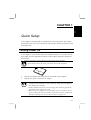
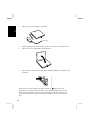
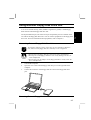
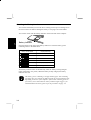
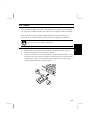
1. Remove the battery protection sheet on the bottom of the computer.
If you do not remove the sheet, you cannot turn on the computer.
Battery Protection Sheet
2.
Plug the AC adapter cable in the plug on the left side of the computer.
3.
Plug the AC power cord into the AC adapter.
• Always use the AC adapter included with the computer or the optional
one(may not be available in some countries). Using other AC adapters
may damage the computer.
• Always hold the AC power cord by its plug when removing it from the
wall outlet. Never pull on the cord.
• When using the computer for the first time, be sure to connect it to AC
power. If using the battery instead, you may not be able to complete the
Windows 98 setup if the battery does not have enough power.
1-1
4.
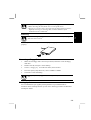
Plug the AC power cord into a wall outlet.
1
To Wall Outlet
5.
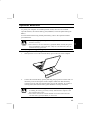
Slide the display lock latch until the screen cover releases, and raise the cover.
6.
Tilt the cover to a comfortable viewing position.
7.
Press the power switch located just above the Esc and F1 keys on the top of the
computer.
When you turn on the computer, the power indicator (
) turns green, the
computer goes through a self test to detect any problems, and Windows 98 starts.
When using the computer for the first time, a dialog box called the Windows 98
Setup Wizard appears to guide you through the Windows 98 setup. See the next
page.
1-2
Setting up Windows 98
The first steps in the setup process are as follows:
•
•
•
•
1
Entering your name
Registering your computer
Accepting license agreement
Completing configuration
To set up Windows 98, follow the instructions on the screen. See also the Windows
98 manual. It takes approximately 5-10 minutes to complete the entire setup
process.
Do not turn off the computer until completing Windows 98 setup. If you
turn off, you cannot set up Windows 98 later.
Properties Dialog Box in Windows
In the instructions in this manual, you will often see the expression “XXX Properties
dialog box.” A dialog box is a window containing text boxes, check boxes, buttons,
etc., with which you can send commands to Windows 98 or other application
programs. To open the properties dialog boxes, click the Start button, select Settings
- Control Panel and double-click the XXX icon. Some of the dialog boxes you will
use often are:
• Display
• Modems
• Mouse
• PC Card
• Power Management
• System
1-3
Shutting Down the System
1
To turn off the computer:
1.
2.
From the Start menu, select Shut Down.
Select Shut down and click OK. The computer turns off automatically.
Or you can turn off the computer with the power switch. Before turning off the
computer with the power switch, follow the steps below:
1.
2.
3.
4.
5.
From the Start menu, select Settings – Control Panel.
Double-click Power Management icon.
In Power Management Properties dialog box, select Advanced tab.
Select Shutdown in When I press the power button on my computer.
Click OK.
If you have not saved a file, a dialog box will appear asking whether you
want to save it.
• Do not turn off or reset the computer while the hard disk indicator, or
the indicator on the external floppy disk drive unit, or optional external
CD-ROM drive are lit. Doing so may damage or even wipe out the
data.
• To protect the screen, always close the screen cover while the computer
is off.
• Before turning it back on, wait at least 5 seconds after turning off the
computer. Turning the power off and on in rapid succession can
damage the computer’s electrical circuitry.
1-4
CHAPTER 2
2
Basic Operations
This chapter describes the basic operations of your computer.
Choosing Power Source
You can use the computer with one of the following power sources:
•
•
AC power from a wall outlet
Use AC power whenever possible; rely on the battery only when AC power is not
available.
Rechargeable battery
There is an internal standard battery in the computer. You can use an optional
external battery adding to the standard battery. See Chapter 3 for battery
information.
About the Power Indicators
The following indicators show the power status of your computer.
Indicator
Battery Power
Power
Light
On (green)
On (orange)
Blinking (orange)
Meaning
Fully charged
Being charged
In abnormal state
On (red)
Blinking(red)
On (green)
Blinking (green)
Almost discharged
The warning beep sounds
Almost completely discharged
Operating
Standby
Off
Hibernation or powered off
2-1
For more information on Standby and Hibernation, see Chapter 3.
Using the AC Adapter
2
When connected to a wall outlet, the AC adapter provides power for operation and
charges the battery. The AC input voltage can range from 100 to 240 volts so that
you can use the computer with the appropriate plug adapter.
The AC power cord included with the computer is appropriate for the
voltage used in the area in which you purchased your computer. If you
attempt to connect the computer to a wall outlet other than in this area,
check the voltage of the outlet and use an AC power cord appropriate for
the outlet. Consult local service staff if you are unsure.
2-2
Resetting the System
You may need to reset the system after adding hardware or software so that your
computer will recognize the newly installed devices or software. When the message
appears after the installation, click OK, Yes, etc. to restart Windows 98.
You can also restart Windows 98 from the Start menu. Select Shut down; then,
Restart.
Warm Boot (Software Reset)
If the system is locked up because of a software problem, you can reset or reboot the
system by pressing the Ctrl+Alt+Del keys simultaneously. Press the Ctrl+Alt+Del
keys again to restart the computer.
Resetting may cause data loss. Use the software reset only if the normal
Windows 98 Shut Down does not work because of software malfunction.
Although resetting will not damage the system, you may lose the data you
are processing.
Power Switch
You can turn off the computer with the power switch if you encounter hardware or
software problems which lock up the system. In this case, press the switch for more
than six seconds.
Reset Switch
If you cannot turn off the computer by pressing the power switch, you can use the
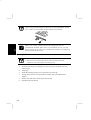
reset switch on the bottom of your computer. To reset the system, insert a narrow
object into the small hole to slide the switch as shown.
Reset Switch
RESET
RESET
Reset Switch
Push
Do not use metallic materials to slide the reset switch. It may cause
malfunction.
2-3
2
Using The Glide Pad
Your computer is equipped with an integrated pointing device called a glide pad.
Using the glide pad, you can move the pointer, select an item from a menu, and
perform other tasks in the same way you would with a mouse.
• Do not hit or scratch the surface of the glide pad with pointed objects
(such as a ballpoint pen).
• Do not operate the glide pad with a moist finger. This may cause the
glide pad to operate incorrectly.
• You cannot use the glide pad when a mouse is connected.
2
Using the Glide Pad
Take a moment to become familiar with how the glide pad works.
Place Your Fingertip
Place your left or right hand next to the glide pad, resting your wrist naturally in a
relaxed manner. Place your thumb or finger on the glide pad.
Move Your Fingertip
The rectangular pad of the glide pad acts like a miniature duplicate of the display.
As you slide your fingertip across the pad, the pointer on the screen moves in the
same direction across the screen. The glide pad is very sensitive, so you do not have
2-4
to exert much pressure on the pad. The glide pad will respond to a light touch from
your fingertip.
Click, Double-click, and Right-click
To click or double-click, you can use the left button just like that of a mouse.
Instead of clicking the left button, you can also just tap gently anywhere on the
rectangular pad. For right-clicking, you must use the right button.
2
Drag and Drop
You can move icons or windows by using “drag and drop” below:
1.
Position the pointer over the object.
2.
Press the left button; do not release it.
3.
Holding down the button, move the pointer. The object moves together with the
pointer.
4.
Release the button when the object reaches its destination.
Scroll
You can scroll through information in a list or in a document by using the glide pad.
To view information vertically, place your finger on the most right part of the glide
pad and slide your finger up and down. To view horizontally, place your finger on
the bottom part of the glide pad and slide your finger left or right. This procedure
works only in limited applications.
Changing the Configuration
In the Mouse Properties dialog box, you can change the configuration of the glide
pad, such as swapping left and right buttons, changing the pointer size, etc.
• If you swap the left and right buttons, "tapping" on the glide pad as an
alternative method of pressing the left button will no longer function.
• If you prefer to use a mouse and turn off the glide pad, you can disable
the glide pad in the Setup Utility. See also Chapter 4.
2-5
Using The Keyboard
Your computer, equipped with the Windows Enhanced Keyboard, provides all the
functionality of a full-sized desktop keyboard.
Windows Logo Keys
2
Opens the Windows Start menu.
Opens an application-specific short-cut menu equivalent to rightclicking.
System Function Keys
When pressed together with the Fn key, function keys set specific system
parameters. This combination is sometimes referred to as “hot keys”.
Switches the display output between the LCD screen and
external monitor (if connected). See the Display section in
Chapter 4 for details.
Decreases the LCD screen brightness.
Increases the LCD screen brightness.
Turns the screen backlight on and off.
Puts the computer in System standby (to Standby or to
Hibernation, according to the setup selection). See also
Chapter 3.
2-6
Using External Floppy Disk Drive Unit
You can use double-density (2DD) 720KB or high-density (2HD) 1.44MB floppy
disks with the external floppy disk drive unit.
The keyboard/mouse port, RS-232C serial port and parallel port are available on the
rear side of the floppy disk drive unit. You can connect peripherals to the floppy disk
drive unit. For more information about peripherals, refer to Chapter 4.
Connecting External Floppy Disk Drive Unit
Turn off the computer before connecting the external floppy disk drive
unit; otherwise the floppy disk drive unit may not be recognized.
• Do not place the floppy disk drive unit on its side or upside down.
• Do not press on the floppy disk drive unit. It may damage the drive or
cause malfunction.
• Do not place the AC adapter on the floppy disk drive. It may cause the
drive to malfunction.
1.
Turn off the computer.
2.
Open the cover of the external floppy disk drive port on the right side of the
computer.
3.
Connect the connector of the floppy disk drive unit to the floppy disk drive
port.
Removing External Floppy Disk Drive Unit
2-7
2
1.
Remove the floppy disk from the floppy disk drive.
2.
Turn off the computer.
3.
Disconnect the floppy disk drive unit by simultaneously pressing the buttons on
each side of the connector and pulling it out.
4.
Close the cover of the floppy disk drive port on the computer.
2
Handling Floppy Disks
•
•
•
•
Do not open the shutter and touch the disk inside; otherwise, you will not be able
to read or write data to the disk.
Do not place floppy disks near magnets or heat source, in direct sunlight or in a
dusty place, etc.
Never subject a disk to sudden shocks or extreme vibration. Do not drop, bend, or
place heavy objects on a disk.
Do not spill liquid onto a disk.
Inserting and Removing a Floppy Disk
Inserting
Hold the floppy disk with the arrow facing up and towards the drive. Slide the disk
into the drive until it locks into place.
2-8
• Always insert a floppy disk straight into the floppy disk drive.
• When inserting the disk, make sure it is not upside down.
• Do not use excessive force when inserting the floppy disk. If you have
difficulty inserting or removing disks, seek the assistance of an
authorized service technician.
Removing
Before removing the floppy disk, make sure the indicator of the floppy
disk drive unit is not lit.
2
Press the eject button firmly. The disk will pop out slightly. Remove it and store it
properly.
Formatting a Floppy Disk
1.
Make sure the floppy disk is not write-protected, and insert it into the floppy
disk drive.
2.
Double-click My Computer on the desktop.
3.
Click 3 ½ Floppy [A:]. From the File menu, select Format.
4.
From the capacity drop-down list, select 1.44MB or 720KB.
5.
Click Start to start formatting.
When you format a floppy disk, all data previously stored on the disk is
lost.
Backing Up Data
We recommend that you regularly backup the data on your hard disk drive.
Windows 98 has a backup function you can use to back up your data. See Windows
98 Help for details.
2-9
CHAPTER 3
Battery and Power Management
3
This chapter explains how to manage the computer’s power effectively and use the
standard battery or an optional battery pack.
Standard Battery Pack
When not connected to an external power source, your computer operates with the
rechargeable internal standard battery pack. The duration of the battery life may be
longer if the computer’s Power Management is active. See the next section for power
management.
To keep the battery life long:
•
•
Initialize the battery pack if the actual remaining power in your battery is less than
what the battery indicator lights suggest as per the procedure on page 3-3.
Turn off your computer when you are not using it.
• The duration a battery charge will last will depend on the computer
usage. Applications which heavily use the peripherals will experience
shorter power duration.
• When the battery is not charged, your computer may not operate
properly. Connect the AC power to charge the battery.
• If you see an error message during booting, press F2 to open the Setup
Utility. Following the instructions in Chapter 7, adjust the Setup Utility
and restart the system.
• When using the computer for several hours with battery packs, enable
power management and set System standby. Refer to the Power
Management section in this chapter.
3-1
Checking the Battery Level
You can check the battery level in the Power Management Properties dialog box in
the Control Panel or double-clicking the battery or AC plug icon on the taskbar.
You can also check with the battery indicator on the front side of the computer.
3
Battery Indicator
Press the button on the right of the battery indicator to show the battery power
remaining. Refer to the table below.
Battery Indicator Status
Capacity Remaining
All on
76% -100%
Three on
51% - 75%
Two on
26% - 50%
One on
1% - 25%
One blinking
Nearly 0%(Empty)
All off
0%(Empty)
This battery indicator turns on automatically while the battery is being charged
(when connected to AC power). When the battery is fully charged, the battery
indicator turns off.
The battery power remaining is an approximate figure. The remaining
operating time expected may be different from the actual remaining time,
depending on the use of the computer. If the actual remaining power in
your battery is less than what the battery indicator lights suggest, you
should initialize the battery pack as per the procedure on page 3-3.
3-2
Low Battery Indication
When the battery power becomes significantly low, the battery power indicator ( )
turns red and the warning beep sounds. Then the indicator starts blinking and the
computer will be shut down soon and the data may be lost. Save your data and turn
off the computer, or connect the computer to AC power immediately. Otherwise, the
computer will be shutdown If you set the battery alarm in Windows 98, the computer
will be turned off or enter System standby in case of significantly low battery power.
See Power Management section of this chapter.
The remaining operating time depends on the power you are consuming. If you are
using the audio system, PC card slot, hard disk, floppy disk or CD-ROM, your
computer may consume more battery life.
See also the section on power management in this chapter.
Charging the Battery Pack
1.
Connect the AC adapter to the computer. While the battery is being charged,
the battery power indicator is orange and the battery indicator turns on.
2.
When the battery is fully charged, the battery power indicator turns green and
the battery indicator turns off. Charging time may vary according to the status
of the computer.
When the battery is hot (for example, after long use), it may take longer
to fully charge the battery.
Initializing the Standard Battery Pack
You need to initialize the battery pack when the actual remaining power in your
battery is less than what the battery indicator lights suggest.
1.
Make sure the computer is turned off. Connect the computer to AC power and
wait until the battery is fully charged. The battery power indicator turns green
and the battery indicator turns off. It will take about 2 hours and 30 minutes if
the battery was previously completed discharged.
2.
Turn on the computer.
3-3
3
3
3.
When the message Press <F2> to enter Setup Utility appears, press F2 to open
the Setup Utility.
4.
Disable the power management and set Critical Battery Suspend to Disabled in
the Power menu of the Setup Utility. See Power menu in Chapter 7.
5.
Press Esc; then Enter twice. The system restarts.
6.
When the message Press <F2> to enter Setup Utility appears, press F2 to open
the Setup Utility. Leave the computer in the Setup Utility.
7.
Disconnect the AC adapter, and leave the computer on until the battery is
completely discharged and the system shuts down automatically. It will take
about 3 hours.
8.
Connect the computer to AC power and let the battery fully charge.
• Do not connect the computer to wall outlet while discharging the
battery. The initialization will be cancelled.
• You can initialize the standard battery alone if the optional external
battery pack is disconnected. When the external battery pack is
connected, both the standard and the external battery will be initialized
together.
Changing the Battery Pack
The capacity of a battery pack gradually decreases when used repeatedly (the
deterioration rate depends on the operating temperature and environment). If the
battery life becomes extremely short even after the initialization, you should change
the standard battery pack. Bring your computer to a local dealer for replacement of
the standard battery pack.
Never replace the standard battery pack yourself.
3-4
Optional Batteries
To power your computer for extended periods of time, there are two available
optional batteries, the external battery pack(CE-BL03) or the flat panel battery(CEBP01).
For more details about using the flat panel battery, refer to the operation manual
provided with it.
• Use only the appropriate optional battery (CE-BL03 or CE-BP01), and
attach it correctly.
• You cannot use the external battery pack(CE-BL03) and the flat panel
battery(CE-BP01) at the same time. Only one external battery may be
connected at any given time.
Connecting External Battery Pack
1.
Slide open the cover of the external battery port on the rear of the computer.
2.
Connect the external battery pack by matching the projections on either side of
the battery to the recessed parts of the computer. Make sure that the battery
connector lines up with the external battery port of the computer. If you hear a
clicking sound, the external battery pack should be correctly connected.
• While the external battery pack is connected, do not carry the computer
by holding the battery pack only. Firmly hold both the computer and
the external battery pack.
• You cannot connect an external monitor nor a LAN cable when the
external battery pack(CE-BL03) is connected.
3-5
3
Removing External Battery Pack
Before removing the external battery pack, turn off the computer or
confirm that the standard battery pack has power remaining. If the
standard battery pack has no power remaining, connect the computer to
AC power; otherwise the computer will be shut down and data may be
lost.
3
Remove the external battery pack by pressing the buttons on each end of the battery
and sliding the battery off the computer.
Close the cover of the external battery port after the external battery pack
is removed.
Checking the Battery Level
You can check the battery level of the external battery pack (in the same way as the
standard battery pack) with the battery indicator. Press the button on the right of the
indicator. The status of the indicator is the same as that of the standard battery. See
page 3-2.
3-6
Charging External Battery Pack
You can charge the external battery pack by connecting AC power to the computer
with the external battery connected.
To charge most effectively, the standard and external battery pack will be charged as
follows:
1. Charge standard battery pack to about 80%.
2. Charge external battery pack to about 80%.
3. Charge standard battery pack remaining 20%.
4. Charge external battery pack remaining 20%.
When the computer is turned off or in Hibernation, it will take about 5 hours and 30
minutes to charge both the standard and external battery packs from completely
discharged to full. When the computer is turned on, it will take about 7 hours and 30
minutes. (The charging time also depends on the power you are consuming.)
Initializing External Battery Pack
The procedure for initializing an external battery pack is the same as that of the
standard battery. But, you cannot initialize the external battery pack only. If you
begin the initializing process, both standard and external battery packs will be
initialized.
3-7
3
Power Management
Power management saves electricity and extends battery life by controlling power
supply to built-in devices. You can set the following power management properties
in Windows 98.
•
•
•
Stopping power supply to the hard disk
Stopping power supply to the display
Using System standby
3
Note that the power management may not seem to function under the
following conditions:
• When you are using an application program that accesses the hard disk
periodically
• When Windows CD Auto Play is functioning
Stopping Power Supply to the Hard Disk
1.
2.
In the Power Management Properties dialog box, select Power Schemes tab.
Set Turn off hard disks to an appropriate value, and click OK.
Stopping Power Supply to the Display
This procedure is also effective for an attached external monitor complying
with power management.
1.
In the Power Management Properties dialog box, select Power Schemes tab.
2.
Set Turn off monitor to an appropriate value, and click OK.
Using System Standby
System standby is a very useful power management tool. For example, after your
computer has entered standby mode, you can restart your computer within much
reduced time compared to when you turn on the computer again after shutting it
3-8
down normally. When your computer resumes from System standby, the system
restores the exact last state of the computer. There are two types of System standby;
Standby and Hibernation. In Windows 98, you can define which System standby the
system enters under what conditions.
•
•
Standby stores the current condition of the computer in RAM and stops power
supply to all but a few essential components. Your system enters and resumes
from Standby per the conditions mentioned below. In Standby, the Power
indicator blinks green.
Hibernation saves the current condition of the computer in an area of the hard
disk and turns off the computer. Your system enters and resumes from
Hibernation per the conditions mentioned below. In Hibernation, the Power
indicator turns off.
3
You can select Standby or Hibernation in Windows 98. See Selecting System
Standby Mode below.
Selecting System Standby Mode
• If your battery becomes completely discharged during Standby, you
will lose unsaved data and will need to reboot your computer.
Therefore, if you are planning to leave your computer powered by
battery for long periods of time, we recommend Hibernation.
1.
2.
3.
4.
5.
6.
From the Start menu, select Settings – Control Panel.
Double-click Power Management icon.
In the Power Management Properties dialog box, select Hibernate tab.
Check Enable hibernate support if you want to support Hibernation. Uncheck
if you want to support Standby.
Click Apply.
Click OK.
Entering System Standby
• Finish communications, printing, and playing music or video before
entering System standby.
• Do not operate the keyboard, glide pad or mouse while the system is
entering System standby.
• When the system enters Hibernation, you may see some flicker on the
display. This is not a malfunction.
• Save your data before your computer enters Standby. If the power supply to
the computer is stopped, the RAM contents will be lost.
3-9
Your computer enters System standby in each of the following cases.
•
•
You select Stand by in the Shut Down Windows dialog box.
The specified time in System standby in Power Schemes tab of Power
Management Properties dialog box has passed without any operation.
In the above two, your computer enters Standby or Hibernation depending on your
selection in Selecting System Standby Mode of this chapter.
3
•
The screen cover is closed.
The above functions if you perform the followings:
1. In the Power Management Properties dialog box, select Advanced tab.
2. Select Hibernate or Standby in When I close the lid of my portable computer:
3. Click Apply.
4. Click OK.
• You press the power switch.
The above functions if you perform the followings:
1. In the Power Management Properties dialog box, select Advanced tab.
2. Select Hibernate or Standby in When I press the power button on my
computer:
3. Click Apply.
4. Click OK.
•
You press Fn + F12.
The above functions if you perform the followings:
1. In the Power Management Properties dialog box, select Advanced tab.
2. Select Hibernate or Standby in When I press the sleep button on my computer:
3. Click Apply.
4. Click OK.
•
The battery level is low.
The above functions if you set the alarm in Windows 98. See Battery Alarm in this
section.
3-10
Resuming from Standby
• Do not operate the keyboard, glide pad or mouse while the system is
resuming from Standby.
Your computer resumes from Standby in each of the following cases:
•
•
•
You press any key.
The screen cover is opened.
The built-in modem receives a call while a communication software is running
(the built-in modem may not be available in some countries).
Resuming from Hibernation
• Do not operate the keyboard, glide pad or mouse while the system is
resuming from Hibernation.
• If sufficient battery power does not remain, your computer will not resume
from Hibernation. To resume it, connect the computer to AC power.
• When the system resumes from Hibernation, you may see some flicker on
the display. This is not a malfunction.
Your computer resumes from Hibernation if you press the power switch.
Disabling Power Management
1.
2.
In the Power Management Properties dialog box, select Power Schemes tab.
Set System standby, Turn off monitor and Turn off hard disks to Never, and
click OK.
When you are using communication software or if sound or voice pauses
or skips while played back, disable power management.
Battery Alarm
In Windows 98, the alarm will tell you when the battery drops to the specified level
by sounding an alarm or displaying a message, and let your computer go on System
standby or be shut down automatically.
3-11
3
1.
2.
3.
4.
5.
3
3-12
From the Start menu, select Settings – Control Panel.
Double-click Power Management icon.
Select Alarms tab.
Set the battery level at which the alarms are activated and the Alarm Action
desired.
Click OK twice.
CHAPTER 4
Peripherals
This chapter describes how to use peripheral devices with your computer. You can
connect a printer, external monitor, external keyboard, mouse, or other device to the
parallel, RS-232C serial, USB or keyboard/mouse ports. To ensure proper use, be
sure to read the instructions for each peripheral device before connecting it to your
computer.
Using Peripherals
You can use the peripheral devices shown on the next page. For the details, refer to
the section explaining each device, and contact your dealer.
• Be sure to turn off the computer and the peripheral device before
connecting them (except when connecting USB devices and PC cards).
• Some devices have to be turned on after the computer is turned on.
• Some devices require that you install drivers before use.
Connecting Peripheral Device
1. Turn off the computer and the peripheral device (except when connecting USB
devices and PC cards).
2. Connect the peripheral device to the computer. If the connector has screws,
tighten them.
3. Turn on the peripheral device; then, turn on the computer.
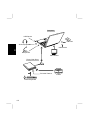
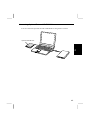
Peripheral Connection Overview
4-1
4
Computer
USB Device
PC Card
Audio Equipment
USB Device
4
Microphone
CRT Monitor
Floppy Disk Drive
RS-232C Device
Mouse/Keyboard
4-2
Printer
PC Card
Your computer is equipped with a PC card (PCMCIA) slot, which can accommodate
one Type II card. Before inserting a PC card into your computer, refer to its manual.
When using a PC card which needs an IRQ, disable one of the following ports:
Serial, IR, LPT, or LAN. Otherwise a PC card or the computer may malfunction.
Never disable the USB port. Disabling the USB port in the Setup Utility
may cause some PC cards to malfunction.
Inserting PC Card
4
1.
Raise the PC card eject button and push it in. The protection card pops out.
2.
Remove the protection card from the PC card slot.
3.
Insert the card into the slot with the label face up until it locks into place. (You
do not have to power down the computer to insert/remove PC cards when using
Windows 98). The PC card eject button pops out. When the PC card is fully
inserted, fold down the PC card eject button.
4-3
Raise the PC card eject button only when you need to push it. The eject
button may get knocked off the computer if it is not pushed down. In this
case, replace the button while the inserted PC card is held in.
When a new card is correctly inserted, the appropriate driver is
automatically installed. If the driver is not installed correctly, you will
hear a warning beep. In this case, install the PC card driver by following
the instructions on the screen.
4
Ejecting PC Card
• Some PC cards may become hot after long use.
• Be sure to use the procedure below when ejecting a PC card.
Otherwise, the system may not work properly.
1.
2.
3.
4.
5.
6.
4-4
In the PC Card Properties dialog box, click on the icon of the PC card you
want to eject.
Click Stop.
When the message prompts you to eject the card, click OK.
Gently push in the PC card eject button. The PC card will be pushed out
slightly.
Remove the card, and re-insert the protection card.
Fold down the eject button.
Connecting Optional External CD-ROM Drive
You can connect the optional external CD-ROM drive using the PC card slot.
Optional CD-ROM Drive
4
4-5
Keyboard / Mouse
You can use a full size desktop keyboard or external mouse with your computer.
A keyboard/mouse port and a RS-232C serial port are available when the external
floppy disk drive is connected.
The ways of connecting a PS/2 mouse and a serial mouse are slightly different.
Never connect or disconnect the devices to the keyboard/mouse port
when the computer is powered on. This may cause the computer to
operate improperly.
Using a PS/2 Mouse
4
You have only to connect the mouse to the keyboard/mouse port of the external
floppy disk drive unit.
You cannot use the glide pad when a PS/2 mouse is connected.
Using a Serial Mouse
Connect the serial mouse to the RS-232C serial port of the external floppy disk drive
unit. When starting the system, enter the Setup Utility and set the item Serial Port: to
Auto or Enabled and Internal Pointing Device to Disabled in the Advanced menu.
You cannot use a mouse and the glide pad simultaneously.
4-6
Display
You can use an external monitor with your computer. To display images on both
displays simultaneously, use the 1024x768 resolution.
• Some monitors, which are not compatible with your computer, may not
display correctly.
• In this section, you often see the expression “Display Properties dialog
box.” To open the dialog box, double-click My Computer - Control
Panel - Display.
Displaying the Screen on an External Monitor
You can display the screen on an external monitor.
4
You cannot connect the optional external battery (CE-BL03) when an
external monitor is connected.
In the Display Properties dialog box, select Settings; then, Advanced….
Select Monitor tab and click Change….
Click Next.
Select Display a list of all the drivers in a specific location, so you can select the
driver you want; then, click Next.
5. Select Show all hardware.
6. Select the manufacturer and the model, and click Next twice.
7. Close the dialog box, following the instructions on the screen.
1.
2.
3.
4.
Switching the Display
1.
2.
3.
4.
In the Display Properties dialog box, select Settings; then, Advanced ….
Select Display Device tab.
Select the display and click Apply.
Click OK.
• Although you can switch the display with Fn+F5, use the above
procedure in normal use.
• While playing video or animation, you may not be able to switch the
display.
• While using multiple displays, you cannot switch the display.
4-7
Changing Resolution and Number of Colors
When shipped, your computer is set to the default resolution and color. The default
resolution is 1024 x 768 at 64k color. To change the resolution and the number of
colors, perform the following:
1.
In the Display Properties dialog box, select Settings.
2.
Select the number of the colors in the Colors, and select the resolution in
Screen area. Refer to the table below.
3.
Click OK twice.
Resolutions and Colors you can choose
Resolution
640 x 480(1)
4
800 x 600(1)
1024 x 768
Number of Colors
256
64K
16M(2)
256
64K
16M(2)
256
64K
16M(2)
(1)
You cannot use screen expansion if you choose 16M colors
The number of colors in this mode is made using a Dithering algorithm(on the
internal LCD only).
(2)
• You cannot switch to a display resolution and number of colors that are not
available.
• In the Color Palette, High Color (16 bit) means 65,536 (64K) colors, and
True Color (24 bit or 32 bit) means about 16,770,000 (16M) colors.
• Select 32 bit if you display video or animation in the True Color.
Otherwise the speed of displaying may be decreased.
• If you select True Color(24 bit) in the Color Palette,
* The drawing speed of screen is decreased.
* You cannot use multiple monitors.
• Note that the above resolutions are ones that you can choose when you
connect a monitor with appropriate resolution.
Using Multiple Displays
You can use multiple displays when an external display is connected. See Windows
Help for more information.
4-8
Audio System
You can output sound to speakers or headphones using an ordinary audio cable.
Connecting audio equipment
1.
Turn off the computer.
2.
Use the following audio cable for the connection:
To output the computer’s audio signal to audio equipment:
4
3.
Turn on the computer.
• You can adjust the volume in Windows 98 by clicking the speaker icon
in the taskbar or with the volume control dial on the right side of your
computer.
• When using the audio output jack, you cannot use the built-in
speakers.
Connecting Microphone
You can input sound using an external microphone connected to the microphone
jack. When using an external microphone, you cannot use the built-in microphone.
USB Device
Your computer has a interface called Universal Serial Bus (USB). With a USB
connection, you can connect/disconnect peripherals without turning off the
computer. Remove the cover of the USB port before using. To use a USB device, set
the item USB Port: to Enabled in the Advanced menu of the Setup Utility. See also
the manuals of peripheral devices supporting USB.
Disabling the USB port may cause some PC cards to malfunction.
4-9
Printer
You can connect a printer to a parallel port of the external floppy disk drive unit.
Before using a printer, read the printer manual.
Setting the Setup Utility
In the Advanced menu of the Setup Utility, set the LPT Port: to Auto or Enabled.
Also set the Mode:, referring to your printer manual.
4
Installing a Printer Driver
To use a printer, you need to install a printer driver.
1.
From the Start menu, select Settings - Printers.
2.
Double-click Add Printer. The Add Printer Wizard appears.
3.
Click Next.
4.
Confirm Local printer is selected and click Next.
5.
Select the manufacturer and the printer, and click Next. If you cannot find the
model name of your printer, you have to install the printer driver included with
your printer. See your printer manual for details.
6.
Select LPT1 and click Next.
7.
Make sure the printer name is correct, and click Next.
8.
Decide whether to print a test page, and click Finish. Before printing a test
page, make sure the printer is ready.
RS-232C Device
You can use RS-232C devices, such as a modem or a terminal adapter with your
computer. RS-232C port is available on the external floppy disk drive unit. To use
an RS-232C device, set the item Serial Port: to Auto or Enabled in the Advanced
menu of the Setup Utility. See the manual before using the device.
4-10
CHAPTER 5
Communication Functions
This chapter explains how to use infrared communications, the built-in modem and
the LAN unit.
Infrared Communication
Using the IR (infrared) port located on the right side of your computer, you can
communicate wirelessly with infrared-equipped devices such as electronic
organizers, computers or printers. To establish infrared communication, follow the
instructions below. See the manual or online help of each application for details.
Positioning and Preparing the Computer and the Target Device
1.
Put your computer on a flat surface.
2.
Place the target device so that its IR port is in line with that of your computer.
3.
Adjust the distance between the IR ports to be less than 20 inches (50 cm).
When using a Sharp electronic organizer, make sure the two IR ports are
within 12 inches (30.5cm).
Setting for Infrared Communication
1.
In the Advanced menu of the Setup Utility, make sure the Mode of IR Port is
IrDA.
2.
In the Power menu of the Setup Utility and the Power Management Properties
dialog box, disable power management. Refer to Disabling Power Management
in Chapter 3.
3.
In the Infrared Monitor dialog box in the Control Panel, select Options and
enable infrared communication.
5-1
5
During infrared communication:
• Do not move the computer and the other IR device.
• Do not enter System standby.
• Do not use a cellular phone or another IR device near the computer.
• Avoid strong light such as sunlight or fluorescent light.
• Disable the screen saver.
IR Mode
Your computer supports two available IR modes: IrDA (Infrared Data Association)
and ASK (Amplitude Shift Keying). Each application automatically selects the
appropriate IR mode.
Logical Port
5
For some software, you may have to change the assignment of the logical port:
1. In the SHARP IR dialog box, select Ports.
2. Change the settings, and click OK.
3. When the message You have changed the infrared communication port
appears, click OK.
Turning off the IR communication
For IrDA communication, your computer is continuously emitting infrared rays to
search for other IR devices. If necessary, you can temporally disable this emission.
1. From the Start menu, select Settings - Control Panel.
2. Double-click the SHARP IR icon.
3. Turn off the infrared communication, and click OK.
Communicating with Windows 98 Personal Computer
To communicate with a personal computer installed with Windows 98:
1.
Right-click the file you want to send.
2.
Select Send To - Infrared Recipient.
The file you send will be saved in My Received Files in C: drive of the target
personal computer.
If you cannot send the file, confirm your computer and the target computer are
located correctly. Double-click My computer - Infrared Recipient, and check
whether the name of the target computer appears in Available infrared devices within
range. If not, relocate your computer and the target computer.
5-2
Built-in Modem (may not be available in some countries)
You can use the built-in modem for data transfer and fax communication.
• The built-in modem on your computer is designed only for regular
analog telephone lines. The modem may be damaged when connected
to a digital ISDN terminal or a digital PBX.
• If an unusual device is attached to the line you are connecting to, the
modem may not function properly. Remove the device or contact the
dealer of the device.
• Before connecting to a PBX, consult the PBX maintenance staff or its
service company. If the electric characteristics of your PBX are
different from those of a regular analog line, the modem will not
function properly. If you connect the modem to a digital PBX, both the
modem and the PBX may be damaged.
Connecting the Modem to a Telephone Line
1.
Turn off your computer.
2.
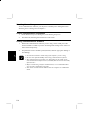
Remove the cover of the modem jack on the right side of your computer and
connect the end nearest the core on the included modem cable to the modem
jack.
Connect the other end of the cable to the telephone line.
3.
5
Core
Modem Jack
4.
Turn on the computer.
Connect the modem to the telephone line directly. Do not use a
distributor or allotter.
5-3
Disabling Power Management
To use communication software, you may have to disable power management. See
Disabling Power Management in Chapter 3.
Setting Communication Information
1.
In the Modems Properties dialog box, select Dialing Properties.
2.
Set each item, following the instructions on the screen.
Setting Communications Software
1.
Within the communications software you are using, set the COM port of the
built-in modem to COM3 if you have not changed the settings in the Advanced
menu of the Setup Utility.
2.
Set parameters such as modem speed (baud rate) and line type (pulse dialing or
tone dialing).
• See also the manual or online help of the software you are using.
• Do not enter System standby while using communication software.
• The communication speed may vary depending on the traffic, local
telecommunications infrastructure, and ISP (Internet Service Provider)
infrastructure.
• Before commencing with fax communication, it is recommended that
you exit other application programs.
• You cannot use the built-in modem when the computer is in MS-DOS
mode.
5
5-4
LAN unit
Your computer is equipped with a 100 Base-TX/10 Base-T LAN interface. To
activate the LAN adapter, perform the following steps.
1.
Turn off the computer.
2.
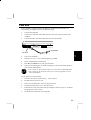
Connect one end of the LAN cable into the LAN jack on the rear side of the
computer.
3.
Connect the other end of the LAN cable into the network hub.
To Network
LAN Jack
5
4.
Turn on the notebook.
5.
When Press <F2> to enter SETUP appears, press F2.
6.
In the Advanced menu, enable LAN.
7.
Press Esc; then Enter twice. The system restarts.
8.
In the Network dialog box, set fields according to your network status. Refer to
your network administrator.
• You cannot use the LAN unit when your notebook is in MS-DOS mode.
• You cannot use the LAN unit when you connect an optional external
battery(CE-BL03).
If you cannot access the network,
1.
From the Start menu, select Settings – Control Panel.
2.
Double-click the Network icon.
3.
In the Network dialog box, select Configuration tab.
4.
Click Realtek RTL8139 xxxxxx; then Properties.
5.
Click Advanced tab, and select Link Speed/Duplex Mode in Property: and enter
an appropriate value in Value:.
6.
Click OK twice and restart your computer.
5-5
CHAPTER 6
Security Features
This chapter describes how to protect your computer against unauthorized use,
computer viruses and theft.
Passwords
Setting a password will help protect against unauthorized access to your computer.
When a password is set and the computer is turned on or resumes from the suspendto-disk mode, the system will require a password.
If you lose your password, you will be unable to access the computer or
change the configuration. Make sure you select a password you will
never forget, and write it down and save it in a secure place. Otherwise,
you will have to contact your dealer for assistance.
If you enter a wrong password three times, the message System Disabled
appears. Press the power switch to turn off the computer, turn it on
again, and enter the correct password.
Supervisor Password and User Password
Two types of passwords limit the access at different levels. To set the user password,
you always have to set the supervisor password. When you set the two passwords, a
person who knows only the user password has the limitations on the next page:
6-1
6
When setting items in the Setup Utility
The person who does not know the supervisor password cannot set:
Security Menu
• Set Supervisor Password
•
•
•
•
•
•
Exit Menu
Password on boot
Power Management Security
Diskette access
Fixed disk boot sector
Load Setup Defaults
Discard Changes
and cannot get default value with F9 key.
When the system starts or resumes from Hibernation
If you have enabled Password on boot in the Security menu of the Setup Utility, the
system requires a password when you turn on the computer. If you have enabled
Power Management Security, the system requires a password when the system
resumes from Hibernation.
6
The person who does not know the supervisor password cannot
read/write a floppy disk when the item of Diskette access is defined as
Supervisor in the Security menu of the Setup Utility.
Setting the Password
1.
In the Security menu of the Setup Utility, select Set Supervisor Password or Set
User Password and press Enter.
2.
Type your password (up to eight characters), and press Enter.
3.
Type the same password again, and press Enter.
4.
When the confirmation message appears, press Enter.
5.
Press Esc and select Exit Saving Changes.
6.
Press Enter twice. The system restarts and asks the password you have set.
If you use the computer personally
We recommend that you set the supervisor password. You can prevent other people
from using your computer by enabling Password on boot in the Security menu of the
Setup Utility.
6-2
If you share the computer with others
We recommend that a person who administers the computer sets both supervisor and
user passwords and lets the other people know only the user password.
Changing the Password
1.
In the Security menu of the Setup Utility, select the password item you want to
change and press Enter.
2.
Type your current password, and press Enter.
3.
Type your new password, and press Enter.
4.
Type your new password again, and press Enter.
5.
When the confirmation message appears, press Enter.
6.
Press Esc and select Exit Saving Changes.
7.
Press Enter twice. The system restarts.
Deleting the Password
1.
In the Security menu of the Setup Utility, select the password item you want to
delete and press Enter.
2.
Type your current password, and press Enter.
3.
Without typing any characters, press Enter.
4.
Press Enter again.
5.
When the confirmation message appears, press Enter.
6.
Press Esc and select Exit Saving Changes.
7.
Press Enter twice. The system restarts.
6
6-3
Preventing Infection of Computer Viruses
You can protect against some viruses by limiting writing to the hard disk. To limit
writing to the hard disk, set the item Fixed disk boot sector to Write Protect in the
Security menu of the Setup Utility.
• You cannot prevent infection of all types of viruses with the above
operation.
• Even if a warning message appears, the system may not be infected in
some cases.
Security Slot
You can prevent theft by using a security cable and the security slot on the right side
of your computer.
6
6-4
CHAPTER 7
Setup Utility
This chapter describes how to run the Setup Utility to change settings on your
computer.
Running the Setup Utility
With the Setup Utility, you can customize the system configuration information, such
as time and date, port assignments, passwords, or power management settings. The
information you have specified is saved in a special area called CMOS RAM, which
the system reads every time you turn on the computer.
Contents of the Setup Utility
7
The Setup Utility consists of five menu pages, as follows:
•
•
•
•
•
Main:
Basic system configuration
Advanced: Device interface configuration (I/O ports, etc.)
Security: Password settings
Power:
Power management (battery saving settings)
Exit:
Exit the Setup Utility or return to the default values
Entering and Exiting the Setup Utility
1. Turn on the computer.
2. When Press <F2> to enter SETUP appears, press F2.
3. Change the desired settings.
4. Press Esc to select the Exit menu.
7-1
5. Select one of the exit methods, and press Enter.
6. When the message Setup Confirmation appears, press Enter again. The system
restarts.
To turn off the computer when the Setup Utility is open, press the power
switch.
Using the Setup Utility
To navigate through the different menus, you can use the following keys:
Moves the cursor from one menu to another.
Moves the cursor from one item to another in a menu.
Space bar
Increases the numeric value or changes an item to the next
value.
Decreases the numeric value or changes an item to the
previous value.
7
Enters the Exit menu. When a sub-menu is open, this key
closes the sub-menu.
F9
Replaces the settings on the current menu with their default
values (date and time are not changed).
F10
Saves the settings you have changed and exits the Setup
Utility.
F1
Displays online help for the Setup Utility.
Displays sub-menu. Items with marks contain sub-menus.
7-2
Main menu
System Time Defines the system time, using the format hour:minute:second (24hour format). The Tab key moves the cursor, and the space bar and the "-" key
change numerals.
System Date Defines the system date. The Tab key moves the cursor, and the space
bar and the "-" key change numerals.
Diskette A Defines whether to use the floppy disk. To use it, set this item to
1.44MB,3½".
Hard Disk Type Specifies the hard disk type. Set to Auto during normal use.
BootSequence Specifies the sequence in which the boot program looks for operating
system files.
Internal Numlock Defines whether you can input numerals through keys with blue
legends on the built-in keyboard when you connect an external keyboard and lock its
numeral keys.
Memory Cache Enables or disables the memory cache function that accelerates the
access speed to data previously accessed.
QuickBoot Mode Enables or disables the quick boot function. When this item is
enabled, the system skips certain tests while booting.
Quiet Boot Enables or disables the quiet boot function. When this item is enabled,
the system shows SHARP logo screen while booting.
BIOS version Shows BIOS version of your notebook.
EC version Shows the version of power source firmware.
System Memory shows the size of conventional memory for starting MS-DOS.
Extended Memory Shows the size of extended memory with 1MB or larger.
7-3
7
Advanced menu
Serial Port Sets the RS-232C serial port, selecting the base I/O address. Enabled
means that you can select the item yourself. Auto means that the item is
automatically assigned. Disabled means that you cannot use the port.
IR Port Sets the infrared port, selecting the mode, the I/O channel, the IRQ channel,
and the DMA channel. Enabled means that you can select the items yourself. Auto
means that all the items except the mode are automatically assigned. Disabled means
that you cannot use the port. Set to Auto during normal use.
Mode Specifies the IR mode: IrDA or ASK. Set to IrDA during normal use.
LPT Port Sets the printer port, selecting the mode and the base I/O address.
Enabled means that you can select the items yourself. Auto means that the base I/O
address is automatically assigned. Disabled means that you cannot use the port.
Mode Specifies the LPT port mode: Bi-directional, Output Only, EPP (Enhanced
Parallel Port mode) or ECP (Extended Capabilities Port mode).
Internal Pointing Device Enables or disables the glide pad.
Resolution Expansion Defines whether the screen is expanded when the resolution
is 640x480 or 600x800. Enabled means that the screen is expanded.
7
USB Port Enables or disables the USB port. Always set to Enabled; otherwise,
some PC cards may malfunction.
LAN Enables or disables the LAN port.
Plug & Play O/S Defines whether the operating system supports the plug & play
function. Set to Yes during normal use.
Large Disk Access Mode Selects the operating system. Set to DOS during normal
use. If you use another operating system such as UNIX, select Other.
PCI Configuration Defines IRQs for some internal devices. Leave them as default
during normal use. Never set them to Disabled.
7-4
Security menu
• See the previous chapter about setting passwords.
• In some password settings, you cannot select some items.
Set Supervisor Password Defines the supervisor password (up to eight characters).
Set User Password Defines the user password (up to eight characters). You cannot
set the user password unless you have set the supervisor password.
If you lose your password, you will be unable to access the computer or
change the configuration. Make sure to select a password you will never
forget, or write it down and protect it in a secure place. Otherwise, you
will have to contact your dealer for assistance.
Password on boot Defines whether the system requires passwords during the boot
process. Enabled means that you need to input a password to continue.
Power Management Security Defines whether the system requires a password
when it resumes from the suspend-to-disk mode. Enabled means that you need to
input a password to continue.
7
Diskette access Specifies who can access the floppy disk drive.
Fixed disk boot sector Defines whether the boot sector of the hard disk is writeprotected. When formatting the hard disk or when reinstalling software, set it to
Normal.
7-5
Power menu
• All items you set except for Auto Backlight Control do not work in
Windows 98.
• See Chapter 3 about power management and the battery.
Power Switch Function Defines the function of the power switch. If you select
On/Off , the switch works only to turn on/off the computer. If you select
Suspend/Resume, the system enters the mode that is specified in the item Suspend
Mode when you press the power switch. To resume the system, press the power
switch again.
Cover Close Specifies the mode the system enters when the screen cover is closed.
Power Management Function Enables or disables the items below: Hard Disk
Power Down after, Video Power Down after, and Auto Suspend.
Hard Disk Power Down after Defines the duration of non-access to the hard disk
after which the power supply for the hard disk stops automatically.
Video Power Down after Defines the duration of non-access to the screen after
which the power supply for the screen stops automatically.
7
Suspend Mode Defines which mode the system enters when the system is
suspended.
Auto Suspend Defines whether the system enters a suspend mode when you do not
operate the computer for the specified length of time. This item does not function
under Windows 98.
Critical Battery Suspend Defines whether the system enters the suspend-to-disk
mode when the battery power becomes low.
Auto Backlight Control Enables or disables the self-adjustment of the display
backlight. When this item is enabled, for example, backlight brightness is reduced
when the system operates on battery power.
7-6
Resume On Modem Ring Defines whether the system resumes from Standby when
the modem receives a call. (may not be available in some countries)
The built-in modem may not be available in some countries.
Battery Level Shows the amount of battery power remaining. Battery 1 refers to the
standard battery; Battery 2 refers to the optional external battery pack.
Exit menu
Exit Saving Changes Saves the settings you have changed and exits the Setup
Utility.
Exit Discarding Changes Exits the Setup Utility without saving the settings you
have changed.
Load Setup Defaults Returns the values of all items to default. To exit, select one
of the above items.
Discard Changes Returns the values of all items to the values you last saved.
Save Changes Saves the settings you have changed.
7
7-7
Appendixes
The appendixes contain additional information on the use and care of your computer.
Maintenance and Care
This appendix provides you with information on how to maintain the computer in
excellent working condition.
Cleaning the Computer
Cabinet
Apply a small amount of mild cleaning solution to a dry, lint-free cloth and wipe the
cabinet with the cloth.
• Do not use alcohol, benzene, thinner or other strong chemical agents
that may damage the cabinet.
• Never clean the computer while it is powered on.
Screen
The surface of the screen may become smeared and accumulate dust during use.
Avoid touching the screen with your fingers when using the system. Gently wipe the
surface of the screen with a soft cloth that has been dipped in a mild detergent
solution and squeezed dry.
IR Port
Dust on the IR port will interfere with data transfer. Wipe the port clean with a soft,
dry cloth.
Glide Pad
Wipe the glide pad with a soft, dry cloth.
Traveling with the Computer
A-1
This computer is designed for portability. For safety and convenience when
traveling, please follow these guidelines.
•
•
•
•
•
•
•
A-2
Before traveling, back up your data on floppy disks or other external media.
Bring an extra copy of your backup data.
Do not travel with an external floppy disk drive unit or optional CD-ROM drive
connected.
Do not travel with the computer powered on. This may result in loss of data
and/or damage to the hard disk drive.
Disconnect the AC adapter from the computer.
Fully charge the standard battery pack and bring the AC adapter and the AC
power cord.
Avoid sudden shocks or extreme vibration.
Specifications
Parts
CPU
Secondary cache
ROM
RAM
System
Video
Display
Panel
Video controller
Keyboard
Pointing device
Drive
Hard disk
Floppy disk(external)
PC card slot
Audio system
I/O ports
Audio
Video
Others
Others(on external
floppy disk drive)
Infrared
Modem (may not be available in some
countries)
Power
AC adapter
Battery
Battery life
Dimensions
Battery charging time
(both standard and
optional external
batteries)
Computer
Operating
environment
Floppy disk drive
unit
Temperature
Humidity
Specifications
Mobile Pentium II Processor (frequency differs by configuration)
256KB(Integrated with CPU)
Including system BIOS and VGA BIOS
SDRAM 64MB (expandable to 128MB)
2.5MB
Active Matrix (TFT) color LCD
Trident Cyber
IBM compatible keyboard
Glide pad (touch-sensitive control pad with 2 buttons )
IDE interface
3.5", 1.44MB/720KB
Type II × 1 (PCMCIA 2.1 compliant) CardBus compliant
Monaural microphone, monaural speaker, sound system compliant
with Sound Blaster Pro
Audio output jack, external microphone jack
External monitor port
Two USB ports, modem jack, LAN jack
Parallel port, RS-232C serial port, keyboard/mouse port
IR port (IrDA:115Kbps/4Mbps, SHARP ASK:9600bps)
Data: 56Kbps(receive), 33.6Kbps(send), Fax: 14.4Kbps,
100-240V, 50-60 Hz
Rechargeable lithium ion battery
Approximately 2 hours (standard internal battery only)
Approximately 4 hours (with flat panel battery(CE-BP01) connected)
Approximately 6 hours (with external battery pack(CE-BL03)
connected)
*battery life varies depending on usage
Turned off/suspended to disk: about 5.5 hours
Turned on: about 7.5 hours
*charging time varies depending on usage
10.4'" wide x 8.3" deep x 0.91"(min.)/1.22"(max.) high
(263mm x 212mm x 23mm(min.)/31mm(max.))
4.65" wide x 6.81" deep x 0.94" high(118mm x 173mm x
24mm)
50°F to 95°F (10°C to 35°C)
20% to 80% (non-condensation)
Options(may not be available in some countries)
External Battery Pack
Flat Panel Battery
External CD-ROM Drive
Optional AC Adapter
CE-BL03
CE-BP01
CE-CD01
CE-J02V
A-3
Memory Module (64MB)
A-4
CE-ME64A (Ask your local service dealer for installation)
Troubleshooting
This chapter describes how to troubleshoot computer problems.
Common Problems
Problems with your computer can be caused by something as minor as an unplugged
power cord or as major as a damaged hard disk drive. The information in this
troubleshooting section is designed to help you find and solve minor problems. If
you still have a problem after trying all the suggested remedies in this chapter,
contact your dealer.
The problems that you might encounter can be divided into two basic categories:
hardware and software. Hardware problems can be further divided into being of an
electrical or a mechanical nature. You will know you have a hardware problem if, for
example, the screen is blank, or the computer cannot recognize the disk drives.
Software problems can occur at several levels. Both your operating system and your
software application programs are capable of generating errors and error messages.
If you encounter a software error, try to determine if the error message is from your
operating system or from an application program, and refer to the appropriate
manual for possible remedies.
Successful troubleshooting is the result of careful observation, deductive reasoning,
and an organized approach to solving the problem. If you encounter a problem,
begin by performing a careful visual inspection. Check the exterior of the computer
first. If no lights are displayed, check the battery charge or power outlet, the plug and
power cord, and any power switches that may affect your computer. If the computer
has been connected to any peripheral devices, look for loose or disconnected cables.
You may also need to check the fuses and breakers in your electric box. A few
common problems and suggested solutions are presented in the examples which
follow.
Troubleshooting T-1
Troubleshooting
You can also refer to the Windows 98 manual or Windows Help program to solve
the problem. To access the Help program, select Help from the Start menu. It also
gives you Troubleshooting tips and an Index.
Trouble when Starting
Question: Why doesn't the power switch function?
•
•
Make sure the AC power cable is correctly connected to a live wall outlet.
If the computer is operating with batteries, batteries may be discharged. Connect
the computer to a wall outlet.
Question: Why doesn't Windows start?
•
•
•
Check whether the external floppy disk drive unit contains a non-system disk.
Remove the floppy disk from the drive, and press any key.
If you are attempting to boot from the external floppy disk drive, check to make
sure the disk is fully inserted and seated into the drive.
If you attempt to boot from the external floppy disk drive, check whether the
Diskette Drive is set to the first in BootSequence in the Main menu of the Setup
Utility.
Question: Why do I get a non-system disk or disk error message?
•
•
•
You may have inserted a non-bootable disk in the external floppy disk drive unit
(either a defective disk or one without an installed operating system). Remove the
disk.
If this message is issued when you attempt to boot from your hard disk drive,
insert a bootable disk into the external floppy disk drive unit and check the status
of your hard disk drive.
Check whether the items Diskette A: and Hard Disk Type: are correctly set in the
Main menu of the Setup Utility.
Troubleshooting
Question: Why do I get the message Operating system not found?
•
•
If you get this message when starting from the hard disk, insert the boot up disk
into the external floppy disk drive unit; then check the condition of the hard disk.
Enter the Setup Utility and check the status of the hard disk. Check the size of the
hard disk and make sure the item Hard Disk Type of Main menu is set to Auto.
T-2 Troubleshooting
Trouble with Display
See also the Display section in Chapter 4.
Question: Why is the screen blank?
•
•
•
•
•
•
•
•
Press any key to see if any power management feature has turned off the screen
to save power.
See the power indicator to check whether the computer is powered.
If you are using a standard battery pack, make sure it has a charge remaining. If
you are using an external battery pack, make sure it is connected correctly and
has a charge remaining.
Make sure the LCD screen is selected as the display by pressing Fn+F5.
Check the brightness controls for your display by pressing Fn+F7.
Check whether the back light is on by pressing Fn+F11.
If you still have the problem after trying the above, press the power switch for
more than six seconds to turn off the system. Five seconds later, turn the
computer on.
If you cannot power off the system with above procedure, slide the reset switch
on the bottom of your computer and turn off the system (refer to page 2-3). Wait
five seconds and turn the computer back on.
Question: Why does the external monitor display nothing?
Confirm the monitor is turned on.
Confirm the monitor is connected correctly.
Make sure an external monitor is selected as the display by pressing Fn+F5.
Question: Why is the image on an external monitor display distorted?
•
•
•
•
Confirm the monitor is connected correctly.
Make sure the CRT is not near any electric devices having strong magnetic fields
such as a TV set or radio.
Do not share an outlet with a TV set or radio.
Make sure the value of the Screen area in the Display Properties is lower than the
resolution of the CRT monitor.
Troubleshooting T-3
Troubleshooting
•
•
•
Trouble with Hard Disk
Question: Why can't I read or write data to/from the hard disk?
•
•
•
•
Confirm the drive and file names are correct.
Confirm the hard disk has sufficient free space.
The hard disk in your computer is formatted with FAT32. You cannot read or
write data formatted in other operating systems, which are not FAT 32
compatible. Applications that are not compliant with FAT32 may not work
properly.
If you cannot re-install Windows 98 correctly, check whether the item Fixed disk
boot sector: in the Security menu of the Setup Utility is Normal.
Trouble with Floppy Disks
Question: Why can't I use a floppy disk?
•
•
•
•
•
•
•
Confirm the external floppy disk drive unit is correctly connected.
Confirm the floppy disk is inserted correctly.
The floppy disk may not be formatted or could be corrupted.
If you cannot write to a floppy disk, the disk may be write-protected. Eject the
disk and ensure that the write-protect tab covers the detection hole.
If you cannot write to a floppy disk, the disk may be full. Use another disk.
Confirm the item Diskette A: is 1.44MB, 3 ½ in the Main menu of the Setup
Utility.
Troubleshooting
Check whether the supervisor has set a password prohibiting access to the floppy
disk drive in the Security menu of the Setup Utility.
Trouble with Keyboard/Glide Pad
Question: Why doesn't the keyboard or the glide pad function?
•
•
Perform a software reset by pressing Ctrl+Alt+Delete.
If you cannot perform a software reset, press the power switch for more than six
seconds to turn off the system. Five seconds later, turn the computer on.
T-4 Troubleshooting
•
If you still cannot turn off the system with the power switch, slide the reset switch
on the bottom of your computer to turn off the system(refer to page 2-3). Five
seconds later, turn on the computer by pressing the power switch.
Question: Why doesn't the glide pad function correctly?
•
•
Confirm the surface of the glide pad is completely dry and free from dirt and
grease.
Confirm the item Internal Pointing Device in the Advanced menu of the Setup
Utility is enabled.
Trouble with Peripherals
Question: Why don't expansion or peripheral devices function?
•
•
•
•
Confirm they are correctly connected to your computer or the external floppy disk
drive.
Confirm the external floppy disk drive is connected correctly to the computer if
peripheral devices are connected to the external floppy disk drive.
Confirm drivers necessary for operating ports on the devices are installed.
There may not be a free IRQ (Interrupt). Free up an IRQ from a built-in device.
Question: Why can't I print?
•
•
•
•
•
Make sure the printer is turned on.
Check whether the external floppy disk drive and the printer are connected
correctly.
Check whether the printer has enough paper.
Check whether the printer driver is installed.
Make sure LPT Port in the Advanced menu of the Setup Utility is set correctly.
From the Start menu, select Settings - Printers to confirm your printer is installed
here. If not, click Add Printer to install your printer.
See also the Windows Help.
Question: Why doesn't the device connected to the RS-232C serial port
function?
•
Confirm the device is correctly connected to the external floppy disk drive with an
appropriate cable.
Troubleshooting T-5
Troubleshooting
•
•
•
•
•
Confirm the external floppy disk drive unit is connected correctly.
Confirm the application program is compliant with the RS-232C standard
interface.
Confirm the COM1 port is not disabled using the following procedure.
1. In the System Properties dialog box, select Device Manager.
2. Double-click Ports(COM&LPT); then, Communications Port (COM1).
•
•
3. Make sure the item Disable in this hardware profile is unchecked.
Confirm the COM 1 port is not used by another applications.
Confirm the item Serial Port is set appropriately in the Advanced menu of the
Setup Utility.
Trouble with Communication
Question: Why can't I communicate through the built-in IR port?
•
•
•
•
•
Confirm the IR port of your computer is lined up with the IR port of the other
device. These ports should be no more than 20 inches (50 cm) apart without any
obstacles.
Confirm that IR communication is not turned off in the Sharp IR dialog box.
Confirm the item Mode of IR Port is set to IrDA in the Advanced menu of the
Setup Utility.
Turn off power management in the Windows.
Do not use the IR port under intense fluorescent light or near cellular phones.
Troubleshooting
Question: Why can't I communicate through the built-in modem?
(The built-in modem may not be available in some countries)
•
•
•
•
•
•
Confirm the telephone line is properly connected to the modem jack.
Confirm the dial settings of Windows 98 or communication software are matched
with the telephone line (Example: To access an outside line, first dial "7" for
local, "1" for long distance).
Confirm the network configuration is appropriate.
Confirm the user name or password is correct.
Confirm the COM port in the communication software is set appropriately.
Turn off the power management in the Windows.
T-6 Troubleshooting
Question: Why can't I access the network?
•
•
•
•
Confirm the item LAN is set to Enabled in the Advanced menu of the Setup
Utility.
Confirm the cable is properly connected to the LAN jack and the network hub.
Confirm the network configuration is appropriate.
Confirm the user name or password are correct.
Other Troubles
Question: Why is the date and/or time incorrect?
•
Correct the date and time using the Date/Time icon in the Windows Control Panel
or the Main menu of the Setup Utility.
Question: Why can't I produce sound?
•
•
Check the volume control on the right side of your computer.
Click the speaker symbol on the taskbar and check the Windows volume control.
Question: Why can't I use a hardware device?
Make sure the hardware device is not crossed out with an X mark using the
following procedure.
1. In the System Properties dialog box, select Device Manager.
2. Select the device you cannot use.
3. Click Properties, and uncheck Disable in this hardware profile.
Troubleshooting
•
Troubleshooting T-7
Index
A
AC adapter, 2-2
audio, 4-9
B
backing up data, 2-9
battery alarm, 3-11
battery pack
changing, 3-4
charging, 3-3;3-7
checking the battery level, 3-2; 3-6
initializing, 3-3; 3-7
low battery indication, 3-3
optional external battery pack, 3-5
standard battery, 3-1
F
flat panel battery, 3-5
floppy disk
formatting, 2-9
handling, 2-8
inserting and removing, 2-8
G
glide pad, 2-4
changing the configuration, 2-5
using, 2-4
H
hibernation, 3-9
resuming from, 3-11
C
computer viruses, 6-4
connecting
keyboard / mouse, 4-6
printer, 4-10
D
display
external monitor, 4-7
resolution and number of colors, 4-8
switching, 4-7
E
external battery pack
connecting, 3-5
removing, 3-6
external floppy disk drive unit
connecting, 2-7
removing, 2-8
I
indicator
battery power, 2-1
power, 2-1
infrared communication, 5-1
communicating in Windows 98, 5-2
positioning and preparing, 5-1
setting, 5-1
K
keyboard, 2-6
system function keys, 2-6
L
LAN unit, 5-5
logical port, 5-2
M
microphone, 4-9
modem, 5-3
Index 1
O
optional external CD-ROM drive, 4-5
P
password
changing, 6-2
deleting, 6-3
setting, 6-2
PC card
ejecting, 4-4
inserting, 4-3
power indicators, 2-1
power management
disabling, 3-11
stopping power supply to the display, 3-8
stopping power supply to the hard disk, 3-8
power source, 2-1
setting up Windows 98, 1-3
Setup Utility
Advanced menu, 7-4
entering and exiting, 7-1
Exit menu, 7-7
Main menu, 7-3
Power menu, 7-6
running, 7-1
Security menu, 7-5
using, 7-2
shutting down the system, 1-4
standby, 3-9
resuming from, 3-11
supervisor password, 6-1
system standby, 3-8
entering, 3-9
T
power switch, 2-3
properties dialog box, 1-3
turning power on, 1-1
U
R
reset switch, 2-3
resetting, 2-3
RS-232C device, 4-10
USB device, 4-9
user password, 6-1
W
S
security slot, 6-4
Index 2
Warm Boot, 2-3
Windows Logo Keys, 2-6