1
HARDWARE INSTALLATION
Direct Connection
Direct Connection Installation
1. Make a note of your station’s current barometric pressure, total rainfall, and (if applicable) calibration numbers.
You must remove power from the station console to install the WeatherLink,
which will cause these values to be erased. Use the WeatherLink software to
reenter these values after restoring power to the station.
2. Remove the mounting base from the console and remove all power by removing the
AC-power adapter and battery backup.
Failure to remove power to the console before installing the WeatherLink may
cause damage to the WeatherLink or console.
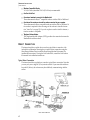
3. Insert the cable plug at the end of the short cable coming from the WeatherLink into
the jack marked WEATHERLINK on the bottom of the console.
CAUTION: Make sure that whenever you connect or disconnect the WeatherLink from the console that the console is NOT powered up. Plugging or unplugging the WeatherLink
while power is applied can damage or lock up the WeatherLink.
4. Restore power to the weather station by reattaching the power adapter and battery.
The weather station should beep three times. The third beep, which should
occur within 30 seconds, indicates that the WeatherLink is operating correctly.
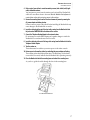
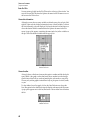
5. Place the WeatherLink inside the mounting base and reattach the mounting base.
As you do so, guide the cables through the slots in the mounting base.
PLACE WEATHERLINK INSIDE BASE.
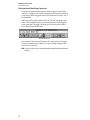
6. Locate a free serial port on the back of your computer and connect the appropriate
adapter (DB9 or DB25) to that serial port.
7. Insert the cable plug at the end of the long cable coming from the WeatherLink into
either the DB9 or DB25 adapter.
The cable which connects the WeatherLink to the computer is 8 feet (2.4 m)
long. If you need to mount the station console more than 8 feet from the computer, use a 40’ (12 m) standard 4-conductor extension cable. Do not attempt
to use more than 40’ of extension cable, or the WeatherLink may have difficulty “communicating” with the computer. If you need to mount the station
console farther away, you will need to use the Short-Range Modem Pair.
5