1
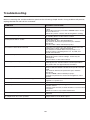
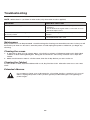
Troubleshooting
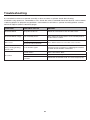
Before contacting the service technician, perform the following simple checks. If any problem still persists,
unplug the LCD TV and call for assistance.
PROBLEM
POSSIBLE SOLUTION
No sound and picture
- Check that the main plug has been connected to a wall
outlet
- Check that you have pressed the POWER button on the
front of the TV set
- Check the picture contrast and the brightness setting
Red LED indicator light
Set in standby mode. Press either the POWER button or
the Standby button on the remote control
Normal picture but no sound
- Check the volume
- Sound muted? Press the MUTE button
- Try another channel, the problem may be with the
broadcast
- Are the audio cables installed properly?
The remote control does not work
- Check to see if there are any objects between the TV
and remote control causing obstruction
- Are batteries installed with correct polarity (+ / -)
- Correct remote operating mode set: TV, VCR, etc?
- Install new batteries
Power suddenly turns off
- Is the sleep timer set?
- Check the power control settings. Power may be
interrupted
- No broadcast on the station tuned
Picture appears slowly after switching on
- This is normal, the image is muted during the product
start up process. Please contact a service provider if
the picture has not appeared after 5 minutes
Poor Color or picture
- Adjust the color in Menu option
- Keep a sufficient distance between the product and the
VCR
- Try another channel, the problem may be with the
broadcast
- Are the VIDEO cables installed properly?
- Activate any function to restore the brightness of the
picture
Horizontal/vertical bars or picture shaking
- Check for local interference, such as an electrical
appliance or power tool
Blue Screen
- Press INPUT button to select correct source
Poor reception on some channels
- Station or cable experiencing problems. Tune to
another station
- Station signal is weak, reorient antenna to receive better
reception
- Check for sources of possible interference
Lines or streaks in pictures
- Check the antenna (change the direction of the
antenna)
No output from one of the speakers
- Adjust balance in the Menu option
23