1
Understand the OpenScape® Video Use Cases
Connect Multiple On-Site Video Endpoints
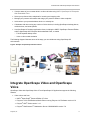
You can connect multiple video endpoints within the same network for a video conference. The following
figure shows an example of multiple video endpoints registered at different SIP registrars with an oncampus MCU.
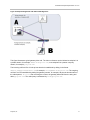
Figure 10: Connecting Multiple On-Site Video Endpoints
This figure illustrates an example of a video conference established between two registered partners
using an MCU in the private domain of one of the partners. For example, a representative of UNIFY
wants to meet with a Polycom associate using a UNIFY MCU address UNIFY-enterprise.com.
User A calls into the MCU with the domain name, for example, 88888. User B dials into the MCU by
dialing domain_name@private domain.com, for example, [email protected].
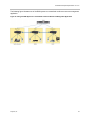
Connect Multiple Off-Site Video Endpoints
You can use an off-site MCU to establish video conferences between multiple off-site video endpoints,
each registered with a different SIP registrar. The following diagram illustrates how multiple partners, such
as UNIFY and Polycom, can connect for a video conference using an MCU in the private domain, for
example, as UNIFY-enterprise.com.
Polycom, Inc.
18