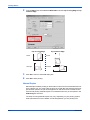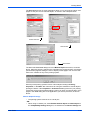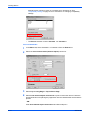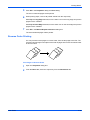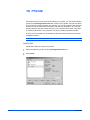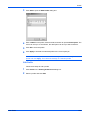
1
KX Driver Version 4.1 User Guide Legal Notes Unauthorized reproduction of all or part of this guide is prohibited. The information in this guide is subject to change for improvement without notice. We cannot be held liable for any problems arising from the use of this product, regardless of the information herein. Regarding Trademarks • • • • • PCL is a registered trademark of Hewlett-Packard Company. Microsoft Windows is a registered trademark of Microsoft Corporation in the U.S. and/or other countries. PostScript is either a registered trademark or trademark of Adobe Systems Incorporated in the U.S. and/or other countries. TrueType is a registered trademark of Apple Computer Inc. All other brand and product names herein are registered trademarks or trademarks of their respective companies. Examples of the operations given in this guide support the Microsoft Windows XP printing environment. Essentially the same operations are used for Microsoft Windows 95/98/Me/2000 environments. Models supported by the KX printer driver Copier/ MFP FS- 1018 FS- 1118 KM-1530 KM- 1650 KM- 1815 KM- 2050 KM- 2530 KM- 2550 KM- 3035 KM- 3050 KM- 3530 KM- 4030 KM- 4035 KM- 4530 KM- 4050 KM- 5035 KM- 5050 KM- 5530 KM- 6030 KM- 6330 KM- 7530 KM- 8030 KM- C830 KM- C830D KM- C850 KM- C850D KM- C2520 KM- C2630 KM- C3225 KM- C3232 KM- C4008 Printers CS-1820 FS- 820 FS- 920 FS- 1010 FS- 1020D FS- 1030 FS- 1800 FS- 1800+ FS- 1900 FS- 1920 FS- 3800 FS-3800PDL3 FS- 3820N FS- 3830N FS- 6020 FS- 6026 FS- 9100DN FS- 9120DN FS- 9130DN FS- 9500DN FS- 9520DN FS- 9530DN FS-C8100DN FS-C5010DN FS- C5016N FS- C5020N FS- C5030N FS- C8008N FS- C8026N KM-1820 The explanatory screens shown in this guide may differ from your printing system. ©2002-2006 All rights reserved. TC Rev. 4.4 CS- 1650 CS- 1815 CS- 2050 CS- 2550 CS- 3050 CS- 4050 CS- 5050 CS- 6030 CS- 8030 Table of Contents Chapter 1 Installation Connections . . . . . . . . . . . . . . . . . . . . . . . . . . . . . . . . . . . . . . . . . . . . . . . . . . . . . . . . . . . 1-3 USB Port . . . . . . . . . . . . . . . . . . . . . . . . . . . . . . . . . . . . . . . . . . . . . . . . . . . . . . . . . . 1-4 Network Connection . . . . . . . . . . . . . . . . . . . . . . . . . . . . . . . . . . . . . . . . . . . . . . . . . 1-5 Installing Optional Components . . . . . . . . . . . . . . . . . . . . . . . . . . . . . . . . . . . . . . . . . . . . 1-12 About Plug-ins. . . . . . . . . . . . . . . . . . . . . . . . . . . . . . . . . . . . . . . . . . . . . . . . . . . . . . . . . . 1-13 Chapter 2 Printer Properties Accessing Printer Properties. . . . . . . . . . . . . . . . . . . . . . . . . . . . . . . . . . . . . . . . . . . . . . . 2-1 Installing Optional Devices . . . . . . . . . . . . . . . . . . . . . . . . . . . . . . . . . . . . . . . . . . . . . . . . 2-1 Device Options . . . . . . . . . . . . . . . . . . . . . . . . . . . . . . . . . . . . . . . . . . . . . . . . . . . . . 2-2 Punch Settings . . . . . . . . . . . . . . . . . . . . . . . . . . . . . . . . . . . . . . . . . . . . . . . . . . . . . . 2-3 Assigning Custom Boxes . . . . . . . . . . . . . . . . . . . . . . . . . . . . . . . . . . . . . . . . . . . . . . 2-3 RAM Disk . . . . . . . . . . . . . . . . . . . . . . . . . . . . . . . . . . . . . . . . . . . . . . . . . . . . . . . . . . 2-4 User Settings. . . . . . . . . . . . . . . . . . . . . . . . . . . . . . . . . . . . . . . . . . . . . . . . . . . . . . . . . . . 2-4 Identification . . . . . . . . . . . . . . . . . . . . . . . . . . . . . . . . . . . . . . . . . . . . . . . . . . . . . . . . 2-5 Unit of Measurement . . . . . . . . . . . . . . . . . . . . . . . . . . . . . . . . . . . . . . . . . . . . . . . . . 2-5 Language Preference Selection . . . . . . . . . . . . . . . . . . . . . . . . . . . . . . . . . . . . . . . . 2-5 Page Description Language (PDL) . . . . . . . . . . . . . . . . . . . . . . . . . . . . . . . . . . . . . . . . . . 2-5 PDL Settings . . . . . . . . . . . . . . . . . . . . . . . . . . . . . . . . . . . . . . . . . . . . . . . . . . . . . . . 2-6 Administrator Settings . . . . . . . . . . . . . . . . . . . . . . . . . . . . . . . . . . . . . . . . . . . . . . . . . . . . 2-8 User Login . . . . . . . . . . . . . . . . . . . . . . . . . . . . . . . . . . . . . . . . . . . . . . . . . . . . . . . . . 2-8 Job Accounting . . . . . . . . . . . . . . . . . . . . . . . . . . . . . . . . . . . . . . . . . . . . . . . . . . . . . 2-11 Administrator Password . . . . . . . . . . . . . . . . . . . . . . . . . . . . . . . . . . . . . . . . . . . . . . . 2-11 Compatibility Settings . . . . . . . . . . . . . . . . . . . . . . . . . . . . . . . . . . . . . . . . . . . . . . . . . . . . 2-12 Auto Configuration . . . . . . . . . . . . . . . . . . . . . . . . . . . . . . . . . . . . . . . . . . . . . . . . . . . . . . 2-13 Chapter 3 Printing Basics Basic Printing Tasks . . . . . . . . . . . . . . . . . . . . . . . . . . . . . . . . . . . . . . . . . . . . . . . . . . . . . 3-1 Basic Printing . . . . . . . . . . . . . . . . . . . . . . . . . . . . . . . . . . . . . . . . . . . . . . . . . . . . . . . 3-1 Printing on Paper of Non-Standard Sizes . . . . . . . . . . . . . . . . . . . . . . . . . . . . . . . . . . . . . 3-6 Custom Paper Sizes . . . . . . . . . . . . . . . . . . . . . . . . . . . . . . . . . . . . . . . . . . . . . . . . . 3-6 Duplex Printing . . . . . . . . . . . . . . . . . . . . . . . . . . . . . . . . . . . . . . . . . . . . . . . . . . . . . . . . . 3-8 Print on Both Sides . . . . . . . . . . . . . . . . . . . . . . . . . . . . . . . . . . . . . . . . . . . . . . . . . . 3-8 Manual Duplex . . . . . . . . . . . . . . . . . . . . . . . . . . . . . . . . . . . . . . . . . . . . . . . . . . . . . . 3-9 Reverse Order Printing . . . . . . . . . . . . . . . . . . . . . . . . . . . . . . . . . . . . . . . . . . . . . . . . . . . 3-12 Collating Modes . . . . . . . . . . . . . . . . . . . . . . . . . . . . . . . . . . . . . . . . . . . . . . . . . . . . . . . . 3-13 Sorter Modes . . . . . . . . . . . . . . . . . . . . . . . . . . . . . . . . . . . . . . . . . . . . . . . . . . . . . . . 3-14 i Chapter 4 Layout Booklet . . . . . . . . . . . . . . . . . . . . . . . . . . . . . . . . . . . . . . . . . . . . . . . . . . . . . . . . . . . . . . . 4-1 Left Edge and Right Edge Binding . . . . . . . . . . . . . . . . . . . . . . . . . . . . . . . . . . . . . . .4-2 Booklet Printing . . . . . . . . . . . . . . . . . . . . . . . . . . . . . . . . . . . . . . . . . . . . . . . . . . . . .4-2 Multiple Pages Per Sheet. . . . . . . . . . . . . . . . . . . . . . . . . . . . . . . . . . . . . . . . . . . . . . . . . 4-3 Poster. . . . . . . . . . . . . . . . . . . . . . . . . . . . . . . . . . . . . . . . . . . . . . . . . . . . . . . . . . . . . . . . 4-4 Sheets Per Page . . . . . . . . . . . . . . . . . . . . . . . . . . . . . . . . . . . . . . . . . . . . . . . . . . . . .4-4 Available Poster Sizes . . . . . . . . . . . . . . . . . . . . . . . . . . . . . . . . . . . . . . . . . . . . . . . .4-5 Scaling And Gutters . . . . . . . . . . . . . . . . . . . . . . . . . . . . . . . . . . . . . . . . . . . . . . . . . . . . . 4-6 Scaling . . . . . . . . . . . . . . . . . . . . . . . . . . . . . . . . . . . . . . . . . . . . . . . . . . . . . . . . . . . .4-6 Gutter . . . . . . . . . . . . . . . . . . . . . . . . . . . . . . . . . . . . . . . . . . . . . . . . . . . . . . . . . . . . .4-6 Chapter 5 Finishing Staple . . . . . . . . . . . . . . . . . . . . . . . . . . . . . . . . . . . . . . . . . . . . . . . . . . . . . . . . . . . . . . . . 5-1 Using the Stapler . . . . . . . . . . . . . . . . . . . . . . . . . . . . . . . . . . . . . . . . . . . . . . . . . . . .5-2 Punch . . . . . . . . . . . . . . . . . . . . . . . . . . . . . . . . . . . . . . . . . . . . . . . . . . . . . . . . . . . . . . . . 5-2 Using Hole Punch . . . . . . . . . . . . . . . . . . . . . . . . . . . . . . . . . . . . . . . . . . . . . . . . . . . .5-3 Separation . . . . . . . . . . . . . . . . . . . . . . . . . . . . . . . . . . . . . . . . . . . . . . . . . . . . . . . . . . . . 5-4 Offset Jobs . . . . . . . . . . . . . . . . . . . . . . . . . . . . . . . . . . . . . . . . . . . . . . . . . . . . . . . . .5-4 Rotate Copies . . . . . . . . . . . . . . . . . . . . . . . . . . . . . . . . . . . . . . . . . . . . . . . . . . . . . . .5-5 Chapter 6 Imaging Print Quality . . . . . . . . . . . . . . . . . . . . . . . . . . . . . . . . . . . . . . . . . . . . . . . . . . . . . . . . . . . 6-1 Custom Print Quality Settings . . . . . . . . . . . . . . . . . . . . . . . . . . . . . . . . . . . . . . . . . .6-2 Fonts . . . . . . . . . . . . . . . . . . . . . . . . . . . . . . . . . . . . . . . . . . . . . . . . . . . . . . . . . . . . . . . . 6-2 Font Substitution . . . . . . . . . . . . . . . . . . . . . . . . . . . . . . . . . . . . . . . . . . . . . . . . . . . . .6-4 Disable Device Fonts . . . . . . . . . . . . . . . . . . . . . . . . . . . . . . . . . . . . . . . . . . . . . . . . .6-4 Graphics . . . . . . . . . . . . . . . . . . . . . . . . . . . . . . . . . . . . . . . . . . . . . . . . . . . . . . . . . . . . . 6-5 Pattern Scaling . . . . . . . . . . . . . . . . . . . . . . . . . . . . . . . . . . . . . . . . . . . . . . . . . . . . . .6-5 Inversion Options . . . . . . . . . . . . . . . . . . . . . . . . . . . . . . . . . . . . . . . . . . . . . . . . . . . .6-5 Optimization . . . . . . . . . . . . . . . . . . . . . . . . . . . . . . . . . . . . . . . . . . . . . . . . . . . . . . . .6-6 Color. . . . . . . . . . . . . . . . . . . . . . . . . . . . . . . . . . . . . . . . . . . . . . . . . . . . . . . . . . . . . . . . . 6-6 Continuous Tone . . . . . . . . . . . . . . . . . . . . . . . . . . . . . . . . . . . . . . . . . . . . . . . . . . . . .6-6 Custom Color Mode Adjustment . . . . . . . . . . . . . . . . . . . . . . . . . . . . . . . . . . . . . . . . .6-7 RGB . . . . . . . . . . . . . . . . . . . . . . . . . . . . . . . . . . . . . . . . . . . . . . . . . . . . . . . . . . . . . .6-8 Color Correction . . . . . . . . . . . . . . . . . . . . . . . . . . . . . . . . . . . . . . . . . . . . . . . . . . . . .6-9 Color Reproduction . . . . . . . . . . . . . . . . . . . . . . . . . . . . . . . . . . . . . . . . . . . . . . . . . . .6-10 ICM Color Correction . . . . . . . . . . . . . . . . . . . . . . . . . . . . . . . . . . . . . . . . . . . . . . . . .6-10 Chapter 7 Publishing Cover Mode, Page Insert, and Transparency Interleaving. . . . . . . . . . . . . . . . . . . . . . . . 7-1 Printing with Covers . . . . . . . . . . . . . . . . . . . . . . . . . . . . . . . . . . . . . . . . . . . . . . . . . . . . . 7-1 Cover Printing Options . . . . . . . . . . . . . . . . . . . . . . . . . . . . . . . . . . . . . . . . . . . . . . . .7-2 Page Insert. . . . . . . . . . . . . . . . . . . . . . . . . . . . . . . . . . . . . . . . . . . . . . . . . . . . . . . . . . . . 7-5 Insert Page Printing . . . . . . . . . . . . . . . . . . . . . . . . . . . . . . . . . . . . . . . . . . . . . . . . . .7-5 Combinations . . . . . . . . . . . . . . . . . . . . . . . . . . . . . . . . . . . . . . . . . . . . . . . . . . . . . . .7-6 Transparency Interleaving . . . . . . . . . . . . . . . . . . . . . . . . . . . . . . . . . . . . . . . . . . . . . . . . 7-7 ii Chapter 8 Job Job Storage (e-MPS) . . . . . . . . . . . . . . . . . . . . . . . . . . . . . . . . . . . . . . . . . . . . . . . . . . . . 8-1 Custom Box . . . . . . . . . . . . . . . . . . . . . . . . . . . . . . . . . . . . . . . . . . . . . . . . . . . . . . . .8-2 Quick Copy . . . . . . . . . . . . . . . . . . . . . . . . . . . . . . . . . . . . . . . . . . . . . . . . . . . . . . . . .8-7 Proof and Hold . . . . . . . . . . . . . . . . . . . . . . . . . . . . . . . . . . . . . . . . . . . . . . . . . . . . . .8-9 Private Print . . . . . . . . . . . . . . . . . . . . . . . . . . . . . . . . . . . . . . . . . . . . . . . . . . . . . . . .8-9 Job Storage . . . . . . . . . . . . . . . . . . . . . . . . . . . . . . . . . . . . . . . . . . . . . . . . . . . . . . . .8-10 Job Name. . . . . . . . . . . . . . . . . . . . . . . . . . . . . . . . . . . . . . . . . . . . . . . . . . . . . . . . . . . . . 8-11 Chapter 9 Advanced Prologue/Epilogue . . . . . . . . . . . . . . . . . . . . . . . . . . . . . . . . . . . . . . . . . . . . . . . . . . . . . . 9-1 Select Prologue/Epilogue File to Insert . . . . . . . . . . . . . . . . . . . . . . . . . . . . . . . . . . .9-1 Add . . . . . . . . . . . . . . . . . . . . . . . . . . . . . . . . . . . . . . . . . . . . . . . . . . . . . . . . . . . . . . .9-1 Edit . . . . . . . . . . . . . . . . . . . . . . . . . . . . . . . . . . . . . . . . . . . . . . . . . . . . . . . . . . . . . . .9-1 Delete . . . . . . . . . . . . . . . . . . . . . . . . . . . . . . . . . . . . . . . . . . . . . . . . . . . . . . . . . . . . .9-1 Insertion Point . . . . . . . . . . . . . . . . . . . . . . . . . . . . . . . . . . . . . . . . . . . . . . . . . . . . . . .9-2 Watermark . . . . . . . . . . . . . . . . . . . . . . . . . . . . . . . . . . . . . . . . . . . . . . . . . . . . . . . . . . . . 9-3 Select Watermark . . . . . . . . . . . . . . . . . . . . . . . . . . . . . . . . . . . . . . . . . . . . . . . . . . . .9-3 Page selection . . . . . . . . . . . . . . . . . . . . . . . . . . . . . . . . . . . . . . . . . . . . . . . . . . . . . .9-3 Add Watermark . . . . . . . . . . . . . . . . . . . . . . . . . . . . . . . . . . . . . . . . . . . . . . . . . . . . . .9-4 Additional Text Options . . . . . . . . . . . . . . . . . . . . . . . . . . . . . . . . . . . . . . . . . . . . . . . .9-4 Selecting and Creating Custom Colors (Color Models Only) . . . . . . . . . . . . . . . . . . .9-5 Edit Watermark . . . . . . . . . . . . . . . . . . . . . . . . . . . . . . . . . . . . . . . . . . . . . . . . . . . . . .9-6 Delete Watermark . . . . . . . . . . . . . . . . . . . . . . . . . . . . . . . . . . . . . . . . . . . . . . . . . . . .9-6 Security Watermark . . . . . . . . . . . . . . . . . . . . . . . . . . . . . . . . . . . . . . . . . . . . . . . . . . . . . 9-7 Select Security Watermark . . . . . . . . . . . . . . . . . . . . . . . . . . . . . . . . . . . . . . . . . . . .9-8 Page Selection . . . . . . . . . . . . . . . . . . . . . . . . . . . . . . . . . . . . . . . . . . . . . . . . . . . . . .9-9 Add Security Watermark . . . . . . . . . . . . . . . . . . . . . . . . . . . . . . . . . . . . . . . . . . . . . .9-9 Additional Options . . . . . . . . . . . . . . . . . . . . . . . . . . . . . . . . . . . . . . . . . . . . . . . . . . .9-11 Edit Security Watermark . . . . . . . . . . . . . . . . . . . . . . . . . . . . . . . . . . . . . . . . . . . . . .9-13 Delete Security Watermark . . . . . . . . . . . . . . . . . . . . . . . . . . . . . . . . . . . . . . . . . . . .9-14 Chapter 10 Profile Add Profile . . . . . . . . . . . . . . . . . . . . . . . . . . . . . . . . . . . . . . . . . . . . . . . . . . . . . . . .10-1 Edit Profile . . . . . . . . . . . . . . . . . . . . . . . . . . . . . . . . . . . . . . . . . . . . . . . . . . . . . . . .10-2 Delete Profile . . . . . . . . . . . . . . . . . . . . . . . . . . . . . . . . . . . . . . . . . . . . . . . . . . . . . .10-3 Import and Export Profile . . . . . . . . . . . . . . . . . . . . . . . . . . . . . . . . . . . . . . . . . . . . .10-3 Glossary . . . . . . . . . . . . . . . . . . . . . . . . . . . . . . . . . . . . . . . . . . . . . . . . . . . . . . . . . . . . . . . . . . . . . . . . . .iv Available Fonts . . . . . . . . . . . . . . . . . . . . . . . . . . . . . . . . . . . . . . . . . . . . . . . . . . . . . . . . . . . . . . . . . . . viii Index . . . . . . . . . . . . . . . . . . . . . . . . . . . . . . . . . . . . . . . . . . . . . . . . . . . . . . . . . . . . . . . . . . . . . . . . . . . . . x iii Installation 1 Installation A printer driver is an application that sends documents to a printing system. Install the printer driver from the supplied CD-ROM. Once the printer driver is installed, you can use it to configure variety of printing system settings. Note: In Windows XP or 2000, you must be logged on to the system with administrator privileges to install the printer driver. When installing the printer driver, you must specify the connection method and port. Once the printer driver is installed, you can add more components. For detailed information on installing components, see Installing Optional Components on page 1-12. 1-1 1 The Welcome to the Kyocera Printer Installation Wizard appears. Click Next. 1 2 The Local or Network Connection page appears. Select Local connection, and click Next. For a Network connection, proceed to Network Connection on page 1-5.2 KX Driver Installation 3 User Guide The Select Printer Model page appears. From the list, select the Manufacturer and corresponding Printers to install, and click Next. 3 • If the Found New Hardware page appears, click Cancel. • If the Hardware Installation warning dialog box appears, click Continue Anyway. • If the Network Printer Port Monitor page appears, select Yes to install an email printer port for network printing and click Next. 1-2 Installation 4 The Select the Printer Port page appears. If the port you want to use appears in the Use the following port list, select the port, click Next, and then proceed to step 7 on page 1-10. 4 Connections If you are connecting your printer to your computer with a parallel cable, from Use the following port, select LPT1, then click Next, and then proceed to step 7 on page 1-10. 5 If the port is not in the list, select Create a new port, select the port type from the menu, and click Next. 6 To create a network port, see Create a New Network Port for LPR on page 1-6 or Create a New Network Port for IPP on page 1-8. 7 1-3 KX Driver Installation USB Port User Guide 1 If there are no USB ports listed under Use the following port, from the Create a new port list, select KM USB Port, then click Next. 1 2 The KM USB Port monitor dialog box appears. Confirm the Port name and click Advanced. 2 3 The Serial number list appears. Confirm the serial number and click OK. If the Serial number list is blank, click Cancel. Turn off the printer and return to step 1. 3 USB port creation is now complete. Proceed to step 7 on page 1-10. 4 1-4 Installation Network Connection 1 The Local or Network Connection page appears. Select Network Connection and click Next. 5 2 The Locate Your Printer page appears. Select one of the following search methods: 3 • Type the printer name Leave the printer name blank and click Next. All printers available on network servers appear. If you have directly typed in the print server name, click Next. • Connect to a printer on the Internet or on your intranet Search by URL for printers that operate with the Internet Printing Protocol (IPP). Find and select the printer URL and click Next. 6 7 To print using LPR, see Create a New Network Port for LPR, below. To print using IPP, see Create a New Network Port for IPP on page 1-8 1-5 KX Driver Installation Create a New Network Port for LPR 1 The Select the Printer Port page appears. From the Create a new port list, select KPrint Port, and then click Next. 1 2 The KPrint Add Port Wizard page appears. Select Print using LPR (Line Printer Remote) and click Next. 2 Note: If the KPrint utility is installed, the following procedure may differ. 3 User Guide In the Enter the IP address or host name of the print server page, enter the IP Address or Host Name and click Next. 3 1-6 Installation 4 Click Search if the IP Address or Host Name is not known. A list of available network printers appears. 4 5 Select the network printer, then click OK. 5 6 Click Next to continue. 6 7 Confirm the Destination printer port name, and click Next. 7 8 Confirm the settings, and click Finish. 8 Network port creation is now complete. Proceed to step 7 on page 1-10. 1-7 KX Driver Installation Create a New Network Port for IPP 1 The Select the Printer Port page appears. From the Create a new port list, select KPrint Port, and then click Next. 1 2 The KPrint Add Port Wizard page appears. Select Print using IPP, and then click Next. 2 Note: If the KPrint utility is installed, the following procedure may differ. 3 User Guide Select Connects using a local area network, and then click Next. 3 1-8 Installation 4 Enter the Printing system URL and then click Next. 4 Note that the syntax for the URL is ipp://xx.xx.xx.xxx/printers/lpx (where x can be 1-4). 5 On the next page of the wizard, enter a name for the port and then click Next, or just click Next to accept the IPP address as the port name. 5 6 Confirm the settings, and click Finish. 6 Network port creation is now complete. Proceed to step 7. 1-9 KX Driver Installation User Guide 7 The Name Your Printer page appears. Select Yes or No to use this printer as the default for Windows-based programs. Click Next. 7 8 The Printer Sharing page appears. If you do not want to share the printer, select Do not share this printer, and then click Next. 8 9 The Print Test Page page appears. 9 1-10 Installation Select Yes (recommended) to print a test page to confirm the proper operation of your printer, and then click Next. If the test page does not print properly, click Troubleshoot to determine the problem. • Select No if you do not wish to print a test page, and then click Next. 10 The Confirm Settings page appears. Verify the settings and click Install. The printer driver installation begins. 11 Once the installation is complete, the Printer Installed Successfully page appears. 11 12 1-11 • 10 • Select Yes (recommended) to install optional components and click Next. Proceed to Installing Optional Components on page 1-12. • Select No if you do not wish to install optional components, and then click Next. Choose from one of the following options: • Select Yes and click Next to install additional printer drivers. The New Printer Installation page appears. • Select No to complete the installation and click Finish. 12 KX Driver Installation Installing Optional Components You can expand the functions of your printer driver by installing optional components that compliment the ways in which you use your printer. Available components may include Auto Configuration, Custom Profiles, and TrueType fonts. Note: The available components may vary depending on the printer model. Once the installation is complete, the Printer Installed Successfully page appears. Select Yes (recommended) and click Next. 1 User Guide 1 The Select Components page appears. Select the check box of the components to install, and click Next. Follow the instructions on the page to proceed. 1 2 The Confirm Settings page appears. Verify the selected component items, and click Next. 2 1-12 Installation 3 The Select Plug-in Modules page appears. To install Security Watermark, select the check box, and click Next. 3 For information on Plug-ins, see About Plug-ins on page 1-13. For information on Security Watermark, see Security Watermark on page 9-7. 4 In the Confirm Settings page, click Install. 5 The Printer Components Installation Completed page appears. Choose from one of the following options. 5 • Select No to complete the installation, and click Finish. • Select Yes to install additional printer drivers, and click Next. 4 When you have completed installing printers and optional components, if prompted, restart your system. 6 About Plug-ins A plug-in is a small computer program that interacts with a larger program to provide additional functionality. An example is Security Watermark, which is available for Kyocera printer drivers. Installing the plug-in adds Security Watermark functionality to the printer driver, adds a Security Watermark icon to the Advanced tab, and adds the dialog boxes that are used to set up a Security Watermark. For detailed information on Security Watermark, see page 9-7. For instructions on installing the plug-in using the installation program, see step 3 on page 1-13. To add or remove a plug-in from the printer driver interface: 1 1-13 Click Start in the Quick Launch toolbar, and click Printers and Faxes. The Printers and Faxes window appears. 1 KX Driver Installation User Guide 2 In the Printers and Faxes window, choose a printer and right-click its icon. A list appears. 2 3 Click Properties in the list. The Properties dialog box appears. 3 4 Click the Device Settings tab, and then click About. 4 1-14 Installation 5 In the About dialog box, click Plug In. 5 6 The Plug-ins dialog box opens. 6 7 1-15 • To add a plug-in, click Add and select the plug-in file, and then click Open. • To remove a plug-in, select the plug-in check box and click Remove. Click Yes in the Remove KX Plug-In confirmation dialog box. Click Close. 7 KX Driver Printer Properties 2 Printer Properties This chapter explains how to customize the following printer driver settings: • • • • • • • Accessing Printer Properties Installing Optional Devices User Settings Page Description Language (PDL) Administrator Settings Compatibility Settings Auto Configuration Follow the steps below to set your preferred options as the default settings. These default settings can be changed temporarily when printing from Windows-based applications. Accessing Printer Properties 1 Click Start in the Quick Launch toolbar, and click Printers and Faxes. The Printers and Faxes window appears. 1 Windows 98/Me/2000: Open the Start menu, and click Settings and Printers in sequence to open the Printers window. 2 Right-click the printer icon in the Printers and Faxes window. A list appears. 2 3 Click Properties in the list. The Properties dialog box appears. 3 Installing Optional Devices In the Printer Properties dialog box, go to the Device Settings tab. For each optional device installed in your printing system, select the equivalent setting under User Guide 2-1 Printer Properties the Device Options list. Depending upon the model, available devices include finishers, paper feeders, side feeders, high-capacity feeders, hard disk and RAM disk, tandem unit, booklet stitcher, and duplex unit. For models connected to a network, the Auto Configure button can be used to select all available devices. See Auto Configuration on page 2-13 for more information. You can also specify the memory setting, PDL (Page Description Language), settings for the user, administrator settings for passwords and more. Note: The printer image shown in the Printer Properties dialog box and the list of Device options will vary depending on the printing system you have. Device Options 1 Click the Device Settings tab. 1 2 In the Device options area of the Device Settings tab, select the check boxes for devices installed in your printing system. 2 Note: Some devices cannot be installed simultaneously. For example, a finisher and a booklet stitcher cannot be used at the same time. After you have selected a device, other devices will be marked with a red X, preventing the selection of conflicting devices. When you select the check box of an optional device shown in blue, a sub-dialog box appears with additional setting details. If a device option check box is already selected, double-click the device option to open the sub-dialog box. 3 The Hard Disk Settings dialog box appears if you select the Hard disk option, enabling the configuration of Custom boxes. For further details, see Custom Box on page 8-2. 3 2-2 In the Memory box, select the memory capacity of your printing system. This setting is required to optimize the downloading of printing system fonts. 4 KX Driver Printer Properties If you don’t know the memory capacity of your printing system, you can use Auto Configure so the information can be automatically selected. If Auto Configure is not available, then printing system memory can be seen on the status page. To generate a status page, select this option from operation panel. See Auto Configuration on page 2-13 for more information. 5 Punch Settings When you select the check box for a finishing device shown in blue in the Device options list, such as Finisher or Multi Finisher, the Punch Unit Settings dialog box appears. If the device listing is already selected, double-click the option to open the Punch Unit Settings dialog box. Select 2 Hole, 2 & 3 Hole (for inches), or 2 & 4 Hole (for millimeters) punch option depending on the optional Punch Unit attached to your finisher. Assigning Custom Boxes If you select the Hard disk check box, the Hard Disk Settings dialog box appears and virtual mail boxes can be created. For further details, see Custom Box on page 8-2. Note: An installed hard disk supports the following options: Custom box, Quick Copy, Proof and Hold, Private Print, and Job Storage. User Guide 2-3 Printer Properties RAM Disk The RAM disk functions as a hard disk saving print requests into the printing system’s memory if a hard disk for printing is not installed. When a hard disk is installed, the RAM disk function is inactive. Note: Because the RAM disk is volatile memory, all data sent to the printing system is lost when the power is turned off. The size of the RAM disk is specified in settings at the printing system’s operation panel. For further details, consult the printing system’s Operation Guide. RAM Disk Settings 1 In the Device options list, select the RAM disk check box. The memory capacity can be adjusted in the RAM disk box. 1 2 Specify the RAM disk size. The maximum RAM disk capacity may vary depending on your printing system model and installed memory. Matching the memory setting in the driver with the memory installed in the printing system allows font downloads to be better managed by the driver. For further details, consult the printing system's Operation Guide. User Settings The following user information can be configured by selecting User in the Device Settings tab. • • • 2-4 Identification Unit of Measurement Language Preference Selection KX Driver Printer Properties Identification In this dialog box, enter user name and department information to be shown at the operation panel during printing. For some printing system models, the User name can be used with the Job Storage feature. For further details, see Job Storage (e-MPS) on page 8-1. 1 In the Device Settings tab, click User. 2 The User Settings dialog box appears. In the User name and Department boxes, enter up to 31 characters. 2 • • 3 1 Enter the preferred name in User name box. Enter the user's department or group name in the Department box. Click OK. Unit of Measurement The unit of measurement will be used for the following settings: • • • Custom Page Sizes setting in the Page Sizes section in the Basic tab Spacing setting in the Watermark Add and Edit dialog boxes Poster settings and Gutter width in the Layout tab. In the User Settings dialog box, select either inches or millimeters. Language Preference Selection The Language preference option specifies the user interface language of the Device Settings tab of Printer Properties and all tabs of Printing Preferences. Available languages will vary depending on your locale and your computer settings. Select the preferred language from the Language preferences list. To activate the new language, click OK in User Settings and then in the Properties dialog box. Page Description Language (PDL) You have the option to change the Page Description Language (PDL) by selecting PDL in the Device Settings tab. Available PDLs vary based on the printing system. You can choose from PCL XL, PCL 5e, PCL 5c, or KPDL (Kyocera Page Description Language). The default is PCL XL (KPDL for most color printers), which is suitable User Guide 2-5 Printer Properties for most printing purposes. After you select a PDL, the selection appears in the lower corner of the 3-D image. PDL Settings 2-6 1 In the Device Settings tab, click PDL. 1 2 The PDL Settings dialog box appears. Select the desired language from the Select PDL list. See the table below for options and descriptions. 2 Option Description PCL XL (color and monochrome printing systems) The most recent version of HP PCL and PCL 6. This PDL includes PCL 5e features. PCL 5c (color printing systems) Specifies PCL 5c as the PDL. • Fully compatible with earlier PCL versions • Bidirectional communication support • Wide selection of fonts for use with Microsoft Windows applications • Allows more options for utilizing PRESCRIBE commands within applications • Complex graphics might not print as well Enhanced over PCL 5e/c in these areas: • Reduced file size • Better print speed • Faster return to application • Lacks backward compatibility with earlier PCL versions KX Driver Printer Properties Option Description PCL 5e (monochrome printing systems) Specifies PCL 5e as the PDL. • Fully compatible with earlier PCL versions • Bidirectional communication support • Wide selection of fonts for use with Microsoft Windows applications • Allows more options for utilizing PRESCRIBE commands within applications • Complex graphics might not print as well KPDL (color and monochrome printing systems) Specifies KPDL as the PDL. KPDL is used when printing from applications that support PostScript 2 or 3. • An optional KPDL upgrade kit may be required for some models. • Kyocera’s emulation of PostScript printing • Strong graphics reproduction • Print speeds may be slower than PCL 5e/c • Requires more printing system memory than PCL 5e/c • Enables native TrueType font downloading In GDI compatible mode, vector graphics are rasterized for printing as bitmap images. Use the GDI compatible mode option to improve the graphic output quality created by the application. Due to memory restrictions, this feature is not available in certain printing environments. 3 Settings is available when the PDL is set to KPDL, and, on some models, when PCL XL is selected. 3 PCL XL Option Description Disable auto media type switching A check box control for disabling automatic switching of the paper source. If the selected cassette runs out of paper: Cleared: The printing system will automatically switch to another cassette loaded with the same page size and media type. Selected: Printing will stop until you load more paper into the cassette. KPDL User Guide Option Description Allow data passthrough Data passthrough reduces errors when printing complex jobs from applications that use PostScript formatting. 2-7 Printer Properties Administrator Settings The following settings can be specified by selecting Administrator in the Device Settings tab. • • • User Login Job Accounting Administrator Password Note: The Administrator Settings dialog box appearance and options may vary depending on your printing system. User Login Use User Login to add users with a user name and password. Use this feature to limit printing privileges to specified users, for secure printing and job accounting. The number of pages/job printed by each user can be tracked by the printer. See your printing system’s Operation Manual for information about tracking usage at the printer. User login provides job restriction by user, in contrast to the Job accounting feature, which assigns privileges by division or department. A maximum of 1000 login user 2-8 KX Driver Printer Properties names and passwords can be registered at the printing system. One hundred user names and passwords can be stored in the printer driver. Note: Job accounting and User login can not be used at the same time. Users added in the printer driver should also be manually registered at the printing system’s operation panel. The settings selected here are applied to every print job sent from this computer. The available options are as follows: • • • • Use specific login user name Select this option and enter a user name and password to use the same user login for every print job. If this option is selected, the user will not have to enter the name and password for each print job. Prompt for login user name When a user prints a document, the driver will prompt for a user name and password. Lets you use a User login name that is not on the list, and does not add the name to the list. When sending a print job, type a login user name and password when prompted, then click OK to print. Prompt for login user name and validate Whenever a user sends a job to print, the driver prompts for user name and password. For the job to print, the user name and password entered must be on the Login User Name List (see Add Login User Names on page 2-9). You can use the login user names entered in the Login User Name List of the driver. When sending a print job, type a login user name and password when prompted, then click OK to print. This option ensures that the job will print, only when verifying that the selected login user name is saved in the driver. Verify login user name for each login user The name entered is added to the list, and thereafter the printer driver does not prompt for a user name and password. Add Login User Names 1 User Guide In the Administrator Settings dialog box, select User login. 4 2-9 Printer Properties 2 Click Login User Name List. 5 3 Click Add. 6 The name and password are case-sensitive. The name and password can each be up to 64 alphanumeric characters. The user name is automatically filled in with the Login User Name by default, but can be changed. The user name can be up to 20 characters. Import and Export the Login User Name List This section explains how to import and export your Login User Name lists. You can save the list of Login User Names created in the previous section to your personal computer or network. Once saved, the list can be imported into other printer drivers. Import 1 2-10 In the Administrator Settings dialog box, click Login User Name List, then click Import. 1 KX Driver Printer Properties 2 Use Look in to browse for the file to import, or enter the file name, and click Open.2 3 You can then select the imported file from the list of Login user names.. 3 Export 1 In the Administrator Settings dialog box, click Login User Name List, then click Export. 1 2 In Login User names, select a file to export, and click Export. 2 3 Use Save in to browse to a location to save the file, enter the file name, and click Save. 3 Job Accounting Job Accounting settings are specified by the system administrator to implement an accounting system for assessing charges or other budgetary or tracking applications. The accounting system can help manage or restrict the printing volume by department, group, or individual. Note: For further details, see Copy Management in the Operation Manual on the Document Library CD-ROM. Administrator Password You can set a password for the Administrator Settings dialog box. Once a password is entered, the administrator settings dialog box cannot be opened until the password is typed in the Enter Password dialog box. This prevents unauthorized personnel from changing the administrator settings. User Guide 2-11 Printer Properties Set the Password 1 In the Administrator Settings dialog box, select the Password protect check box to open the Password dialog box. 1 2 In the Password dialog box, enter the new password in the Password box. Reenter the password in the Confirm password box and click OK. 2 Note: Use a password from 4 to 16 characters. Change the Password 1 In the Device Settings tab, click Administrator. 1 2 The Enter Password dialog box appears. Enter the password and click OK. 2 3 The Administrator Settings dialog box appears. Clear the Password protect check box. A Password message appears. 3 4 Click OK. 4 Compatibility Settings This feature supports compatibility for media source values unique to the printer driver, such as those for cassettes or feeders, so your newly installed Kyocera KX driver maintains identical media source support with the driver it replaces, whether for this Kyocera driver or one from another manufacturer. If media source macros 2-12 KX Driver Printer Properties exist for the older driver, then the alignment of media source values will maintain support without the need to change the macros. Use the Driver Info utility, available on the Kyocera Software Library CD, to compare the source values for all installed drivers. If the values for a given media source differ between the old and new printer drivers, reassign the value in the new driver to match the value in the previous driver. Compatibility settings can be adjusted by selecting Compatibility in the Device Settings tab. 1 In the Device Settings tab, click Compatibility. 1 2 The Compatibility Settings dialog box appears. From the list in the Media source enumeration area, select the paper supply method. The current value is listed in the Enumerated value box. 3 Enter a new Enumerated value for the media source and click OK. You can also restore all the parameters to the default by cllicking Reset. 2 The other options in the Compatibility Settings dialog box vary depending on model. Options can include: • • • • 3 Combine source and media type lists This option changes the Basic tab of Printer Properties so that Media type and Source are combined into one box, labelled Source. Enable manual duplex on network port Use this option if you do not have a duplex unit and you want to print using Manual Duplex (see page 3-9). Disable face-up reverse page order This option prevents reverse order printing if face-up output is selected. Ignore application collation Use this option to bypass the Collate setting in the application, and give priority to the printer driver setting. Auto Configuration Auto Configure detects the installed device options on the printing system if it is connected over a network. This button appears in the Device Settings Properties page. User Guide 2-13 Printer Properties Auto Configure can detect printing system devices such as input devices, output devices, RAM disk size, and hard disk size. Then it updates the Device options list in the Device Settings properties page. Auto Configure keeps the printer driver’s Device Settings consistent with the actual printing system devices. Note: Not all installed devices are detected by using Auto Configuration. Before selecting OK in the Device Settings tab, check the settings to make sure they are correct. Auto Configure currently supports these ports for Microsoft Windows operating systems: • • • • Windows 98 & ME – KPrint ports (Raw mode, LPR, and IPP) only Windows NT 4.0 – KPrint ports (Raw mode, LPR, and IPP) only Windows 2000 – TCP/IP Ports and KPrint Ports (Raw mode, LPR, and IPP) Windows XP – TCP/IP Ports only TCP/IP port can be either an IP address or the printing system name (Host name). Note: Auto Configuration is not supported for Microsoft Windows 95. To use this feature, click Auto Configure. An “in progress” message will appear. The check box settings in the Device options list will be changed and the 3D image will be updated according to the device options installed. Memory and RAM Disk information will also change based on the setting information returned. Under the following conditions the Auto Configure tool cannot communicate with the printing system: 2-14 KX Driver Printer Properties • The printing system is powered off or is in the middle of the startup process. In such cases, Auto Configure will display the following message after the time out. • The Windows XP firewall prevents the communication. It generates the following message: The Microsoft Windows XP Firewall settings can be changed to allow communication between the printing system and your computer. The default setting for Windows XP Service Pack 2 is for the Windows Firewall to be set to On. When the Windows Security alert shown above appears, click Unblock to allow communication between the printing system and your computer. When you click Unblock, Auto Configure is added to the Windows Firewall exception list, as shown in the example below. The Windows Firewall is accessed through the Control Panel. 4 User Guide 2-15 Printing Basics 3 Printing Basics This chapter describes the following printing tasks when printing from Microsoft Windows applications. • • • • • Basic Printing Tasks Printing on Paper of Non-Standard Sizes Duplex Printing Reverse Order Printing Collating Modes Basic Printing Tasks The steps required to print a document created with an application are explained below. You can select the printing paper size and output destination. Note: The Print dialog box does not look the same in every application. Basic Printing 1 Insert the proper paper size (such as A4) into the printing system's paper cassette or MP tray. 1 2 From the application’s File menu, select Print. The Print dialog box appears. 2 3 Select the desired printing system from the list of available printing systems. 3 4 Specify the number of copies to print in the Number of copies box. You can print up to 999 copies. When printing two or more copies, enable the Collate check box for collation. Number of copies and Collate can also be specified in the Basic tab. See page 3-15 for further information. 4 If Ignore application collation is selected in the Compatibility Settings dialog box, the Print Collate setting will not be applied. 3-1 KX Driver Printing Basics When using Microsoft Word, we recommend that you click Options, and for default tray select Use printer settings. 5 User Guide Click Properties to open the Properties dialog box. 5 3-2 Printing Basics 6 In the Basic tab, click Page Sizes to open the Page Sizes dialog box. In the Select page size list, select a page size for the print job. 6 7 Click OK to return to the Basic tab. Click OK to return to the Properties dialog box.7 For best results when printing on transparencies or recycled paper (the back side of paper which has already been printed on), from the Media type list select the media type. For further details, see Media Types on page 3-4. The printing system automatically selects the paper size that matches the size specified above. A message appears requesting you to load paper into the MP tray if the proper paper size is not available. 8 Click the Source list to specify the paper cassette for printing. 9 Choose either Portrait or Landscape to match the document page orientation. You can rotate the document 180 degrees by selecting the Rotated check box. 8 10 Click OK to return to the Print dialog box. 11 Click OK to start printing. 9 10 Print Sizes This section describes how to print documents of different sizes than the original document. The document image is adjusted to match the size you select. If you would like to manually input the Scaling percentage, see Scaling And Gutters on page 4-6. 1 3-3 In the Properties dialog box, from the Basic tab click Page Sizes. 1 KX Driver Printing Basics 2 In the Page Sizes list, select the document’s paper size and click OK. 2 3 In the Basic tab, click the Print Size list and select the preferred output paper size.3 4 Confirm the proper paper size is loaded. Click OK to return to the Print dialog box. 4 5 Click OK to start printing. 5 The source document is automatically scaled to fit the output paper size. Media Types The printing system automatically selects the paper size specified in the Page Sizes setting in the Basic tab by default when you are printing on regular paper. However, the printing system supports a wide variety of printing media depending on your printing system model. You can specify the media type in the Media type setting for auto media selection selection when using non-standard types of printing media, such as recycled paper, labels, or transparencies. You can also specify the finishing settings for best results. User Guide 3-4 Printing Basics Automatic selection of media types can be disabled in the PCL XL settings dialog box. For further details, refer to Page Description Language (PDL) on page 2-5. Labels, transparencies, and envelopes must be printed using the MP tray. Ensure the paper is properly loaded by following the instructions outlined in the printing system's Operation Guide. Note: The default setting is for Source and Media type to be separate items in the dialog box, but it is possible to combine them using a setting in Compatibility Settings. If they are combined, the Media type list is not available. To change this setting, open Printer Properties from the Microsoft Windows Printer and Faxes window, go to Device settings and then Compatibility Settings, and then clear the Combine source and media type lists selection. When paper is properly loaded in the paper cassette, the printing system can automatically detect the paper size. However, it is necessary to use the operation panel on the printing system to assign the media type of the paper cassette so that the printing system can recognize it. The steps to specify the media settings are listed below. 1 Load the paper in a paper cassette or the MP tray. 1 Note: Use the MP tray in cassette mode (the default). For further details on MP tray modes, refer to the printing system's Operation Guide. 3-5 2 Specify the media type at the operation panel on the printing system. 2 3 Open the Properties dialog box. 3 4 Select the document paper size from the Print Size list. 4 5 From the Media type list, select the type of media for printing, then click OK. 5 KX Driver Printing Basics Options available in the Media type list are as follows. Media Type Usable Paper Cassettes Plain 64 to 90 g/m 2 All Preprinted All Bond (securities) All Recycled All Vellum Less than 64 g/m2 All Letterhead All Color 64 to 90 g/m2 All Prepunched All Card Stock All High quality All Envelopes MP Tray Thick Rough 90 to 200 MP Tray g/m2 MP Tray Labels MP Tray Transparency MP Tray Custom (1-8) Refer to Operation Guide Once printing begins, the printing system automatically selects the paper to match the paper size and specified media type. If the paper loaded does not match the size, type, or both, a message appears asking you to load paper in the MP tray. Printing on Paper of Non-Standard Sizes To use custom sizes of paper in your printing system, you must first define the custom paper sizes in the Properties dialog box. Note: For custom paper, supply the paper using the universal (adjustable) paper cassette or the MP tray. Custom Paper Sizes 1 Load the custom paper into the printing system. For further details, refer to the printing system's Operation Guide. 1 2 Click Start in the Windows taskbar and then select Printers and Faxes. The Printers and Faxes window appears. 2 Note: Windows 98/Me/2000: Open the printer driver properties by selecting Start in the Windows taskbar and then selecting the Printers window. 3 User Guide Right-click the printer icon and select Properties to open the Properties dialog box. 3 3-6 Printing Basics 4 Click Printing Preferences to open the Printing Preferences dialog box. 4 5 Click Page Sizes. The Page Sizes dialog box appears. 5 6 Click New. Custom_size_1 will appear in the Name box. Replace Custom_size_1 with the name for your new custom paper size. The name can be up to 31 characters. 6 7 Enter the measurements in the Height and Width boxes in millimeters or inches. The unit (inches or millimeters) is selected in the User Settings dialog box, accessed from the Device Settings tab. For further details on changing the unit, refer to User Settings on page 2-4. 7 Size limits for custom paper are listed in the table below. 8 Size Cassette MP tray Duplex unit Minimum (A4 printing systems) 148 × 210 mm (5.8 x 8.3 inches) 70 × 148 mm (Portrait) 148 × 216 mm Maximum (A4 printing systems) 216 × 356 mm (8.5 x 14 inches) 216 × 356 mm (Portrait) 216 × 356 mm Minimum (A3 printing systems) 148 × 210 mm (5.8 x 8.3 inches) 70 × 148 mm 148 × 210 mm Maximum (A3 printing systems) 297 × 450 mm (11.7 x 17.7 inches) 310 × 458 mm 297 × 431.8 mm Height = 200 mm Width = 150 mm Sample Paper Measurements (150 mm x 200 mm) 8 3-7 Click OK. 9 KX Driver Printing Basics To add more custom paper sizes, repeat the steps above (Maximum 20 custom paper sizes). Printing with Custom Paper Sizes 1 Select Print from the File menu. From the application’s Print dialog box, open Print Properties. 1 2 In the Basic tab, select the name of your saved paper size in the Print Size list. 2 3 From the Source list, select the source cassette for the custom page size. 3 4 Click OK to return to the Print dialog box. 4 5 Click OK to start printing. 5 Duplex Printing This section describes how to enable the duplex printing option. In order to activate this printing option, a duplex unit must be installed, and additional memory may be required depending on the printing system model. For further details, refer to your printing system's Operation Guide. For information on Booklet printing, see Booklet Printing on page 4-2. The paper sizes and media types listed in the table below can not be used for duplex printing: Paper sizes Media Types A3 wide A6 B6 Postcards Double postcards Envelopes Western size 2 (114 × 162 mm) Western size 4 (105 × 235 mm) Transparencies Labels Thin paper Envelopes Postcards Print on Both Sides 1 User Guide Within your application, select Print from the File menu. Then, from the Print dialog box open Properties. 1 3-8 Printing Basics 2 From the Basic tab, select Print on Both Sides. Choose Flip on Long Edge or Flip on Short Edge. 2 Flip on Long Edge Portrait Landscape Flip on Short Edge Portrait Landscape 3 Click OK to return to the Print dialog box. 3 4 Click OK to start printing. 4 Manual Duplex Manual duplex enables printing on both sides of a sheet for some models that do not have a duplex unit. You must order the print job so that after the first half of the print job has been printed, the job can be flipped over and fed from the cassette for the second side printing. Manual Duplex is not available when any of the options in the Publishing tab are used. The steps for using Manual Duplex may vary, depending on your printing system, what optional devices are installed, and what application you are printing from. 3-9 KX Driver Printing Basics The Print dialog boxes of some applications allow you to print just the odd or even pages so that you can use manual duplex, as shown in the examples below. Adobe Framemaker Adobe Acrobat Microsoft Word The Microsoft Word Print dialog box has a Manual Duplex check box, as shown above. When this option is selected, the odd pages are printed and then a message (shown below) appears telling the user to flip the printed pages over and re-insert them in the cassette or tray of the printing system. Some Kyocera printing systems have a manual duplex setting in Printing Properties, in the Basic tab. Instructions for using this method for manual duplex printing are below. If the Properties or Preferences dialog boxes for your printing system don't have manual duplex settings, look for an option to print just odd or even pages in the Print dialog box of the application you want to print from, as shown above. Manual Duplex Settings • The printing system must be set to a local port. - OR • User Guide When using a network port, select Enable manual duplex on network port in the Compatibility Settings dialog box, accessed from the Device Settings tab. 3-10 Printing Basics Manual Duplex cannot be used on a network port in Windows 9x. See Compatibility Settings on page 2-12 for instructions on changing compatibility settings. • The Source selection must be Cassette 1 or Cassette 2. Print on Both Sides 1 In the Basic tab, select Cassette 1 or Cassette 2 from the Source list. 1 2 Select the Print on both sides (manual duplex) check box. 2 3 Select Flip on Long Edge or Flip on Short Edge. 3 4 Select Print manual duplex instructions to print an instruction sheet. Follow the printed instructions for placing the pages back into the cassette after the first side is printed. 4 - OR Clear Print manual duplex instructions and follow steps 5-7. 3-11 KX Driver Printing Basics 5 Click OK in the Properties dialog and Print dialog. 5 The even-numbered pages will be printed. 6 When printing stops, remove all printed sheets from the output tray. 6 With Flip on Long Edge selected, turn the stack over on the long edge and put the pages into the cassette. With Flip on Short Edge selected, turn the stack over on the short edge and put the pages into the cassette. 7 Click OK in the Manual Duplex Instruction dialog box. 7 The odd-numbered pages will be printed. Reverse Order Printing You can print document pages in reverse order, from the last page to the first. The reverse order printing function places the order of pages into reverse numerical order as shown below. 3 1 2 1 2 3 Print Pages in Reverse Order User Guide 1 Open the Properties dialog box. 1 2 From the Basic tab, select the output tray from the Destination list. 2 3-12 Printing Basics 3 Select Reverse page order. If Reverse page order is not present, you can change the Destination output tray to enable this feature. 3 4 Click OK to return to the Print dialog box. 4 5 Click OK to start printing. 5 Collating Modes By attaching a sorter to your printing system, you can specify how printed documents are stacked in the output trays after printing. The number of output trays and their receiving capacity (the number of sheets) varies depending on the sorter model. Refer to your sorter's Operation Guide. Frequently, the application settings are given priority, causing a change in the sorter output method depending on the application. Verify these settings before printing your documents. 3-13 KX Driver Printing Basics Sorter Modes There are three sorter modes available. These modes are selected in the Basic tab: Collating Tray 1 Tray 2 Tray 3 Tray 4 Tray 5 Page 2 Page 1 Page 2 Page 1 • Collating in sorter mode produces the specified number of copies as complete sets of documents in each tray. • The document is printed following the page order and received in each tray. The number of document copies must not exceed the number of trays. If a tray becomes full, the printing system pauses and shows a message to remove the paper from the tray. After the paper is removed, printing resumes for the remaining number of copies. • Non-collating mode produces the specified number of copies but divides the document for output in each tray, with page 1 in tray 1, page 2 in tray 2, and so on. For example, printing 20 copies of a four page document using grouping produces 20 copies of page 1 in tray 1, 20 copies of page 2 in tray 2, and so on. • The number of document copies must not exceed the sheet capacity of any tray. When a tray reaches capacity, the printing system pauses and shows a message to remove the paper from the tray. In addition, the maximum document page length must not exceed the number of sorter trays. When a tray reaches capacity, the printing system pauses and shows a message to remove the paper from the tray. • The mailbox mode sends copies to specified user trays, which is useful when the printing system is shared among different users. For example, specifying tray 5 sends the printed document to tray 5. • When a tray reaches capacity, the printing system pauses and shows a message to remove the paper from the tray. • Mailbox is not available on all printing system models. • Mailbox is a physical mailbox. Page 2 Page 1 Non-collating 20 copies of page 1 Tray 1 Tray 2 Tray 3 Tray 4 Tray 5 20 copies of page 4 Page 1 Page 1 Page 2 Page 2 Mailbox Tray 1 Tray 2 Tray 3 Tray 4 Tray 5 User Guide Page 3 Page 3 3-14 Printing Basics Collate 1 Open the Properties dialog box. 1 2 From the Destination list, select a face-down destination, such as Finisher (facedown) or Top Tray (face-down). 2 3 Select the Collate check box. 4 Select the number of complete sets in the Number of copies box. When printing using the collate option, specify the number of copies not to exceed the number of trays. The document page length must not exceed the tray capacity (for example, 200 sheets). 4 5 Click OK to return to the Print dialog box, and click OK to begin printing. The specified number of copies are produced in separate trays. 3 5 Non-Collating Clearing the Collate check box produces page 1 in tray 1 and page 2 in tray 2. 3-15 1 Open the Properties dialog box. 1 2 From the Destination list, select Finisher (face-down) or Top Tray (face-down). 2 3 Clear the Collate check box. 4 Click OK to return to the application’s Print dialog box and begin printing. The specified number of copies of each page of the document are delivered to each tray.4 3 KX Driver Layout 4 Layout In the Layout tab you can arrange document data on printed pages without changing the original document. • • • • • Booklet prints a multi-page document in a book format that can be folded and stapled. Multiple pages per sheet prints more than one document page on a single sheet. Use Poster to print a large banner using several sheets of paper. Scaling increases or decreases the print size. Gutter increases the left or top margin, to make a booklet or hole punch pages easier to assemble and read. Booklet Use the Booklet option to print a two-page layout on both sides of each sheet of paper. You can then fold and bind the booklet in the center. Booklet printing is available for printing system models equipped with a duplex unit. For further details, refer to Installing Optional Devices on page 2-1. You can use optional document finishers to fold and staple the booklet. For further details on Staple settings, refer to Staple on page 5-1. The supported paper sizes for Booklet printing are A3, B4, A4, A5, B5 (JIS), ledger, letter, legal, statement, and folio. Booklet printing can be used with Cover mode to add a cover to the booklet. For further details, refer to Printing with Covers on page 7-1. User Guide 4-1 Layout Left Edge and Right Edge Binding Select left edge or right edge binding of the booklet to match the direction of your written language: • • Select Left edge binding for languages that read left to right. Select Right edge binding for languages that read right to left. Left Edge Binding Outside Outside Outside Inside Inside Right Edge Binding Outside Outside Outside Inside Inside Booklet Printing 4-2 1 In your application, select Print from the File menu and open Print Properties. 1 2 Click the Layout tab. 2 KX Driver Layout 3 Select Booklet. 3 4 Choose either Left edge binding or Right edge binding. 4 To use the stapling feature, complete the following steps: 5 Click the Basic tab, and under Destination, select a face-down finishing tray. 5 If the Staple check box is not available in the Finishing tab, change the setting for Destination in the Basic tab to an output tray that has a stapler. 6 Select the number of copies to print. 6 7 Click the Finishing tab, and select the Staple check box. Booklet (fold) is selected automatically. 7 For models using an optional folding unit, in the Basic tab, select Folding tray as the output Destination. The Finishing tab will display Booklet (fold). 8 Click OK to return to the Print dialog box. 8 9 Click OK to start printing. 9 Multiple Pages Per Sheet You can print multiple pages of a document on a single sheet of paper. Pages can be arranged in a variety of ways, and a border can be printed around each document page. User Guide 1 From the application’s Print dialog box, open Properties. (Select Print from the File menu, and select Properties.) 10 2 Click the Layout tab. 11 3 Select Multiple pages per sheet. 12 4-3 Layout 4 In the Pages per sheet list, select the number of source pages . 13 5 From the Layout list, select the horizontal and vertical direction for the page layout. 14 Examples: • • 6 If you select six pages per sheet and select Top to bottom and left, the pages will be arranged from the top right corner to the bottom left corner. If Auto is selected, the pages will be arranged from the top left corner to the bottom right corner. Select the Print borders check box to print a border around each document page.15 Poster You can print a document in a larger size than the paper supported for the printing system. The Poster feature allows you to increase the print size, print portions of the document on several sheets of paper, then assemble the sheets into a large banner, up to 25 times larger than the original document. Sheets Per Page In the Sheets per page list, select the size of the desired poster, in relation to the original document size. The list shows the number of sheets to be printed and the maximum poster size. The final size may be reduced slightly depending on selections made in the Poster Settings dialog box. For further details, refer to Poster Settings on page 4-5. 4-4 KX Driver Layout Available Poster Sizes • • • • Select 2 x 2 to print a poster 4 times larger than the original. Select 3 x 3 to print a poster 9 times larger than the original. Select 4 x 4 to print a poster 16 times larger than the original. Select 5 x 5 to print a poster 25 times larger than the original. 2x2 3x3 4x4 5x5 The dimensions shown after each option are based on the selected Page size in the Basic tab. For further details on selecting a page size, refer to Basic Printing Tasks on page 3-1. The unit (inches or millimeters) is selected in the User Settings dialog box, accessed from the Device Settings tab. For further details on changing the unit, refer to User Settings on page 2-4. Print Format If you are new to poster printing, you may want to print a proof sheet, in addition to the poster, to guide you in assembling the printed poster sheets. The proof sheet shows all poster pages on one sheet with markings that show how to assemble the sheets. Under Print format: • • • Select Poster pages to print only the sheets of the poster. Select Proof sheet to print only a one-page proof sheet. Select Poster pages and proof sheet to print all poster sheets and a one-page proof sheet. Poster Settings To make it easier to create a poster, you can print visual cues on the poster sheets that provide help in cropping and assembling the pages. In the Layout tab, click the Poster Settings button to open the Poster Settings dialog box. User Guide 4-5 Layout You can use any combination of the following options in the Poster Settings dialog box. • • • Overlap edges Select this option to duplicate the edges of document data on adjoining sheets. Poster appearance is improved when the edges overlap slightly. Select the check box, then type or select a value between 0.00 and 1.20 inches (0.0 and 30.4 mm). This option will reduce the final poster size slightly. Print crop marks Select this option to print a border at the edges of each poster sheet. You can crop each sheet on the border before assembling the sheets. This option ensures that data on adjoining sheets will match precisely. Print assembly marks Select this option to print numbers at the edges of each sheet, matching numbers on adjoining sheets. Assemble each sheet edge to the same numbered edge on another sheet. For a large poster with many sheets, this option ensures that the poster will be assembled correctly. Scaling And Gutters Based on the page size and print size specified in the Basic tab, you can reduce or enlarge the image from 20% to 500% of the original size, or increase the top or left margin, before printing. Scaling Click the Layout tab in the Properties dialog box, and enter the scale percentage into the Scaling (20-500%) box, or click the up or down arrow buttons to adjust the value. Gutter Click Gutter to increase the outside margins in a range from 5.0 to 25.4 mm (0.20 to 1.00 inch). The left and/or top margins can be adjusted. This is useful when you want 4-6 KX Driver Layout to add extra margin space to the page for staples or hole punches. When used with duplex printing, the enlarged gutter lines up evenly on both sides of the sheet. For further details on duplex printing, refer to Duplex Printing on page 3-8. • • • • To increase outside margins on the left side of the page, enter a number into the Left box. The Left option may not be available, depending on your Orientation and Print on both sides settings in the Basic tab. To increase outside margins at the top of the page, enter a number into the Top box. The Top option may not be available, depending on your Orientation and Print on both sides settings in the Basic tab. Since the Gutter feature shifts document data to the right or down, select the Reduce image to fit check box if the printed data extends beyond the edge of the paper when changing the gutter setting. The size of the printed data is decreased slightly to fit in the printable margins of the page. If the document data is small enough that it will not extend beyond the edge of the paper when the gutter is increased, clear the Reduce image to fit check box. When you want to change the page size (for example, to enlarge an A4-size brochure for printing on A3 paper), refer to Print Sizes on page 3-3. User Guide 4-7 Finishing 5 Finishing This chapter describes the uses of finishing equipment. The Finishing tab is available for models that support optional finishing devices such as Multi finisher or Booklet stitcher. Note: For some features in the Finishing tab, the symbol appears when the feature is unavailable. Place the pointer over the symbol for a message that tells how to activate the feature in the driver. • Staple binds multiple document pages together with one or more staples. • Punch places round hole punches in the margin. • Separation physically separates document copies or multiple copies of a print job in the finishing tray. Staple The Staple feature is available on printing systems with an optional finishing device installed. If a Booklet stitcher is installed, the Booklet printing feature is available. For further details, refer to Booklet on page 4-1. After installation, optional equipment must be selected in the printer driver in the Device Settings tab. For further details, refer to Installing Optional Devices on page 2-1. Note: Staple and Separation features cannot be used together. 5-1 KX Driver Finishing Using the Stapler 1 From the application’s Print dialog box, open Properties. (Select Print from the File menu, and select Properties.) 1 2 In the Basic tab, under Destination, select a face-down finishing tray, such as Finisher (face-down) or Tray A (face-down). 2 3 Click the Finishing tab, then select Staple. 3 4 Select one of the available stapling positions: Upper left, Upper right, or Booklet. (Some models support multiple booklet positions.) 4 Note: You can increase the left or top margin to provide additional space for stapling by using the Gutter feature in the Layout tab. See Scaling And Gutters on page 4-6. 5 Select how many pages to staple together under Count. 5 Note: The maximum number of sheets that can be stapled varies, depending on the selected Page size or Media type. • All sheets (maximum of [--]) • Staples all document sheets up to the displayed limit. If the document being printed has more than the maximum number of sheets, the maximum number will be stapled, and the remainder will be stapled separately. For example, If the maximum is 50 and the document has 58 sheets, the first 50 sheets will be stapled together, and the last eight will be stapled together. After every [--] sheets Select this option to divide the document into sets, with a specified number of sheets in each set, then staple each set separately. You can designate from 2 sheets up to the limit displayed under All sheets. If the final set has fewer sheets than the limit, it will be stapled. For example, if stapling has been specified after every 20 sheets for a document that has 58 sheets, the print job will be stapled in sets of 20, 20, and 18 sheets. 6 Click OK to return to the Print dialog box. 6 7 Click OK to start printing. 7 The final printed document will be stapled and delivered to the output tray. For further details about stapler specifications, refer to your finishing device’s Operation Guide. Punch The Punch feature is available on printing systems with an optional finishing device installed. This feature places hole punches along the edge of the printed pages, so that the pages can be bound together or placed in a binder. Punch cannot be used when Booklet is selected in the Layout tab. Note: Not all finishing devices support the punch feature. For further details, refer to Installing Optional Devices on page 2-1. User Guide 5-2 Finishing Using Hole Punch 1 In your application, open the Print dialog box, then open Properties. (Select Print from the File menu, and select Properties.) 1 2 In the Basic tab, under Destination, select a face-up or face-down finishing tray. 2 3 Click the Finishing tab, then select Punch. 4 Select the number of hole punches: 2 hole, 3 hole, or 4 hole. Available punch options are set in the Device Settings tab and depend on the punch unit installed. For further details, refer to Installing Optional Devices on page 2-1. For information on positioning the hole punches, refer to Position the Hole Punch below. 4 • For metric specification, use 2 hole and 4 hole punch options. • For inches specification, use 2 hole and 3 hole punch options. 3 5 Click OK to return to the Print dialog box. 5 6 Click OK to start printing. 6 The print job will be punched by the finishing device and delivered to the output tray. For further details about hole punch specifications, refer to your finishing device’s Operation Guide. 5-3 KX Driver Finishing Position the Hole Punch Note: Some models do not support the punch position option. 1 With Punch selected in the Finishing tab, click the Settings button. 1 2 In the Punch Position Settings dialog box, select where to place the hole punches on the page: Left, Right, or Upper. 2 3 In the Punch Position Settings dialog box, click OK. 3 4 Click OK to return to the Print dialog box. 4 5 Click OK to start printing. 5 The print job will be punched by the finishing device and delivered to the output tray. Note: Each sheet will be punched separately. When sheets are stacked, the holes may not line up exactly. You can increase the left or top margin to provide additional space for hole punches by using the Gutter feature in the Layout tab. For further details, refer to Scaling And Gutters on page 4-6. Separation When multiple copies of a print job are printed, they can be difficult to separate in the output tray. The Separation feature stacks copies so that one can be clearly distinguished from another. Available options are: • Offset jobs physically shifts each print job in the output tray. • Rotate copies stacks each copy of a print job at right angles in the output tray. Note: Offset jobs and Rotate copies will not be available at the same time. Some models do not support both options. Offset Jobs Offset jobs physically shifts each print job in the output tray. This feature requires an optional finishing device such as a Booklet stitcher or Multi finisher. For further details, refer to Installing Optional Devices on page 2-1. Note: To ensure consistent offset stacking, all users printing to the same printing system should select Offset jobs as the default setting. For further details, refer to Printer Properties on page 2-1. User Guide 5-4 Finishing 1 From the application’s Print dialog box, open Properties. (Select Print from the File menu, and select Properties.) 1 2 In the Basic tab, under Destination, select a face-down finishing tray, such as Finisher (face-down) or Tray A (face-down). 2 3 Click the Finishing tab, then select Separation. The Offset jobs option is selected. 3 4 Click OK to return to the Print dialog box. 4 5 Click OK to start printing. 5 Your print job will be stacked in the output tray, offset from other jobs in the same tray. Rotate Copies Rotate copies stacks each copy of a print job at right angles in the output tray. This feature requires the following: 5-5 • A Hard disk must be installed or a RAM disk enabled. For further details, refer to Installing Optional Devices on page 2-1. • Paper size selections are limited to Letter, A4, or B5 (JIS). • The selected paper size must be loaded into two paper sources, one horizontally and one vertically. • The print job must contain multiple pages and be specified to print multiple copies. 1 From the application’s Print dialog box, open Properties. (Select Print from the File menu, and select Properties.) 1 2 In the Basic tab, under Destination, select an option that is not a finishing tray, for example: Printer default or Inner tray. 2 KX Driver Finishing 3 Select a number of copies greater than 1. 3 4 Click the Finishing tab, then select Separation. The Rotate copies option is selected. 4 5 Click OK to return to the Print dialog box. 5 6 Click OK to start printing. 6 Your print job will be stacked in the output tray with each copy alternating horizontally and vertically. User Guide 5-6 Imaging 6 Imaging The Imaging tab contains options for print job Quality and Grayscale for monochrome models. Color models offer these features plus Color adjustments. Print Quality 1 From the Print dialog box of the application, click Properties. 1 2 In the Properties dialog box, click the Imaging tab. 2 3 Select a Print quality from the list. 3 4 If you select Custom as the Print quality, next to the list click Custom Quality to open the Custom Quality Settings dialog box. 4 Print Quality 6-1 Option Description High quality Uses the highest printing system resolution. Proof (monochrome printers only) Uses the second highest printing system resolution. EcoPrint Uses a resolution of 600 dpi. Custom Choose your own combination of settings for Resolution, Kyocera KIRImage Refinement, and EcoPrint. KX Driver Imaging Custom Print Quality Settings You can select one or more Custom Quality Settings: • • • Resolution Kyocera Image Refinement EcoPrint These settings can extend the life of toner cartridges by adjusting print resolution to reduce the amount of toner used. Note: The availability of EcoPrint on color printers depends on the printer model and PDL (Page Description Language). For further details on changing the page description language, refer to PDL Settings on page 2-6. For some color printer models, Kyocera Image Refinement KIR is only available for monochrome printing. Custom Option Description Resolution (monochrome printers only) The number of dots printed in one inch. At higher resolutions more detail appears in the print job. Select Fast 1200 mode, 600 dpi, or 300 dpi. Printer models FS-1800, FS-1800+, and FS-3800 support Fine 1200 mode. Kyocera Image Refinement (KIR) Smoothes the outlines of text and vector graphics. For color printers, this option is only available when printing in monochrome mode. EcoPrint Reduces the amount of toner placed on the printed page, and extends the life of the toner cartridge, making EcoPrint both economical and ecological. Because toner saturation is reduced, the text and graphics appear lighter in the print job. EcoPrint does not increase print speed. For some color models, the EcoPrint options are: Off, 75%, or 50%. Fonts The Fonts feature lets you specify how TrueType fonts are sent to the printing system. The chosen method will affect the speed and quality of the print job. User Guide 6-2 Imaging Note: All of Kyocera's device fonts are TrueType fonts; do not disable them in the driver. 1 Click Fonts to open the Font Settings dialog box. 1 2 Select one of the methods for sending TrueType fonts, and then click OK to save your selection: 2 Fonts 6-3 Option Description Download as outlines Best suited for large documents or print jobs using multiple fonts and font sizes. Print speeds will be faster because of the optimization features in this setting. The repetition of similar font data sent to the printing system will be reduced, thereby increasing the print speed. Print speed will not be increased when using Asian fonts such as Japanese, Chinese, and Korean, because of the large amount of font information used for these particular fonts. Allow native download Improves text quality and increases print speed by converting TrueType fonts to Adobe Type 42 font format. This feature is available when KPDL is selected in the PDL Settings dialog. For further details on changing the page description language, refer to PDL Settings on page 2-6. Download as bitmaps Bitmap downloading provides more detail, however it creates large file sizes. Select under these circumstances: • For print jobs with very small fonts (point size 1-4), user-defined fonts, or Asian fonts. • For operating systems with fewer TrueType system fonts (Microsoft Windows 3.1, Windows 98 and Millennium Edition). Non-TrueType fonts can only be downloaded as bitmaps. KX Driver Imaging Fonts Option Description Substitute with device fonts System fonts and device fonts are automatically matched based on typeface name. To match a specific device font with a system font, select Substitute with device fonts, then click Fonts to open the Font Substitution dialog box. Select under these circumstances: • To increase print speed and efficiency. • To change a font found throughout a large document. This selection replaces the old font with the desired font. Note: GDI compatible mode does not support Substitute with device fonts. For further details on GDI compatible mode see page 2-7. Font Substitution With Substitute with device fonts selected as the font setting, click Fonts to open the Font Substitution dialog box. The System fonts list shows the fonts installed on your computer. The printing system fonts are listed in the Available device fonts list. Select the system font then the available device font to be substituted. If the device font does not have similar font characteristics to the system font, character spacing in the document will appear incorrect. Disable Device Fonts In some cases, the printing system substitutes fonts even if you send the TrueType fonts as outline fonts or bitmap images. Select Disable device fonts to prevent substitution of device fonts for TrueType fonts. When printing with AutoDesk or Adobe applications and Microsoft Office versions older than Office 2000, select Disable device fonts to overcome device font limitations with these applications. Device fonts are normally visible in application font lists as printer icons next to the font name, unless there are equivalent system fonts, in which case the “TT” TrueType icon remains. User Guide 6-4 Imaging This option also improves portability of printable data. (If cleared, device fonts may not match when sent to a different printing system.) The Substitute with device fonts option is disabled if Disable device fonts is selected. Graphics From the Imaging tab, click Graphics to open the Graphics Settings dialog box. Choose your graphics settings, and then click OK to save your selections. See below for descriptions of graphics settings options. Note: Some options are available only when a specific PDL is selected. To view or change PDL settings, in the Windows Printers and Faxes folder, right-click the icon for your printing system and select Properties. For further details on changing the page description language, refer to PDL Settings on page 2-6. Pattern Scaling Adjust the pattern scaling to improve visual compatibility between screen and print output. If printed patterns and fills do not match the appearance of that on the screen, use this feature to select a different print density. Pattern Scaling Option Description Auto (default setting) In most cases, this option prints patterns and fills to match the on-screen appearance. Coarse Prints patterns and fills with the fewest number of lines, patterns, or dots. Coarse is the same as Auto when PCL XL or PCL 5e/c is selected in the PDL Settings dialog box. Medium Prints patterns and fills with a greater number of lines, patterns or dots than the Coarse setting. Medium is the same as Auto when KPDL is selected in the PDL Settings dialog box. Fine Prints patterns and fills with the greatest number of lines, patterns, or dots. Printed patterns and fills may appear more dense than the on-screen appearance. Inversion Options Inversion options are available when KPDL is selected in the PDL Settings dialog box. Inversion options 6-5 Option Description Reverse image Prints images like a photo negative, reversing black and white areas of the image. KX Driver Imaging Inversion options Option Description Mirror print Prints the page content backwards, as it would appear in a mirror image. Optimization Optimization selections are available when KPDL is selected in the PDL Settings dialog box. Optimization Option Description Fast printing Delivers images in binary format. Fast printing decreases spool size and increases print speed. Use it for most everyday printing needs. Document portability Creates a PostScript file in ASCII text encoding. Unlike the binary format created in Fast printing, the ASCII text created with this selection can be edited. Color Options in Color Mode let you choose how the printing system processes color matching for a print job. Color matching is the process of accurately and consistently converting RGB colors (colors as shown on the computer monitor) to CMYK colors (colors as used for output printing). RGB is an acronym for Red, Green, and Blue. CMYK is an acronym for Cyan, Magenta, Yellow and Black. Color mode offers the following options: Color Mode Option Description Color (CMYK) Prints full four-color text and graphics. Monochrome Prints as black only, constraining all color settings. Click Adjustment to change the Adjustment settings. Custom Select to make Continuous tone settings available. Continuous Tone Continuous tone prints a wide range of color with every shade of gray represented.is the tone setting most associated with photographic images. For color models, Continuous tone and Gloss mode are available in addition to Print text as black, and Print graphics as black. Gloss mode simulates high-gloss copies by adding a glossy appearance to printed text and images. Continuous tone and Gloss mode are available when Custom is selected under Color mode. User Guide 6-6 Imaging Custom Color Mode Adjustment To specify custom color settings: 1 Select Custom from the Color mode list. 2 To open the Adjustment Settings dialog box, click Adjustment. A preview image in the dialog box illustrates color changes. 2 Crayons Saturation or RGB adjustment 6-7 Portrait Skin tone and mid-tone adjustment 1 Fruit Hue adjustment 3 From the Custom color adjustment list, select Custom 1, Custom 2, or Custom 3.3 4 To open the Custom Color Adjustment dialog box, click Settings. 4 5 Select HSL (hue, saturation, lightness) or RGB (red, green, blue) as the color space to work with. 5 6 Click the arrow buttons beneath the photograph to select one of three different images. Different colors are emphasized in each of the photographs to aid in the color adjustment process. 6 KX Driver Imaging HSL (Hue, Saturation, Lightness) 1 Under Select color space, select HSL (hue, saturation, lightness). HSL lets you adjust the full spectrum, brightness, contrast, and vividness of the color. 1 2 Adjust the distribution and balance of hues. 2 For coordinated hue adjustment, select Master from the Modify list. Drag the Hue slider to the right or left to increase or decrease the value between -180 and +180. For specific hue adjustment, select Red, Yellow, Green, Cyan, Blue, or Magenta from the Modify list. Drag the Hue slider to the right or left to increase or decrease the value between -10 and +10. The upper color bar indicates the adjustment made when the slider is dragged, or a value is typed in the box. The horizontal bracket above the upper color bar shows the part of the color bar affected by the adjustment. The lower color bar provides a reference point to the color bar above it for Hue Adjustment. 3 Drag each slider to adjust the Saturation, Lightness and Contrast between -10 and +10. You can also type values in the boxes. 3 4 If you want to return all HSL settings to zero, click Reset. 4 5 Click OK to save the new HSL settings. 5 RGB 1 User Guide Under Select color space, select RGB. RGB adjusts only the relative values of the colors red, green, and blue. 1 6-8 Imaging 2 Under each bar, drag the slider to adjust the relative values of Red, Green, and Blue between -10 and +10. You can also type values in the boxes. 2 3 If you want to return all RGB settings to zero, click Reset. 3 4 Click OK to save the new RGB settings. 4 Color Correction Color Matching is used for greater consistency in color reproduction among various devices. It compensates for the different color spaces of color printing systems. Selecting and applying a set of profiles is called a color profile. Color Correction is unavailable when Monochrome is selected under Color Mode. Click Correction to open the Color Correction dialog box. Select one of the color correction options. Options for ICM (Image Color Management) are available by selecting ICM Settings. For more information see the section on ICM Color Correction on page 6-10. Color Correction 6-9 Option Description Automatic Performs color matching according to the default color profile specified in the Color Management tab in Properties. ICM (system corrected) Specifies color rendering in the print job to make it as close to the original as possible. ICM technology relies upon associating an output device like a printing system with a Color Profile. An ICM Profile for a printing system contains information about rendering accurate color information for that device. The settings for ICM must be set in the Color Management tab in the printing system Properties. In Windows 2000 and XP, additional ICM rendering intent options are available under ICM Settings. Note: ICM technology is not supported in Windows 95 or Windows NT. KX Driver Imaging Color Correction Option Description None (application corrected) Processes the color data without applying the adjustments contained in the printing system's internal color look-up tables. Ink simulation will not be executed. This is useful if the application provides its own color correction. Color Reproduction 1 In the Color Correction dialog box, select Automatic, then click Color Reproduction. (The Color Reproduction button is enabled only when Automatic is selected.) 5 2 In the Color Reproduction dialog box, select one Mode, then click OK to save the selection. 6 Color Reproduction Option Description Auto 1 For use in almost all cases, for printing generic documents. Auto 2 Prints black text and graphs in black toner only. Auto 3 Prints black text and graphs in four-color toner (CMYK). Auto 4 Prints images and graphs similar to colors shown on the monitor. Picture image Prints images, text, and graphs similar to colors shown on the monitor. Text Prints images, text, and graphs in vivid color (black prints with black toner only). Chart (graphic) Prints images, text, and graphs in vivid color (black prints with four-color toner (CMYK). ICM Color Correction 1 User Guide In the Color Correction dialog box, select ICM (system corrected), then click ICM Settings. 1 6-10 Imaging 2 In the ICM Settings dialog box, select one Rendering intent, then click OK to save the selection. 2 ICM Settings Option Description Optimize for exact color (Colormetric) Select when colors must match precisely in all print jobs, such as colors in a corporate logo. Optimize for color contrast (best for images) Select for images or scanned photographs containing many colors or shades of color. Optimizes for color contrast by adjusting contrast to preserve detail throughout the tonal range. Optimize for color saturation (best for graphs) Select for graphs or charts containing solid colors. Optimizes for color saturation by adjusting hue to preserve the vividness of pure colors. 3 6-11 KX Driver Publishing 7 Publishing Note: The properties boxes described here may differ from those for your printing system and are dependent on what optional devices are installed. Cover Mode, Page Insert, and Transparency Interleaving This section describes the Cover mode, Page insert, and Transparency interleaving features of the printer driver. When these options are used with the MP tray, cassette mode (the default setting), must be set. For further details, refer to the printing system's Operation Guide. • • • Cover mode: Adds a front or back cover to your document. Page insert: Inserts blank or printed pages before pages in your document. Transparency interleaving: Inserts a blank or printed page between transparencies. Printing with Covers For your document's front cover or front and back covers, you can insert and print on paper that is a different weight or color than the paper for the body of the document. You can also specify cover printing when completing booklet printing settings. The paper used for printing the document body is specified in the Paper settings in the Basic tab of the Properties dialog box. The source of the cover paper is specified by adjusting the Media for cover settings in the Publishing dialog box. You can also print on the covers. A duplex unit must be connected in order to print using the Front inside or Back outside options. You must also specify Print on Both Sides in the Basic tab. Although Cover mode and Page insert may be used simultaneously, they cannot be used with Transparency interleaving (described in Transparency Interleaving on page 7-7). For further details on printing with covers in the booklet printing settings, refer to Booklet Printing on page 4-2. User Guide 1 From the application’s Print dialog box, open the Properties. (Select Print from the File menu and select Properties.) 1 2 In the Properties dialog box, click the Publishing tab. 2 7-1 Publishing 3 Select the Cover mode check box. Select from the page arrangements described in the table below. 3 Cover Printing Options Check Box Selection Cover Insertion Type Front Inserts a blank front cover. Front cover Front Prints on the outside surface of the front cover. 5Front Outside Front cover Front Prints on the inside surface of the front cover. 5Front Inside Front cover 7-2 KX Driver Publishing Check Box Selection Cover Insertion Type Front Prints on the outside and inside surfaces of the front cover. 5Front Outside 5Front Inside Front cover Front and Back Inserts blank front and back covers. Back cover Front cover Front and Back 5Front Outside Prints on the outside surface of the front cover and inserts a blank back cover. Back cover Front cover Front and Back 5Front Inside Prints on the inside surface of the front cover and inserts a blank back cover. Back cover Front cover Front and Back 5Front Outside Prints on both sides of the front cover and inserts a blank back cover. Back cover 5Front Inside Front cover User Guide 7-3 Publishing Check Box Selection Cover Insertion Type Front and Back Prints on the inside surface of the back cover and inserts a blank front cover. 5Back Inside Back cover Front cover Front and Back 5Back Outside Prints on the outside surface of the back cover and inserts a blank front cover. Back cover Front cover Front and Back 5Back Inside Prints on both sides of the back cover and inserts a blank front cover. Back cover 5Back Outside Front cover Front and Back Prints on both sides of the front and back covers. 5Front Outside Back cover 5Front Inside 5Back Inside 5Back Outside Front cover 7-4 KX Driver Publishing Edit Cover Printing Options 1 From the Media for cover list, select the media type or source cassette for the front and back covers. When you choose the media type, a source cassette matching that media is automatically selected. 1 Note: Heavy, thin, or other special papers must be supplied from the MP tray. Media type selections are not supported for KM-1530. 2 Load the paper for the front and back cover in the paper cassette selected in step 1. 2 3 Click OK to return to the Print dialog box 3 4 Click OK to start printing. 4 Page Insert You can insert a preprinted page or a page of a different paper type before a designated page. You can also print on the inserted paper. If a duplex unit is installed, you can also print on the reverse of the inserted paper. Although the Page insert and Cover mode may be used simultaneously, they cannot be combined with Transparency interleaving (described in Transparency Interleaving on page 7-7). Insert Page Printing User Guide 1 From the application’s Print dialog box, open the Properties. (Select Print from the File menu and select Properties). 1 2 In the Properties dialog box, click the Publishing tab. 3 Select the Page insert check box. Select the option corresponding to your desired page arrangement as shown in the table below. To print on both the front and back 2 7-5 Publishing of the inserted page, enable the Print onto front and Print onto back check boxes. Check Box Options Page Insertion Types 5Page insert Inserts a blank page before the second page. 3 Inserted page 5Page insert Prints on the front surface of the inserted page. 5Print onto Front Inserted page 5Page insert Prints on the inside surface of the inserted page. 5Print onto Back Inserted page 5Page insert Prints on both sides of the inserted page. 5Print onto Front 5Print onto Back Inserted page Combinations Adjust Media Combination Settings 1 7-6 Enter the page number to insert. A page will be inserted between the page number you entered and the page before it. For duplex printing without printing on the cover, you can designate for pages to be inserted starting with page 2 and ending on page KX Driver Publishing 255. For duplex printing and if you check print cover front and back, then the range is 3 to 255. If simplex printing, the range is from 2 to 511. 2 To designate several pages in the document for insertion, enter a comma (,) to separate them. For a series of insertions in a range of pages, use a hyphen (-). For example, to insert a page before pages 5, 11, 12, 13, and 18, enter [5,11-13,18]. 4 3 From the Media for page list, select the media type of the inserted page or the source paper cassette. 5 When you choose the media type, a source cassette that matches that media is automatically selected. Heavy, thin, or other special papers must be supplied from the MP tray. 6 4 Click OK to return to the Print dialog box. 7 5 Load the paper into the paper cassette. 8 6 Click OK to begin printing. 9 Transparency Interleaving Transparency interleaving inserts a page between each transparency in a print job to prevent damaging the transparencies. This function is only available when printing on transparencies supplied from the MP tray. On these inserted pages you can print the same content as for the transparencies. Transparency interleaving cannot be used together with Cover mode or Page insert. Transparency Interleaving Method 1 User Guide From the application’s Print dialog box, open the Properties. (Select Print from the File menu and select Properties.) 1 7-7 Publishing 2 If the Source and Media type lists have been combined in the Compatibility Settings dialog box, select Auto (Transparency). 2 If the Source and Media type lists have not been combined, from the Media type list, select Transparency. 3 7-8 3 Click the Publishing tab. 4 4 Select the Transparency interleaving check box. To print the transparency content on the inserted pages as well, select the Print onto backing check box. 5 5 From the Media for backing list, select the media type of the backing sheet or the source paper cassette. When you choose the media type, the source cassette where that media is loaded will be automatically selected. 6 KX Driver Publishing User Guide 6 The printing system’s operation panel will prompt you to load transparencies into the MP tray, and, if necessary, load backing paper into the selected cassette. 7 7 Click OK to begin printing. 8 7-9 Job 8 Job The Job options are available for printing systems with a hard disk installed or a RAM disk enabled. For further details on RAM disk setup, refer to RAM Disk on page 2-4. For some models, Private print and Proof and hold can be used with a RAM Disk. Job Storage (e-MPS) The Job tab offers a variety of features, as listed below. Not all features are available on all printing systems. The Job tab will only show the features that are available on your particular printing system. Printer Driver Menu Options Function Job Deletion after Printing Access Code Panel Message (Category) Default number of copies printed Custom Box Stores print jobs for later printing from the operation panel. User can specify how long job is saved Yes Document Box> Same as for original job Quick Copy Prints all copies of a job and then saves it on the printing system’s hard disk so it can be reprinted from the printing system’s operation panel. Saved until printing system power is turned off No Menu> e-MPS> Quick Copy Same as for original job (adjustable) 8-1 KX Driver Job Printer Driver Menu Options Function Job Deletion after Printing Access Code Panel Message (Category) Default number of copies printed Proof and Hold When you print multiple copies, the printing system produces one copy for proofing and pauses. You can resume printing the remaining copies from the printing system’s operation panel. Saved until printing system power is turned off No Menu> e-MPS >Quick Copy One fewer than original job (adjustable) Private Print Saves print jobs (without printing them) for printing later using the printing system’s operation panel. Printing with this function requires an access code. Deleted after printing Yes Menu> e-MPS > Private/ Stored Same as for original job (adjustable) Job Storage Saves print jobs to print later as needed. You can print the required number of copies later from the printing system’s operation panel. Saved until manually deleted Optional Menu> e-MPS > Private/ Stored 1 Sometimes the application settings are given priority over the printer driver settings, causing a change in the output method. If you select one of the Job options, the hard disk icon appears in the lower corner of the 3-D image. Custom Box Custom boxes are created on the printing system’s hard disk and assigned to multiple users. Jobs saved in a Custom box can be printed later from the printing system’s operation panel. Your printing system must have an installed hard disk to use this feature. 100 Custom boxes are set up on the printing system’s hard disk at installation. The maximum number of Custom boxes is 1000. When setting up a Custom box on the hard disk, you have the option of having jobs deleted after printing or of saving jobs for 1-31 days. Registering a Custom Box Before you can send a document to a Custom box, you must register a Custom box at the printing system’s operation panel. User Guide 8-2 Job 1 At the printing system’s operation panel, press the Document Box key. 2 A list of Custom boxes that are already registered, if any, appears on the operation panel. Press the Edit Box key and then on the next screen press the Add key. 2 3 To assign the box number, press the Box Number Change key. Use the + and - keys to enter the box number and then press OK. 3 4 To give the box a name, press the Box Name Change key. Enter a name using the alphanumeric keypad and then press Ok. 4 5 Press the Box Password Change key, then press the Password key and enter the password using the alphanumeric keypad and press OK. 5 6 Next, press Confirm Password and reenter the password and then press OK. 6 7 Press OK one more time to finish entering the password. 7 8 If you would like to restrict the size of Custom boxes that can be created, press the Usage Restriction Change key and then use the + and - keys to enter a number, then press OK. 8 9 If you would like to set a time limit on how long the hard disk saves print jobs in this box, press the Auto File Deletion Change key. Use the + and - keys to set the number of days to save jobs, and then press OK. 9 10 1 When you have completed the Custom box settings, press the Register key. 10 Set Up Custom Boxes in the Driver Use this procedure to set up Custom boxes in your printer driver (on your computer) that match the custom boxes registered at the printing system’s operation panel. 8-3 1 Click Start in the Windows task bar, and click Printers and Faxes to open the Printers and Faxes window. 2 Right-click the icon for your printing system in the Printers and Faxes window. A list appears. 2 1 KX Driver Job User Guide 3 Click Properties in the list. The Properties dialog box appears. Click the Device Settings tab, and double-click Hard disk. 3 4 The Hard Disk Settings dialog box appears. Click Add. In Box number, enter a four-digit number between 0001 and 1000. 4 5 Enter a name in the Box name text box. The name can be up to 32 characters in length. 5 6 Enter a User name. 6 7 To share a box, select Shared box. 7 8 To set a password for the Shared box, select Require password and enter a password. 8 9 Click Add. 9 8-4 Job To assign multiple Custom boxes, repeat the steps for setting up custom boxes in the driver. When finished, click OK to close the Hard Disk Settings dialog box. To delete a Custom box that you created, select the Custom box from the Box Number list and click Delete. Import and Export a Custom Box List This section explains how to import and export Custom box lists. You can save the list of Custom boxes created in the previous section onto your personal computer or network. Once saved, the list can be imported into other printer drivers. Export 1 Click Start in the Windows task bar, and click Printers and Faxes to open the Printers and Faxes window. 2 Right-click the icon for your printer in the Printers and Faxes window. A list appears.2 3 Click Properties in the list. The Properties dialog box appears. Click the Device Settings tab, and select Hard disk. 3 4 The Hard Disk Settings dialog box appears. Click Add. In Box number, enter a four-digit number between 0001 and 1000. 4 5 Click Export. 6 The Export Custom Box List dialog box appears. Select a save location from the Save in list. 6 7 Enter a File name and click Save. 7 8 Click OK to close the Properties dialog box. 8 1 5 Import 8-5 1 Click Start in the Windows task bar, and click Printers and Faxes to open the Printers and Faxes window. 2 Right-click the icon for your printing system in the Printers and Faxes window. A list appears. 2 3 Click Properties in the list. The Properties dialog box appears. Click the Device Settings tab, and select Hard disk. 3 4 The Hard Disk Settings dialog box appears. Click Add. In Box number, enter a four-digit number between 0001 and 1000. 4 5 Click Import. 6 The Import Custom Box List dialog box appears. Select the Custom box data file to import and click Open. 6 7 The Custom box list is opened and displayed in the Defined Custom Boxes area. Click OK to save the list. The imported list replaces all the Custom boxes that were already in the list. 7 1 5 KX Driver Job Save Jobs in Custom Boxes 1 From the application’s Print dialog box, open the Properties dialog box, and click the Job tab. 1 2 Select Custom box and click Selection. 2 3 The Custom Box Settings dialog box appears. 3 If no Custom boxes have been created in the driver, the last two options will be disabled. See Set Up Custom Boxes in the Driver on page 8-3 for instructions on adding a Custom box. The options, and their behavior at print time are explained here: 4 Use the specific box number This option lets you enter the box number and password here instead of after you click Print (or OK, depending on the application you are printing from). To use this option, select Use the specific box number, enter the box number and password, and then click OK. Prompt for box number If this option is selected, at print time the driver asks for the box number and password. Display box number list If you select this option, at print time the driver opens a dialog box with a list of Custom boxes to choose from. Select a box, enter the password, and then click OK. User Guide 8-6 Job Verify box number for each login user At print time this option asks for a box number and password for each login user saved to a custom box. The box number and password must have been already added to the Custom box list. See Set Up Custom Boxes in the Driver on page 8-3 for instructions on adding a Custom box. Make a selection, enter a box number and password if needed, and then click OK.5 4 Click OK to close the Properties dialog box, and then click Print. The job is saved to the specified Custom box and held for printing. 6 Print Jobs in Custom Boxes Jobs are printed from the printing system's operation panel. 1 At the printing system’s operation panel, press the Document Box key. 1 2 A list of custom boxes appears. Select a box and press Open. 2 3 A list of documents saved in the custom box appears. To select a document to print, press the checkbox in the left hand column. A checkmark appears. 3 4 Press Print. 5 A window with printing options appears. Here you can select options like duplex, staple, and paper size. For complete information on print settings that can be set at the operation panel, see your printing system’s Operation Guide. 5 6 To print the document, press the Start key. 4 6 Quick Copy After using the quick copy feature, a document can be reprinted from the operation panel. 1 8-7 In the Properties dialog box, click the Job tab. 1 KX Driver Job 2 Select the Job storage (e-MPS) check box, and then select Quick copy. 2 3 You can name the job for later reference when printing from the printing system’s operation panel. Under Job name, select Application defined for automatic naming by the application. Or, select Custom to enter a name of your choice. The name can be up to 31 characters. 3 4 Click OK. 5 When you Print from the application, the job will be saved to the hard disk while the specified number of copies prints. 5 4 Print Additional Copies of Quick Copy Jobs Note: The actual key sequence may differ depending on the model. 1 Press the MENU key at the printing system’s operation panel. 1 2 Press the S or T key repeatedly until e-MPS > appears. 2 3 Press the X key to open the submenu. 3 4 Press the S or T key repeatedly until >Quick Copy appears. 4 5 Press the ENTER key. A blinking question mark [ ? ] appears by the user name. To set a user name, follow the instructions in Identification on page 2-5. 5 6 If the user name is correct, press the ENTER key. Otherwise, press the S or T key until the correct name appears. 6 7 Press the ENTER key. 7 8 The job name appears with a blinking question mark [ ? ]. If this is the correct job for printing, press the ENTER key. 8 9 Otherwise, press the T or S key until the correct name appears. Then, press the ENTER key. 9 10 Press theT or S key to specify the number of copies. 11 Press the ENTER key. The Quick Copy job is reprinted in the specified number of copies. 11 10 Delete Quick Copy Jobs User Guide 1 Refer to steps 1 through 8 in Print Additional Copies of Quick Copy Jobs on page 8-8. 1 2 If this is the correct job for deletion, press the ENTER key. 2 3 Otherwise, press the T or S key until the correct name appears. 3 4 After the menu for specifying the number of print copies appears, press the T key once. Delete appears. 4 8-8 Job 5 Press ENTER to delete the job. 5 Proof and Hold 1 Open the Job tab as indicated in the instructions for Quick Copy on page 8-7. Select Proof and hold. 1 2 Name the job for future reference when printing from the printing system’s operation panel. 2 3 • If you select Application defined in Job name, the application automatically names the document. • In the Job name area, select Custom to enter a name of your choice. The name can be up to 31 characters in length. Click OK. 3 When printing a Proof and hold job of multiple copies, only the first copy is printed and the remaining copies are saved. Follow the steps below after proofing the first copy. Print the Remaining Copies of Proof and Hold Jobs You can print the remaining copies of Proof and hold jobs following the same steps as for Print Additional Copies of Quick Copy Jobs on page 8-8. Use the keys at the printing system’s operation panel to proceed. When using the Proof and hold option, the number of copies shown will be one less than the total due to the existing proof copy. The printed jobs will remain saved on the hard disk until the printing system is turned off. To delete jobs manually, use the same key sequences as explained in Delete Quick Copy Jobs on page 8-8. Private Print Private print jobs are saved to the hard disk for printing until a four-digit access code is entered. The saved jobs are deleted as soon as they are printed. Save a Private Print Job 1 In the Job tab, select Private print. 1 2 Enter a four-digit number for the Access code. 2 3 You can name the job for later reference when printing from the printing system’s operation panel. 3 4 • If you select Application defined in Job name the application automatically names the document. • In Job name, select Custom to enter a name of your choice. The name can be up to 31 characters in length. Click OK. 4 Print Private Print Jobs Note: The actual key sequence may differ depending on the printing system model. 8-9 KX Driver Job 1 At the printing system’s operation panel, press the MENU key. 1 2 Press the S or T key repeatedly until e-MPS > appears. 2 3 Press the X key to open the submenu. 3 4 Press the S or T key repeatedly until >Private/Stored appears. 4 5 Press the ENTER key, the user name appears with a blinking question mark [ ? ]. 5 6 If the user name is correct, press the ENTER key. Otherwise, press the S or T key until the correct name appears. 6 7 The job name appears with a blinking question mark [ ? ]. Press the ENTER key. 7 8 The user name shown is specified following the instructions in Identification on page 2-5. If this is the correct job for printing, press the ENTER key. 9 Otherwise, press the S or T key until the correct job name appears, then press the ENTER key. 9 8 10 Enter the four-digit access code created in Private Print on page 8-9. 10 11 Press the S or T key to increase or decrease the number. 11 12 Press the W or X key to move the cursor right and left. 12 13 Press the ENTER key. Use the S or T key to specify the number of copies for printing. 13 14 Press the ENTER key to start printing. 15 After printing, the job will be automatically deleted from the hard disk. To delete the job without printing it, follow the same procedure as in Delete Quick Copy Jobs on page 8-8. 15 14 Job Storage The Job storage feature saves jobs on the hard disk for future printing, even if the printing system is switched off. You can also use access codes to restrict the printing of forms. User Guide 8-10 Job 1 In the Job tab, click Job storage (e-MPS) and then select Job Storage. 2 Select the Access code check box and enter the desired four-digit access code. When you want to print the saved jobs, enter the access code on the printing system’s operation panel. 2 3 You can name the job for future reference when printing from the printing system’s operation panel. 3 4 1 • If you select Application defined in the Job name box, the application automatically names the document. • To give it a name you create, in Job name, select Custom and enter the name of your choice. The name can be up to 31 characters in length. Click OK. When you select print, the job will be saved to the hard disk without printing. 4 Print Jobs Saved Using Job Storage To print forms and other documents saved using Job Storage, follow the same steps as for Print Private Print Jobs on page 8-9. The stored jobs will remain saved even after the printing system is switched off. To delete them manually, follow the same steps as for Delete Quick Copy Jobs on page 8-8. When deleting jobs, you must enter the same access code as saved in the Job storage procedure. Job Name Select a name for your print job to use with Job storage features, or to display the name on the printing system's operation panel while the job is printing. This can help manage documents when multiple users are using the device at the same time. 8-11 KX Driver Job Select Application defined to allow the application to define the Job name or select Custom and type your own Job name, to a maximum of 79 characters. User Guide 8-12 Advanced 9 Advanced The Advanced tab contains special features that extend the capabilities of the printing system. Click the button at the left of the feature name to open a dialog box containing options for that feature. • • Prologue/Epilogue inserts PRESCRIBE printing system language commands into specified pages or locations of a print job. Watermark adds semitransparent text to a print job. Prologue/Epilogue Prologue/Epilogue lets an experienced PRESCRIBE user insert one or more printing system language command files into specific locations of a print job. For example, a command file may contain a macro (series of commands called to accomplish a specific task), settings for printing system emulation, an electronic form, or a graphic object such as a logo or signature. You can add or delete command file names in the list, or select a file to edit. • • To insert a command file into the print job and enable the features in the Prologue/Epilogue dialog box, select a file name from the list. To disable Prologue/Epilogue features and clear selection of all command files, select [None] at the top of the file list. (To disable a particular command file, select the file, then select Unassigned.) Select Prologue/Epilogue File to Insert From the list, select the name of a command file to insert into the print job. (If no file names are visible in the list, you must click Add to browse for files on your computer or network to add to the list.) Selecting a file enables the insertion point options for that file in the dialog box. Add Click Add to browse your computer or network for command files. The files are plain text format and typically have a file name extension of either .txt, or .log. Edit Select a file name in the list, then click Edit. Microsoft Notepad opens for editing the file text. To return to the Prologue/Epilogue dialog box, save any changes to the file and exit Notepad. Note: Editing a file changes the original file in the computer or network directory. Delete Select a Prologue/Epilogue file name, then click Delete. In the message box, click Yes to confirm the deletion. To refuse the deletion, click No. 9-1 KX Driver Advanced Note: The file name only is removed from the Prologue/Epilogue list. The original file itself is not deleted; it remains in the computer or network directory. Insertion Point Each file in the list can be assigned only one insertion point. Choose one of the following insertion point options: Unassigned The selected command file is not inserted into the print job. This is useful if the list contains several command files, and you want to print some but not others. Select Unassigned for the files you do not want to print. Note: To disable all command files (thereby disabling the entire Prologue/Epilogue feature), select [None] at the top of the file list. Beginning of the print job The command file is inserted as the first page of the print job. The document starts printing on the second page. End of the print job The command file is inserted as the last page of the print job, which prints after the last page of the document. Note: The following Start of the page and End of the page insertion point options are available only when PCL 5e or PCL 5c is selected as the PDL (Page Description Language). For further details on changing the page description language, refer to PDL Settings on page 2-6. Start of the page The command file is inserted at the top of each page of the print job. End of the page The command file is inserted at the bottom of each page of the print job. With Start of the page or End of the page selected, choose one of the following page options: Only on odd pages The command file is inserted into all odd-numbered pages. Only on even pages The command file is inserted into all even-numbered pages. Pages To insert the command file into specific pages, type individual page numbers separated by commas in the text box, or a page range separated by a hyphen. User Guide 9-2 Advanced For example, if you type 2 in the text box, the command file is inserted only into page 2. If you type 1, 3, 5-12 the command file is inserted into page 1, page 3, and pages 5 through 12. If the Pages option is selected and you click OK without entering any numbers, you will be prompted to specify page numbers. Watermark Use the Watermark feature to create, arrange, and print semitransparent text in the background of a document. You can choose one of four standard watermarks or create your own text. The preview area at the left of the dialog box shows how the watermark appears on a page. This is useful for viewing any adjustments you make to the appearance and location of the text. Select Watermark Select a watermark from the Select watermark list. The selection list contains four standard watermarks: Confidential 1, Confidential 2, Sample and Copy. For details on creating your own watermarks, see Add Watermark on page 9-4. Page selection Page selection options are enabled after a watermark is selected from the list. Choose one of the following: All pages The watermark prints on every page of the document. First page only The watermark prints only on the first page of the document. All pages except first page The watermark prints on all pages of the document except the first page. Only on specified pages To print the watermark only on specific pages, type individual page numbers separated by commas in the text box, or a page range separated by a hyphen. For example, if you type 2 in the text box, the watermark prints only on page 2. If you type 1, 3, 5-12 the watermark prints on page 1, page 3, and pages 5 through 12. If the Only on specified pages option is selected and you click OK without entering any numbers, you will be prompted to specify page numbers. Print onto front outside cover Select Print onto front outside cover to print the watermark on a separate front cover page before the document prints. This option is enabled when Cover mode is selected in the Publishing tab. If Cover mode and Front outside are selected in the Publishing tab, the Print onto front outside cover option in the Watermark dialog box shows as selected, but is disabled. This is because cover printing is already enabled by the two Publishing tab selections. 9-3 KX Driver Advanced In the Publishing tab you can also select different media for the cover than that used for the rest of the print job. For further details, see Printing with Covers on page 7-1. Add Watermark You can create your own custom watermarks with different fonts, styles, colors, sizes, positions, and angles. You can also set Count to have the watermark appear multiple times on the page. 1 Click Add to open the Add Watermark dialog box. 1 2 Type a descriptive name for your watermark in the Watermark name text box. The name can be different from the actual watermark text. After the new watermark is added, the name appears in the Select watermark list. 2 3 Type the text you want to print as a watermark in the Watermark text box. Your text will appear in the preview area at the left of the dialog box. 3 4 To add the new custom watermark, click OK. To exit the dialog box without saving the watermark, click Cancel. 4 Additional Text Options Fonts Select a font for the new watermark from the Font list, and select a font style, color, and size. In the Count box, enter the number of watermarks to appear on a page, from 1 to 20. Selecting a number greater than 1 in Count enables the Spacing option. Enter a number for the distance between multiple watermarks, in tenths of an inch or millimeters. The unit (inches or millimeters) is selected in the User Settings dialog box, accessed from the Device Settings tab. For further details on changing the unit, refer to User Settings on page 2-4. Use the preview area and the Position or Angle features to adjust where the watermark prints on the page. User Guide 9-4 Advanced Position Click the position button to change the position of the watermark without changing the angle. Position the cursor anywhere in the preview area. Click and hold as you move the mouse, adjusting the watermark image as you want it to appear on the printed page. The following options provide additional means for positioning watermark text: Centered [default]: Places the center of the watermark text in the center of the page. User defined: Select, and then use the x and y boxes to move the text from the center of the page: • • • • A positive x value moves the watermark text to the right. A negative x value moves the watermark text to the left. A positive y value moves the watermark text down. A negative y value moves the watermark text up. Angle Click the angle button to change the angle of the watermark. Position the cursor anywhere in the preview area. Click and hold as you move the mouse, rotating the watermark image to as you want it to appear on the printed page The method of rotation is determined by selecting or clearing the Rotate around center check box at the far right of the dialog box. Select the check box to rotate text around its center; clear the check box to rotate text around its left end. You must select User defined in both Angle and Position to enable the Rotate around center option. The following options provide additional means for positioning watermark text: Diagonal [default]: Places the watermark at the default angle of 52 degrees. User defined: Select to change the angle from the default value. Enter the number for the angle you want. An angle is measured in degrees, ranging from 0 to 360. Selecting and Creating Custom Colors (Color Models Only) 9-5 1 To use a predefined color for the watermark text, select one from the Color list. 1 2 For more colors, select Custom at the bottom of the list. Click the […] button to open the Color dialog box. 2 KX Driver Advanced 3 Click one of the Basic colors and click OK; or click Define Custom Colors to open the color spectrum panel. 3 4 In the color spectrum, click and drag the pointer to different areas of the spectrum to adjust the hue and saturation levels. The corresponding numeric values appear in the Hue, Sat, and RGB (Red, Green, Blue) text boxes. Click and drag the slider at the right side of the color spectrum to adjust the luminosity (relative lightness or darkness) of a color. The corresponding numeric value appears in the Lum and RGB text boxes. 4 5 You can also create a specific color by typing numbers in the Hue, Sat, Lum or RGB text boxes. 5 6 Click Add to Custom Colors to save the new color to the Custom colors at the bottom left of the Color dialog box. 6 7 Click OK to save any new custom colors and close the Color dialog box. To close the dialog box without saving any new colors, click Cancel. 7 Edit Watermark The Edit Watermark feature lets you select an existing watermark and make changes to its appearance and properties. For standard watermarks, the Watermark name and Watermark text cannot be changed. 1 From the Select watermark list, select a watermark to edit. 1 2 Click Edit to open the Edit Watermark dialog box. 2 3 Make any adjustments you want to the watermark. For details on how to change watermark properties, refer to Add Watermark on page 9-4. 3 4 When you are finished editing, click OK to save any changes you made to the watermark. To exit the dialog box without saving the changes, click Cancel. 4 Delete Watermark The Delete feature lets you delete custom watermarks that were added. The standard watermarks cannot be deleted. 1 User Guide From the Select watermark list, select a watermark to delete. 1 9-6 Advanced 2 Click Delete. 2 3 In the message box, click Yes to confirm the deletion. To refuse the deletion, click No. 3 Security Watermark Security Watermark is an optional feature that is available with some printing systems. Security Watermark adds watermark text and a background pattern to a print job. The text blends into the background pattern making it nearly invisible when printed. If the printed document is photocopied, the security watermark will be visible. A security watermark can be used to help protect against unauthorized reproduction of documents, or simply to differentiate original documents from photocopies. If Security Watermark is available for your printing system, the installation program will offer the opportunity to install it during installation of the printer driver. If you have already installed the printer driver, you can install Security Watermark using the installation CD-ROM that came with your printing system. The Security Watermark feature is accessed from the Advanced tab. To enable the button that opens the Security Watermark dialog box, PCL XL must be selected as the PDL (Page Description Language). To view or change PDL settings, in the Windows Printers and Faxes folder right-click the icon for your printing system, and select Properties. Click the Device Settings tab, then click PDL. To enable the Security Watermark feature, select a watermark from the list. You can choose one of four standard security watermarks, or create your own text. To disable the security watermark feature, at the top of the list select [None]. If [None] is selected, no security watermark is applied to the document, and all options in the dialog box are unavailable, except Add. The preview area provides an idea of how the security watermark and background will appear on a photocopied page. It is useful for viewing any adjustments made to the appearance of the text. Only a section of the preview page is displayed; it does not show how the entire page will look. The preview shows all security watermark settings except Pattern shading, Text contrast, Overprint, and Print as footer also. 9-7 KX Driver Advanced Security watermark is available only when these driver features are set as follows: • • • • • • • • • • • • • Scaling set to 100% Print size set to 100% Gutter – Reduce Image to Fit set to Off Multiple pages per sheet set to Off Booklet set to Off Watermark set to Off Poster set to Off Kyocera Image Refinement (KIR) set to Off Resolution set to 600 dpi EcoPrint set to Off Monochrome Brightness and Contrast set to 0 Custom color adjustment set to [None] Color correction set to Automatic The Select security watermark list is constrained to [None] if any of these settings are changed. The reverse also applies: if Security Watermark is set to anything other than [None], the settings are constrained by the driver to the following values: • • • • • • • • • • • Scaling set to 100% Print size set to the same size as Page size Gutter – Reduce Image to Fit set to Off Multiple pages per sheet set to Off (pages per sheet is set to 1) Booklet set to Off Watermark set to Off Poster set to Off Print Quality set as follows: • Custom is set if it is one of the model’s options. Custom selections are constrained as follows: • Kyocera Image Refinement (KIR) set to Off • Resolution set to 600 dpi • EcoPrint set to Off • If Custom is not one of the model’s options, 600 dpi, and either High Quality, Proof, or Draft is set, depending on the printing system model. Monochrome Brightness and Contrast set to 0 Custom color adjustment set to [None] Color correction set to Automatic Select Security Watermark Select a watermark from the Select security watermark drop-down list. The selection list contains four standard security watermarks: Confidential 1, Confidential 2, Sample and Copy. For details on creating your own watermarks, see Add Security Watermark on page 9-9. Note: The quality and effectiveness of the printed and photocopied security watermark is dependent on the particular printing system and the settings used. Before printing a security watermark, it is necessary to adjust the calibration and print calibration pages. It is also necessary to adjust the calibration, then print calibration pages, whenever certain changes are made to the printing system or security watermark settings. See Adjust Calibration on page 9-12 for more information on how to perform these important steps. User Guide 9-8 Advanced Page Selection Page selection options are enabled after a security watermark is selected from the list. Choose one of the following: All pages The security watermark prints on every page of the document. First page only The security watermark prints only on the first page of the document. All pages except first page The security watermark prints on all pages of the document except the first page. Only on specified pages To print the security watermark on specific pages, type individual page numbers separated by commas in the text box, or a page range separated by a hyphen. For example, if you type 2 in the text box, the security watermark prints only on page 2. If you type 1, 3, 5-12 the security watermark prints on page 1, page 3, and pages 5 through 12. If the Only on specified pages option is selected and you click OK without entering any numbers, you will be prompted to specify page numbers. Print onto front outside cover Select this option to print the security watermark on the front cover page. Print onto front outside cover is enabled when Cover mode is selected in the Publishing tab. When printing is specified for the first page under Page Selection and Front outside is selected In the Publishing tab, Print onto front outside cover is automatically selected by the driver. (Even though the check box shows as selected, the option is disabled.) If you want, in the Publishing tab you can also select different media for the covers than that used for the rest of the print job. For more details on Cover mode, see the Publishing chapter in the Kyocera Extended Driver User Guide. Add Security Watermark You can create your own custom security watermarks with different fonts, styles, colors, sizes and angles. You can also make changes to the footer, footer position, background pattern, pattern shading, and text contrast. A maximum of 26 security watermarks can be added (in addition to the existing standard security watermarks). Note: The Add button is unavailable when the number of security watermarks reaches the maximum of 30. You must delete items to make the Add button available again. 9-9 KX Driver Advanced 1 Click Add to open the Add Security Watermark dialog box. 1 2 Type a descriptive name for your watermark in the Security watermark name text box. The name can be different from the actual watermark text, but the name cannot be the same as one of the standard security watermark names. After the new watermark is added, its name appears in the Select security watermark drop-down list. 2 If you type the same name as a previously added security watermark, when you try to add the new watermark the driver will prompt you for a decision to replace the one that already exists. Click Yes to replace the existing security watermark with the new one, or click No to cancel the Add action. If you do not type a name, and the name text box is left blank, the driver will prompt you to type a name. A security watermark cannot be saved with a blank name. 3 Up to three lines of text can be printed as a security watermark. Though the text lines (Line 1, Line 2, Line 3) are all optional, at least one of the lines must contain text.3 To leave a text line blank, select [None] from that line’s drop-down list. With User Defined selected from the Line text drop-down list, type the text you want in the text box next to the drop-down list. The maximum length of each line of text is 39 characters. As you type, your text will appear in the preview pane at the left. As an alternative to creating your own security watermark text, you can choose one of the following selections from the list. These options direct the printing system to retrieve information from the computer or printer driver to print the security watermark: • Computer name • Mac address • Time • Date and time • User name • IP address • Job name • Date • Job ID For date, time, and job selections, only a label for the selection will appear in the preview panel. When the job is printed, the actual date, time or job information will print as the security watermark text. User Guide 9-10 Advanced 4 To add the new custom security watermark, click OK. To quit the dialog box without saving the watermark, click Cancel. 4 Additional Options Fonts Select a font for the new watermark from the Font list. The Security Watermark feature uses only TrueType fonts. Select a font Size and Style. To adjust the Angle of the text on the page, select from the list. An angle is measured in degrees, ranging from 0 to 180. The default is 45 degrees. Print as Footer Also Select this option to print the first available line of text (in the Line 1, Line 2, or Line 3 text boxes) as a footer on the document page. Select Left, Center, or Right to position the text in the footer. Since the actual security watermark text may not be visible on the document original, the footer can be useful for reproducing the text visibly in an inconspicuous place at the bottom of the page, Outline Text This option produces an effect on the photocopied page that is the reverse of the standard result. If the check box for Outline text is cleared (the standard printing option), the text is the darkest, most visible part of the photocopy. If selected, the background is the most visible part, creating an outline around the text which makes the text appear white. The default setting for Outline text is On. Watermark Color Select a Watermark color from the drop-down list for printing the security watermark text and background. The default is Black. • For monochrome printing systems, the list is disabled, with Black as the only value. For color models, the available selections are Black, Cyan and Magenta. • Background Pattern Select a Background Pattern from the drop-down list for printing the security watermark background. The default is Tile. Available background pattern choices are: • • • • Wave Leaf Diamond Lattice • • • • Tile Plaid Square Crystal Overprint Select Overprint to print the security watermark over the document content, leaving the content visible. The effect is the security watermark seems blended in with the document content. This is useful for applications such as Microsoft Power Point and Internet Explorer, where the document content fills the entire page. If the Overprint check box is cleared, the security watermark is covered with the document content. 9-11 KX Driver Advanced In the Device Settings tab’s PDL Settings dialog box, if GDI compatible mode is selected, then Overprint is selected automatically. Adjust Calibration Use this option to set and make adjustments to the Pattern shading and Text contrast for each individual security watermark. You can print sample calibrations to help you determine the appearance of the security watermark. The quality and effectiveness of the printed and photocopied security watermark is dependent on the particular printing system and the settings used. Before printing a security watermark it is necessary to adjust the calibration, and then print calibration pages. Calibration should be adjusted (and calibration pages printed) under these circumstances: • • • • • • User Guide Before using the Security Watermark feature the first time for each standard or custom security watermark. When the toner is replaced. After periods of heavy printing activity. When the physical printing device is replaced. After changing the background pattern. For color models, you must also make adjustments to the calibration if you change the Watermark color. The Pattern Shading and Text contrast values of the previously selected color may not produce the best results with a newly selected color. 1 Click Adjust Calibration to open the Calibration Adjustments dialog box. 1 2 Pattern shading: Select Light, Normal, or Dark from the list for the shading density to apply to the pattern background. The default is Normal. 2 3 Text contrast: Select a contrast level from the list to specify text darkness in relation to the background pattern. Contrast 1 is the lightest against the background, and Contrast 9 is the darkest. The default value for Text contrast varies with the printing system model. 3 4 Print sample: Click to print a sample page of the selected text contrast and background shading density. For comparison, the page also includes other text contrast options. Your settings are identified in the Current selection box bordered in black. 4 9-12 Advanced 5 For best results, print three separate sample pages using each of the Pattern shading selections, Light, Normal and Dark. This will provide the best range of choices for Pattern shading and Text contrast settings. 5 6 To ensure the security watermark will print and photocopy correctly, select the combination of Pattern shading and Text contrast settings where the text is the most nearly invisible. 6 7 To save your calibration adjustments, click OK. To quit the dialog box without saving new adjustments, click Cancel. 7 Edit Security Watermark The Edit Security Watermark feature lets you select an existing watermark and make changes to its appearance and properties. For standard security watermarks, the Security watermark name and Line 1, 2, and 3 text cannot be changed. 9-13 1 From the Select security watermark drop-down list, select a watermark to edit. 1 2 Click Edit to open the Edit Security Watermark dialog box. 3 Make any adjustments you want to the security watermark. For details on how to change security watermark properties, see Add Security Watermark on page 9-9. 3 4 When you are finished editing, click OK to save any changes you made to the security watermark. To quit the dialog box without saving the changes, click Cancel. 4 2 KX Driver Advanced Delete Security Watermark The Delete option lets you remove a custom security watermark that was previously added. The standard security watermarks cannot be deleted. If the watermark selected in the list is one of the standard security watermarks, the Delete button is disabled. 1 From the Select security watermark list, select a watermark to delete. 1 2 Click Delete. 2 3 In the message box, click Yes to confirm the deletion. To refuse the deletion, click No. 3 4 User Guide 9-14 Profile 10 Profile This feature lets you save printer driver settings as a profile. You can select multiple options in the Printing Preferences tabs, save them to a profile, and use all of them at once when you apply the profile. For example, you can save a profile with selected options for Print on both sides, landscape, and rear tray destination. You can also export profiles to other KX printer drivers on your computer and to other computers. A maximum 26 profiles can be saved in one driver, including the default profile. A set of common profiles can be installed as optional components from the Printer Installation Wizard. Note: The Device Settings tab options cannot be saved to a profile. Add Profile Follow these steps to create a new profile. 10-1 1 Select the options you want in each Printing Preferences tab. 1 2 Click Profile. 2 KX Driver Profile 3 Click Add to open the Add Profile dialog box. 3 4 Enter a Name for the profile, select an Icon, and enter an optional Description. The name can be up to 31 characters, the description can be up to 255 characters. 4 5 Click OK to save the profile. 5 6 Click Apply to activate the selected profile to the current print job. 6 Note: To reset the printer driver to default settings, select the Factory Default profile and click Apply. This clears the settings of a selected profile. Edit Profile Follow these steps to edit a profile. User Guide 1 Click Profile in the Printing Preferences dialog box. 1 2 Select a profile and click Edit. 2 10-2 Profile 3 The Edit Profile dialog box appears. You can edit the Name, Icon, and Description. 3 4 Click OK to save the profile. 4 Delete Profile 1 Click Profile in the Printing Preferences dialog box. 1 2 Select profiles and click Delete. 2 3 Click Yes to delete the profiles. 3 Import and Export Profile You can export and save a profile on your computer and transfer it to other computers, then use it with other printing systems. Only one profile can be exported at a time. Use the import feature to import a profile. Export 10-3 1 Click Profile in the Printing Preferences dialog box. 1 2 Select a profile and click Export. 2 KX Driver Profile 3 The Export Profile dialog box appears. Name and save the profile. 3 Import User Guide 1 Click Import in the Profile dialog box. The Import Profile dialog box appears. 1 2 Select a profile and click Open. 2 3 The profile appears in the Select profile list. 3 10-4 Access code Glossary A Access code A four-digit code you must enter at the printing system’s operation panel to print a Private Print job. An access code can also be used with the Job storage feature. Auto Configure Device settings feature that queries a printing system through the network and automatically retrieves settings for optional devices, memory, and RAM disk. Driver settings will be updated with information received from the physical printing system. Installed devices will be displayed in the 3-D image. B Barcode reader Optional device that attaches to your printing system and scans barcodes on a print job or code list. You can use a barcode reader with Permanent, Temporary, or Virtual Mail Box jobs, to print them or delete them from the hard disk. Booklet Layout mode that prints a multi-page document in a booklet format by using a duplex unit. Two pages are printed on each side of a sheet to create a document that can be read like a book. For some models, finishing devices are available to fold and staple booklets. C Cassette Input paper tray. Custom box Job option that stores print jobs in the printing system’s memory for later printing from the operation panel. Custom box jobs are saved to boxes that are assigned to users, and can be restricted by password. Your printing system must have an installed hard disk to use this feature. 100 Custom boxes are set up on the printing system’s hard disk at installation. The maximum number of Custom boxes is 1000. D dpi Dots per inch. See also Resolution. Duplex unit Optional accessory that supports two-sided document printing. E EcoPrint Printing mode that reduces the amount of toner placed on the printed page. It extends the life of the toner cartridge. Because toner saturation is reduced, the entire image, text and graphics, will appear lighter in the printed job. EcoPrint does not increase print speed. Ecoprint is also called Draft mode in some models. e-MPS Job storage that lets you store print jobs in the printing system’s memory so that you can access and print the job again later from the printing system’s operation panel. For most e-MPS options, an optional Hard disk must be installed. F Fast printing Printing mode that decreases spool size and increases print speed. Finisher Optional device for stapling, folding, punching, or sorting print jobs. G iv GDI compatible mode A page description language option that accurately reproduces what is viewed on the screen using the Microsoft Graphical Device Interface (GDI) component to render the document. It generates data in a raster printing format, creating a larger printable file. KX Driver Operation panel Gutter Blank space on the left side or top of a printed page that can be increased by scaling down text and graphics. This supports stapling and hole punching. When used with Duplex printing, the enlarged blank space lines up evenly on both sides of the sheet. The larger blank space is created by shifting the printable area to the right or down as much as one inch (25.4 mm). H Halftone screen Imaging process that breaks down an image into dots. An experienced user can adjust Halftone screen settings to create shades of gray in graphic images. Larger dots spaced close together create darker shades, and smaller dots spaced farther apart create lighter shades. Shading can be varied by adjusting the number of rows of dots, the angle at which rows of dots are placed, and the shape of the dots. J Job accounting An accounting system that records and controls the number of pages printed by each account ID. Account IDs can be assigned at the printing system and stored in the driver. Once account IDs are assigned, use Job accounting to print in the Copy Management mode. Job storage Job feature that saves print jobs for printing at a later time. Jobs are stored permanently on the printing system's optional Hard disk: they are not deleted when the printing system is powered off. Job Storage offers a secure print option using a four-digit Access code. Secure print jobs cannot be printed until requested, using the Access code, at the printing system's operation panel. K KM-NET Software that provides network-wide management of printers and copiers. Kyocera image refinement (KIR) Imaging feature that smoothes the edges of text and vector graphics. M Mailbox Print job destination option that distributes print jobs to output trays when an optional device such as a Sorter stacker, Document finisher, or Mailbox is installed. Compare with Virtual Mailbox. Manual duplex Method for printing on both sides of a sheet when the printing system does not support a duplex unit. After the first half of the print job has been printed, the job can be flipped over and fed from the cassette for the second side printing. Monochrome Imaging mode that uses black toner only. When used with color models, all color settings are constrained. MP tray Source tray used for labels, transparencies, envelopes, and custom printing media. O Offset jobs Finishing mode that physically shifts each print job in the output tray. This feature requires an optional finishing device such as a Booklet stitcher or Multi finisher. Operation panel The keys and display on the printing system. Use the operation panel to set options such as media type and RAM disk size, and to print jobs stored on the optional Hard disk. Glossary v PDL P PDL Page Description Language. This is the language used by your computer to tell the printing system how to print a document. Availability of some printing options depends on the selected PDL. Available page description languages are PCL XL, PCL 5e (monochrome models only), PCL 5c (color models only), and KPDL. Poster Layout feature for printing a document in a larger size than the maximum supported by the printer so the cumulative sheets can be assembled as a poster. Use this feature to print a document in a large, eye-catching poster format, up to 25 times larger than the original document size. PRESCRIBE Kyocera's scripting language that you can use to embed commands into specified locations in a print job. See also Prologue/Epilogue. Private print Job feature that sends secure print jobs to the printing system with a fourdigit Access code and stores them in RAM disk memory or an optional Hard disk. The job is printed out at the operation panel by using the Access code. Profile A set of user defined driver settings that you save as a group. Once saved, you can select a profile by name and apply its settings to a print job without selecting each feature individually. Prologue/Epilogue Advanced feature that allows you to insert a macro into specific locations in the print job. An advanced user may choose to use this feature to embed a PRESCRIBE command that will call a macro to overlay PRESCRIBE form data or a graphic object, such as a logo or a signature, at a specific point in the print job. Proof and hold Job feature that prints one copy of a multiple copy job and then stores the remaining copies in RAM disk memory or an optional Hard disk. Once the first copy has been reviewed, the remaining copies can be printed or deleted at the printing system’s operation panel. Proof and hold jobs are stored temporarily and are deleted when the printing system is reset or powered off. Q Quick copy Job feature that prints all copies of a job, then saves the job on the printing R RAM disk A feature that lets you set up an area within the printing system memory as a virtual hard disk for faster printing. RAM disk is not an attached device, but an allocation of existing printing system memory. RAM disk is temporary. All data sent to RAM disk memory will be lost when the printing system is reset or the power is turned off. system’s optional Hard disk temporarily for later access. The stored Quick copy jobs can be accessed from the printing system's operation panel. Resolution The number of dots printed in one inch. Higher resolution improves the quality of detailed printed images. Reverse page order Print output option that sends a print job to a destination from the last page to the first. This option is unavailable when Printer default is selected. Rotate copies Finishing mode that draws every other copy from a separate tray and stacks them in a collated, multi-copy print job. The final stack clearly distinguishes each copy horizontally and vertically. For restrictions see Finishing chapter. S vi Separation Finishing option that stacks print jobs in an output tray so that one print job or copy is clearly distinguished from another. Separation options include Offset jobs and Rotate copies. KX Driver Watermark T Transparency Clear sheet used as printing media. Transparency interleaving A Publishing feature that inserts a backing sheet between printed transparencies. The backing sheet, also known as an interleaf, helps keep transparencies clean and prevents the transparencies from clinging together. U User login Registers users with a user name and password. User login provides job restriction by user, in contrast to the Job accounting feature, which assigns privileges by division or department. A maximum of 1000 login user names and passwords can be registered at the printing system. One hundred user names and passwords can be stored in the printer driver W Watermark Advanced feature that lets you add semitransparent text to a document. Glossary vii Appendix: Available Fonts MTI (AGFA) 80 FONTS Font Name File Name Font Name Albertus Extra Bold KYCW1_1.TTF ITC Avant Garde Gothic Book Oblique KYCW1_48.TTF Albertus Medium KYCW1_0.TTF ITC Avant Garde Gothic Demi KYCW1_49.TTF Antique Olive KYCW1_2.TTF KYCW1_50.TTF Antique Olive Bold KYCW1_4.TTF ITC Avant Garde Gothic Demi Oblique ITC Bookman Demi Antique Olive Italic KYCW1_3.TTF ITC Bookman Demi Italic KYCW1_54.TTF Arial KYCW1_5.TTF ITC Bookman Light KYCW1_51.TTF Arial Bold KYCW1_7.TTF ITC Bookman Light Italic KYCW1_52.TTF Arial Italic KYCW1_6.TTF ITC Zapf Chancery Medium Italic KYCW1_79.TTF Arial Bold Italic KYCW1_8.TTF Zapf ITC Zapf Dingbats KYZAPF.TTF CG Times KYCW1_27.TTF Letter Gothic KYCW1_19.TTF CG Times Bold KYCW1_29.TTF Letter Gothic Bold KYCW1_21.TTF CG Times Italic KYCW1_28.TTF Letter Gothic Italic KYCW1_20.TTF CG Times Bold Italic KYCW1_30.TTF Marigold KYCW1_22.TTF CG Omega KYCW1_23.TTF New Century Schoolbook Roman KYCW1_67.TTF CG Omega Bold KYCW1_25.TTF New Century Schoolbook Bold KYCW1_69.TTF CG Omega Italic KYCW1_24.TTF New Century Schoolbook Italic KYCW1_68.TTF CG Omega Bold Italic KYCW1_26.TTF New Century Schoolbook Bold Italic KYCW1_70.TTF Clarendon Condensed Bold KYCW1_9.TTF Palatino KYCW1_71.TTF Coronet KYCW1_10.TTF Palatino Bold KYCW1_73.TTF KYCW1_11.TTF Palatino Italic KYCW1_72.TTF Courier Bold KYCW1_13.TTF Palatino Bold Italic KYCW1_74.TTF Courier Italic KYCW1_12.TTF Σψμβολ Symbol KYSYM.TTF Courier Bold Italic KYCW1_14.TTF Symbol SymbolPS KYSYM1.TTF CourierPS KYCW1_55.TTF Times Roman KYCW1_75.TTF CourierPS Bold KYCW1_57.TTF Times Bold KYCW1_77.TTF CourierPS Oblique KYCW1_56.TTF Times Italic KYCW1_76.TTF viii File Name KYCW1_53.TTF KX Driver CourierPS Bold Oblique KYCW1_58.TTF Times Bold Italic KYCW1_78.TTF Garamond Antiqua KYCW1_15.TTF Times New Roman KYCW1_31.TTF Garamond Halbfett KYCW1_17.TTF Times New Roman Bold KYCW1_33.TTF Garamond Kursiv KYCW1_16.TTF Times New Roman Italic KYCW1_32.TTF Garamond Halbfett Kursiv KYCW1_18.TTF Times New Roman Bold Italic KYCW1_34.TTF Helvetica KYCW1_59.TTF Univers Bold KYCW1_37.TTF Helvetica Bold KYCW1_61.TTF Univers Bold Condensed KYCW1_41.TTF Helvetica Oblique KYCW1_60.TTF Univers Bold Italic KYCW1_38.TTF Helvetica Bold Oblique KYCW1_62.TTF Univers Bold Condensed Italic KYCW1_42.TTF Helvetica Narrow KYCW1_63.TTF Univers Medium KYCW1_35.TTF Helvetica Narrow Bold KYCW1_64.TTF Univers Medium Condensed KYCW1_39.TTF Helvetica Narrow Oblique KYCW1_65.TTF Univers Medium Italic KYCW1_36.TTF Helvetica Narrow Bold Oblique KYCW1_66.TTF Univers Medium Condensed Italic KYCW1_40.TTF ITC Avant Garde Gothic Book KYCW1_49.TTF >PN Wingdings KYWD_29.TTF User Guide ix Index A Accessing Printer Properties 2-1 Administrator Settings 2-8 job accounting 2-11 password 2-11 Advanced tab 9-1 Assembly marks 4-6 Auto Configuration 2-13 Available device fonts 6-4 B Basic Printing Tasks 3-1 Binding 4-2 Bitmaps 6-3 C Cassettes 3-7 Chart 6-10 CMYK 6-6 Collating Modes 3-13 Color 6-6 adjustment settings 6-7 continuous tone 6-6 correction 6-9 custom 6-7 hue 6-7 – 6-8 ICM correction 6-10 in Watermark text 9-5 lightness 6-7 – 6-8 reproduction 6-10 Command files 9-1 Compatibility settings 2-12 Components, installing 1-12 Continuous Tone 6-6 Cover 7-1 printing 7-2 printing options 7-2, 7-5 x printing with 7-1 Cover Mode 7-1 Crop marks 4-6 Custom box 8-1 – 8-2, 8-6 registering at the printer 8-2 setting up in the driver 8-3 Custom Color 6-7 in Watermarks 9-5 D Data Passthrough 2-7 Device fonts 6-4 disabling 6-4 Device Options 2-2 Document image, sizing 3-3 Document portability 6-6 Duplex Printing 3-8 Duplex unit 3-7 E EcoPrint 6-2 F Fast printing 6-6 Finisher 2-3 Punch settings 2-3 Finishing 4-3, 5-1 Firewall 2-15 Font Substitution 6-4 Fonts 6-2, Appendix-viii native download 6-3 G GDI compatible mode 2-7 Gloss mode 6-6 Gutters 4-6 – 4-7 KX Driver H Hard Disk Settings 8-4 Hole Punch 5-3 HSL 6-7 – 6-8 Hue 6-7 – 6-8 I ICM 6-9 ICM Color Correction 6-10 ICM Settings 6-11 Imaging 6-1 Inserting a page 7-5 Installing Components 1-12 Installing Optional Devices 2-1 Inversion Options 6-5 IPP 1-8 J Job Accounting 2-11 administrator password 2-11 password protect 2-11 Job Storage 8-2, 8-10 Jobs 8-1 job storage 8-10 private print 8-9 proof and hold 8-9 quick copy 8-7 K KIR 6-2 KPDL 2-5, 2-7, 6-6 settings 2-7 Kyocera Image Refinement 6-2 L Language Preference Selection 2-5 Layout 4-1 Left edge binding 4-2 Lightness 6-8 LPR 1-6 M Macros 9-1 Manual Duplex 3-9 User Guide settings 3-10 Margins 4-6 Measurement 2-5 Media type 3-4 available options 3-6 combinations 7-6 combined with Source 2-13 Memory 2-2 Mirror print 6-6 Monochrome 6-6 Monochrome printers 2-6 MP tray 3-7 Multiple pages per sheet 4-3 N Non-Collating 3-15 O Offset 5-4 – 5-5 Optimization 6-6 Optional devices, installing 2-1 P Page Description Language (PDL) Settings 2-5 Page Insert 7-1, 7-5 Page Size 3-4 Paper Cassettes 3-6 Paper Size matching 3-4 Pattern Scaling 6-5 PCL 2-5 PCL 5c settings 2-6 PCL 5e 2-5 settings 2-7 PCL XL 2-6, 3-5 settings 2-7 PDL 2-5 – 2-6 PDL settings 2-2, 2-5, 6-6 Picture image 6-10 Plug-ins 1-13 Poster 4-4, 4-6 assembly marks 4-6 crop marks 4-6 settings 4-5 Sheets Per Page 4-4 Sizes 4-5 xi PostScript 6-6 PRESCRIBE 9-1 Print borders 4-4 Print Quality 6-1 Custom settings 6-2 Printer default settings 2-1 Printer Properties accessing 2-1 Printing basic tasks 3-1 covers 7-2 duplex 3-8 on paper of non-standard sizes 3-6 remaining copies of proof and hold jobs 8-9 reverse order 3-12 with Custom Paper Sizes 3-8 Private Print 8-2, 8-9 Profile 10-1 Prologue/Epilogue 9-1 Proof and Hold 8-2, 8-9 Punch positioning 5-4 using 5-2 Punch Settings 2-3 Punch Unit 2-3 S Saturation 6-7 – 6-8 Scaling 4-6 Separation 5-4 Settings administrator 2-8 Administrator password 2-11 compatibility 2-12 manual duplex 3-10 PDL 2-2, 2-5 Punch 2-3 RAM Disk 2-4 user 2-4 Sorter Modes 3-14 Staple 5-1 Substitute with device fonts 6-4 System fonts 6-4 T Toner saturation 6-2 Transparency 3-3, 7-1, 7-8 Transparency Interleaving 7-1, 7-7 – 7-8 U Q Quick Copy 8-1, 8-7 additional copies 8-8 deleting 8-8 R RAM Disk Settings 2-4 Recycled paper 3-3 Resolution 6-2 Reverse image 6-5 Reverse Order Printing 3-12 RGB 6-8 Right edge binding 4-2 Rotate copies 5-4 xii Unit of Measurement 2-5 User login 2-8 – 2-9 User Settings 2-4 Identification 2-5 language preference 2-5 measurement 2-5 W Watermark 9-3 add watermark 9-4 additional text options 9-4 custom colors 9-5 delete watermark 9-6 edit watermark 9-6 page selection 9-3 KX Driver ©2005 KYOCERA MITA Corporation is a trademark of Kyocera Corporation Rev. 2.4 2006.09