1
CLEANING YOUR PRINTER
WARNING: Before proceeding with any type of operation, unplug the power cord of the external power
supply unit from the electrical power outlet and bear in mind the information provided in the chapter entitled
Safety Precautions and General Operating Norms.
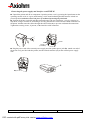
Cleaning the paper roll compartment
n Open the printer cover, remove the paper roll from the paper roll compartment and then clean the
compartment with a soft cloth being very careful to avoid touching the printhead and cutter blades.
n Load the paper roll.
Cleaning the printer case
n Clean the printer’s external case using a soft cloth. Do not use solvents or hydrocarbon-based
products.
Cleaning the printhead
WARNING: The printhead could be easily damaged so it is suggested that you clean it with extreme care,
without scratching it.
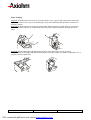
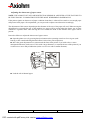
n Open the printer cover and remove the paper roll.
n Gently pass a cotton swab dampened with isopropyl alcohol (IPA) over the surface of the thermal
printhead.
n Unroll about 20 cm of paper and, while holding the unrolled portion of paper; close the printer
cover by pressing on the right-hand and left-hand sides of the paper output slot. Make sure that the
cover is properly closed on both sides.
ASTRIUM Set-Up Guide
13/14
PDF created with pdfFactory trial version www.pdffactory.com
Reference :3108332 - Issue Z