Download Axiohm Astrium Specifications
Transcript
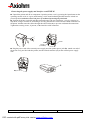
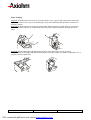
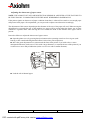
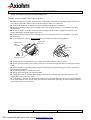
Paper Loading Step n°1: With the printer powered on, open the printer cover by pressing the Open button (A) on the operating console as far as it goes (until hearing a click sound indicating that the button is locked in a pressed position). Step n°2: With the paper roll oriented as shown in the following figures, unroll about 20 cm of paper and then insert the roll into its compartment inside the printer while holding the unrolled portion of paper. A A Step n°3: While holding the unrolled portion of paper, close the printer cover by pressing simultaneously on the right-hand and left-hand sides of the paper output slot. Make sure that the cover is properly closed on both sides. ASTRIUM Set-Up Guide 8/14 PDF created with pdfFactory trial version www.pdffactory.com Reference :3108332 - Issue Z