1
CVS-128
1
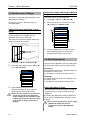
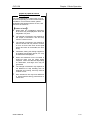
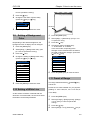
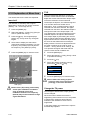
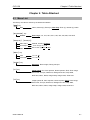
Press the [MENU] key
2
Select the [Adjust] → [TX power]. (See [2.1
How to operate the menu])
3
Press the [ ] key.
4
Select the [TX power]. (Press the [ ] key
or [ ] key.)
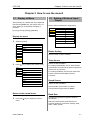
Chapter 2 How to use the menu
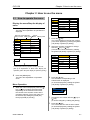
Change the display color of echo
sounder image
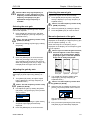
The [Monochrome], [8 color], [16 color] and [64
color] can be selected.
1
2
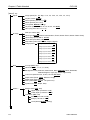
Press the [MENU] key.
3
4
Press the [ ] key.
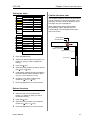
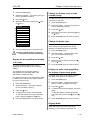
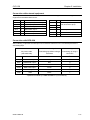
TX power
20
1
30
40
50
60
70
80
90
100
Auto
5
Press the [MENU] key to close the menu.
Caution: In [Auto] setting, it controls
transmission power automatically.
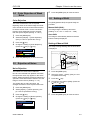
Display the A scope/Stop the display
of A scope
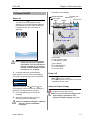
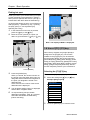
The echo strength of latest echo can be
displayed at the right side of echo sounder
display.
The strength of echo sounder image is
expressed by the horizontal width. This
expression is called [A scope].
The width for strong echo is wide and the width
for weak echo is narrow. This makes it easier
for your to see the echo.
1
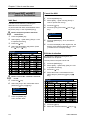
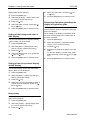
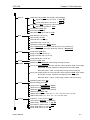
Press the [MENU] key.
2
Select the [Disp] → [A scope]. (See [2.1
How to operate the menu])
3
Press the [ ] key.
4
To display the A scope, select the [ON].
To stop the display of A scope, select the
[OFF]. (Press the [ ] key or [ ] key)
5
Press the [MENU] key to close the menu.
5
Select the [Disp] → [Color tone]. (See [2.1
How to operate the menu])
Select the [Color tone]. (Press the [ ] key
or [ ] key)
Press the [MENU] key to close the menu.
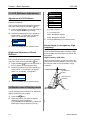
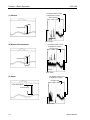
Change the depth value
The display size of depth value and the scale
value can be changed. [Detection range]
displays a propspecting range to the depth.
1
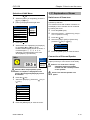
Press the [MENU] key.
2
Select the [Disp] → [Depth value]. (See
[2.1 How to operate the menu])
3
Press the [ ] key.
4
Select the size of display. (Press the [ ]
key or [ ] key)
5
Press the [MENU] key to close the menu.
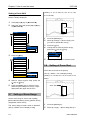
Display the water temp graph/Stop
the display of water temp graph
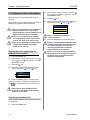
The latest water temp value and the graph of
past water temp data can be displayed.
1
2
Press the [MENU] key.
3
4
Press the [ ] key.
5
Select the [Disp] → [Water temp graph].
(See [2.1 How to operate the menu])
To display the water temp graph, select the
[ON].
To stop the display of water temp graph,
select the [OFF]. (Press the [ ] key or [ ]
key)
Press the [MENU] key to close the menu.
Display Width
When the image is zoomed or the High
frequency / Low frequency displayed, the
0093112802-00
2-15