1
4.2 Quick Setup
4.2.1 Using Smart Wizard
The camera’s Smart Wizard lets you configure your camera easily
and quickly. The wizard will guide you through the necessary
settings with detailed instructions on each step.
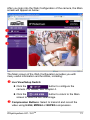
To start the wizard, click Smart Wizard in the left menu bar.
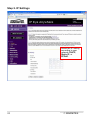
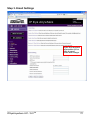
Step 1. Camera Settings
Enter the name and
location for the camera.
Enter the administrator
password twice.
IPEyeAnywhere 241 / 341TM
23