1
S50 Quick Reference
October 2005
101-00169-00
Copyright 2005 Force10 Networks
All rights reserved. Printed in the USA. October 2005.
Force10 Networks reserves the right to change, modify, revise this publication without notice.
Trademarks
Copyright 2005 by Force10 Networks, Inc. All rights reserved. Force10, the Force10 logo, E1200, E600, E300, EtherScale, FTOS, S-Series,
SFTOS, and TeraScale are trademarks of Force10 Networks, Inc. All other brand and product names are registered trademarks or trademarks
of their respective holders.
Statement of Conditions
In the interest of improving internal design, operational function, and/or reliability, Force10 Networks reserves the right to make changes to
products described in this document without notice.
Force10 Networks does not assume any liability that may occur due to the use or application of the product(s) described herein.
Danger: To prevent electrical shock, make sure the S50 is grounded properly. If you do
not ground your equipment correctly, excessive emissions may result. Use a qualified
electrician to ensure the power cables meet your local electrical requirements.
Warning: As with all electrical devices of this type, take all the necessary safety precautions to
prevent injury when installing this system. Electrostatic discharge (ESD) damage can occur if
components are mishandled. Always wear an ESD-preventive wrist or heel ground strap when
handling the S50 and its components.
Warning: For fan maintenance and proper ventilation, position the S50 in an equipment rack (or
cabinet) with a minimum of five inches (12.7 cm) of clearance around the side intake and exhaust
vents.
Warning: The site where the S50 is placed should be a dry, clean, well-ventilated and
temperature-controlled room, away from heat sources such as hot air vents or direct sunlight and
have an environmental temperature between 32° – 122°F (0° – 40°C).
Contents
Overview . . . . . . . . . . . . . . . . . . . . . . . . . . . . . . . . . . . . . . . . . . . . . . . . . . . . . . . . . . . . . . . . . . . . . . . 4
Contents of the S50 CD-ROM . . . . . . . . . . . . . . . . . . . . . . . . . . . . . . . . . . . . . . . . . . . . . . . . . . . . . . . 5
Documentation . . . . . . . . . . . . . . . . . . . . . . . . . . . . . . . . . . . . . . . . . . . . . . . . . . . . . . . . . . . . . . . 5
Software . . . . . . . . . . . . . . . . . . . . . . . . . . . . . . . . . . . . . . . . . . . . . . . . . . . . . . . . . . . . . . . . . . . . 5
Training Material . . . . . . . . . . . . . . . . . . . . . . . . . . . . . . . . . . . . . . . . . . . . . . . . . . . . . . . . . . . . . . 5
Installing the Hardware . . . . . . . . . . . . . . . . . . . . . . . . . . . . . . . . . . . . . . . . . . . . . . . . . . . . . . . . . . . . 6
Insert the 10-Gigabit Module (optional) . . . . . . . . . . . . . . . . . . . . . . . . . . . . . . . . . . . . . . . . . . . . . 6
Insert the DC Power Module (optional) . . . . . . . . . . . . . . . . . . . . . . . . . . . . . . . . . . . . . . . . . . . . . 6
Attach the S50 to the Rack . . . . . . . . . . . . . . . . . . . . . . . . . . . . . . . . . . . . . . . . . . . . . . . . . . . . . . 7
Connect Stacking Ports (optional) . . . . . . . . . . . . . . . . . . . . . . . . . . . . . . . . . . . . . . . . . . . . . . . . . 8
Install Small Form-factor Pluggable (SFP) Modules . . . . . . . . . . . . . . . . . . . . . . . . . . . . . . . . . . . 8
Install XFP / CX4 Modules . . . . . . . . . . . . . . . . . . . . . . . . . . . . . . . . . . . . . . . . . . . . . . . . . . . . . . 9
Connect a Cable to the Console Port . . . . . . . . . . . . . . . . . . . . . . . . . . . . . . . . . . . . . . . . . . . . . . 9
Basic Software Configuration . . . . . . . . . . . . . . . . . . . . . . . . . . . . . . . . . . . . . . . . . . . . . . . . . . . . . . 10
Creating a User and Password . . . . . . . . . . . . . . . . . . . . . . . . . . . . . . . . . . . . . . . . . . . . . . . . . . 10
Setting the Enable Password . . . . . . . . . . . . . . . . . . . . . . . . . . . . . . . . . . . . . . . . . . . . . . . . . . . .11
Enabling Ports . . . . . . . . . . . . . . . . . . . . . . . . . . . . . . . . . . . . . . . . . . . . . . . . . . . . . . . . . . . . . . . .11
Setting the Management IP Address . . . . . . . . . . . . . . . . . . . . . . . . . . . . . . . . . . . . . . . . . . . . . .11
Enabling Telnet to the Switch . . . . . . . . . . . . . . . . . . . . . . . . . . . . . . . . . . . . . . . . . . . . . . . . . . . 12
Managing a Stack of S50 Switches . . . . . . . . . . . . . . . . . . . . . . . . . . . . . . . . . . . . . . . . . . . . . . . 12
Installing New Software . . . . . . . . . . . . . . . . . . . . . . . . . . . . . . . . . . . . . . . . . . . . . . . . . . . . . . . . 12
Enabling and Using the S50 Web Interface . . . . . . . . . . . . . . . . . . . . . . . . . . . . . . . . . . . . . . . . 12
Creating a Simple Configuration using VLANs and STP . . . . . . . . . . . . . . . . . . . . . . . . . . . . . . 13
Enabling Spanning Tree Protocol . . . . . . . . . . . . . . . . . . . . . . . . . . . . . . . . . . . . . . . . . . . . . . . . 15
Installing New Software . . . . . . . . . . . . . . . . . . . . . . . . . . . . . . . . . . . . . . . . . . . . . . . . . . . . . . . . 16
The iSupport Website . . . . . . . . . . . . . . . . . . . . . . . . . . . . . . . . . . . . . . . . . . . . . . . . . . . . . . . . . . . . 17
Notable Differences between S-Series and E-Series . . . . . . . . . . . . . . . . . . . . . . . . . . . . . . . . . . . . 18
Interface Nomenclature . . . . . . . . . . . . . . . . . . . . . . . . . . . . . . . . . . . . . . . . . . . . . . . . . . . . . . . . 18
Layer 2 Switching . . . . . . . . . . . . . . . . . . . . . . . . . . . . . . . . . . . . . . . . . . . . . . . . . . . . . . . . . . . . 19
S50 Quick Reference
3
Overview
Thank you for purchasing a Force10 Networks S50 switch!
This S50 Quick Reference document is printed and included in the S50 shipping box to provide you with a
quick way to access basic installation and configuration instructions and to tell you how to get more
information.
In addition to the S50 with its SFTOS operating system (basic Layer 2 package) loaded in its default
configuration, the shipping box also contains the AC power cord and a small bag with rack-mounting
screws, plastic feet for table-top mounting, and the S50 Documentation and Software CD-ROM (hereafter
simply referred to as the “S50 CD-ROM”).
Other purchased components are shipped separately.
The hardware installation section (Installing the Hardware on page 6) in this guide contains a subset of the
information in Installing the S50 System, a book stored as a PDF both on the S50 CD-ROM and at the
iSupport website.
The software configuration section (see “Basic Software Configuration on page 10”) contains a subset of
the configuration information in the SFTOS Configuration Guide, which is also on the S50 CD-ROM and
at the iSupport website.
In fact, all of the S50 documentation that is on the S50 CD-ROM is also available on the iSupport website.
For more information about the S50 CD-ROM, see the next section, Contents of the S50 CD-ROM on
page 5.
For more information about the iSupport website (login required), see The iSupport Website on page 17.
4
Overview
Contents of the S50 CD-ROM
The S50 CD-ROM launches a Web page containing the links described in the following sections.
Documentation
Force10 Literature: This is a link to the Force10 Literature folder on the CD. It contains product
collateral for all Force10 switches.
Getting Started: This is Chapter 3 in the SFTOS Configuration Guide, available here as a standalone
document for easy printing.
Installing the S50 System: This book contains details of installation options.
Release Notes: This document contains release notes for the SFTOS operating system. In addition to a list
of open and closed caveats, the document contains a replication of the Secure Communications document
listed above. It also contains a discussion of differences in the behavior between SFTOS for the S-Series
(S50) and FTOS for the E-Series switches.
SFTOS CLI Reference Guide: This is the SFTOS Command Reference Guide, which provides the syntax
for all SFTOS commands, both the Layer-2 version of SFTOS and the extended Layer-2/Layer-3 version.
SFTOS Configuration Guide: This book is designed to help you perform the most common configuration
tasks, with examples of the most commonly used commands.
Software
Software Image: This is a link to a folder on the CD-ROM that contains the Layer-2 version of the SFTOS
operating system that shipped with the system. You can check the iSupport website of Force10 for the
latest image. See The iSupport Website on page 17.
MIBs: This is a link to a folder on the CD containing the S-Series MIBs.
Secure Communications (SSH/SSL/HTTPS): This link opens a Web page with a link to the S50 Secure
Management application note, which describes how to enable secure communications through SSH, SSL,
and HTTP. The Web page also contains links to folders on the CD-ROM containing example keys and
shell scripts that you can use to generate your own SSH keys and SSL certificates.
Training Material
The Training Material link on the CD home page is to a folder on the CD-ROM containing eight sets of
slides that are used in the S-Series training. The slides are presented here in PDF format.
S50 Quick Reference
5
Installing the Hardware
To install the S50 system, Force10 Networks recommends that you complete the installation procedures in
the order presented below, before attaching a power source:
•
•
•
•
Insert the 10-Gigabit Module (optional)
Insert the DC Power Module (optional)
Attach the S50 to the Rack
Connect Stacking Ports (optional)
Warning: Before starting the installation, be sure that the installation conditions conform to
those specified in Installing the S50 System.
Insert the 10-Gigabit Module (optional)
The S50 chassis has an optional 10-Gigabit module that can be installed at the rear of the S50 chassis, as
shown below. To install this component, follow the steps below:
Step
Task
Remove the 10-Gigabit module faceplate located at the far right rear of the S50.
2.
Remove the 10-Gigabit module from its packaging and slide the module into the 10-Gigabit slot.
3.
Secure the captive screws on either side of the module.
fn00144s50
1.
Insert the DC Power Module (optional)
The S50 system includes optional external power modules, connected through a cable to a power module
that you install at the rear of the S50 chassis. To install these optional components, see Chapter 4 in
Installing the S50 System.
6
Installing the Hardware
Attach the S50 to the Rack
The S50 is shipped with universal front-mounting brackets (rack ears) attached. The screws for attaching
those ears to a standard 19-inch rack are in the bag that also contains the S50 CD-ROM.
Ensure that there is adequate clearance surrounding the rack to permit access and airflow. If you are
installing two S50 systems side-by-side, position the two S50 chassis at least 5 inches (12.7 cm) apart to
permit proper airflow.
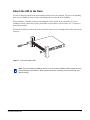
Position the S50 chassis in the rack. Secure the chassis with two screws through each bracket and onto the
rack post.
Figure 1 Front-mounting the S50
Note: The front-mounting installation above is one of several installation options contained in the
book Installing the S50 System. Other options include rear mounting, four-post mounting, and
table-mounting.
S50 Quick Reference
7
Connect Stacking Ports (optional)
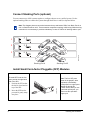
You can connect up to 8 S50 systems together to configure them to act as a unified system. Use the
optional stacking cables to connect the systems through Stack Ports A and B, as depicted below.
Note: The diagram shows a connection between the top and bottom S50s, from Stack Port A on
unit 1 to Stack Port B on unit 3. That connection completes a topology called a ring. While that ring
connection is not necessary, it provides redundancy in case of a failure of stacking cable or port.
1
2
3
fn00152s50
Stacking Port A
Stacking Port B
Install Small Form-factor Pluggable (SFP) Modules
To install SFPs into the four
open ports at the right-hand
end of the S50:
1.
2. Insert the SFP into the
port until it gently snaps
into place.
8
fn00162s50
Position the SFP so that
the bail is closed and on
top of the SFP.
Note: The four SFP ports
shown in the graphic, when
populated, automatically
preempt the four copper ports
labeled 45 through 48.
In other words, while you use
a particular optical port, you
cannot use the equivalent
copper port.
Installing the Hardware
Install XFP / CX4 Modules
Warning: Do not look directly into any optical port. Failure to follow this warning could result in
physical harm.
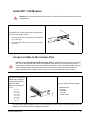
To install XFPs or CX4s into the two open ports that
are in the 10G module in back:
1.
Position the XFP so that the bail is closed and on
top of the XFP.
fn00160s50
2. Insert the XFP into the port until it gently snaps
into place.
Connect a Cable to the Console Port
Caution: Install a straight-through RJ-45 copper cable (a standard Ethernet cable) into the console
port. This is different from many other implementations that require a crossover (rollover) cable. If
connecting to a terminal server and using an Ethernet crossover cable, daisychain another crossover
cable to effectively get a straight-through cable connection. Many console terminal servers use
octopus cables that are crossover cables. As above, connect an additional crossover cable.
Connect the RJ-45/DB-9
adapter that is shipped
with the S50 system to
the RJ-45 cable.
Set your console terminal settings
to:
Note: The console port
pinout:
fn00162s50
Pin 1 = NC
Pin 2 = NC
Pin 3 = RXD
Pin 4 = GND
Pin 5 = GND
Pin 6 = TXD
Pin 7 = NC
Pin 8 = NC
•
•
•
•
•
9600 baud rate
no parity
8 data bits
1 stop bit
no flow control
See the Getting Started chapter of the SFTOS Configuration Guide for other console port details, such as
setting the console timeout and changing the baud rate.
S50 Quick Reference
9
Basic Software Configuration
This Quick Reference contains a small subset of the information that is provided in the Getting Started
chapter of the SFTOS Configuration Guide. That guide is available as a PDF on the S50 CD-ROM and on
the Documents tab of the iSupport website. The Getting Started chapter is also available on the CD-ROM
as a separate PDF file.
This section discusses the following configuration topics for the S50:
•
•
•
•
•
•
•
•
•
•
Creating a User and Password on page 10
Setting the Enable Password on page 11
Enabling Ports on page 11
Setting the Management IP Address on page 11
Enabling Telnet to the Switch on page 12
Managing a Stack of S50 Switches on page 12
Installing New Software on page 12
Enabling and Using the S50 Web Interface on page 13
Creating a Simple Configuration using VLANs and STP on page 14
Enabling Spanning Tree Protocol on page 15
Creating a User and Password
The S50 comes installed with one read/write user named “admin”, with no password. You can add that
password, and also create up to five more read/write users with the username command in Global Config
mode. The command edits the user name and password in one statement, as shown below. Usernames
provide access to the S50 through both the CLI and the Web interface.
Note: Text boxes surrounded by oval lines, such as the following, are used throughout Force10
documentation to simulate the appearance of a terminal screen after logging in to the operating
system of the switch through a console program. The hostname prompt, exemplified in the
following example by “(Force10_S50)”, is configurable.
Note: In this guide, bold text highlights the commands that you enter.
:
(Force10_S50) >enable
(Force10_S50) #config
(Force10_S50) (Config)#username admin passwd apassword
User login name and password are set.
(Force10_S50) (Config)#exit
(Force10_S50) #exit
(Force10_S50) >
10
Basic Software Configuration
Setting the Enable Password
The Privileged Exec password (commonly called the “enable” password), is not set when the S50 starts the
first time. To set the enable password, access the Privileged Exec mode (also called “enable mode”), as
shown in the following example. (Also note you do not use the Global Config mode here.) Enter the
command enable passwd, then press Enter. At the prompts, enter the password that you want to use:
:
(Force10_S50) >enable
(Force10_S50) #enable passwd
Enter new password:*******
Confirm new password:*******
Password Changed!
(Force10_S50) #exit
Enabling Ports
When the S50 is first installed, all ports are disabled by default. To enable all ports, enter no shutdown
all in Global Config mode, as shown here:
(Force10_S50)
(Force10_S50)
(Force10_S50)
(Force10_S50)
>enable
#config
(Config)#no shutdown all
(Config)#exit
Alternatively, you can use the no shutdown command at the specific interface level.
Note: The equivalent action on the Web interface is to select Enable in the Admin Mode field
of the Port Configuration panel. See Enabling and Using the S50 Web Interface, next.
Setting the Management IP Address
Continuing in Privileged Exec mode (the “#” prompt is also called “enable” mode) (Note: Do not use
Global Config mode here), use the network parms command to set the management IP address of the
switch and the gateway. You can use that IP address to manage the switch through the Web interface of the
switch. The addresses in the following example show only the format; you enter your own IP addresses.
(Force10_S50) #network parms 172.17.1.33 255.255.255.0 172.17.1.254
IP Address of the Switch (sample)
Mask Default Gateway
Note: This management address is reachable from VLAN 1. All physical ports are, by default,
members of VLAN 1, so the management address will be reachable from all enabled physical
ports by default.
S50 Quick Reference
11
Enabling Telnet to the Switch
Access to the switch through a Telnet server is disabled by default. If you want to access the switch
through an SSH client, you would leave Telnet disabled and set up the SSH connection, as described in
“Enabling Secure Management with Secure Shell or Secure Sockets Layer” in the SFTOS Configuration
Guide.
To enable Telnet access, execute the ip telnet server enable command.
Managing a Stack of S50 Switches
When you connect a set of previously unconfigured S50 switches, and you follow the instructions in
Connect Stacking Ports (optional) on page 8, a startup algorithm automatically designates a unit to be the
management unit. You do not need to configure anything else specific to stack management.
If, on the other hand, you are modifying a stack, you will need to follow the directions that are in the
Stacking chapter of the SFTOS Configuration Guide.
If you need to upgrade the software in the stack, see the following section.
Installing New Software
The S50 comes with the basic Layer-2 software package installed. If you purchased the extended Layer-3
software package, you will receive instructions under separate cover on how to access the software.
If you need to upgrade the software image that is installed on the S50, and you want to download the image
from a TFTP server, issue the following command: copy tftp://ip address/filename system:image
You can use variations of the copy command to download the software image or the startup configuration
to the switch. For details on the command syntax, see the copy command in the SFTOS Command
Reference Guide. More detailed instructions for upgrading or reinstalling the software or configuration
files are available in the Getting Started chapter of the SFTOS Configuration Guide.
12
Basic Software Configuration
Enabling and Using the S50 Web Interface
The Web interface to the S50 that is provided by the SFTOS operating system provides much of the
functionality provided by the CLI. Also, the CLI and Web interface can be used in combination to give you
even better control.
1. To enable the Web interface, you first must give the S50 a management IP address, which you can
using the network parms command, as described above.
2. Then, continuing in Privileged Exec mode, enter the command ip http server.
Note: Details on enabling an HTTPS secure server are in Chapter 7, “Security”, the SFTOS
Configuration Guide and through a separate link on the S50 CD-ROM.
3. Launch a supported Web browser. The Web browser must support:
• HTML version 4.0, or later
• HTTP version 1.1, or later
• JavaScript(TM) version 1.2, or later
4. Enter the URL of the switch (http://<IP address>) in the Web browser address field. The IP address is
the management IP address that you assigned above.
5. When the Login panel is displayed, click the Login button.
6. Enter the admin username and password, or any other username and password that you created, as
discussed above in Creating a User and Password.
7. The Navigation tree is displayed in the left frame, and the System Description panel is displayed in the
right frame. Make your selection by clicking on the appropriate item in the Navigation tree.
For example, the following screenshot shows that the Inventory Information panel opened when the
user clicked the Inventory Information node in the tree. Notice that the Inventory Information panel
displays the serial number of the S50. Notice also the large red Help button, which displays on every
panel, and provides context help for the panels in the selected branch of the tree.
S50 Quick Reference
13
Creating a Simple Configuration using VLANs and STP
You can use the S50 Web interface to create a VLAN. The following screenshot of the VLAN
Configuration panel shows selection of a group of ports to add to a VLAN.
1. Access the VLAN Configuration panel by traversing the Navigation tree in this sequence:
System >> Switching >> VLAN >> Configuration
2. On the VLAN Configuration panel, simply choose the VLAN number, and assign a name if you desire.
3. Then choose the interfaces that you want to include in the VLAN, and whether you want them to
participate in tagged or untagged mode.
4. When you have finished, click the Submit button at the bottom of the panel.
If you have questions about VLAN configuration, click the red Help icon in the upper right corner of
the panel.
Note: As noted in Enabling Ports on page 11, all ports are disabled by default. Enable them
with no shutdown all (Global Config mode), or individually with the no shutdown
command on each port. The equivalent action on the Web interface is to select Enable in the
Admin Mode field on the Port Configuration panel.
14
Basic Software Configuration
If you prefer to use the command line interface (CLI) for the same purpose, here is an example of using the
CLI to create a VLAN (55) and add an interface to it:
:
(Force10_S50)
(Force10_S50)
(Force10_S50)
(Force10_S50)
(Force10_S50)
(Force10_S50)
(Force10_S50)
(Force10_S50)
(Force10_S50)
#vlan database
(Vlan)#vlan 55
(Vlan)#exit
#configure
(Config)#interface 1/0/5
(Interface 1/0/5)#vlan participation include 55
(Interface 1/0/5)#vlan pvid 55
(Interface 1/0/5)#vlan tagging 55
(Interface 1/0/5)#vlan participation exclude 1
In the above example, we have also excluded the port from VLAN 1 (all ports are included by default). We
have also set the Per VLAN ID (PVID) to 55. This causes untagged frames to be assigned to VLAN 55.
vlan tagging 55 causes frames transmitted by this port to be tagged as part of traffic for VLAN 55. These
additional functions are found on other screens in the Web interface, and their Help screens can assist you
in configuring them. For more on using the CLI to create VLANs, see the IEEE 802.1Q VLANs chapter in
the SFTOS Configuration Guide.
Enabling Spanning Tree Protocol
Spanning Tree Protocol (STP) is off by default. First, you must enable STP globally. To use the Web
interface to enable it, navigate to the Spanning Tree branch, and then select the Switch Configuration/
Status panel:
S50 Quick Reference
15
Next, enable STP on the desired ports. To use the Web interface, select the CST Port Configuration/
Status panel. Choose the port from the Unit/Slot/Port list, and then set Port Mode to Enable:
Alternatively, you can use the CLI to enable STP. It is possible to enable spanning tree globally, and on all
the ports with just two commands:
(Force10
(Force10
(Force10
(Force10
(Force10
S50)
S50)
S50)
S50)
S50)
#configure
(Config)#spanning-tree
(Config)#spanning-tree port mode all
(Config)#exit
#show spanning-tree summary
Spanning Tree Adminmode...........
Spanning Tree Version.............
Configuration Name................
Configuration Revision Level......
Configuration Digest Key..........
0xac36177f50283cd4b83821d8ab26de62
Configuration Format Selector.....
No MST instances to display.
Enabled
IEEE 802.1s
00-01-E8-D5-A0-F7
0
0
(Force10 S50) #show spanning-tree interface 1/0/1
Hello Time..................................... 0
Port Mode...................................... Enabled
Port Up Time Since Counters Last Cleared....... 0 day 0 hr 19 min 38 sec
STP BPDUs Transmitted.......................... 2
STP BPDUs Received............................. 593
RSTP BPDUs Transmitted......................... 0
RSTP BPDUs Received............................ 0
16
Basic Software Configuration
The iSupport Website
You must first request a password to access the iSupport website.
1. On the Force10 Networks website home page, www.force10networks.com, click the Support link.
2. Click the Account Request link.
3. Fill out the User Account Request form and click Send.
4. Click Login, and then enter the userid and password that you received by email.
The i-Support website (www.force10networks.com/support/) contains the following five tabs:
•
•
•
•
•
Home: Summary of open cases, RMA management, and field notices (as shown below)
Service Request: Case management
Software Center: Software downloads, bug fixes, and bug tracking tool
Documents: User documentation, FAQs, field notices, technical tips, and white papers
Support Programs: Information on the complete suite of Force10 support and professional support
services.
For more on using the iSupport website and accessing services, see the Force10 Service and Support Guide,
available on the Home tab, as displayed above.
You can also contact the Force10 Technical Assistance Center (TAC) by:
• E-mail: [email protected]
• Telephone:
— US and Canada customers: 866-965-5800
— International customers: 408-965-5800
S50 Quick Reference
17
Notable Differences between S-Series and E-Series
This section describes the major differences in how command usage on the S-Series differs from the
E-Series. Users familiar with the E-Series CLI will notice enough similarities in the CLI environment on
the S-Series that they can quickly learn the variations in syntax and usage.
Of course, there are more commands with more detailed options in FTOS than in SFTOS, because FTOS
supports the E-Series switches, which are larger and more complex than the S50 (currently, the only switch
in the S-Series line, supported by SFTOS).
Interface Nomenclature
The major difference between SFTOS and FTOS is that commands that contain a parameter in the form
slot/port in FTOS use a unit/slot/port parameter in SFTOS for both physical and logical interfaces.
For physical identifiers, the unit is the stack member number in an S50 stack. For example, both FTOS and
SFTOS have the show interface command, but the SFTOS equivalent of show interface
gigabitethernet 2/11 (slot 2, port 11 in FTOS) would be show interface 1/0/11, where 1/0/11
represents unit 1 in the stack, slot 0, port 11. If the port were in unit 2 of the S50 stack, the command would
be show interface 2/0/11.
Logical interface identifiers are automatically generated by SFTOS. They also use the unit/slot/port
convention, but system unit numbers are always 0, slot numbers are sequential, starting at 1, and the
interface numbers (in the third position) are also sequential, starting at 1 per slot.
Other variations include:
•
Creating a static route: The SFTOS command ip route supports only IP addresses for setting the
next-hop router, while ip route in the FTOS also supports physical interfaces.
•
Setting the size of the logging buffer: The FTOS command logging buffered has a parameter
that enables you to set the size of the buffer, while SFTOS does not. Both FTOS and SFTOS invoke
debug logging with the number 7 for the severity level parameter. The SFTOS command is logging
buffered 7.
Displaying the MAC address table: Both FTOS and SFTOS have the show mac-address-table
command, but the SFTOS command show mac-addr-table provides more similar results to that
FTOS command. The SFTOS syntax contains the unit/slot/port form cited above, for example,
•
show mac-addr-table interface 1/0/4.
•
Displaying system information: The FTOS command show linecard is similar to show
version in SFTOS, which shows basic information, including the running software version and up
time. Other similar commands in SFTOS are show hardware and show sysinfo, and show
tech-support provides the results of a group of those similar commands.
•
terminal length: This FTOS command (often shortened to “term len”) is not available in SFTOS.
•
SFTOS sets the number of lines displayed on the terminal screen as a function of each report, to
optimize its presentation.
service timestamps: This FTOS command is not available in SFTOS. SFTOS sets timestamps
automatically.
aaa authentication: This FTOS command is available in SFTOS as authentication.
•
18
Notable Differences between S-Series and E-Series
Layer 2 Switching
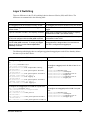
There are differences in the VLAN switching behavior between S-Series (S50) and E-Series. The
differences are summarized in the following table.
S50
E-Series
An untagged port can be a member of many VLANs.
An untagged port can be a member of only one VLAN.
A port can be tagged in one VLAN and untagged in
another VLAN.
If a port is a member of multiple VLANs, it must be
tagged.
A port is a member of VLAN 1 until explicitly excluded.
When a port is assigned a VLAN, the port is implicitly
excluded from VLAN 1 (the default VLAN).
A port forwards traffic in VLAN 1 even when assigned a
VLAN, until configured with the vlan pvid command.
When a port is assigned a VLAN, all traffic on the port
is forwarded in that VLAN.
Untagged traffic is forwarded in the VLAN configured
with the vlan pvid command. To accept only tagged
frames on the port, use the vlan acceptframe
vlanonly command.
Untagged traffic is dropped when it is received on a
port that is configured as a tagged port.
The following table displays how to configure tagged and untagged ports on the S50 so that they behave
the same way as on the E-Series.
S50
E-Series
To configure a tagged port for VLANs 10 and 11 on port 1/
0/1:
(S50)(Config)#interface 1/0/1
! Only accept tagged frames
(S50)(Interface 1/0/1)#vlan acceptframe vlanonly
! Exclude VLAN 1
(S50)(Interface 1/0/1)#vlan participation exclude 1
! Include VLAN 10
(S50)(Interface 1/0/1)#vlan participation include 10
! Transmit tagged frames for VLAN 10
(S50)(Interface 1/0/1)#vlan tagging 10
! Include VLAN 11
(S50)(Interface 1/0/1)#vlan participation include 11
! Transmit tagged frames for VLAN 11
(S50) (Interface 1/0/1)#vlan tagging 11
To configure a tagged port for VLANs 10 and 11 on
port g0/1:
Force10(conf)#interface g0/1
Force10(conf-if-gi-0/1)#switchport
Force10(conf-if-gi-0/1)#interface vlan 10
Force10(conf-if-vl-10)#tagged g0/1
Force10(conf-if-gi-0/1)#interface vlan 11
Force10(conf-if-vl-11)#tagged g0/1
To configure an untagged port for VLAN 10 on port 1/0/1:
(S50) (Config)#interface 1/0/1
! Only forward traffic in configured VLANs
! Set the VLAN ID to 10
(S50) (Interface 1/0/1)#vlan pvid 10
! Exclude VLAN 1
(S50) (Interface 1/0/1)#vlan participation exclude 1
! Include VLAN 10
(S50) (Interface 1/0/1)#vlan participation include 10
S50 Quick Reference
To configure an untagged port for VLAN 10 on port
g0/1:
Force10(conf)#interface g0/1
Force10(conf-if-gi-0/1)#switchport
Force10(conf-if-gi-0/1)#interface vlan 10
Force10(conf-if-vl-10)#untagged g0/1
19
20
Notable Differences between S-Series and E-Series