1
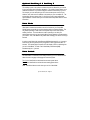
A u t o - S t ar t F u n cti on
Press Button II for 2 seconds to auto-start an automatic transmission engine. You
will hear one beep from your remote-pager if there is successful communication with
your vehicle. The engine will start and give you a visual confirmation by an exhaust
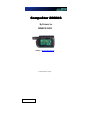
fume icon coming out from the tailpipe on the remote-pager CompuGlo LCD. A
manual key in the ignition is required to drive the car. In addition, the anti-grind
circuit prevents you from wearing down the ignition mechanism in your car when
you start it. For manual transmission vehicles, please use reservation mode.
The engine will run 15 minutes (25 min for diesel) to 25 minutes (40 min for diesel)
and then shut off. If your remote-pager has a problem starting the vehicle,
CompuStar will try 2 additional times. If the engine does not start after the 3rd
attempt, please call your authorized CompuStar dealer.
Note: In order to change the duration of engine running time once auto-start is
engaged, please contact your local authorized CompuStar dealer.
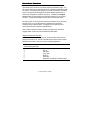
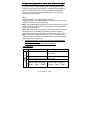
Diagnosis problems with Auto-Start
If there is a problem in auto-starting your car, you will hear three chirps when you
attempt to auto-start the car. Wait for 2 seconds and the cause for the error will be
indicated by the number of times the car chirps and parking lights flash.
Error Number (# of times the car
chirps & parking lights flash)
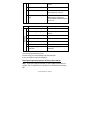
1
2
3
4
5
6
7
Error Reason
Engine On
Key On
Door Open
Trunk Open
Brake On
Hood Open
Reservation Off (Manual Transmission Only)
© 2001 Firstech, Inc. Page 9