1
Smart Alert
remote
™
What it does
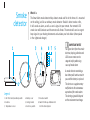
Your Smart Alert remote is the communications hub of your system. It acts as a
receiver of signals from the detectors, as well as sends signals to your hearing
instruments and activates bed shaker. It, itself, is an alerting device: LED lights
and vibration make you aware of a detector going off in the household.
In addition to alerting functions, your Smart Alert remote contains many of your
hearing instrument functions. These are explained in the Hearing instrument functions
section of this guide.
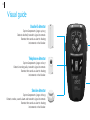
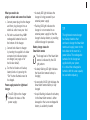
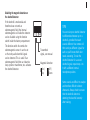
Acknowledge button
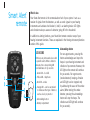
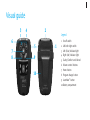
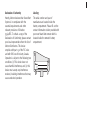
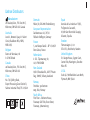
LED ICONS
LED icons are picture-and-color-coded
to specific events. When a detector
activates, the corresponding LED
icon illuminates for 30 seconds:
1. Green LED – doorbell
2
4
5
6
2. Yellow LED – telephone
3. Red LED – smoke
AAA
1
3
4. Orange LED – can be customized
to indicate another type of detector,
such as a baby cry monitor
5. Acknowledge button
6. Battery compartment
For non-urgent events, pressing this
button acknowledges and stops the
beeps in your hearing instrument and
vibration of your remote. However, the
LED light on the remote will continue
for 30 seconds. For urgent events
(smoke detector), beeping, vibration
and LED light can be stopped only
by addressing the cause of the smoke
alarm. (When testing the smoke
detector, pressing the acknowledge
button will stop the beeps. The
vibration and LED light will continue
for 30 seconds).