1
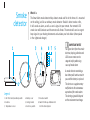
Replacing the battery
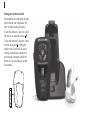
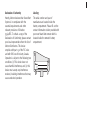
The battery compartment is located on
the back of the remote.
This warning will occur every 30 seconds
when the battery is approaching end of life.
Caring for your remote
Caring for batteries
• If the remote control will not be used for
long periods of time, open the battery
compartment and remove the battery.
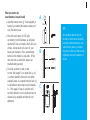
2. Slide the battery cover.
Always discard batteries in a safe and
environmentally friendly way.
3. Grasp the old battery with your
thumb and index finger and remove.
• Do not use your remote in the bath
or shower or immerse it in water.
To prolong battery life, remember to
turn the remote off when not in use.
• If your remote does become wet,
do not attempt to dry it in an oven
or microwave. Do not adjust
any controls. Open the battery
compartment and allow your remote
to dry naturally for 24 hours.
1. Remove the remote belt clip.
4. Insert the new battery into the
battery compartment in the correct
+/- position, placing the battery’s
minus(-) end into the compartment first.
5. Slide the battery cover door closed.
IMPORTANT NOTE! If replacing with
non-rechargeable batteries, do not place
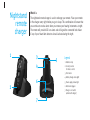
remote in the nightstand charger.
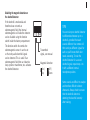
Low battery warning
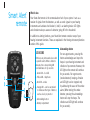
When the left and right indicator lights
blink, alternating left and right for 2
seconds, your remote is warning you
that its battery is low.
Operating instructions
Before using your remote, turn on your
hearing instruments to ensure they are
able to receive the remote commands.
Your remote is designed to be used
comfortably in your hand at a maximum
distance of one arm’s length. You do not
have to point the remote at your hearing
instruments. Placing the remote control
directly next to or too close to your
hearing instruments may decrease the
remote’s effectiveness.
• Protect your remote from excessive
heat (hair dryer, vehicle glove box
or dashboard).
• Do not drop your remote or knock it
against hard surfaces.
Cleaning your remote
Do not use alcohol to clean your remote.
Use a damp cloth to clean the outside of
the remote.