1
___
Kingdom One Touch
Chapter 5. Menu Overview
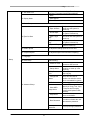
Function Table
Function
Sub-function
Description
1. Copy
To copy disc to disc
2. Test
To simulate copy process
3. Compare
To bit by bit compare between source disc and
copied disc
4. Copy & Compare
To copy first and compare the copied discs later.
5. Set Burn Speed
To set burning speed for duplication.
6. Select Source
To select source from any optical drive
2. Drive Info.
To check the format of disc, burning speed
supported and total capacity or data size.
To check the version, model No. and brand name
3. System Info.
To check the model No. and firmware version
1. Quick Erase
To quick erase data from rewriteable disc.
2. Full Erase
To full erase data from rewriteable disc.
1. Disc Info.
1. Information
2. Erase Disc
3. PreScan Source
To check source disc’s readability.
1. Copy Track
7. Utility
4. Track Edit
2. Close Disc
3. Disc Info.
To check the audio CD’s status of usage.
5. Eject All Disc
1. Show Count
6. Copy Counter
To select and combine audio tracks from various
CDs into a single customized audio CD.
To close the disc after track copying to make the CD
playable on CD player.
To eject all trays.
To check how many discs copy successfully and
failed.
2. Enable Counter
To enable or disable counter setting.
3. Clear Counter
To delete the record.
7. Update BIOS
To update the system’s firmware.
8