1
Printelligence (M) Sdn. Bhd
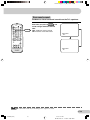
Save
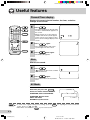
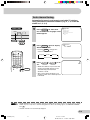
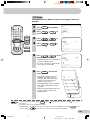
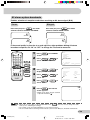
This function reduces the picture brightness to create a
softer image while saving electricity.
POWER
SAVE
TV/VIDEO
1
2
3
4
5
6
7
8
9
POWER SAVE
Using
1
AV MODE
SURROUND
2
MPX
0
A
B
C
CH
D
CH
MENU
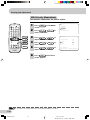
Press
screen.
MENU
to call MENU
Press CH
/
select “FEATURE”.
CH
to
MENU
PICTURE
SOUND
FEATURE
TIMER
CH-SETTING
CH
CH
NORMAL
3
MENU
MENU
4
5
TV/TEXT
FEATURE
Press
/
display FEATURE menu.
to
Press CH
/
select “SAVE”.
CH
to
BLUE BACK
SAVE
VM
TEXT
AI
Press
/
select “ON” or “OFF”.
to
CH
SELECT
ADJUST
ON
ON
ON
3
ON
MENU RETURN
• When SAVE is set “ON”, the Power save indicator on the TV set
lights up in red.
• When SAVE is set “OFF”, the Power save indicator on the TV set is
turn off.
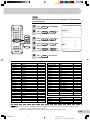
TV Set (Bottom)
ON TIMER
POWER
SAVE
6
Power save indicator (Red)
Press
MENU
until normal screen appears.
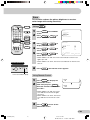
Using Remote Control
1
2
Press POWER SAVE to display the
SAVE mode screen.
SAVE
ON
Each time you press POWER SAVE ,
the mode switches between “ON”
and “OFF”.
SAVE
OFF
• When SAVE is set “ON”, the Power
save indicator on the TV set lights
up in red.
• When SAVE is set “OFF”, the Power
save indicator on the TV set is turn
off.
3
Press
to turn off the
SAVE mode screen.
E 20
SX68NF8(16-25)
20
7/11/02, 2:04 PM
Dimension: 176 x 250 mm