1
Dynamis ProBox
Dynamis ProBox
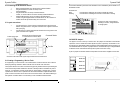
2.2 Connecting the IR Extension module
1
2
3
4
Remove the IR Receiver from the top of the Command Station
Plug the IR Extension module on the top of the
Command Station
Plug the IR Receiver on the top of the IR Extension
module, or use the cable to connect to remotely located IR Receiver.
Additional IR Receivers can be connected to the IR Extension
module using the supplied cable. The IR Receivers can be mounted in a
location above the layout where they are in clear view.
A locomotive selected by more than one Handset at once is indicated by the ‘Controller’ icon on
the Handset screen.
Controller icon
Solid
Flashing
this Handset is viewing the locomotive controlled by another
this Handset is controlling the locomotive and another is viewing
A viewer can ‘steal’ a locomotive by
activating a function, change direction
or change speed.
2.3 Layout connections
1
2
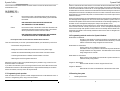
Connect the Service Track to the track output terminal of the Command
Station using either wires to the green connector block supplied or the lead
with a jack plug
Connect the layout to the output terminal of the Pro Box using wires to the
green connector block supplied
Power supply input
Connect to Service Track with jack
or screw terminal connector block
Command Station
3.9 BASE ID Jumpers
PWR
Track
Pro Box
Track
ECoSLink
The jumpers are set on the top of the Pro Box. Set jumpers as indicated for the BaseID
required to avoid a conflict with another Dynamis system in proximity. All handsets in use
should also have their BaseID setting changed to match the Basestation before powering up.
The default BaseID of 0 requires no jumpers and it is recommended only to change the BaseID
if needed to avoid conflict with another Dynamis system used in the vicinity.
A pair of jumpers is included: standard components from electronics suppliers can be used.
Connect to main track of the layout using screw terminal connector block
BASE ID 0
2.4 Creating a Programming / Service Track
A ‘Programming’ or ‘Service Track’ is an isolated section of track to allow the use of Service
Mode programming methods to write to decoder CVs as well as ‘read’ from them.
The Dynamis Service Track does not need to be physically isolated from the layout although it
must be electrically double isolated from the rest of the layout with an insulated rail joiner in
each rail – for example it could be a track within an engine depot or storage yard. In normal
operations the Service Track is powered from the Command Station output with DCC track
power so that a locomotive can be driven into and out of the section. The internal switching in
the Dynamis unit means that it is not necessary to use an additional external switch.
2
BASE ID 1
BASE ID 2
BASE ID 3
7