1
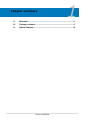
Contents
2.5.5
PCI Express x1 slots...................................................... 2-20
2.5.6
PCI Express 2.0 x16 slots.............................................. 2-20
2.5.7
Universal PCI Express x16 slot...................................... 2-20
2.6
Jumpers....................................................................................... 2-22
2.7
Onboard switches....................................................................... 2-24
2.8
Connectors.................................................................................. 2-25
2.8.1
Rear panel connectors................................................... 2-25
2.8.2
Internal connectors........................................................ 2-27
2.8.3
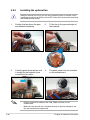
Installing the optional fan............................................... 2-40
2.9
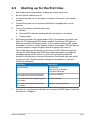
Starting up for the first time....................................................... 2-41
2.10
Turning off the computer............................................................ 2-42
2.10.1
Using the OS shut down function................................... 2-42
2.10.2
Using the dual function power switch............................. 2-42
Chapter 3:
3.1
3.2
3.3
iv
BIOS setup
Managing and updating your BIOS............................................. 3-1
3.1.1
ASUS Update utility......................................................... 3-1
3.1.2
ASUS EZ Flash 2 utility.................................................... 3-4
3.1.3
AFUDOS utility................................................................. 3-5
BIOS setup program..................................................................... 3-7
3.2.1
BIOS menu screen........................................................... 3-8
3.2.2
Menu bar.......................................................................... 3-8
3.2.3
Navigation keys................................................................ 3-8
3.2.4
Menu items...................................................................... 3-9
3.2.5
Sub-menu items............................................................... 3-9
3.2.6
Configuration fields.......................................................... 3-9
3.2.7
Pop-up window................................................................ 3-9
3.2.8
Scroll bar.......................................................................... 3-9
3.2.9
General help.................................................................... 3-9
Main menu................................................................................... 3-10
3.3.1
System Time.................................................................. 3-10
3.3.2
System Date.................................................................. 3-10
3.3.3
Legacy Diskette A ......................................................... 3-10
3.3.4
Language....................................................................... 3-10
3.3.5
SATA 1-6.........................................................................3-11
3.3.6
Storage Configuration.................................................... 3-12