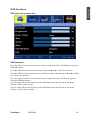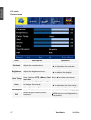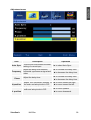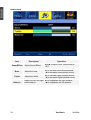
1
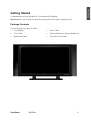
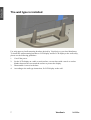
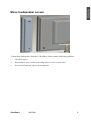
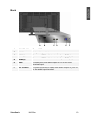
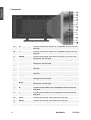
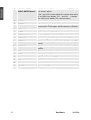
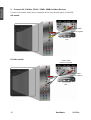
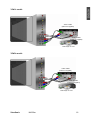
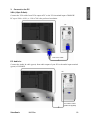
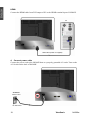
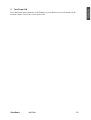
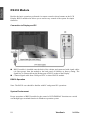
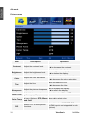
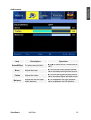
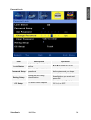
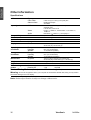
ViewSonic ® N4200w LCD Display - User Guide - Guide de l’utilisateur - Guida dell’utente - Model No. : VS10945-1M Contents Compliance Information.............................................................................................1 Declaration of RoHS Compliance ..............................................................................2 Important Safety Instructions .....................................................................................3 Copyright Information ................................................................................................4 Product Registration ..................................................................................................4 Cleaning the LCD Display..........................................................................................5 Disclaimer..................................................................................................................5 Getting Started Package Contents .....................................................................................................6 The wall type is installed............................................................................................7 Move loudspeaker secure..........................................................................................8 View of the Product ...................................................................................................9 Remote Control .......................................................................................................12 Installation ...............................................................................................................14 RS232 Module.........................................................................................................21 Basic Operation .......................................................................................................24 OSD Functions OSD style and operation tips ...................................................................................26 OSD Operation ........................................................................................................26 Other Information Specifications ..........................................................................................................35 Troubleshooting.......................................................................................................36 Customer Support ...................................................................................................38 Limited Warranty .....................................................................................................39 ViewSonic N4200w Compliance Information FCC Statement This device complies with part 15 of FCC Rules. Operation is subject to the following two conditions: (1) this device may not cause harmful interference, and (2) this device must accept any interference received, including interference that may cause undesired operation. This equipment has been tested and found to comply with the limits for a Class B digital device, pursuant to part 15 of the FCC Rules. These limits are designed to provide reasonable protection against harmful interference in a residential installation. This equipment generates, uses, and can radiate radio frequency energy, and if not installed and used in accordance with the instructions, may cause harmful interference to radio communications. However, there is no guarantee that interference will not occur in a particular installation. If this equipment does cause harmful interference to radio or television reception, which can be determined by turning the equipment off and on, the user is encouraged to try to correct the interference by one or more of the following measures: • Reorient or relocate the receiving antenna. • Increase the separation between the equipment and receiver. • Connect the equipment into an outlet on a circuit different from that to which the receiver is connected. • Consult the dealer or an experienced radio/TV technician for help. Warning: You are cautioned that changes or modifications not expressly approved by the party responsible for compliance could void your authority to operate the equipment. Following information is only for EU-member states: The mark shown to the right is in compliance with the Waste Electrical and Electronic Equipment Directive 2002/96/EC (WEEE). The mark indicates the requirement NOT to dispose the equipment as unsorted municipal waste, but use the return and collection systems according to local law. 1 ViewSonic N4200w Declaration of RoHS Compliance This product has been designed and manufactured in compliance with Directive 2002/95/EC of the European Parliament and the Council on restriction of the use of certain hazardous substances in electrical and electronic equipment (RoHS Directive) and is deemed to comply with the maximum concentration values issued by the European Technical Adaptation Committee (TAC) as shown below: Substance Lead (Pb) Mercury (Hg) Cadmium (Cd) Hexavalent Chromium (Cr6+) Polybrominated biphenyls (PBB) Polybrominated diphenyl ethers (PBDE) Proposed Maximum Concentration 0.1% 0.1% 0.01% 0.1% 0.1% 0.1% Actual Concentration < 0.1% < 0.1% < 0.01% < 0.1% < 0.1% < 0.1% Certain components of products as stated above are exempted under the Annex of the RoHS Directives as noted below: Examples of exempted components are: 1. Mercury in compact fluorescent lamps not exceeding 5 mg per lamp and in other lamps not specifically mentioned in the Annex of RoHS Directive. 2. Lead in glass of cathode ray tubes, electronic components, fluorescent tubes, and electronic ceramic parts (e.g. piezoelectronic devices). 3. Lead in high temperature type solders (i.e. lead-based alloys containing 85% by weight or more lead). 4. Lead as an allotting element in steel containing up to 0.35% lead by weight, aluminium containing up to 0.4% lead by weight and as a cooper alloy containing up to 4% lead by weight. ViewSonic N4200w 2 Important Safety Instructions 1. Read these instructions completely before using the equipment. 2. Keep these instructions in a safe place. 3. Heed all warnings. 4. Follow all instructions. 5. Do not use this equipment near water. 6. Clean with a soft, dry cloth. If further cleaning is required, see “Cleaning the Display” in this guide for further instructions. 7. Do not block any ventilation openings. Install the equipment in accordance with the manufacturer’s instructions. 8. Do not install near any heat sources such as radiators, heat registers, stoves, or other devices (including amplifiers) that produce heat. 9. Do not attempt to circumvent the safety provisions of the polarized or grounding-type plug. A polarized plug has two blades with one wider than the other. A grounding type plug has two blades and a third grounding prong. The wide blade and the third prong are provided for your safety. If the plug does not fit into your outlet, consult an electrician for replacement of the outlet. 10. Protect the power cord from being tread upon or pinched, particularly at the plug, and the point where if emerges from the equipment. Be sure that the power outlet is located near the equipment so that it is easily accessible. 11. Only use attachments/accessories specified by the manufacturer. 12. Use only with the cart, stand, tripod, bracket, or table specified by the manufacturer, or sold with the equipment. When a cart is used, use caution when moving the cart/ equipment combination to avoid injury from tipping over. 13. Unplug this equipment when it will be unused for long periods of time. 14. Refer all servicing to qualified service personnel. Service is required when the unit has been damaged in any way, such as: if the power-supply cord or plug is damaged, if liquid is spilled onto or objects fall into the unit, if the unit is exposed to rain or moisture, or if the unit does not operate normally or has been dropped. 3 ViewSonic N4200w Copyright Information Copyright © ViewSonic® Corporation, 2006. All rights reserved. ViewSonic, the three birds logo, OnView, ViewMatch, and ViewMeter are registered trademarks of ViewSonic Corporation. Disclaimer: ViewSonic Corporation shall not be liable for technical or editorial errors or omissions contained herein; nor for incidental or consequential damages resulting from furnishing this material, or the performance or use of this product. In the interest of continuing product improvement, ViewSonic Corporation reserves the right to change product specifications without notice. Information in this document may change without notice. No part of this document may be copied, reproduced, or transmitted by any means, for any purpose without prior written permission from ViewSonic Corporation. Product Registration To meet your future needs, and to receive any additional product information as it becomes available, please register your product on the Internet at: www.viewsonic.com. For Your Records Product Name: N4200w-2 ViewSonic LCD Display Model Number: VS10945-1M Document Number: N4200w-2M_UG_ENG Rev. 1A 12-13-06 Serial Number: Purchase Date: Product disposal at end of product life ViewSonic is concerned about the preservation of our environment. Please dispose of this product properly at the end of its useful life. Your local waste disposal company may provide information about proper disposal. The lamp in this product contains mercury. Please dispose of properly in accordance with environmental laws of your location. ViewSonic N4200w 4 Cleaning the LCD Display y Make sure the LCD Display is turned off. y Never spray or pour any liquid directly onto the screen or case. To clean the screen: 1 Wipe the screen with a clean, soft, lint-free cloth. This removes dust and other particles. 2 If still not clean, apply a small amount of non-ammonia, non-alcohol based glass cleaner onto a clean, soft, lint-free cloth, and wipe the screen. To clean the case: 1 Use a soft, dry cloth. 2 If still not clean, apply a small amount of non-ammonia, non-alcohol based, mild non-abrasive detergent onto a clean, soft, lint-free cloth, then wipe the surface. Disclaimer ViewSonic® does not recommend the use of any ammonia or alcohol-based cleaners on the LCD display screen or case. Some chemical cleaners have been reported to damage the screen and/or case of the LCD display. ViewSonic will not be liable for damage resulting from use of any ammonia or alcohol-based cleaners. 5 ViewSonic N4200w Getting Started Congratulations on your purchase of a ViewSonic® LCD display. Important! Save the original box and all packing material for future shipping needs. Package Contents Your LCD display package includes: y LCD Display y Power Cable y VGA Cable y Universal Remote Control with batteries y Quick Start Guide y ViewSonic User Guide ViewSonic N4200w 6 The wall type is installed Use only approved wall-mounting brackets advised by ViewSonic or your local distributor. To install the wall-mounting brackets to LCD display and fix LCD display to the wall safely, please use the following guidelines: 1. Cut off the power. 2. Set the LCD display on a table or work surface, screen-down with a towel or woolen blanket between the screen and the surface to protect the display. 3. Disassemble 6 screws in the base. 4. According to the wall type instruction, fix LCD display to the wall. 7 ViewSonic N4200w Move loudspeaker secure To detach the loudspeakers from the LCD display, please read the following guidelines: 1. Cut off the power. 2. Disassemble 6 screws of the back loudspeaker(3 screws on each side). 3. Exert oneself outward, remove the loudspeaker ViewSonic N4200w 8 View of the Product Front A INPUT Select input sources B MENU Turn OSD menu ON/OFF C VOL - D VOL + Increase volume or adjust a highlighted control increasingly while in OSD menu E CH Channel down/ Scroll down F CH Channel up/ Scroll up G 9 POWER Decrease volume or adjust a highlighted control decreasingly while in OSD menu Turn the power ON/OFF ViewSonic N4200w Back A POWER S/W Power S/W B AC IN Using cable provided, connect a power source. C HDMI(1) Have one HDMI cable terminals of your DVD player. D HDMI(2) Have one HDMI cable terminals of your DVD player. E VGA Connect the VGA cable output of PC to the VGA terminal input. F PC STEREO Connect the Audio in cable from audio output of your PC to the audio input terminal. ViewSonic N4200w 10 Component 11 A R Connect Video/Audio cable from compatible devices into the side jack. B L Connect Video/Audio cable from compatible devices into the side jack. C VIDEO Connect the external video device such as VCR, DVD, and video game into this jack. D S-V1 Connect the external video device such as VCR, DVD, and video game into this jack. E R Connect Video/Audio cable from compatible devices into the side jack. F L Connect Video/Audio cable from compatible devices into the side jack. G VIDEO Connect the external video device such as VCR, DVD, and video game into this jack. H S-V2 Connect the external video device such as VCR, DVD, and video game into this jack. I R Connect Audio cable from compatible devices into the side jack. J L Connect Audio cable from compatible devices into the side jack. K Pr/Cr Connect the external video device into this jack. L Pb/Cb Connect the external video device into this jack. M Y Connect the external video device into this jack. ViewSonic N4200w Remote Control S A B C R D Q E F P I N G H O J M K L Remote control button function as follow A Source button Select Input Source B 0~100+ number button No functions C Volume Adjust Volume D CC button Close Caption ViewSonic N4200w 12 E UP/DOWN/LEFT/ RIGHT/ ENTER button UP/DOWN for OSD function select and LEFT/ RIGHT for function adjust VOL- and VOL+ button=adjust the volume when there is no OSD menu display. CH﹀ and CH^ = change the OSD menu display (For certain models) 13 F MUTE button Mute On/Off G FREEZE When the program information you want to capture, press button. Press again, and the picture is released H DISPLAY Display the sources and time I SLEEP Set timer to turn off the Display J PIP/POP (Guide) Activate PIP feature (Activate Guide) K PIP/SOUR Press to toggle the Sub picture between PIP L PIP/POS Change the display position of the Sub Picture in PIP mode M PIP/SWAP Toggles between input sources for the Main and Sub picture N SRS Enable/Disable Surround Sound O WIDE Change Aspect Ratio P Menu Display menu or exit OSD menu Q MTS No function R Channel No function S POWER Power ON/OFF ViewSonic N4200w Installation 1. Insert Remote Control Batteries 1 Remove the battery cover by pulling then lifting the knob on the cover. 2 Insert the batteries, corresponding to the (+) and (-) markings on the battery compartment. 3 Reattach the battery cover. CAUTION y Only use the specified AAA batteries. y Do not mix new and old batteries. This may result in cracking or leakage, which may pose a risk of fire or lead to personal injury. y Insert batteries according to (+) and (-) markings. Inserting the batteries incorrectly may result in cracking or leakage, which may pose a risk of fire or lead to personal injury. y Dispose of the battery in accordance with local laws and regulations. y Keep the battery away from children and pets. y When the remote control will not be used for an extended period, remove the batteries. ViewSonic N4200w 14 2. Connect AV, S-Video, YCbCr, YPbPr, HDMI to Video Devices Connect Video/Audio cables from compatible devices into the back panel of N4200W. AV model: RCA A/V Cable (Cable not supplied) VCR S-Video model: S-Video Cable (Cable not supplied) Audio in Cable (Cable not supplied) VCR 15 ViewSonic N4200w YCbCr model: YCbCr Cable (Cable not supplied) Audio in Cable (Cable not supplied) DVD Player or VCR YPbPr model: YCbCr Cable (Cable not supplied) Audio in Cable (Cable not supplied) DVD Player or VCR ViewSonic N4200w 16 HDMI model: Connect the HDMI cable from DVI output of your DVD player to the HDMI terminal input of N4200W. HDMI cable DVD Player (Cable not supplied) HDMI Cable (Cable not supplied) Note: To receive the sound from DVD, please turn on Sound Menu of OSD for selecting HDMI audio to HDMI. However, the input source should be in HDMI. 17 ViewSonic N4200w 3. Connect to the PC VGA (15pin D-Sub): Connect the VGA cable from VGA output of PC to the VGA terminal input of N4200W. PC up to 1280 x 1024 , or 1360 x 768 is the preferred resolution. PC VGA 15 Pin Cable PC Audio in: Connect the Audio In cable (green) from audio output of your PC to the audio input terminal (green) of N4200W. PC PC Audio in Cable (Cable not supplied) ViewSonic N4200w 18 HDMI: Connect the HDMI cable from DVI output of PC to the HDMI terminal input of N4200W. PC HDMI Cable (Cable not supplied) 4. Connect power cable Connect the power cord to the N4200W then to a properly grounded AC outlet. Turn on the AC Switch on the back of N4200W AC Switch Switch to ON AC wall socket 19 ViewSonic N4200w 5. Turn Power ON Press the Power button under the LCD Display, or press the Power On (red) button on the Remote Control. Turn Video source power ON. ViewSonic N4200w 20 RS232 Module Besides the basic operations performed via remote control or those buttons on the LCD Display, RS232 module also allows you to realize easy control of the system for simple functions. Connection to Display and PC RS232 module is installed onto the back of the cabinet and connected with signal cables (six lines group) from the module to the back panel of N4200w as factory setting. The signal line is connected from the Debug port of RS232 to that of the Display. Connect Signal cable from COM port of PC to that of RS232 module. RS232 Operation Note: The RS232 user should be familiar with PC and general PC operations. System Environment Proper operations of RS232 module for the control of LCD DISPLAY functions are carried out through hyper terminal function in Windows operation system. 21 ViewSonic N4200w New Terminal Creation Power on your PC and boot in the operational system normally. (Take WinXP as example hereinafter) Presetting Double click My Computer icon on desktop and open the window. Right click and select Property item in the pop-up menu. Select Hardware label in the System Property window, and click the Device Manager Button (D). Click and expand the Port(COM and LPT)folder and select the communication port to be used in the Device Manager window. Double click the corresponding icon and enter into the Port Setting label in the new window. Set the parameters respectively on the label as 9600, 8 bits, No parity, 1 and Stop bit. (Hard Code) Click OK buttons and exit the windows. Creation Note: If there is no hyper terminal already created, follow the hereinafter procedures to finish the creation operation. Open Hyper Terminal submenu item in Start Menu on desktop following the procedures as described hereinafter: Start Menu > All Programs > Accessories > Communication > Hyper Terminal, and click it. Input the name (N) of the new hyper terminal connection and select the icon (I) corresponding in Connection Description window, and click OK button to exit. Select the port used practically (N) in the Connection window, including COM1, COM2 or TCP/IP, and click OK button to exit. Adjust the parameter setting in the port property window, complying with the description of HARD CODE. Click OK button and exit. Click the Property item (R) in File Menu (F) of the main interface of the hyper terminal created and select the setting label. Set the Terminal Emulation (E) as VT100. Click the ASCII Code Setting button (A) and click the item Display the Characters Input (E) in the ASCII Code Transmission field of the ASCII Code Setting window. Click OK buttons and exit. Then, the new hyper terminal is created, and you can input commands properly to conduct easy control of the system for certain functions with RS232 module’s correct connection with N4200w and the PC. ViewSonic N4200w 22 Operation To realize certain function of the system, you need to input the corresponding commands properly in the hyper terminal window. Note: As for the detailed commands for the functions, please refer to the command list attached additionally. 23 ViewSonic N4200w Basic Operation To operate the function of your LCD Display, you can use your remote control or those buttons on your LCD Display to set input source, change channels, or adjust volume. Turning on the LCD Display Before using the LCD Display: 1. Insert the power plug. 2. Connect external equipment properly. 3. Turn on the Main AC Power Switch, located on the rear of the cabinet. (If the LCD Display will not be used for a long period of time, please turn it off) Power On/Off To turn the LCD Display on/off : Press the POWER button under the LCD Display or press the Power button on your remote control to turn on/off the Display. The power LED indicator lights up when the LCD Display is on. Select input source To select the required input sources. Use ▲▼to move the cursor bar, and select by pressing OK. VOLUME Adjusting Press VOL-/+ to adjust the volume. To silence the volume, press MUTE. If you want to restore volume, press MUTE again. VOLUME ViewSonic N4200w 24 Source menu Select the source you want. Select VGA, then PC mode appears. Select others, then AV mode appears. 25 ViewSonic N4200w OSD Functions OSD style and operation tips OSD Operation Press the “Menu” button on your remote control or right side of the LCD Display to open the OSD Main Menu. Press ▲ or ▼ button to select the sub menu, and press◄ or ► to enter the sub menu. Press ▲ or ▼ to select the function you would like to adjust, and then press ◄ or ► to adjust it or execute the function. Press the “Menu” button on your remote control or right side of the LCD Display again to close the OSD Main Menu. (For PC mode) The 4 icons at the top of the OSD Main menu stand for the 4 sub menus (Picture, Adjust, Audio, Setup). (For AV mode) The 4 icons at the top of the OSD Main menu stand for the 4 sub menus (Picture, Audio, Setup, Parental) ViewSonic N4200w 26 PC mode Picture menu Item Contrast Brightness Color Temp User Description Adjust the contrast level. Adjust the brightness level. Some default color temp set is here. Options: STD , Warm, Cold and user You can adjust Red, Green, Blue to change color temp. Text/Graphic Select Graphic or Text PIP 27 Select single or Multi-picture functions Operation ► to increase the contrast. ◄ to decrease the contrast. ► to brighten the display. ◄ to darken the display. ►or ◄ to select color temp. ► to increase the color temp. ◄ to decrease the color temp. ►or◄ to select Graphic or Text. ►or◄ to select Single, PBP, PIP. (HDMI input is not supported in sub picture) ViewSonic N4200w Adjustment menu Item Description Auto Sync This function auto search the best setting of current input Frequency Adjust the delay time between horizontal synchronous signal and video Phase Adjust the delay time Operation ► to select Auto Sync. ► to increase the delay time ◄ to decrease the delay time. ► to increase the delay time ◄ to decrease the delay time. H.position Adjust the horizontal position of ► to move toward the right. the main and sub picture in PIP. ◄ to move toward the left. V. position Adjust the vertical position of the ► to move upward. main and sub picture in PIP. ◄ to move downward. ViewSonic N4200w 28 Audio menu Item Operation Select Sound Effect ►or◄ to select SRS Trusurround or OFF. Bass Adjust the bass. ► to increase lower-pitched sound. ◄ to decrease lower-pitched sound. Treble Adjust the treble. ► to increase higher-pitched sound. ◄ to decrease higher-pitched sound. SoundEffect Balance 29 Description Adjust the left and right ► to emphasize the right speaker. audio balance. ◄ to emphasize the left speaker. ViewSonic N4200w Setup menu Item View Mode Description To adjust the picture ratio To recover the original status FactoryPreset before shipping out the factory OSD Language OSD Position ViewSonic ►or◄ to select Normal/Wide Press► for setup. To select the OSD language ►or◄ to select OSD language. To select the OSD position on the Display ►or◄ to select five kinds of OSD position on the Display. Adjust OSD’s transparency Transparency level. OSD Timer Out Operation Adjust OSD show time. N4200w ► to increase the transparency ◄ to decrease the transparency. ►or◄ to select show time. 30 AV mode Picture menu Item Contrast Description Adjust the contrast level. Brightness Adjust the brightness level. Color Adjust the color saturation Tint Adjust the Hue Operation ► to increase the contrast. ◄ to decrease the contrast. ► to brighten the display. ◄ to darken the display. ►to increase the color saturation. ◄to decrease the color saturation. ►to increase the Hue. ◄to decrease the Hue. ► to sharpen the display. Sharpness Adjust the picture sharpness. Flesh Tone Adjust the image color ►or◄ to select ON or OFF. Color Temp Some default color temp set is here. Options: STD, Warm and Cold ►or ◄ to select color Select OFF or Multi-picture functions ►or◄ to select OFF, PBP, PIP. (HDMI input is not supported in sub picture) PIP 31 ◄ to soften the display. ViewSonic N4200w Audio menu Item Description Operation To select sound effect ►or◄ to select SRS Trusurround or OFF Bass Adjust the bass. ► to increase lower-pitched sound. ◄ to decrease lower-pitched sound. Treble Adjust the treble. ► to increase higher-pitched sound. ◄ to decrease higher-pitched sound. Adjust the left and right audio balance. ► to emphasize the right speaker. ◄ to emphasize the left speaker. SoundEffect Balance ViewSonic N4200w 32 Setup menu Item Description Operation View Mode To adjust the picture ratio ►or◄ to select Smart/4:3/16:9/Zoom/Wide Sleep Timer To select sleep timer ►or◄ to select 30 MIN, 60 MIN, 90MIN, 120 MIN, 150 MIN or OFF. BlueScreen To select background color when no input. ►or◄ to select ON or OFF. FactoryPreset To recover the original status before shipping out the factory Press► for setup. OSD Language To select the OSD language ►or◄ to select OSD language. OSD Position To select the OSD position on ►or◄ to select five kinds of the Display OSD position on the Display. Transparency Adjust OSD’s transparency level. ► to increase the transparency ◄ to decrease the transparency. Adjust OSD show time. ►or◄ to select show time. OSD Timer Out 33 ViewSonic N4200w Parental Lock Item Description Operation Lock Status Adjust the Parental Lock status ►or◄ to select on or off. Password Setup Setup the Parental Lock password press►, then enter the number as the password you hope. Setup the film rating classification press►, then select the classification you want and press OK. To select Close caption ►or◄ to select Text1~4, CC1~4, or OFF. Rating Setup CC Setup ViewSonic N4200w 34 Other Information Specifications LCD Type Color Filter Glass surface Input signal RGB Video Compatibility Resolution Speaker Output Power Display area Operating conditions Storage conditions Dimensions Weight Regulations Power saving modes Audio PC 42.02” view able 0.681 mm (H) x 0.227 (V) mm pixel pitch RGB vertical stripe Anti-Glare RGB analog (0.7/1.0 Vp-p, 75 ohms) Separate Sync, fh:30-80 kHz, fv:50-75 Hz D-sub x 1 ,HDMI x 2, YPbPr/YCbCr x 2, S-Video x 2, CVBS x 2 Mini-stereo (Φ3.5mm x 1 ), RCA (L/R) x 4 Up to 1360 x 768 Non-interlaced 1360 x 768 @ 60 Hz 10W x 2 Voltage Full Scan 90-240 VAC, 50/60 Hz Temperature Humidity Altitude Temperature Humidity Altitude Physical 32° F to + 104° F (0° C to + 40° C) 85% (no condensation) To 10,000 feet (3,000m) Net 930.25mm (H) x 523.01 mm (V) 36.62 inch (H) x 20.59 inch (V) -4° F to + 122° F (-20° C to + 50° C 240h) 85% (no condensation) To 40,000 feet (12,000m) 1243 mm (W) x 739 mm (H) x 304mm (D) 48.93 inch (W) x 29.09 inch (H) x 11.96 inch (D) 33kg (72.68 lb) FCC, UL, cUL, NOM On <240 W LED Green Passive Off <3 W LED Red Pre-test Timing Mode (Pre-adjusted to GTF 1360 x 768@60Hz) Warning: Do not set the graphics card in your computer to exceed these refresh rates; doing so may result in permanent damage to the LCD display. Note: Product Specification is subject to change without notice. 35 ViewSonic N4200w Troubleshooting No power y Make sure the LCD Display is properly connected. y Make sure the AC power cord is properly connected. y Make sure the AC power is ON, DC power button is ON. y Plug another electrical device (like a radio) to the power outlet to verify that the outlet is supplying the proper voltage. Poor or no picture y Make sure that connection to other components is correct. y Make sure that setup has been done correctly after connections. y Make sure the correct input is selected and the input signal is compatible. Strange color, light color, or color misalignment y Ensure that the video cable is securely connected. y The picture may appear dim in a brightly lit room. y Adjust brightness and contrast. y Check the input signal setting. No Sound y Check your audio connections y The MUTE button may have been pressed, try pressing this button again. y Check your audio settings, your Display audio may be set to minimum. y Press the Volume + (Up) button on the remote control. Remote control unit does not operate y Make sure batteries are inserted correctly. y Batteries could be weak or dead. Replace batteries. y Is a fluorescent light illuminated near the remote control sensor? y The path of the remote control beam may be blocked. Make sure the path is clear and that the remote control is aimed at the remote control sensor on the Display. y Press only one button at a time and it is the correct one for the operation you want to perform. Unit cannot be operated y External influences such as lightning or static electricity may cause improper operation. In this case, operate the unit after first turning on the power of the LCD Display and the AVC System, or unplug the AC cord for 1 to 2 minutes, then replug again. Power is cut off suddenly y Is the sleep timer set? y The internal temperature of the unit has increased. Remove any objects blocking the vent or clean as necessary. ViewSonic N4200w 36 Picture is cut off/with sidebar screen y Is the image positioned correctly? y Are screen mode adjustments such as picture size set correctly? 37 ViewSonic N4200w Customer Support For technical support or product service, see the table below or contact your reseller. NOTE: You will need the product serial number. Contry/ Region Web site T = Telephone F = FAX Email United States www.viewsonic.com /support/ T = (800) 688 6688 F = (909) 468 1202 [email protected] Canada www.viewsonic.com /support/ T = (866) 463 4775 [email protected] ViewSonic N4200w 38 Limited Warranty VIEWSONIC® LCD DISPLAY What the warranty covers: ViewSonic warrants its products to be free from defects in material and workmanship, under normal use, during the warranty period. If a product proves to be defective in material or workmanship during the warranty period, ViewSonic will, at its sole option, repair or replace the product with a like product. Replacement product or parts may include remanufactured or refurbished parts or components. How long the warranty is effective: ViewSonic LCD displays are warranted for 1 year for all parts excluding the light source and 1 year for labor from the date of the first customer purchase. Who the warranty protects: This warranty is valid only for the first consumer purchaser. What the warranty does not cover: 1. Any product on which the serial number has been defaced, modified or removed. 2. Damage, deterioration or malfunction resulting from: a. Accident, misuse, neglect, fire, water, lightning, or other acts of nature, unauthorized product modification, or failure to follow instructions supplied with the product. b. Repair or attempted repair by anyone not authorized by ViewSonic. c. Any damage of the product due to shipment. d. Removal or installation of the product. e. Causes external to the product, such as electric power fluctuations or failure. f. Use of supplies or parts not meeting ViewSonic’s specifications. g. Normal wear and tear. h. Any other cause which does not relate to a product defect. 3. Any product exhibiting a condition commonly known as “image burn-in” which results when a static image is displayed on the product for an extended period of time. 4. Removal, installation, and set-up service charges. 5. When you mount it on the wall, the following must be noticed: a. The accessories attached with this product are applicable for this product only. b. When the product is mounted on the wall, holes and fixed screws will remain in the wall body. c. Wall face may discolor when this product has been mounted on the wall for a long time. How to get service: 1. For information about receiving service under warranty, contact ViewSonic Customer Support (please refer to Customer Support page). You will need to provide your product’s serial number. 2. To obtain warranted service, you will be required to provide (a) the original dated sales slip, (b) your name, (c) your address, (d) a description of the problem, and (e) the serial number of the product. 3. Take or ship the product freight prepaid in the original container to an authorized ViewSonic service center or ViewSonic. 4. For additional information or the name of the nearest ViewSonic service center, contact ViewSonic. Limitation of implied warranties: There are no warranties, express or implied, which extend beyond the description contained herein including the implied warranty of merchantability and fitness for a particular purpose. Exclusion of damages: ViewSonic’s liability is limited to the cost of repair or replacement of the product. ViewSonic shall not be liable for: 1. Damage to other property caused by any defects in the product, damages based upon inconvenience, loss of use of the product, loss of time, loss of profits, loss of business opportunity, loss of goodwill, interference with business relationships, or other commercial loss, even if advised of the possibility of such damages. 2. Any other damages, whether incidental, consequential or otherwise. 3. Any claim against the customer by any other party. Effect of state law: This warranty gives you specific legal rights, and you may also have other rights which vary from state to state. Some states do not allow limitations on implied warranties and/or do not allow the exclusion of incidental or consequential damages, so the above limitations and exclusions may not apply to you. Sales outside the U.S.A. and Canada: For warranty information and service on ViewSonic products sold outside of the U.S.A. and Canada, contact ViewSonic or your local ViewSonic dealer. The warranty period for this product in mainland China (Hong Kong, Macao and Taiwan Excluded) is subject to the terms and conditions of the Maintenance Guarantee Card. 4.3: ViewSonic LCD Warranty 39 LTV_LW01 Rev. 1B 06-30-06 ViewSonic N4200w