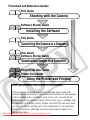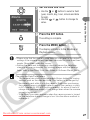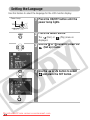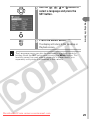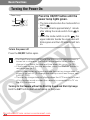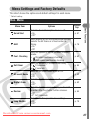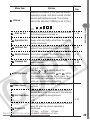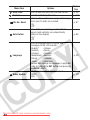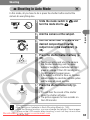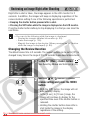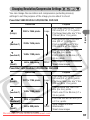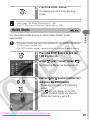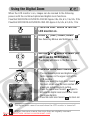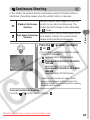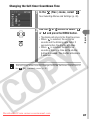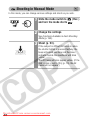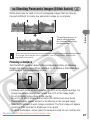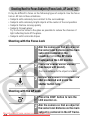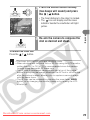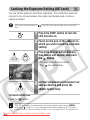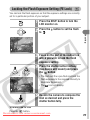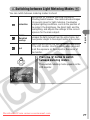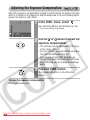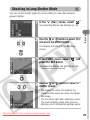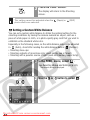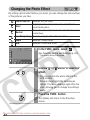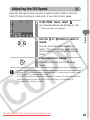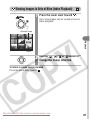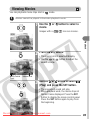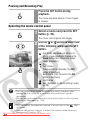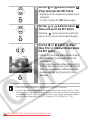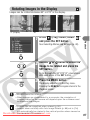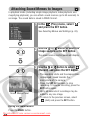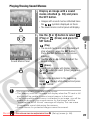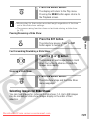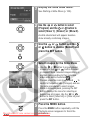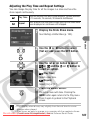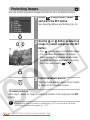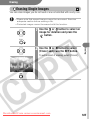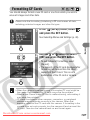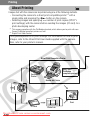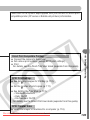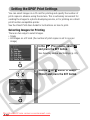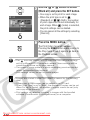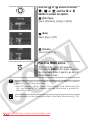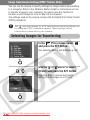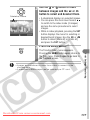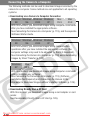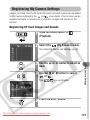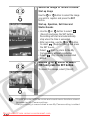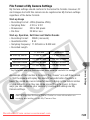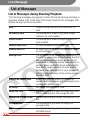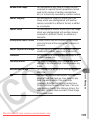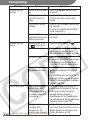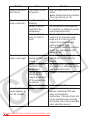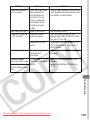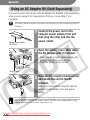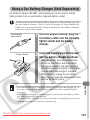
1
ENGLISH DIGITAL CAMERA Camera User Guide CDI-E117-010 XXXXXXX © 2004 CANON INC. PRINTED IN JAPAN Downloaded From camera-usermanual.com Camera User Guide Please read the Read This First section (p. 7). Please also read the Software Starter Guide and the Direct Print User Guide. Flowchart and Reference Guides This Guide Shooting with the Camera Software Starter Guide Installing the Software This Guide Connecting the Camera to a Computer This Guide Software Starter Guide Downloading Images to a Computer Direct Print User Guide Printer User Guide Using the Printer and Printing Use of genuine Canon accessories is recommended. This product is designed to perform optimally when used with genuine Canon accessories. Canon shall not be liable for any damage to this product and/or accidents such as fire, etc., caused by the malfunction of non-genuine Canon accessories (e.g., a leakage and/ or explosion of a battery pack). Please note that this warranty does not apply to repairs arising out of the malfunction of non-genuine Canon accessories, although you may request such repairs on a chargeable basis. Downloaded From camera-usermanual.com Camera Body Temperature If your camera is used for prolonged periods, the camera body may become warm. Please be aware of this and take care when operating the camera for an extended period. About the LCD Monitor The LCD monitor is produced with extremely high-precision manufacturing techniques. More than 99.99% of the pixels operate to specification. Less than 0.01% of the pixels may occasionally misfire or appear as red or black dots. This has no effect on the recorded image and does not constitute a malfunction. Video Format Please set the camera’s video signal format to the one used in your region before using it with a TV monitor (p. 127). Charging the Date/Time Battery • The camera has a built-in rechargeable lithium battery that maintains the date, time and other camera settings. This battery recharges when the main battery pack is inserted into the camera. When you first purchase the camera, place a charged battery pack in it or use the AC adapter kit (sold separately) for at least 4 hours to charge the date/time battery. It will charge even when the camera power is set to Off. • If the Date/Time menu appears when the camera power is turned on, it means that the date/time battery charge is depleted. Recharge it as described above. Downloaded From camera-usermanual.com 1 About This Guide Conventions Used in the Text Icons on the right end of title bars show the applicable operating modes. As in the example below, the procedure can be performed in (Auto), (Manual), (Stitch Assist) or (Movie) mode. Using the Self-timer : This mark denotes issues that may affect the camera’s operation. : This mark denotes additional topics that complement the basic operating procedures. Question? Look Here First What settings are available under each function? Will my settings remain in effect even after I’ve turned the camera off? What can be accomplished with each function? What do the icons listed in the Camera User Guide mean? • See Functions Available in Each Shooting Mode (p. 160). • • • • • See FUNC. MENU (p. 44). See Rec. Menu (p. 47). See Play Menu (p. 48). See Set up Menu (p. 48). See My Camera Menu (p. 51). • See Information Displayed on the LCD Monitor (p. 35). • See Menu Settings and Factory Defaults (p. 47). Downloaded From camera-usermanual.com 2 Thumb Index Preparing the Camera 18 Basic Functions 30 Shooting 53 Playback 89 Erasing 105 Print Settings/Transferring 108 Connecting the Camera to a Computer/TV 118 My Camera Settings 129 List of Messages 134 Troubleshooting 136 Appendix 140 Photo Tips and Information 153 Downloaded From camera-usermanual.com 3 Table of Contents Items marked with procedures. are lists or charts that summarize camera functions or Read This First .................................................. 7 Please Read............................................................................................... 7 Safety Precautions..................................................................................... 8 Preventing Malfunctions .......................................................................... 13 Components Guide .............................................14 Preparing the Camera Charging the Battery Pack ....................................................................... Installing the Battery Pack ....................................................................... Installing the CF Card .............................................................................. Setting the Date and Time ....................................................................... Setting the Language............................................................................... 18 21 23 26 28 Basic Functions Turning the Power On.............................................................................. Switching Between Shooting/Playback.................................................... Using the LCD Monitor ............................................................................ Information Displayed on the LCD Monitor ............................................. Using the Viewfinder ............................................................................... Using the Zoom....................................................................................... Pressing the Shutter Button .................................................................... Selecting Menus and Settings ................................................................. Menu Settings and Factory Defaults ........................................................ Resetting Settings to Their Default Values............................................... 30 32 33 35 39 40 41 43 47 52 Shooting Shooting in Auto Mode ..................................................................... Reviewing an Image Right after Shooting................................................ Changing Resolution/Compression Settings ........................................... Quick Shots ............................................................................................. Using the Flash ................................................................................... Shooting Close-Ups/ Infinity Shots.............................................. Using the Digital Zoom............................................................................ Continuous Shooting ......................................................................... Using the Self-timer........................................................................... Shooting in Manual Mode ............................................................... Panoramic Images (Stitch Assist)..................................... Downloaded Shooting From camera-usermanual.com 4 53 54 55 57 58 60 62 63 64 66 67 Shooting a Movie............................................................................... 70 Shooting Hard-to-Focus Subjects (Focus Lock, AF Lock) ........................ 72 Locking the Exposure Setting (AE Lock) .................................................. 74 Locking the Flash Exposure Setting (FE Lock) ......................................... 75 Switching between Focusing Modes ........................................................ 76 Switching between Light Metering Modes ......................................... 77 Adjusting the Exposure Compensation .................................................... 78 Shooting in Long Shutter Mode ............................................................... 79 Adjusting the Tone (White Balance) ......................................................... 81 Changing the Photo Effect........................................................................ 84 Adjusting the ISO Speed .......................................................................... 85 Setting the Auto Rotate Function ............................................................. 86 Resetting the File Number........................................................................ 87 Playback Displaying Images Individually................................................................. 89 Magnifying Images............................................................................. 90 Viewing Images in Sets of Nine (Index Playback) ............................ 91 Viewing Movies........................................................................................ 93 Editing Movies ......................................................................................... 95 Rotating Images in the Display ................................................................ 97 Attaching Sound Memos to Images ......................................................... 98 Automated Playback (Slide Shows) ....................................................... 100 Protecting Images.................................................................................. 104 Erasing Erasing Single Images ..................................................................... 105 Erasing All Images ................................................................................. 106 Formatting CF Cards .............................................................................. 107 Printing About Printing........................................................................................ 108 Setting the DPOF Print Settings ............................................................. 110 Image Transmission Settings (DPOF Transfer Order) Selecting Images for Transferring.......................................................... 116 Connecting the Camera to a Computer Connecting the Camera to a Computer .................................................. 119 Computer System Requirements.................................................... 119 Downloading Images by Direct Transfer ................................................ 123 Downloaded From camera-usermanual.com 5 Connecting the Camera to the Computer to Download Images without Installing Software .......................................................................... 125 Downloading Directly from a CF Card .................................................... 126 Viewing Images on a TV set.................................... 127 Customizing the Camera (My Camera Settings) Changing My Camera Settings .............................................................. 129 Registering My Camera Settings ........................................................... 131 List of Messages ............................................. 134 Troubleshooting .............................................. 136 Appendix Using an AC Adapter Kit (Sold Separately) ............................................ Using a Car Battery Charger (Sold Separately) ...................................... Camera Care and Maintenance .............................................................. Specifications ........................................................................................ 140 141 142 143 Photo Tips and Information Tip for Using the Self-timer ................................................................... How to adjust the exposure ................................................................... ISO Speed.............................................................................................. Advanced Technique for the Macro mode ............................................. 153 153 154 154 Index ........................................................... 155 Functions Available in Each Shooting Mode ............. 160 Downloaded From camera-usermanual.com 6 Read This First Please Read Test Shots Before you try to photograph important subjects, we highly recommend that you shoot several trial images to confirm that the camera is operating and being operated correctly. Please note that Canon, its subsidiaries and affiliates, and its distributors are not liable for any consequential damages arising from any malfunction of a camera or accessory, including CF cards, that results in the failure of an image to be recorded or to be recorded in a format that is machine readable. Warning Against Copyright Infringement Please note that Canon digital cameras are intended for personal use and should never be used in a manner that infringes upon or contravenes international or domestic copyright laws and regulations. Please be advised that in certain cases the copying of images from performances, exhibitions, or commercial properties by means of a camera or other device may contravene copyright or other legal rights even if the image was shot for personal use. Warranty Limitations This camera’s warranty is only effective in the country of sale. If a problem arises while the camera is in use abroad, please convey it back to the country of sale before proceeding with a warranty claim to a Canon Customer Support Help Desk. For Canon Customer Support contacts, please see the Canon Limited Warranty supplied with your camera. Downloaded From camera-usermanual.com 7 Safety Precautions • Before using the camera, please ensure that you read and understand the safety precautions described below. Always ensure that the camera is operated correctly. • The safety precautions noted on the following pages are intended to instruct you in the safe and correct operation of the camera and its accessories to prevent injuries or damage to yourself, other persons and equipment. • In the next few pages, the term “equipment” refers primarily to the camera and its power supply accessories, such as the battery charger and optional compact power adapter or car battery charger. Warnings • Do not aim the camera directly into the sun or at other intense light sources that could damage your eyesight. • Do not trigger the flash in close proximity to human or animal eyes. Exposure to the intense light produced by the flash may damage eyesight. In particular, remain at least one meter (39 inches) away from infants when using the flash. • Store this equipment out of the reach of children and infants. Accidental damage to the camera or batteries by a child could result in serious injury. In addition, placement of the strap around the child’s neck could result in asphyxiation. • Do not attempt to disassemble or alter any part of the equipment that is not expressly described in this guide. Disassembly or alteration may result in high-voltage electrical shock. Internal inspections, alterations and repairs should be conducted by qualified service personnel authorized by your camera distributor or a Canon Customer Support Help Desk. • To avoid the risk of high-voltage electrical shock, do not touch the flash portion of the camera if it has been damaged. Similarly, never touch internal portions of the equipment that become exposed as a result of damage. There is a risk of high-voltage electrical shock. Please take the first opportunity to consult your camera distributor or the closest Canon Customer Support Help Desk. Downloaded From camera-usermanual.com 8 • Stop operating the equipment immediately if it emits smoke or noxious fumes. Failure to do so may result in fire or electrical shock. Immediately turn the camera power off, remove the camera battery or unplug the power cable from the power outlet. Confirm that smoke or fume emissions have ceased. Please consult your camera distributor or the closest Canon Customer Support Help Desk. • Stop operating the equipment if it is dropped or the casing is damaged. Failure to do so may result in fire or electrical shock. Immediately turn the camera power off, remove the camera battery or unplug the power cable from the power outlet. Please consult your camera distributor or the closest Canon Customer Support Help Desk. • Do not allow the equipment to come into contact with, or become immersed in, water or other liquids. Do not allow liquids to enter the interior. The camera has not been waterproofed. If the exterior comes into contact with liquids or salt air, wipe it dry with a soft, absorbent cloth. If water or other foreign substances enter the interior, immediately turn the camera power off and remove the camera battery or unplug the power cable from the power outlet. Continued use of the equipment may result in fire or electrical shock. Please consult your camera distributor or the closest Canon Customer Support Help Desk. • Do not use substances containing alcohol, benzene, thinners or other flammable substances to clean or maintain the equipment. The use of these substances may lead to fire. • Remove the power cable on a regular periodic basis and wipe away the dust and dirt that collects on the plug, the exterior of the power outlet and the surrounding area. In dusty, humid or greasy environments, the dust that collects around the plug over long periods of time may become saturated with humidity and short-circuit, leading to fire. • Do not cut, damage, alter or place heavy items on the power adapter cable. Any of these actions may cause an electrical short circuit, which may lead to fire or electrical shock. • Do not handle the power cable if your hands are wet. Handling it with wet hands may lead to electrical shock. When unplugging the cable, ensure that you hold the solid portion of the plug. Pulling on the flexible portion of the cable may damage or expose the wire and insulation, creating the potential for fires or electrical shocks. Downloaded From camera-usermanual.com 9 • Use only recommended power accessories. Use of power sources not expressly recommended for this equipment may lead to overheating, distortion of the equipment, fire, electrical shock or other hazards. • Do not place the batteries near a heat source or expose them to direct flame or heat. Neither should you immerse them in water. Such exposure may damage the batteries and lead to the leakage of corrosive liquids, fire, electrical shock, explosion or serious injury. • Do not attempt to disassemble, alter or apply heat to the batteries. There is serious risk of injury due to an explosion. Immediately flush with water any area of the body - including the eyes and mouth, or clothing that comes into contact with the inner contents of a battery. If the eyes or mouth contact these substances, immediately flush with water and seek medical assistance. • Avoid dropping or subjecting the batteries to severe impacts that could damage the casings. It could lead to leakage and injury. • Do not short-circuit the battery terminals with metallic objects, such as key holders. It could lead to overheating, burns and other injuries. Use the supplied terminal cover to transport or store the battery pack. • Before you discard a battery, cover the terminals with tape or other insulators to prevent direct contact with other objects. Contact with the metallic components of other materials in waste containers may lead to fire or explosions. Discard the batteries in specialized waste facilities if available in your area. • Use only recommended batteries and accessories. Use of batteries not expressly recommended for this equipment may cause explosions or leaks, resulting in fire, injury and damage to the surroundings. • Use the specified battery charger to charge Battery Pack NB-1LH or NB1L. Use of other chargers may lead to overheating, distortion of the equipment, fire or electrical shock. • Disconnect the battery charger and compact power adapter from both the camera and the power outlet after recharging and when it is not in use to avoid fire and other hazards. Continuous use over a long period may cause a unit to overheat and distort, resulting in fire. Downloaded From camera-usermanual.com 10 • The camera terminals of the battery charger and compact power adapter are designed for exclusive use with your camera. Do not use them with other products or batteries. There is a risk of fire and other hazards. Caution about magnetic fields Keep objects that are sensitive to magnetic fields (such as credit cards) away from the speaker of the camera (p. 14). Such items may lose data or stop working. Downloaded From camera-usermanual.com 11 Cautions • Avoid using, placing or storing the equipment in places subject to strong sunlight or high temperatures, such as the dashboard or trunk (boot) of a car. Exposure to intense sunlight and heat may cause the batteries to leak, overheat or explode, resulting in fire, burns or other injuries. High temperatures may also cause deformation of the casing. Ensure that there is good ventilation when using the battery charger to charge the battery pack. • Do not store the equipment in humid or dusty areas. Storage in such areas could lead to fire, electrical shock or other damage. • Be careful not to bang the camera or subject it to strong impacts or shocks that could lead to injury or damage the equipment when wearing or holding it by the strap. • Be careful not to cover the flash with your fingers or clothing when shooting. The flash may be damaged and emit smoke or noise. In addition, do not touch the surface of the flash after taking several pictures in rapid succession. Either action could result in burns. • Do not operate the flash with dirt, dust or other items stuck to its lens. The resulting heat build-up could damage the flash. • Ensure that the battery charger is plugged into a power outlet of the specified rating, not over the specified rating. The plug of the battery charger varies according to region. • Do not use the battery charger or compact power adapter if the plug or cable is damaged, or if the plug is not fully inserted into the power outlet. • Do not allow metal objects (such as pins or keys) or dirt to contact the charger terminals or plug. • If your camera is used for prolonged periods, the camera body may become warm. Please take care when operating the camera for extended periods as your hands may experience a burning sensation. Downloaded From camera-usermanual.com 12 Preventing Malfunctions Avoid Strong Magnetic Fields Never place the camera in close proximity to electric motors or other equipment generating strong electromagnetic fields. Exposure to strong magnetic fields may cause malfunctions or corrupt image data. Avoid Condensation Related Problems Moving the equipment rapidly between hot and cold temperatures may cause condensation (water droplets) to form on its external and internal surfaces. You can avoid this by placing the equipment in an airtight, resealable plastic bag and letting it adjust to temperature changes slowly before removing it from the bag. If Condensation Forms Inside the Camera Stop using the camera immediately if you detect condensation. Continued use may damage the equipment. Remove the CF card, battery pack or compact power adapter from the camera and wait until the moisture evaporates completely before resuming use. Extended Storage When not using the camera for extended periods of time, remove the battery pack and store the equipment in a safe place. Storing the camera for extended periods with a battery pack installed will run down the battery pack and may damage the camera. The date, time and other camera settings may reset to default settings if the battery pack has been removed for more than three weeks. Follow the instructions in this guide to reset the desired settings. Downloaded From camera-usermanual.com 13 Components Guide Front View Viewfinder Window (p. 39) AF-assist Beam (p. 42) Red-eye Reduction Lamp (p. 58) Self-timer Lamp (p. 64) Microphone (p. 98) Speaker Flash (p. 58) DIGITAL Terminal (p. 120) A/V Out (Audio/Video Out) Terminal (p. 127) Lens Terminal Cover Wrist Strap Mount Attaching the Wrist Strap* * Be careful not to wave the camera about or catch it on other items when dangling it from the wrist strap. Downloaded From camera-usermanual.com 14 Back View Viewfinder (p. 39) Lock for the CF Card Slot Cover (p. 23) Battery Cover (p. 21) Preparing the Camera CF Card Slot Cover (p. 23) DC Coupler Terminal Cover (p. 140) LCD Monitor (p. 33) Tripod Socket The following cables are used to connect the camera to a computer or printer. Computer (p. 118) Interface Cable IFC-400PCU (supplied with the camera) Direct Print Compatible Printers (Sold Separately) • CP Printers Interface Cable IFC-400PCU (supplied with camera) or the Direct Interface Cable DIF-100 (supplied with the CP-100/CP-10). • Bubble Jet Printers - Bubble Jet Direct Compatible Printers: Please refer to your Bubble Jet printer user guide. - PictBridge Compliant Printers: Interface Cable IFC-400PCU (supplied with the camera) • PictBridge Compliant Non-Canon Printers: Interface Cable IFC-400PCU (supplied with the camera) Please refer to the System Map or the Direct Print User Guide supplied with the camera for direct print compatible printer information. Downloaded From camera-usermanual.com 15 Operation Panel Shooting Mode Dial (p. 53) Indicators (p. 17) Power Lamp Lights when the power is on or transmission preparations are complete when connected to a computer ON/OFF Button (p. 30) Shutter Button (p. 41) Zoom Lever Shooting: (Telephoto)/ (Wide Angle) (p. 40) Replay: (Magnify) (p. 90)/ (Index) (p. 91) Mode Switch (p. 32) Print/Share Button (See below) (Light Metering) Button (p. 77)/ Button (Flash) Button (p. 58)/ Button (Continuous) Button (p. 63)/ (Self-timer) Button (p. 64)/ Button (Macro) / (Infinity) Button (p. 60)/ Button FUNC. (Function) Button (p. 43)/ (Single Image Erase) Button (p. 105) DISP. (Display) Button (p. 33) MENU Button SET Button The following operations are accessible through one easy press of the (Print/Share) button. • Printing: See the Direct Print User Guide (separate from this guide) • Downloading images (Windows only): See p.118 of this guide and the Software Starter Guide (separate from this guide) The indicator blinks or lights during a printer or computer connection. Blue: Ready to print/Ready to transfer images Blinking blue: Printing/Transferring Downloaded From camera-usermanual.com 16 Indicator The indicator lights or blinks when the ON/OFF button or shutter button is pressed. Green: Ready to shoot Blinking Green: Recording to CF card / Reading CF card / Erasing from CF card/Transmitting data (during a computer connection) Orange: Ready to shoot (flash on) Blinking Orange: Ready to shoot (camera shake warning) Lower Indicator Preparing the Camera Upper Indicator Yellow: Macro mode / Infinity mode/ AF lock Blinking Yellow: Focusing difficulty (single beep). Although you can still press the shutter button when the indicator blinks yellow, you are recommended to shoot using the focus lock or AF lock (p. 72). Downloaded From camera-usermanual.com 17 Preparing the Camera Charging the Battery Pack Use the following procedures to charge the battery pack the first time you use the camera or when the “Change the battery pack” message displays. 1 Insert the battery pack into the battery charger. Align the battery pack according to the arrows on the battery and the charger. Insert the battery securely. 2 Battery charger model names and types vary by region. (For CB-2LS) Plug the battery charger into a power outlet. Charge Indicator (For CB-2LSE) Attach the power cord to the battery charger and plug it into a power outlet. • The charge indicator will light red while the battery pack is charging. It will change to green when the charge is complete. • After charging, unplug the battery charger and remove the battery pack. To protect the battery pack and prolong its life, do not charge it for longer than 24 hours continuously. Downloaded From camera-usermanual.com 18 Handling Precautions Preparing the Camera • Since this is a lithium ion battery pack, you need not completely discharge it before recharging. It can be recharged at any point. However, since the maximum number of charge cycles is approximately 300 times (battery life), you are recommended to charge the battery pack after having discharged it completely to prolong battery life. • It takes approximately 130 minutes to fully charge the battery pack from a fully discharged state (based on Canon’s testing standard). Charging it within a temperature range of 5° to 40 °C (41° to 104 °F) is recommended. • Charge times may vary according to the ambient temperature and the battery pack’s charge state. • See Battery Capacity (p. 147). • You may hear a noise during charging. This is not a malfunction. zKeep the battery pack terminals ( ) clean at all times. Dirty terminals may cause poor contact between the battery pack and camera. Polish the terminals with a tissue or a dry cloth before charging or using the battery pack. zDo not rapidly overturn or wave the battery charger around when it contains the battery pack. The battery pack could fly out. zAt low temperatures, battery pack performance may be reduced and the low battery icon may appear earlier than usual. Under these conditions, resuscitate the battery pack by warming it in a pocket immediately before use. However, ensure that there are no metallic items in the pocket that could cause a short circuit, such as a key holder, etc. zDo not place anything, such as tablecloths, carpets, bedding or cushions, on top of the battery charger while it is charging. Heat will build up and could result in a fire. zDo not charge batteries other than Battery Pack NB-1LH or NB-1L in this charger. zThe battery pack continues to discharge a minimal portion of its power while installed in the camera, even with the power off, or in the charger. This will shorten battery life. Downloaded From camera-usermanual.com 19 zDo not allow any metal objects Fig. A Fig. B such as key rings to touch the and terminals (Fig. A), as this can damage the battery pack. To carry the battery pack or store it during periods of disuse, always replace the terminal cover (Fig. B). zEven charged battery packs continue to discharge naturally. You are advised to charge the battery on the day of use, or one day before, to ensure a full charge. zSince storing a fully charged battery pack for long periods of time (about 1 year) can shorten its life cycle or affect performance, you are recommended to use the battery pack in the camera until it is completely discharged and to store it at normal temperature (23 °C/73 °F) or lower. If you do not use the battery pack for long periods of time, charge it fully and discharge it fully in the camera at least once a year before returning it to storage. zIf the performance of the battery pack diminishes substantially even when it is fully charged, its life has been exceeded and it should be replaced. Downloaded From camera-usermanual.com 20 Installing the Battery Pack Install Battery Pack NB-1LH (supplied) as shown below. Battery Pack NB-1L can also be used with the camera. 2 1 Slide the battery cover in the direction of the arrows. 2 Press the battery lock while inserting the battery pack all the way in until the lock clicks. 1 • Insert the battery pack correctly by aligning the arrows on the camera and the battery pack. • To remove the battery pack, press the battery lock and pull the battery pack out. Battery Lock 1 Preparing the Camera Please recharge the battery pack (p. 18) before you use it for the first time. 3 Slide the battery cover closed. 2 Downloaded From camera-usermanual.com 21 • Do not turn off the power or open the battery cover while the upper indicator beside the viewfinder blinks green. The camera is writing, reading, erasing or transmitting an image to or from the CF card. • Remove the battery pack when the camera is not in use. Please note, however, that the date, time and other camera settings may reset to the default settings if the battery pack has been removed for more than three weeks. Please use an AC Adapter Kit ACK500 (sold separately) for extended use of the camera (p. 140). Battery Pack Charge The following icons and messages will display when the battery pack charge is low. Battery pack charge is low. Recharge it as soon as possible before it is required for an extended period. When the LCD monitor is off, this icon will display when you press any button other than the ON/OFF, SET or MENU button. Change the battery pack Battery charge is insufficient to operate the camera. Replace the battery pack immediately. See Battery Capacity (p. 147). Downloaded From camera-usermanual.com 22 Installing the CF Card Turn the camera power off and insert the CF card with the following procedures. 1 Slide the lock up and open the CF card slot cover. 2 Insert the CF card with its label facing upward until the CF card eject button fully extends. 2 Preparing the Camera 1 Insert the card firmly into the slot, following the diagram on the CF card slot cover. Label 3 Close the CF card slot cover. To remove the CF card Push the eject button and pull the CF card out. Downloaded From camera-usermanual.com CF Card Eject Button 23 • Since the camera is writing, reading, erasing or transmitting data to or from the CF card when the upper indicator beside the viewfinder blinks green, never perform the following actions during this time. It could corrupt the image data. - Subject the camera body to vibration or shocks. - Turn the camera’s power off, or open the battery cover or CF card slot cover. • Please note that CF cards formatted with other manufacturers’ cameras or a computer, or formatted or edited with application programs, may slow down writing to the CF card or may not operate correctly in the camera. • You are recommended to use CF cards that have been formatted in your camera (p. 107). The card supplied with the camera may be used without further formatting. See CF Cards and Estimated Capacities (p. 148). Downloaded From camera-usermanual.com 24 Handling Precautions for CF Cards z CF cards are high-precision electronic devices. Do not bend them, apply force to them, or subject them to shocks or vibration. z Do not attempt to disassemble or alter the CF card. z Moving a CF card rapidly between temperature extremes will cause - Locations subject to dust or sand - Locations subject to high humidity and high temperatures Downloaded From camera-usermanual.com Preparing the Camera condensation to form in the card and lead to a malfunction. To avoid condensation, place the CF card in a sealed plastic bag before moving it into a different temperature zone and allow it to adjust slowly to the new temperature. z If condensation forms on the CF card, store it at room temperature until the water droplets have evaporated naturally. z Do not use or store CF cards in the following locations. 25 Setting the Date and Time The Date/Time menu will appear the first time the camera power is turned on or whenever the built-in rechargeable lithium date/time battery charge is low. Start from Step 5 to set the date and time. Power Lamp 1 Press the ON/OFF button until the power lamp lights. 2 Press the MENU button. 3 Use the or button to select the (Set up) menu. 4 Use the or button to select and press the SET button. The (Rec.) or displayed. Downloaded From camera-usermanual.com 26 (Play) menu is Set the date and time. 6 Press the SET button. 7 Press the MENU button. • Use the or button to select a field (year, month, day, hour, minute and date format). • Use the or button to change its value. The setting is complete. Preparing the Camera 5 The display will return to the Shooting or Playback screen. • Please note that the date and time settings may reset to the default settings if the camera battery has been removed for more than three weeks. Reset them when this occurs. • Setting the date and time settings does not cause the date/time stamp to appear on images. For printing images with the date on them, refer to the Direct Print User Guide or Software Starter Guide. Charging the Date/Time Battery - The camera has a built-in rechargeable lithium battery for saving settings such as the date and time. This battery is recharged by the battery pack while it is in the camera. Right after purchasing the camera, leave a charged battery pack in the camera, or plug in AC Adapter Kit ACK500 (sold separately), for about 4 hours to charge the date/time battery. It will charge even when the camera power is turned off. - If the Date/Time menu appears when the camera power is turned on, the date/time battery charge is low. Use the above method to recharge it. Downloaded From camera-usermanual.com 27 Setting the Language Use this feature to select the language for the LCD monitor display. Power Lamp 1 Press the ON/OFF button until the power lamp lights. 2 Press the MENU button. 3 Use the or button to select the (Set up) menu. 4 Use the or button to select and press the SET button. The (Rec.) or displayed. Downloaded From camera-usermanual.com 28 (Play) menu is Use the , , or button to select a language and press the SET button. 6 Press the MENU button. Preparing the Camera 5 The display will return to the Shooting or Playback screen. The Language menu can also be displayed in playback mode by holding down the SET button and pressing the MENU button. This function cannot be used while a movie clip is played back, or a separately sold printer is connected to the camera. Downloaded From camera-usermanual.com 29 Basic Functions Turning the Power On Power Lamp Press the ON/OFF button until the power lamp lights green. • The lens extends when the mode switch is set to . • The lens retracts approximately 1 minute after sliding the mode switch from to . • When the mode switch is set to , the upper indicator beside the viewfinder will blinks green and the LCD monitor will turn on. To turn the power off Press the ON/OFF button again. • The Date/Time menu will appear the first time the camera power is turned on or whenever the built-in rechargeable lithium battery charge is low. Reset the date and time when this occurs (p. 26). • If the power saving function activates, press the ON/OFF button to restore power. (p. 31) • You will hear a start-up sound and see the start-up image when the power is turned on. (To change the start-up sound and image, see p.49, 51, 129) • The start-up image does not display when the LCD monitor is turned off in shooting mode or when the camera is connected to a TV via the A/V Out terminal. Turning On the Camera without the Start-Up Sound and Start-Up Image Hold the SET button down while turning on the power. Downloaded From camera-usermanual.com 30 Power Saving Function This camera is equipped with a power saving function. When this function is turned on and it activates, restore power by pressing the ON/OFF button. * This time can be changed (p. 49). Playback Mode: Powers down approximately 5 minutes after the last control is accessed on the camera. Connected to a Printer (sold separately): Powers down approximately 5 minutes after the last control is accessed on the camera or on a connected printer. Basic Functions Shooting Mode: Powers down approximately 3 minutes after the last control is accessed on the camera. The LCD monitor automatically turns off 1 minute* after the last control is accessed even if [Auto Power Down] is set to [Off]. (Press any button except the ON/OFF button to turn the LCD monitor back on.) • The power saving function will not activate during slide show or while the camera is connected to a computer. • The power saving function can be turned off (p. 49). Downloaded From camera-usermanual.com 31 Switching Between Shooting/Playback The mode switch is used to select Shooting and Playback functions. To Shoot Images (Shooting Mode) Slide the mode switch to . To Play Back Images (Playback Mode) Slide the mode switch to . • When a printer (sold separately) is connected, images can be printed (see the Direct Print User Guide). • When a camera is connected, recorded images can be downloaded to and viewed with a computer (p. 119). When a printer (sold separately) is properly connected, the icon appears on the LCD monitor. Downloaded From camera-usermanual.com 32 , or Using the LCD Monitor The LCD monitor can be used to compose images while shooting, adjust menu settings and play back recorded images. Icons showing the camera’s status and setting contents appear on the LCD monitor. Shooting Mode ( ) Press the DISP. button. The display mode changes as follows with each press. Basic Functions The image in the LCD monitor will darken in strong sunlight or bright light. This does not constitute a malfunction. Standard (No Information) Detailed (Information View) Off • The LCD monitor setting (On or Off) is saved by the camera when the power is turned off so that the same setting is automatically available when the power is turned on again. However, the setting may be lost when the power has been turned off after the “Change the battery pack” message has displayed, while the LCD monitor was on in shooting mode. the camera-usermanual.com or mode, the LCD monitor turns on regardless of its Downloaded• In From On/Off setting. 33 Playback Mode ( ) When the mode switch is set to , the LCD monitor will turn on. Press the DISP. button. The display mode changes as follows with each press. Standard Detailed No Information In Index playback mode (p. 91), the detailed display is not available. Downloaded From camera-usermanual.com 34 Information Displayed on the LCD Monitor When shooting or playing back images, the shooting information or play back information appears on the LCD monitor. Shooting Mode Basic Functions When setting the flash, continuous mode, self-timer, macro mode, infinity mode, or the metering method, the shooting information displays on the LCD monitor for approximately 6 seconds even if the LCD monitor is set to [Standard (No Information)] or [Off]. (It may not display under some circumstances, depending on the selected settings.) A slow shutter speed has likely been selected because of insufficient lighting if the upper indicator beside the viewfinder blinks orange after the metering preparations are complete and the camera shake icon appears in the LCD monitor. Set the flash to or , or affix the camera to a tripod to shoot. • Right after a shot is taken, the image and its information appear in the LCD monitor for 2 seconds (or for the number of seconds selected if the review time was changed (2 - 10 sec.)) even if you release the shutter button. If the SET button is pressed while an image is displayed, it will continue to display (p. 54) • While a recorded image is displayed on the LCD monitor, you can check the exposure with the graph (see Histogram Function p.38) that shows the distribution of the brightness data. If the exposure requires adjustment, set the exposure compensation and reshoot. (Press the DISP. button if the histogram and other information is not shown) Downloaded From camera-usermanual.com 35 Exposure Compensation (p. 78) * Low Battery (p. 22) Long Shutter Mode (p. 79) Quick Shot (p. 57) White Balance (p. 81) Metering Mode (p. 77) Shooting Method (p. 63, 64) ISO Speed (p. 85) Macro/Infinity (p. 60) Photo Effect (p. 84) Flash (p. 58) Compression (p. 55) Auto Rotate (p. 86) (1) Resolution (p. 55) * Camera Shake Warning (p. 35) Shooting Mode (p. 53) (Red)* Movie Recording (p. 70) Digital Zoom (p. 62) PowerShot S500 DIGITAL ELPH/DIGITAL IXUS 500: 3.8x, 4.9x, 6.1x, 7.6x, 9.3x, 12.0x PowerShot S410 DIGITAL ELPH/DIGITAL IXUS 430: 4.3x, 5.3x, 6.7x, 8.2, 11.0x * Spot AE Point Frame ( * AF Frame (p. 76) Mode) * AE Lock (p. 74) * FE Lock (p. 75) * AF Lock (p. 72) Shots Remaining or Remaining Movie Time/Elapsed Time * Appears even if the LCD monitor is set to [Standard (No Information)]. (1) is not available with the PowerShot S410 DIGITAL ELPH/DIGITAL IXUS 430. Zoom powers indicate the combined optical and digital amount of zoom. Downloaded Fromappear camera-usermanual.com These figures when the digital zoom is activated. 36 Playback Mode (Standard Display) File Number Protection Status (p. 104) Shooting Date Resolution (Still Images) (p. 55) Basic Functions Image Number Movie (p. 93) WAVE Format Sound (p. 98) Compression (Still Images) (p. 55) Playback Mode (Detailed Display) Histogram Long Shutter Mode (p. 79) Shooting Mode (p. 53) Exposure Compensation (p. 78) White Balance (p. 81) Flash (p. 58) Photo Effect (p. 84) Macro/Infinity (p. 60) ISO Speed (p. 85) Metering Mode (p. 77) Movie Length Shown on Movie Files (p. 70) (1) Resolution (Movies) (p. 55) Downloaded From camera-usermanual.com (1) is not available with the PowerShot S410 DIGITAL ELPH/DIGITAL IXUS 430. 37 The following information may also be displayed with some images. A sound file in a format other than the WAVE format is attached or the file format is not recognized. JPEG file with format not conforming to Design rule for Camera File System Standards RAW format file File with unrecognized format Please note that image information recorded by this camera may not display correctly on other cameras and image information recorded by other cameras may not display correctly on this camera. Histogram Function The histogram is a graph that allows you to judge the brightness of the shot image. The greater the bias toward the left in the graph, the darker the image. The greater the bias toward the right, the brighter the image. If the image is too dark, adjust the exposure compensation to a positive value. Similarly, adjust the exposure compensation to a negative value if the image is too bright (p. 78). Sample Histograms Dark Image Balanced Image Downloaded From camera-usermanual.com 38 Bright Image Using the Viewfinder The viewfinder can be used to conserve power by setting the LCD monitor to Off (p. 33) while shooting. View Finder Basic Functions Shows the center of the image Image Seen in Viewfinder vs. Recorded Image Usually the recorded image is wider than the image seen in the viewfinder. Confirm the actual image size with the LCD monitor. The image recorded may differ from the image seen in the viewfinder due to the distance between the viewfinder and lens (especially with close-ups). If you use the viewfinder to take close-up shots, portions of the close-up subject may not appear in the recorded image. Use the LCD monitor when taking close-up shots. About the Autofocus Function This camera employs AiAF (artificial intelligence autofocus) technology which uses a broad metering field to calculate the focal distance with high precision. It delivers a crisp focus even when the photographic subject is slightly off-center. The AiAF function can be turned off so that the autofocus is metered from a fixed AF frame at the center of the field (p. 76). Downloaded From camera-usermanual.com 39 Using the Zoom The zoom can be adjusted from 36 mm to 108 mm in 35 mm film equivalent terms. Telephoto/Wide Angle 1 Press the zoom lever toward . • Press the zoom lever toward in (telephoto). • Press the zoom lever toward out (wide angle). or to zoom to zoom Digital Zoom When the LCD monitor is on, you can shoot with a combined optical and digital zoom up to approximately 12x with the PowerShot S500 DIGITAL ELPH/DIGITAL IXUS 500 and 11x with the PowerShot S410 DIGITAL ELPH/ DIGITAL IXUS 430 (p. 62). The digital zoom is unavailable in some modes (p. 160). Images become coarser the more they are digitally zoomed. Downloaded From camera-usermanual.com 40 Pressing the Shutter Button The shutter button features a two-stage action. Pressing Halfway Pressing halfway automatically sets the exposure and focus. z Indicator Status Indicator Upper Indicator • Green: Metering complete (two beeps sound) • Orange: Flash will fire • Blinking Orange: Camera shake warning/ Insufficient exposure Lower Indicator • Yellow: Macro mode/Infinity mode/AF lock (p. 72) • Blinking Yellow: Focusing difficulty* (single beep sounds) Basic Functions Press the shutter button halfway. * Use the focus lock or AF lock to shoot when the indicator blinks yellow (p. 72). z AF Frame Status (LCD Monitor On) AiAF On (p. 76) • Green Frame: Metering complete (focused AF frame) • No Frame: Focusing difficulty (single beep sounds) AiAF Off (p. 76) (Center AF Frame) • Green Frame: Metering complete • Yellow Frame: Focusing difficulty (single beep sounds) Downloaded From camera-usermanual.com 41 Pressing Fully Pressing the shutter button down fully activates the shutter and causes the shutter sound to sound. Press the shutter button fully. While the image is being recorded to the CF card, the upper indicator beside the viewfinder blinks green. Shots cannot be taken while the flash is charging. AF-assist Beam • The AF-assist Beam will sometimes emit when the shutter button is pressed halfway to assist focusing in certain conditions, i.e., dark conditions. • The AF-assist Beam can be turned off (p. 47). For example, if animals are your subject, turn off the beam when shooting in the dark to avoid startling them. However, please keep in mind the following facts. - Turning the AF-assist Beam off or shooting in dark places may make it more difficult for the camera to focus. - The red-eye reduction lamp may emit when the flash is set to or even if the AF-assist Beam is turned off. Downloaded From camera-usermanual.com 42 Selecting Menus and Settings Menus are used to adjust shooting and playback settings, as well as other camera settings like the Date/Time and sounds. Menus are displayed by pressing the FUNC. or MENU button according to the circumstances. Use the LCD monitor to perform the following procedures. 1 Slide the mode switch to 2 Press the FUNC. button. 3 Use the item. (Rec.). Basic Functions Selecting Menu Settings with the FUNC. Button (Shooting Mode only) The icons of the items that can be adjusted appear at the LCD monitor’s left edge. or button to select an See FUNC Menu on the next page for the menu items available. 4 Use the option. or button to select an • Some menu items can only be selected after pressing the SET button to display the next menu. Press the SET button again to confirm the setting. • You can shoot right after performing these steps. The menu displays again after the shot, allowing you to change the settings easily. 5 Press the FUNC. button. The menu will close. Downloaded From camera-usermanual.com 43 FUNC. MENU ( ) Photo Effect (p. 84) (1) Long Shutter Mode (p. 79) ( ) Compression (p. 55) ( ) White Balance (p. 81) ( ) Resolution (p. 55) ( ) ISO Speed (p. 85) ( ) Resolution (Movie)* (p. 55) ( ) Exposure Compensation (p. 78) ( ) Items in parentheses show default settings. *The PowerShot S410 DIGITAL ELPH/DIGITAL IXUS 430 menu is different because it does not feature the option. Selecting Menu Settings with the MENU Button 1 Slide the mode switch to or (Play). Downloaded From camera-usermanual.com 44 (Rec.) 2 3 Press the MENU button. In Shooting mode, the appears. In Playback mode, the appears. or (Play) menu button to select a • Select the menu with the / , or icon in the upper left corner of the LCD monitor selected. • The zoom lever lets you select the menu even if the / , or icon is not selected. 4 Use the item. or Basic Functions Use the menu. (Rec.) menu button to select an See Menu Settings and Factory Defaults (p. 47) for the menu items. 5 Use the option. or button to select an Menu items followed by an ellipsis (...) can only be selected after pressing the SET button to display the next menu. Press the SET button again to confirm the setting. 6 Press the MENU button. In Shooting mode, the menu can be closed by pressing the shutter button halfway. See Setting the DPOF Print Settings for the procedures for the (Print Order) item in the Play menu. Downloaded From camera-usermanual.com 45 Shooting Mode Rec. Menu Playback Mode (The menu will appear slightly different depending on the Shooting mode) Play Menu Set up Menu My Camera Menu • When the My camera menu is displayed, pressing the button returns to the Rec./Play menu. • When the Rec./Play menu is displayed, pressing the button displays the My camera menu. : Selects items. : Selects options. Shooting Mode Playback Mode Downloaded From camera-usermanual.com 46 Menu Settings and Factory Defaults This chart shows the options and default settings for each menu. * Default setting Rec. Menu Menu Item AiAF Cont. Shooting Self-timer AF-assist Beam Digital Zoom Review Long Shutter Sets the Quick Shot option to on or off. • On • Off* Sets whether or not the camera automatically selects the AF frame or a fixed center AF frame. • On* • Off Sets the speeds of the continuous shooting mode. • Standard continuous shooting* • High-speed continuous shooting Sets the duration of the self-timer delay. • 10 seconds* • 2 seconds Sets the AF-assist Beam to on or off. • On* • Off Sets the digital zoom to on or off. • On • Off* Sets the duration images display on the LCD monitor after the shutter button releases. • Off • 2* to 10 seconds Sets the shutter speed to slow settings. • On • Off* Downloaded From camera-usermanual.com Reference Page p. 57 Basic Functions Quick Shot Options p. 76 p. 63 p. 64 p. 42 p. 62 p. 54 p. 79 47 Play Menu Menu Item Protect Rotate Sound Memo Erase all Slide Show Print Order Transfer Order Options Protects images from accidental erasure. Rotates images clockwise 90° or 270° in the display. Adds sound memos to images. Deletes all images from a CF card (except for protected images). Plays images automatically one after the other. Selects images and the number of print copies for output to a direct print compatible printer or photo developing service. Specifies settings for images before downloading to a computer. Reference Page p. 104 p. 97 p. 98 p. 106 p. 100 p. 110 p. 116 Set up Menu Menu Item Mute Options Reference Page Sets whether or not a beep sounds when the shutter button is pressed or when a menu operation is performed. See How the [Mute] option in the (Set up) Menu and Sound in the (My Camera) Menu Interact (p. 51). • On • Off* (Still beeps to warn of an error even when set to On.) – Downloaded From camera-usermanual.com 48 Menu Item Volume Options Adjusts the volume of the start-up sound, operation sound, self-timer sound, shutter sound and playback sound. The volume cannot be adjusted if [Mute] is set to [On]. - p. 30 – Basic Functions Off 1 2* 3 4 5 Adjusts the volume of the start-up sound when Start-up Vol. the camera power is turned on. Adjusts the volume of the operation sound that Operation Vol. beeps when any button other than the shutter button is pressed. Adjusts the volume of the self-timer sound Selftimer Vol. played 2 sec. before the shutter is released. Adjusts the volume of the sound played when Shutter Volume the shutter releases. The shutter sound does not play when a movie is recording. Adjusts the volume of movie sounds and Playback Vol. sound memos. Adjusts the LCD brightness of the LCD monitor. • -7 to 0* to +7 Use the or button to adjust the LCD Brightness brightness. If you press the or button, the display returns to the Set up menu. You can check the brightness in the LCD monitor while you are adjusting the setting. Sets the [Auto Power Down] and [Display Off] Power Saving options. Sets whether or not the camera automatically powers down after a set period of time elapses Auto Power Down without something being pressed. • On* • Off Sets the length of time before the LCD monitor goes off when no camera operation is Display Off performed. • 10 sec. • 20 sec. • 30 sec. Downloaded From camera-usermanual.com • 1 min.* • 2 min. • 3 min. Reference Page p. 64 p. 41 p. 93 p. 98 – p. 31 49 Menu Item Date/Time Format File No. Reset Auto Rotate Language Video System Options Sets the date and time and the date format. Formats (initializes) CF cards. Sets how file numbers are assigned to images when new CF cards are inserted. • On • Off* Sets whether or not images shot with the camera held vertically are automatically rotated in the display. • On* • Off Sets the language used in menus and messages on the LCD monitor. • English* • Italiano • Deutsch • Norsk • Français • Svenska • Nederlands • Español • Dansk • Chinese • Suomi • Japanese You can also change the language in playback mode by holding the SET button and pressing the MENU button. Sets the video output signal standard. • NTSC • PAL Downloaded From camera-usermanual.com 50 Reference Page p. 26 p. 107 p. 87 p. 86 p. 28 p. 127 My Camera Menu You can select the theme, start-up image and sound, shutter sound, operation sound and selftimer sound used on this camera. These are called the My Camera settings. You can also customize the and options for each item with images recorded on the CF card and newly recorded sounds or by using the supplied software. See the Software Starter Guide for details. Theme Start-up Image Start-up Sound Operation Sound Selftimer Sound Shutter Sound My Camera Menu Contents Available Settings Selects a common theme for each My Camera settings item. Sets the image displayed when the camera power is turned on. Sets the sound emitted when the camera power is turned on. Sets the sound emitted when any button other than the shutter button is pressed. Sets the sound emitted 2 seconds before the shutter releases in self-timer mode. Sets the sound emitted when the shutter button is pressed. There is no shutter sound for movies. (Off) / */ / Reference Page Basic Functions Menu Item p. 129 • How the [Mute] option in the (Set up) Menu and Sounds in the (My Camera) Menu Interact To turn off each sound, such as the start-up sound, shutter sound, operation sound and selftimer sound, [Mute] must first be set to [On] in the (Set up) menu. When [Mute] is set to [On], each sound option will not sound even if they are set individually to [On]. The warning sound, however, will emit even when [Mute] is set to [On]. Downloaded From camera-usermanual.com 51 Resetting Settings to Their Default Values You can reset the menu and button settings to the default settings in one operation. Power Lamp 1 Press the ON/ OFF button until the power lamp lights green. Set the mode switch to any position. 2 Press and hold the MENU button for more than 5 seconds. 3 Use the or button to select [OK] and press the SET button. To exit without resetting, select [Cancel]. • Settings cannot be reset when the camera is connected to a computer or to a separately sold printer. • The following cannot be reset. - The [Date/Time], [Language] and [Video System] options in the (Set up) menu (p. 50) - White balance data recorded with the custom white balance function (p. 82). - Newly added My Camera settings (p. 131) Downloaded From camera-usermanual.com 52 Shooting Shooting in Auto Mode In this mode, all you have to do is press the shutter button and let the camera do everything else. Slide the mode switch to turn the mode dial to . and 2 3 Aim the camera at the subject. 4 Press the shutter button halfway (p. 41). Use the zoom lever to achieve the desired composition (relative subject size in the viewfinder) (p. 40). Shooting 1 • Two beeps will sound when the camera has finished metering, and the upper indicator beside the viewfinder will light green or orange. If the LCD monitor is on, the AF frame will appear green. • If the subject is difficult to focus on, the lower indicator beside the viewfinder will blink yellow and the beep will sound one time. 5 Press the shutter button fully (p. 42). • You will hear the sound of the shutter when the shutter activates. • The picture appears for two seconds on the LCD monitor. •See Functions Available in Each Shooting Mode (p. 160). • With the Review function, you can change the length of time images show on the LCD monitor after shooting, or set it so they do not show Downloaded at From all (p.camera-usermanual.com 54). 53 Reviewing an Image Right after Shooting Right after a shot is taken, the image appears in the LCD monitor for 2 seconds. In addition, the images will keep on displaying regardless of the review duration setting if one of the following operations is performed. • Keeping the shutter button pressed after a shot. • Pressing the SET button while the image is displayed on the LCD monitor. Press the shutter button halfway to stop displaying it so that you can shoot the next frame. • You can do the following while the image is displayed. - Display the image’s detailed information (p. 34). - Erase the image (p. 105). - Magnify the image in the display (When pressing the SET button while the image is displayed) (p. 90). Changing the Review Duration The default review time is 2 seconds. The review function can be set to [Off] or changed to any time in the range of 2 to 10 seconds in one-second increments. 1 In the (Rec.) menu, select 2 Use the or button to select review setting and press the MENU button. . See Selecting Menus and Settings (p. 43). • With the [Off] option, the image will not automatically display. • In the [2 sec.] to [10 sec.] range, the image will continue to display for the specified time even if the shutter button is released. • Holding the shutter button down after a shot holds the image in the display regardless of the setting. Downloaded From camera-usermanual.com 54 Changing Resolution/Compression Settings You can change the resolution and compression (excluding movies) settings to suit the purpose of the image you are about to shoot. PowerShot S500 DIGITAL ELPH/DIGITAL IXUS 500 Resolution (Medium 1) (Medium 2) (Small) 2592 x 1944 pixels 2048 x 1536 pixels • Print up to A4 size* 210 x 297 mm (8.3 x 11.7 in.) prints • Print up to Letter size* 216 x 279 mm (8.5 x 11 in.) prints 1600 x 1200 pixels • Print postcard size 148 x 100 mm (6 x 4 in.) prints • Print L-size 119 x 89 mm (4.7 x 3.5 in.) prints 640 x 480 pixels Small Shooting (Large) Purpose • Print larger than A4 size* 210 x 297 mm (8.3 x 11.7 in.) prints Large • Print larger than Letter size* 216 x 279 mm (8.5 x 11 in.) prints • Send images as e-mail attachments • Shoot more images PowerShot S410 DIGITAL ELPH/DIGITAL IXUS 430 Resolution (Large) (Medium 1) (Medium 2) (Small) Purpose 2272 x 1704 pixels • Print larger than A4 size* 210 x 297 mm (8.3 x 11.7 in.) prints Large • Print larger than Letter size* 216 x 279 mm (8.5 x 11 in.) prints 1600 x 1200 pixels • Print postcard size 148 x 100 mm (6 x 4 in.) prints • Print L-size 119 x 89 mm (4.7 x 3.5 in.) prints 1024 x 768 pixels • Print card size 86 x 54 mm (3.4 x 2.1 in.) prints 640 x 480 pixels Small * Paper sizes vary camera-usermanual.com according to region. Downloaded From • Send images as e-mail attachments • Shoot more images 55 Compression Superfine Purpose High • Shoot higher quality images Quality Fine • Shoot normal quality images Normal Normal • Shoot more images Movies can be shot with the following resolution. Resolution 640 x 480 pixels (Not featured on the PowerShot S410 DIGITAL ELPH/DIGITAL IXUS 430) 320 x 240 pixels 160 x 120 pixels 1 In the FUNC. menu, select *. * or See Selecting Menus and Settings (p. 43). * The current setting is displayed. 2 Use the option. or button to select an Compression (Excluding Movies) Select , or . Resolution (Still Images) Select , , or . Resolution (Movies) Select *, or . You can shoot right after selecting an option. The menu displays again after the shot, allowing you to change the settings easily. * is not available with the PowerShot S410 DIGITAL ELPH/DIGITAL IXUS 430. Downloaded From camera-usermanual.com 56 3 Press the FUNC. button. The display will return to the Shooting screen. • See Image File Sizes (Estimated) (p. 150). • See CF Cards and Estimated Capacities (p. 148). Quick Shots • You cannot select the quick shot method for use with the viewfinder (LCD monitor must be on). • The LCD monitor display freezes while the camera is autofocusing. 1 Press the DISP. button to turn the LCD monitor on. 2 In the 3 Use the or button to select [On] and press the MENU button. (Rec.) menu, select Shooting You can reduce shutter lag time to capture those fleeting “photo opportunities”. . See Selecting Menus and Settings (p. 43). • The display will return to the Shooting screen. • The icon will display on the LCD monitor (detailed display on) when the "Quick Shot" option is set to On. Downloaded From camera-usermanual.com 57 Using the Flash Use the flash according to the guidelines below. Auto The flash fires automatically as required by the light level. Auto with The flash fires automatically as required by the lighting Red-eye level, and the red-eye reduction lamp fires each time Reduction the main flash fires. Flash On The flash fires with every shot. Flash Off The flash will not fire. Slow Synchro The flash timing is adjusted to slow shutter speeds. This reduces the chance that the background will be dark when shots are taken at night or in rooms with artificial lighting. The red-eye reduction lamp fires with each shot. Use of a tripod is recommended. – – U U – U – 1 Setting available U Can be selected for the first image only. Press the button to switch between flash modes. The selected flash mode appears on the LCD monitor. Downloaded From camera-usermanual.com 58 • When you use flash photography at higher ISO speeds, the chances of white streaks appearing in the image increase the closer you approach to the subject. • Since a slow shutter speed is selected in dark places when the flash is set to Off or Slow Synchro, take care to avoid blurring the image. - Shooting in Mode Be careful to hold the camera still to avoid camera shake. - Shooting in or Mode Fix the camera to a tripod to shoot in these modes since the shutter speed will be slower than in the mode. If an image is dark in mode, reshooting it in mode will make it brighter. Shooting • The flash can be fired when the indicator lights a steady orange after pressing the shutter button halfway. • The flash may take up to approximately 10 seconds to charge. The recharging time will vary with such factors as the shooting conditions and battery charge. Shots cannot be taken while the flash is charging. • The flash fires twice. The main flash follows a preparatory pre-flash. The exposure reading obtained from the subject with the pre-flash is used to set the optimal flash intensity for the main flash, which is used to capture the image. • When using the flash, be sure to shoot from at least 46 cm (1.5 ft.) away from your subject for standard photography and at least 30 cm (1.0 ft.) for macro photography. Red-eye Reduction • Light reflecting back from eyes can make them appear red when the flash is used in dark areas. Under these conditions, use the red-eye reduction mode. For this mode to be effective, the subject must be looking right at the red-eye reduction lamp. Try asking them to look directly at the lamp. Even better results can be obtained by increasing the lighting in indoor settings or approaching closer to the subject. • The shutter will not activate for approximately 1 second after the redeye reduction lamp fires in order to improve the effect (excluding when using the quick shot function). If you want a more immediate shutter response, set the flash to , or . Downloaded From camera-usermanual.com 59 Shooting Close-Ups/ Infinity Shots Macro Use this mode to record subjects in the range of 5 to 46 cm (2.0 in. to 1.5 ft.) from the lens tip when at wideangle end and in the range of 30 to 46 cm (1.0 ft. to 1.5 ft.) when at the telephoto end setting. Use this mode to record landscapes and distant objects. Infinity It can also be used for compositions combining both near and distant objects. U – U 1 Setting available U Can be selected for the first image only. Press the / button to select the macro/infinity mode. The selected macro/infinity mode appears on the LCD monitor. To cancel the macro/infinity mode Press the / button to remove or from the display. • Use the LCD monitor to compose close-ups in macro mode since images composed with the viewfinder may be off-center (p. 39). • The exposure may not be optimal when the flash is used in macro mode in the range of 5 to 30 cm (2.0 in. to 1.0 ft.). Downloaded From camera-usermanual.com 60 Image Area in Macro Mode When the zoom is set between the telephoto end and the wide-angle end, the distance from lens to subject is the same as when the zoom is set to the telephoto end. Distance from Lens to Subject Image Area Telephoto End 30 cm (1.0 ft.) 107 x 80 mm (4.2 x 3.1 in.) Wide-Angle End 5 cm (2.0 in.) 58 x 43 mm (2.3 x 1.7 in.) Shooting Downloaded From camera-usermanual.com 61 Using the Digital Zoom When the LCD monitor is on, images can be zoomed to the following powers with the combined optical and digital zoom functions. PowerShot S500 DIGITAL ELPH/DIGITAL IXUS 500: Approx. 3.8x, 4.9x, 6.1x, 7.6x, 9.3x, 12.0x PowerShot S410 DIGITAL ELPH/DIGITAL IXUS 430: Approx. 4.3x, 5.3x, 6.7x, 8.2x, 11.0x 1 Press the DISP. button to turn the LCD monitor on. 2 In the 3 Use the or button to select [On] and press the MENU button. (Rec.) menu, select . See Selecting Menus and Settings (p. 43). The display will return to the Rec. screen. 4 Press the zoom lever toward The digital zoom cannot be used when the LCD monitor is turned off. Images become coarser the more they are digitally zoomed. Downloaded From camera-usermanual.com 62 . • The combined optical and digital zoom factor appears in the upper right of the LCD monitor. • When you press the zoom lever toward , the zoom stops when the lens reaches the maximum optical telephoto setting. Press the zoom lever toward again to activate the digital zoom and further zoom the image digitally. • Press the zoom lever toward to zoom out. Continuous Shooting In this mode, the camera shoots continuously while the shutter button is held down. Recording ceases when the shutter button is released. Use this mode to view images on the LCD Standard Continuous monitor as you shoot continuously. The Shooting shutter interval is longer in this mode than in mode. 1 Press the / or . Shooting Use this mode to shoot continuously with a High-Speed Continuous short shutter interval. You cannot check Shooting images while shooting continuously. button to display •The continuous shooting function shoots at the following rates.* Approximately 1.5 frames/sec. PowerShot S500 DIGITAL ELPH/DIGITAL IXUS 500: Approximately 2.2 frames/sec. PowerShot S410 DIGITAL ELPH/DIGITAL IXUS 430: Approximately 2.5 frames/sec. * Large/Fine, LCD monitor off mode. (These figures reflect Canon’s testing standard. The actual figures will vary according to the shooting conditions and settings.) To cancel continuous shooting Press the / button twice to display Downloaded From camera-usermanual.com . 63 To change the continuous shooting speed 1 In the (Rec.) menu, select 2 Use the or button to select or and press the MENU button. . See Selecting Menus and Settings (p. 43). The display will return to the Shooting screen. • The interval between shots may lengthen slightly when the camera’s built-in memory fills. • If the flash is firing, the interval between shots will lengthen to accommodate the flash’s charging requirements. Using the Self-timer With this function, images are shot 10 or 2 seconds after the shutter button is pressed. This is useful when you want to take a memorable photo with everyone including yourself in the picture. The self-timer can be used in any shooting mode. 1 Press the / or . button to display • When the shutter button is pressed fully, the self-timer will activate and the selftimer lamp will blink. • When the self-timer is set to ( ), the shutter activates 10 (2) seconds after the shutter button is pressed fully. To cancel the self-timer / camera-usermanual.com button to display . Press theFrom Downloaded 64 Changing the Self-timer Countdown Time 1 In the (Rec.) menu, select 2 Use the or button to select or and press the MENU button. . See Selecting Menus and Settings (p. 43). Shooting • The display will return to the Shooting screen. • When is selected, the self-timer sounds and the blinking gets faster 2 seconds before the shutter activates. • When is selected, the self-timer sounds at the same time as the shutter button is pressed. The shutter activates in 2 seconds. The self-timer sound can be changed with the Selftimer Sound item in the (My Camera) menu (p. 51). Downloaded From camera-usermanual.com 65 Shooting in Manual Mode In this mode, you can change various settings and shoot as you wish. 1 Slide the mode switch to and turn the mode dial to 2 Change the settings. 3 Shoot (p. 53). See Functions Available in Each Shooting Mode (p. 160). If the subject is difficult to focus on when the shutter button is pressed halfway, the beep will sound one time and the lower indicator beside the viewfinder will blink yellow. The AF frame will also appear yellow. (If the AiAF option is set to [On] (p. 76), the AF frame will not appear.) Downloaded From camera-usermanual.com 66 (Rec.) . Shooting Panoramic Images (Stitch Assist) Stitch Assist can be used to shoot overlapping images that can later be merged (stitched) to create one panoramic image on a computer. Shooting The overlapping seams of several adjacent images can be joined into a single panoramic image. To merge the images on a computer, use PhotoStitch, one of the supplied programs. Framing a Subject The PhotoStitch program detects the overlapping portions of adjoining images and merges them. When shooting, try to include a distinctive item (landmark) in the overlapping portions. • Compose each frame so that it overlaps 30 - 50% of the adjoining image. Try to keep the vertical misalignment to less than 10% of the image height. • Do not include moving items in the overlap. • Do not try to stitch images that include both distant and close items. These items may appear warped or doubled up in the merged image. • Make the brightness in each image consistent. The final image will appear unnatural if the contrast in brightness is too great. • To shoot landscapes, swivel (pan) the camera around its own vertical axis. Downloaded From camera-usermanual.com 67 • To shoot close-ups, slide the camera over the subject, keeping it parallel to the subject as you move it. Shooting Images can be shot in two sequences in Stitch Assist. Left to right horizontally Right to left horizontally 1 Slide the mode switch to and turn the mode dial to (Rec.) . 2 Use the or button to select the sequence direction and press the SET button. 3 Shoot the first frame in the sequence. The exposure and white balance are set and locked with the first image. Downloaded From camera-usermanual.com 68 4 Compose the second image so that it overlaps a portion of the first and shoot. • Use the or button to check or retake the recorded images. • Minor discrepancies in the overlapping portions can be corrected when the images are stitched together. Repeat the procedure for additional images. Shooting 5 A sequence may contain up to 26 images. 6 Press the SET button after the last shot. • A custom white balance setting cannot be set in [Stitch Assist] mode. To use a custom white balance setting, first set it in another shooting mode (p. 82). • The settings for the first image are used to take subsequent images in the sequence. • It is not possible to display images on the TV when shooting in Stitch Assist. See Functions Available in Each Shooting Mode (p. 160). Downloaded From camera-usermanual.com 69 Shooting a Movie PowerShot S500 DIGITAL ELPH DIGITAL IXUS 500 PowerShot S410 DIGITAL ELPH DIGITAL IXUS 430 640 x 480 pixels — 320 x 240 pixels 160 x 120 pixels 1 Slide the mode switch to and turn the mode dial to (Rec.) . The LCD monitor turns on and displays the maximum recording time (in seconds). 2 Press the shutter button fully. 3 Press the shutter button fully again to stop recording. • Shooting and sound recording starts simultaneously. • During shooting the recording time (in seconds) and a red circle appear on the LCD monitor. • The maximum length of a movie clip (10 frames/sec. at , 15 frames/sec. at , ) is approximately 30 sec. at ,3 min. at , 3 min. at (according to Canon’s standardized tests). • Recording time vary by the CF card. See CF Cards and Estimated Capacities (p. 148). • The maximum length of movies may vary with the subject and shooting conditions. Recording will automatically stop when the maximum is reached or when the CF card runs out of free capacity. Downloaded From camera-usermanual.com 70 • • • • Shooting • The recording time may not display properly during shooting or filming may stop unexpectedly with the following types of CF cards. - Slow recording cards - Cards formatted on a different camera or a computer - Cards which have had images recorded and erased repeatedly Although the recording time may not display properly during shooting, the movie will be recorded correctly on the CF card. Recording time will display properly if you format the CF card in this camera (excluding slow recording CF cards). • You are recommended to use a CF card that has been formatted in your camera to shoot movies (p. 107). The card supplied with the camera may be used without further formatting. • Be careful not to touch the microphone while recording. • The AE, AF, white balance and zoom settings remain fixed for subsequent frames at the values selected for the first frame. • After a clip is shot, the upper indicator beside the viewfinder will blink green while the clip is being written to the CF card. You cannot shoot again until the blinking stops. See Functions Available in Each Shooting Mode (p. 160). Sound is recorded monaurally. There is no shutter sound in movie mode. QuickTime 3.0 or later is required to play back movie files (AVI/ Motion JPEG) on a computer. QuickTime (for Windows) is included on the Canon Digital Camera Solution Disk. On the Macintosh platform, this program is generally bundled with Mac OS 8.5 or later operating systems. Downloaded From camera-usermanual.com 71 Shooting Hard-to-Focus Subjects (Focus Lock, AF Lock) It may be difficult to focus on the following types of subjects. Use the focus lock or AF lock in these situations. • Subjects with extremely low contrast to the surroundings • Subjects with extremely bright objects at the center of the composition • Subjects that are moving quickly • Subjects through glass: Try to shoot as close to the glass as possible to reduce the chances of light reflecting back off the glass. • Subjects with horizontal stripes Shooting with the Focus Lock 1 Aim the camera so that an object at the same focal distance as the main subject is centered in the viewfinder or in the AF frame displayed on the LCD monitor. 2 Press the shutter button halfway (two beeps will sound). The focal distance to the object is locked. 3 Re-aim the camera to compose the shot as desired and press the shutter button fully. Shooting with the AF Lock 1 Press the DISP. button to turn the LCD monitor on. Aim the camera so that an object at the same focal distance as the main subject is centered in the AF frame. Downloaded From camera-usermanual.com 2 72 3 Press the shutter button halfway (two beeps will sound) and press the / button. • The focal distance to the object is locked. • The icon will display and the lower indicator beside the viewfinder will light yellow. Re-aim the camera to compose the shot as desired and shoot. Shooting 4 To release the focus lock Press the / button. • The focus lock can be set in any shooting mode. • When shooting with the focus lock or AF lock using the LCD monitor, setting the AiAF to Off (p. 76) is recommended since the camera focuses using the center AF frame only. • The AF lock is convenient because you can let go of the shutter button to compose the image. Moreover, the AF lock is still effective after the picture is taken, allowing you to capture a second image with the same focus. • The AF lock can be released by pressing the zoom lever, MENU button, or by changing the shooting mode or by turning the LCD monitor off. Downloaded From camera-usermanual.com 73 Locking the Exposure Setting (AE Lock) You can set the exposure and focus separately. This is effective when the contrast is too strong between the subject and background or when a subject is backlit. You must set the flash to fires. . The AE lock cannot be set if the flash 1 Press the DISP. button to turn the LCD monitor on. 2 Focus on the part of the subject on which you wish to lock the exposure setting. 3 Press the shutter button halfway (two beeps will sound) and press the button. • The exposure setting is locked. • The icon will display. 4 Re-aim the camera to compose the shot as desired and press the shutter button fully. To release the AE lock Press the button. The AE lock may be released by pressing the zoom lever, MENU button or button, or by changing the white balance, ISO speed, photo effect or the shooting mode, or by turning the LCD monitor off. Downloaded From camera-usermanual.com 74 Locking the Flash Exposure Setting (FE Lock) You can lock the flash exposure so that the exposure settings are correctly set for a particular portion of your subject. 1 Press the DISP. button to turn the LCD monitor on. 2 Press the to . 3 Focus on the part of the subject on which you wish to lock the flash exposure setting. 4 Press the shutter button halfway (two beeps will sound) and press the button. button to set the flash Shooting • The flash will fire a pre-flash and lock the flash exposure to the required intensity to illuminate the subject. • The icon will display. 5 Re-aim the camera to compose the shot as desired and press the shutter button fully. To release the FE lock Press the button. Downloaded From camera-usermanual.com 75 The FE lock may be released by pressing the zoom lever, MENU button or button, or by changing the white balance, ISO speed, photo effect or the shooting mode, or by turning the LCD monitor off. Switching between Focusing Modes Although the autofocus function is preset to the AiAF setting (9 AF frames), you can set it to the center AF frame. When [AiAF] is set to [On], the AF frame does not appear. When [AiAF] is set to [Off], however, the AF frame will appear. No frame On The camera detects the subject and highlights the AF frames, from 9 available points, that it will use to determine the focus. Off The camera focuses using the center AF frame. This is convenient for focusing on a specific part of a subject with greater certainty. The symbol represents the AF frames as they appear in the LCD monitor. 1 In the (Rec.) menu, select 2 Use the or [On] or [Off]. See Selecting Menus and Settings (p. 43). button to select You can shoot right after selecting an option. 3 Press the MENU button. The display will return to the Shooting screen. The focus is locked to the center AF frame when the digital zoom is used. Downloaded From camera-usermanual.com 76 . Switching between Light Metering Modes You can switch between metering modes to shoot. CenterWeighted Average Averages the light metered from the entire frame, but gives greater weight to the subject matter at the center. Spot Meters the area within the spot AE point at the center of the LCD monitor. Use this setting when you want to set the exposure on the subject in the center of the monitor. 1 Shooting Evaluative Appropriate for standard shooting conditions, including backlit scenes. The camera divides images into several zones for light metering. It evaluates complex lighting conditions, such as the position of the subject, the brightness, the direct light, and the backlighting, and adjusts the settings to the correct exposure for the main subject. Press the button to switch between metering modes. The selected metering mode appears on the LCD monitor. Downloaded From camera-usermanual.com 77 Adjusting the Exposure Compensation Adjust the exposure compensation setting to avoid making the subject too dark when it is backlit or shot against a bright background or to avoid making lights appear too bright in night shots. 1 In the FUNC. menu, select *. See Selecting Menus and Settings (p. 43). * The current setting is displayed. 2 Use the or button to adjust the exposure compensation. • The settings can be adjusted in 1/3 stops in the range -2 to +2. • You can confirm the effect of the setting in the LCD monitor when it is on. • You can shoot right after selecting an option. The menu displays again after the shot, allowing you to change the settings easily. 3 Press the FUNC. button. The display will return to the Shooting screen. To reset the exposure compensation Return the setting to 0. Downloaded From camera-usermanual.com 78 Shooting in Long Shutter Mode You can set the shutter speed to a slow setting to make dark subjects appear brighter. 1 In the (Rec.) menu, select . 2 Use the or button to select [On] and press the MENU button. See Selecting Menus and Settings (p. 43). Shooting The display will return to the Shooting screen. 3 In the FUNC. menu, select press the SET button. * and See Selecting Menus and Settings (p. 43). * The current setting is displayed. 4 Use the or button to select a shutter speed. • The higher the value, the brighter the image and the lower the value, the darker the image. • You can shoot right after selecting a value. The menu displays again after the shot, allowing you to change the settings easily. Downloaded From camera-usermanual.com 79 5 Press the FUNC. button. The display will return to the Shooting screen. To cancel the long shutter mode While [Long Shutter] is displayed in the FUNC. menu, press the SET button. The nature of CCD image sensors is such that noise in the recorded image increases at long shutter speeds. This camera, however, applies special processing to images shot at shutter speeds slower than 1.3 seconds to eliminate the noise, thereby producing high-quality images. Nevertheless, a certain amount of processing time may be required before the next image can be shot. • Use the LCD monitor to confirm that the image was recorded at the desired brightness. • Please note that camera shake becomes a factor at low shutter speeds. If the camera shake warning appears on the LCD monitor, secure the camera to a tripod before shooting. • Use of the flash may result in an over-exposed image. If that occurs, shoot with the flash set to . • The following are unavailable: - Exposure Compensation - Light Metering - AE Lock - FE Lock - ISO speed [AUTO] - Flash [Auto][Red-eye Reduction Auto] Available Shutter Speeds The following shutter speeds (in seconds) are available. 15 13 10 8 6 5 4 3.2 2.5 2 1.6 1.3 1 Downloaded From camera-usermanual.com 80 Adjusting the Tone (White Balance) When the white balance mode is set to match the light source, the camera reproduces colors more accurately. Auto The camera sets the white balance automatically according to shooting conditions. For recording outdoors on a bright day. Cloudy For recording under overcast, shady or twilight skies. Tungsten For recording under tungsten and bulb-type 3-wavelength fluorescent lighting. Fluorescent For recording under warm-white, cool-white or warmwhite (3-wavelength) fluorescent lighting. Fluorescent H For recording under daylight fluorescent, or daylight fluorescent-type 3-wavelength fluorescent lighting. Custom For setting a custom value with a white sheet of paper, etc., to obtain the optimal white balance for the conditions. 1 In the FUNC. menu, select Shooting Daylight *. See Selecting Menus and Settings (p. 43). * The current setting is displayed. 2 Use the option. or button to select an • See Setting a Custom White Balance (p. 82). • You can confirm the effect of the setting in the LCD monitor when it is on. • You can shoot right after selecting an option. The menu displays again after the shot, allowing you to change the settings easily. Downloaded From camera-usermanual.com 81 3 Press the FUNC. button. The display will return to the Shooting screen. This setting cannot be adjusted when the photo effects are selected. (Sepia) or (B/W) Setting a Custom White Balance You can set a custom white balance to obtain the optimal setting for the shooting conditions by having the camera evaluate an object, such as a piece of white paper or cloth, or a photo-quality gray card that you wish to establish as the standard white color. Especially in the following cases, as the white balance may not be adjusted in (Auto), shoot after reading the white balance data in (Custom). • Shooting close-ups • Shooting subjects of monotone color (such as sky, sea or forest) • Shooting with a peculiar source of light (such as a mercury-vapor lamp) 1 In the FUNC. menu, select *. See Selecting Menus and Settings (p. 43). * The current setting is displayed. 2 Use the Downloaded From camera-usermanual.com 82 or button to select . 3 Aim the camera at the white paper, cloth or gray card and press the SET button. 4 Shooting • Aim the camera so that the white paper, cloth or gray card completely fills the frame on the LCD monitor or the entire viewfinder before pressing the SET button. The camera reads the white balance data when you press the SET button. • You can shoot right after selecting an option. The menu displays again after the shot, allowing you to change the settings easily. Press the FUNC. button. The display will return to the Shooting screen. • You are recommended to set the shooting mode to and the exposure compensation setting to zero (±0) before setting a custom white balance. The correct white balance may not be obtained when the exposure setting is incorrect (image appears completely black or white). • Shoot with the same settings as when reading the white balance data. If the settings differ, the optimal white balance may not be set. Especially the following should not be changed. - Flash Setting the flash to on or off is recommended. If the flash fires when reading the white balance data with the flash set to or , make sure that you also use the flash when you shoot. - ISO Speed • It is also advisable to use the LCD monitor to compose the shot and to zoom to the telephoto end setting. Also, the digital zoom should be set to [Off]. • Since the white balance data cannot be read in (Stitch Assist mode), preset the white balance in another shooting mode. Downloaded From camera-usermanual.com 83 Changing the Photo Effect By setting a photo effect before you shoot, you can change the look and feel of the pictures you take. Photo Effect Off Records with no effect. Vivid Emphasizes the contrast and color saturation to record bold colors. Neutral Tones down the contrast and color saturation to record neutral hues. Low Sharpening Records subjects with softened outlines. Sepia Records in sepia tones. B/W Records in black and white. 1 In the FUNC. menu, select *. See Selecting Menus and Settings (p. 43). * The current setting is displayed. 2 Use the effect. or button to select an • You can confirm the photo effect in the LCD monitor. • You can shoot right after selecting an option. The menu displays again after the shot, allowing you to change the settings easily. 3 Press the FUNC. button. The display will return to the Shooting screen. Downloaded From camera-usermanual.com 84 Adjusting the ISO Speed Raise the ISO speed when you wish to reduce camera shake or turn the flash off when shooting in a dark area, or use a fast shutter speed. 1 In the FUNC. menu, select *. See Selecting Menus and Settings (p. 43). * The current setting is displayed. Use the speed. or button to select a Shooting 2 You can shoot right after selecting an option. The menu displays again after the shot, allowing you to change the settings easily. 3 Press the FUNC. button. The display will return to the Shooting screen. • Higher ISO speeds increase image noise. To take clean images, use as low an ISO speed as possible. • The AUTO setting selects the optimal ISO speed. It will automatically raise the speed when the light from the flash is insufficient to illuminate the subject matter. Downloaded From camera-usermanual.com 85 Setting the Auto Rotate Function Your camera is equipped with an Intelligent Orientation sensor that detects the orientation of an image shot with the camera held vertically and automatically rotates it to the correct viewing orientation in the display. You can set this function on/off. 1 In the (Set up) menu, select . 2 Use the or button to select [On] and press the MENU button. See Selecting Menus and Settings (p. 43). • The display will return to the Shooting screen. • When the Auto Rotate function is set to [On] and the LCD monitor is set to the detailed display mode, the icon (normal), icon (right end is down) or icon (left end is down) will appear in the upper right of the display. • This function may not operate correctly when the camera is pointed straight up or down. Check that the arrow is pointing in the right direction and if it is not, then set the Auto Rotate function to [Off]. • Even if the Auto Rotate function is set to [On], the orientation of images downloaded to a computer will depend upon the software used to download the images. • When the camera is held vertically to shoot, the Intelligent Orientation sensor judges the upper end to be “up” and the lower end to be “down.” It then regulates the optional white balance, exposure and focus for vertical photography. This function operates regardless of the On/Off status of the Auto Rotate function. • When changing the camera’s orientation between the horizontal and vertical positions, you may hear noise coming from the orientation mechanism. This is not a malfunction. Downloadeddetection From camera-usermanual.com 86 Resetting the File Number The images you shoot are automatically assigned a file number. You can set whether or not the file numbers of a new CF card consecutively follow the file numbers on the previous CF card. The file number is reset to the start (100-0001) each time a new CF card is inserted. New images recorded on CF cards with existing files are assigned the next available number. Off The file number of the last image to be shot is memorized so that images recorded to a new CF card start from the next number. 1 In the (Set up) menu, select 2 Use the or button to select [On] or [Off] and press the MENU button. . Shooting On See Selecting Menus and Settings (p. 43). The display will return to the Shooting screen. Setting the File No. Reset to [Off] is useful for avoiding file name duplication when images are downloaded to a computer. Downloaded From camera-usermanual.com 87 About File Numbers and Folder Numbers Images are assigned file numbers from 0001 to 9900, and folders are assigned folder numbers from 100 to 998 (Folder numbers cannot contain 99 in the last two digits). Folder numbers cannot contain 99 in the last two digits Folder File Capacity Each folder usually contains up to 100 images. However, since images shot in continuous shooting and stitch assist are always saved into the same folder, a folder may contain more than 100 images. The number of images may also exceed 100 if a folder contains images copied from a computer or images shot with other cameras. Please note, however, that the images in folders containing 2001 or more images cannot be played back in this camera. Downloaded From camera-usermanual.com 88 Playback Displaying Images Individually 1 Slide the mode switch to (Playback). The last recorded image will appear in the display (single image playback). Use the or button to move between the images. Playback 2 Use the button to move to the previous image and the button to move the next image. Holding the button down advances the images more rapidly, but the images will not appear as clearly. You may not be able to play back images that have been shot with another camera or edited on a computer with other software applications. Downloaded From camera-usermanual.com 89 Magnifying Images 1 Press the zoom lever toward 2 Use the , , or button to move around the image. Approximate Location of the Magnified Area To cancel the magnified display Press the zoom lever toward . Movie frames and index playback images cannot be magnified. Downloaded From camera-usermanual.com 90 . • Images can be magnified up to approximately 10 times in single image playback. • Hold the SET button down and press the zoom lever toward to cycle through each setting, from approximately 2.5 times, to approximately 5 and 10 times. • Hold the SET button down and press the zoom lever toward to cycle back through the levels of magnification from approximately 5 times, to 2.5 times and the standard view. Viewing Images in Sets of Nine (Index Playback) 1 Press the zoom lever toward . 2 Use the , , or button to change the image selection. Up to nine images can be viewed at once in index playback. Selected Image Playback Movie To return to single image playback Press the zoom lever toward . Downloaded From camera-usermanual.com 91 Switching between Sets of Nine Images 1 Press the zoom lever toward while in index playback. The jump bar will display. Jump Bar 2 Use the or button to move to the previous set or the next set. Hold the SET button down and press the or button to jump to the first or last set. To return to index playback Press the zoom lever toward . Downloaded From camera-usermanual.com 92 Viewing Movies You can playback movie clips shot in mode. Movies cannot be played in the index playback mode. 1 Use the movie. or Images with a button to select a icon are movies. Playback Movie Control Panel 2 Press the SET button. 3 Use the or button to select (Play) and press the SET button. • The movie control panel will display. • Use the or button to adjust the sound volume. Volume Level • The movie and sound will play. • When playback ends, the movie stops at the last frame displayed. Press the SET button to display the movie control panel. Press the SET button again to play from the beginning. Downloaded From camera-usermanual.com 93 Pausing and Resuming Play Press the SET button during playback. The movie playback pauses. Press it again to resume. Operating the movie control panel 1 Select a movie and press the SET button (p. 93). The movie control panel will display. 2 Use the or button to select one of the following and press the SET button. : Exit (Ends playback and returns to single image playback. Pressing the Menu button also returns to single image playback.) : Play : First Frame : Previous Frame (Rewinds if the SET button is held down) : Next Frame (Fast Forwards if the SET button is held down) : Last Frame : Edit (Switches to movie editing mode) (p. 95) • You may experience frame dropping and audio breakup when playing back a movie on a computer with insufficient system resources. • Movies shot with other cameras may not play back on this camera. See List of Messages (p. 134). • You can adjust the playback volume of movie clips in the (Set up) menu. • Use the television’s controls to adjust the volume when playing a a TV set (p. 127). Downloadedmovie Fromoncamera-usermanual.com 94 Editing Movies Selecting (Edit) in the movie control panel enables you to cut unwanted portions at the start or end of a movie clip. Protected movies and movies less than 1 second in duration cannot be edited. Use the or button to select a movie and press the SET button. 2 Switch to the movie editing mode. Playback Movie Editing Panel 1 • See Operating the movie control panel (p. 94). • The movie editing panel and the movie editing bar will display. Movie Editing Bar 3 Use the or button to select or and the or button to set the portion to which the cut is applied. : Cut Beginning : Cut End : Cursor Downloaded From camera-usermanual.com 95 4 Use the or button to select (Play) and press the SET button. • A preview of the temporarily edited movie clip plays. • To stop it, press the SET button again. 5 Use the or button to select (Save) and press the SET button. Selecting (Exit) cancels the edits and returns to the movie control panel display. 6 Use the or button to select [New File] or [Overwrite] and press the SET button. • [New File] saves the edited movie under a new file name. The pre-edit data is left unchanged. • [Overwrite] saves the edited movie with its original file name. The pre-edit data is lost. • When the CF card lacks sufficient space to create a new file, only [Overwrite] can be selected. • The minimum duration of an edited movie is 1 second. • It may take approximately 3 minutes to save an edited movie. If the battery pack runs out of charge partway through, edited movie clips cannot be saved. When editing movies, use a fully charged battery pack or the separately sold AC Adapter Kit ACK500 (p. 140). Downloaded From camera-usermanual.com 96 Rotating Images in the Display Images can be rotated clockwise 90° or 270° in the display. 0° (Original) 90° In the (Play) menu, select and press the SET button. See Selecting Menus and Settings (p. 43). 2 Playback 1 270° Use the or button to select the image to be rotated and press the SET button. Cycle through the 90°/270°/0° orientations with each press of the SET button. 3 Press the MENU button. The display will return to the Play menu. Pressing the MENU button again returns to the Playback screen. • Movies cannot be rotated. • When images are downloaded to a computer, the orientation of images rotated by the camera will depend upon the software used to download the images. • Images can be magnified when rotated (p. 90). • Images taken vertically with Auto Image Rotate (p. 86) set to [On] will automatically be rotated to the vertical position when viewed on Downloaded the From camera-usermanual.com camera’s LCD monitor. 97 Attaching Sound Memos to Images In playback mode (including single image playback, index playback, and magnifying playback), you can attach sound memos (up to 60 seconds) to an image. The sound data is saved in WAVE format. 1 In the (Play) menu, select and press the SET button. See Selecting Menus and Settings (p. 43). 2 Use the or button to select an image and press the SET button. The sound memo control panel will display. 3 Sound Memo Panel Use the or button to select (Record) and press the SET button. • The recording starts and the elapsed time is displayed. Speak towards the microphone of the camera. • Press the SET button again to stop recording. To resume recording, press the SET button again. • Up to 60 seconds of recordings may be added to any one image. • To return to the previous screen, select (Exit) and press the SET button. Exiting the Sound Memos Press the MENU button. Downloaded From camera-usermanual.com 98 Playing/Erasing Sound Memos 1 Display an image with a sound memo attached (p. 98) and press the SET button. • Images with sound memos attached have the symbols displayed on them. • The sound memo control panel will display. 2 (Play) • The sound memo will play. Playback will stop when you press the SET button. Press the SET button again to resume playback. • Use the or button to adjust the sound volume. (Erase) A confirmation menu will display. Use the or button to select [Erase] and press the SET button. Playback Sound Memo Panel Use the or button to select (Play) or (Erase) and press the SET button. To return the playback to the beginning, select (Pause) while stopped and press the SET button. • You cannot attach sound memos to movies. • The “Memory card full” message will display when the CF card is full and you will be unable to record sound memos to that card. • If an incompatible sound memo is attached to an image, you will be unable to record or play sound memos for that image, and the “Incompatible WAVE format” message will display. You can erase incompatible sound data using the camera. • Sound memos for protected images cannot be erased. volume can be adjusted in the DownloadedThe From camera-usermanual.com (Set up) menu (p. 48). 99 Automated Playback (Slide Shows) Starting a Slide Show A selection of images or all the images on a CF card can be displayed oneby-one in an automated slide show. Slide show image settings are based on DPOF standards (p. 110). All Images Plays all images on the CF card in order. Slide Show 1-3 Plays the images selected for each slide show in order (p. 101). 1 In the (Play) menu, select and press the SET button. • See Selecting Menus and Settings (p. 43). • The Slide Show menu will display. 2 Use the or button to select [Program] and the or button to select [All Images], [Show 1], [Show 2] or [Show 3]. See p.102 from step 3, for selecting the playback images in slide shows 1-3. 3 Use the or button to select [Start] and press the SET button. The slide show starts. The Slide Show menu will reappear after the playback ends. Downloaded From camera-usermanual.com 100 4 Press the MENU button. The display will return to the Play menu. Pressing the MENU button again returns to the Playback screen. • Movies play for their entire recorded length regardless of the time set in the slide show settings. • The power-saving function does not activate during a slide show (p. 31). Pausing/Resuming a Slide Show Press the SET button. Playback The slide show pauses. Press the SET button again to restart it. Fast Forwarding/Rewinding a Slide Show Press the or button. The previous or next image displays. Hold down the button to advance through the images more rapidly. Stopping a Slide Show Press the MENU button. The slide show stops and the Slide Show menu reappears. Selecting Images for Slide Shows You can mark images for inclusion in slide shows 1-3. Up to 998 images may be marked per slide show. Images display in the order of their selection. Downloaded From camera-usermanual.com 101 1 Display the Slide Show menu. 2 Use the or button to select [Program] and the or button to select [Show 1], [Show 2] or [Show 3]. See Starting a Slide Show (p. 100). A white checkmark will appear beside a show already containing images. 3 Use the or button and the or button to choose [Select] and press the SET button. 4 Select images for the Slide Show 5 Press the MENU button. • Use the or button to move between images and the or button to select or deselect them. Selected images display a number corresponding to their selection order and a white checkmark . • You can press the zoom lever toward to switch to the index mode (3 images) and use the same procedures to select images. • While in index playback, pressing the SET button displays the menu for selecting or deselecting all images. Use the or button to select [Select all] or [Clear all] and press the SET button. Press the MENU button repeatedly until the Playback screen reappears to finish the Downloaded From camera-usermanual.com procedure. 102 Adjusting the Play Time and Repeat Settings You can change the play time for all the images in a show and have the show repeat continuously. Play Time Sets the duration that each image displays. Choose between 3-10 seconds, 15 seconds, 30 seconds and Manual. Repeat Sets whether the slide show stops when all the slides have been displayed or continues until stopped. 1 Display the Slide Show menu. 2 Use the or button to select [Set up] and press the SET button. 3 Use the or button to select or and the or button to select an option. See Starting a Slide Show (p. 100). Playback (Play Time) Select a play time. (Repeat) Select [On] or [Off]. 4 Press the MENU button. The set up menu will close. Pressing the MENU button again returns to the Play menu. Press it again to go back to the Playback screen. • The display interval may vary slightly from the set time for some images when played. • Slide shows are easy to arrange on a computer with the supplied software Downloaded (ZoomBrowser From camera-usermanual.com EX/ImageBrowser). See the Software Starter Guide. 103 Protecting Images You can protect important images and movies from accidental erasure. 1 In the (Play) menu, select and press the SET button. See Selecting Menus and Settings (p. 43). 2 Use the or button to select an image to protect and press the SET button. • The icon appears on protected images. • You can make the selection of images easier by toggling between single image playback and index playback by pressing the zoom lever toward or . Protection Icon 3 Press the MENU button. The Play menu displays again. Press it again to return to the Playback screen. To cancel protection After step 1, select an image to remove protection from and press the SET button. Please note that formatting (initializing) a CF card erases all data, including protected images (p. 107). Downloaded From camera-usermanual.com 104 Erasing Erasing Single Images You can erase images you do not need or are not satisfied with one by one. • Please note that erased images cannot be recovered. Exercise adequate caution before erasing a file. • Protected images cannot be erased with this function. Use the or button to select an image for deletion and press the button. 2 Use the or button to select [Erase] and press the SET button. To exit instead of erasing, select [Cancel]. Downloaded From camera-usermanual.com Erasing 1 105 Erasing All Images You can erase all the images saved on the CF card. • Please note that erased images cannot be recovered. Exercise adequate caution before erasing a file. • Protected images cannot be erased with this function. 1 In the (Play) menu, select and press the SET button. See Selecting Menus and Settings (p. 43). 2 Use the or button to select [OK] and press the SET button. To exit instead of erasing, select [Cancel]. Downloaded From camera-usermanual.com 106 Formatting CF Cards You should always format a new CF card or one from which you wish to erase all images and other data. Please note that formatting (initializing) a CF card erases all data, including protected images and other file types. 1 In the (Set up) menu, select and press the SET button. See Selecting Menus and Settings (p. 43). Use the or button to select [OK] and press the SET button. Erasing 2 • To exit instead of formatting, select [Cancel]. • The capacity of the CF card displayed after formatting will be less than the rated capacity of the CF card. This is not a malfunction of the CF card or camera. • When the camera is malfunctioning, a corrupted CF card might be the cause. Reformatting the CF card may solve the problem. • When a non-Canon brand CF card is malfunctioning, reformatting it may solve the problem. • CF cards formatted in other cameras, computers, or peripheral devices may not operate correctly in this camera. When that happens, reformat the CF card with this camera. If formatting in the camera does not work properly, turn the camera off and re-insert the CF card. Then turn the camera back on and format again. Downloaded From camera-usermanual.com 107 Printing About Printing Images shot with this camera can be printed using one of the following methods. - Connecting the camera to a direct print compatible printer*1 with a single cable and pressing the button on the camera. - Selecting images and specifying the number of print copies (DPOF*2 print settings) with the camera before sending the images (CF card) to a photo developing center *1 This camera complies with the PictBridge standard, which allows you to print with nonCanon PictBridge compliant printers as well. *2 Digital Print Order Format This guide explains DPOF print settings. For information on how to print images, refer to the Direct Print User Guide supplied with the camera. Also, refer to your printer’s manual. Direct Print Compatible Printer Non-Canon PictBridge compliant printers Card Photo Printer Bubble Jet Printer Print CF Card Photo Lab Downloaded From camera-usermanual.com 108 Please refer to the System Map supplied with your camera for direct print compatible printer (CP series or Bubble Jet printers) information. For details, see the Direct Print User Guide (separate from this guide). DPOF Print Settings Print Settings/Transferring Direct Print Compatible Printing z Connect the camera to the printer z Set various print settings (except DPOF print settings) z Print z See Selecting Images for Printing (p. 110). T z Set the number of print copies (p. 111) T z See Setting the Print Style (p. 113). • Standard/Index/Both • Date: On/Off • File Numbers: On/Off For details, see the Direct Print User Guide (separate from this guide). DPOF Transfer Order z Select the images to download to a computer (p. 116) Downloaded From camera-usermanual.com 109 Setting the DPOF Print Settings You can select images on a CF card for printing and specify the number of print copies in advance using the camera. This is extremely convenient for sending the images to a photo developing service, or for printing on a direct print function compatible printer. See the Direct Print User Guide for instructions on how to print. Selecting Images for Printing There are two ways to select images. • Singly • All images on a CF card (the number of print copies is set to one per image) 1 In the (Play) menu, select and press the SET button. See Selecting Menus and Settings (p. 43). 2 Use the or button to select [Order] and press the SET button. Downloaded From camera-usermanual.com 110 Single Images 3 Number of Print Copies Select images for printing. As shown below, selection methods differ according to the options chosen for the (Print Type) settings (p. 113). (Standard)/ (Both) Use the or button to select an image and the or button to select the number of print copies (up to maximum of 99). (Index) Selected for an Index Print Use the or button to move to an image and the or button to select or deselect it. A checkmark displays on selected images. 4 Press the MENU button. The Print Order menu will reappear. Pressing the MENU button again returns to the Play menu. Press it again to go back to the Playback screen. Print Settings/Transferring You can press the zoom lever toward to switch to the index mode (3 images) and use the same procedures to select images. All the Images on a CF Card 3 Press the zoom lever toward 4 Press the SET button. . The display switches to index playback (3 images). Downloaded From camera-usermanual.com 111 5 Use the or button to select [Mark all] and press the SET button. • One copy is set to print for each image. • When the print type is set to (Standard) or (Both), the number of print copies can be set individually for each image. When (Index) is selected, the print settings can be deleted. • You can cancel all the settings by selecting [Clear all]. 6 Press the MENU button. The Print Order menu will reappear. Pressing the MENU button again returns to the Play menu. Press it again to go back to the Playback screen. • The icon may display for a CF card that has had print settings set by a different DPOF-compliant camera. These settings will be overwritten by those set by your camera. • The output of some printers or photo developing services may not reflect the specified print settings. • Print settings cannot be set for movie images. • Images are printed in order from oldest to newest by the shooting date. • A maximum of 998 images can be selected per CF card. • When [Print Type] is set to [Both], the number of copies can be set. When it is set to [Index], the number of copies cannot be set (only one copy will be printed). • Print settings can also be assigned to images with the bundled software (ZoomBrowser EX/ImageBrowser) on a computer. Downloaded From camera-usermanual.com 112 Setting the Print Style Set the print style after selecting the image to print. The following print settings can be selected. Print Type Standard Prints one image per page. Index Prints the selected images together at a reduced size in an index format. Prints the images in both the standard and index formats. Both Date Adds the date to the print. File No. Adds the file number to the print. 1 In the (Play) menu, select and press the SET button. See Selecting Menus and Settings (p. 43). Use the or button to select [Set up] and press the SET button. Downloaded From camera-usermanual.com Print Settings/Transferring 2 113 3 Use the or button to select , or and the or button to select an option. (Print Type) Select [Standard], [Index] or [Both]. (Date) Select [On] or [Off]. (File No.) Select [On] or [Off]. 4 Press the MENU button. The Print Order menu will reappear. Pressing the MENU button again returns to the Play menu. Press it again to go back to the Playback screen. • When [Print Type] is set to [Index], the [Date] and [File No.] cannot be set to [On] at the same time. • With CP printers, if [Print Type] is set to [Both], both [Date] and [File No.] can be set to [On], however, only the file number is printed for the index print. The date prints in the format specified in the Date/Time menu (p. 26). Downloaded From camera-usermanual.com 114 Resetting the Print Settings The print settings can all be removed at once. The print type resets to Standard and the Date and File No. options to Off. 1 In the (Play) menu, select and press the SET button. See Selecting Menus and Settings (p. 43). Use the or button to select [Reset] and press the SET button. 3 Use the or button to select [OK] and press the SET button. Print Settings/Transferring 2 To exit without resetting, select [Cancel]. Downloaded From camera-usermanual.com 115 Image Transmission Settings (DPOF Transfer Order) You can use the camera to specify settings for images before downloading to a computer. Refer to the Software Starter Guide for instructions on how to transfer images to your computer. You cannot use this function to transfer several images at once on Mac OS X computers. The settings used on the camera comply with the Digital Print Order Format (DPOF) standards. The icon may display for a CF card that has had print settings set by a different DPOF-compliant camera. These settings will be overwritten by those set by your camera. Selecting Images for Transferring 1 In the (Play) menu, select and press the SET button. See Selecting Menus and Settings (p. 43). 2 Use the or button to select [Order] and press the SET button. Selecting [Reset] cancels the transfer settings for all images on a CF card. Downloaded From camera-usermanual.com 116 3 Selected for Transfer Use the or button to move between images and the or button to select and deselect them. • A checkmark displays on selected images. • You can press the zoom lever toward to switch to the index mode (3 images) and use the same procedures to select images. • While in index playback, pressing the SET button displays the menu for selecting or deselecting all images. Use the or button to select [Mark all] or [Clear all] and press the SET button. 4 Press the MENU button. • Images are transferred in order from oldest to newest by the shooting date. • A maximum of 998 images can be selected per CF card. Downloaded From camera-usermanual.com Print Settings/Transferring The Transfer Order menu reappears. Pressing the MENU button again returns to the Play menu. Press it again to go back to the Playback screen. 117 Connecting the Camera to a Computer The following methods can be used to download images recorded by the camera to a computer. Some methods are not applicable to all operating systems. • Downloading via a Camera to Computer Connection Windows Windows Windows Windows Mac Mac 98 Me 2000 XP OS 9 OS X With this method, you download images using computer commands after you have installed the appropriate software. See Connecting the Camera to a Computer (p. 119), and the separate Software Starter Guide. Windows Windows Windows Windows 98 Me 2000 XP With this method, you download images using camera button operations after you have installed the appropriate software (the computer settings only need to be adjusted for the first download). See Connecting the Camera to a Computer (p. 119) and Downloading Images by Direct Transfer (p. 123). Windows XP Mac OS X With this method, you download images using computer commands without installing any software. See Connecting the Camera to a Computer (p. 119) (Software Installation Not Required) and Connecting the Camera to the Computer to Download Images without Installing Software (p. 125). • Downloading Directly from a CF Card With this method, you download images using a card adapter or card reader. See Downloading Directly from a CF Card (p. 126). Downloaded From camera-usermanual.com 118 Connecting the Camera to a Computer Computer System Requirements Windows OS Windows 98 (First or Second Edition) Windows Millennium Edition (Windows Me) Windows 2000 Windows XP (Home Edition, Professional) Computer Model The above OS should be pre-installed on computers with built-in USB ports. CPU Windows 98/ Windows Me/ Windows 2000: Pentium 150 MHz or higher processor Windows XP: Pentium 300 MHz or higher processor For all of the above OSs: Pentium 500MHz or higher processor is recommended (for editing movies) RAM Windows 98/ Windows Me/Windows 2000: 64 MB or more Windows XP: 128 MB or more For all of the above OSs: 128MB or more is recommended (for editing movies) Interface USB Display 800 x 600 pixels/ High Color (16 bit) or better is required 1,024 x 768 pixels or better is recommended Macintosh OS Mac OS 9.0 – 9.2, Mac OS X (v10.1/v10.2) Computer Model The above OS should be pre-installed on computers with built-in USB ports. CPU PowerPC RAM Mac OS 9.0 – 9.2: 64 MB or more of application memory Mac OS X (v10.1/v10.2): 128 MB or more Interface USB Connecting the Camera to a Computer/TV Free Hard Disk • Canon Utilities Space - ZoomBrowser EX: 200 MB or more (Including the PhotoRecord printing program) - PhotoStitch: 40 MB or more • Canon Camera TWAIN Driver: 25 MB or more • Canon Camera WIA Driver: 25 MB or more Free Hard Disk • Canon Utilities Space - ImageBrowser: 120 MB or more - PhotoStitch: 30 MB or more Display 800 x 600 pixels/ 32,000 Colors or better is required Downloaded From camera-usermanual.com 1,024 x 768 pixels or better is recommended 119 IMPORTANT You must install the software and driver bundled on the supplied Canon Digital Camera Solution Disk onto your computer before connecting the camera to a computer. The camera will not operate correctly if you connect it to your computer before installing the driver and software. If this happens, please refer to the Troubleshooting section of the Software Starter Guide. • You do not need to turn off the camera or computer power when making a USB connection. • Please refer to your computer’s manual for information regarding the location of the USB port. • You are recommended to use a fully charged battery pack or AC Adapter Kit ACK500 (sold separately) to power the camera when connecting to a computer (pp. 18, 140). • All procedures performed with a connection to a USB 2.0 compliant board are not guaranteed. 1 Install the driver and the software applications bundled on the Canon Digital Camera Solution Disk. Please see the Software Starter Guide for the installation procedures. 2 Use the supplied interface cable to connect the computer's USB port to the camera's DIGITAL terminal. DIGITAL Terminal USB Port Interface Cable • To connect the interface cable to the camera's DIGITAL terminal, lift the terminal cover with a fingernail under its upper edge and insert the connector until it clicks into place. • Always grasp the connector’s sides to remove the interface cable from the camera's DIGITAL terminal. Downloaded From camera-usermanual.com 120 3 4 Slide the camera's mode switch to (Play). Press the ON/OFF button until the power lamp lights green. • Windows: Proceed to steps 5 and 6 below. • Macintosh: Refer to the Software Starter Guide and download images. 5 Select [Canon CameraWindow] in the event dialog that appears on the computer and click [OK] (first time only). Downloaded From camera-usermanual.com Connecting the Camera to a Computer/TV If the event dialog fails to appear, click the [Start] menu, followed by [Programs] or [All Programs], [Canon Utilities], [CameraWindow], and [CameraWindow Set Auto-Launch]. 121 6 Click [Set] in the [CameraWindow - Set Auto-Launch] window (first time only). The Download Image window will display. • Using the software and computer to download images: See the Software Starter Guide. • Using the Camera to Download Images (Direct Transfer Function) See Downloading Images by Direct Transfer (next page). Downloaded From camera-usermanual.com 122 Downloading Images by Direct Transfer Use this method to download images using camera operations. Install the supplied software and adjust the computer settings before using this method for the first time (p. 120). All Images Transfers and saves all images to the computer. New Images Transfers and saves to the computer only the images that have not been previously transferred. DPOF Trans. Images Transfers and saves to the computer only the images with DPOF Transfer Order settings (p. 116). Select & Transfer Transfers and saves single images to the computer as you view and select them. Wallpaper Transfers and saves single images to the computer as you view and select them. The transferred images display on the computer desktop. 1 • The button will light blue. • Press the MENU button if the Direct Transfer menu fails to appear. All Images/New Images/DPOF Trans. Images 2 Use the or button to select , or , and press the (Print/Share) button. • To cancel the transfer, press the SET button. • The images will download and the Direct Transfer menu will reappear. Downloaded From camera-usermanual.com Connecting the Camera to a Computer/TV Confirm that the Direct Transfer menu is displayed on the camera's LCD monitor. 123 Select & Transfer/Wallpaper 2 Use the or button to select or , and press the button (or SET button). 3 Use the or button to select images to download and press the button (or SET button). The images will download. The button will blink blue while downloading is in progress. 4 Press the MENU button. The Direct Transfer menu will reappear. Only JPEG format images can be downloaded as wallpaper for the computer. The option selected with the button is retained even when the camera's power is turned off. The previous setting will be in effect the next time the Direct Transfer menu is displayed. The image selection screen will appear directly when the [Select & Transfer] or the [Wallpaper] option was last selected. Downloaded From camera-usermanual.com 124 Connecting the Camera to the Computer to Download Images without Installing Software If you are using Windows XP or Mac OS X (v10.1/v10.2), you can use the software distributed with these operating systems to download images (JPEG format only) without installing the software bundled on the Canon Digital Camera Solution Disk. This is useful for downloading images to a computer in which the software is not installed. However, please note that there are certain limitations to downloading with this method. For more details, please refer to the supplied For Windows® XP and Mac OS X Users leaflet. 1 Use the supplied interface cable to connect the computer's USB port to the camera's DIGITAL terminal. See steps 2-4 and onward on p.120. 2 Follow the onscreen instructions to proceed with downloading. Connecting the Camera to a Computer/TV Downloaded From camera-usermanual.com 125 Downloading Directly from a CF Card 1 Eject the CF card from the camera and insert it into a CF card reader connected to the computer. PC Card Adapter • If you are using a PC card reader or a PC card slot, first place the CF card into a PC card adapter (sold separately) and then insert the loaded adapter into the slot. • Refer to your card adapter’s or card reader’s manual for information regarding the connection between the computer and card adapter or card reader. 2 Double-click the icon of the drive containing the CF card. 3 Copy the CF card’s images to the desired folder on the hard disk. Depending on the operating system, the drive containing the CF card may display automatically. The images are contained in the [xxxCANON] folder, which is a subfolder of the [DCIM] folder on the CF card. The xxx represents a number from 100 to 998 (p. 88). Downloaded From camera-usermanual.com 126 Viewing Images on a TV set Viewing Images on a TV set You can use a video-compatible television as a monitor to shoot or play back images when it is connected to the camera with the supplied AV Cable AVC-DC300. 1 Power Lamp Press the ON/OFF button to turn the camera off. Also turn the television off. 2 Connect the AV cable to the camera’s A/V Out terminal. Slip your fingernail under the upper edge of the terminal cover to open it and insert the cable securely. VIDEO AUDIO IN 3 Plug the other ends of the AV cable to the VIDEO IN and AUDIO IN jacks on the TV. 4 Turn on the TV and switch it to Video mode. 5 Slide the mode switch to (Shooting) or (Playback). Black Downloaded From camera-usermanual.com Connecting the Camera to a Computer/TV Yellow 127 Power Lamp 6 Press the ON/OFF button. • The image will appear on the TV. Shoot or play back images as usual. • If the images are not appearing on the TV when shooting, press the DISP. button. • A TV set cannot be used in (stitch assist). • No image will appear on the LCD monitor when the camera is connected to a TV. • If the TV is a stereo model, you can plug the audio plug into either the left or right Audio In jack. Please refer to the TV’s manual for details. The video output signal can be switched (NTSC or PAL) to accommodate different regional standards (p. 50). The default setting varies between regions. - NTSC: Japan, U.S.A., Canada, Taiwan, etc. - PAL: Europe, Asia (excluding Taiwan), Oceania, etc. If the video system is set incorrectly, the camera output may not display properly. Downloaded From camera-usermanual.com 128 Customizing the Camera (My Camera Settings) My Camera allows you to customize the start-up image and start-up, shutter, operation and self-timer sounds. Each menu item has three choices. Example: Start-up Image The option features science fiction related images and sounds. The option features animals. Changing My Camera Settings 1 Select the (My Camera) menu. 2 Use the item. or button to select an 3 Use the option. or button to select an See Selecting Menus and Settings (p. 43). My Camera Settings Downloaded From camera-usermanual.com 129 4 Press the MENU button. • The menu will close. • In Shooting mode, the menu can be closed by pressing the shutter button halfway. • If you select (Theme) in Step 2, you can select a consistent theme for each of the My Camera settings. • If the [Mute] option in the (Set up) menu is set to [On], the beep will not sound even if each sound item is individually set to , or (On) in the My Camera menu (p. 48). Downloaded From camera-usermanual.com 130 Registering My Camera Settings Images recorded onto the CF card and newly recorded sounds can be added as My Camera settings to the and menu items. You can also use the supplied software to upload your computer’s images and sounds to the camera. Registering CF Card Images and Sounds 1 Slide the mode switch to (Playback). 2 Select the 3 Use the item. or button to select an 4 Use the or or . button to select See Selecting Menus and Settings (p. 43). icon will display. My Camera Settings The 5 (My Camera) menu. Press the DISP. button. Downloaded From camera-usermanual.com 131 6 Select an image or record a sound. Start-up Image Use the or button to select the image you wish to register and press the SET button. Start-up, Operation, Self-timer and Shutter Sounds • Use the or button to select (Record) and press the SET button. Recording will start and automatically stop when the time is exceeded. • After recording, use the or button to select (Register Sound) and press the SET button. • Select (Exit) to return to the My Camera Menu without registering. • Select (Play) to play the recorded sound. 7 Use the or button to select [OK] and press the SET button. To cancel the change, select [Cancel]. • Sounds recorded with the movie and sound memo functions cannot be added as My Camera settings. • The prior setting is erased when a new My Camera setting is added. Downloaded From camera-usermanual.com 132 File Format of My Camera Settings My Camera settings should conform to the below file formats. However, CF card images shot with this camera can be registered as My Camera settings regardless of the below formats. Start-up Image • • • • Recording Format: Sampling Rate: Dimensions: File Size: JPEG (Baseline JPEG) 4:2:0 or 4:2:2 320 x 240 pixels 20 KB or less Start-up, Operation, Self-timer and Shutter Sounds • • • • Recording format: WAVE (monaural) Quantization Bits: 8 bit Sampling Frequency: 11.025 kHz or 8.000 kHz Recorded Length Start-up Sound 11.025 kHz 8.000 kHz 1.0 sec. or less 1.3 sec. or less 0.3 sec. or less 0.4 sec. or less Selftimer Sound 2.0 sec. or less 2.0 sec. or less Shutter Sound 0.3 sec. or less 0.4 sec. or less * Any file formats other than those described above cannot be used with this camera. An example of this function is to record “Say Cheese” as a self-timer sound so that the camera will replay this sound 2 seconds before the photo is taken. You could also record cheerful music to bring out the natural smiles of your subjects, or so they can strike a pose fitting the music. In these ways you can customize your camera by creating and adding new My Camera settings. My Camera Settings Operation Sound See the supplied Software Starter Guide for more information on creating and adding to the My Camera files. Downloaded From camera-usermanual.com 133 List of Messages List of Messages List of Messages during Shooting/Playback The following messages may appear on the LCD monitor during shooting or playback. Please refer to the Direct Print User Guide for the messages that display during a printer connection. Busy... Image is being recorded to, or read from, CF card. No memory card You attempted to shoot or play back images without a CF card installed. Cannot record! You attempted to shoot an image without a CF card installed. Memory card error! CF card has experienced an anomaly. Memory card full CF card is too full to accommodate more images or print settings. Naming error! The file could not be created because there is a file with the same name as the directory that the camera is attempting to create, or the highest possible file number has already been reached. In the Rec. Menu, set the File Reset option to [On]. Save all the images you wish to retain onto a computer, then reformat the CF card. Please note that formatting will erase all the existing images and other data. Change the battery pack Battery charge is insufficient to operate the camera. Replace it at once with a charged one or recharge the battery pack. No image No images recorded on CF card. Image too large You attempted to play back an image larger than 4064 x 3048 pixels or with a large file size. Incompatible JPEG format. You attempted to play back an incompatible JPEG file. Corrupted Data You attempted to play back an image with corrupted data. RAW You attempted to play back an image recorded in the RAW format. Downloaded From camera-usermanual.com 134 Unidentified Image You attempted to play back an image that was recorded in a special format (proprietary format used by the camera of another manufacturer, etc.) or a movie clip recorded by another camera. Cannot magnify! You attempted to magnify a movie clip or an image which was photographed with another camera, recorded in a different format, or edited on a computer. Cannot rotate You attempted to rotate a movie clip or an image which was photographed with another camera, recorded in a different format, or edited on a computer. Incompatible WAVE format A sound memo cannot be added to this image since the format of the existing sound memo is incorrect. Cannot register this image! You attempted to add a start-up image that was created with another camera, or a movie clip. You attempted to erase a protected image or a protected movie clip. Too many marks Too many images have been marked with print settings or transfer settings. Cannot process any more. Unselectable image You attempted to set the print settings for a nonJPEG file. Exx (xx: number) Camera malfunction. Turn the power off and then back on, then shoot or play back. A problem exists if the error code reappears. Note the number and contact your Canon Customer Support Help Desk. If an error code displays directly after taking a picture, the shot may not have been recorded. Check image in playback mode. Downloaded From camera-usermanual.com List of Messages Protected! 135 Troubleshooting Problem Camera will not operate Cause Solution Power is not turned • Press the ON/OFF button for a on moment. Battery cover or CF • Confirm that the battery cover and card slot cover is CF card slot cover are securely open closed. Insufficient battery • Insert a fully charged battery into voltage the camera. • Use the AC Adapter Kit ACK500 (sold separately). Poor contact • Wipe the terminals with a clean between camera and dry cloth. battery terminals Camera will not Mode switch is set • Slide the mode switch to . record to (Playback) Flash is charging • Wait until the flash charges. You can press the shutter button when the indicator lights orange. CF card is full • Insert a new CF card. • If required, download the images to a computer and erase them from the CF card to make space. CF card is not • Format CF card. formatted correctly (See Formatting CF Cards (p. 107).) • If reformatting does not work, the CF card logic circuits may be damaged. Consult the nearest Canon Customer Support Help Desk. Cannot play back You attempted to play • Computer images that cannot be back images shot played back will playback if they are with another camera added to the camera using the or images edited with bundled software program a computer ZoomBrowser EX or ImageBrowser. See ZoomBrowser EX/ImageBrowser Software Starter Guide (PDF). File name was • Set the file name or location to the changed with a file format/structure of the camera. See About File Numbers and computer or file location was changed Folder Numbers (p. 88). Downloaded From camera-usermanual.com 136 Problem Cause Lens will not retract Battery cover or CF card slot cover was opened with power on Battery cover or CF card slot cover was opened while recording to the CF card (warning signal sounds) Battery life exceeded Battery pack consumed quickly if battery pack loses its charge quickly at normal temperature (23 °C/73 °F) Battery pack will not Battery pack life charge exceeded Poor contact between battery pack and battery charger Image is blurred or out of focus Camera moved • Replace the battery pack with a new one. • Replace the battery pack with a new one. • Insert battery pack securely into battery charger. • Ensure that battery charger plug is securely plugged into the power outlet. • Be careful not to move the camera while pressing the shutter button. • Be careful not to block the AFassist Beam with fingers or other items. • Set the AF-assist Beam to [On] (p. 47). • Ensure there is at least 46 cm (1.5 ft.) between the camera lens and subject. • Use the Macro mode to shoot close-ups between 30 and 46 cm (1.0 to 1.5 ft.) from the lens (5 cm (2 in.) when set to wide angle). • Use the Infinity mode to shoot distant subjects. Downloaded From camera-usermanual.com Troubleshooting Autofocus function hampered by obstruction to AFassist Beam AF-assist Beam is set to [Off] Subject is out of focal range Solution • First close the battery cover or CF card slot cover and then turn the power off. • First close the battery cover or CF card slot cover and then turn the power off. 137 Problem Image is blurred or out of focus Subject in recorded image is too dark Subject in recorded image is too bright A bar of light (red, purple) appears on the LCD monitor Cause The subject is hard to focus on Solution • Use the focus lock or AF lock to shoot. See Shooting Hard-to-Focus Subjects (Focus Lock, AF Lock) (p. 72). Insufficient light for • Set the flash to on. shooting Subject is dark in • Set the exposure compensation contrast to the to a positive (+) setting or use the background spot metering function. Subject is too far • Shoot within 3.5 m (11 ft.) of the subject at the maximum wide away for flash to angle or 2.0 m (6.6 ft.) of the reach subject at the telephoto end setting using the flash. • Raise the ISO sensitivity and then shoot. See Adjusting the ISO Speed (p. 85). Subject is too close, • When using the flash, stay at making the flash too least 46 cm (1.5 ft.) from the subject. strong Subject is bright in • Set the exposure compensation contrast to the to a negative (-) setting or use the background spot metering function. Light is shining • Change the shooting angle. directly on the subject or reflected off the subject into the camera Flash is set to on • Set the flash to off. Subject is too bright • This is a normal occurrence in devices containing CCDs and does not constitute a malfunction. (This bar of light will not be recorded when shooting still photos, but it will be recorded when shooting movies.) Downloaded From camera-usermanual.com 138 Problem White dots appear on the image Flash does not fire Image not showing on TV monitor Zoom does not work Reading images from CF card is slow Recording images to CF card takes a long time Cause Solution Light from the flash • This is a phenomenon that occurs has reflected off with digital cameras and does not dust particles or constitute a malfunction. insects in the air. (This is especially noticeable when shooting at wide angle) Flash is set to off • Set the flash to on. Incorrect video • Set the video system to the system setting appropriate setting, NTSC or PAL, for your TV (p. 50). Shooting in stitch • The output will not appear on a assist TV in stitch assist. Cancel the stitch assist. Zoom lever pressed • Adjust the zoom before shooting during movie a movie. recording CF card was • Use a CF card formatted in your formatted in another camera. See Formatting CF Cards (p. device 107). Troubleshooting Downloaded From camera-usermanual.com 139 Appendix Using an AC Adapter Kit (Sold Separately) It is best to power the camera with AC Adapter Kit ACK500 (sold separately) when you are using it for long periods of time or connecting it to a computer. Turn the camera power off before connecting or disconnecting the AC adapter. 1 Connect the power cord to the compact power adapter first and then plug the other end into the power outlet. 2 Open the battery cover, then insert the DC coupler until it is locked. Compact Power Adapter CA-PS500 • Insert the DC coupler while pressing the battery lock as the arrow shows. • Slide the battery cover closed. DC Coupler DR-500 Battery Lock 3 Open the DC coupler terminal cover and attach the cord to the DC terminal. After you have finished using the camera, unplug the AC adapter from the power outlet. Use of an AC adapter kit other than ACK500 (sold separately) may cause a malfunction in the camera or kit. Downloaded From camera-usermanual.com 140 Using a Car Battery Charger (Sold Separately) Car Battery Charger CBC-NB1 (sold separately) can be used to charge battery packs from an automobile’s cigarette lighter socket. Always ensure that the automobile’s engine is running when you use the car battery charger. Use of it with the engine off may deplete the battery in some automobiles. Always unplug the car battery charger before turning off the engine . To the cigarette lighter socket Charge Indicator 1 With the engine running, plug the car battery cable into the cigarette lighter socket and the battery charger. 2 Insert the battery pack all the way into the battery charger as shown. • Align the battery pack according to the arrows on the battery and the charger. • The charge indicator will light red while the battery pack is charging. It will change to green when the charge is complete. • After charging, unplug the car battery cable from the cigarette lighter socket and remove the battery pack. Downloaded From camera-usermanual.com Appendix • The battery will stop charging whenever you turn the engine off, so be sure to unplug the car battery cable from the cigarette lighter socket. • Wait until the engine is running again to plug the car battery cable into the cigarette lighter socket. • The car battery charger can only be used in a negative ground car. It cannot be used in a positive ground car. 141 Camera Care and Maintenance Use the following procedures to clean the camera body, lens, viewfinder and LCD monitor. Never use thinners, benzene, synthetic cleansers or water to clean the camera. These substances may distort or damage the equipment. Camera Body Gently wipe dirt off the camera body with a soft cloth or eyeglass lens wiper. Lens First use a lens blower brush to remove dust and dirt, then remove any remaining dirt by wiping the lens lightly with a soft cloth. Never use synthetic cleansers on the camera body or lens. If dirt remains, contact the closest Canon Customer Support Help Desk as listed on the separate Canon Customer Support leaflet. Viewfinder and LCD Monitor Use a lens blower brush to remove dust and dirt. If necessary, gently wipe with a soft cloth or an eyeglass lens wiper to remove stubborn dirt. Never rub or press strongly on the LCD monitor. These actions may damage it or lead to other problems. Downloaded From camera-usermanual.com 142 Specifications All data is based on Canon’s standard testing methods. Subject to change without notice. PowerShot S500 DIGITAL ELPH/DIGITAL IXUS 500 PowerShot S410 DIGITAL ELPH/DIGITAL IXUS 430 (W): wide angle (T): telephoto Camera Effective Pixels PowerShot S500 DIGITAL ELPH/DIGITAL IXUS 500: Approx. 5.0 million PowerShot S410 DIGITAL ELPH/DIGITAL IXUS 430: Approx. 4.0 million PowerShot S500 DIGITAL ELPH/DIGITAL IXUS 500: 1/1.8-inch CCD (Total number of pixels: Approx. 5.3 million) PowerShot S410 DIGITAL ELPH/DIGITAL IXUS 430: 1/1.8-inch CCD (Total number of pixels: Approx. 4.1 million) Lens 7.4 (W) – 22.2 (T) mm (35 mm film equivalent: 36 (W) – 108 (T) mm) f/2.8 (W) – f/4.9 (T) Digital Zoom PowerShot S500 DIGITAL ELPH/DIGITAL IXUS 500: Approx. 4.1x (Up to approx. 12x in combination with the optical zoom) PowerShot S410 DIGITAL ELPH/DIGITAL IXUS 430: Approx. 3.6x (Up to approx. 11x in combination with the optical zoom) Optical Viewfinder Real-image zoom viewfinder LCD Monitor 1.5-inch, low-temperature polycrystalline silicon TFT color LCD, approx. 118,000 pixels (Picture coverrage 100%) AF System TTL autofocus Focusing frame: 9-point AiAF/1-point AF (center) Shooting Distance (From the front of the lens) Normal AF: 46 cm (1.5 ft.) – infinity Macro AF: 5 – 46 cm (W)/30 – 46 cm (T) (2.0 in. – 1.5 ft. (W)/1.0 – 1.5 ft. (T)) Shutter Mechanical shutter + electronic shutter Downloaded From camera-usermanual.com Appendix Image Sensor 143 Shutter Speeds 15 – 1/2000 sec. 15 – 1 sec. possible in long shutter mode. Slow shutter speeds of 1.3 sec. or slower operate with noise reduction. Light Metering System Evaluative, Center-weighted average or Spot (Center) Exposure Control System Program AE Exposure Compensation ± 2.0 stops in 1/3-stop increments Sensitivity Auto, ISO 50/100/200/400 equivalent White Balance TTL auto, pre-set (available settings: Daylight, Cloudy, Tungsten, Fluorescent or Fluorescent H) or custom Built-in Flash Auto/Red-eye reduction auto/on/off/slow-synchro Flash Range Normal: 46 cm – 3.5 m (1.5 – 11 ft.) (W), 46 cm – 2.0 m (1.5 – 6.6 ft.) (T) Macro: 30 cm – 46 cm (1.0 – 1.5 ft.) (W/T) (When sensitivity is set to AUTO.) Shooting Modes Auto/manual/stitch assist/movie Continuous Shooting High-speed: PowerShot S500 DIGITAL ELPH/DIGITAL IXUS 500: Approx. 2.2 shots/sec. PowerShot S410 DIGITAL ELPH/DIGITAL IXUS 430: Approx. 2.5 shots/sec. Normal: Approx. 1.5 shots/sec. (Large/Fine mode with LCD monitor off) Self-timer Activates shutter after an approx. 2-sec./approx. 10sec. delay PC-controlled Shooting Available (USB connection only. Exclusive software program is included in the camera kit.) Recording Media CompactFlash™ card (Type I) File Format Design rule for camera file system and DPOF compliant Image Recording Format Still images: JPEG (Exif 2.2)*1 Movies: AVI (Image data: Motion JPEG; Audio data: WAVE (monaural)) Compression Superfine, Fine, Normal Downloaded From camera-usermanual.com 144 Still images: PowerShot S500 DIGITAL ELPH/DIGITAL IXUS 500 Large: 2592 x 1944 pixels Medium 1: 2048 x 1536 pixels Medium 2: 1600 x 1200 pixels Small: 640 x 480 pixels PowerShot S410 DIGITAL ELPH/DIGITAL IXUS 430 Large: 2272 x 1704 pixels Medium 1: 1600 x 1200 pixels Medium 2: 1024 x 768 pixels Small: 640 x 480 pixels Number of Recording Pixels Movies: PowerShot S500 DIGITAL ELPH/DIGITAL IXUS 500 640 x 480 pixels (approx. 30 sec.) 320 x 240 pixels (approx. 3 min.) 160 x 120 pixels (approx. 3 min.) PowerShot S410 DIGITAL ELPH/DIGITAL IXUS 430 320 x 240 pixels (approx. 3 min.) 160 x 120 pixels (approx. 3 min.) The data in parentheses refer to the maximum movie length per shooting. ( :10 frames/sec., :15 frames/sec.) Playback Modes Single (histogram displayable), Index (9 thumbnail images), Magnified (approx. 10x (max.) in LCD monitor), Sound memos (up to 60 sec.) or Slide show. Direct Print Canon Direct Print and Bubble Jet Direct compatible, and PictBridge compliant Display Languages 12 languages available for menus and messages (English, German, French, Dutch, Danish, Finnish, Italian, Norwegian, Swedish, Spanish, Chinese and Japanese) My Camera Settings The start-up image, start-up sound, shutter sound, operation sound and self-timer sound can be customized using the following methods: 1. Using the images and sounds recorded on a camera. 2.Using the downloaded data from your computer using the supplied software. Interface USB (mini-B, PTP [Picture Transfer Protocol]), Audio/Video output (NTSC or PAL selectable, monaural audio) Downloaded From camera-usermanual.com Appendix Number of Recording Pixels 145 Power Source Rechargeable lithium-ion battery (type: NB-1LH/NB-1L) AC Adapter Kit ACK500 Car Battery Charger CBC-NB1 Operating Temperature 0 – 40 °C (32 – 104 °F) Operating Humidity 10 – 90% Dimensions 87.0 x 57.0 x 27.8 mm (3.4 x 2.2 x 1.1 in.) (excluding protrusions) Weight Approx. 185 g (6.5 oz.) (camera body only) *1 This digital camera supports Exif 2.2 (also called “Exif Print”). Exif Print is a standard for enhancing the communication between digital cameras and printers. By connecting to an Exif Print-compliant printer, the camera’s image data at the time of shooting is used and optimized, yielding extremely high quality prints. Downloaded From camera-usermanual.com 146 Battery Capacity Battery Pack NB-1LH (fully charged) Number of recordable images LCD monitor on LCD monitor off Playback Time Approx. 190 images Approx. 440 images Approx. 140 minutes * Excludes movie data. * At low operating temperatures, battery pack performance may be reduced and the low battery icon may appear earlier than usual. Under these conditions, resuscitate the battery pack by warming it in a pocket immediately before use. Test Criteria Shooting: Normal temperature (23º C/73º F), alternating between wide angle and telephoto every 20 seconds, flash used once in four shots, power turned off and on again after every eighth shot, LCD monitor set to default brightness. Playback: Normal temperature (23º C/73º F), continuous playback at 3 seconds per image, LCD monitor set to default brightness. Appendix Downloaded From camera-usermanual.com 147 CF Cards and Estimated Capacities PowerShot S500 DIGITAL ELPH/DIGITAL IXUS 500 : With card included with the camera (2592 x 1944 pixels) (2048 x 1536 pixels) (1600 x 1200 pixels) (640 x 480 pixels) (640 x 480 pixels) Movie (320 x 240 pixels) (160 x 120 pixels) FC-32MH FC-64M FC-128M 11 24 49 99 198 21 43 88 177 354 43 88 176 355 709 18 38 76 154 308 33 68 137 276 552 67 136 274 548 1095 30 61 122 246 491 54 109 219 440 879 108 217 435 868 1734 120 241 482 962 1891 196 393 788 1563 3122 337 676 1355 2720 5203 46 sec. 92 sec. 186 sec. 374 sec. 742 sec. 91 sec. 183 sec. 368 sec. 735 sec. 1451 sec. 242 sec. 486 sec. 973 sec. 1954 sec. 3902 sec. Downloaded From camera-usermanual.com 148 FC-256MH FC-512MSH PowerShot S410 DIGITAL ELPH/DIGITAL IXUS 430 : With card included with the camera (2272 x 1704 pixels) (1600 x 1200 pixels) (1024 x 768 pixels) (640 x 480 pixels) Movie (320 x 240 pixels) (160 x 120 pixels) FC-32MH FC-64M FC-128M 14 30 61 FC-256MH FC-512MSH 123 247 27 54 110 222 442 54 110 220 443 879 30 61 122 246 491 54 109 219 440 879 108 217 435 868 1734 53 107 215 431 855 94 189 379 762 1522 174 349 700 1390 2714 120 241 482 962 1891 196 393 788 1563 3122 337 676 1355 2720 5203 91 sec. 183 sec. 368 sec. 242 sec. 486 sec. 973 sec. 1954 sec. 3902 sec. 735 sec. 1451 sec. • The maximum movie clip length is approximately : 30 sec., :3 min.* or : 3 min. The times shown are the maximum continuous recording times. * When using the 64MB or higher capacity CF card. • Downloaded From camera-usermanual.com Appendix (Large), (Medium 1), (Medium 2), (Small), , and indicate the recording resolution. • (Superfine), (Fine) and (Normal) indicate the compression setting. • Some CF cards are not sold in some regions. 149 Image File Sizes (Estimated) PowerShot S500 DIGITAL ELPH/DIGITAL IXUS 500 Compression Resolution (2592 x 1944) 2053 KB 1395 KB 695 KB (2048 x 1536) 1602 KB 893 KB 445 KB (1600 x 1200) 1002 KB 558 KB 278 KB 249 KB 150 KB 84 KB (640 x 480) Movies (640 x 480) 660 KB/sec. (320 x 240) 330 KB/sec. (160 x 120) 120 KB/sec. PowerShot S410 DIGITAL ELPH/DIGITAL IXUS 430 Compression Resolution Movies (2272 x 1704) 2002 KB 1116 KB 556 KB (1600 x 1200) 1002 KB 558 KB 278 KB (1024 x 768) 570 KB 320 KB 170 KB (640 x 480) 249 KB 150 KB 84 KB (320 x 240) 330 KB/sec. (160 x 120) 120 KB/sec. Downloaded From camera-usermanual.com 150 CompactFlash™ Card Card Slot Type Type I Dimensions 36.4 x 42.8 x 3.3 mm (1.4 x 1.7 x 0.1 in.) Weight Approx. 10 g (0.4 oz.) Battery Pack NB-1LH Type Rechargeable Lithium Ion Cell Nominal Voltage 3.7 V Typical Capacity 840 mAh Cycle Life Approx. 300 times Operating Temperatures 0 – 40 °C (32 – 104 °F) Dimensions 32.3 x 49.8 x 10.6 mm (1.3 x 2.0 x 0.4 in.) Weight Approx. 29 g (1.0 oz.) Battery Charger CB-2LS/CB-2LSE Rated Input 100 – 240 V AC (50 / 60 Hz) 0.075 A (100 V) – 0.045 A (240 V) Rated Output 4.2 V DC/0.5 A Charging Time Approx. 130 minutes* Operating Temperatures 0 – 40 °C (32 – 104 °F) Dimensions 90.4 x 56.0 x 28.0 mm (3.6 x 2.2 x 1.1 in.) Approx. 78 g (2.8 oz.) Weight * When charging Battery Pack NB-1LH (Included with the optional AC Adapter Kit ACK500) Rated Input 100 – 240 V AC (50/ 60 Hz) 0.17 A Rated Output 4.3 V DC/1.5 A Operating Temperatures 0 – 40 °C (32 – 104 °F) Dimensions 42.6 x 104.4 x 31.4 mm (1.7 x 4.1 x 1.2 in.) Weight Approx. 180 g (6.3 oz.) Downloaded From camera-usermanual.com Appendix Compact Power Adapter CA-PS500 151 Car Battery Charger CBC-NB1 (Optional) Rated Input DC 12 – 24 V, 4.3 W Rated Output 4.2 V DC/0.55 A Charging Time Approx. 130 minutes* Operating Temperatures 0 – 40 °C (32 – 104 °F) Dimensions 90.4 x 56.0 x 28.0 mm (3.6 x 2.2 x 1.1 in.) Weight Approx. 106 g (3.7 oz.) * When charging Battery Pack NB-1LH Downloaded From camera-usermanual.com 152 Photo Tips and Information Tip for Using the Self-timer (p.64) Normally the camera shakes a little when you press the shutter button. Setting the self-timer to delays the shutter release for 2 seconds and allows the camera to stop shaking, thus preventing a blurred image. Even better results can be obtained by placing the camera on a stable surface or by using a tripod to shoot. How to adjust the exposure (p.78) This camera automatically adjusts the exposure to shoot images with the optimal brightness. However, recorded images may sometimes be brighter or darker than the actual image depending on the shooting conditions. If this happens, adjust the exposure compensation manually. Underexposure The whole recorded image is dark, which makes white elements of the image appear gray. Shooting bright subjects or in backlit conditions may cause the image to be underexposed. Adjust the exposure compensation towards the + end. Optimal Exposure Downloaded From camera-usermanual.com Photo Tips and Information Overexposure The whole recorded image is bright, which makes black elements of the image appear gray. Shooting dark subjects or in dark places may cause the image to be overexposed. Adjust the exposure compensation towards the - end. 153 ISO Speed (p.85) The ISO speed is the numeric representation of the camera’s sensitivity to light. The higher the ISO speed, the higher the sensitivity. A high ISO speed allows you to shoot images in dark indoor or outdoor conditions without a flash and also helps prevent blurred images due to camera shake. This is convenient when shooting images in places where flash photography is prohibited. The ISO speed setting makes full use of the available light, resulting in images that convey the feel of the place they were shot. ISO 50 equivalent ISO 400 equivalent Advanced Technique for the Macro mode (p.60) Macro mode can make unique images when used with the zoom function. For example, shooting a flower at maximum wide angle in Macro mode allows the camera to bring both the flower and the background into focus. However, shooting at maximum telephoto can throw the background out of focus to make the flower stand out. Macro with the wide angle zoom Macro with the telephoto zoom Downloaded From camera-usermanual.com 154 Index A AC Adapter Kit ACK500 ........... 140 AE Lock ..................................... 74 AF Frame ................................... 41 AF Lock ..................................... 72 AF-assist Beam.......................... 42 AiAF........................................... 39 Auto Play (Slide Show)............ 100 Auto Rotate Function................. 86 Autofocus.................................. 39 AV Cable AVC-DC300 .............. 127 B Battery Capacity............................. 147 Charging .............................. 18 Handling .............................. 19 Installing.............................. 21 C CF Card...................................... 23 Formatting ......................... 107 Handling .............................. 25 Installing.............................. 23 Compression ............................. 55 Computer System Requirements ................................................. 119 Connecting the Camera to a Computer ................................ 118 Continuous Shooting................. 63 Custom White Balance .............. 82 D Selecting Images ............... 110 DPOF Transfer Order ............... 116 E Erasing .................................... 105 All Images.......................... 106 Single Images.................... 105 Exposure ................................... 78 F FE Lock ..................................... File Number............................... Flash.......................................... Focus Lock ................................ FUNC. menu .............................. 75 87 58 72 44 H Histogram ................................. 38 I Image File Sizes ...................... 150 Index Playback .......................... 91 Indicator.................................... 17 Infinity ....................................... 60 Interface Cable ........................ 120 ISO Speed ................................. 85 L Language .................................. LCD Monitor.............................. Information Displayed ......... Playback Mode .................... Shooting Mode .................... Using the LCD Monitor ........ Date/Time.................................. 26 M DIGITAL Terminal.............. 14, 120 Macro........................................ Digital Zoom.............................. 62 Magnifying ................................ Direct Interface Cable ................ 15 Menu Direct Transfer ........................ 123 Menu Settings and Factory DPOF Print Order ..................... 110 Defaults ............................... Print Style.......................... 113 Downloaded From camera-usermanual.com My Camera Menu ................ Resetting ........................... 115 28 33 35 37 35 33 60 90 47 51 155 Play Menu ............................ 48 Rec. Menu............................ 47 Selecting Menus and Settings ..............................................43 Set up Menu......................... 48 Messages List of Messages during Shooting/Playback ............. 134 Metering Modes......................... 77 Mode Dial .................................. 16 Mode switch .............................. 32 Movie......................................... 70 Edit .......................................95 Playback............................... 93 Shooting .............................. 70 Mute Mode ................................ 48 My Camera Menu Changing............................ 129 Registering......................... 131 My Camera Setting File Format ......................... 133 My Camera Settings................. 129 Resolution ................................. 55 Review Duration ........................ 54 Rotate ........................................ 97 S ON/OFF Button........................... 30 Self-Timer.................................. 64 Set up Menu .............................. 48 Shooting Mode Auto ..................................... 53 Functions Available in Each Shooting Mode .................. 160 Manual ................................. 66 Movie ................................... 70 Stitch Assist......................... 67 Shutter Button ........................... 41 Pressing Fully ...................... 42 Pressing Halfway ................. 41 Shutter Speed ............................ 79 Single Image Playback............... 89 Slide Show Play Time ........................... 103 Repeat Settings.................. 103 Sound Memo ............................. 98 Spot AE Point Frame............ 36, 77 Stitch Assist............................... 67 P T Photo Effect ................................84 Play Menu.................................. 48 Playback Mode .......................... 32 Power-saving............................. 31 Print/Share Button ..................... 16 Printing.................................... 108 Protect ..................................... 104 Telephoto................................... 40 O Q Quick Shot ................................. 57 R U USB port.................................. 120 V Video Output System ............... 128 W White Balance ............................ 81 Wide Angle ................................ 40 Wrist Strap ................................ 14 Rec. Menu ................................. 47 Red-eye Reduction Function...... 59 Downloaded From camera-usermanual.com 156 MEMO Downloaded From camera-usermanual.com 157 Disclaimer • While every effort has been made to ensure that the information contained in this guide is accurate and complete, no liability can be accepted for any errors or omissions. Canon reserves the right to change the specifications of the hardware and software described herein at any time without prior notice. • Canon reserves the right to change the specifications of the hardware and software described herein at anytime without prior notice. • No part of this guide may be reproduced, transmitted, transcribed, stored in a retrieval system, or translated into any language in any form, by any means, without the prior written permission of Canon. • Canon makes no warranties for damages resulting from corrupted or lost data due to a mistaken operation or malfunction of the camera, the software, the CompactFrash™ cards (CF cards), personal computers, peripheral devices, or use of non-Canon CF cards. Trademark Acknowledgements • • • • Canon and PowerShot are trademarks of Canon. CompactFrash is a trademark of SanDisk Corporation. iBook and iMac are trademarks of Apple Computer, Inc. Macintosh, PowerBook, Power Macintosh and QuickTime are trademarks of Apple Computer, Inc., registered in the United States and other countries. • Microsoft, Windows and Windows NT are either registered trademarks or trademarks of Microsoft Corporation in the United States and/or other countries. • Other names and products not mentioned above may be registered trademarks or trademarks of their respective companies. Copyright © 2004 Canon Inc. All rights reserved. Downloaded From camera-usermanual.com 158 FCC Notice (Digital Camera, Model PC1084/1086) This device complies with Part 15 of the FCC Rules. Operation is subject to the following two conditions; (1) this device may not cause harmful interference, and (2) this device must accept any interference received, including interference that may cause undesired operation. Note: This equipment has been tested and found to comply with the limits for Class B digital devices, pursuant to Part 15 of the FCC rules. These limits are designed to provide reasonable protection against harmful interference in a residential installation. This equipment generates, uses and can radiate radio frequency energy and, if not installed and used in accordance with the instructions, may cause harmful interference to radio communications. However, there is no guarantee that interference will not occur in a particular installation. If this equipment does cause harmful interference to radio or television reception, which can be determined by turning the equipment off and on, the user is encouraged to try to correct the interference by one or more of the following measures: • Reorient or relocate the receiving antenna. • Increase the separation between the equipment and receiver. • Connect the equipment into an outlet on a circuit different from that to which the receiver is connected. • Consult the dealer or an experienced radio/TV technician for help. The cable with the ferrite core provided with the digital camera must be used with this equipment in order to comply with Class B limits in Subpart B of Part 15 of the FCC rules. Do not make any changes or modifications to the equipment unless otherwise specified in the manual. If such changes or modifications should be made, you could be required to stop operation of the equipment. Canon U.S.A. Inc. One Canon Plaza, Lake Success, NY 11042, U.S.A. Tel No. (516) 328-5600 Canadian Radio Interference Regulations THIS CLASS B DIGITAL APPARATUS MEETS ALL REQUIREMENTS OF THE CANADIAN INTERFERENCE CAUSING EQUIPMENT REGULATIONS. Réglementation canadienne sur les interférences radio CET APPAREIL NUMERIQUE DE LA CLASSE B RESPECTE TOUTES LES EXIGENCES DU REGLEMENT SUR LE MATERIEL BROUILLEUR DU CANADA. Downloaded From camera-usermanual.com 159 Functions Available in Each Shooting Mode The chart below is a reference for the settings available for various shooting conditions. The settings selected in each shooting mode are saved after you finish shooting. Function Stitch Assist U* U U U – – – U U* U – – U U* U – U U – – – U* Auto Manual Single * – – – * * – – – – – – * * – – – * * * Standard Continuous shooting – – – – – – – Autofocus Modes Downloaded From camera-usermanual.com AF-assist Beam 160 U U – U – Large Medium 1 Medium 2 Resolution Small Movie (1) Movie Movie Superfine Compression Fine Normal Auto Red-eye Reduction Auto Flash On Off Slow Synchro Quick Shot Macro Mode Infinity Mode AF Lock AE Lock FE Lock Shooting High-speed continuous Method shooting 10-sec. self-timer 2-sec. self-timer Movie – – – – * * – – – – – – – – – – – – * Reference Page p. 55 p. 55 p. 58 p. 57 p. 60 p. 72 p. 74 p. 75 – p. 63 p. 64 p. 76 p. 47 Function Digital Zoom Exposure Compensation Evaluative Light Center-Weighted Metering Average Method Spot Long Shutter White Balance Photo Effect ISO Speed Auto Rotate Auto Manual – – * – – – – – –(2) Stitch Assist – U – Movie Reference Page – – p. 62 p. 78 – – p. 77 – – U U –(2) U – – –(2) – p. 79 p. 81 p. 84 p. 85 p. 86 * Default setting Setting available USetting can only be selected for the first image. (Shaded Area): Setting is memorized even when the camera power is shut off. (1) is not available with the PowerShot S410 DIGITAL ELPH/DIGITAL IXUS 430. (2) The ISO speed is automatically set. With the exception of the [Date/Time], [Language] and [Video System] settings, all the other menu settings and changes made with the camera buttons can be reset to the default values in a single operation (p. 52). Downloaded From camera-usermanual.com 161