1
Crestron HD-MD8X1/2
QuickSwitch HD™ HDMI Switchers
Route Mode
Signals coming in to the switcher can be switched to either of the outputs.
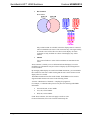
Additionally, the audio and video portions of an input signal can be switched
simultaneously or separately.
To enter the Route mode, press the ROUTE button. The ROUTE LED will light.
Switch Audio and Video
Simultaneously
1.
Press the A and V buttons to select the audio and video portions for
switching. The respective LEDS will light.
NOTE: If an output has different audio or video portions, a new route will
cause the audio portion on the output to switch to the newly selected video
input.
Switch Audio and Video
Separately
Operations Guide – DOC. 6714A
2.
Press the button corresponding to the input to be switched. The LED of the
selected input will light. To turn off an output, deselect the input.
3.
Press the button(s) corresponding to the output(s) to be switched. The
LED(s) of the selected output(s) will light and the new route will be
connected.
4.
Repeat for any other routes to be changed.
1.
Press the A or V buttons to select the audio or video portions to be
switched. The respective LEDS will light.
2.
Press the button corresponding to the input to be switched. The LED of the
selected input will light. To turn off an output, deselect the input.
3.
Press the button(s) corresponding to the output(s) to be switched. The
LED(s) of the selected output(s) will light.
4.
Repeat for any other routes to be changed.
QuickSwitch HD™ HDMI Switchers: HD-MD8X1/2 • 25