1
Getting Started
The first question new DKEC owners need to
ask is,“Where should I install my DKEC?”
The installer and home owner should discuss
the question to come up with a mutually
satisfactory solution. The choice of where to
locate the DKEC is a very important one. The
DKEC is designed for the kitchen environment.
To get the maximum benefit from the product on
a daily basis, consider the following details:
•
Most kitchens have a “work triangle” as
defined by the sink, the refrigerator and the
stove. This is where people typically spend
most of their time while in the kitchen.
Consider how the unit will most easily be
viewed, taking into account that the display
can pivot 60 degrees to either side of
center.
•
How much light from sources such as
windows will fall directly on the screen?
Uncontrollable light flooding the screen
can make it difficult to view content on the
DKEC screen.
•
Don’t install the DKEC above a stove, a
coffee maker, sink, dishwasher vent or any
other location that will subject it to high
heat and/or humidity.
•
The installer will need to get the necessary
wiring to the unit. Careful consideration
needs to be given to how the installer plans
to run and conceal the wires. Consideration
should be given to suitable locations for the
junction boxes where wires will terminate
behind the unit.
Before beginning the installation of the DKEC
the installer should:
•
Read through all installation instructions.
•
Make sure all peripheral connections are
available at the installation location (TV
cable, electrical power, connections to
security locks, video monitor, phone line, or
Broadband).
•
Seek additional information from other
sections of this document including Internet
Connection Information and Video Mode
sections.
Verifying the Package Contents
•
•
•
•
•
•
•
•
•
•
•
•
•
•
•
DKEC unit
Use and Care Manual
Washable, wireless keyboard
Two (2) AA batteries for keyboard
Washable, wireless remote
Two (2) AAA batteries for remote
Two (2) Styli
AC Power Cord
Right Angle F connector.
PCMCIA Ethernet Card
Mounting Bracket
Mounting Template
Connectivity Template
Quick Start Guide
Remote and Keyboard Guide
Tool Checklist
The following tools may be necessary for
installing the DKEC:
•
Drill and drill bits
•
Standard and Phillips head screwdrivers
•
Small standard screwdriver
•
Wallboard saw or knife
•
Center punch or awl
•
RJ45/RJ11 crimping tool
•
RG6 - f connector - stripping/crimping tool
•
Masking tape
•
Tape measure
•
Pliers
•
Zip ties
Note:
Mounting screws are NOT
included with the DKEC. While
we recommend the use of six
5/16” T-nuts and screws, it is
impossible to predict the length
of screws needed for a particular
customer’s installation.
WARNING:
Installation of this device should
be performed by a professional.
Proper installation requires
ensuring that the supporting unit
can bear the weight of the device,
that all mountings are secure
and that electrical and telephone
wiring meets local building codes,
and that all mounting instructions
are followed. IMPROPER
INSTALLATION COULD LEAD TO
PROPERTY DAMAGE, SEVERE
PERSONAL INJURY OR DEATH.
Dacor disclaims any and all
liability for damages and/or
injury resulting from improper
installation.
Note:
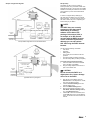
If you are installing the DKEC
in a site that has structured
wiring, see Internet Connection
Information for more information.
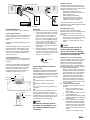
Also see Connectivity Template
on page 3 for suggested
termination layout.
Prepare the Site
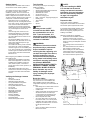
The two most common installation
configurations for the DKEC are shown below.
The minimum space required is also shown.
It is advisable that the DKEC installer consult
with the kitchen cabinet installer to ensure
that the site is properly prepared prior to the
installing of the DKEC.
Selecting a suitable site for installation:
•
Avoid areas where the DKEC would be
exposed to extreme heat or moisture.
•
Allow a full 11” of horizontal space (front to
back), accounting for backsplash and trim if
necessary.
•
The mounting surface must be flat and
level.
•
The cabinet material must be at least ½”
thick and able to support 30 lbs.
•
When installing the unit, allow sufficient
vertical space above the countertop to
accommodate screen in lowered position.
The minimum distance required is 13”.
3 3/4”
(97mm)
13”
(330mm)
23 5/8”
(600mm)
10 13/16”
(275mm)
Route the Cables
The following is the full list of cables that
may need to be run to the installation site.
Each installation site will require different
configurations depending on how the DKEC will
be used.
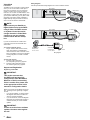
•
RG6 cabling with a coaxial cable connector
(F-style) for the cable TV service.
•
S-Video cable
•
Analog signal cable, left and right channel
with RCA connectors for audio input
or output (these are separate from the
connectors for the internal speakers).
•
RCA Composite video cable
•
AC power cables with a ground should
be routed to within 3 ¾” of the top of the
installation site to hide cables from view.
•
Telephone wire with the RJ11 connectors
for Dial-Up Internet access.
-or•
CAT 5 wire with an RJ45 connector for
Ethernet connection.
Shown in a Custom Built Nook
23 5/8”
(600mm)
13”
(330mm)
10 13/16”
(275mm)
Shown Under a Standard Flat Cabinet Surface