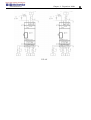
1
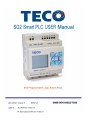
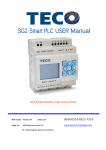
SG2 Smart PLC USER Manual
SG2 Programmable Logic Smart Relay
4KA72X023 Version: 03
Apply to:
2009.07.03
SG2 firmware version 3.0,
PC client program software version 3.0
0086-0510-8522-7555
www.taian-technology.com
4KA72X023
I
Contents
Contents ...............................................................................................................................I
Summary of changes ....................................................................................................... Ⅳ
Chapter 1: Getting Started ................................................................................................. 1
Examination before Installation .............................................................................................................................. 2
Environmental Precautions ..................................................................................................................................... 2
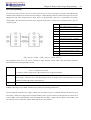
SG2 Model Identification........................................................................................................................................ 2
Quick Start Setup............................................................................................................... 4
Install SG2 Client Software.................................................................................................................................. 4
Connect Power to SG2 smart relay ..................................................................................................................... 4
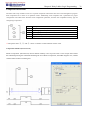
Connect Programming Cable .................................................................................................................................. 5
Establish Communication ....................................................................................................................................... 5
Write simple program ............................................................................................................................................. 6
Chapter 2: Installation ......................................................................................................10
General Specifications ...........................................................................................................................................10
Product Specifications............................................................................................................................................13
Mounting................................................................................................................................................................14
Wiring ....................................................................................................................................................................16
Indicator Light .......................................................................................................................................................18
Chapter 3: Program Tools................................................................................................ 19
PC Programming Software “SG2 Client” ............................................................................................................. 19
Installing the Software .................................................................................................................................. 19
Connecting the Software ................................................................................................................................20
Start Screen ....................................................................................................................................................20
Ladder Logic Programming Environment .....................................................................................................21
Menus, Icons and Status Displays..................................................................................................................22
Programming..................................................................................................................................................23
Simulation Mode............................................................................................................................................24
Establish Communication ..............................................................................................................................24
Writing Program to smart relay......................................................................................................................25
Operation menu..............................................................................................................................................25
Online Monitoring/Editing.............................................................................................................................26
HMI/TEXT ....................................................................................................................................................27
Program Documentation ................................................................................................................................30
AQ Set…........................................................................................................................................................31
Memory Cartridge (sold separately) ......................................................................................................................33
LCD Display and Keypad ......................................................................................................................................34
Keypad ...........................................................................................................................................................34
Original Screen ..............................................................................................................................................34
LCD Display Main Menu...............................................................................................................................36
4KA72X023
II
Chapter 4: Relay Ladder Logic Programming .................................................................45
Common Memory Types........................................................................................................................................45
Specialty Memory Types........................................................................................................................................48
Output Instructions................................................................................................................................................ 49
Analog memory type..............................................................................................................................................50
Timer Instruction....................................................................................................................................................51
Counter Instructions.............................................................................................................................................. 59
Real Time Clock (RTC) Instructions .................................................................................................................... 69
Comparator Instructions.........................................................................................................................................76
HMI Display Instructions...................................................................................................................................... 79
PWM Output Instruction (DC Transistor Output Models Only)............................................................................82
Data Link/Remote I/O Instruction (SG2-20Vxxx model only)..............................................................................85
SHIFT (shift output).............................................................................................................................................. 88
AQ (Analog Output) ............................................................................................................................................. 89
AS (Add-Subtract) .................................................................................................................................................90
MD (MUL-DIV) ....................................................................................................................................................91
PID (Proportion- Integral- Differential).................................................................................................................92
MX (Multiplexer)...................................................................................................................................................93
AR (Analog-Ramp)................................................................................................................................................94
DR (Data register)..................................................................................................................................................96
MU (MODBUS) (only V type model) .................................................................................................................. 98
Chapter 5: Function Block Diagram Programming .......................................................101
Coil Block Instruction..........................................................................................................................................101
HMI..............................................................................................................................................................102
PWM function block (only transistor output version)..................................................................................102
Data Link function block .............................................................................................................................103
SHIFT function block ..................................................................................................................................103
Logic Block Instructions......................................................................................................................................104
AND Logic Diagram....................................................................................................................................104
AND (EDGE) Logic Diagram .....................................................................................................................104
NAND Logic Diagram.................................................................................................................................105
NAND (EDGE) Logic Diagram...................................................................................................................105
OR Logic Diagram.......................................................................................................................................105
NOR Logic Diagram....................................................................................................................................106
XOR Logic Diagram....................................................................................................................................106
SR Logic Diagram .......................................................................................................................................106
NOT Logic Diagram ....................................................................................................................................106
Pulse Logic Diagram....................................................................................................................................107
BOOLEAN Logic Diagram .........................................................................................................................107
Function Block.....................................................................................................................................................108
Timer Function Block ..................................................................................................................................109
Common Counter function block.................................................................................................................111
High Speed Counter Function Block ...........................................................................................................112
RTC Comparator Function Block ................................................................................................................113
Analog Comparator Function Block ............................................................................................................114
AS (ADD-SUB) function block ...................................................................................................................115
4KA72X023
III
MD (MUL-DIV) function block ..................................................................................................................115
PID (Proportion- Integral- Differential) function block...............................................................................116
MX (Multiplexer) function block.................................................................................................................116
AR (Analog-Ramp) function block..............................................................................................................116
DR (Data-Register) function block ..............................................................................................................116
MU (MODBUS) function block ..................................................................................................................117
Chapter 6: Hardware Specification ................................................................................118
Normal Specification ...........................................................................................................................................118
Product Specifications..........................................................................................................................................119
Power Specifications............................................................................................................................................120
Normal model machine Specifications ........................................................................................................120
12V DC model Specifications......................................................................................................................121
24V AC model Specifications ......................................................................................................................121
Power circuitry diagram...............................................................................................................................122
Input Specifications..............................................................................................................................................123
100~240V AC model ...................................................................................................................................123
24V AC model .............................................................................................................................................123
24V DC, 12I/O model ..................................................................................................................................124
24V DC, 20I/O model ..................................................................................................................................125
Output Specifications...........................................................................................................................................126
Output Port wiring notice.....................................................................................................................................126
Light Load....................................................................................................................................................126
Inductance Load...........................................................................................................................................127
Life of relay..................................................................................................................................................127
Size diagram of SG2 ............................................................................................................................................128
Chapter 7: 20 Pointe V type High-powered Models Instruction....................................129
Function Summarization ......................................................................................................................................129
Detail Instruction .................................................................................................................................................129
Remote IO function......................................................................................................................................131
IO Link Function..........................................................................................................................................132
Modbus RTU master ....................................................................................................................................133
Slaver via Modbus RTU protocol ................................................................................................................135
SG2 Modbus protocol ..........................................................................................................................................136
Chapter 8: Expansion Module........................................................................................137
Summarize ...........................................................................................................................................................137
Digital IO module ................................................................................................................................................139
Analog module.....................................................................................................................................................145
Communication module.......................................................................................................................................148
ModBus module...........................................................................................................................................148
DeviceNet COMM. Module.........................................................................................................................151
ProfiBus .......................................................................................................................................................154
Appendix: Keypad Programming...................................................................................157
Appendix A: Keypad programming in Ladder mode...........................................................................................157
Appendix B: Keypad programming in Ladder FUNCTION BLOCK .................................................................161
4KA72X023
IV
Summary of changes
This user manual is modified by firmware V3.0 and SG2 Client programming software V3.0. SG2 V3.0 adds some
new functions with firmware version V3.0 to strong SG2 function. The upgrade content is shown as the 2 tables
below simply. More information about idiographic function to see function instruction.
Edit and Display
Ladder
FBD
LCD
SG2 V3.0
300 lines
260blocks
4 lines * 16 characters
SG2 V2.x
200 lines
99blocks
4 lines * 12 characters
Contact and function block
input output
SG2 V3.0
Auxiliary relay M M
M 63(M01~M3F)
Auxiliary relay N
N
N 63(N01~N3F)
temperature input
analog output
PWM
HMI
Timer
AT
Counter
C
RTC
R
T
Analog Comparator G
AS(Add-Sub)
MD(Mul-Div)
PID
MX(Multiplexer)
NO
AR(Analog Ramp)
DR(Data Register)
MU(MODBUS)
Block
B
PM05(3rd)
SG2 V2.x
15(M1~MF)
Ladder: NO
FBD: 15(N1~NF)
4(AT01~AT04)
NO
AQ 4(AQ01~AQ04)
NO
P 2(P01~P02, P01 adds PLSY mode) 1(P1: PWM)
31(H01~H1F)
15(H1~HF)
T Ladder: 31(T01~T1F)
15(T1~TF)
FBD: 250(T01~TFA)
C Ladder: 31(C01~C1F)
15(C1~CF)
FBD: 250(C01~CFA)
R Ladder: 31(R01~R1F)
15(R1~RF)
FBD: 250(R01~RFA)
G Ladder: 31(G01~G1F)
15(G1~GF)
FBD: 250(G01~GFA)
Ladder: 31(AS01~AS1F)
NO
FBD: 250(AS01~ASFA)
Ladder: 31(MD01~MD1F)
NO
FBD: 250(MD01~MDFA)
Ladder: 15(PI01~PI0F)
NO
FBD: 30(PI01~PI1E)
NO Ladder: 15(MX01~MX0F)
NO
FBD: 250(MX01~MXFA)
Ladder: 15(AR01~AR0F)
NO
FBD: 30(AR01~AR1E)
240(DR01~DRF0)
NO
Ladder: 15(MU01~MU0F)
NO
FBD: 250(MU01~MUFA)
Logic function: BOOLEAN
NO
260(B001~B260)The capability of 99(B01~B99)The capability of each
B
each block is alterable, and the total block is fixed
capability of block is 6000bytes
PM05(3rd) can be used with all PM05 can not be used with SG2 V3.x
version of SG2
Chapter 1: Getting Started
1
Chapter 1: Getting Started
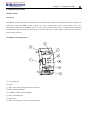
The SG2 tiny smart Relay is an electronic device. For safety reasons, please carefully read and follow the paragraphs
with "WARNING" or "CAUTION" symbols. They are important safety precautions to be aware of while transporting,
installing, operating, or examining the SG2 Controller.
WARNING: Personal injury may result from improper operation.
CAUTION: The SG2 smart relay may be damaged by improper operation.
Precaution for Installation
Compliance with the installation instructions and the user manual is absolutely necessary. Failure to comply
could lead to improper operation, equipment damage or in extreme cases even death, serious bodily injury or
considerable damage to property.
When installing the open-board models, insure that no wiring or foreign materials can fall into the exposed
circuits and components. Damage to equipment, fire, or considerable damage to property could result.
Always switch off power before you wire, connect, install, or remove any module.
The wiring for the SG2 smart relay is open and exposed. For the open-board models, all electrical components
are exposed. For this reason, it is recommended the SG2 smart relay be installed in an enclosure or cabinet to prevent
accidental contact or exposure to the electrical circuits and components.
Never install the product in an environment beyond the limits specified in this user manual such as high
temperature, humidity, dust, corrosive gas, vibration, etc.
Precaution for Wiring
Improper wiring and installation could lead to death, serious bodily injury or considerable damage to property.
The SG2 smart relay should only be installed and wired by properly experienced and certified personnel.
Make sure the wiring of the SG2 smart relay meets all applicable regulations and codes including local and
national standards and codes.
Be sure to properly size cables for the required current rating.
Always separate AC wiring, DC wiring with high-frequency switching cycles, and low-voltage signal wiring.
Precaution for Operation
To insure safety with the application of the SG2 smart relay, complete functional and safety testing must be
conducted. Only run the SG2 after all testing and confirming safe and proper operation is complete. Any potential
faults in the application should be included in the testing. Failure to do so could lead to improper operation,
equipment damage or in extreme cases even Death, serious bodily injury or considerable damage to property.
When the power is on, never contact the terminals, exposed conductors or electrical components. Failure to
comply could lead to improper operation, equipment damage or in extreme cases even death, serious bodily injury or
considerable damage to property.
It is strongly recommended to add safety protection such as an emergency stop and external interlock circuit in
case the SG2 smart relay operation must be shut down immediately.
Chapter 1: Getting Started
2
Examination before Installation
Every SG2 smart relay has been fully tested and examined before shipment. Please carry out the following
examination procedures after unpacking your SG2 smart relay.
• Check to see if the model number of the SG2 matches the model number that you ordered.
• Check to see whether any damage occurred to the SG2 during shipment. Do not connect the SG2 smart relay to the
power supply if there is any sign of damage.
Contact
if you find any abnormal conditions as mentioned above.
Environmental Precautions
The installation site of the SG2 smart relay is very important. It relates directly to the functionality and the life span
of your SG2. Please carefully choose an installation site that meets the following requirements:
• Mount the unit vertically
• Environment temperature: -4°F - 131°F (-20°C - 55°C)
• Avoid placing SG2 close to any heating equipment
• Avoid dripping water, condensation, or humid environment
• Avoid direct sunlight
• Avoid oil, grease, and gas
• Avoid contact with corrosive gases and liquids
• Prevent foreign dust, flecks, or metal scraps from contacting the SG2 smart relay
• Avoid electric-magnetic interference (soldering or power machinery)
• Avoid excessive vibration; if vibration cannot be avoided, an anti-rattle mounting device should be installed to
reduce vibration.
Disclaim of Liability
We have reviewed the contents of this publication to ensure consistency with the hardware and software described.
Since variance cannot be precluded entirely, we cannot guarantee full consistency. However, the information in this
publication is reviewed regularly and any necessary corrections are included in subsequent editions.
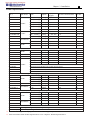
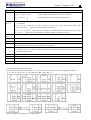
SG2 Model Identification
Quick Start Setup
4
Quick Start Setup
This section is a simple 5-steps guide to connecting, programming and operating your new SG2 smart relay. This is
not intended to be the complete instructions for programming and installation of your system. Many steps refer to
other sections in the manual for more detailed information.
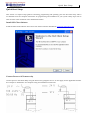
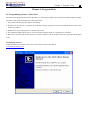
Install SG2 Client Software
Install the SG2 Client Software from CD or from the free internet download at www.taian-technology.com
Connect Power to SG2 smart relay
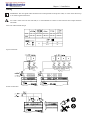
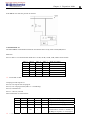
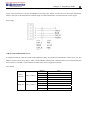
Connect power to the Smart Relay using the below wiring diagrams for AC or DC supply for the applicable modules.
See “Chapter 2: Installation” for complete wiring and installation instructions.
Quick Start Setup
5
Connect Programming Cable
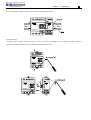
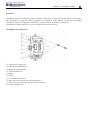
Remove the plastic connector cover from the SG2 using a flathead screwdriver as shown in the figure below. Insert
the plastic connector end of the programming cable into the SG2 smart relay as shown in the figure below. Connect
the opposite end of the cable to an RS232 serial port on the computer.
Establish Communication
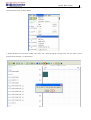
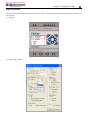
a. Open the SG2 Client software and select “New Ladder Document” as shown below left.
b. Select “Operation/Link Com Port…” as shown below right.
Quick Start Setup
6
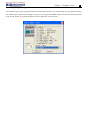
c. Select the correct Com Port number where the programming cable is connected to the computer then press the
“Link” button.
d. The SG2 Client will then begin to detect the connected smart relay to complete its connection.
Write simple program
a.
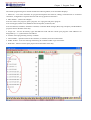
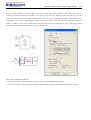
Write a simple one rung program by clicking on the leftmost cell at line 001 of the programming grid, then click
on the “M” contact icon on the ladder toolbar, as shown below. Select M01 and press the OK button. See Chapter
4: Ladder Programming instructions for complete instruction set definitions.
Note: If the ladder toolbar is not visible at the bottom of the screen, select View>>Ladder Toolbar from the menu to
enable.
Quick Start Setup
7
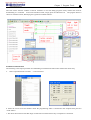
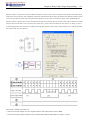
b. Use the “A” key on your keyboard (or the “A” icon on the ladder toolbar) to draw the horizontal circuit line from
the M contact to the right most cell, as shown below.
c. Select the “Q” coil icon from the ladder toolbar and drop it on the right most cells. Select Q01 from the dialog and
press OK as shown below. See Chapter 4: Ladder Programming instructions for complete instruction set definitions.
Quick Start Setup
8
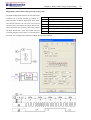
d. Test the simple program. From the Operation menu, select the Write function and write the program to the
connected smart relay as shown below.
e. Select the RUN icon from the toolbar, and select “No” when the pop-up message asks “Do you want to read
program from module?”, as shown below.
Quick Start Setup
9
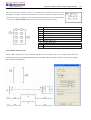
f. On the Input Status dialog, click on M01 to activate the contact M01 which will turn ON the Output Q01 as shown
below. The highlighted circuit will show active and the first Output (Q01) on the connected smart relay will be ON.
See Chapter 3: Programming Tools for more detailed software information.
Chapter 2 Installation
10
Chapter 2: Installation
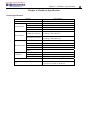
General Specifications
SG2 is a miniature smart Relay with a maximum of 44 I/O points and can be programmed in Relay Ladder Logic or
FBD (Function Block Diagram) program. The SG2 can expand to its maximum I/O count by adding 3 groups of
4-input and 4-output modules.
Power Supply
24V DC Models: 20.4-28.8V
Input Power Voltage Range
12V DC Models: 10.4~14.4V
AC Models: 85-265V
24V AC Models: 20.4-28.8V
24VDC: 12-point :125mA
20-point: 185mA
Power Consumption
12VDC: 12-point: 195mA
20-point: 265mA
100-240VAC: 100mA
24VAC: 290mA
Wire Size (all terminals)
26 to 14 AWG
Programming
Programming languages
Ladder/Function Block Diagram
Program Memory
300 Lines or 260 Function Blocks
Programming storage media
Flash
Execution Speed
10ms/cycle
LCD Display
4 lines x 16 characters
Timers
Maximum Number
Ladder: 31;FBD: 250
Timing ranges
0.01s–9999min
Counters
Maximum Number
Ladder: 31;FBD: 250
Highest count
999999
Resolution
1
RTC (Real Time Clock)
Maximum Number
Ladder: 31;FBD: 250
Resolution
1min
Time span available
week, year, month, day, hour, min
Compare Instructions (Analog, Analog*gain + Offset, Timer, Counter,
(AT), Analog Output (AQ), AS, MD, PI, MX, AR and DR Values)
Temperature Input
Chapter 2 Installation
11
Analog compare
Maximum Number
Ladder: 31;FBD: 250
Analog, Timer, Counter,
Compare versus other inputs
Temperature Input (AT),
Analog Output (AQ), Analog*gain + Offset,
PI, MX, AR , DR , or Numeric values
Environmental
Enclosure Type
IP20
Maximum Vibration
1G according to IEC60068-2-6
Operating Temperature Range
-4° to 131°F (-20° to 55°C)
Storage Temperature Range
-40° to 158°F (-40° to 70°C)
Maximum Humidity
90% (Relative, non-condensing)
Vibration
0.075mm amplitude, 1.0g acceleration
8-point:190g
Weight
Agency Approvals
10,12-point: 230g
(C type: 160g)
20-point: 345g
(C type: 250g)
CUL , CE, UL
Discrete Inputs
3.2mA @24VDC
Current consumption
4mA @12VDC
1.3mA @100-240VAC
3.3mA @24VAC
24VDC: < 5VDC;
Input Signal ”OFF” Threshold
12VDC: < 2.5VDC
100-240VAC : < 40VAC
24VAC: <6VAC
24VDC: > 15VDC;
Input Signal ”ON” Threshold
12VDC: > 7.5VDC
100-240VAC : > 79VAC
24VAC: >14VAC
24, 12VDC: 5ms
Input On delay
240VAC: 25ms;
120VAC: 50ms
24VAC: 5ms
24, 12VDC: 3ms
Input Off Delay
240VAC: 90/85ms 50/60Hz ;
120VAC: 50/45ms 50/60Hz
24VAC: 3ms
Transistor device compatibility
NPN, 3-wire device only
High Speed Input frequency
1kHz
Standard Input frequency
< 40 Hz
Required protection
Inverse voltage protection required
AS, MD,
Chapter 2 Installation
12
Analog Inputs
Resolution
Basic unit: 12 bit
Expansion unit: 12bit
Basic unit: Analog input: 0-10VDC voltage,
Voltage Range acceptable
24VDC when used as discrete input;
Expansion unit: Analog input: 0-10VDC voltage or
0-20mA current
Input Signal ”OFF” Threshold
< 5VDC (as 24VDC discreet input)
Input Signal ”ON” Threshold
> 9.8VDC (as 24VDC discreet input)
Isolation
None
Short circuit protection
Yes
Total number available
Basic unit: A01-A04
Expansion unit: A05-A08
Relay Outputs
Contact material
Ag Alloy
Current rating
8A
HP rating
1/3HP@120V 1/2HP@250V
Maximum Load
Resistive: 8A /point
Inductive: 4A /point
Maximum operating time
15ms (normal condition)
Life expectancy (rated load)
100k operations
Minimum load
16.7mA
Transistor Outputs
PWM max. output frequency
1.0kHz (0.5ms on,0.5ms off)
Standard max. output frequency
100Hz
Voltage specification
10-28.8VDC
Current capacity
1A
Maximum Load
Minimum Load
Resistive: 0.5A/point
Inductive: 0.3A/point
0.2mA
Chapter 2 Installation
13
Product Specifications
Inputs
Outputs
SG2-12HR-D
6 DC, 2 Analog
4 Relay
Display
&
RS-485 Communications Max I/O
Keypad
√, Z01-Z04 N/A
36 + 4 *1
SG2-12HT-D
6 DC, 2 Analog
4 Trans.
√, Z01-Z04
N/A
36 + 4 *1
8 DC, 4 Analog
8 Relay
√, Z01-Z04
N/A
44 + 4 *1
8 DC, 4 Analog
8 Trans.
√, Z01-Z04
N/A
44 + 4 *1
SG2-20VR-D
8 DC, 4 Analog
8 Relay
√, Z01-Z04
Built-in MODBUS
44 + 4 *1
SG2-20VT-D
8 DC, 4 Analog
8 Trans.
√, Z01-Z04
Built-in MODBUS
44 + 4 *1
SG2-12HR-12D
6 DC, 2 Analog
4 Relay
√, Z01-Z04
N/A
36 + 4 *1
SG2-20HR-12D 12 VDC
8 DC, 4 Analog
8 Relay
√, Z01-Z04
N/A
44 + 4 *1
SG2-20VR-12D
8 DC, 4 Analog
8 Relay
√, Z01-Z04
Built-in MODBUS
44 + 4 *1
6 AC
4 Relay
√, Z01-Z04
N/A
34+ 4 *1
12 AC
8 Relay
√, Z01-Z04
N/A
44 + 4 *1
8 AC
4 Relay
√, Z01-Z04
N/A
36 + 4 *1
Part #
SG2-20HR-D
SG2-20HT-D
SG2-10HR-A
SG2-20HR-A
SG2-12HR-24A
Input Power
24 VDC
100-240 VAC
24VDC
SG2-20HR-24A
12 AC
8 Relay √, Z01-Z04 N/A
Expansion Modules
SG2-8ER-D
4 DC
4 Relay N/A
N/A
24VDC
SG2-8ET-D
4 DC
4 Trans. N/A
N/A
SG2-8ER-A
100-240VAC 4 AC
4 Relay N/A
N/A
SG2-8ER-24A 24VAC
4 AC
4 Relay N/A
N/A
SG2-4AI
4 Analog
N/A
N/A
N/A
SG2-4PT
4 Analog
N/A
N/A
N/A
SG2-2AO
N/A
2 Analog N/A
N/A
24 VDC
SG2-MBUS
Communications Module, RS-485 ModBus RTU slaver
SG2-DNET
Communications Module, DeviceNet Group2 slaver
SG2-PBUS
Communications Module, Profibus-DP slaver
EN01
Communications Module, TCP/IP
OEM “Blind” Models, No Keypad, No Display
SG2-12KR-D
6 DC, 2 Analog 4 Relay X
N/A
SG2-12KT-D
6 DC, 2 Analog 4 Trans. X
N/A
24VDC
SG2-20KR-D
8 DC, 4 Analog 8 Relay X
N/A
SG2-20KT-D
8 DC, 4 Analog 8 Trans. X
N/A
SG2-12KR-12D 12VDC
6 DC, 2 Analog 4 Relay X
N/A
SG2-10KR-A
6 AC
4 Relay X
N/A
100-240VAC
SG2-20KR-A
12 AC
8 Relay X
N/A
OEM “Baseboard” Models, No Keypad, No Display, No Expansion
SG2-12CR-D
6 DC, 2 Analog 4 Relay X
N/A
SG2-12CT-D
6 DC, 2 Analog 4 Trans. X
N/A
24VDC
SG2-20CR-D
8 DC, 4 Analog 8 Relay X
N/A
SG2-20CT-D
8 DC, 4 Analog 8 Trans. X
N/A
SG2-10CR-A
6 AC
4 Relay X
N/A
100-240VAC
SG2-20CR-A
12 AC
8 Relay X
N/A
Accessories
SG2-PL01
SG2 Programming Cable, SG2 Programming software
SG2-PM05(3rd) SG2 Memory cartridge
※ If module with keypad and display, Max IO can be added keypad input Z01-Z04.
※ More information about Product Specifications to see “chapter 6: Product Specifications”.
44 + 4 *1
N/A
N/A
N/A
N/A
N/A
N/A
N/A
36
36
44
44
36
34
44
12
12
20
20
10
20
Chapter 2 Installation
14
Mounting
DIN-rail Mounting
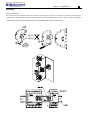
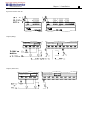
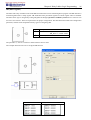
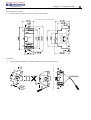
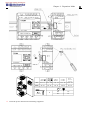
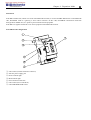
The SG2 smart relay should always be mounted vertically. Press the slots on the back of the SG2 and expansion
module plug CONNECTOR onto the rail until the plastic clamps hold the rails in place. Then connect the expansion
module and CONNECTOR with the Master (press the PRESS-BUTTON simultaneously)
+
-
DC 24V
I1 I2 I3
I4 I5 I6 A1 A2
Input 8 x DC(A1,A2 0~10V)
Input X1 X2 X3 X4
4×AC
L
N AC 100~240V
Run
SG2-8ER-A
SG2-12HR-D
Output 4 x Relay / 8A
Output 4 x Relay / 8A
Q1
Q2
Y1
Q3
Q4
Y3
Y2
Y4
Chapter 2 Installation
15
It is recommended to apply a DIN-rail end clamp to hold the SG2 in place.
+
-
DC 24V
I1 I2 I3 I4 I5 I6 A1 A2
Input X1 X2 X3 X4
4×AC
N
L
Input 8 x DC(A1,A2 0~10V)
AC 100~240V
Run
SG2-8ER-A
SG2-12HR-D
Output 4 x Relay / 8A
Output 4 x Relay / 8A
Q1
Q2
Y1
Q3
Y3
Q4
Y2
Y4
Direct Mounting
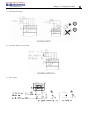
Use M4 screws to direct mount the SG2 as shown. For direct installation of the expansion module, slide the
expansion module and connect with the Master after the Master is fixed.
+
-
DC 24V
I1 I2 I3 I4 I5 I6 A1 A2
Input 8 x DC(A1,A2 0~10V)
Input X1 X2 X3 X4
4×AC
L
N AC 100~240V
Run
SG2-8ER-A
SG2-12HR-D
Output 4 x Relay / 8A
Output 4 x Relay / 8A
Q1
Q2
Y1
Q3
Q4
Y3
Y2
Y4
Chapter 2 Installation
16
Wiring
WARNING: The I/O signal cables should not be routed parallel to the power cable, or in the same cable trays
to avoid the signal interference.
To avoid a short circuit on the load side, it is recommended to connect a fuse between each output terminals
and loads.
Wire size and Terminal Torque
2
mm
0.14...1.5
0.14...0.75
0.14...2.5
0.14...2.5
0.14...1.5
AWG
26...16
26...18
26...14
26...14
26...16
C
3.5
(0.14in)
C
Nm
0.6
lb-in
5.4
Input 12/24V DC
+-
+
-
DC V
A1 A2
I1 I2 I3
I4 I5 I6 A1 A2
A1 A3
A2 A4
+-
+ -
I1 I2 I3
I4
DC V
Input
INPUT
Sensor Connection
+ -
DC V
I1 I2 I3
Input
I4 I5 I6 A1 A2
I5 I6
A1 A2 A3 A4
I7 I8
A1 A2 A3 A4
Chapter 2 Installation
17
Input 100~240V /24V AC
L N
I1 I2 I3
AC ..V
I4 I5
L N
I6
Input ......
I1 I2 I3
I4
AC ..V
I5 I6 I7 I8
I9 IA IB IC
INPUT ......
Output (Relay)
Output 4 x Relay / 8A
Q1
Q2
Output 8 x Relay / 8A
Q3
Q4
Q1
Q2
Q3
Q4
Q5
Q6
Q7
Q8
Output (Transistor)
OUTPUT 4 x TR / 0.5A
+Q1-
+Q2-
OUTPUT 8 x TR / 0.5A
+Q3-
+Q4-
+Q1-
+Q2-
+Q3-
+Q4-
+Q5-
+Q6-
+Q7-
+Q8-
Chapter 2 Installation
18
Data Link OR Remote I/O Link
A1 A2 A3 A4
A
S
B
A1 A2 A3 A4
S
RS485
A
B
A1 A2 A3 A4
RS485
S
A
B
RS485
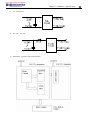
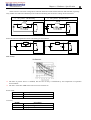
The power supply and the I/O supply should share the same power source. Only short circuit the first and the last
module.
When I/O link, the net can connect 8 products in max. (ID: 0-7).
When Remote I/O is available, it only can connect 2 products max (Master & Slave).
①-1A quick-blowing fuse, circuit-breaker or circuit protector
②-Surge absorber (36V DC)
③-Surge absorber (400V AC)
④-Fuse, circuit-breaker or circuit protector
⑤-Inductive load
⑥-Only short circuit the first product and the last product
⑦-Comply with standard: EIA RS-485.
※ More information about V type communication to see “Chapter 7 20 Pointe V type High-powered Models
Instruction”.
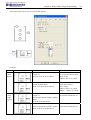
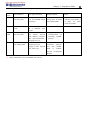
K type Indicator Light
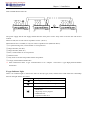
There is an indicator light to indicate the status of SG2 (K type) smart, and the below table shows the relationship
between the light and the SG2 status.
State of light
Description
Power up, SG2 is stopping
Flicker slow(2Hz), SG2 is running
Flicker quick(5Hz), SG2 is under failure status
—ROM error
—illogicality in user program
—EEPROM error
—expansion model error
Chapter 3 Program Tools
19
Chapter 3: Program Tools
PC Programming Software “SG2 Client”
The SG2 Client programming software provides two edit modes, Ladder Logic and Function Block Diagram (FBD).
The SG2 Client software includes the following features:
1. Easy and convenient program creation and editing.
2. Programs can be saved on a computer for archiving and reuse. Programs can also be uploaded directly from a SG2
and saved or edited.
3. Enables users to print programs for reference and review.
4. The Simulation Mode allows users to run and test their program before it is loaded to the controller.
5. Real-time communication allows the user to monitor and force I/O on the SG2 smart relay operation during RUN
mode.
Installing the Software
Install the SG2 Client Software from CD or from the free internet download at
www.taian-technology.com
Chapter 3 Program Tools
20
Connecting the Software
Remove the plastic connector cover from SG2 using a flathead screwdriver as shown in the figure below. Insert the
plastic connector end of the programming cable into the SG2 smart relay as shown in the figure below. Connect the
opposite end of the cable to an RS232C serial port on the computer.
Start Screen
Run the SG2 Client software and the below Start screen will be displayed. From this screen, you can perform the
following functions
New Ladder Program
Select File -->New -->New LAD to enter the development environment for a new Ladder program.
New FBD Program
Select File -->New -->New FBD to enter the development environment for a new FBD (Function Block Diagram)
program.
Open Existing File
Select File -->Open to choose the type of file to open (Ladder or FBD), and choose the desired program file, and
then click Open.
Chapter 3 Program Tools
21
Ladder Logic Programming Environment
The Ladder Logic Programming Environment includes all the functions for programming and testing the SG2 using
the Ladder Logic programming language. To begin a new program select File-->New, and select the desired model of
SG2, and the number of connected expansion units if applicable, as shown below.
Chapter 3 Program Tools
22
Menus, Icons and Status Displays
The Ladder programming environment includes the following Menus, Icons and Status Displays
1. Menu bar – Five menu selections for program development and retrieval, editing, communication to connected
controllers, configuration of special functions and viewing preference selections.
2. Main Toolbar – (From Left to Right)
Icons for create a new program, open a program, save a program and print a program.
Icons for Keypad, Ladder view, HMI/Text edit and Symbol (comments) edit.
Icons for Monitor, Simulator, Simulator Controller, Controller Mode changes (Run, Stop, and Quit), and Read/Write
programs from/to the SG2 smart relay.
3. Usage List – List for all memory types and addresses used with the current open program. Used addresses are
designated by a “*” symbol below each address.
4. Amount of free programming memory available.
5. Current Mode – operation mode of the controller, or simulator, from the connected PC.
6. Ladder Toolbar – Icons for selecting and entering all available Ladder Logic instructions.
7. Status Bar – Status of current open project and connect SG2 smart relay.
Chapter 3 Program Tools
23
Programming
The SG2 Client software can be programmed by either drag-and-drop of instructions or by using keyboard entry
commands. Below is an example of some common methods of entering programming instructions.
The “A” and “L” keys or icons are used to complete parallel and serial circuits. The right column is for output coils.
Chapter 3 Program Tools
24
Simulation Mode
The SG2 Client software includes a built-in simulator to test and debug programs easily without the need for
downloading to a controller.
To activate simulation mode, simply press the red RUN icon. The program below is
shown in simulation mode, identifying the significant available features.
Establish Communication
The following is the simple procedure for establishing communication between PC and the SG2 smart relay.
a.
Select “Operation/Link Com Port…” as shown below.
b. Select the correct Com Port number where the programming cable is connected to the computer then press the
“Link” button.
c. The SG2 Client software will then begin to detect the connected smart relay to complete its connection.
Chapter 3 Program Tools
25
Writing Program to smart relay
From the Operation menu, select the Write function and write the program to the connected smart relay as shown
below, or press Write button to write program to connected smart relay as shown below.
Operation menu
The Operation menu, includes several system configuration functions for both online and offline setup. The following
explains the details of each function.
Monitor – Online function for runtime monitor and editing when connected to a controller
Simulator – Offline function for testing and debugging a program.
Simulator Control – Self-motion simulator control
Run-Stop-Quit – Mode change selections for both runtime editing and simulation mode.
Read-Write – Reading and writing programs to and from a connected SG2 smart relay.
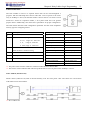
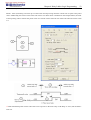
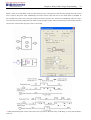
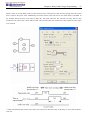
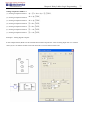
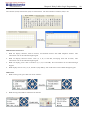
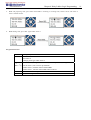
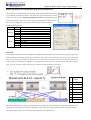
RTC Set – Online function for setup of the Real-time clock/calendar (see dialog below left)
Analog Set – setup analog input A01-A08 gain and offset (see dialog below right)
Password – Set a password for accessing the current program after upload to the smart relay
Language – Change SG2 smart relay menu language
Module System Set – Dialog for changing important system setup functions including Module ID,
Remote I/O preferences, Expansion I/O settings, and Retentive memory preferences (Keeping) for (C) Counters, (M)
Auxiliary Coils, and (Z) keypad input set and the LCD Backlight.
Link Com Port – Select the port communication with SG2 smart relay.
Chapter 3 Program Tools
26
Online Monitoring/Editing
The SG2 Client software allows for online monitoring of the currently running program during runtime. Additional
online functions include, I/O forcing, and Mode changes (Run/Stop/Quit).
※ The SG2 Client software does not support runtime logic editing changes. All logic edits to contacts, coils,
Timers/Counters, and circuit connecting lines must be written to the connected smart relay while in Stop mode.
Chapter 3 Program Tools
27
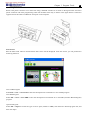
HMI/TEXT
This function block can display information on 16×4 LCD screen. Information displaying can be present value or
target value of Counter, Timer, RTC and Analog comparator etc. Under running mode, to modify the target value of
timer, counter and analog comparator via HMI is available. HMI can display the status of input terminal (I, Z, X) and
Auxiliary terminal M, N (only FBD).
HMI/TEXT setting:
Chapter 3 Program Tools
28
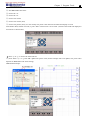
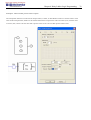
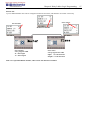
① Enter H01 coil
② Into HMI/TEXT edit frame
③ Choice the “T”
④ Choice the “E”
⑤ Choice T01 current
⑥ Choice T01 current (unit)
⑦ Choice T01 present (unit), user can modify T01 preset value when H coil enable and display on LCD
Download to SG2, and I01 turn ON, or press “SEL” if the H coils is set to mode 1, then the SG2 LCD will display the
first H text as shown below.
Ⅰ, Press “↑” or “↓” to choice the nearest H coil
Ⅱ, Press “SEL”+“↑” or “↓”and “OK” update T01 preset value (In this example, 050.0 can update, T01 preset value
depends on HMI/TEXT edit frame setting.)
HMI/TEXT Example:
Chapter 3 Program Tools
Power ON and RUN (initial display)
29
Press “↑” (Z01) and display H03 coil
① Press “SEL” to display cursor
② Press “↑”, “↓”, “←”, “→” to move cursor
③ Press “SEL” again to choice modified position
④ Press “↑”, “↓” to change number and press “←”, “→” to move cursor
⑤ Press “OK” to make sure the modify value
Press “←” (Z02) to disable H03 coil, and the LCD display changes to initial
frame.
Press “↓” to reset Timer (T01、T02、T03) as program designed.
Chapter 3 Program Tools
30
Program Documentation
The SG2 Client software includes the ability to document a program using Symbols and Line Comments. Symbols
are used to label each I/O address up to a length of 12 characters. Line Comments are used to document sections of a
program. Each Line Comment can have up to 4 lines with each line containing up to 50 characters in length. Below
are examples of entering Symbols and Line Comments.
Symbol…
The Symbol editing environment can be access through the menu using the Edit>>symbol… selection or using the
symbol icon on the main toolbar shown below.
The Symbol editing environment allows for documenting all the contact and coil memory types, and selecting display
modes as shown below.
Chapter 3 Program Tools
31
Line Comments
The Line Comment editor is accessed by clicking the “N” icon on the Ladder Toolbar. After clicking on the “N” icon,
to drag the line number you want to comment and release, and then type the desired comments and press OK.
AQ Set…
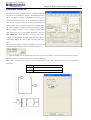
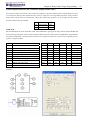
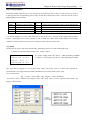
The AQ editing environment can be access through the menu using the Edit>> AQ Set… selection shown below. The
range of AQ is 0~1000 if the output mode of AQ is voltage mode. And the range is 0~500 if the output mode is
current mode. The preset value of AQ can be set as either a constant or a code of other data. The output mode of AQ
and preset value are set as below. More information about output mode and displaying to see: Chapter 4: Relay
Ladder Logic Programming
Chapter 3 Program Tools
32
Data Register Set…
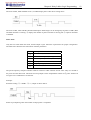
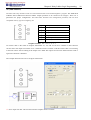
The content of Data Register is either unsigned or sign, it can be set as shown below. Selecting Unsigned, the range
of DR is 0~65535; and selecting Signed, the range of DR is -32768~32767.
After the operating above, the Data Register editing environment can be access through the menu using the Edit>>
Data Register Set… selection shown below. The preset value of DR can be set as either a constant or a code of other
data type.
DR is set as signed shown below.
Chapter 3 Program Tools
33
Memory Cartridge (sold separately)
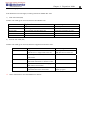
PM05 (3rd) is a special kind of PM05, it can be used in all version of SG2. There is an icon
on SG2 V3
smart and side of PM05 (3rd).
About to use PM05 and PM05 (3rd) with SG2V2/3, see next figure:
SG2V2
PM05
PM05 (3rd)
SG2V2
SG2V3
SG2V3
PM05 (3rd)
SG2V3
The optional PM05 (3rd) memory cartridge is used to easily transfer programs from one smart relay to another. The
PM05 (3rd) memory cartridge plugs into the same connector as the programming cable (see procedure below).
1. Remove the plastic connector cover from SG2 using a flathead screwdriver as shown in the figure below.
2. Insert the PM05 (3rd) memory cartridge onto the connector as shown below.
3. From the display keypad on the face of the SG2 smart relay, select either WRITE or READ to transfer the
program to PM05 (3rd) or from the PM05 (3rd) memory cartridge to the smart relay.
4, K type and C type, electrify the product, the program in PM05 (3rd) will automatically download and executed.
5, Program in different types are not compatible, here are the regulations:
A-1: 10/12 point type program ---- available in 20 point type
A-2: 20 point type program ---- unavailable in 10/12 point type
B-1: AC type program ---- available in DC type
B-2: DC type program ---- unavailable in AC type
C-1: Relay type program ---- available in Transistor type
C-2: Transistor type program ---- unavailable in Relay type
D-1: Not-V type program ---- available V type
D-2: V type program ---- unavailable Not-V type
E-1: SG2V2 program ---- available SG2V3 type
E-2: SG2V3 program ---- unavailable SG2V2 type
Chapter 3 Program Tools
34
LCD Display and Keypad
Keypad
Most SG2 CPU units include the built-in LCD Display and Keypad. The keypad and display are most often used for
changing timer/counter set points, controller mode changes (Run/Stop), uploading/downloading to the PM05 memory
cartridge, and updating the RTC (Real Time Clock/Calendar). Although, logic programming can be performed from
the keypad and display, it is highly recommended to only perform logic changes using the SG2 Client software.
Below is an overview of the basic keypad and display functions.
Select (SEL) – Used to select the available memory and instruction types for editing. Holding the Select button will
display all “H” HMI/Text messages on the LCD.
OK – Used to accept the selection displayed of an instruction or function. It is also used to select any of the Main
Menu options on the LCD.
Note: Press the “SEL” and “OK” simultaneously to insert a rung above the current active cursor position.
Escape – Used to exit a selected display screen and go to the previous screen. When in a ladder display screen, press
the ESC to display the main menu.
Delete – Used to delete an instruction or rung from the ladder program.
The 4 navigation buttons (↑←↓→) are used to move the cursor throughout the functions of the SG2 display or active
program. The 4 buttons also can be set programmable input coils Z01-Z04 (‘↑’= Z01, ‘←’=Z02, ‘↓’=Z03, ‘→’ =Z04);
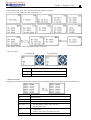
Original Screen
LCD displays 4-line state
◎ Original screen as power on
Chapter 3 Program Tools
35
Press the button:
ESC
Enter Main Menu screen
Under LADDER Mode, display the state of relays (I ⇔ Z ⇔ Q ⇔ X ⇔ Y ⇔
SEL+↑ ↓
M ⇔ N ⇔ T ⇔ C ⇔ R ⇔ G ⇔ A ⇔ AT ⇔ AQ) ⇔ Original Screen
↑↓
Under FBD Mode, display the state of relays (I ⇔ Z ⇔ Q ⇔ X ⇔ Y ⇔ M ⇔
N ⇔ A ⇔ AT ⇔ AQ) ⇔ Original Screen
SEL
H Function will be displayed whose mode is 1 as the button is pressed.
SEL+OK
Enter RTC setting screen
◎ Expansion display State
※ Expansion module setting: refer to Main Menu “SET”
◎ Other Display State
Ladder edit mode: Coil I, Z, X, Q, Y, M, N, T, C, R, G, D, Analog input A01~A04, Expansion Analog input A05~A08,
temperature analog input AT01~AT04, analog output AQ01~AQ04;
FBD edit mode: Coil I, Z, X, Q, Y, M, N, Analog input A01~A04, Expansion Analog input A05~A08, temperature
analog input AT01~AT04, analog output AQ01~AQ04;
Chapter 3 Program Tools
36
LCD Display Main Menu
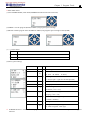
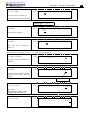
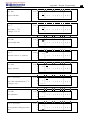
(1) The Main Menu as SG2 under ‘STOP’ Mode.
Into ladder main function to press ESC after power on when the user program is ladder type or empty program.
Into FBD main function to press ESC after power on when the user program is FBD type or empty program.
Menu
Description
>
LADDER
Ladder edit
FUN.BLOCK
Ladder function block
(timer/counter/RTC …) edit
FBD
FBD display
PARAMETER
FBD block or LADDER function
block parameter display
RUN
RUN or STOP
DATA REGISTER
DR display
CLEAR PROG.
Clear the user program and the
password
WRITE
Save user program to PM05 (3rd)
READ
Read user Program from PM05
SET
System setting
RTC SET
RTC setting
ANALOG SET
Analog setting
PASSWORD
Password setting
LANGUAGE
Select the language
INITIAL
initially set Edit method
Chapter 3 Program Tools
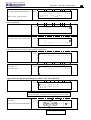
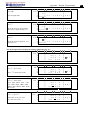
(2) The Main Menu as SG2 under ‘RUN’ Mode.
>
LADDER
FUN.BLOCK
FBD
PARAMETER
STOP
DATA REGISTER
WRITE
RTC SET
PASSWORD
LANGUAGE
Press the Button
↑
↓
Move the Cursor to select Main Menu
OK
Confirm the selected Function
ESC
Skip to Initial Screen
※SG2 can be modified, edited, cleared and read user program only when it is under STOP Mode.
※As the program is modified, SG2 will automatically backup it to FLASH.
◎ Main Menu LADDER
37
Chapter 3 Program Tools
38
Press the Button
Button
SEL
Description
1. Ixx ⇒ ixx ⇒ ── ⇒ space ⇒ Ixx (only for digital and character position of 1, 3, 5 column.)
2. Qxx ⇒ space ⇒ Qxx
3. ┬ ⇒ Space⇒ ┬
┴
┴
SEL,
then ↑/ ↓
SEL ,
then ←/→
↑↓←→
DEL
ESC
OK
SEL+DEL
SEL+ESC
(only for digital and character position of 8 column.).
(all available but the 2,4,6 column of the first line)
1. I ⇔ X ⇔ Z ⇔Q ⇔ Y⇔ M ⇔ N ⇔ D ⇔ T ⇔ C ⇔ R ⇔ G ⇔ I
(When the cursor located at 1,
3, 5 Column).
2. Q ⇔ Y ⇔ M ⇔ N ⇔ T ⇔ C ⇔ R ⇔ G ⇔H ⇔ L ⇔P ⇔ S ⇔ AS ⇔ MD ⇔ PI ⇔ MX ⇔ AR ⇔
DR ⇔ MU ⇔Q
(When the cursor located at 8 Column)
3. ( ⇔ ¿ ⇔ À ⇔ P ⇔ ( (When the cursor located at 7 Column, and the 8 Column is set as Q, Y, M, N)
4. ( ⇔ P ⇔ (
(When the cursor located at 7 Column, and the 8 Column is set as T)
Confirm the input data and move the cursor
move the cursor
Delete an instruction
1. Cancel the Instruction or action under Edition.
2. Back to Main Menu after query the program (save program).
1. Confirm the data and automatically save, the cursor moves to next input position.
2. When the cursor is on Column 8, Press the button to automatically enter the function block and set the
parameters(such as T/C)。
Delete a Line of Instruction.
Display the number of the Lines and operation state of SG2 (RUN/STOP)。
Skip up/ down every 4-line program.
SEL+↑/ ↓
SEL+OK
Insert a space line
Operation Sample: more detailed to see appendix A.
◎ FUNCTION BLOCK program input
Into FUNCTION BLOCK, cursor flicker on “T”, press “SEL” key, Ladder function block display in sequence:
T→C→R→G→H→L→P→S→AS→MD→PI→MX→AR→MU→T…
Operation Sample: more detailed to see Appendix B.
Chapter 3 Program Tools
39
◎PARAMETER
Under Ladder mode, press “SEL” key, function block display in sequence:
T→C→R→G→AS→MD→PI→MX→AR→MU→T…
Under FBD mode, Press “SEL” key, Block displays in sequence.
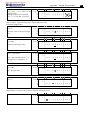
◎ RUN or STOP
(1) RUN Mode
↑
↓
(2) STOP Mode
Move the cursor
OK
Execute the instruction, then back to main menu
ESC
Back to main menu
◎DATA REGISTER
Displaying preset value when the smart is STOP status and displaying current value when the smart is RUN status.
↑↓←→
Move the cursor
OK
Ensure the edit
SEL
Enter edit (edit DR display number or DR preset value)
‘SEL’ then ‘SEL’
Edit DR preset value type
‘SEL’ then ‘↑ ↓’
1. Edit DR display number (only first line)
2. Edit DR preset value
ESC
SEL+↑/ ↓
1.
Cancel edit.
2.
Back to main menu (save DR preset data)
Tip-up/down page
Chapter 3 Program Tools
40
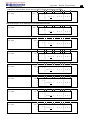
◎Other Menu Items
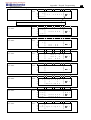
(1) CLEAR PROGRAM (Clear RAM, EEPROM and Password at the same time)
(2) WRITE: save the program (RAM) to PM05 (3rd) program spare cartridge
(3) READ: read the program from the PM05 or PM05 (3rd) program spare cartridge to SG2 (RAM)
(1) ∼ (3) Now Press:
↑
↓
Move the cursor
OK
Execute the instruction
ESC
Back to main menu
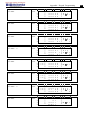
(4) SET (system setting)
content
default
ID SET
01
REMOTE I/O
BACK LIGHT
N
×
Æ
ID setting (00~99)
Æ
Remote I/O Mode
(N: none
Æ
M: Master
S: Slave)
Back light mode
(√: always light ×: light for 10s after pressed.)
M KEEP
√
Æ
M: non-Volatile (√:Volatile
I/O NUMBER
0
Æ
Setting expansion I/O module number (0~3)
Æ
Siren setting when is not available to Expansion
I/O ALARM
C KEEP
Z SET
V COMM SET
DATA REG.
√
×
×
03
U
×: Non- Volatile)
I/O Points (√:Yes ×:No)
Æ
in stop/run switching, Counter Present Value
Keeping (√:Yes ×:No)
Æ
Enable or disable keypad input Z01-Z04
(√:enable ×:disable)
Æ
Setting the form and baud rate of RS-485
Æ
Setting the Data Register type
(U: 16bit-unsiged S: 16bit-sign)
※ M KEEP function is available for keeping M status and current value of T0E/T0F when power is re-supplied
after loss.
Chapter 3 Program Tools
Now Press:
↑↓←→
SEL
‘SEL’ then ‘←/→’
‘SEL’ then ‘↑ /↓’
OK
ESC
Move the cursor
Begin to edit.
Move the cursor for ‘ID SET’ item and ‘V COMM SET’ item
1. ID SET = 00~99 ; I/O NUMBER = 0~3
2. REMOTE I/O = N⇔M⇔S⇔N
3. BACK LIGHT ; C KEEP ; Z SET = ×⇔√
4. M KEEP; I/O ALARM = √⇔×
5. V COMM SET = (0~3)(0~5)
6. DATA REG. = U⇔S
Confirm the Edition Data
1. Cancel the setting when pressed ‘SEL’
2. Back to Main Menu(save edit data)
※ When DATALINK is selected, ID setting range is 0~7, which should be continuous.
ID=0 default as Master, ID=1~7 default as Slave.
※ When REMOTE I/O is selected, the distribution of the remote I/O is as follows:
Remote Input
Master
X01~X0C
←
Slave
I01~I0C
Remote Output
Y01~Y08
→
Q01~Q08
※ The high bit of V COMM SET detects the form of RS-485, and the low bit detects the baud rate of RS-485.
More detailed to see chapter 4: Relay Logic Programming: Data Link/Remote IO Instruction
(5) RTC SET
Now Press
↑↓
SEL
‘SEL’ then ‘←/→’
‘SEL’ then ‘↑/↓’
‘SEL’ then ‘SEL’
OK
ESC
Enter RTC setting or Summer/Winter setting
Begin to input parameters
Move the Cursor
1. year=00~99, month=01~12, day=01~31
2. week: MO⇔TU⇔WE⇔TH⇔FR⇔SA⇔SU⇔MO
3. hour = 00~23 , minute = 00~59
Summer/Winter setting: NO – EUROPE – USA – OTHER – NO …
Save the Input Data
1. Cancel the Input Data when press ‘SEL’.
2. Back to Main Menu.
※ RTC precision
Temperature
+25℃
-20℃/+50℃
Error
±3s/day
±6s/day
41
Chapter 3 Program Tools
RTC Summer/Winter setting
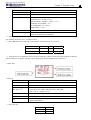
There are 2 fixed Summer/Winter, EUROPE and USA, 1 edit Summer/Winter in SG2.
Edit rule: ①The last Sunday is defined as 0;
②Hour range: 1~22;
③Summer hour and Winter hour are the same.
Summer/Winter can be set through the two methods as shown below.
1) PC Client
2) Keypad
Then pressing “→” selects edit location, pressing “↑”, “↓” edit content.
Example:
Year 2009, SUM M: 05 D: 01 → 2009-5-3; M: 10 D: 00 → 2009-10-25.
42
Chapter 3 Program Tools
(6) ANALOG SET
Æ
A 1=GAIN : 010
Æ
OFFSET : +00
A 2=GAIN : 010
OFFSET : +00
A3~A8…Gain + Offset
GAIN (0~999), default 10
OFFSET (-50~+50), default 0
Now Press
↑↓
SEL
‘SEL’ then ‘←/ →’
‘SEL’ then ‘↑/ ↓’
OK
ESC
1. Move downward the Cursor
2. Switch the setting screen from A01/A02Æ A03/A04Æ A50/A06
A07/A08
Begin to input parameters
Move the Cursor
1. GAIN =000~999
2. OFFSET=-50~+50
Save the Input Data
1. Cancel the Input Data when press ‘SEL’.
2. Back to Main Menu (save edit data).
※ V01 = A01*A01_GAIN + A01_OFFSET …… V08 = A08*A08_GAIN + A08_OFFSET
(7) PASSWORD (setting password)
Now Press
SEL
1. Begin to input numeral
2. When the password is ON, it will not display 0000, but ****.
‘SEL’ then ‘←/→’
Move the cursor
‘SEL’ then ‘↑/ ↓’
Data changed 0~F
OK
Save the input data, not 0000 or FFFF, as the PASSWORD is ON.
ESC
1. Cancel the Input Data when press ‘SEL’.
2. Back to Main Menu.
※ A Class: Password number is set to 0001~9FFF.
B Class: Password number is set to A000~FFFE.
Password number = 0000 or FFFF is disabled Password function, Default setting: 0000.
Æ
43
Chapter 3 Program Tools
A/B Class password Description (√:cannot use under password protected )
Menu
LADDER
A Class
√
B Class
√
FUN.BLOCK
√
√
FBD
√
√
PARAMETER
√
RUN/STOP
DATA REGISTER
CLEAR PROG.
WRITE
READ
SET
RTC SET
ANALOG SET
LANGUAGE
INITIAL
√
√
√
√
√
√
√
√
√
√
√
√
√
(8) LANGUAGE (Selection menu language)
Æ
English
Æ
French
Æ
Spanish
Æ
Italian
Æ
German
Æ
Portuguese
Æ
Simplified Chinese
Now Press
↑↓
Vertically move the Cursor
OK
Select the language the cursor located
ESC
Back to Main Menu
(9) INITIAL (select Ladder Logic and Function Block Diagram (FBD))
Now Press:
↑↓
Vertically move the Cursor
OK
Select the mode the cursor located
ESC
Back to Main Menu
The origin program will be cleared as the change of edition method.
44
Chapter 4 Relay Ladder Logic Programming
45
Chapter 4: Relay Ladder Logic Programming
Common Memory Types
Symbol
Input
contact
Keypad
input
Output coil
Auxiliary
relay
Auxiliary
relay
Counter
Timer
General
output
[
SET
output
¿
RESET
output
À
PULSE
output
P
N.O.
contact
N.C.
contact
Number
(N.O./N.C.)
I
i
12(I01-I0C/i01-i0C)
Z
z
4(Z01-Z04/z01-z04)
Q
Q
Q
Q
Q
q
8(Q01-Q08/q01-q08)
M
M
M
M
M
m
63(M01-M3F/m01-m3F)
N
N
N
N
N
n
63 (N01-N3F/n01-n3F)
T
C
T
c
t
31(C01-C1F/c01-c1F)
31(T01-T1F/t01-t1F)
C
T
Inputs (I memory Type)
The SG2 digital input points are designated I memory types. The number of digital I input points is 6, 8 or 12
depending on each SG2 model.
Keypad inputs (Z Memory type)
The SG2 keypad input points are designated Z memory types. The number of digital Z input points is 4 depending on
SG2 H type model and V type model.
Outputs (Q Memory Type)
The SG2 digital output points are designated Q memory types. The number of digital Q output points is 4 or 8
depending on each SG2 model. In this example, output point Q01 will be turned on when input point I01 is activated.
Chapter 4 Relay Ladder Logic Programming
46
Auxiliary Relays (M memory type)
Auxiliary relays ate digital internal memory bits used to control a ladder logic program. The auxiliary relays are not
physical inputs or outputs that can be wired to any external device, switches, sensors, relays, lamps, etc. The number
of Auxiliary Relays M is 63. Since auxiliary relays are internal bits within the CPU, they can be programmed as
digital inputs (contacts) or digital outputs (coils). In the first rung of this example, auxiliary relay M01 is being used
as an output coil and will energize when input I02 turns on. In the second rung auxiliary relay M01 is being used as
an input and when energized, will turn on outputs Q02 and Q03.
※ The state of auxiliary relays “M01~M3F” will be kept when the smart powers down if “M Keep” is active. “M
Keep” can be set by the two ways below.
Special Auxiliary Relays: M31~M3F
Code
M31
Signification
User program upstart flag
M32
M33
1s blinking output
Summer/Winter output
M34
M35
M36
M37
M38~M3C
M3D
M3E
M3F
AT01 flag
AT02 flag
AT03 flag
AT04 flag
reserved
Received
Error flag
Time out
Description
Outputting ON during the first scanning period; and used as
normal auxiliary relay at other scan period.
0.5s ON, 0.5s OFF
Summer time turn ON, winter time turn OFF, used as normal
auxiliary relay.
Output ON when the first channel of SG2-4PT is error
Output ON when the second channel of SG2-4PT is error
Output ON when the third channel of SG2-4PT is error
Output ON when the fourth channel of SG2-4PT is error
MODBUS function using
Chapter 4 Relay Ladder Logic Programming
47
Auxiliary Relays (N memory type)
Auxiliary relays N is the same to auxiliary relays M, but it can’t be kept when the smart powers down.
In the first rung of this example, auxiliary relay N01 is being used as an output coil and will energize when input I03
turns on. In the second rung auxiliary relay N01 is being used as an input and when energized, will turn on outputs
Q04 and Q05.
Timers and Timer Status Bits (T Memory Type)
Timer status bits provide the relationship between the current value and the preset value of a selected timer. The timer
status bit will be on when the current value is equal or greater than the preset value of a selected timer. In this
example, when input I03 turns on, timer T01 will start. When the timer reaches the preset of 5 seconds timer status
contact T01 turns on. When T01 turns on, output Q04 will turn on. Turning off I03 will reset the Timer.
Counters and Counter Status Bits (C Memory Type)
Counter status bits provide the relationship between the current value and the preset value of a selected counter. The
counter status bit will be on when the current value is equal or greater than the preset value of a selected counter. In
this example, each time the input contact I04 transitions from off to on, the counter (C01) increments by one. When
the counter reaches the preset of 2 counts, the counter status contact C01 turns on. When C01 turns on, output Q05
will turn on. When M02 turns on counter C01 will reset. If M09 is turned on, the counter will change from a count-up
to a count-down counter.
Chapter 4 Relay Ladder Logic Programming
48
Specialty Memory Types
Symbol
Expansion input coil
Expansion output coil
Differential (one shot)
RTC
Analog comparator
HMI
PWM
DATA LINK
SHIFT
General
output
[
Y
SET
output
¿
RESET
output
À
Y
R
G
H
P
L
S
Y
PULSE
output
P
Y
N.O.
contact
Lo
X
Y
D
R
G
N.C.
contact
Hi
x
y
d
r
g
Number
(N.O./N.C.)
Used in function block
12(X01-X0C/x01-x0C)
12(Y01-Y0C/y01-y0C)
31(R01-R1F/r01-r1F)
31(G01-G1F/g01-g1F)
31(H01-H1F)
2(P01-P02)
8(L01-L08)
1(S01)
Positive input Differential Instruction (One-Shot)
A positive input differential instruction, or One-Shot, holds its status ON for one CPU scan when the preceding series
contact transitions from OFF to ON. This transition from OFF to ON is called a Positive Input Differential.
Negative Input Differential Instruction (One-Shot)
A negative input differential instruction, or One-Shot, holds its status ON for one CPU scan when the preceding
series contact transitions from ON to OFF. This transition from ON to OFF is called a Negative Input Differential.
Chapter 4 Relay Ladder Logic Programming
49
Output Instructions
Set Output Instruction (Latch) (¿)
A set output instruction, or Latch, turns ON an output coil (Q) or an auxiliary contact (M) when the preceding input
contact transitions from OFF to ON. Once the output is ON or set, it will remain ON until it is reset using the Reset
output instruction. It is not necessary for the preceding input contact controlling the Set output instruction to remain
ON.
Reset Output Instruction (Unlatch) (À)
A reset output instruction, or Unlatch, turns OFF a previous set output coil (Q) or an auxiliary contact (M) when the
preceding input contact transitions from OFF to ON. Once the output is OFF or reset, it will remain OFF until it if
reset using another output instruction. It is not necessary for the preceding input contact controlling the Reset output
instruction to remain ON.
Chapter 4 Relay Ladder Logic Programming
50
Pulse Output Instruction (Flip-Flop) (P)
A pulse output instruction, or Flip-Flop, turns ON a coil (Q) or an auxiliary contact (M) when the preceding input
contact transition from OFF to ON. Once the output is ON, it will remain ON until the preceding input contact
transitions from OFF to ON a second time. In the example below, when Pushbutton I03 is pressed and released Motor
Q04 will turn on and remain on. When Pushbutton I03 is pressed again, Motor Q04 will turn off and remain off. The
pulse output instruction (P) will “flip-flop” its state from ON to OFF at each press of Pushbutton I03.
Analog memory type
Analog input
Analog output
number
Analog input
A
8 (A01~A08)
Analog input parameter
V
8 (V01~V08)
Temperature input
AT
4 (AT01~AT04)
Analog output
AQ
4 (AQ01~AQ04)
Add-Subtract control
AS
AS
31 (AS01~AS1F)
Multiply-Divide control
MD
MD
31 (MD01~MD1F)
PID contrl
PID
PID
15 (PI01~PI0F)
Data Multiplexer control
MX
MX
15 (MX01~MX0F)
Analog Ramp control
AR
AR
15 (AR01~AR0F)
Data Register
DR
DR
240 (DR01~DRF0)
MODBUS
15 (MU01~MU0F)
Analog value (A01~A08, V01~V08, AT01~AT04, AQ01~AQ04) and current value of functions (T01~T1F, C01~C1F,
AS01~AS1F, MD01~MD1F, PI01~PI0F, MX01~MX0F, AR01~AR0F, and DR01~DRF0) can be used as other
function’s preset value. And the parameter preset value is its limit value when the current value of those functions is
bigger or less than parameter’s limit value.
Chapter 4 Relay Ladder Logic Programming
51
Timer Instruction
The SG2 includes a total of 31 separate Timers that can be used throughout a
program. T0E and T0F keep their current value after a loss of power to the smart
relay if “M Keep” is active, but the other Timers’ current value is non-retentive. Each
Timer has a choice of 8 operation modes, 1 for a pulse Timer and 7 for general
purpose Timer. Additionally, each Timer has 6 parameters for proper configuration.
The table below describes each configuration parameter and lists each compatible
memory type for configuring Timers.
Symbol
Description
Compatible Instructions
Range
①
Timer Mode (0-7)
Input
I01-I0C/i01-i0C
②
Timer Unit 1: 0.01s, range: 0.00 - 99.99 sec
Keypad input
Z01-Z04/z01-z04
2: 0.1s,
range: 0.0 - 999.9 sec
Output
Q01-Q08/q01-q08
3: 1s,
range: 0 - 9999 sec
Auxiliary coil
M01-M3F/m01-m3F
4: 1min, range: 0 - 9999 min
Auxiliary coil
N01-N3F/n01-n3F
ON: the Timer reset to 0
Expansion input
X01-X0C/x01-x0C
OFF: the Timer continues timing
Expansion output
Y01-Y0C/y01-y0C
④
Timer current value
RTC
R01-R1F/r01-r1F
⑤
Timer preset value
Counter
C01-C1F/c01-c1F
⑥
Timer code(T01~T1F total: 31 Timers)
Timer
T01-T1F/t01-t1F
Analog comparator
G01-G1F/g01-g1F
Normal close contact
Hi
③
※ The preset value of Timer could be a constant or other function current value.
※ The current value of T0E and T0F will be kept when SG2 on a loss of power if the “M-Keep” is active.
Timer Mode 0 (Internal Coil)
Mode 0 Timer (Internal Coil) used as internal auxiliary coils. No timer preset value. The status of T coil becomes
with enable coil as shown below.
※ I01 is enable coil.
Chapter 4 Relay Ladder Logic Programming
52
Timer Mode 1 (ON-Delay)
Mode 1 Timer (ON-Delay) will time up to a fixed value and stop timing when the current time is equal to the preset
value. Additionally, the Timer current value will reset to zero when Timer is disabled. In the example below, the timer
will stop timing when it reaches the preset value of 5 seconds. Timer status bit T01 will be ON when the current value
is 5.
※ T0E and T0F keep their current value after a loss of power to the smart relay if “M Keep” is active, but the others’
reset to 0.
Chapter 4 Relay Ladder Logic Programming
53
Timer Mode 2 (ON-Delay with Reset)
Mode 2 Timer is an ON-Delay with reset that will time up to a fixed preset value and stop timing when the current
time is equal to the preset value. Additionally, the Timer current value will be kept when Timer is disabled. In the
example below, the Timer will stop timing when it reaches its preset value of 5 seconds. Timer status bit T01 will be
ON when the current value is 5. The timer reset input is input I01. The timer current value will reset to 0, and Timer
status bit T01 will turn off when I01 is ON.
※ T0E and T0F keep their current value after a loss of power to the smart relay if “M Keep” is active, but the others’
reset to 0.
Chapter 4 Relay Ladder Logic Programming
54
Timer Mode 3 (OFF-Delay)
Mode 3 Timer is an OFF-Delay with reset that will time up to a fixed preset value and stop timing when the current
time is equal to the preset value. Additionally, the Timer current value will reset to zero when Timer is disabled. In
the example below, the timer reset input is Input I01.Timer status bit T01 will be ON immediately when its rung is
true. The timer will only begin timing up when its rung changes to false. Timer status bit T01 will turn OFF when the
current time value reaches its preset value of 10 seconds.
※ T0E and T0F keep their current value after a loss of power to the smart relay if “M Keep” is active, but the others’
reset to 0.
Chapter 4 Relay Ladder Logic Programming
55
Timer Mode 4 (OFF-Delay)
Mode 4 Timer is an OFF-Delay with reset that will time up to a fixed preset value and stop timing when the current
time is equal to the preset value. Additionally, the Timer current value will reset to zero when Timer is disabled. In
the example below, the timer reset input is Input I01. The timer status bit T01 will turn ON only after its rung
transitions from true to false. Timer status bit T01 will turn OFF when the current time value reaches its preset value
of 10 seconds.
※ T0E and T0F keep their current value after a loss of power to the smart relay if “M Keep” is active, but the others’
reset to 0.
Chapter 4 Relay Ladder Logic Programming
56
Timer Mode 5 (FLASH without reset)
Mode 5 Timer is a Flash timer without reset that will time up to a fixed preset value and then change the state of its
status bit. Additionally, the Timer current value will reset to zero when Timer is disabled. In the example below, timer
status bit T01 will be ON immediately when its rung is true and begin its timing sequence. Timer status bit T01 will
turn OFF when the current time value reaches its preset of 10 seconds. This Flash sequence of the Timer status bit
T01 will continue as long as its rung remains true.
※ The current value of Timer can not be kept on a loss of power to smart.
Chapter 4 Relay Ladder Logic Programming
57
Timer Mode 6 (FLASH with Reset)
Mode 6 Timer is a Flash timer with reset that will time up to a fixed preset value and then change the state of its
status bit. Additionally, the Timer current value will reset to zero when Timer is disabled. In the example below, the
timer reset input is Input I01. Timer status bit T01will be ON immediately when its rung is true and begin its timing
sequence. Timer status bit T01 will turn OFF when the current time value reaches its preset of 10 seconds. This Flash
sequence of the timer status bit T01 will continue as long as its rung remains true.
※ The current value of Timer can not be kept on a loss of power to smart.
Chapter 4 Relay Ladder Logic Programming
58
Timer Mode 7 (FLASH Cascade without Reset)
Mode 7 Timer is a Flash Timer which using two Timers in a cascade configuration without reset. The second Timer
number follows the first Timer. The cascade configuration connects the timer status bit of first timer to enable the
second timer. The second timer will time up to its preset value then flash and its timer status bit will enable the first
timer. Additionally, the Timer current value will reset to zero when Timer is disabled. In the example below, timer
status T01 will be ON after it completes its timing sequence of 2.5 seconds. Timer 2 will then begin its timing
sequence of 1 second. When the current time value of Timer 2 reaches its preset of 1 second, its status bit T02 will
flash and Timer 1 will begin timing again. This type of cascade timer is of ten used in combination with a counter in
applications where it is necessary to count the number of time cycles completed.
※ The two Timers used in Timer Mode 7 cannot be reused as Timers for other modes in the same program.
※ The current value of Timer can not be kept on a loss of power to smart.
Chapter 4 Relay Ladder Logic Programming
59
Counter Instructions
The SG2 includes a total 31 separate counters that can be used throughout a
program. Each counter has a choice of 9 operation modes, 1 for pulse counter, 6 for
general purpose counting and 2 for high speed counting. Additionally, each counter
has 6 parameters for proper configuration. The tables below describe each
configuration parameter and lists each compatible memory type for configuring
counters.
Common Counter
Symbol
description
Counting Mode (0-6)
Compatible Instructions
Input
Range
I01-I0C/i01-i0C
④
Use (I01~g1F) to set counting up or down
OFF: counting up (0, 1, 2, 3……)
ON: counting down (……3, 2, 1, 0)
Use (I01~g1F) to reset the counting value
ON: the counter value reset to 0
OFF: the counter continues to count
Counter current Value, range: 0~999999
Keypad input
Output
Auxiliary coil
Auxiliary coil
Expansion input
Expansion output
RTC
Z01-Z04/z01-z04
Q01-Q08/q01-q08
M01-M3F/m01-m3F
N01-N3F/n01-n3F
X01-X0C/x01-x0C
Y01-Y0C/y01-y0C
R01-R1F/r01-r1F
⑤
Counter preset Value, range: 0~999999
Counter
C01-C1F/c01-c1F
⑥
Counter Code (C01~C1F total: 31 Counters)
Timer
T01-T1F/t01-t1F
Analog comparator
Normal close contact
G01-F1F/g01-g1F
Lo
①
②
③
※ The preset value of Counter could be a constant or other function current value.
The figure below shows the relationship among the numbered block diagram for a Counter, the ladder diagram view,
and the software Edit Contact/Coil dialog box.
Chapter 4 Relay Ladder Logic Programming
60
Counter Mode 0 (Internal coil)
Mode 0 Counter (Internal Coil) used as internal auxiliary coils. No counter preset value. In the example below shows
the relationship among the numbered block diagram for a mode 0 counter, the ladder diagram view, and the software
Edit Contact/Coil dialog box.
Chapter 4 Relay Ladder Logic Programming
61
Counter Mode 1 (Fixed Count, Non-Retentive)
Mode 1 Counter will count up to a fixed preset value and stop counting when the current count is equal to the preset value,
or count down to 0 and stop counting when the current count is equal to 0. Additionally, the current count value is non-retentive
and will reset to init value on a powering up to the smart relay. In the example below, the counter will stop counting when it
reaches the preset value of 20. Counter status bit C01 will be ON when the current value is 20.
※ Under this mode, the counter current value will be init value when the smart is power up or switching between
RUN and STOP. The init value is 0 if the counter configured as counting up, else, it is preset value.
Chapter 4 Relay Ladder Logic Programming
62
Counter Mode 2 (Continuous Count, Non-Retentive)
Mode 2 Counter will count up to a fixed preset value and continue counting after the preset value, but it won’t count when the
current value equals 0 if it’s configured as down Counter. Additionally, the current count value is non-retentive and will reset
to init value on a powering up to the smart relay or switching between RUN and STOP. In the example below, the counter
will continue counting after its preset value of 20. Counter status bit C01 will be ON when the current value is 20.
※ Under this mode, Counter will continue counting after reaching preset value if it’s configured as counter up. But it
stops counting when its current value is 0 if it’s configured as counter down.
※ The counter current value will be init value when the smart’s status switches between RUN and STOP or the smart
is power up. If the counter configured as counting up, the init value is 0, else, it is preset value.
Chapter 4 Relay Ladder Logic Programming
63
Counter Mode 3 (Fixed Count, Retentive)
Mode 3 Counter operation is similar to Mode 1 except its current count value is retentive when Counter powers down. So, the
current value won’t be init value when Counter powers up, but be the value when it powering down. Mode 3 Counter
will count up to a fixed preset value and stop counting at that value, or stop counting when its current value is 0 if it’s configured as
down counter. Additionally, the current count value is retentive when the smart switches between RUN and STOP if “C Keep” is
active. In the example below, the counter will stop counting when it reaches the preset value of 20. Counter status bit C01 will
be ON when the current value is 20.
This mode is similar to mode 1, but:
※ The current counter value will keep on a loss of power when the smart status is RUN;
※ The current counter value will keep when the smart switches between RUN and STOP if C-keep is active.
Chapter 4 Relay Ladder Logic Programming
64
Counter Mode 4 (Continuous Count, Retentive)
Mode 4 Counter operation is similar to Mode 2 except its current count value is retentive. The current count value is
retentive and will keep its current count after a loss of power to the smart relay. Mode 4 Counter will count up to a fixed
preset value and then continue counting after the preset value, but it won’t count when the current value equals 0 if it’s
configured as down Counter. Additionally, the current count value is retentive when the smart switches between RUN and
STOP if “C Keep” is active. In the example below, the counter will continue counting after its preset value of 20. Counter
status bit C01 will be ON when the current value isn’t less than 20.
This mode is similar to mode 2, but:
※ The current counter value will be kept on a loss of power when the smart status is RUN;
※ The current counter value will be kept when the smart switches between RUN and STOP if “C-keep” is active.
Chapter 4 Relay Ladder Logic Programming
65
Counter Mode 5 (Continuous Count, Up-Down Count, Non-Retentive)
Mode 5 Counter’s operation is similar to Mode 2 except its current count value is continuous and non-retentive. The status bit
is fixed to the non-zero preset value regardless of the state of the direction bit. Its status bit will be ON when the counter current
value isn’t less than its preset value, and will be OFF when the current value is less than its preset value.
The Mode 5 Counter will count up to a fixed preset value and continue counting after the preset value. Additionally, the
current count value is non-retentive and will reset to 0 on a loss of power to the smart relay. Additionally, the Mode 5
counter is always reset to zero, and the current value also is always 0 when the smart switches between RUN and STOP
unrelated to the state of its direction bit. In the example below, the counter will continue counting after its preset value of 20.
Counter status bit C01 will be ON when the current value is 20.
※ Under this mode, the count will continuous after reaching its preset value;
※ The current value is always 0 regardless of the state of its direction bit when the reset is availability;
※ The current value is always 0 regardless of the state of its direction bit when the smart switches between RUN and
STOP.
Chapter 4 Relay Ladder Logic Programming
66
Counter Mode 6 (Continuous Count, Up-Down Count, Retentive)
Mode 6 Counter’s operation is similar to Mode 4 except its current count value is continuous and retentive. The status bit is
fixed to the non-zero preset value regardless of the state of the direction bit. Its status bit will be ON when the counter current
value isn’t less than its preset value, and will be OFF when the current value is less than its preset value. Additionally, the
Mode 6 counter is always reset to zero, unrelated to the state of its direction bit. The current count value is retentive and will
keep its current count after a loss of power to the smart relay. And Counter will keep current value if “C Keep” is active.
In the example below, the counter will continue counting after its preset value of 20. Counter status bit C01 will be ON when
the current value isn’t less than 20.
This mode is similar to mode 5, but:
※ The current value is kept on a loss of power down to the smart when it status is RUN;
※ The current value is kept when the smart switches between RUN and STOP if “C Keep” is active.
Chapter 4 Relay Ladder Logic Programming
67
High Speed Counters (DC Version Only)
The DC powered version smart relays include two 1 KHz high speed inputs on terminal I01 and I02. These can be used as
general purpose DC inputs or can be wired to a high speed input device (encoder, etc.) when configured for high speed
counting. They are often used for counting something moving very fast (>40Hz) or used as a speed reference on a machine.
The high speed counters are configured using the same software Edit Contact/Coil dialog box, except selecting Counter
Mode 7 or Mode 8.
High Speed Counter Mode 7 (DC powered versions only)
The Mode 7 High Speed Counter can use either input
Symbol
terminals I01 or I02 for forward up-counting to 1 KHz
①
Description
Counting Mode (7) high speed counting
maximum at 24VDC high speed input signal.
The
②
High speed counting input terminal: I01 or I02 only
selected Counter Coil (C01-C1F) will turn ON when the
③
the Reset Input is active. In the example below shows the
④
Use (I01~g1F) to Reset the counting value
ON: the counter reset to 0
OFF: the counter continues to count
Current Count Value, range: 0~999999
relationship among the numbered block diagram for a
⑤
Preset Value, range: 0~999999
Mode 7 Counter, the ladder diagram view, and the
⑥
Counter Coil Number (C01~C1F total: 31 counters)
pulse count reaches preset value and remain ON. The
counter will reset when the preceding rung is inactive or
software Edit Contact/Coil dialog box.
Example:
Chapter 4 Relay Ladder Logic Programming
68
High Speed Counter Mode 8 (DC powered versions only)
The Mode 8 High Speed Counter can use either input
terminals I01 or I02 for forward up-counting to 1
KHz maximum at 24VDC high speed input signal.
The selected Counter Coil (C01-C1F) will turn ON
when the pulse count reaches the target “Preset ON”
value and remain ON until the pulse count reaches
the target “Preset OFF” value. The counter will reset
when the preceding rung is inactive. The table below
Symbol
Description
①
Counting Mode (8) high speed counting
②
High speed counting input terminal: I01 or I02 only
③
Counting interval time: 0~99.99 sec
④
Counter ‘on’ preset Value, range: 0~999999
⑤
Counter ‘off’ preset Value, range: 0~999999
⑥
Counter Coil Number (C01~C1F total: 31 counters)
describes each configuration parameter for High Speed Counter Mode 8.
Chapter 4 Relay Ladder Logic Programming
69
Real Time Clock (RTC) Instructions
The SG2 smart relay includes a total of 31 separate RTC instructions that can be used
throughout a program. Each RTC instruction has a choice of 5 operation modes, and has 10
parameters for proper configuration. The initial clock/calendar setting for each connected SG2
is set using the Operation»RTC Set menu selection from the SG2 Client software.
Symbol Description
① Input the first week to RTC
② Input the second week to RTC
③ RTC mode 0~2, 0: internal coil 1:daily, 2:consecutive days
④ RTC displays the hour of present time.
⑤ RTC displays the minute of present time
⑥ Set RTC hour ON
⑦ Set RTC Minute ON
⑧ Set RTC Hour OFF
⑨ Set RTC Minute OFF
⑩ RTC Coil Number (R01~R1F Total: 31 RTC)
RTC Mode 0 (Internal Coil)
Mode 0 RTC (Internal Coil) used as internal auxiliary coils. No preset value. In the example below shows the
relationship among the numbered block diagram for a Mode 0 RTC, the ladder diagram view, and the software
Edit Contact/Coil dialog box.
Chapter 4 Relay Ladder Logic Programming
RTC Mode 1 (Daily)
The Daily Mode 1 allows the Rxx coil to active based on a fixed time across a defined set of days per week. The
configuration dialog below (example 1) allows for selection of the number of days per week (i.e. Mon-Fri) and
the Day and Time for the Rxx coil to activate ON, and the Day and Time for the Rxx coil to deactivate OFF.
Example 1:
Example 2:
Example 3:
70
Chapter 4 Relay Ladder Logic Programming
Example 4:
Example 5:
Example 6:
RTC Mode 2 (Interval weekly)
The Interval Time Mode 2 allows the Rxx coil to activate based on time and day per week. The configuration
dialog below (example 1) allows for selection of Day and Time for the Rxx coil to activate ON, and Day and
Time for the Rxx coil to deactivate OFF.
Example 1:
71
Chapter 4 Relay Ladder Logic Programming
Example 2:
Example 3:
Example 4:
RTC Mode 3 (Year-Month-Day)
The Year-Month-Day Mode 3 allows the Rxx coil to activate based on Year, Month, and Date. The
configuration dialog below (example 1) allows for selection of Year and Date for the Rxx coil to activate ON,
and Year and Date for the Rxx coil to deactivate OFF.
Symbol
①
Description
RTC Year ON
②
RTC Year OFF
③
RTC Mode 3, Year-Month-Day
④
Display RTC present time, Year-Month-Day
⑤
RTC month ON
⑥
RTC day ON
⑦
RTC month OFF
⑧
RTC day OFF
⑨
RTC code (R01~R1F, total 31 group)
72
Chapter 4 Relay Ladder Logic Programming
Example 1:
Example 2:
Example 3:
73
Chapter 4 Relay Ladder Logic Programming
RTC Mode 4 (30-second adjustment)
The 30-second adjustment Mode 4 allows the Rxx coil to activate based on week, hour, minute and second. The
configuration dialog below shows for selection of week, hour, minute and second for the Rxx coil to activate
ON, and 30-second adjustment then Rxx OFF.
Symbol
①
Description
RTC adjustment week
②
RTC mode 4
③
RTC present hour
④
RTC present minute
⑤
RTC adjustment hour
⑥
RTC adjustment minute
⑦
RTC adjustment second
⑧
RTC code (R01~R1F, total 31 group)
Example 1: preset second < 30s
※ The present time will be 8:00:00 when it achieves 8:00:20 at first time, and RTC status bit R01 will be ON.
RTC status bit R01 will be OFF when the present time achieves 8:00:20 at second time. Then time continuous
going. So, this means that RTC status bit is ON for 21 seconds.
74
Chapter 4 Relay Ladder Logic Programming
Example 2: preset second > 30s
※ The present time will change to be 8:01:00 when it achieves 8:00:40, and RTC status bit R01 turns ON. Then
time is gonging on and R01 turns OFF. This means that the RTC status bit will be ON for one pulse.
75
Chapter 4 Relay Ladder Logic Programming
Comparator Instructions
The SG2 smart relay includes a total of 31 separate comparator instructions that can be used throughout a program.
Each comparator has a choice of 8 operation modes. Additionally, each comparator has 5 parameters for proper
configuration. The table below describes each configuration parameter, and lists each compatible memory type for
configuring Comparators.
Symbol
①
②
③
④
⑤
Description
Comparison Mode (0~7)
Ax analog input value (0.00~99.99)
Ay analog input value (0.00~99.99)
Reference comparative value, could be constant, or other data code
Output terminal (G01~G1F)
※ The preset value ②, ③ and ④ can be a constant or other function current value.
Comparator Mode 0 (Internal Coil)
Mode 0 Comparator (Internal Coil) used as internal auxiliary coils. No preset value. In the example below shows
the relationship among the numbered block diagram for a Mode 0 Comparator, the ladder diagram view, and the
software Edit Contact/Coil dialog box.
76
Chapter 4 Relay Ladder Logic Programming
Analog comparator Mode 1~7
(1) Analog Comparator mode 1: Ay − ④ ≤ Ax ≤ Ay + ④, ⑤ON ;
(2) Analog Comparator mode 2: Ax ≤ Ay, ⑤ON ;
(3) Analog Comparator mode 3: Ax ≥ Ay, ⑤ON ;
(4) Analog Comparator mode 4: ④ ≥ Ax, ⑤ON ;
(5) Analog Comparator mode 5: ④ ≤ Ax, ⑤ON ;
(6) Analog Comparator mode 6: ④ = Ax, ⑤ON ;
(7) Analog Comparator mode 7: ④ ≠ Ax, ⑤ON ;
Example 1: Analog Signal Compare
In the example below, Mode 4 is the selected function that compares the value of analog input A01 to a constant
value (N) of 2.50. Status coil G01 turns ON when A01 is not less than constant 2.50.
77
Chapter 4 Relay Ladder Logic Programming
Example 2: Timer/Counter present value Compare
The Comparator instruction can be used to compare Timer, Counter, or other function values to a constant value or each
other. In this example below, Mode 5 is the selected function that compares the value of Counter (C01) with the value
of Timer (T01). Status coil G01 turns ON if present value of C01 isn’t less than present value of T01.
78
Chapter 4 Relay Ladder Logic Programming
HMI Display Instructions
The SG2 smart relay includes a total of 31 HMI instructions
that can be used throughout a program. Each HMI instruction
can be configured to display information on the SG2 16×4
character LCD in text, numeric, or bit format for items such as
current value and preset value for functions, Input/Output bit
status, and text. There are three kinds of text in HMI. They
are Multi Language, Chinese (fixed) and Chinese (edit),
Multi Language is shown in the adjacent example. Each
HMI instruction can be configured separately using the
Edit>>HMI/Text menu selection from the SG2 Client
software. In the adjacent example, HMI instruction H01 is
configured to display the value of T01, and some descriptive
text.
Allows the SEL button on the SG2 keypad to activate the
selected message onto the LCD even the Hxx is inactive.
※ A phone number can be displayed on the screen to alert an operator to call for help. But the phone number
field does not dial a modem or allow for a modem connection.
Each HMI instruction has a choice of 2 operation modes. The table below describes each configuration
parameter.
Symbol
①
②
Description
Display mode (1-2)
HMI character output terminal (H01~H1F)
79
Chapter 4 Relay Ladder Logic Programming
The Chinese (fixed) and Chinese (edit) are shown below. The total number of Chinese (edit) is 60.
HMI function instruction
1. HMI can display character, built-in Chinese, user-defined Chinese and GSM telephone number. This
information can not be edited through keypad.
2. HMI can display function current value (T, C, R, G and DR, classifying units and un-units). This
information can not be edited through keypad.
3. HMI can display preset value of function (T, C, R, G and DR). This information can be edited through
keypad.
4. HMI display state of coil (I, X, Z, M and N (only FBD)), state of M and N can be edited through keypad.
HMI status
1. HMI scanning state, press SEL into at IO interface
2. HMI running state, HMI is enabled at IO interface
80
Chapter 4 Relay Ladder Logic Programming
3. HMI edit preparing state, press SEL when HMI is scanning or running state, flicker cursor will show if
there is edited content.
4. HMI editing state, press SEL again under status 3
Keypad instruction
ESC
SEL
↑↓
(SEL+↑ ↓)
←→
OK
Abrogate operation
Into status 3 if there is edited content at status 1 or 2
Into status 4
Change preset type under status 4
Under status 4, change data and number, function preset data; change coil state
Not in status 4, move cursor up and down
Under status 2, find the nearest enabled HMI
Under status 1, find the nearest HMI whose mode is 1
Move cursor lift and right
Validate editing and store automatic
81
Chapter 4 Relay Ladder Logic Programming
82
PWM Output Instruction (DC Transistor Output Models Only)
The transistor output model smart relay includes the capability to provide a PWM (Pulse Width Modulation) output
on terminal Q01 and Q02. The PWM instruction is able to output up to an 8-stage PWM waveform. It also provides a
PLSY (Pulse output) output on terminal Q01, whose pulse number and frequency can be changed. The table below
describes number and mode of PWM.
P01
P02
Mode
PWM, PLSY
PWM
Output
Q01
Q02
PWM mode
P01 and P02 both can work under this mode. Each PWM has 8 group preset stages which contents Width and
Period. The 8 group preset values can be constant or other function current value. Each PWM has 10 parameters
for proper configuration. The table below describes each configuration parameter, and lists each compatible memory
type for configuring PWM.
Symbol
①
②
③
④
⑤
⑥
⑦
⑧
⑨
⑩
Example:
Description
PWM mode (1)
present stages as operating (0~8)
Select1 (I01~g1F)
Select2 (I01~g1F)
Select3 (I01~g1F)
Current number of pulse (0~32767)
Period of preset stage ② (1~32767 ms)
Width of preset stage ② (0~32767 ms)
Output port (Q01~Q02)
PWM code (P01~P02)
Enable
OFF
ON
ON
ON
ON
ON
ON
ON
ON
Select3
X
OFF
OFF
OFF
OFF
ON
ON
ON
ON
Select2
X
OFF
OFF
ON
ON
OFF
OFF
ON
ON
Select1
X
OFF
ON
OFF
ON
OFF
ON
OFF
ON
stage
0
1
2
3
4
5
6
7
8
PWM Output
OFF
Preset stage 1
Preset stage 2
Preset stage 3
Preset stage 4
Preset stage 5
Preset stage 6
Preset stage 7
Preset stage 8
Chapter 4 Relay Ladder Logic Programming
The state of M01, M02 and M03 are 010, so PWM output pulse is like this as setting above:
The state of M01, M02 and M03 decide PWM output. PWM stages can be changed by the status of M01, M02
and M03 when P01 is running. ⑥ displays the number of pulse when P01 is running, but ⑥ equals 0 when P01
is disabled.
PLSY mode
Only P01 can work under this mode, and the output is Q01. PLSY has 6 parameters for proper configuration.
The table below describes the information of PLSY parameters.
Symbol
①
Description
PLSY mode (2)
②
Total number of pulse (storing in DRC9)
③
Preset frequency of PLSY (1~1000Hz)
④
Preset pulse number of PLSY(0~32767)
⑤
Output port (Q01)
⑥
PWM code (P01)
The preset frequency and pulse number could be constant or other function current value. They are variable if
the preset are other data code. The PLSY will stop output if it has outputted the number of ④ pulse. PLSY will
run again if it is enabled for a second time.
Example:
Parameter setting: ③ = 500Hz,④ = 5, output as shown below:
PLSY stops outputting when the number of output pulse is completed.
83
Chapter 4 Relay Ladder Logic Programming
In the example below, the frequency is other data code (C01). So the wave’s frequency will change following
the current value of C01.
※ In the example above, frequency is 1000 if the current value of C01 is bigger than 1000.
※ PLSY stops outputting pulse after it has output 100 pulses.
※ PLSY will be going on as long as it’s enabled if ④ is 0.
84
Chapter 4 Relay Ladder Logic Programming
85
Data Link/Remote I/O Instruction (SG2-20Vxxx model only)
The SG2-20Vxxx models include the capability to link additional SG2-20Vxx units
via the RS-485 connection terminals. The baud rate and communication format
both can be set using the Operation»Module System Set menu selection from the
SG2 Client software. They also can be set through keypad like adjacent picture.
The two bits of keypad how to decide the communication format and baud
rate like describing below.
High bit
Low bit
Data
0
1
2
3
0
1
2
3
4
5
Meaning
8/N/2 Data 8bit, No Parity, 2 Stop bit.
8/E/1
Data 8bit, Even Parity, 1 Stop bit.
8/O/1 Data 8bit, Odd Parity, 1 Stop bit.
8/N/1 Data 8bit, No Parity, 1 Stop bit.
4800bps
9600bps
19200bps
38400bps
57600bps
115200bps
Data Link
Up to 8 additional SG2 units can be configured as independent Slave nodes, each running their own logic program and
their I/O linked to one Master smart relay. The Master smart relay’s ID must be 00, and Slave nodes’ ID should
start with 01 and be continuous. If nodes’ ID isn’t continuous, the Master won’t communication with those
nodes which are behind the first broken. For example, the nodes’ ID is 01, 02, 04 and 05. The Master thinks
there are only two Slave nodes whose ID is 01 and 02, and communication with them.
ID
Memory list
location
0
W01~W08
1
W09~W16
2
W17~W24
3
W25~W32
4
W33~W40
5
W41~W48
6
W49~W56
7
W57~W64
The Mode 1 Send memory range is determined by the Controller ID. Each controller ID is allocated a range of 8 I/O
points (Wxx - Wxx) that can be read into the Master smart relay using a Data Link instruction. The adjacent table
show the memory range of Wxx locations associated with each controller ID.
Chapter 4 Relay Ladder Logic Programming
Symbol
①
Description
Setting mode(1,2) 1:sending 2:receiving
Type of points
Inputs
Range
I01~I0C/i01~i0C
②
Number of send/receive points (1~8)
Outputs
Q01~Q08/q01~q08
③
Type of send/receive points
Auxiliary coil
M01~M3F/m01~m3F
④
Send/Receive W Table list location
Expansion inputs
X01~X0C/x01~x0C
⑤
I/O link output terminal (L01~L08)
Expansion outputs
Y01~Y0C/y01~y0C
※ Only one Data Link instruction can work at Mode 1, and the other Data Link instructions must be Mode 2.
Example 1: Data Link Mode 1
Set ① = 1, ② = 5, set ③ as the initiate of I03, the state of actual sending terminal I03~I07 is sent to memory list; the
controller ID = 1, the state of corresponding memory list position W09~W13, and relationship of sending terminal is
as below:
①=1, ② = 5, ③ = I03~I07, ID=1 (④:W09~W13)
Memory List Position
W09
W10
W11
W12
W13
W14
W15
W16
I03
I04
I05
I06
I07
0
0
0
Corresponding receiving
Or sending terminal
Example 2: Data Link Mode 2
Set ① = 2, ② = 5, set ③ as start from M03, set ④ as from W17, when enabling the Data Link, the state
“ON/OFF” of M03~M07 is controlled by the state of memory list position W17~W21.
①=1, ② = 5, ③ = M03~M07, ④:W17~W21
Memory List Position
W17
W18
W19
W20
W21
M03
M04
M05
M06
M07
Corresponding receiving
Or sending terminal
86
Chapter 4 Relay Ladder Logic Programming
Remote I/O
Up to 2 additional SG2 units can be configured as Remote I/O nodes, and linked to one master smart relay.
Set to slaver
Set to master
Remote I/O disable
Set to master
User program valid
X = slave input
Y = slave output
Set to slave
User program not valid
Input = X coil of master
Output = Y coil of master
Don’t use expansion DI/DO modules, when remote I/O function is enabled.
87
Chapter 4 Relay Ladder Logic Programming
SHIFT (shift output)
The SG2 smart relay includes only one SHIFT instruction that can be used throughout a program. This function
output a serial of pulse on selection points depending on SHIFT input pulse. It has 4 parameters for proper
configuration. The table below describes each configuration parameter, and lists each compatible memory type for
configuring SHIFT.
Symbol
①
Description
Preset number of output pulse (1~8)
②
SHIFT input coil (I01~g1F)
③
SHIFT output coils (Q, Y, M, N)
④
SHIFT code (S01)
In the example below, ① = 5, ② = I01, ③: Q03~Q07.
※ Q03 is ON, and from Q04 TO Q07 are OFF when ENABLE is active. Q04 turns ON when I01’s rising edge
coming on, and others points turn OFF. The next coil turns ON at each rising edge of SHIFT input, and others
turn OFF.
88
Chapter 4 Relay Ladder Logic Programming
AQ (Analog Output)
The default output mode of AQ is 0-10V voltage, the corresponding value of AQ is 0~1000. It also can be set as
0-20mA current, the corresponding value of AQ is 0~500. The output mode of AQ is set by the current value of
DRD0~DRD3 as shown below.
Number
DRD0
DRD1
DRD2
DRD3
Signification
Setting the output of AQ01
Setting the output of AQ02
Setting the output of AQ03
Setting the output of AQ04
Mode
1
2
3
4
DRD0~DRD3 data definition
0: voltage mode, AQ output value is 0 under STOP mode
1: current mode, AQ output value is 0 under STOP mode
2: voltage mode, AQ keeps output value under STOP mode
3: current mode, AQ keeps output value under STOP mode
※ It will be thought as 0 if the value of DR isn’t in the range of 0~3. That means the output mode of AQ is
mode 1. AQ displays preset value (constant of code of other data) under STOP mode, displays current value
under RUN mode. AQ preset value can be a constant or other function current value.
AQ display
AQ displays the preset value under STOP mode, and displays the current value under RUN mode.
2 number of expansion analog output 2AO,AQ01~AQ04
AQ0 1 = 0 1 . 2 3 V
0~10VDC voltage mode (AQ value: 0~1000), depending on DRD0
AQ0 2 = 0 8 . 9 2 mA
AQ0 3 = A 01 V
AQ0 4 =DR 3F mA
0~20mA current mode (AQ value: 0~500), depending on DRD1
The value will be judged if it’s over-flow when writing AQ preset value or current value through PC
communication. So, output mode information should have been written before preset value.
AQ is current mode:
AQ _ current _ value : 500 = AQ _ display _ value : 20.00mA
AQ current value is different from display value, and current value is used in operation and storage. AQ
display is shown below.
89
Chapter 4 Relay Ladder Logic Programming
AS (Add-Subtract)
The SG2 smart relay includes a total of 31AS instructions that can be used throughout a program. The ADD-SUB
Addition and/or Subtraction function enables simple operations to be carried out on integers. There are 6
parameters for proper configuration. The table below describes each configuration parameter, and lists each
compatible memory type for configuring AS.
Symbol
①
Description
AS current value ( -32768~32767)
②
V1 parameter ( -32768~32767)
③
V2 parameter ( -32768~32767)
④
V3 parameter ( -32768~32767)
⑤
Error output coil (M, N, NOP)
⑥
AS code (AS01~AS1F)
Compute formula: AS = V 1 + V 2 − V 3
AS current value is the result of compute. Parameters V1, V2, and V3 can be a constant or other function
current value. The output coil will be set to 1 when the result is overflow. And the current value is no meaning
at this time. But it will do nothing if the output coil is NOP. The output coil will turns OFF when the result is
right or the function is disabled.
The example below shows how to configure AS function.
※ Error output coil N01 will turn ON when the compute result is overflow.
90
Chapter 4 Relay Ladder Logic Programming
MD (MUL-DIV)
The SG2 smart relay includes a total of 31MD instructions that can be used throughout a program. The MUL-DIV
Multiplication and Division function enables simple operations to be carried out on integers. There are 6
parameters for proper configuration. The table below describes each configuration parameter, and lists each
compatible memory type for configuring MD.
Symbol
①
Description
MD current value ( -32768~32767)
②
V1 parameter ( -32768~32767)
③
V2 parameter ( -32768~32767)
④
V3 parameter ( -32768~32767)
⑤
Error output coil (M, N, NOP)
⑥
MD code (MD01~MD1F)
Compute formula: MD = V 1 * V 2 / V 3
MD current value is the result of compute. Parameters V1, V2, and V3 can be a constant or other function
current value. The output coil will be set to 1 when the result is overflow. And the current value is no meaning
at this time. But it will do nothing if the output coil is NOP. The output coil will turns OFF when the result is
right or the function is disabled.
The example below shows how to configure MD function.
※ Error output coil M01 will turn ON when the compute result is overflow.
91
Chapter 4 Relay Ladder Logic Programming
PID (Proportion- Integral- Differential)
The SG2 smart relay includes a total of 15 PID instructions that can be used throughout a program. The PID function
enables simple operations to be carried out on integers. There are 9 parameters for proper configuration. The
table below describes each configuration parameter, and lists each compatible memory type for configuring PID.
Symbol
①
Description
PI: PID current value (-32768~32767)
②
SV: target value (-32768~32767)
③
PV: measure value (-32768~32767)
④
TS: sampling time (1~32767 * 0.01s)
⑤
KP: Proportion (1~32767 %)
⑥
TI: Integral time (1~32767 * 0.1s)
⑦
TD: Differential time (1~32767 * 0.01s)
⑧
Error output coil (M, N, NOP)
⑨
PID code (PI01~PI0F)
The parameters from ① to ⑦ can be constant or other function current value. The error coil will turn ON
when either TS or KP is 0. But it will do nothing if the output coil is NOP. The output coil will turns OFF when
the result is right or the function is disabled.
PID computes formula:
EVn = SV − PVn
⎫
⎧
T
∆PI = K P ⎨(EVn − EVn −1 ) + s EVn + Dn ⎬
TI
⎭
⎩
T
Dn = D (2 PVn −1 − PVn − PVn − 2 )
TS
PI = ∑ ∆PI
The example below shows how to configure PID function.
92
Chapter 4 Relay Ladder Logic Programming
MX (Multiplexer)
The SG2 smart relay includes a total of 15 MX instructions that can be used throughout a program. This special
function transmits 0 or one of 4 preset values to MX current value memory. The MX function enables simple
operations to be carried out on integers. There are 7 parameters for proper configuration. The table below
describes each configuration parameter, and lists each compatible memory type for configuring MX.
symbol
①
description
V1 parameter ( -32768~32767)
②
V2 parameter ( -32768~32767)
③
V3 parameter ( -32768~32767)
④
V4 parameter ( -32768~32767)
⑤
Selection bit 1: S1
⑥
Selection bit 2: S2
⑦
MX code (MX01~MX0F)
The parameters from ① to ④ can be constant or other function current value. The table below describes the
relationship between parameter and MX current value.
disable MX = 0;
enable S1=0,S2=0: MX = V1;
S1=0,S2=1: MX = V2;
S1=1,S2=0: MX = V3;
S1=1,S2=1: MX = V4;
The example below shows how to configure MX function.
93
Chapter 4 Relay Ladder Logic Programming
94
AR (Analog-Ramp)
The SG2 smart relay includes a total of 15 AR instructions that can be used throughout a program. The AR function
enables simple operations to be carried out on integers. Analog Ramp instruction allows AR current level to be
changed by step from starting level to target level at a specified rate. There are 12 parameters for proper
configuration. The table below describes each configuration parameter, and lists each compatible memory type for
configuring AR.
symbol
①
Description
AR current value: 0~32767
②
Level1:-10000~20000
③
Level2:-10000~20000
④
MaxL (max level):-10000~20000
⑤
start/stop level (StSp): 0~20000
⑥
stepping rate (rate): 1~10000
⑦
Proportion (A): 0~10.00
⑧
Excursion (B): -10000~10000
⑨
Level selection coil (Sel)
⑩
Stop selection coil (St)
⑾
Error output coil (M, N, NOP)
⑿
AR code (AR01~AR0F)
AR _ current _ value = ( AR _ current _ level − B) / A
The parameters from ② to ⑧ can be constant or other function current value. The table below describes
detail information of each parameter of AR.
Sel
Selection level
Sel = 0: target level = Level1
Sel = 1: target level = Level2
※ MaxL is used as target level if the selected level is bigger than MaxL.
St
Selection stop coil. The St’s state becomes from 0 to 1 will startup the current level decrease to start/stop
level (StSp + excursion “B”), and then keep this level for 100ms. Then AR current level is set to B
which will make AR current value equals 0.
Output coil
The output coil turns ON when A is 0.
※ The output coil can be M, N or NOP. The output coil is set when the wrong thing happens, but it will do
nothing if the output coil is NOP. And the current value is no meaning at this time.
AR will keep the current level at “StSp + Offset "B"” for 100ms when it’s enabled. Then the current level runs
from StSp + Offset "B" to target level at enactment Rate. If St is set, the current level decreases from current level
to level StSp + B at enactment Rate. Then AR holds the level StSp + Offset "B" for 100ms. After 100ms, AR
current level is set to offset "B", which makes AR current value equals 0.
Chapter 4 Relay Ladder Logic Programming
Timing diagram for AR
The example below shows how to configure AR function.
95
Chapter 4 Relay Ladder Logic Programming
96
DR (Data register)
The SG2 smart relay includes a total of 240 DR instructions that can be used throughout a program. The DR function is
transferring data. DR is a temp register. DR sends data from prevention registers to current register when it’s enabled.
The data can be sign or unsigned by setting DR_SET bit through operation>>module system set menu selection from
the SG2 Client software. There are 2 parameters for proper configuration. The table below describes each configuration
parameter, and lists each compatible memory type for configuring DR.
symbol
①
②
Description
Preset value: DR_SET = 0, 0~65535
DR_SET = 1,-32768~32767
DR code (DR01~DRF0)
The parameter ① can be a constant or other function current value.
The example below shows how to configure DR function.
STOP
RUN (DR01 = C01 current value)
Chapter 4 Relay Ladder Logic Programming
97
The data registers from DR65 to DRF0 will be kept when the smart powers down. The last 40 DR that from DRC9 to
DRF0 are special data register as shown below. The content of DRC9 is PLSY’S total number of pulse, and
DRD0~DRD3 are output mode registers of AQ01~AQ04, and DRCA~ DRCF, DRD4~ DRF0 are reserved.
DRC9
DRCA~DRCF
DRD0
DRD1
DRD2
DRD3
DRD4~DRF0
PLSY total number
reserved
AQ01 output mode register
AQ02 output mode register
AQ03 output mode register
AQ04 output mode register
reserved
Chapter 4 Relay Ladder Logic Programming
98
MU (MODBUS) (only V type model)
MODBUS function carries out Modbus RTU master communication at RS485 port.
There are 15 MODBUS functions: MU01~MU0F. Remote IO and Date Link are
precedence than MODBUS. MODBUS is executed when the system setting is N (No
Remote IO) and ID isn’t 0.
MODBUS comes into possession of communication port, release the port when disable
and one MODBUS period is completed. There can be a number of communication orders in one program, but only
one order can come into possession of communication port at the same time. And the others keep their enable state
for executing function.
Function mode corresponding communication function code:
mode
1
2
3
4
5
Communication function code
03 (read registers)
06 (write single register)
10 (write some registers)
01 (read coils)
05 (write single coil)
The coil used in MODBUS function:
Received (M3D)
M3D is set to ON after received, then check-up for error. Transferring data to
target address if there is no error.
Error flag (M3E)
communication error flag
Time out flag (M3F)
M3F is set to 1 when the time from after sending to start receiving is longer
than setting, and M3D also be set to 1. M3F is automatically reset if M3D reset.
The time out time is depending communication baud rate as shown in the table below:
Baud rate (bps)
Time
out (ms)
4800、9600、19200、38400
125
57600
115200
100
80
There are 5 parameters in MODBUS function as shown below.
symbol
①
Description
MODBUS mode (1~5)
②
Communication address: slave ID, range: 0~127
Communication content: address and data length:
③
1) address is constant, range: 0000~ffff; length must be 1 word;
2) DR code, get address and length from this DR and the next
④
DR code, store sending/receiving data from this DR
⑤
MODBUS code (MU01~MU0F)
Chapter 4 Relay Ladder Logic Programming
The example below shows how to configure DR function.
Examples:
mode
1
Read
register
2
Write
single
register
display
Address is constant: 0003,
Length ≡ 1,
Send: 01 03 00 03 00 01 CRC16;
Receive:
01 03 02 data1 data2 CRC16,
data storage:
DRE0= (data1<<8) | data2,
Address is DR03=0001,
Length is DR04=0002,
Send: 01 03 00 01 00 02 CRC16;
Receive: 01 03 04 data1 data2
data3 data4 CRC16,
data storage:
DRE0= (data1<<8) | data2,
DRE1= (data3<<8) | data4
Receive:
01 06 00 03 04 D2 CRC16;
Address is constant: 0003,
Length ≡ 1,
data storage: DRE0=1234(hex: 04D2),
Send:
01 06 00 03 04 D2 CRC16;
Address: DR03=0001,
Receive:
data storage: DRE0=1234(hex: 04D2), 01 06 00 01 04 D2 CRC16;
Send: 01 06 00 01 04 D2 CRC16;
99
Chapter 4 Relay Ladder Logic Programming
3
Write
register
Receive:
data storage: DRE0=1234(hex: 04D2), 01 10 00 03 00 01 CRC16;
Send:
01 10 00 03 00 01 02 04 D2 CRC16;
Address: 0003,Length ≡ 1,
Address: DR03=0001,
Length: DR04=0002,
data storage: DRE0=1234(hex: 04D2),
DRE1=5678(hex: 162E),
Send: 01 10 00 01 00 02 04 04 D2 16 2E
CRC16;
4
Read
coil
Receive:
01 10 00 01 00 02 CRC16;
Address: 0003,
Length ≡ 10H,
Send: 01 01 00 03 00 10 CRC16;
Receive: 01 01 02 data1 data2
CRC16,
data storage:
DRE0= (data1<<8) | data2;
Address: DR03=0001,
Receive: 01 01 02 data1 data2
CRC16,
data storage:
DRE0= (data1<<8) | data2;
Length: DR04=0016,
Send: 01 01 00 01 00 10 CRC16;
Max value in DR04 is 400.
5
Write
single
coil
100
Address: 0003,
data storage:
DRE0=65280(hex: FF00),
Receive:
01 05 00 03 FF 00 CRC16;
Send: 01 05 00 03 FF 00 CRC16;
Address: DR03=0001,
data storage:
DRE0=65280(hex: FF00),
Send: 01 05 00 01 FF 00 CRC16;
Receive:
01 05 00 01 FF 00 CRC16;
Chapter 5 FBD Block Diagram Programming
101
Chapter 5: Function Block Diagram Programming
FBD Instructions
Input
Keypad input
Expansion input
Output
Expansion output
Auxiliary coil
Auxiliary coil
HMI
PWM
SHIFT
I/O LINK
Logic/Function Block
Normal ON
Normal OFF
No connection
Analog input
Analog input parameter
Analog output
Analog temperature input
Input
I
Z
X
Q
Y
M
N
B
Hi
Lo
Nop
A
V
Output coil
Q
Y
M
N
H
P
S
L
B
AQ
AT
Range
12 (I01~I0C)
4 (Z01~Z04)
12 (X01~X0C)
8 (Q01~Q08)
12 (Y01~Y0C)
63(M01~M3F)
63(N01~N3F)
31 (H01~H1F)
2 (P01~P02)
1 (S01)
8 (L01~L08)
260 (B001~B260)
8 (A01~A08)
8 (V01~V08)
4(AQ01~AQ04)
4(AT01~AT04)
FBD program can only be edited and modified in the SG2 Client software and write to SG2 controlled equipments
via communication cable. Via controlled equipment, FBD program is available for querying or the parameter of the
function block of the program for modifying. The preset value of Block could be a constant or other block code. That
means the preset value of this block is other block’s current value.
※ Each FBD block’s size isn’t restricted, it depends its function.
Coil Block Instruction
Chapter 5 FBD Block Diagram Programming
HMI
PWM function block (only transistor output version)
PWM mode
The PWM output terminal Q01 or Q02 can output 8 PWM waveforms.
102
Chapter 5 FBD Block Diagram Programming
103
PLSY mode
The PLSY output terminal Q01 can output preset number of pulse whose frequency is variable from 1 to 1000 Hz.
Data Link function block
SHIFT function block
Timing diagram
Chapter 5 FBD Block Diagram Programming
Logic Block Instructions
Logic function block source:
Total block
AND
AND(EDGE)
NAND
NAND(EDGE)
OR
NOR
XOR
RS
NOT
PLUSE
BOOLEAN
block
260
1
1
1
1
1
1
1
1
1
1
1
Number(byte)
6000
8
8
8
8
8
8
6
6
4
4
12
AND Logic Diagram
FBD:
LADDER:
=
I01 And I02 And I03
Note: The input terminal is NOP which is equivalent to ‘Hi’
AND (EDGE) Logic Diagram
FBD:
LADDER:
=
I01 And I02 And I03 And D
Note: The input terminal is NOP which is equivalent to ‘Hi’
104
Chapter 5 FBD Block Diagram Programming
NAND Logic Diagram
FBD:
LADDER:
=
Not(I01 And I02 And I03)
Note: The input terminal is NOP which is equivalent to ‘Hi’
NAND (EDGE) Logic Diagram
FBD:
LADDER:
=
Not(I01 And I02 And I03) And D
Note: The input terminal is NOP which is equivalent to ‘‘Hi’
OR Logic Diagram
FBD:
LADDER:
=
I01 or I02 or I03
Note: The input terminal is NOP which is equivalent to ‘‘Lo’
105
Chapter 5 FBD Block Diagram Programming
NOR Logic Diagram
FBD:
LADDER:
=
Not ( I01 or I02 or I03 )
Note: The input terminal is NOP which is equivalent to ‘‘Lo’
XOR Logic Diagram
LADDER:
FBD:
=
I01 XOR I02
Note: The input terminal is NOP which is equivalent to ‘Lo’
SR Logic Diagram
FBD:
LADDER:
=
→
Logic Table
I01
I02 B001
0
0
holding
0
1
0
1
0
1
1
1
0
Note: The input terminal is NOP which is equivalent to ‘Lo’
NOT Logic Diagram
FBD:
LADDER:
=
Not I01
Note: The input terminal is NOP which is equivalent to ‘‘Hi’
106
Chapter 5 FBD Block Diagram Programming
Pulse Logic Diagram
FBD:
LADDER:
=
Note: The input terminal is NOP which is equivalent to ‘‘Lo’
BOOLEAN Logic Diagram
FBD:
LADDER:
NO
=
Note: The input terminal is NOP which is equivalent to ‘‘Lo”
Description:
The relationship between input and real table is shown below.
Input1
Input2
Input3
Input4
Output (edit)
Example
0
0
0
0
0/1
0
1
0
0
0
0/1
0
0
1
0
0
0/1
0
1
1
0
0
0/1
1
0
0
1
0
0/1
0
1
0
1
0
0/1
1
0
1
1
0
0/1
0
1
1
1
0
0/1
1
0
0
0
1
0/1
1
1
0
0
1
0/1
0
0
1
0
1
0/1
1
1
1
0
1
0/1
0
0
0
1
1
0/1
1
1
0
1
1
0/1
0
0
1
1
1
0/1
0
1
1
1
1
0/1
0
Real table
8
A
5
1
107
Chapter 5 FBD Block Diagram Programming
108
Function Block
Function Block includes three kinds of function: special function, adjust-controlling function and communication
function. Function type and number are shown in the table below.
special function
adjust-controlling function
communication function
Function type
Timer
Counter
RTC
Analog Comparator
AS
MD
PID
MX
AR
DR
MU
number
250
250
250
250
250
250
30
250
30
240
250
The capability of each block is alterable, it depends the type of function. There are total of 260 blocks, and the
total capability of block area is 6000 bytes. For example, the block is Timer mode 7, the block seize is 12 bytes.
Source table:
Total
source
Timer
mode0
Timer
mode1~6
Timer
mode7
Counter
mode0
Counter
mode1~7
Counter
mode8
RTC
mode0
RTC
mode1~4
Analog
mode0
Analog
mode1~7
AS
MD
PID
MX
AR
DR
MU
block
Number
(byte)
Timer
Counter
RTC
Analog
comparator
AS
MD
PID
MX
AR
DR
MU
260
6000
250
250
250
250
250
250
30
250
30
240
250
1
5
1
1
10
1
1
12
2
1
5
1
1
14
1
1
16
1
1
5
1
1
11
1
1
5
1
1
12
1
1
1
1
1
1
1
1
11
11
17
17
23
6
12
1
1
1
1
1
1
1
Chapter 5 FBD Block Diagram Programming
Function displaying:
109
Timer Function Block
T0E and T0F keep their current value after a loss of power to the smart relay if “M Keep” is active. But the other
Timers’ current value is 0.
(1) Timer mode 0 (Internal coil Mode)
FBD display
Enable Input
Parameter display
Program display
Parameter display
Program display
Parameter display
Program display
→
(2) Timer mode 1 (ON-Delay A Mode)
FBD display
Enable Input
→
Timing Parameter
→
(3) Timer mode 2 (ON-Delay B Mode)
FBD display
Enable Input
Reset
→
Timing Parameter
→
→
(4) Timer mode 3 (OFF-Delay A Mode)
FBD display
Enable Input
Reset
→
Timing Parameter
→
Timing Parameter
Enable Input
→
Timing Parameter
→
(7) Timer mode 6(FLASH B Mode)
FBD display
Timing Parameter
Program display
Parameter display
Program display
Parameter display
Program display
Parameter display
Program display
Parameter display
Program display
→
→
→
(6) Timer mode 5(FLASH A Mode)
FBD display
Enable Input
Reset
Parameter display
→
(5) Timer mode 4(OFF-Delay B Mode)
FBD display
Enable Input
Reset
Chapter 5 FBD Block Diagram Programming
→
→
→
(8) Timer mode 7(FLASH C Mode)
FBD display
Enable Input
→
Timing Parameter
→
110
Chapter 5 FBD Block Diagram Programming
Common Counter function block
(1) Counter Mode 0
Counting Input
FBD display
Parameter display
Program display
FBD display
Parameter display
Program display
FBD display
Parameter display
Program display
→
(2) Counter Mode 1
Counting Input
Up/Down Counting
Reset
Counting Parameter
→
→
→
→
(3) Counter Mode 2
Counting Input
Up/Down Counting
Reset
Counting Parameter
→
→
→
→
Note: The “>”means the current value appeared will be greater than present value.
(4) Counter Mode 3
FBD display
Counting Input
Up/Down Counting
Reset
Counting Parameter
Parameter display
Program display
→
→
→
→
Note: The “PD” means the current value will be retain until the power recover;Counter keeps current
value when the smart switches between RUN and STOP when C KEEP enable;
(5) Counter Mode 4
FBD display
Counting Input
Up/Down Counting
Reset
Counting Parameter
Parameter display
Program display
→
→
→
→
Note: The “>”means the current value appeared will be greater than present value;
The “PD” means the current value will be retain until the power recover;Counter keeps current
value when the smart switches between RUN and STOP when C KEEP enable;
111
Chapter 5 FBD Block Diagram Programming
(6) Counter Mode 5
FBD display
Counting Input
Up/Down Counting
Reset
Counting Parameter
Parameter display
Program display
→
→
→
→
Note: The “>”means the current value appeared will be greater than present value.
(7) Counter Mode 6
FBD display
Counting Input
Up/Down Counting
Reset
Counting Parameter
Parameter display
Program display
→
→
→
→
Note: The “>”means the current value appeared will be greater than present value;
The “PD” means the current value will be retain until the power recover;Counter keeps current
value when the smart switches between RUN and STOP when C KEEP enable;
Note: Only first 31 Counter functions can keep their current value after a loss of power to the smart relay.
High Speed Counter Function Block
(1) Counter Mode 7
FBD display
High counting input
Enable Input
→
→
Reset
→
Counter Parameter
→
Parameter display
Program display
Parameter display
Program display
Note: High speed input terminal I01,I02
(2) Counter Mode 8
FBD display
High counting input
Enable Input
→
→
Counter Parameter
→
Note: High speed input terminal I01,I02
112
Chapter 5 FBD Block Diagram Programming
RTC Comparator Function Block
(1) RTC Mode 0(Internal Coil)
FBD display
Enable Input
Parameter display
Program display
Parameter display
Program display
Parameter display
Program display
Parameter display
Program display
Parameter display
Program display
→
(2) RTC Mode 1(Daily)
FBD display
Enable Input
→
RTC Parameter
→
(3) RTC Mode 2 (Continuous)
FBD display
Enable Input
→
RTC Parameter
→
(4) RTC Mode 3 (Year Month Day)
FBD display
Enable Input
→
RTC Parameter
→
(5) RTC Mode 4(30-second adjustment)
FBD display
Enable Input
→
RTC Parameter
→
113
Chapter 5 FBD Block Diagram Programming
Analog Comparator Function Block
(1) Analog Comparison Mode 0 (Internal coil)
FBD display
Parameter display
Enable Input
Program display
→
(2) Analog Comparison Mode 1
FBD display
Enable Input
Analog Input
→
→
Analog Input
Reference
→
Parameter display
Program display
Parameter display
Program display
Parameter display
Program display
Parameter display
Program display
→
(3) Analog Comparison Mode 2
FBD display
Enable Input
Analog Input
→
Analog Input
Reference
→
→
→
(4) Analog Comparison Mode 3
FBD display
Enable Input
Analog Input
→
Analog Input
Reference
→
→
→
(5) Analog Comparison Mode 4
FBD display
Enable Input
→
Analog Input
Reference
→
→
114
Chapter 5 FBD Block Diagram Programming
(6) Analog Comparison Mode 5
FBD display
Enable Input
→
Analog Input
Reference
→
→
(7) Analog Comparison Mode 6
FBD display
Enable Input
→
Analog Input
→
Reference
→
(8) Analog Comparison Mode 7
FBD display
Enable Input
→
Analog Input
→
Reference
→
Parameter display
Program display
Parameter display
Program display
Parameter display
Program display
Parameter display
Program display
Parameter display
Program display
AS (ADD-SUB) function block
FBD display
Enable Input
→
Reference
→
MD (MUL-DIV) function block
FBD display
Enable Input
→
Reference
→
115
Chapter 5 FBD Block Diagram Programming
PID (Proportion- Integral- Differential) function block
FBD display
Parameter display
Enable Input
→
Reference
→
SEL+←/→
MX (Multiplexer) function block
FBD display
Enable Input
Selection input1
Selection input2
Reference
→
→
→
→
AR (Analog-Ramp) function block
FBD display
Enable Input
Select level input
Stop input
Reference
Program display
→
→
→
→
DR (Data-Register) function block
FBD display
Enable Input
→
Reference
→
Parameter display
Program display
SEL+←/→
Parameter display
Program display
SEL+←/→
Parameter display
Program display
116
Chapter 5 FBD Block Diagram Programming
MU (MODBUS) function block
Mode1
Enable Input
→
Reference
→
Mode2
Enable Input
→
Reference
→
Mode3
Enable Input
→
Reference
→
Mode4
Enable Input
→
Reference
→
Mode5
Enable Input
→
Reference
→
FBD display
Parameter display
Program display
FBD display
Parameter display
Program display
FBD display
Parameter display
Program display
FBD display
Parameter display
Program display
FBD display
Parameter display
Program display
117
Chapter 6 Hardware Specification
Chapter 6: Hardware Specification
Normal Specification
Content
Mode of user program
Operation temperature
Storage temperature
Environmental
Maximum Humidity
Operation Gas
Maximum Vibration
Main machine
Maximum Concussion
ESD
Maximum Noise
Wiring
size
peak value 15g, 11ms
according to IEC60068-2-27
EFT
Contact ±4KV, air discharge ±8KV
Power AC: ±2KV DC: ±1KV
CS
0.15~80MHz
RS
80~1000MHz 10V/m
EN55011 class B
EMI
Enclosure Type
installation
Specification
Ladder & FBD
-4° to 131°F (-20° to 55°C)
-40° to 158°F (-40° to 70°C)
90% (Relative, non-condensing)
No corrosive gases
0.075mm amplitude, 1.0g acceleration
according to IEC60068-2-6
Mounting mode
Direction
10V/m
IP20
Direct Mounting or DIN-rail (35mm) Mounting
According to chapter 2: Installing
AWG 14/ψ2.6mm2
2×90×59.6 mm(W×L×H) Din rail
72×126×59.6 mm(W×L×H) Direct
118
Chapter 6 Hardware Specification
119
Product Specifications
Input Power
Output
Analog
Input
AC
MODE
AC DC DC
point
input
point
100~
24V 24V 12V
240V
Expansion models
10HR-A
6
4
relay
◎
12HR-D
8*
4
2
◎
relay
12HT-D
8* 4 transistor
2
◎
12HR-12D
8*
4
relay
2
◎
12HR-24A
8
4
relay
◎
OEM “Blind” Models, No Keypad, No Display
10KR-A
6 4
relay
◎
10
12KR-D
8* 4
relay
2
◎
points
12KT-D
8* 4 transistor
2
◎
12KR-12D
8* 4
relay
2
◎
12KR-24A
8
4
relay
◎
OEM “Baseboard” Models, No Keypad, No Display, No Expansion
10CR-A
6 4
relay
◎
12CR-D
8* 4
relay
2
◎
12CT-D
8* 4 transistor
2
◎
12CR-12D
8* 4
relay
2
◎
Expansion models
20HR-A
12 8
relay
◎
20HR-D
12* 8
relay
4
◎
20HT-D
12* 8 transistor
4
◎
20HR-12D
12* 8
relay
4
◎
20HR-24A
12 8
relay
◎
OEM “Blind” Models, No Keypad, No Display
20KR-A
12 8
relay
◎
20KR-D
12* 8
relay
4
◎
20KT-D
12* 8 transistor
4
◎
20
20KR-12D
12* 8
relay
4
◎
points
20KR-24A
12 8
relay
◎
OEM “Baseboard” Models, No Keypad, No Display, No Expansion
20CR-A
12 8
relay
◎
20CR-D
12* 8
relay
4
◎
20CT-D
12*
8
transistor
4
◎
20CR-12D
12* 8 relay
4
◎
V communication models
20VR-D
12* 8
relay
4
◎
20VT-D
12* 8 transistor
4
◎
20VR-12D
relay
4
◎ 12* 8
8ER-A
4
4
relay
◎
8ER-D
4
4
relay
◎
8ET-D
4
4 transistor
◎
8ER-24A
4
4
relay
◎
4AI
◎
4*
4
4PT
◎
4*
4
2AO
◎
2 analog
◎
: exist
*: There are analog input points in.
1KHz
I/O
LCD
High
PWM
RTC
expansion
LINK
keypad
speed
input
◎
◎
◎
◎
◎
◎
◎
◎
◎
◎
◎
◎
◎
◎
◎
◎
◎
◎
◎
◎
◎
◎
◎
◎
◎
◎
◎
◎
◎
◎
◎
◎
◎
◎
◎
◎
◎
◎
◎
◎
◎
◎
◎
◎
◎
◎
◎
◎
◎
◎
◎
◎
◎
◎
◎
◎
◎
◎
◎
◎
◎
◎
◎
◎
◎
◎
◎
◎
◎
◎
◎
◎
◎
◎
◎
◎
◎
◎
◎
◎
◎
◎
◎
◎
◎
◎
◎
◎
◎
◎
◎
◎
◎
◎
◎
◎
◎
◎
Chapter 6 Hardware Specification
Power Specifications
Normal model machine Specifications
content
SG2-10HR-A
SG2-10KR-A
SG2-10CR-A
SG2-20HR-A
SG2-20KR-A
operation
Power range
Voltage Rating
Frequency
Rating
Frequency
range
instantaneous
power down
time allowable
fuse
AC 100~240V
AC 100~240V
DC 24V
SG2-12HR-D
SG2-12KR-D
SG2-12CR-D
SG2-12HT-D
SG2-12KT-D
SG2-12CT-D
DC 24V
AC 85~265V
50 / 60 Hz
AC 85~265V
50 / 60 Hz
DC 20.4~28.8V
DC 20.4~28.8V
47~63Hz
47~63Hz
10 ms(half cycle) /
20 times
(IEC61131-2)
Need connect a fuse
or breaker of current
1A
10 ms(half cycle) / 1ms/10times
20 times
(IEC61131-2)
(IEC61131-2)
Need connect a fuse Need connect a fuse
or breaker of current or breaker of current
1A
1A
10ms/10times
(IEC61131-2)
Isolation
None
None
None
Current
average
AC 110V AC 220V AC 110V AC 220V DC 24V DC 28.8V DC 24V DC 28.8V
All inputs All inputs All inputs All inputs All inputs All inputs All inputs All inputs
and relays and relays and relays and relays and relays and relays and relays and relays
are ON are ON are ON are ON are ON are ON are ON are ON
90mA
90mA
100mA 100mA 145mA 185mA 115mA 125mA
Consume
power
SG2-20HR-D
SG2-20KR-D
SG2-20HT-D
SG2-20KT-D
None
Need connect a fuse
or breaker of current
1A
All inputs All inputs All inputs All inputs All inputs All inputs All inputs All inputs
and relays and relays and relays and relays and relays and relays and relays and relays
are OFF are OFF are OFF are OFF are OFF are OFF are OFF are OFF
85mA
85mA
90mA
90mA
80mA
120mA 75mA
85mA
7.5 W
12.5 W
5W
4.5W
120
Chapter 6 Hardware Specification
12V DC model Specifications
content
Voltage Rating
operation Power
range
instantaneous
power down time
allowable
fuse
Isolation
Current
average
Consume power
SG2-12HR-12D
DC 12 V
DC 10.4~14.4 V
SG2-20HR-12D
DC 12 V
DC 10.4~14.4 V
10 ms / 10 times (IEC 61131-2)
1ms/ 10 times (IEC 61131-2)
Need connect a fuse or breaker of
Current 1A
Need connect a fuse or breaker of
current 1A
None
None
DC 12V
All inputs and
relays are ON
195mA
All inputs and
Relays are OFF
160mA
2.5W
DC 14.4V
All inputs and
relays are ON
195mA
All inputs and
Relays are OFF
160mA
DC 12V
All inputs and
relays are ON
265mA
All inputs and
Relays are OFF
200mA
3.5 W
DC 14.4V
All inputs and
relays are ON
265mA
All inputs and
Relays are OFF
200mA
24V AC model Specifications
content
SG2-12HR-24A
SG2-12KR-24A
AC 24V
20.4~28.8V AC
SG2-20HR-24A
SG2-20KR-24A
AC 24V
20.4~28.8V AC
10 ms(half cycle) / 20 times
10 ms(half cycle) / 20 times
Need connect a fuse or breaker of
Current 1A
Need connect a fuse or breaker of
current 1A
Isolation
None
None
Current average
AC 24V
All inputs and
relays are ON
270mA
All inputs and
Relays are OFF
160mA
6.5W
Voltage Rating
operation Power
range
instantaneous
power down
time allowable
fuse
Consume power
AC 28.8V
All inputs and
relays are ON
250mA
All inputs and
Relays are OFF
160mA
AC 24V
All inputs and
relays are ON
290mA
All inputs and
Relays are OFF
200mA
7W
AC 28.8V
All inputs and
relays are ON
260mA
All inputs and
Relays are OFF
200mA
121
Chapter 6 Hardware Specification
Power circuitry diagram
1)
AC 10/20 points
2)
DC 12V,DC 24V
3)
Mainframe, expansion and communication
122
Chapter 6 Hardware Specification
Input Specifications
100~240V AC model
content
SG2-10HR-A SG2-10KR-A
SG2-10CR-A
SG2-20HR-A & SG2-20KR-A
Input circuitry
6(digital input)
Signal current AC 110V
AC 220V
input
0.66 mA
1.3 mA
ON current
> AC 79 V /0.41mA
input
OFF current < AC 40 V /0.28 mA
input
wire length
< / = 100 m
response time
On=>Off
of input
Typical 50/60 Hz 50/45 ms(AC 110 V)
Typical 50/60 Hz 90/85 ms(AC 220 V)
Off=>On
Typical 50/60 Hz 50/45 ms(AC 110 V)
Typical 50/60 Hz 22/18 ms(AC 220 V)
number
12(digital input)
AC 110V
0.55mA
> AC 79 V/ 0.4mA
AC 220V
1.2 mA
< AC 40 V / 0.15mA
< / = 100 m
On=>Off
Typical 50/60 Hz 50/45 ms(AC 110 V)
Typical 50/60 Hz 90/85 ms(AC 220 V)
Off=>On
Typical 50/60 Hz 50/45 ms(AC 110 V)
Typical 50/60 Hz 22/18 ms(AC 220 V)
24V AC model
content
SG2-12HR-24A
Input circuitry
SG2-20HR-24A
6(digital input)
Signal current 3 mA
input
ON current
> AC 14 V /3mA
input
OFF current < AC 6 V /0.85 mA
input
wire length
< / = 100 m
response time
On=>Off
of input
Typical 50/60 Hz
90/90ms
Off=>On
Typical 50/60 Hz
90/90ms
12(digital input)
3mA
number
> AC 14 V/ 3mA
< AC 6 V / 0.85mA
< / = 100 m
On=>Off
Typical 50/60 Hz
90/90ms
Off=>On
Typical 50/60 Hz
90/90ms
123
Chapter 6 Hardware Specification
24V DC, 12I/O model
content
Input
circuitry
SG2-12HR-D& SG2-12KR-D & SG2-12CR-D
SG2-12HT-D&SG2-12KT-D&SG2-12CT-D
Normal digital input
High speed input
I03~I06
number
4
Signal
3.2mA/24V DC
current
input
ON current >1.875mA/15V
input
OFF
< 0.625mA/5V
current
input
wire length < / = 100 m
response
On=>Off
time of
3ms
input
Off=>On
5ms
Input
voltage
Precision
class
bit of
conversion
error
Conversion
time
sensor
resistance
I01,I02
Analog input used
Analog input
as normal digital
input
I07,I08
2
3.2mA/24V DC
2
0.63mA/24V
>1.875mA/15V
>0.161mA/9.8V
< 0.625mA/5V
< 0.085mA/5V
< / = 100 m
On=>Off
0.3ms
Off=>On
< / = 100 m
On=>Off
Typical: 5ms
Off=>On
Typical: 3ms
0.5ms
2
<0.17 mA/10V
< / = 30 m(shield wire)
0~10 V DC
0.01V DC
10
±2%±0.12V
1 cycle
<1K ohm
124
Chapter 6 Hardware Specification
24V DC, 20I/O model
content
Input
circuitry
SG2-20HR-D& SG2-20KR-D
SG2-20HT-D& SG2-20KT-D
Normal digital input
High speed input
I03~I08
number
6
Signal
3.1mA/24V DC
current
input
ON current >1.875mA/15V
input
OFF current < 0.625mA/5V
input
wire length < / = 100 m
response
On=>Off
time of
5ms
input
Off=>On
3ms
Input
voltage
Precision
class
bit of
conversion
error
Conversion
time
sensor
resistance
I01,I02
Analog input used
Analog input
as normal digital
input
I09,I0A,I0B,I0C
2
3.1mA/24V DC
4
0.63mA/24V
>1.875mA/15V
>0.163mA/9.8V
< 0.625mA/5V
< 0.083mA/5V
< / = 100 m
On=>Off
0.5ms
Off=>On
0.3ms
< / = 100 m
On=>Off
Typical: 5ms
Off=>On
Typical: 3ms
4
<0.17 mA/10V
< / = 30 m(shield wire)
0~10 V DC
0.01V DC
8
±2%±0.12V
1 cycle
<1K ohm
125
Chapter 6 Hardware Specification
126
Output Specifications
content
relay
transistor
Load
Load
output circuitry
Extern power
SG2
Extern power
SG2
Extern power
Less than AC265,DC30V
23.9~24.1V
circuitry isolation
Maximal
Resistive
Load
Inductive
mechanism isolation
8A/point
Photo couplers isolation
light
Open drain current
200W
-
Minimum Load
Response
time
OFF
ON
ON
OFF
0.3A/point
-
-
10W/DC 24V
<10uA
-
-
15 ms
15 ms
25 us
Less than 0.6 ms
Output Port wiring notice
Light Load
The current value will be 10~20 times of normal value for several 10ms when filament is turning-on. A distributaries
resistance or restricted current resistance is added at output port to reduce the concussion current value.
distributaries resistance
Distributaries
resistance
restricted current resistance
output
There is a little current makes light shine
faintness, so the value of resistance must be
careful.
The brightness will be described if the
resistance value is too big.
Chapter 6 Hardware Specification
127
Inductance Load
There will be a concussion voltage (KV) when the inductance load switches between ON and OFF, especially
relay model. The methods of different power mode for absorbing the concussion voltage are shown below.
a.
AC power,CR absorbing
b. DC power,flywheel diode
Please do can’t use capacitance alone as absorbing as shown below.
Life of relay
※ The data of picture above is standard, but the life of relay is influenced by the temperature of operation
environmental.
※ The life is more than 100K times if the current is less than 2A.
Power mode
Mode
DC +12V
DC +24V
Input/Output
AC 100~240V / DC +12V
AC 100~240V / DC +24V
Accessory
MODE
PM05(3rd)
description
memory cartridge
SG2 Client
SG2 program software
Chapter 6 Hardware Specification
Size diagram of SG2
10/12 points
20 points
+ -
I1 I2
I3
DC 24V
I4
I5 I6
I7
I8
A1 A2 A3 A4
Input 12 x DC(A1...A4=0~10V)
SG2-20HR-D
Output 8 x Relay / 8A
Q1
Q2
Q3
Q4
Q5
Q6
Q7
Q8
128
Chapter 7: 20 Points V type Models Instruction
129
Chapter 7: 20 Points V type Models Instruction
Only SG2-20VR-D, SG2-20VT-D, SG2-20VR-12D do have V type special function. The setting takes effect after
power up again if the smart if set to V type.
Function Summarization
Communication parameter
Remote IO function
I/O Link function
Modbus RTU master
Modbus communication
Communication mode parameter and baud rate.
It can be used to communication between 2 SG2 units. For more
information you could refer to Chapter 4: Remote IO.
Up to 8 additional V type SG2 units can be configured as I/O Link
nodes. Each SG2 can make used of the I/O information of other
SG2.for detail, please refer to Chapter 4: Data Link.
SG2 can be used as master
SG2 can be controlled by computer or other controller with
Modbus protocol via RS 485 port.
Detail instruction
Communication parameter
1. About SG2 communication parameter
SG2 provides different communication parameter to satisfy your needs. And there are two ways to set
that parameter.
●. Setting communication parameter via SG2 Client.
i.
Insert the plastic connector end of the programming cable into the SG2 smart relay. Connect
the opposite end of the cable to an RS232 serial port on the computer.
ii.
In SG2 Client Soft Select Operation>>Module System Set, to open the dialog box as show
below.
Chapter 7: 20 Points V type Models Instruction
iii.
As the illustration show, you can set Communication Mode and Baud Rate.
iv.
In the table below, list the options which you can choose from.
Comm.
Mode
Baud Rate.
8/N/2 Data 8bit, No Parity, 2 Stop bit.
8/E/1
Data 8bit, Even Parity, 1 Stop bit.
8/0/1
Data 8bit, Odd Parity, 1 Stop bit.
8/N/1 Data 8bit, No Parity, 1 Stop bit.
4800 bps
9600 bps
19200 bps
38400 bps
57600 bps
115200 bps
●. Set communication format and Baud Rate on SG2.
i.
Press ESC to enter main menu.
ii.
Press UP/DOWN to choose SET menu, and press OK to enter it.
iii.
Press UP/DOWN makes the LCD to display the options as show below.
iv.
Changing high bit would set Comm. Mode; changing low bit would set Baud Rate.
Content
High bit
Low bit
Data
0
meaning
8/N/2 Data 8bit, No Parity, 2 Stop bit.
1
8/E/1
Data 8bit, Even Parity, 1 Stop bit.
2
8/0/1
Data 8bit, Odd Parity, 1 Stop bit.
3
8/N/1
Data 8bit, No Parity, 1 Stop bit.
0
4800 bps
1
9600 bps
2
19200 bps
3
38400 bps
4
57600 bps
5
115200 bps
2. SG2 RS485 port default communication parameter as table show below:
Baud rate
Data bit
Stop bit
Parity
Frame length maximum
38400bps
8
2
No
128 bytes
※ SG2 V2 RS485 port communication parameter as table show above.
※ The communication parameter setting takes effect after power up again.
130
Chapter 7: 20 Points V type Models Instruction
131
Remote IO function
Function Description:
Up to 2 additional SG2 units can be configured as Remote I/O nodes, and linked to one master smart relay.
The Master can run its programming, but the Slave can’t. The Master writes its state of expansion output coil
Y to Slaver’s output coil Q. The Slaver writes its state of input coil I to Master’s expansion input coil X.
I/O Address
Master
Slave
Input Coils
I01~I0C
Output Coils
Q01~Q08
Expansion Input Coils
X01~X0C
I01~I0C
Expansion Output Coils
Y01~Y0C
Q01~Q08
Hardware Configuration:
1. Link 2 V type SG2 as illustration show below.
2. Set left SG2 in the illustration to master.
3. Set another SG2 to Slave.
Example:
Create a Ladder program as show below in SG2 which is master.
X02――――――― Y01
X03――――――― Y02
If input coils I02 and I03 in the Slave are on. X02 and X03 in master will be on state with the influenceing
of I01 and I02 in the Slave. Obviously, Y01 and Y02 in the master will be the on state. Then for the
influenceing of Y01 and Y02 in master, Q01 and Q02 in slave will on. You can see the consequence on the
IO interface show below.
I/O State on Slave Run mode
I/O State on Master Run mode
I .1 2 3 4 5 6 7 8 9 0 A B C
Z.1 2 3 4
Q.1 2 3 4 5 6 7 8 9 0 A B C
MO 14 : 42
X. 1 2 3 4 5 6 7 8 9 0 A B C
Y. 1 2 3 4 5 6 7 8 9 0 A B C
EXE
2010.05.09
Chapter 7: 20 Points V type Models Instruction
132
IO Link Function
Hardware Configuration:
1. Link not more 8 V type SG2 as show below.
2. Set all the SG2 in SET menu to No Remote IO.
3. Set those SG2’s ID continuously 00 ,01,02,… The max number of the ID is 07.
V-SG2
A B
ID=0
V-SG2
A B
ID=1
V-SG2 A B
ID=7
Example:
1. Link 8 20 pointe V type SG2 according to the steps of the Hardware Configuration.
2. Create a ladder program as show below in those 8 SG2.
I01
L 01
M01
M02
M03
M04
M05
M06
M07
M08
3. Set L1 of the SG2 which’s ID =7 as fellow illustration.
4. L1 of other 7 SG2 be set as fellow illustration.
5. Run program.Let I01 of the SG2 which’s ID = 7 on. And M01~M08 will be on state.
6. You will find M01~M08 of other 7 SG2 will be controlled by the M01~M08 of the SG2 which’s
ID=7.
Chapter 7: 20 Points V type Models Instruction
133
Modbus RTU master
MODBUS function carries out Modbus RTU master communication at RS485 port. There are 15 MODBUS
functions: MU01~MU0F. Remote IO and Date Link are precedence than MODBUS. MODBUS is executed when the
system setting is N Remote IO and ID isn’t 0.
MODBUS comes into possession of communication port, release the port when disable and one MODBUS period is
completed. There can be a number of communication orders in one program, but only one order can come into
possession of communication port at the same time. And the others keep their enable state for executing function.
Function mode corresponding communication function code:
mode
1
2
3
4
5
Communication function code
03 (read register)
06 (write single register)
10 (write some registers)
01 (read coil)
05 (write single coil)
The coil used in MODBUS function:
Received (M3D)
M3D is set to ON after received, then check-up for error. Transferring data to
target address if there is no error.
Error flag (M3E)
communication error flag
Time out flag (M3F)
M3F is set to 1 when the time from after sending to start receiving is longer
than setting, and M3D also be set to 1. M3F is automatically reset if M3D reset.
The time out time is depending communication baud rate as shown in the table below:
Baud rate (bps)
Time (ms)
4800、9600、19200、38400
125
57600
115200
100
80
There are 5 parameters in MODBUS function as shown below.
symbol
①
Description
MODBUS mode (1~5)
②
Communication address: slave ID, range: 0~127
Communication content: address and data length:
③
1) address is constant, range: 0000~ffff; length must be 1 word;
2) DR code, get address and length from this DR and the next
④
DR code, store sending/receiving data from this DR
⑤
MODBUS code (MU01~MU0F)
Chapter 7: 20 Points V type Models Instruction
134
Examples:
mode
1
Read
register
display
Address is constant: 0003,
Receive:
Length ≡ 1,
01 03 02 data1 data2 CRC16,
Send: 01 03 00 03 00 01 CRC16;
data storage:
DRE0= (data1<<8) | data2,
Address is DR03=0001,
Receive: 01 03 04 data1
Length is DR04=0002,
data2 data3 data4 CRC16,
Send: 01 03 00 01 00 02 CRC16;
data storage:
DRE0= (data1<<8) | data2,
DRE1=
(data3<<8) | data4
Address is constant: 0003,
Receive:
Write
Length ≡ 1,
01 06 00 03 04 D2 CRC16;
single
data storage: DRE0=1234(hex: 04D2),
2
register
Send:
01 06 00 03 04 D2 CRC16;
Address: DR03=0001,
Receive:
data storage: DRE0=1234(hex: 04D2), 01 06 00 01 04 D2 CRC16;
Send: 01 06 00 01 04 D2 CRC16;
3
Write
register
Address: 0003,Length ≡ 1,
Receive:
data storage: DRE0=1234(hex: 04D2), 01 10 00 03 00 01 CRC16;
Send:
01 10 00 03 00 01 02 04 D2 CRC16;
Address: DR03=0001,
Receive:
Length: DR04=0002,
01 10 00 01 00 02 CRC16;
data storage: DRE0=1234(hex: 04D2),
DRE1=5678(hex: 162E),
Send: 01 10 00 01 00 02 04 04 D2 16
2E CRC16;
Address: 0003,
Receive: 01 01 02 data1
Read
Length ≡ 10H,
data2
coil
Send: 01 01 00 03 00 10 CRC16;
data storage:
4
CRC16,
DRE0= (data1<<8) | data2;
Address: DR03=0001,
Receive: 01 01 02 data1
Length: DR04=0016,
data2 CRC16,
Send: 01 01 00 01 00 10 CRC16;
data storage:
Max value in DR04 is 400.
DRE0= (data1<<8) | data2;
Chapter 7: 20 Points V type Models Instruction
135
Address: 0003,
Receive:
Write
data storage:
01 05 00 03 FF 00 CRC16;
single
DRE0=65280(hex: FF00),
5
Send: 01 05 00 03 FF 00 CRC16;
coil
Address: DR03=0001,
Receive:
data storage:
01 05 00 01 FF 00 CRC16;
DRE0=65280(hex: FF00),
Send: 01 05 00 01 FF 00 CRC16;
Slaver via Modbus RTU protocol
Function Description:
SG2 series PLC can be communication controlled by the computer or other controller with the
communication. PC and other controller can read and write IO state, Function Block preset value. It also
can use to read Function Block current value, control SG Run/Stop mode.
Hardware Configuration:
1. Line some SG2 RS485 port A, B as show below.
2. Set all the SG2 in the SET menu to No Remote IO.
3. Set SG2 ID = 01~99, each of those SG2’s ID is different.
ModBus
Master
V-SG2
A B
ID=01
V-SG2
A B
ID=n(02~99)
Chapter 7: 20 Points V type Models Instruction
136
SG2 Modbus protocol
If SG2 receive a correct frame, it will carry out the command, it responses a correct frame to computer
or other controller. If the command that SG2 received is not allowed, SG2 responses Exception code to
computer or controller.
● Command format and Response format
CRC verifying range
Slave address
Function code data
Data
CRC-16
● The Response command format, once SG2 receive an unexpected command.
CRC verifying range
Slave address
Function code
Exception code
CRC-16
Command Format:
Slave address
Function code
00H: broadcast to all the drivers
01H
Read coils status
01H: to the No.01 driver
05H
Write single coil
0FH: to the No.15 driver
03H
Read registers
10H: to the No.16 driver
06H
Write single register
register
10H
Write multiple registers
address
08H
diagnostic
….
63H: to the No.99 driver
Data
For detail
please fefer
CRC-16
CRC verifying
range contain
Slave Address
Function Code
Exception Code
Exception code
For detail,
please refer
Exception Code
Instruction
Exception Code:
Under communication linking, the controller responses the Exception Code and send Function Code add
80H to main system if there is error happened.
Exception Code
51
52
53
54
55
56
57
58
59
Description
Frame error (Function Code error, Register Encoding error, Data Quantity Error)
Run mode and command disable
Secret mode and command disable
Data value over rang
SG2 system ROM error
SG2 RTC not exist, can’t operate RTC
SG2 the other error
Commands do not match SG2 edit mode
Brand ID error
Get more protocol information form ‘R09-SG2-C03V30(SG2 Modbus protocol )’;
Chapter 8: Expansion Mode
137
Chapter 8: Expansion Module
Summarize
Digital Input/Output module: SG2-8ER-A, SG2-8ER-D, SG2-8ET-D, SG2-8ER-24A
Analog Input module: SG2-4PT, SG2-4AI
Analog Output module: SG2-2AO
Communication module: MBUS, DNET, PBUS, TCP/IP
SG2 V type, H type and K type all can connect expansion module. And the maximal expansion team is 3 Digital
modes, 2 Analog Output modes, 2 Analog Input modules (each of 4PT and 4AI) and 1 Communication module. The
sequence of these expansion modules connect with SG2 is digital, analog and communication.
※
SG2-4AI must be the last one of analog module.
The digital models have 2 kinds: version 1.2 and version 3.0. They can connect with SG2 together.
There are 3 kinds of connecting of expansion modules as shown below.
Mainframe + digital IO (V1.2/V3.0) * 3 + 4AI*1+COMM.*1
※
digital IO: SG2-8ER-A, SG2-8ER-D, SG2-8ET-D, SG2-8ER-24A
※
Digital IO version can be either 1.2 or 3.0
Mainframe + digital IO (V1.2/V3.0) * 3 + 2AO*1/4PT*1
※
digital IO: SG2-8ER-A, SG2-8ER-D, SG2-8ET-D, SG2-8ER-24A
※
Either 2AO or 4PT.
Chapter 8: Expansion Mode
138
Mainframe + digital IO (V3.0) * 3+2AO*2+4PT*1+4AI*1+ COMM.*1
※
V3.0: Digital IO version is V3.0
※ The method of all expansion modules connecting with SG2 is the same as shown above.
※ The number of digital module must be accord with IO number set if there are other modules after digital module,.
But the IO number set can be less than connecting if there is no other expansion module after digital module.
Chapter 8: Expansion Mode
139
Digital IO module
The SG2 must set the number of expansion IO when connect expansion module. The method of setting IO number is
shown below.
1) Keypad
2) SG2 Client software
Chapter 8: Expansion Mode
Expansion display State
Installation and Wiring
E type of expansion module: SG2-8ER-D/8ET-D, SG2-8ER-A/8ER-24A
140
Chapter 8: Expansion Mode
Size of expansion module
※
All the expansion modules’ size is the same as shown below.
Unit:mm (1inch=25.4mm)
INPUT X1 X2 X3 X4
4×AC
L
N
AC 100~240V
RUN
SG2-8ER-A
Output 4 x Relay / 8A
Y1
Y3
Y2
Y4
Installation
※
All the expansion modules’ installation method is the same as shown below.
Input X1 X2 X3 X4
4×AC
N AC 100~240V
L
Run
SG2-8ER-A
Output 4 x Relay / 8A
Y1
Y3
Y2
Y4
141
Chapter 8: Expansion Mode
2
mm
0.14...1.5
0.14...0.75
0.14...2.5
0.14...2.5
0.14...1.5
AWG
26...16
26...18
26...14
26...14
26...16
C
3.5
(0.14in)
※
Please do power down before maintaining equipment.
C
Nm
0.6
lb-in
5.4
142
Chapter 8: Expansion Mode
Wiring
1) 24V DC power input
2) 24V/100~240V AC power input
3) relay output
S G 2-8 E R -A
O utp ut 4 x R ela y / 8 A
Y1
Y3
Y2
Y4
143
Chapter 8: Expansion Mode
144
4) Transistor output
SG2-8ET-D
OUTPUT 4 x TR/0.5A
+Y1 -
+Y2 -
+Y3 -
+Y4 -
①-1A quick-blowing fuse, circuit-breaker or circuit protector
②-Surge absorber (36V DC)
③-Surge absorber (400V AC)
④-Fuse, circuit-breaker or circuit protector
⑤-Inductive load
※
AC inductive load needs parallel connect Surge absorber to describe noise if the SG2 output is relay. DC
inductive load needs parallel connect commute diode if the SG2 output is relay. The commute diode ‘s inverted
voltage should be more than 5~10 times of load voltage, and the positive current should be more than load
current. Inductive load needs parallel connect commute diode if the SG2 output is transistor.
Digital IO module and Analog module both have indicator light. The state of indicator light is the same
The state of indicator light is shown below.
Chapter 8: Expansion Mode
145
Analog module
The maximal assembled of Analog expansion module to SG2 is 2 2AO, 1 4PT and 1 4AI. The nearer 2AO to SG2
corresponds with AQ01~AQ02, and the farer 2AO to SG2 corresponds with AQ03~AQ04. The 4 input of 4AI
corresponds with A05~A08.
The current value of 2AO output displaying as shown below:
A
A
A
A
Q
Q
Q
Q
0
0
0
0
1
2
3
4
=
=
=
=
0
0
0
0
0
0
0
0
.
.
.
.
0
0
0
0
0
0
0
0
V
V
V
V
0 ℃
0 ℃
The current value of 4PT input displaying as shown below:
A T 0 1 = 0
0
0
0
.
A T 0 2 = 0
0
0
0
.
A T 0 3 = 0
0
0
0
.
A T 0 4 = 0
0
0
0
.
0
0
0
0
0
0
0
0
V
V
V
V
The current value of 4AI input displaying as shown below:
A
A
A
A
0
0
0
0
5
6
7
8
=
=
=
=
0
0
0
0
0
0
0
0
.
.
.
.
Wiring
SG2-4PT
0 ℃
0 ℃
Chapter 8: Expansion Mode
Voltage output
146
Current output
SG2-2AO
4PT
content
standard
Temperature input
range
-100℃~600℃
Digital output
-100.0℃~600.0℃
Differentiation
2.5mV
Definition
±0.5%
voltage
2AO
current
0V~10V
0mA~20mA
Analog output range Load impedance should Load impedance should
be bigger than 500Ω be smaller than 500Ω
Differentiation
10mV
10µA
Digital output
0.00V~10.00V
0.00mA~20.00mA
Register value
0~1000
0~500
Definition
±2.5%
±2.5%
The input value of SG2-4PT is over range if wiring error or no input, SG2 will not receive and store the value of
corresponding channel, and the corresponding channel’s coil M turns ON.
coil
M34
M35
M36
M37
AT number
AT01
AT02
AT03
AT04
SG2-4PT channel 1 error
SG2-4PT channel 2 error
SG2-4PT channel 3 error
SG2-4PT channel 4 error
Chapter 8: Expansion Mode
147
Chapter 8: Expansion Mode
148
Communication module
ModBus module
Summarize
SG2-MBUS module makes SG2, which doesn’t have communication ability, to communicate with other controller as
master/slave mode. SG2-MBUS works as RTU slave node, responses RTU master node’s request, but it can’t
communicate initiatively. SG2-MBUS makes the scan period of SG2 become long, it is different from difference
communication order. Normally, the extend time is less than 20ms, but it will be 100ms if the order is to rework the
preset value of function.
SG2-MBUS Cell Configuration
①: Connecting port
②: Power
③: SW2, 2-bit switch (terminal resistance selection)
④: RUN, running LED light
⑤: COMM. Communication LED light
⑥: Error, state LED light
⑦: RS 485 port
⑧: SW1, 8-bit switch (set format of communication)
Chapter 8: Expansion Mode
Connect with electrical source
SG2-MBUS uses 24V DC provide for oneself
Communication set
The SG2-MBUS communication baud rate and format can be set by 8 bits switch (DIP) SW1.
Baud rate
SW1-3~SW1-1 set communication baud rate is 57.6K, 38.4K, 19.2K, 9.6K, 4.8K as shown below.
SW1-6
OFF
OFF
OFF
OFF
OFF
ON
SW1-3
OFF
OFF
OFF
OFF
ON
*
SW1-2
OFF
OFF
ON
ON
*
*
SW1-1
OFF
ON
OFF
ON
*
*
Baud rate (Kbps)
4.8
9.6
19.2
38.4
57.6
38.4
※ *can be ON or OFF
Verifying bit and stop bit set
SW1-4, sets stop bit and verifying bit
SW1-5, sets verifying format (SW1-4=1 availability)
SW1-6, assembled set
SW1-7~SW1-8, reserved
More information as shown below:
SW1-8
*
*
*
SW1-7
*
*
*
*
※
* can be ON or OFF
*
SW1-6
OFF
OFF
OFF
ON
SW1-5
*
OFF
ON
*
SW1-4
OFF
ON
ON
*
Stop bit, verifying bit, assembled set
2 stop bits, no verifying bit
1 stop bit, 1 odd verifying bit
1 stop bit, 1 even verifying bit
SW1-1 ~ SW1-5 are inefficacy,
communication format is default as
38.4Kbps, 2 stop bits, no verifying bit
149
Chapter 8: Expansion Mode
150
State indication and unconventionality manage
Error
code
56H
State indication
Error type and reason
Manage method
remark
The error LED light
flick slow (2Hz)
The connection between
SG2 and COMM. Mode
is improper
check-up connection
among SG2, IO mode
and COMM. Mode
The question is connection
with the mode before it
if there are many
expansion modes.
55H
The error LED light
is ON
check-up SG2 set
51H 、
54H
The error LED light
flick slow (2Hz)
59H
The error LED light
flick quickly(5Hz)
SG2 set error: IO number
set is different from
factual.
ModBus order error:
data frames, function
code, address of register,
CRC , data unseemliness,
verifying error, etc.
COMM. data error:
Verifying bit error,
Length of data respond
error, CRC error
※
More information to see SG2-MBUS user manual.
check-up the order and
communication set
according COMM.
protocol
Make
sure
the
connection
between
SG2 and COMM.
Mode is credible,
describe environment
interfere.
Chapter 8: Expansion Mode
151
DeviceNet COMM. Module
Summarize
SG2-DNET makes SG2, which doesn’t have the ability of DeviceNet, to work in DeviceNet network. At DeviceNet
side, SG2-DNET is a GROUP 2 ONLY equipment, slave equipment in this network. At PLC side, SG2-DNET
communicate with SG2 through SG2 COMM. Port, it is point-to-point communication equipment.
SG2-DNET is together with SG2 as one slave equipment in DeviceNet network.
SG2-DNET Cell Configuration
①: 24V DC power supply port
②: Network state LED light NS
③: Mode state LED light MS
④: 5-pin DeviceNet port
⑤: Button
⑥: Linker
⑦: Port connection with SG2
⑧: SW1, 8-bit switch (set network’s ID and baud rate)
⑨: SW2, 2-bit switch (network terminal resistance selection)
⑩: Flexed installation feet
Chapter 8: Expansion Mode
152
Connect with DeviceNet network
Using 5-pin network tie-in connect SG2-DNET to DeviceNet bus. Please use network tie-in and cable ordained by
ODVA. The style of cable decides the maximal length of cable and baud rate of communication at more degree.
Ports assign
Address and COMM. Baud rate set
In equipment network, each slave node needs a difference MAC ID, and the maximal number of ID is 64 (0~63). The
address of node can be set by SW1-1~SW1-6 of SG2-DNET oneself mode. And the baud rate of communication can
be set by SW1-7 and SW1-8, the baud rate set must be the same as equipment network.
SW1 setting
ID in
network
SW1_6~SW1_1
Baud rate
SW1_8~SW1_7
000000
000001
……
111110
111111
00
01
10
11
ID: 0
ID: 1
……
ID: 62
ID: 63
Baud rate: 125K
Baud rate: 250K
Baud rate: 500K
standby (default baud rate: 125K)
Chapter 8: Expansion Mode
LED state display
SG2-DNET has two LED lights, watching itself and COMM. Bus’ state.
1) mode state LED (MS)
Double color LED (green and red) indicates SG2-DNET state.
Module status LED
Explanation
Correct or prevent fault
Off
Green on
Green flash
Red flash
Red on
No power
Normal operation status
No connected with SG2 basic unit
Connect with SG2 but communication error.
Device hardware error.
Power up
No
Connected with SG2 correctly.
Set SG2 IO number correctly.
Use a new module.
2) network state LED (NS)
Double color LED (green and red) indicates equipment network bus state.
Net status LED
Off
Green on
Green flash
Red flash
Red on
※
Explanation
·No power.
·The device is a single node in the net.
Normal operation mode, and connected
with master.
Normal operation mode, but not
connected with master or had be set free
IO connection time out, waiting green
flash after a few seconds.
·Dup_mac_id check error
·Communication error and restart
More information to see SG2-DNET user manual.
Correct or prevent fault
Power up.
Add other device in the net.
No
No
No
Replace node address and
power up again.
153
Chapter 8: Expansion Mode
154
ProfiBus
Summarize
SG2-PBUS makes SG2, which can’t work in ProfiBus DP network, to work in ProfiBus DP network. At ProfiBus DP
side, SG2-PBUS mode is a gateway, a slave node in network. At PLC side, SG2-PBUS communicate with SG2
through SG2 COMM. Port, it is point-to-point communication equipment.
SG2-PBUS is together with SG2 as one slave equipment in ProfiBus DP network.
SG2-PBUS Cell Configuration
W
O
P
S
U
B
①: 2-bit switch (terminal resistance selection)
②: 24V DC power supply port
③: Power indicate light
④: BUS indicate light
⑤: Port connection with SG2
⑥: 8-bit switch (slave node ID set)
⑦: 9-hole PROFIBUS DP socket
Chapter 8: Expansion Mode
155
Connection with Profibus Net
Using 9-hole pin to connect with PROFIBUS DP bus, please use the regulated pin and cable.
Ports assign
NO.
1
2
3
4
5
6
7
8
9
name
reserved
reserved
RxD/TxD-P (B- Line)
reserved
DGND (2M)
VP(2 P5)
reserved
RxD/TxD-N (A-Line)
reserved
description
Send/receive data (positive)
Digital GND
+5V DC (supply bus expansion)
Send/receive data (negative)
Baud rate adapt oneself and address set
After SG2-PBUS mode powers up, it can identify the baud rate on Profibus automatically when at least one master
sends right message. The baud rate range is: 9.6Kbit/s ~6Mbit/s. In equipment network, each slave node has a
difference ID, and the maximal number of ID is 127 (0~126). Its ID can be set by 8-bit switch integration on itself.
※
SW_7
OFF
OFF
OFF
OFF
OFF
SW-6
OFF
OFF
OFF
OFF
OFF
SW-5
OFF
OFF
OFF
OFF
OFF
SW-4
OFF
OFF
OFF
OFF
OFF
SW-3
OFF
OFF
OFF
OFF
ON
SW-2
OFF
OFF
ON
ON
OFF
SW-1
OFF
ON
OFF
ON
OFF
ID
0
1
2
3
4
┈
┈
┈
┈
┈
┈
┈
┈
ON
ON
ON
ON
ON
ON
ON
ON
ON
ON
OFF
ON
ON
OFF
125
126
The eighth bit is reserved.
Chapter 8: Expansion Mode
156
LED state display
SG2-PBUS mode has two number of double color LED (green and red) used for fast diagnostics, to indicate the state
of COMM. Bus and itself.
1) power LED
State of LED
Description
Green ON
natural
Yellow (red and green) flash (4Hz)
Hardware error
Yellow (red and green) flash (2Hz)
IO number error
Red flash (2Hz)
Connection with SG2 error
Red flash (1Hz)
Read/write order COMM. With Network bus error
OFF
Power down
2) BUS LED
State of LED
Description
Green ON
Connect with DP Net and communication right
OFF
Not connect with DP Net
※ More information to see SG2-PBUS user manual.
Appendix: Keypad Programming
Appendix: Keypad Programming
Appendix A: Keypad programming in Ladder mode
Operation Sample:
1
Line 1 > L
2
F
3
P
4
R
Procedure 1:
Press ‘OK’
Enter LADDER Edition
Procedure 2 :
Press ‘SEL’
(When cursor located at character or
digital, press the button to show I01)
Procedure 3 :
Press ‘↑’ 3 times
(Press ‘↑ ↓’, and the digital cursor
located will change from I to G).
Procedure 4 :
Press ‘SEL’
(start /end modifying parameter)
Procedure 5 :
Press ‘→’ 2 times
(Press ‘← →’,
the cursor located in digital)
Procedure 6 :
Press ‘↑’ for 3 times
(Press ‘↑ ↓’,
the digital the cursor located will
change from 1 to 4)
1
A
U
A
U
2
D
N
R
N
3
4 5
D E R
. B L O C K
A M E T E R
6 7 8
Column
2 3
4 5
6 7 8
Column
1
2 3
Line 1 I 0 1
2
3
4
4 5
6 7 8
Column
1
2 3
Line 1 Q 0 1
2
3
4
4 5
6 7 8
Column
1
2 3
Line 1 q 0 1
2
3
4
4 5
6 7 8
Column
1
2 3
Line 1 q 0 1
2
3
4
4 5
6 7 8
Column
1
2 3
Line 1 q 0 4
2
3
4
4 5
6 7 8
Column
Line 1
2
3
4
157
Appendix: Keypad Programming
Procedure 7 :
Press ‘←’ 2 times
(Press ‘SEL’ + ‘← →’
to move the cursor to the position
Required revision.
OR
4 5
6 7 8
Column
4 5
6 7 8
Column
4 5
6 7 8
Column
Automatically Link
Procedure 7 :
Press ‘OK’
(Move the cursor to character in
column 3)
OR
1
2 3
Line 1 q 0 4
2
3
4
1
2 3
Line 1 q 0 4 ⎯
2
3
4
Automatically Link
Procedure 7 :
Press ‘→’
(move the cursor to the link location
in column 2)
1
2 3
Line 1 q 0 4 ⎯
2
3
4
Repeat the step1~7, and input M01, I03 Instruction to column 3, 5.
Procedure 8 :
1
2 3
4 5
6 7 8
Press ‘OK’ in Column 5
Line 1 q 0 4 ⎯ M 0 1 ⎯ I 0 3 ⎯
2
(move the cursor to the character in
3
column 8)
4
Procedure 9 :
Press ‘SEL’
(when the cursor located at character
and digital, press ‘SEL’ to show
‘ ( Q01’
Column
1
2 3
4 5
6 7 8
Column
Line 1 q 0 4 ⎯ M 0 1 ⎯ I 0 3 ⎯ ( Q 0 1
2
3
4
Auto Add “ ( ”
Procedure 10 :
Press ‘OK’
Save the input program data, the
position of the cursor will not move.
Procedure 11 :
Press ‘→’ 3 times
(Move the cursor to column 1 and
Line 2.)
1
2 3
4 5
6 7 8
Column
Line 1 q 0 4 ⎯ M 0 1 ⎯ I 0 3 ⎯ ( Q 0 1
2
3
4
1
2 3
4 5
6 7 8
Column
Line 1 q 0 4 ⎯ M 0 1 ⎯ I 0 3 ⎯ ( Q 0 1
2
3
4
158
Appendix: Keypad Programming
Procedure 12 :
Press ‘→’ 3 times
(move the cursor to column 2)
1
2 3
4 5
6 7 8
Column
Line 1 q 0 4 ⎯ M 0 1 ⎯ I 0 3 ⎯ ( Q 0 1
2
3
4
Note: never press ‘SEL’ before hand
Change Wire ‘-’ to ‘ I ’
Procedure 13 :
Press ‘SEL’
(A vertical line emerges)
Procedure 14 :
Press ‘OK’
(Move the cursor to character in
column 3.)
1
2 3
4 5
6 7 8
Line 1 q 0 4 ┬ M 0 1 ⎯ I 0 3 ⎯ ( Q 0 1
┴
2
3
4
Column
1
2 3
4 5
6 7 8
Column
Line 1 q 0 4 ┬ M 0 1 ⎯ I 0 3 ⎯ ( Q 0 1
┴
2
3
4
Repeat the step 1~7 and key in ‘r0 3’ , ‘ ―’ at Line 2 and column 3~6.
Procedure 15 :
1
2 3
4 5
6 7 8
Column
Press ‘OK’ in column 5
Line 1 q 0 4 ┬ M 0 1 ⎯ I 0 3 ⎯ ( Q 0 1
┴ r 0 3 ⎯⎯⎯⎯⎯
2
(move the cursor to the character in
3
Column 8)
4
Procedure 16 :
Press ‘SEL’
(When the cursor located in digital
or character, press ‘SEL’, ‘Q01’ will
emerges)
1
2 3
4 5
6 7 8
Column
Line 1 q 0 4 ┬ M 0 1 ⎯ I 0 3 ⎯ ( Q 0 1
┴ r 0 3 ⎯⎯⎯⎯⎯ ( Q 0 1
2
3
4
Auto Add “( ”
Procedure 17 :
Press ‘↑’ for 5 times
(Press ‘SEL’ + ‘↑ ↓’
(The character Q the cursor
locating will change to C.)
Procedure 18 :
Press ‘→’ 2 times
1
2 3
4 5
6 7 8
Column
Line 1 q 0 4 ┬ M 0 1 ⎯ I 0 3 ⎯ ( Q 0 1
┴ r 0 3 ⎯⎯⎯⎯⎯ ( C 0 1
2
3
4
1
2 3
4 5
6 7 8
Column
Line 1 q 0 4 ┬ M 0 1 ⎯ I 0 3 ⎯ ( Q 0 1
┴ r 0 3 ⎯⎯⎯⎯⎯ ( C 0 1
2
3
4
159
Appendix: Keypad Programming
Procedure 19 :
Press ‘↑’ for 6 times
(The digital 1 the cursor locating
will change to 7)
160
1
2 3
4 5
6 7 8
Column
Line 1 q 0 4 ┬ M 0 1 ⎯ I 0 3 ⎯ ( Q 0 1
┴ r 0 3 ⎯⎯⎯⎯⎯ ( C 0 7
2
3
4
Auto Enter Function
Block Edition
Procedure 20 :
Press ‘OK’
(Auto shift to FUNCTION BLOCK
and the counter input parameter)
Procedure 21 :
Press ‘ESC’ back to
LADDER edition screen
1
2 3
4 5
6 7 8
Column
┌ 1
┐
Line 1
│
2 L o w ┤
│
├ C 0 7
3
0 0 0 0 0 0
┘
4 L o w ┴
1
2 3
4 5
6 7 8
Column
Line 1 q 0 4 ┬ M 0 1 ⎯ I 0 3 ⎯ ( Q 0 1
┴ r 0 3 ⎯⎯⎯⎯⎯ ( C 0 7
2
3
4
Delete the Program Element
1
2 3
4 5
6 7 8
Column
Line 1 q 0 4 ┬ M 0 1 ⎯ I 0 3 ⎯ ( Q 0 1
┴ r 0 3 ⎯⎯⎯⎯⎯ ( C 0 7
2
3
4
Procedure :
Press ‘DEL’
(to delete the element C07 the cursor
locating)
1
2 3
4 5
6 7 8
Column
Line 1 q 0 4 ┬ M 0 1 ⎯ I 0 3 ⎯ ( Q 0 1
┴ r 0 3 ⎯⎯⎯⎯⎯
2
3
4
Display the present Line the cursor locating and operation state of SG2.
Procedure :
Press ‘SEL+ESC’ (simultaneously)
(The Line 4 displays where the cursor
locating and operation state of SG2)
1
2 3
4 5
6 7 8
Column
Line 1 q 0 4 ┬ M 0 1 ⎯ I 0 3 ⎯ ( Q 0 1
┴ r 0 3 ⎯⎯⎯⎯⎯ ( C 0 7
2
3
4 S T O P
L I N E
0 0 2
Delete the whole Line
1
2 3
4 5
6 7 8
Column
Line 1 q 0 4 ┬ M 0 1 ⎯ I 0 3 ⎯ ( Q 0 1
┴ r 0 3 ⎯⎯⎯⎯⎯ ( C 0 7
2
3
4
Appendix: Keypad Programming
Procedure :
Press ‘SEL+DEL’ (Simultaneously)
(‘ESC’ Cancel , ‘OK’ Execute)
1
Line 1 q 0 4
2
3 C L E
4 E S C
2
┬
┴
A
3
4 5
6 7 8
Column
M 0 1 ⎯ I 0 3 ⎯ ( Q 0 1
r 0 3 ⎯⎯⎯⎯⎯ ( C 0 7
R
L n
0 0 2
?
O K
?
Insert a whole line.
1
2 3
4 5
6 7 8
column
line 1 q 0 4 ┬ M 0 1 ⎯ I 0 3 ⎯ ( Q 0 1
┴ r 0 3 ⎯⎯⎯⎯⎯ ( C 0 7
2
3
4
Step:
Press“SEL+OK” ( at the same time)
1
2 3
4 5
6 7 8
column
Line 1 q 0 4 ⎯ M 0 1 ⎯ I 0 3 ⎯ ( Q 0 1
┬
2
┴ r 0 3 ⎯⎯⎯⎯⎯ ( C 0 7
3
4
Turn page (move upward/ downward 4 lines program):
1
2 3
4 5
6 7 8
column
line 1 q 0 4 ┬ M 0 1 ⎯ I 0 3 ⎯ ( Q 0 1
┴ r 0 3 ⎯⎯⎯⎯⎯ ( C 0 7
2
3
4
5
Step:
Press ‘SEL+↑/↓’
(at the same time)
1
2 3
4 5
6 7 8
column
line 1 q 0 4 ┬ M 0 1 ⎯ I 0 3 ⎯ ( Q 0 1
┴ r 0 3 ⎯⎯⎯⎯⎯ ( C 0 7
2
3
4
5
Appendix B: Keypad programming in Ladder FUNCTION BLOCK
1
Line 1
L A
2 > F U
3
P A
4
R U
2
D
N
R
N
3
4 5
D E R
. B L O C K
A M E T E R
6 7 8
Column
Present action area
The present value will appear when SG2 is under ‘RUN’ mode.
Procedure 1:
Press ‘OK’
(Enter FUNCTION BLOCK edition)
1
Line 1
2
3
4
2 3
4 5
6 7 8
Column
┌ 1
┐
│
1 ┤
│ 0 0 . 0 0 S e c ├ T 0 1
┴
┘
Preset action value area
161
Appendix: Keypad Programming
1
Never press ‘→’ to move to the
digital position.
(If T02 is required to be changed,
Press ‘↑’/‘↓’ and ‘SEL’ to execute.)
Line 1
2
3
4
2 3
4 5
6 7 8
Column
┌ 1
┐
│
1 ┤
│ 0 0 . 0 0 S e c ├ T 0 1
┴
┘
Step 2: modify ①present target value ②preset the action relay
Preset the target value
Procedure 2-1:
Press ‘←’
(move the cursor to the preset action
area )
Procedure 2-2:
Press ‘SEL’
(begin input the target value)
Procedure 2-3:
Press ‘↑’ for 3 times
(Press ‘SEL’ and followed by ‘↑,↓’
The digital ‘0’ is changed to ‘3’)
Procedure 2-4:
Press ‘OK’
(Save the input data)
Procedure 2-5:
Press ‘←’
1
2 3
4 5
6 7 8
Column
┌ 1
┐
│
1 ┤
│ 0 0 . 0 0 S e c ├ T 0 1
┴
┘
1
2 3
4 5
6 7 8
Column
┌ 1
┐
│
1 ┤
│ 0 0 . 0 0 S e c ├ T 0 1
┴
┘
1
2 3
4 5
6 7 8
Column
┌ 1
┐
│
1 ┤
│ 0 0 . 0 3 S e c ├ T 0 1
┴
┘
1
2 3
4 5
6 7 8
Column
┌ 1
┐
│
1 ┤
│ 0 0 . 0 3 S e c ├ T 0 1
┴
┘
1
2 3
4 5
6 7 8
Column
┌ 1
┐
│
1 ┤
│ 0 0 . 0 3 S e c ├ T 0 1
┴
┘
Line 1
2
3
4
Line 1
2
3
4
Line 1
2
3
4
Line 1
2
3
4
Line 1
2
3
4
Repeat Step 2-2 ~ step 2-4 for 3 times, to enter the following screen:
Procedure 2-6:
1
Line 1
2
3
4
2 3
4 5
6 7 8
Column
┌ 1
┐
│
1 ┤
│ 3 3 . 3 3 S e c ├ T 0 1
┴
┘
162
Appendix: Keypad Programming
As the present value of the timer, counter, analog input (A01-A08) and analog gain value (V01-V08) is set
as the preset value of them. Next to the step 2-2, to execute the following operation:
Step2-3A:
1
2 3
4 5
6 7 8
column
┌ 1
┐
Press ‘SEL’
line 1
│
2
1 ┤
│
3
V 0 1
S e c ├ T 0 1
┴
┘
4
Repeat the step 2-3A, the following screen will be shown in turn:
Step2-3B:
1
2 3
4 5
6 7 8
column
┌ 1
┐
Press ‘SEL’
line 1
│
2
1 ┤
│
3
A 0 1
S e c ├ T 0 1
┴
┘
4
Step 2-3C:
press ‘SEL’
Step 2-3D:
Press ‘SEL’
Step 2-3E:
Press ‘SEL’
Step 2-3F:
Press ‘SEL’
Step 2-3G:
Press ‘SEL’
Step 2-3H:
Press ‘SEL’
1
2 3
4 5
6 7 8
column
┌ 1
┐
│
1 ┤
│
T 0 1
S e c ├ T 0 1
┴
┘
1
2 3
4 5
6 7 8
column
┌ 1
┐
│
1 ┤
│
├
C 0 1
S e c
T 0 1
┴
┘
1
2 3
4 5
6 7 8
column
┌ 1
┐
│
1 ┤
│ A T 0 1
S e c ├ T 0 1
┴
┘
1
2 3
4 5
6 7 8
column
┌ 1
┐
│
1 ┤
│ A Q 0 1
├
S e c
T 0 1
┴
┘
1
2 3
4 5
6 7 8
column
┌ 1
┐
│
1 ┤
│ D R 0 1
S e c ├ T 0 1
┴
┘
1
2 3
4 5
6 7 8
column
┌ 1
┐
│
1 ┤
│ A S 0 1
S e c ├ T 0 1
┴
┘
line 1
2
3
4
line 1
2
3
4
line 1
2
3
4
line 1
2
3
4
line 1
2
3
4
line 1
2
3
4
163
Appendix: Keypad Programming
Step 2-3I:
Press ‘SEL’
Step 2-3J:
Press ‘SEL’
Step 2-3K:
Press ‘SEL’
Step 2-3L:
Press ‘SEL’
1
2 3
4 5
6 7 8
column
┌ 1
┐
│
1 ┤
│ M D 0 1
S e c ├ T 0 1
┴
┘
1
2 3
4 5
6 7 8
column
┌ 1
┐
│
1 ┤
│ P I 0 1
S e c ├ T 0 1
┴
┘
1
2 3
4 5
6 7 8
column
┌ 1
┐
│
1 ┤
│ M X 0 1
S e c ├ T 0 1
┴
┘
1
2 3
4 5
6 7 8
column
┌ 1
┐
│
1 ┤
│ A R 0 1
├
S e c
T 0 1
┴
┘
line 1
2
3
4
line 1
2
3
4
line 1
2
3
4
line 1
2
3
4
Next to step 2-3B, the following screen will be shown.
step 2-4B:
1
line1
Press ‘→’, press ‘↑’
2
1
3
4
2 3
4 5
6 7 8
column
┌ 1
┐
┤
│
│
A 0 2
S e c ├ T 0 1
┴
┘
Repeat step2-4B (press ‘↓’ is also available), the preset value of A01-A08 will be periodically changed. And
so on. ‘Analog*gain + offset’ value (V01-V08) and the other function blocks (time, counter…) present
value is set as preset value, to repeat the step to select T01-T1F, C01-C1F, V01-V08.
step 2-5B:
press ‘OK’
Save the present data.
Procedure 2-7:
Press ‘↑’
line
1
2 3
4 5
6 7 8
column
┌ 1
┐
│
1 ┤
│
S e c ├ T 0 1
A 0 2
┴
┘
1
2 3
4 5
6 7 8
Column
┌ 1
┐
│
1 ┤
│ 3 3 . 3 3 S e c ├ T 0 1
┴
┘
1
2
3
4
Line 1
2
3
4
164
Appendix: Keypad Programming
Procedure 2-8:
Press ‘SEL’
(begin to edit data)
Procedure 2-9:
Press ‘↑’
(Press ‘SEL’ + ‘ ↑/↓’
to change ‘1’ to ‘ 2’)
Procedure 2-10:
Press ‘OK’
(save the input data)
Procedure 2-11:
Press ‘↑’
(move the cursor to ‘1” position)
Procedure 2-12:
Press ‘SEL’
(begin to edit data)
2-13:
Press ‘↑’ for 3 times
(Press ‘SEL’ and followed by ‘↑ ↓’
to change 1 to 4)
Procedure 2-14:
Press ‘OK’
(save input data)
Procedure 2-15:
Press ‘↓’ for 3 times
(this step leads to editing the action
relay)
1
2 3
4 5
6 7 8
Column
┌ 1
┐
│
1 ┤
│ 3 3 . 3 3 S e c ├ T 0 1
┴
┘
1
2 3
4 5
6 7 8
Column
┌ 1
┐
│
2 ┤
│ 3 3 . 3 3 S e c ├ T 0 1
┴
┘
1
2 3
4 5
6 7 8
Column
┌ 1
┐
│
2 ┤
│ 3 3 . 3 3 S e c ├ T 0 1
┴
┘
1
2 3
4 5
6 7 8
Column
┌ 1
┐
│
2 ┤
│ 3 3 . 3 3 S e c ├ T 0 1
┴
┘
1
2 3
4 5
6 7 8
Column
┌ 1
┐
│
2 ┤
│ 3 3 . 3 3 S e c ├ T 0 1
┴
┘
Line 1
2
3
4
Line 1
2
3
4
Line 1
2
3
4
Line 1
2
3
4
Line 1
2
3
4
1
2 3
4 5
6 7 8
Column
┌ 4
┐
Line 1
│
2
2 ┤
│ 3 3 . 3 3 S e c ├ T 0 1
3
┘
4 L o w ┴
1
2 3
4 5
6 7 8
Column
┌ 4
┐
Line 1
│
2
2 ┤
│ 3 3 . 3 3 S e c ├ T 0 1
3
┘
4 L o w ┴
1
2 3
4 5
6 7 8
Column
┌ 4
┐
Line 1
│
2
2 ┤
│
3
3 3 . 3 3 S e c ├ T 0 1
┴
┘
4 L o w
165
Appendix: Keypad Programming
② Edit action program and preset the action relay
Procedure 2-16:
1
2 3
4 5
6 7 8
Column
┌ 4
┐
Line 1
Press ‘‘→’’ 2 times, Press ‘SEL’
│
2
2 ┤
│ 3 3 . 3 3 S e c ├ T 0 1
(Begin to modify )
3
┘
4 L o w ┴
Procedure 2-16A:
Press ‘SEL’
(Begin to modify )
1
2 3
4 5
6 7 8
Column
┌ 4
┐
Line 1
│
2
2 ┤
│ 3 3 . 3 3 S e c ├ T 0 1
3
┘
4 I 0 1 ┴
Repeat the step 2-16A, the following screen will be shown in turn:
Procedure 2-16B:
Press ‘SEL’
1
2 3
4 5
6 7 8
Column
┌ 4
┐
Line 1
│
2
2 ┤
│ 3 3 . 3 3 S e c ├ T 0 1
3
┘
4 i 0 1 ┴
Procedure 2-16C:
Press ‘SEL’
1
2 3
4 5
6 7 8
Column
┌ 4
┐
Line 1
│
2
2 ┤
│
3
3 3 . 3 3 S e c ├ T 0 1
┴
┘
4 L o w
Next to step 2-16A, then ‘↑’, the following screen will be shown.
Procedure 2-17:
1
2 3
4 5
6 7 8
Column
┌ 4
┐
Line 1
Press ‘↑’ for 5 times
│
2
2 ┤
│ 3 3 . 3 3 S e c ├ T 0 1
3
(Press ‘SEL’ + ‘↑ /↓’
┘
to change I to M )
4M 0 1 ┴
Procedure 2-18:
Press ‘→’ 2 times
(Press ‘SEL’ + ‘← →’ to move
the cursor to digital location)
Procedure 2-19:
Press ‘↑’for 3 times
(Press ‘SEL’ + ‘↑ ↓’ to change ‘1’ to
‘4’)
1
2 3
4 5
6 7 8
Column
┌ 4
┐
Line 1
│
2
2 ┤
│ 3 3 . 3 3 S e c ├ T 0 1
3
┘
4M 0 1 ┴
1
Line 1
2
3
4
2 3
4 5
6 7 8
Column
┌ 4
┐
│
2 ┤
│ 3 3 . 3 3 S e c ├ T 0 1
┘
M 0 4 ┴
166
Appendix: Keypad Programming
Procedure 2-20:
Press ‘OK’
(save the input data)
Procedure 2-21:
Press ‘↑’
(Move the cursor to preset action
value area to repeat the step 2-1)
Procedure 2-22:
Press ‘↑’
(Move the cursor to position ‘2’ to
repeat the 2-8)
1
2 3
4 5
6 7 8
Column
┌ 4
┐
Line 1
│
2
2 ┤
│ 3 3 . 3 3 S e c ├ T 0 1
3
┘
4M 0 4 ┴
1
Line 1
2
3
4
2 3
4 5
6 7 8
Column
┌ 4
┐
│
2 ┤
│ 3 3 . 3 3 S e c ├ T 0 1
┘
M 0 4 ┴
1
2 3
4 5
6 7 8
Column
┌ 4
┐
Line 1
│
2
2 ┤
│
3
3 3 . 3 3 S e c ├ T 0 1
┴
┘
4M 0 4
The detail operation of modify the analog comparator Ax, Ay:
1
2 3
┌
Line 1
1
│
2
A
│
3
A
┴
4
0 0
step 2-23:
Press ‘←’, press ‘SEL’
(press ‘↑ ↓’,Select A01-A08 )
Step 2-24:
Press ‘←’, Press ‘SEL’
(press ‘SEL’ Select A02 – T01 –
C01–AT01–AQ01–DR01–AS01–
MD01–PI01–MX01–AR01–00.00–
V01–A01)
Step 2-25:
Press ‘→’, press ‘↑’
(Select T01~T1F, C01~C1F,
A01~A08, V01~V08…)
2 3
4 5
6 7 8
column
┌ 1
┐
│
│
A 0 1
V
│
├ G 0 1
A 0 2
V
┴
┘
0 0 . 0 0 V
1
2 3
4 5
6 7 8
column
┌ 1
┐
│
│
A 0 1
V
│
├ G 0 1
T 0 1
V
┴
┘
0 0 . 0 0 V
1
2 3
4 5
6 7 8
column
┌ 1
┐
│
│
A 0 1
V
│
├ G 0 1
T 0 2
V
┴
┘
0 0 . 0 0 V
line 1
2
3
4
1
2
3
4
6 7 8
column
┐
│
0 1
V
├ G 0 1
0 2
V
┘
. 0 0 V
1
line 1
2
3
4
line
4 5
167
Appendix: Keypad Programming
Step 2-26:
Press ‘OK’
Save the present data
1
2 3
4 5
6 7 8
column
┌ 1
┐
│
│
A 0 1
V
├ G 0 1
│
V
T 0 2
┴
┘
0 0 . 0 0 V
line 1
2
3
4
Continue to input Function Block
Next Function Block
1
2 3
4 5
6 7 8
Column
┌ 4
┐
Line 1
│
2
2 ┤
│ 3 3 . 3 3 S e c ├ T 0 1
3
┘
4M 0 4 ┴
Procedure 1:
Press ‘SEL+↑’ (Simultaneously)
1
Line 1
2
3
4
2 3
4 5
6 7 8
Column
┌ 1
┐
│
1 ┤
│ 0 0 . 0 0 S e c ├ T 0 2
┴
┘
Last Function Block
1
2 3
4 5
6 7 8
Column
┌ 4
┐
Line 1
│
2
2 ┤
│ 3 3 . 3 3 S e c ├ T 0 1
3
┘
4M 0 4 ┴
Procedure :
Press ‘SEL+↓’ (Simultaneously)
Delete Function Block
Procedure:
Press ‘SEL+DEL’ (Simultaneously)
(‘ESC’: Cancel ;
‘OK’: Execute)
1
v1
2
3
4
2 3
4 5
6 7 8
Column
┌ 1
┐
│
1 ┤
│ 0 0 . 0 0 S e c ├ T 1 F
┴
┘
1
2 3
┌ 4
Line 1
2
2 ┤
3 C L E A R
4 E S C
?
4 5
6 7 8
┐
│
B L O C K !
O K
?
Column
Back to Main Menu:
Press ‘ESC’
1
Line 1
L A
2 > F U
3
P A
4
R U
2
D
N
R
N
3
4 5
D E R
. B L O C K
A M E T E R
6 7 8
Column
168
Appendix: Keypad Programming
Change Function Block Category:
Line
1
2 3
4 5
6 7 8
Column
┌ 4
┐
1
│
2
2 ┤
│ 3 3 . 3 3 S e c ├ T 0 1
3
┘
4M 0 4 ┴
Move the cursor to change to T, C, R, G, H, L, P, S, AS, MD, PI, MX, AR
Step 1:
Press ‘SEL’
Step 2:
Press ‘SEL’
Step3:
Press ‘SEL’
Step4:
Press ‘SEL’
Step5:
Press ‘SEL’
Step 6:
Press ‘SEL’
Step7:
Press ‘SEL’
1
2 3
4 5
6 7 8
Column
┌ 1
┐
Line 1
│
2 L o w ┤
│
├ C 0 1
3
0 0 0 0 0 0
┘
4 L o w ┴
1
Line 1
2
3
4
2 3
4
┌
S u ⎯
1 ┤
│
0 0 :
┴
0 0 :
5
S u
0 0
0 0
6 7 8
Column
┐
│
├ R 0 1
┘
1
2 3
4 5
6 7 8
Column
┌ 1
┐
│
│
A 0 1
V
│
├ G 0 1
A 0 2
V
┴
┘
0 0 . 0 0 V
1
2 3
┌ 1
│
│
┴
Line 1
2
3
4
Line 1
2
3
4
1
Line 1
2
3
4
2
┌
1 ┤
│
┴
4 5
6 7 8
Column
┐
│
├ H 0 1
┘
3
4 5
6 7 8
Column
┐
1
│
I 0 1 ⎯ I 0 1
├ L 0 1
↓
↓
┘
W 0 9 ⎯W 0 9
1
Line 1
2
3
4
2 3
4 5
6 7 8
Column
┌ 1
┐
├ Q 0 1
L o w ┤
┤
├ P 0 1
L o w
0 0 0 0 0 0
┘
L o w ┴
0 0 0 0 0 1
1
2 3
4 5
6 7 8
Column
┌
┐
Line 1
1
│
2
1 ┤
┤
├
3 L o w
Q 0 1 ⎯ Q 0 1
S 0 1
┴
┘
4
169
Appendix: Keypad Programming
Step 8:
Press ‘SEL’
Step 9:
Press ‘SEL’
Step 10-A:
Press ‘SEL’
Step 10-B:
Press ‘SEL + →’
1
2 3
4
┌
│
0 0 0
│
0 0 0
┴
0 0 0
5
2 3
4
┌
│
0 0 0
│
0 0 0
┴
0 0 0
5
1
2 3
4
┌
│
0 0 0
│
0 0 0
┴
0 0 0
5
6 7 8
Column
┐
├ N o p
0 0
├ P I 0 1
0 0
. 0 1 ┘
1
1
2 3
4
┌
│
0 0 0
│
0 0 0
┴
0 0 0
5
Line 1
2
3
4
1
Line 1
2
3
4
Line 1
2
3
4
Line
1
2
3
4
0 0
0 0
0 0
0 1
0 1
0 1
1
2 3
4 5
┌
Line 1
0 0 0 0
2 L o w ┤
0 0 0 0
3 L o w ┤
0 0 0 0
┴
4
0 0 0 0
Step 12-A:
Press ‘SEL’
1
2 3
4
┌
Line 1
2 L o w ┤
0 0 0
3 L o w ┤
0 0 0
┴
4
0 1 0
Step 13:
Press ‘SEL’
Line
0
0
0
0
6 7 8
Column
┐
│
├ M X 0 1
┘
0 0
0 0
0 0
6 7 8
Column
┐
├ N o p
├ A R 0 1
┘
1
5
1
2 3
4 5
┌
0 0 0 0
1
2 L o w ┤
0 0 0 1
3 L o w ┤
0 1 . 0
┴
4
0 0 0 0
1
Line 1
2
3
4
2 3
┌ 1
│
│
0 0
┴
D R
6 7 8
Column
┐
├ N o p
├ M D 0 1
┘
6 7 8
Column
┐
├ N o p
0 1
0 . 1 ├ P I 0 1
. 0 1 ┘
2
Step 11:
Press ‘SEL’
Step 12-B:
Press ‘SEL + →’
6 7 8
Column
┐
├ N o p
├ A S 0 1
┘
4 5
0 1
0 1
0 1
0
0
0
0
6 7 8
Column
┐
├ N o p
├ A R 0 1
┘
2
6 7 8
Column
┐
│
├ M U 0 1
┘
170