1
2. Setting the Focus Mode
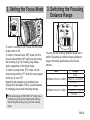
To shoot in autofocus (AF) mode, set the focus
mode switch to AF.
To shoot in manual focus (MF) mode, set the
focus mode switch to MF, and focus by turning
the focusing ring. The focusing ring always
works, regardless of the focus mode.
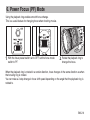
To shoot in power focus (PF) mode, set the
focus mode switch to PF when the focus preset
switch (p. 8) is at OFF.
Operating the playback ring enables focus
change at a set speed. This is a useful feature
for changing focus when shooting movies.
After autofocusing in ONE SHOT AF mode, focus
manually by pressing the shutter button halfway
and turning the focusing ring. (Full-time manual
focus)
3. Switching the Focusing
Distance Range
You can set the focusing distance range with a
switch. By setting a suitable focusing distance
range, the actual autofocusing time will be
shorter.
Lens
EF300mm f/2.8L IS II USM
EF400mm f/2.8L IS II USM
Ranges
FULL
2 m/6.6 ft. – 6 m/19.7 ft.
6 m/19.7 ft. – ∞
FULL
2.7 m/8.9 ft. – 7 m/23 ft.
7 m/23 ft. – ∞
ENG-6