1
07395.043 DR GD Inst Rev D Body D146.fm Page 5 Monday, December 1, 2003 12:02 PM
Often you can route the sensor wires through an existing feedthrough in the
firewall.
❏ Decide where to install the harness cable and where to connect the power
and ground leads. (Procedure 2)
Find a location inside the vehicle where you can bring together the harness
cable leads, the power and ground tap wires, the adapter cable leads, and
the sensor cable leads. The location should allow the adapter cable to reach
the DriveRight console.
❏ Determine where to connect the digital input leads (if used). Digital input 1 is
typically used to monitor brake lights and digital input 2 is used to monitor
headlights. (Procedure 3)
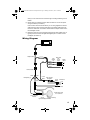
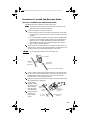
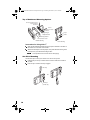
:LULQJ'LDJUDP
Display
Adapter Cable
Red
Butt
Splices
Green (2)
Blue Wires
with
In-Line
Fuses
Digital
Inputs
1
Yellow
2
Ground
Black
Harness Cable
White
Red
In-Line
Splice
Butt Splices (3)
Black
Red Wire with
Fuseholder
Red
In-Line
Splice
Unswitched
+12V
Ground
Spade Terminal
Vehicle Drive Shaft
or CV Joint Hub
Sensor Support
Bracket
Sensor
Magnet Assembly
Typical DriveRight Installation