1
USER’S QUICK REFERENCE GUIDE
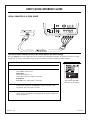
SETUP CHECKLIST
Turn on all system components including the
video source you intend to watch; video source
is the video equipment connected to the HD
Display connection center.
Turn on the PRO895X.
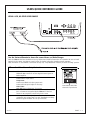
Select a video source from one of the video
inputs provided on the connection center:
Video In, S-Video In, or RGB input jacks.
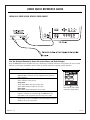
Set the PRO895X internal clock.
The internal clock must be set before the Timer
Menu option will appear in the Setup Main Menu.
Select English, Spanish, French, or German for onscreen menus.
Use other options (fine-tune video image).
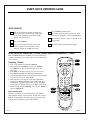
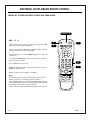
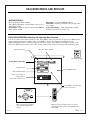
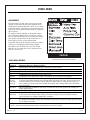
BASIC OPERATION: PROJECTING A PICTURE (Remote operates the PRO895X in TV mode)
Once the PRO895X has been installed and set up, follow these
simplified instructions for operation. Be sure to install batteries
in the remote.
PRG
Projecting a Picture
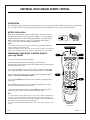
1. Press TV on remote to operate the PRO895X.
2. Point remote toward PRO895X screen, press POWER to
turn PRO895X on. (Be sure all video sources are also
turned on.)
3. Press MENU to display and access the on-screen menus.
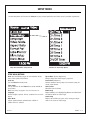
4. Press MENU repeatedly to highlight the Source menu.
5. Use the Up/Down arrow to select the input source you want
to project on the screen, press ENTER.
6. Make any other necessary on-screen menu adjustments
using the Up/Down/Left/Right arrows for the Setup and
Video Menus. (Up/Down arrows select options, Left/Right
arrows adjust or change settings). Press QUIT to exit menu.
7. When finished using the PRO895X, press TV, press POWER to
turn the PRO895X off.
Audio Amplifier Note:
Reference is made to an audio amplifier. The user-supplied
audio amplifier may be a stereo system. In that case, connect
Right and Left Audio Out from the video source you are using
to Right and Left Audio In on the audio amplifier.
206-3701
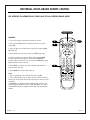
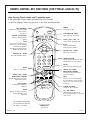
CABLE
VCR
POWER
2/7
TV
1/7
AUX
MUTE
FLASHBK
SURF
CHANNEL
VOLUME
VOLUME
CHANNEL
1
2
3
4
5
6
7
8
9
0
3/4
5/6
QUIT
MENU
PIP
pip ch
RECORD
4/5/6
ENTER
CC
FREEZ
PAUSE
TIMER
5/6
TV/VCR
SOURCE
PLAY
REWIND
FFWD
STOP
MBR3458CT
124-233-06
PAGE 9