1
Fuji Xerox
DocuCentre-II C4300/C3300/C2200 Series
Security Kit for Asia Pacific
Security Target
27 October 2006
Version: V1.01
This document is a translation of the evaluated and certified security
target written in Japanese
Fuji Xerox Co., Ltd.
-1-
Revision History
No.
1
2
3
4
5
6
7
8
9
10
11
12
13
14
15
16
17
18
19
20
Date
October 17, 2006
October 27, 2006
Version
V1.00
V1.01
Description
First draft.
Changed the name of Documents, etc.
-2-
-Contents-
1.
ST Introduction .................................................................... 5
1.1.
1.2.
1.3.
1.4.
1.5.
1.6.
1.7.
1.8.
1.9.
2.
ST Identification.............................................................................................................................................................................................................5
ST Overview ....................................................................................................................................................................................................................5
Evaluation Assurance Level ...................................................................................................................................................................................2
Applicable PP..................................................................................................................................................................................................................2
Related ST........................................................................................................................................................................................................................2
CC Conformance ..........................................................................................................................................................................................................2
Abbreviated Terms .......................................................................................................................................................................................................2
Terms ...................................................................................................................................................................................................................................2
Reference..........................................................................................................................................................................................................................7
TOE Description ................................................................... 7
2.1.
2.2.
Type of TOE.....................................................................................................................................................................................................................7
2.3.
2.4.
Purpose of Using TOE...............................................................................................................................................................................................9
Physical Configuration.......................................................................................................................................................................................9
2.4.2.
Logical Configuration ...................................................................................................................................................................................... 10
Persons Related to TOE........................................................................................................................................................................................ 15
Assets protected by TOE ...................................................................................................................................................................................... 16
Functions of TOE....................................................................................................................................................................................................... 17
2.7.1.
Security Functions of TOE .......................................................................................................................................................................... 17
2.7.2.
Non-Security Function of TOE.................................................................................................................................................................. 18
2.8.
How to Use TOE ........................................................................................................................................................................................................ 18
TOE Security Environment ......................................................... 21
3.1.
3.2.
3.3.
4.
Configuration of TOE..................................................................................................................................................................................................9
2.4.1.
2.5.
2.6.
2.7.
3.
Usage Environment of TOE....................................................................................................................................................................................8
Assumptions ................................................................................................................................................................................................................. 21
Threats............................................................................................................................................................................................................................. 21
Organizational Security Policies ....................................................................................................................................................................... 21
Security Objectives ............................................................... 22
4.1.
Security Objectives for the TOE........................................................................................................................................................................ 22
4.2.
Security Objectives for the Environment...................................................................................................................................................... 22
5.
4.2.1.
Security Objectives for IT Environment ................................................................................................................................................ 22
4.2.2.
Security Objectives for Operation and Management....................................................................................................................... 22
IT Security Requirements .......................................................... 23
5.1.
TOE Security Functional Requirements ....................................................................................................................................................... 23
5.1.1.
Class FCS: Cryptographic Support .......................................................................................................................................................... 23
5.1.2.
Class FDP: User Data Protection............................................................................................................................................................. 24
-3-
5.1.3.
Class FIA: Identification and Authentication........................................................................................................................................ 24
5.1.4.
Class FMT: Security Management............................................................................................................................................................ 25
5.1.5.
Class FPT: TSF Protection.......................................................................................................................................................................... 29
5.2.
5.3.
5.4.
6.
TOE Security Assurance Requirements....................................................................................................................................................... 29
Security Functional Requirement for IT Environment........................................................................................................................... 30
Claim of TOE Security Function Strength.................................................................................................................................................... 30
TOE Summary Specification........................................................ 31
6.1.
TOE Security Functions ......................................................................................................................................................................................... 31
6.1.1.
HDD Overwriting Function for Residual Data (SF.OVERWRITE)................................................................................................ 31
6.1.2.
HDD Data Encryption Function (SF.ENCRYPTION)......................................................................................................................... 32
6.1.3.
Key-operator Authentication Function(SF.MANAGE) ..................................................................................................................... 32
6.1.4.
Customer-Engineer Operation Restriction Function (SF.CEREST).......................................................................................... 33
6.1.5.
Function that is Realized using Probabilistic or Permutational Mechanisms........................................................................ 33
6.2.
Assurance Measures............................................................................................................................................................................................... 33
6.2.1.
DocuCentre-II C4300(AP) Series Configuration Management Description (AS.CONFIGURATION) ......................... 33
6.2.2.
DocuCentre-II C4300(AP) Series TOE Configuration List (AS.CONFIGURATIONLIST) ................................................ 34
6.2.3.
C4300(AP) Series Delivery, Introduction, and Operation Procedure Description (AS.DELIVERY)............................. 34
6.2.4.
DocuCentre-II C4300(AP) Series Functional Specification (AS.FUNCSPEC) ..................................................................... 34
6.2.5.
DocuCentre-II C4300(AP) Series High-Level Design Specification (AS.HIGHLDESIGN)............................................... 35
6.2.6.
DocuCentre-II C4300(AP) Series Correspondence Analysis Description (AS.REPRESENT)....................................... 35
6.2.7.
ApeosPort-II C4300/C3300/C2200 DocuCentre-II C4300/C3300/C2200 Security Kit Supplementary Guide,
ApeosPort-II C4300/C3300/C2200 DocuCentre-II C4300/C3300/C2200 User Guide (AS. GUIDANCE) .................................... 35
In the development of TOE, Fuji Xerox creates manuals (“ApeosPort-II C4300/C3300/C2200 DocuCentre-II
C4300/C3300/C2200
Security
Kit
Supplementary
Guide,
ApeosPort-II
C4300/C3300/C2200
DocuCentre-II
C4300/C3300/C2200 User Guide”) and reviews the following in the development department, product evaluation
department, and technical support department......................................................................................................................................................... 35
7.
6.2.8.
DocuCentre-II C4300(AP) Series Test Plan and Report (AS.TEST)........................................................................................ 37
6.2.9.
DocuCentre-II C4300(AP) Series Vulnerability Analysis (AS.VULNERABILITY)................................................................ 37
PP Claims ....................................................................... 39
7.1.
7.2.
PP Reference............................................................................................................................................................................................................... 39
7.3.
PP Additions ................................................................................................................................................................................................................. 39
8.
PP Tailoring ................................................................................................................................................................................................................... 39
Rationale ........................................................................ 40
8.1.
8.2.
Security Objectives Rationale ............................................................................................................................................................................ 40
Security Requirements Rationale..................................................................................................................................................................... 42
8.2.1.
Security Functional Requirements Rationale....................................................................................................................................... 42
8.2.2.
Security Assurance Requirements Rationale ...................................................................................................................................... 46
8.3.
TOE Summary Specification Rationale......................................................................................................................................................... 47
-4-
8.3.1.
Rationale for Function Summary Specification .................................................................................................................................. 47
8.3.2.
Assurance Measures Rationale.................................................................................................................................................................. 49
8.4.
PP Claims Rationale................................................................................................................................................................................................ 53
1. ST Introduction
1.1.
ST Identification
(1) ST identification
ST identification
Version
Creator
Date
CC identification
PP identification
Keyword
(2) TOE identification
TOE
identification
Version
Manufacturer
Fuji Xerox DocuCentre-II C4300/C3300/C2200 Series Security Kit for Asia
Pacific Security Target
V1.01
Fuji Xerox Co., Ltd.
October 27, 2006
Common Criteria for Information Technology Security Evaluation,
Version2.3, August 2005
None
Digital multifunction machine, copy, printer, scanner, facsimile, hard disk
drive, to overwrite and erase, and password
Fuji Xerox DocuCentre-II C4300/C3300/C2200 Series Security Kit for Asia
Pacific
Controller ROM Ver1.101.7
Fuji Xerox Co., Ltd.
This Security Target conforms to ISO/IEC 15408 (2005).
1.2.
ST Overview
This Security Target describes security-related specifications of Data Security Kit, which is an
optional product of DocuCentre-II C4300, DocuCentre-II C3300 and DocuCentre-II C2200 (digital
multifunction machines with copy, printer, scanner and facsimile functions).
Data Security Kit is a product to protect document data that is stored on the hard disk drive after
being processed by DocuCentre-II C4300, DocuCentre-II C3300or DocuCentre-II C2200 (hereafter
“used document data”) from being disclosed illicitly.
This product provides the following security functions:
- HDD overwriting for residual data
- HDD data encryption
- Key-operator authentication
- Customer engineer operation restriction
-5-
Fuji Xerox ApeosPort-II C4300(AP)Series Security Kit for Asia Pacific Security Target V1.01
1.3.
Evaluation Assurance Level
Evaluation Assurance Level of TOE: EAL2
Reason: TOE is to be used in facilities of organizations such as SOHO, general offices, government
and municipal offices, and universities. The users are limited to those who are related to the
organization.
1.4.
Applicable PP
There is no applicable Protection Profile.
1.5.
Related ST
There is no related Security Target.
1.6.
CC Conformance
This TOE conforms to the following evaluation standards for information security:
CC Version 2.3 Part 2
CC Version 2.3 Part 3
EAL2
1.7.
Abbreviated Terms
The following abbreviated terms are used in this ST.
Abbreviation
CC
CE
CWIS
DC
EAL
IIT
IOT
IT
NVRAM
PDL
PP
SEEPROM
SF
SFP
SOF
ST
TOE
TSC
TSF
TSFI
TSP
UI
1.8.
Definition
Common Criteria.
Customer Engineer.
CentreWare Internet Service.
Digital Copier.
Evaluation Assurance Level.
Image Input Terminal.
Image Output Terminal.
Information Technology.
Non-volatile Random Access Memory.
Page Description Language.
Protection Profile.
Serial Electronically Erasable and Programmable Read Only Memory.
Security Function.
Security Function Policy.
Strength of Function.
Security Target.
Target of Evaluation.
TSF Scope of Control.
TOE Security Function.
TSF Interface.
TOE Security Policy.
User Interface.
Terms
The following terms are used in this ST:
General User
One who uses copy and printer functions of MFP.
Key Operator
-2-
Fuji Xerox ApeosPort-II C4300(AP)Series Security Kit for Asia Pacific Security Target V1.01
One who manages MFP.
Customer Engineer
Fuji Xerox’s engineer who maintains and repairs MFP.
Attacker
One who uses TOE with malicious intention.
Control Panel
Panel on which the buttons, lamps, and touch panel display that are necessary for operating MFP
are arranged.
User’s Client
Client that is used by general user. General user uses printer functions of MFP by using printer
driver that is installed on the user’s client.
Key-operator’s Client
Client that is used by key operator. Key operator checks and rewrites TOE
setting data for MFP using the Web browser.
CentreWare Internet Service
Provides functions for key operator to check and rewrite TOE setting data for
MFP using the Web browser.
Printer Driver
Software that converts data on user’s client to print data described in page description language
(PDL) that can be interpreted by MFP. Used on user’s client.
Print Data
Data described in page description language (PDL) that can be interpreted by MFP. Print data is
converted to bitmap data by decomposing function of TOE.
Bitmap Data
Data that is converted by decomposing function from the data scanned in copy function or the print
data sent from user’s client in printer function. Bitmap data is compressed using the Fuji Xerox’s
unique method and stored on the hard disk drive.
Decomposing Function
Function to parse print data described in page description language (PDL) and convert it to bitmap
data.
Decompose
To parse data described in page description language (PDL) and convert it to bitmap data using
decomposing function.
Network Scanner Utility
Software to access document data stored on the internal hard disk drive of
MFP. Used on user’s client.
Printer Function
Function to decompose and print out print data sent from user’s client.
-3-
Fuji Xerox ApeosPort-II C4300(AP)Series Security Kit for Asia Pacific Security Target V1.01
Printer Control Function
Function to control the equipment to realize printer function.
Storage Print
Print method in printer function. In this method, bitmap data created by decomposing
print data is once stored on the internal hard disk drive of MFP, and printed
according to the general-user’s instruction from the control panel or when the
designated time comes. There are following five methods:
- Security print
- Sample print
- Authentication print
- Time designation print
- Print that uses mailbox
Security Print
Storage print method, in which the print is enabled by setting a password from the printer driver on
user’s client and entering the password at the control panel.
Sample Print
Storage print method, in which the first copy is normally printed out for checking the print result and
then the remaining copies are printed according to the instruction from the control panel.
Authentication Print
Storage print method for when authentication function is used. In this method, print jobs that failed
in authentication are stored and then the print is performed according to the instruction from the
control panel.
Time Designation Print
Storage print method, in which print-start time is designated from the printer driver on user’s
client and the print is performed when the designated time comes.
Print that uses Mailbox
Storage print method, in which decomposed bitmap data is stored in an expanded mailbox and
printed according to the instruction from the control panel. Compared to security print and sample
print, functions to make settings on stapling, punching, and paper size when printing are added.
Spool
Method used in printer function, in which decomposing is started after all the print data sent from
user’s client is received in the internal memory.
Print data from multiple user’s-clients can be received simultaneously using this method.
Hard-disk-drive Spool
Uses a hard disk drive as an internal memory for spool.
Memory Spool
Uses a volatile memory as an internal memory for spool.
Non-spool
-4-
Fuji Xerox ApeosPort-II C4300(AP)Series Security Kit for Asia Pacific Security Target V1.01
Method used in printer function, in which decomposing is performed while print data sent from
user’s client is being received. In this method, print data from multiple user’s-clients cannot be
received simultaneously.
Original
Texts, pictures, photographs, and others that are scanned in IIT in copy function.
Copy Function
Function to scan an original in IIT and print out from IOT, according to the general-user’s instruction
from the control panel. When multiple copies of the same original are instructed to be printed, the
document data is
1) scanned in IIT,
2) stored on the internal hard disk drive of MFP,
3) read from the internal hard disk drive for the same number of times as the number of designated
copies, and printed out.
Copy Control Function
Function to control the equipment to realize copy function.
Scanner Function
According to the general-user’s instruction from the control panel, scans an original in IIT and
stores it in an expanded mailbox created in the internal hard disk drive of MFP. The stored
document data is retrieved by network scanner utility on user’s client.
Scanner Control Function
Function to control the equipment to realize scanner function.
Facsimile Function
Sends and receives facsimiles. When sending a facsimile, document data of an original scanned in
IIT is sent to a remote machine connected to public telephone line network, according to the
general-user’s instruction from the control panel.
When receiving a facsimile, document data sent via public telephone line network from a
connected remote-machine is received and printed out from IOT.
Facsimile Control Function
Function to control the equipment to realize facsimile function.
Expanded Mailbox
Logical box created in the hard disk drive of MFP. The following can be stored in this box: the
document data scanned by scanner function and the document data for the print that uses an
expanded mailbox.
Document Data
In this ST, “document data” is used as a generic term for the data including all the image
information that pass the inside of MFP when general user uses copy, printer, scanner, and
facsimile functions of MFP.
The following are included:
- Bitmap data that is printed in IOT when using copy function.
-5-
Fuji Xerox ApeosPort-II C4300(AP)Series Security Kit for Asia Pacific Security Target V1.01
- Print data sent from user’s client and bitmap data created by decomposing the data, when using
printer function.
- Bitmap data that is stored on the internal hard disk drive when using scanner function.
- Bitmap data that is sent to a connected remote-machine and bitmap data that is received from a
connected remote-machine and printed in IOT, when using facsimile function.
Used Document Data
Document data of which use is finished after being stored on the internal hard disk drive of MFP.
Control Data
Data that are communicated as a command and its response in the communication performed
between hardware units that compose MFP.
Deletion from Hard Disk Drive
In this ST, “deletion from hard disk drive” means deletion of administrative information. When
document data is deleted from the hard disk drive, the deleted document data cannot be accessed
in theory because the corresponding administrative information is deleted. However, the document
data itself is not cleared. The document data itself remains on the hard disk drive as used
document data until new data is written on the same area.
To Overwrite and Erase
To overwrite the data area with the specific data when document data stored on the hard disk drive
is to be deleted.
Cryptographic Seed Key
12-digit alphanumeric characters that are entered by user. Cryptographic key is generated from this
key.
Cryptographic Key
128-bit data that is automatically generated from cryptographic seed key. Encryption is performed
using this cryptographic key.
-6-
Fuji Xerox ApeosPort-II C4300(AP)Series Security Kit for Asia Pacific Security Target V1.01
1.9.
Reference
The following are references for this ST:
[CC Part 1]
[CC Part 2]
[CC Part 3]
[CEM]
[PDTR15446]
Common Criteria for Information Technology Security Evaluation
Part1:Introduction and general model Version2.3
August 2005 CCMB-2005-08-001
Common Criteria for Information Technology Security Evaluation
Part2: Security functional requirements Version2.3
August 2005 CCMB-2005-08-002
Common Criteria for Information Technology Security Evaluation
Part3: Security assurance requirements Version2.3
August 2005 CCMB-2005-08-003
Common Methodology for Information Technology Security Evaluation :
Evaluation Methodology Version 2.3
August 2005 CCMB-2005-08-004
Information Technology Security techniques Guide for the production of protection
profiles and security targets Propsed Draft,
April 2000
2. TOE Description
2.1.
Type of TOE
TOE is a data security kit that is installed on a digital multifunction machine. This kit is a firmware
product to protect used document data, which is stored on the hard disk drive after being processed
by digital multifunction machine, from being disclosed illicitly.
TOE is offered as an optional product of Fuji Xerox’s digital multifunction machines.
-7-
Fuji Xerox ApeosPort-II C4300(AP)Series Security Kit for Asia Pacific Security Target V1.01
2.2.
Usage Environment of TOE
TOE is assumed to be used in the condition where the machine is connected to internal network,
public telephone line network, and user’s clients.
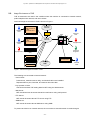
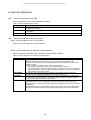
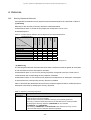
Assumed usage environment of TOE is shown in Figure 1.
General
User
External
Network
- Printer Driver
- Network Scanner
Utility
- Facsimile Driver
Firewall
MFP
User’s Client (PC)
General
User
- Printer Driver
- Network Scanner
Utility
- Facsimile Driver
Internal
Network
General
User
TOE
Key Operator
User’s Client (PC)
Web Brow ser
Customer
Engineer
Key Operator Key-operator’s Client
(PC)
Mail Server
- Printer Driver
- Facsimile Driver
FTP Server
SMB Server
公衆電話回
線網
User’s Client (PC)
General
User
Figure 1: Assumed Usage Environment of TOE
The following are connected to internal network:
- User’s Client:
Printer driver, network scanner utility, and facsimile driver are installed.
Requests MFP to print, facsimile, and retrieve document data.
- Key-operator’s Client:
Checks and rewrites TOE setting data for MFP using the Web browser.
- Mail Server:
MFP sends/receives document data to/from mail server using mail protocol.
- FTP Server:
MFP sends document data to FTP server using FTP.
- SMB Server:
MFP sends document data to SMB server using SMB.
To protect each device on internal network, the connection to external network is made through a
-8-
Fuji Xerox ApeosPort-II C4300(AP)Series Security Kit for Asia Pacific Security Target V1.01
firewall.
2.3.
Purpose of Using TOE
To protect the used document data that is stored on the internal hard disk drive of
MFP from being disclosed illicitly.
2.4.
Configuration of TOE
2.4.1. Physical Configuration
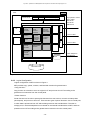
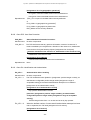
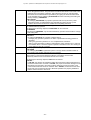
Each unit in MFP and physical boundaries within TOE are shown in Figure 2.
MFP consists of three board-units: controller board, control panel, and
facsimile card.
Controller board and control panel are connected via the internal interface where control data are
communicated.
In each of the following sets, the two are connected via the internal interface where document data
and control data are communicated:
- controller board and facsimile card
- controller board and IIT
- controller board and IOT
Controller board is a circuit board to control copy, printer, scanner, and facsimile functions of MFP.
This board has a network interface (Ethernet) and local interfaces (IEEE1284 and USB), and is
connected to IIT and IOT.
Control panel is for operating / making settings on copy, printer, scanner, and facsimile functions of
MFP.
Facsimile card is a circuit board to control facsimile communication using public telephone line
network.
TOE is a set of programs that are recorded in the system ROM that is mounted on the controller
board. Programs recorded in the ROM, which is a physical configuration item of TOE, are shown in
Table 1.
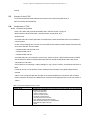
Table 1: Physical Configuration Item of TOE
Configuration item
System ROM
Stored program
Programs to control MFP are recorded in the system ROM, and the following
functions are provided:
- Copy control function
- Printer control function
- Scanner control function
- Facsimile control function
- Control-panel control function
- Key-operator authentication function
- HDD overwriting function for residual data
- HDD data encryption function
- CWIS
-9-
Fuji Xerox ApeosPort-II C4300(AP)Series Security Kit for Asia Pacific Security Target V1.01
TOE
MFP
Control Panel
Button
Lamp
Touch-panel Display
IIT
Copy
Control
Function
NVRAM
Printer Control
Function
IOT
Key-operator
Authentic ation
Function
Scanner
Control
Function
HDD Data
Encryption
Function
SEEPRO
M
User’s Client
USB
Decomposing
Function
Customerengineer
Operation
Restriction
Function
HDD
Overw riting
Function for
Residual Data
IEEE1284
Controlpanel
Control
Function
Ethernet
Controller Board
System ROM
Key-operator’s Client
User’s Client
Mail Server
FTP Server
SMB Server
CWIS
Facsimile
Control
Function
User’s Client
DRAM
Facsimile
Card
Public Telephone
Line Network
CPU
Hard Disk Drive
Figure 2: Each Unit in MFP and Physical Boundaries within TOE
2.4.2. Logical Configuration
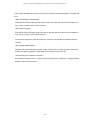
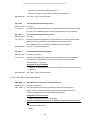
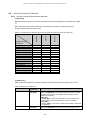
Logical configuration of MFP is shown in Figure 3.
MFP provides copy, printer, scanner, and facsimile functions for general users.
<Copy function>
Copy function is a function to scan an original in IIT and print out from IOT according to the
general-user’s instruction from the control panel.
<Printer function>
Printer function is a function to parse print data sent from user’s client, convert it to bitmap data
(decompose), and print it out from IOT. There are two types of printer functions. One is normal print,
in which data is printed out from IOT without being stored on the hard disk drive. The other is
storage print, in which bitmap data is once stored on the internal hard disk drive of MFP, and then
printed out from IOT according to the general-user’s instruction from the control panel.
- 10 -
Fuji Xerox ApeosPort-II C4300(AP)Series Security Kit for Asia Pacific Security Target V1.01
In printer functions, there are two types of decomposing methods. One is spool method, in which the
print data sent from user’s client is temporarily received in an memory (internal memory or internal
hard disk drive of MFP) and then decomposed. The other is non-spool method,
in which decomposing is performed while print data sent from user’s client is being received in an
internal memory of MFP.
<Scanner function>
Scanner function is a function to scan an original in IIT and store the data on the internal hard disk
drive of MFP according to the general-user’s instruction from the control panel. Stored document
data can be retrieved using network scanner utility on user’s client, and can be transferred to an
external server according to the information set to MFP.
<Facsimile function>
Facsimile function is a function to send and receive facsimiles. When sending a facsimile, document
data of an original scanned in IIT is sent to a remote machine connected to public telephone line
network, according to the general-user’s instruction from the control panel. When receiving a
facsimile, document data sent via public telephone line network from a connected remote-machine
is printed out from IOT.
<Control-panel control function>
Control-panel control function is a function to send the information that is entered by key operator or
customer engineer at the control panel to the “customer-engineer operation restriction function” or
the “key-operator authentication function.” When authenticated as a customer engineer or a key
operator, he or she can access TOE setting data.
<CWIS>
CWIS sends the information that is entered at the key-operator’s client using the Web browser to the
“key-operator authentication function.” When authenticated as a key operator, he or she can access
TOE setting data.
MFP has a single internal hard disk drive. When the document data stored on the
hard disk drive is to be deleted after being used, only the administrative information is deleted and
the stored data itself is not cleared. Therefore, the data remains on the hard disk drive as used
document data.
- 11 -
Fuji Xerox ApeosPort-II C4300(AP)Series Security Kit for Asia Pacific Security Target V1.01
TOE provides the following security functions for this used document data stored on the hard disk
drive:
<HDD overwriting for residual data>
Overwrites and erases used document data stored on the hard disk drive after the operation of
copy, printer, scanner, and facsimile functions.
<HDD data encryption>
Encrypts document data when storing the data on the hard disk drive at the time of operation of
copy, printer, scanner, and facsimile functions.
To assure the operations of the above security functions, TOE provides the following security
functions:
<Key-operator authentication>
Identifies and authenticates key operator via the control panel or the key-operator’s client, and
enables only the key operator to make settings on security functions of TOE.
<Customer-engineer operation restriction>
Key-operator’s setting function to restrict customer engineer from referring to / changing settings
related to TOE security functions.
- 12 -
Fuji Xerox ApeosPort-II C4300(AP)Series Security Kit for Asia Pacific Security Target V1.01
TOE
MFP
Control Panel
Control- panel
Control
Function
Copy
Control
Function
User’s Client
Mail Server
FTP Server
SMB Server
User’s Client
Public Telephone
Line Network
Printer Control
Function
Decomposi
ng Function
Scanner
Control
Function
Customerengineer
Operation
Restriction
Function
Key-operator
Authentic ation
Function
HDD
Overw riting
Function for
Residual Data
HDD Data
Encryption
Function
TOE Setting
Data
CWIS
Key-operator’s Client
Facs im ile
Control
Function
Used Document
Data File
Figure 3: Logical Configuration of TOE
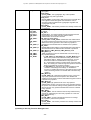
TOE setting data that are stored on NVRAM and SEEPROM on controller board of MFP are
described in Table 2.
Table 2: TOE Setting Data in MFP, and Memory Location
Setting data
Memory location
Setting for HDD overwriting function for
residual data
Setting for using password
NVRAM
Key-operator’s password
Setting for customer-engineer operation
restriction function
Access denial due to failure in
authentication of key-operator’s ID
Setting for HDD data encryption function
SEEPROM
Cryptographic seed key for data stored on the
hard disk drive
- 13 -
Fuji Xerox ApeosPort-II C4300(AP)Series Security Kit for Asia Pacific Security Target V1.01
In “setting for HDD overwriting function for residual data,” the number of overwriting and erasing used
document data recorded on the hard disk drive can be set to one of those described below:
- Not perform:
Does not overwrite nor erase.
Set when security functions of TOE are not used. Lowering of process speed of
copy and printer functions, which occurs due to overwriting and erasing, can be
avoided.
- Perform
(one time):
Overwrites and erases with data “0” once.
Overwriting and erasing makes the recovery of used document data difficult.
Has less effect of lowering process speed of copying and printing than
three-time overwritings and erasings. Protects used document data by being set
in combination with the setting for HDD data encryption function.
- Perform
(three times):
Overwrites and erases with data “random numbers” twice, and with data “0”
once. Recommended setting value. Although the recovery of used document
data is difficult after one-time overwriting and erasing, three-time overwritings
and erasings make the recovery more difficult. Protects used document data by
being set in combination with the setting for HDD data encryption function.
“Setting for using password” can be set to either of those described below:
- Not perform:
Does not use password.
In authentication of key operator, requests entering of only the user ID of key
operator and authenticates him or her as a key operator when the entered user
ID matches the information recorded on NVRAM of MFP. Used when
convenience is desired, although the security level is low.
- Perform:
Uses password.
In authentication of key operator, requests entering of user ID and
password of key operator and authenticates him or her as a key operator when
the entered user ID and password match the information
recorded on NVRAM of MFP.
In “setting for HDD data encryption function,” cryptographic operation on document data stored on
the hard disk drive can be set to either of those described below:
- Not perform:
Does not encrypt.
Set when security functions of TOE are not used. Lowering of process speed
- 14 -
Fuji Xerox ApeosPort-II C4300(AP)Series Security Kit for Asia Pacific Security Target V1.01
due to the encryption can be avoided.
- Perform:
Encryption makes the parsing of document data difficult. Protects used
document data by being set in combination with the setting for HDD overwriting
function for residual data.
Cryptographic seed key for data stored on the hard disk drive becomes valid when the “setting for
HDD data encryption function” is “Perform.” In this condition, user can enter 12-digit alphanumeric
characters that are used for generating cryptographic key to encrypt document data recorded on
the hard disk drive.
“Setting for customer-engineer operation restriction function” can be set to either of those described
below:
- Not perform:
Does not use restriction of customer-engineer’s operation.
Set when security functions of TOE are not used. Customer engineer can refer
to / change settings related to security functions of TOE.
- Perform:
Uses restriction of customer-engineer’s operation.
Restricts customer engineer from referring to / changing settings related to
security functions of TOE.
“Access denial due to failure in authentication of key-operator’s ID” can be set to either of those
described below:
- Not perform:
Does not restrict the number of errors in authentication of key operator.
- Perform:
The allowable number of failures in authentication of key operator. Can be set
in the range of 1 to 10. When “1” is set, the second or later authentications are
not accepted after the first authentication fails.
2.5.
Persons Related to TOE
In this ST, the following related persons are assumed.
Related person
Organization’s
person in charge
General user
Key operator
Customer engineer
Description
Person in charge in the organization where MFP is used and operated.
User of copy and printer functions provided by MFP.
Person who manages MFP machine. Has a special authority such as to make settings for
operations of MFP.
Manages machine using the control panel of MFP or the Web browser of key-operator’s
client.
Makes settings for operations of MFP using the interface
only for customer engineer. This interface only for customer engineer is for the
maintenance of MFP.
- 15 -
Fuji Xerox ApeosPort-II C4300(AP)Series Security Kit for Asia Pacific Security Target V1.01
2.6.
Assets protected by TOE
Assets protected by TOE are the used document data stored on the hard disk drive of
MFP and the TOE setting data stored on NVRAM and SEEPROM.
There are two types of document data; one is bitmap data stored by copy function, and the other is
print data that is sent from user’s client and stored. Print data is firstly converted to bitmap data by
decomposing function of TOE, and then stored, and printed out. There are two types of used
document data; one is used bitmap data and the other is used print data.
Contents, storage mediums, and types of assets protected by TOE are described in Table 3.
Table 3: Contents, Storage Mediums, and Types of Protected Assets
Protected asset
R.DOCDATA
(used document
data stored on the
hard disk drive)
Description
[Asset contents]
Used document data that is stored on the hard disk drive when using copy, printer,
scanner, or facsimile function.
[Storage mediums]
Stored on the hard disk drive of MFP.
[Asset types]
Types of used document data when using copy function:
- Bitmap data of which use is finished when the copying instructed by general user
from the control panel is completed.
- Bitmap data of which use is finished when cancel is instructed by general user
from the control panel during copying.
Types of used document data when using printer function:
- Print data in spool, of which use is finished when printing of the print data set from
user’s client is completed in normal print of hard-disk-drive spool method.
- Print data in spool, of which use is finished when cancel is instructed by general
user from the control panel during printing in normal print of had-disk-drive spool
method.
- Print data in spool, of which use is finished when cancel is instructed by user’s
client during sending of the print data from user’s client in normal print or storage
print of hard-disk-drive spool method.
- Print data in spool, of which use is finished when bitmap data is stored on the hard
disk drive after being decomposed in storage print of hard-disk-drive spool
method.
- Bitmap data of which use is finished when printing of the stored document data is
instructed by general user from the control panel and the printing is completed in
storage print.
- Bitmap data of which use is finished when the printing started at the designated
time is completed in storage print.
- Bitmap data of which use is finished when cancel is instructed by general user
from the control panel during printing of the document data for storage print.
- Bitmap data of which use is finished when the deletion of the stored document
data is instructed by general user from the control panel in storage print.
- Bitmap data of which use is finished when printing of the print data sent from
user’s client is completed.
- Bitmap data of which use is finished when cancel is instructed by general user
from the control panel during printing.
Types of used document data when using scanner function:
- Bitmap data of which use is finished when retrieving of the stored document data
is finished by network scanner utility on user’s client.
- Bitmap data of which use is finished when transferring of the stored document
data to FTP server, mail server, or SMB server is finished.
- Bitmap data of which use is finished when deletion of the stored document
data is instructed by general user from the control panel.
- Bitmap data of which use is finished when cancel is instructed by general user
from the control panel during scanning.
- 16 -
Fuji Xerox ApeosPort-II C4300(AP)Series Security Kit for Asia Pacific Security Target V1.01
R.CONFDATA
(TOE setting data)
Types of used document data when using facsimile function:
- Bitmap data of which use is finished when sending of the stored document data is
finished in sending a facsimile.
- Bitmap data of which use is finished when printing of the stored document data is
finished in receiving a facsimile.
- Bitmap data of which use is finished when deletion of the stored document data is
instructed by general user from the control panel.
- Bitmap data of which use is finished when cancel is instructed by general user
from the control panel during scanning for sending a facsimile.
[Asset contents]
- Setting for HDD overwriting function for residual data
- Setting for using password
- Key-operator’s password
- Setting for customer-engineer operation restriction function
- Setting for HDD data encryption function
- Cryptographic seed key for data stored on the hard disk drive
- Access denial due to failure in authentication of key-operator’s ID
[Storage mediums]
The following are stored on NVRAM*:
- Setting for HDD overwriting function for residual data
- Setting for using password
- Key-operator’s password
- Setting for customer-engineer operation restriction function
- Access denial due to failure in authentication of key-operator’s ID
The following are stored on SEEPROM*:
- Setting for HDD data encryption function
- Cryptographic seed key for data stored on the hard disk drive
* Although data other than those described in Table 3, such as setting data for power-saving time,
are stored on NVRAM and SEEPROM of MFP, these data are not the assets to be protected
because they are not related to the security functions of TOE.
2.7.
Functions of TOE
2.7.1. Security Functions of TOE
TOE provides the following security functions.
Function classification
HDD overwriting function for
residual data
HDD data encryption function
Key-operator authentication
function
Customer-engineer operation
restriction function
Description
Function to perform specific-pattern overwriting and erasing of the used
document data stored on the hard disk drive of MFP.
When the overwriting of the used document data is not finished such as
due to power shutdown, the used document data is automatically
overwritten and erased according to the “setting for HDD overwriting
function for residual data” at the next power-on.
Function to encrypt document data stored on the hard disk drive of MFP.
Function to identify and authenticate key operator and to enable
only the key operator to make settings on TOE setting data.
Denies the authentication when authentication fails the set number of
times.
Used when customer engineer refers to / changes TOE setting data.
Function to make the only-for-customer-engineer interface unavailable.
This function can be set by key operator.
By enabling this function, attacker who pretends to be a customer engineer
becomes unable to refer to / change TOE setting data using the interface
only for customer engineer.
- 17 -
Fuji Xerox ApeosPort-II C4300(AP)Series Security Kit for Asia Pacific Security Target V1.01
2.7.2. Non-Security Function of TOE
TOE provides the following non-security functions.
Function classification
Copy control function
Printer control function
Decomposing function
Scanner control function
Facsimile control function
CWIS
2.8.
Description
Function to control copy operation of MFP. Document data scanned in IIT
is converted to image data such as through digital filter and printed out by
IOT.
Function to control printer operation of MFP. Print data described in page
description language (PDL) is sent from user’s client. This data is
converted to bitmap data by decomposing function so that it can be printed,
and printed out by IOT.
Used in printer function. Function to parse print data that is described in
page description language (PDL) and sent from user’s client and to convert
the data to bitmap data so that it can be printed out.
Function to control scanner operation of MFP. Document data scanned in
IIT is converted to image data such as through digital filter and stored on
the hard disk drive.
Function to control facsimile operation of MFP. Document data scanned in
IIT is converted to image data such as through digital filter and sent to a
remote-machine connected to public telephone line network. Document
data sent from a remote-machine connected to public telephone line
network is printed out by IOT.
Function to check the status of consumables etc. of MFP using the Web
browser and to read/write various setting data.
How to Use TOE
TOE setting data is set by key operator. After being authenticated by entering the default
key-operator’s user ID, which is set at the shipment, at the control panel, key operator makes
settings on the setting items described below. Only the “changing of key-operator’s password”
described below can be set from key-operator’s client.
- Setting for using password
Set to “Perform.”
- Changing of key-operator’s password
Set 7 to 12 alphanumeric characters other than the default password.
- Setting for access denial due to failure in authentication of key-operator’s ID
Set to “5.”
- Setting for customer-engineer operation restriction function
Set to “Perform.”
- Setting for HDD overwriting function for residual data
Set to “Perform (one time)” or ”Perform (three times).”
- Setting for HDD data encryption function
Set to “Perform.”
- Setting for cryptographic seed key for data stored on the hard disk drive
Set 12 alphanumeric characters. (When 11 or fewer characters are set, “0” is automatically set for the
shortage.)
When general user uses copy and printer functions of MFP, used document data is stored on the
- 18 -
Fuji Xerox ApeosPort-II C4300(AP)Series Security Kit for Asia Pacific Security Target V1.01
hard disk drive that is built into MFP as described in Table 4.
Security functions of TOE operate for this stored used document data according to the
key-operator’s setting before general user knows.
Flows of control data and document data between respective units in each function of
MFP are described in Table 4.
Table 4: Data Flow in Each Function of MFP
Function
Normal copy
Copy
Normal print
(non-spool)
Normal print
(hard-disk-drive
spool)
Storage print
(non-spool)
Data type
Control data
Data flow
Control panel→Controller board→IOT
Document
data
IIT→Controller board→Hard disk drive→Controller board→IOT
Control data
User’s client→Controller board→IOT
Document
data
(print data)
Document
data
(bitmap data)
Control data
User’s client→Controller board
Document
data
(print data)
Document
data
(bitmap data)
Control data
Printer
Document
data
(print data)
Document
data
(bitmap data)
Storage print
(hard-disk-drive
spool)
Control data
Document
data
(print data)
Document
data
(bitmap data)
(Creates bitmap data by decomposing at the controller board.)
Controller board→IOT
User’s client→Controller board→Hard disk drive→Controller
board→IOT
User’s client→Controller board→Hard disk drive→Controller board
(Creates bitmap data by decomposing at the controller board.)
Controller board→IOT
1) Storage of document data on the hard disk drive
User’s client→Controller board→Hard disk drive
2) Printing out of document data
(Started by operation at the control panel.)
Hard disk drive→Controller board→IOT
1) Storage of document data on the hard disk drive
User’s client→Controller board
(Creates bitmap data by decomposing at the controller board.)
Controller board→Hard disk drive
2) Printing out of document data
(Started by operation at the control panel.)
Hard disk drive→Controller board→IOT
1) Storage of document data on the hard disk drive
User’s client→Controller board→Hard disk drive→Controller
board→Hard disk drive
2) Printing out of document data
(Started by operation at the control panel.)
Hard disk drive→Controller board→IOT
1) Storage of document data on the hard disk drive
User’s client→Controller board→Hard disk drive→Controller board
(Creates bitmap data by decomposing at the controller board.)
Controller board→Hard disk drive
2) Printing out of document data
(Started by operation at the control panel.)
Hard disk drive→Controller board→IOT
- 19 -
Fuji Xerox ApeosPort-II C4300(AP)Series Security Kit for Asia Pacific Security Target V1.01
Control data
Control panel→Controller board→IIT
Document
data
IIT→Controller board→Hard disk drive
Control data
User’s client→Controller board
Document
data
Hard disk drive→Controller board→User’s client
Control data
Control panel→Controller board→Facsimile card
Document
data
Control data
IIT→Controller board→Hard disk drive→Controller board→Facsimile
card
Facsimile card→Controller board→IOT
Document
data
Facsimile card→Controller board→Hard disk drive→Controller
board→IOT
Operation at the control
panel
Control data
(operation)
Control panel→Controller board
Operation of
key-operator’s client
Control data
(operation)
Key-operator’s client (Web browser)→Internal network→Controller
board
Scan storage
Scanner
Scan retrieval
Facsimile sending
Facsimile
Facsimile
receiving
- 20 -
Fuji Xerox ApeosPort-II C4300(AP)Series Security Kit for Asia Pacific Security Target V1.01
3. TOE Security Environment
3.1.
Assumptions
Assumptions related to the operation and use of this TOE are described in Table 5.
Table 5: Assumptions
Assumption
A.SECMODE
A.ADMIN
A.NET
3.2.
Contents
<Protection mode>
When operating TOE, key operator makes settings as follows:
Key-operator’s password: 7 to 12 characters
Setting for customer-engineer operation restriction function: “Perform”
Setting for using password: “Perform”
Access denial due to failure in authentication of key-operator’s ID:
“Perform” and five times
Additionally, key-operator’s password is managed so that it is prevented from being
guessed or disclosed.
<Trust in key operator>
Key operator has knowledge necessary to fulfill the assigned role and does not conduct
improperly with malicious intention.
<Network connection condition>
MFP that TOE is installed on is connected to an internal network. This internal network
constitutes an environment where interceptions are not made.
Even when this internal network is connected to an external network, MFP cannot be
accessed from the external network.
Threats
Key operator and customer engineer, who are given special access authority to TOE, do not fall
under “attacker” because they are reliable. Security threats and attackers to this TOE are
described in Table 6.
Attackers are thought to have low-level attack capability.
Table 6: Security Threats
Threat
Contents
Attacker
T.RECOVER
<Illicit recovery of used document data>
General user and the person who is not related to
TOE might recover used document data such as by
removing the hard disk drive and connecting it
directly to a tool.
<Illicit access to TOE setting data>
General user and the person who is not related to
TOE might change settings by accessing TOE
setting data from the control panel or key-operator’s
client. This setting data is allowed to be accessed
only by key operator.
- General user
- Non-related
person
T.CONFDATA
3.3.
Organizational Security Policies
There is no organizational security policy.
- 21 -
- General user
- Non-related
person
Protected
asset
R.DOCDATA
R.CONFDATA
Fuji Xerox ApeosPort-II C4300(AP)Series Security Kit for Asia Pacific Security Target V1.01
4. Security Objectives
4.1.
Security Objectives for the TOE
Security objectives for the TOE are described in Table 7.
Table 7: Security Objectives for the TOE
Objective
O.RESIDUAL
O.DECIPHER
O.MANAGE
4.2.
Description
TOE must make the recovery of used document data stored on the hard disk drive
impossible by overwriting.
TOE must make the parsing of used document data stored on the hard disk drive difficult
by encryption.
TOE must enable only the authenticated key-operator to change TOE setting data.
Security Objectives for the Environment
4.2.1. Security Objectives for IT Environment
There is no security objective for IT environment.
4.2.2. Security Objectives for Operation and Management
Security objectives for operation and management are described in Table 8.
Table 8: Security Objectives for Operation and Management
Objective
OE.AUTH
OE.FUNCON
OE.ADMIN
OE.NET
Description
Key operator must manage “key-operator’s password” to prevent it from being guessed or
disclosed. Specifically, he or she must not set the key-operator’s password to the
alphanumeric characters that can be easily guessed nor store the data in the area where
attacker can see it.
Also, key operator must operate TOE, satisfying the following:
- “Key-operator’s password” is set to 7 to 12 alphanumeric characters.
- “Access denial due to failure in authentication of key-operator’s ID” is set to five times in
the condition where “customer-engineer operation restriction function” and “setting for
using password” are set to function.
Key operator must operate TOE in the condition where “HDD overwriting function for
residual data” and “HDD data encryption function” are set to function.
To assure that key operator has knowledge necessary to fulfill the assigned role and does
not conduct with malicious intention, organization person in charge must select suitable
member and provide management and education.
MFP that TOE is installed on is connected to an internal network. On this internal network,
organization person in charge installs the devices that realize the environment where
interceptions are not made, and performs the proper management and operation to prevent
interceptions.
Organization person in charge installs the devices to shut down the access to this internal
network from the external network, and properly makes settings to shut down the access.
- 22 -
Fuji Xerox ApeosPort-II C4300(AP)Series Security Kit for Asia Pacific Security Target V1.01
5. IT Security Requirements
5.1.
TOE Security Functional Requirements
Specifies security functional requirements provided by TOE.
5.1.1. Class FCS: Cryptographic Support
FCS_CKM.1
Cryptographic Key Generation
Hierarchical to:
No other components.
FCS_CKM.1.1 The TSF shall generate cryptographic keys in accordance with a specified
cryptographic key generation algorithm [assignment: cryptographic key
generation algorithm] and specified cryptographic key sizes [assignment:
cryptographic key sizes] that meet the following: [assignment: list of standards].
[assignment: list of standards]
None
[assignment: cryptographic key generation algorithm]
Fuji Xerox’s unique FXOSENC method
[assignment: cryptographic key sizes]
128 bits
Dependencies:
[FCS_CKM.2 Cryptographic key distribution
or
FCS_COP.1 Cryptographic operation]
FCS_CKM.4 Cryptographic key destruction
FMT_MSA.2 Secure security attributes
FCS_COP.1
Cryptographic Operation
Hierarchical to:
No other components.
FCS_COP.1.1 The TSF shall perform [assignment: list of cryptographic operations] in
accordance with a specified cryptographic algorithm [assignment:
cryptographic algorithm] and cryptographic key sizes [assignment:
cryptographic key sizes] that meet the following: [assignment: list of standards].
[assignment: list of standards]
AES (Advanced Encryption Standard)
[assignment: cryptographic algorithm]
Rijndael Algorithm
[assignment: cryptographic key sizes]
128 bits
- 23 -
Fuji Xerox ApeosPort-II C4300(AP)Series Security Kit for Asia Pacific Security Target V1.01
[assignment: list of cryptographic operations]
Encryption of document data stored on the hard disk drive
Decryption of document data stored on the hard disk drive
Dependencies:
[FDP_ITC.1 Import of user data without security attributes
or
FCS_CKM.1 Cryptographic key generation]
FCS_CKM.4 Cryptographic key destruction
FMT_MSA.2 Secure security attributes
5.1.2. Class FDP: User Data Protection
FDP_RIP.1
Subset Residual Information Protection
Hierarchical to:
No other components.
FDP_RIP.1.1
The TSF shall ensure that any previous information content of a resource is
made unavailable upon the [selection: allocation of the resource to, deallocation
of the resource from] the following objects: [assignment: list of objects].
[selection: allocation of the resource to, deallocation of the resource from]
Deallocation of the resource from
[assignment: list of objects]
Used document data file stored on the hard disk drive
Dependencies:
None
5.1.3. Class FIA: Identification and Authentication
FIA_AFL.1
Authentication failure handling
Hierarchical to:
No other components.
FIA_AFL.1.1
The TSF shall detect when [selection: [assignment: positive integer number], an
administrator configurable positive integer within [assignment: range of
acceptable values]] unsuccessful authentication attempts occur related to
[assignment: list of authentication events].
[assignment: list of authentication events]
Key-operator authentication function
[selection: [assignment: positive integer number], an administrator
configurable positive integer within [assignment: range of acceptable
values]]
Positive integral value from 1 to 10 that can be set by key operator
FIA_AFL.1.2
When the defined number of unsuccessful authentication attempts has been
met or surpassed, the TSF shall [assignment: list of actions].
[assignment: list of actions]
- 24 -
Fuji Xerox ApeosPort-II C4300(AP)Series Security Kit for Asia Pacific Security Target V1.01
Transition to the authentication-denial status.
There is no function to cancel the authentication-denial status.
Dependencies:
FIA_UAU.1 Timing of authentication
FIA_UID.2
User Identification before Any Action
Hierarchical to: FIA_UID.1
FIA_UID.2.1
The TSF shall require [Refinement: key operator] to identify itself before allowing
any other TSF-mediated actions on behalf of the [Refinement: key operator].
FIA_UAU.2
User authentication before any action
Hierarchical to: FIA_UAU.1
FIA_UAU.2.1
The TSF shall require [Refinement: key operator] be successfully authenticated
[Refinement: by key-operator’s password] before allowing any other
TSF-mediated actions on behalf of the [Refinement: key operator].
Dependencies:
FIA_UID.1 Timing of identification
FIA_UAU.7
Protected Authentication-feedback
Hierarchical to: No other components.
FIA_UAU.7.1
The TSF shall provide only [assignment: list of feedback] to the user while the
authentication of [Refinement: key-operator’s password for key-operator
authentication] is in progress.
[assignment: list of feedback]
Asterisks (‘*’) of the same number as the characters entered as key-operator’s
password
Dependencies:
FIA_UAU.1 Timing of authentication
5.1.4. Class FMT: Security Management
FMT_MOF.1 (1) Management of security functions behaviour (1)
Hierarchical to: No other components.
FMT_MOF.1.1 The TSF shall restrict the ability to [selection: determine the behavior of,
disable, enable, modify the behavior of] the functions [assignment: list of
functions] to [assignment: the authorized identified roles].
[assignment: list of functions]
HDD overwriting function for residual data
[selection: determine the behavior of, disable, enable, modify the behavior
of]
Determine the behavior of
Disable
- 25 -
Fuji Xerox ApeosPort-II C4300(AP)Series Security Kit for Asia Pacific Security Target V1.01
Enable
[assignment: the authorized identified roles]
Key operator
Dependencies:
FMT_SMF.1 Specification of management function
FMT_SMR.1 Security roles
FMT_MOF.1 (2) Management of security functions behaviour (2)
Hierarchical to: No other components.
FMT_MOF.1.1 The TSF shall restrict the ability to [selection: determine the behavior of,
disable, enable, modify the behavior of] the functions [assignment: list of
functions] to [assignment: the authorized identified roles].
[assignment: list of functions]
HDD data encryption function
[selection: determine the behavior of, disable, enable, modify the behavior
of]
Disable
Enable
[assignment: the authorized identified roles]
Key operator
Dependencies:
FMT_SMF.1 Specification of management function
FMT_SMR.1 Security roles
FMT_MOF.1 (3) Management of security functions behaviour (3)
Hierarchical to: No other components.
FMT_MOF.1.1 The TSF shall restrict the ability to [selection: determine the behavior of,
disable, enable, modify the behavior of] the functions [assignment: list of
functions] to [assignment: the authorized identified roles].
[assignment: list of functions]
Key-operator authentication function
[selection: determine the behavior of, disable, enable, modify the behavior
of]
Determine the behavior of
[assignment: the authorized identified roles]
Key operator
Dependencies:
FMT_SMF.1 Specification of management function
FMT_SMR.1 Security roles
FMT_MTD.1(1) Management of TSF data (1)
- 26 -
Fuji Xerox ApeosPort-II C4300(AP)Series Security Kit for Asia Pacific Security Target V1.01
Hierarchical to: No other components.
FMT_MTD.1.1 The TSF shall restrict the ability to [selection: change_default, query, modify,
delete, clear, [assignment: other operations]] the [assignment: list of TSF data]
to [assignment: the authorized identified roles].
[assignment: list of TSF data]
Setting for using password
Access denial due to failure in authentication of key-operator’s ID
[selection: change_default, query, modify, delete, clear, [assignment: other
operations]]
Query
Modify
[assignment: the authorized identified roles]
Key operator
Dependencies: FMT_SMF.1 Specification of management function
FMT_SMR.1 Security roles
FMT_MTD.1(2) Management of TSF data (2)
Hierarchical to: No other components.
FMT_MTD.1.1 The TSF shall restrict the ability to [selection: change_default, query, modify,
delete, clear, [assignment: other operations]] the [assignment: list of TSF data]
to [assignment: the authorized identified roles].
[assignment: list of TSF data]
Cryptographic seed key for data stored on the hard disk drive
[selection: change_default, query, modify, delete, clear, [assignment: other
operations]]
Modify
[assignment: the authorized identified roles]
Key operator
Dependencies:
FMT_SMF.1 Specification of management function
FMT_SMR.1 Security roles
FMT_MTD.1(3) Management of TSF data (3)
Hierarchical to: No other components.
FMT_MTD.1.1 The TSF shall restrict the ability to [selection: change_default, query, modify,
delete, clear, [assignment: other operations]] the [assignment: list of TSF data]
to [assignment: the authorized identified roles].
[assignment: list of TSF data]
Setting for customer-engineer operation restriction function
[selection: change_default, query, modify, delete, clear, [assignment: other
operations]]
Modify
- 27 -
Fuji Xerox ApeosPort-II C4300(AP)Series Security Kit for Asia Pacific Security Target V1.01
[assignment: the authorized identified roles]
Key operator
Dependencies:
FMT_SMF.1 Specification of management function
FMT_SMR.1 Security roles
FMT_SMF.1
Specification of Management Functions
Hierarchical to: No other components.
FMT_SMF.1.1
The TSF shall be capable of performing the following security management
functions: [assignment: list of security management functions to be provided by
the TSF].
[assignment: list of security management functions to be provided by the
TSF]
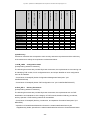
Functions to manage the management items described in Table 9.
Table 9: Functions to Manage Management Items
Functional
requirement
FCS_CKM.1
FCS_COP.1
FDP_RIP.1
FIA_AFL.1
FIA_UID.2
FIA_UAU.2
FMT_MOF.1
(1)
FMT_MOF.1
(2)
FMT_MOF.1
(3)
FMT_MTD.1(1)
FMT_MTD.1(2)
FMT_MTD.1(3)
FMT_SMR.1
Management requirement
Management item
Management of change of
cryptographic-key attribute
None. (Management of change in
cryptographic-key attribute is not
necessary because the size of
cryptographic key is fixed and there is
no attribute other than the key size).
None
There is no expected management
activity.
Selection of when to perform
residual information protection (i.e. upon
allocation or deallocation)
becomes able to be set in TOE.
Management of threshold value for
failed authentication attempt
Management of action that is taken in
authentication-failure event
Management of user-identification
information
Management of authentication data by
key operator and by the user
who is related to this data
Management of the group with a role
that has a possibility of having
interinfluence with TSF function
Management of the group with a role
that has a possibility of having
interinfluence with TSF function
Management of the group with a role
that has a possibility of having
interinfluence with TSF function
Management of the group with a role
that has a possibility of having
interinfluence with TSF data
Management of the group with a role
that has a possibility of having
interinfluence with TSF data
Management of the group with a role
that has a possibility of having
interinfluence with TSF data
Management of user group that is a
part of the roles
- 28 -
Fixed to the time to delete document
data.
Number of key-operator
authentication errors
Authentication-denial status
Key-operator’s user ID
Key-operator’s password
Fixed to key operator.
Fixed to key operator.
Fixed to key operator.
Fixed to key operator.
Fixed to key operator.
Fixed to key operator.
Fixed to key operator.
(Only the person who knows
key-operator’s password can be a key
Fuji Xerox ApeosPort-II C4300(AP)Series Security Kit for Asia Pacific Security Target V1.01
operator.)
As for FMT_MOF.1, FMT_MTD.1(1), FMT_MTD.1(2), FMT_MTD.1(3), and FMT_SMR.1, only the
key operator who is authenticated by key-operator’s password is managed, and management of
group is not performed.
Dependencies:
None
FMT_SMR.1
Security roles
Hierarchical to: No other components.
FMT_SMR.1.1 The TSF shall maintain the roles [assignment: the authorized identified roles].
[assignment: the authorized identified roles]
Key operator
FMT_SMR.1.2 The TSF shall be able to associate users with roles.
Dependencies:
FIA_UID.1 Timing of identification
5.1.5. Class FPT: TSF Protection
FPT_RVM.1
Non-bypassability of the TSP
Hierarchical to: No other components.
FPT_RVM.1.1 The TSF shall ensure that TSP enforcement functions are invoked and succeed
before each function within the TSC is allowed to proceed.
Dependencies: None
5.2.
TOE Security Assurance Requirements
Evaluation assurance level of TOE is EAL2. Components of EAL2 assurance package provided in
[CC Part3] are described below.
Table 10: EAL2 Assurance Requirements
Assurance class
Configuration
management
Delivery and operation
Development
Assurance component
ID
ACM_CAP.2
ADO_DEL.1
ADO_IGS.1
ADV_FSP.1
ADV_HLD.1
ADV_RCR.1
Guidance document
Test
Assurance component
Dependencies
Configuration item
None
Delivery procedure
Installation, generation, and
start-up procedures
Informal functional specification
Descriptive high-level design
None
AGD_ADM.1
AGD_ADM.1
AGD_USR.1
ATE_COV.1
Informal correspondence
demonstration
Administrator guidance
User guidance
Analysis of coverage
ATE_FUN.1
Functional test
- 29 -
ADV_RCR.1
ADV_FSP.1
ADV_RCR.1
None
ADV_FSP.1
ADV_FSP.1
ADV_FSP.1
ATE_FUN.1
None
Fuji Xerox ApeosPort-II C4300(AP)Series Security Kit for Asia Pacific Security Target V1.01
Vulnerability assessment
ATE_IND.2
Independent testing - sample
AVA_SOF.1
Evaluation of TOE security function
strength
Developer vulnerability analysis
AVA_VLA.1
5.3.
ADV_FSP.1
ADV_ADM.1
AGD_USR.1
ATE_FUN.1
ADV_FSP. 1
ADV_HLD.1
ADV_FSP.1
ADV_HLD.1
AGD_ADM.1
AGD_USR.1
Security Functional Requirement for IT Environment
There is no security functional requirement provided by IT environment of TOE.
5.4.
Claim of TOE Security Function Strength
Minimum function strength level of TOE security functions is SOF-basic. TOE security functional
requirements that use probabilistic or permutational mechanisms are FIA_AFL.1 and FIA_UAU.2.
- 30 -
Fuji Xerox ApeosPort-II C4300(AP)Series Security Kit for Asia Pacific Security Target V1.01
6. TOE Summary Specification
6.1.
TOE Security Functions
This TOE has the following security functions to satisfy TOE security functional requirements:
- HDD overwriting function for residual data (SF.OVERWRITE)
- HDD data encryption function (SF.ENCRYPTION)
- Key-operator authentication function (SF.MANAGE)
- Customer-engineer operation restriction function (SF.CEREST)
Relations between each TOE security function and security functional requirement are described in
Table 11.
Table 11: Relations between TOE Security Functions and Security Functional Requirements
SF.CEREST
FCS_CKM.1
FCS_COP.1
FDP_RIP.1
FIA_AFL.1
FIA_UID.2
FIA_UAU.2
FIA_UAU.7
FMT_MOF.1(1)
FMT_MOF.1 (2)
FMT_MOF.1 (3)
FMT_MTD.1(1)
FMT_MTD.1(2)
FMT_MTD.1(3)
FMT_SMF.1
FMT_SMR.1
FPT_RVM.1
SF.MANAGE
Security functional
requirement
SF.ENCRYPTION
SF.OVERWRITE
TOE security function
O
O
O
O
O
O
O
O
O
O
O
O
O
O
O
O
O
O
O: Shows that it is the security function that satisfies the security functional requirement.
6.1.1. HDD Overwriting Function for Residual Data (SF.OVERWRITE)
According to the ”setting for HDD overwriting function for residual data” that is set by key operator,
this function overwrites and erases the used document data in the hard disk drive using the way
described in Table 12.
List of the used document data that are to be overwritten and erased is on the hard disk drive. When
the existence of the used document data is shown in this list at the time of booting the system, this
function overwrites and erases the used document data.
- 31 -
Fuji Xerox ApeosPort-II C4300(AP)Series Security Kit for Asia Pacific Security Target V1.01
This function is configured to certainly operate because it is realized by unique software that does
not have bypass measures.
Table 12: Control of Overwriting
Number of
overwritings
One time
Three times
Data to overwrite with
0
First time: random number
Second time: random number
Third time: 0
6.1.2. HDD Data Encryption Function (SF.ENCRYPTION)
According to the “setting for HDD data encryption function” that is set by key operator, this function
encrypts document data stored on the hard disk drive. At the time of booting, TOE generates 128-bit
cryptographic key using the Fuji Xerox’s unique FXOSENC method algorithm and “cryptographic
seed key for data stored on the hard disk drive” that is set by key operator. (When “cryptographic
seed key for data stored on the hard disk drive” is the same, the same cryptographic key is
generated.)
When storing document data on the hard disk drive, TOE stores the document data after performing
encryption using the cryptographic key generated at the time of booting. When reading the stored
document data, TOE also performs decryption using the cryptographic key generated at the time of
booting. The cryptographic key generated at the time of booting is stored on DRAM (volatile
memory) on the controller board in MFP. Cryptographic key is lost when the power of the mainframe
of MFP is shut down.
This function is configured to certainly operate because it is realized by unique software that does
not have bypass measures.
This function also uses the encryption mechanism (encryption with Rijndael Algorithm) as a security
mechanism.
6.1.3. Key-operator Authentication Function(SF.MANAGE)
This function controls the operation of TOE setting data so that the operation can be performed by
the authenticated key-operator. Before allowing the operation of TOE setting data, this function
identifies and authenticates key operator with “key-operator’s user ID” and “key-operator’s
password” entered at the control panel or through the Web browser of key-operator’s client.
While “key-operator’s password” is being entered at the control panel or through the Web browser of
key-operator’s client, asterisks (“*”) of the same number as the characters of the entered password
are displayed in the “password” input field of the control panel or the Web browser of key-operator’s
client.
When the “key-operator’s user ID” and ”key-operator’s password” entered at the control panel or
through the Web browser of key-operator’s client are correct and the identification/authentication of
- 32 -
Fuji Xerox ApeosPort-II C4300(AP)Series Security Kit for Asia Pacific Security Target V1.01
key operator succeeds, this function allows the operation of TOE setting data. When either of the
“key-operator’s user ID” or ”key-operator’s password” entered at the control panel or through the
Web browser of key-operator’s client is incorrect and the identification/authentication of key operator
fails, this function displays identification/authentication error. When authentication fails the same
number of times as that set in the “access denial due to failure in authentication of key-operator’s
ID,” this function denies authentication. Only the key operator who is authenticated in the
above-described way can set:
- “HDD overwriting function for residual data” to “Not perform,” “Perform (one time),” or “Perform
(three times).”
- “setting for using password” to “Not perform” or “Perform.”
- “HDD data encryption function” to “Not perform” or ”Perform.”
- “key-operator’s password” to 7 to 12 alphanumeric characters.
- “access denial due to failure in authentication of key-operator’s ID” to “Not perform”
or ”Perform (1 to 10 times).”
- “cryptographic seed key for data stored on the hard disk drive” to 12 alphanumeric characters.
This function is configured to certainly operate because it is realized by unique software that does
not have bypass measures.
6.1.4. Customer-Engineer Operation Restriction Function (SF.CEREST)
This function controls the operation of the TOE setting data for “setting for customer-engineer
operation restriction function” so that the operation can be performed by the authenticated
key-operator.
Although ”setting for customer-engineer operation restriction function” can be set to “Not perform”
or ”Perform,” “Perform” must be set when using TOE. By setting to “Perform,” customer engineer
can be restricted from referring to / changing settings on TOE security functions. This function is
configured to certainly operate because it is realized by unique software that does not have bypass
measures.
6.1.5. Function that is Realized using Probabilistic or Permutational Mechanisms
Among the TOE security functions, the function that is realized using probabilistic or permutational
mechanisms is the key-operator authentication function (SF.MANAGE). Strength level of this
function is SOF-basic.
6.2.
Assurance Measures
6.2.1. DocuCentre-II C4300(AP) Series Configuration Management Description
(AS.CONFIGURATION)
The following are described in the “DocuCentre-II C4300(AP) Series Configuration Management
- 33 -
Fuji Xerox ApeosPort-II C4300(AP)Series Security Kit for Asia Pacific Security Target V1.01
Description”:
- Function and usage of configuration management system
- Naming rule for the unique identification of TOE
- Configuration items that are included in TOE
- Unique identifier of each configuration item
- How to track the changing history of TOE configuration items
Corresponding security assurance requirement:
ACM_CAP.2
6.2.2. DocuCentre-II C4300(AP) Series TOE Configuration List (AS.CONFIGURATIONLIST)
The following are described in the “DocuCentre-II C4300(AP) Series TOE Configuration List”:
- TOE configuration items that correspond to the evidential materials
- Version for uniquely identifying TOE configuration items
Corresponding security assurance requirement:
ACM_CAP.2
6.2.3. C4300(AP) Series Delivery, Introduction, and Operation Procedure Description
(AS.DELIVERY)
The following are described in the “Delivery, Introduction, and Operation Procedure Description”:
- Procedure to identify TOE and maintain the integrity of TOE in transit
- All procedures that are applied from the creation environment to the delivery to user, for
maintaining the security of TOE
- Method to check that TOE is correct when user receives it
- Notes on the security of introduction, installation, and booting, and method to check the
correct introduction, installation, and booting
- Exceptional events and measures to deal with such events
- Minimum system requirement that is necessary for the safe introduction and installation
Corresponding security assurance requirement:
ADO_DEL.1
ADO_IGS.1
6.2.4. DocuCentre-II C4300(AP) Series Functional Specification (AS.FUNCSPEC)
The following are described in the “DocuCentre-II C4300(AP) Series Functional Specification”:
- All security functions of TOE, and its external interfaces (only when such interfaces exist)
- Purpose, function, and usage (including parameter, exceptional item, and error message) of the
- 34 -
Fuji Xerox ApeosPort-II C4300(AP)Series Security Kit for Asia Pacific Security Target V1.01
above-described external interfaces
- Complete description of TOE security functions
Corresponding security assurance requirement:
ADV_FSP.1
6.2.5.
DocuCentre-II C4300(AP) Series High-Level Design Specification (AS.HIGHLDESIGN)
The following are described in the “DocuCentre-II C4300(AP) Series High-level Design
Specification”:
- TOE security functions’ configuration as seen from the subsystems
- Purpose and usage (including exceptional item and error message) of the interfaces among all
the subsystems
- Identification of the subsystems that provide security functions and those that do not
Corresponding security assurance requirement:
ADV_HLD.1
6.2.6. DocuCentre-II C4300(AP) Series Correspondence Analysis Description (AS.REPRESENT)
The following is described in the “DocuCentre-II C4300(AP) Series Correspondence Analysis
Description”:
- Analysis of the accurate and complete reflection of security functions in all the design phases
Corresponding security assurance requirement:
ADV_RCR.1
6.2.7. ApeosPort-II C4300/C3300/C2200 DocuCentre-II C4300/C3300/C2200 Security Kit
Supplementary Guide, ApeosPort-II C4300/C3300/C2200 DocuCentre-II C4300/C3300/C2200 User
Guide (AS. GUIDANCE)
In the development of TOE, Fuji Xerox creates manuals (“ApeosPort-II C4300/C3300/C2200
DocuCentre-II C4300/C3300/C2200 Security Kit Supplementary Guide, ApeosPort-II
C4300/C3300/C2200 DocuCentre-II C4300/C3300/C2200 User Guide”) and reviews the
following in the development department, product evaluation department, and technical
support department.
<Review contents>
- Checks the manual’s description of the influence on the security, the policy for maintaining the
security, the operation mode, and the contents of the following:
⋅ what to do after the occurrence of the trouble of the hardware or software related to TOE
⋅ what to do after the occurrence of misoperation
- 35 -
Fuji Xerox ApeosPort-II C4300(AP)Series Security Kit for Asia Pacific Security Target V1.01
⋅ what to do at the time of initial setting
⋅ what to do at the recovery from the trouble
- Checks the unified terminology in all the manuals
- Checks the clarity, rationality, and consistency of the description in the manual
- Checks the consistency among the descriptions in TOE DocuCentre-II C4300(AP) Series
functional specification, test specification, and manual
“ApeosPort-II C4300/C3300/C2200 DocuCentre-II C4300/C3300/C2200 Security Kit
Supplementary Guide, ApeosPort-II C4300/C3300/C2200 DocuCentre-II C4300/C3300/C2200
User Guide” are common to key operator and general user.
The following are described in these user guides.
<Description for key operator>
- Management functions that are used by key operator, and its interfaces
- How to manage TOE by ensuring the security
- Notes on the functions that should be managed in the environment where the security is ensured,
and notes on authority
- Notes on all the security-related parameters under the management of key operator, and notes on
the parameter values
- Types of all the security events that are related to management functions
- Assumptions about key-operator’s responsibility and behavior
- Contents of warning messages to key operator, and clear indication of specific measures to be
taken
<Description for general user>
- How to use the security functions that can be used by general user
- Functions that are used by general user, and its interfaces
- Notes on the functions that should be used in the environment where the security is ensured, and
notes on authority
- Assumptions about general-user’s responsibility and behavior
- Contents of the warning messages to general user, and clear indication of the specific
measures to be taken
Corresponding security assurance requirement:
ADO_DEL.1
ADO_IGS.1
AGD_ADM.1
AGD_USR.1
- 36 -
Fuji Xerox ApeosPort-II C4300(AP)Series Security Kit for Asia Pacific Security Target V1.01
6.2.8. DocuCentre-II C4300(AP) Series Test Plan and Report (AS.TEST)
The following are described in the “DocuCentre-II C4300(AP) Series Test Plan and Report”:
- Overall plan in which the schedule, skills necessary for testers, and configuration of the system
used for the test are described
- Test items
- Test coverage analysis that verifies that all the functions described in the “550 I Series Functional
Specification” are tested with the test items
- Purpose of each test item
- How to conduct each test item
- Expected result of each test item
- Date of conducting each test item, and the name of the test conductor
- Result of each test item
Corresponding security assurance requirement:
ATE_COV.1
ATE_FUN.1
ATE_IND.2
6.2.9.
DocuCentre-II C4300(AP) Series Vulnerability Analysis (AS.VULNERABILITY)
“DocuCentre-II C4300(AP) Series Vulnerability Analysis” is created to check and evaluate the
security strength and vulnerability of TOE.
The following are described in the “DocuCentre-II C4300(AP) Series Vulnerability Analysis.” This
document verifies that the TOE’s
security strength and identified vulnerability are not problematic in an assumed environment.
<Security strength>
- Result of analyzing that the security strength of TOE security function is the same or more of the
minimum strength specified in this ST and the same or more of the strength specified in each
specification
- Result of checking that strength analysis is conducted to all the functions that use the techniques
of probability theory, permutation, combination, and others
- Result of verifying the validity of the hypothesis of security strength analysis
<Vulnerability>
- Confirmation of vulnerability analysis being conducted using the information on general security
issues and all the materials provided for the evaluation
- Result of testing that all the identified vulnerability is not problematic in an assumed operation
environment
- Result of checking that notes on vulnerability related to TOE configuration and settings for
- 37 -
Fuji Xerox ApeosPort-II C4300(AP)Series Security Kit for Asia Pacific Security Target V1.01
functions’ operation-conditions are described in the manual
Corresponding security assurance requirement:
AVA_SOF.1
AVA_VLA.1
- 38 -
Fuji Xerox ApeosPort-II C4300(AP)Series Security Kit for Asia Pacific Security Target V1.01
7. PP Claims
7.1.
PP Reference
There is no referred PP.
7.2.
PP Tailoring
There is no refinement to PP.
7.3.
PP Additions
There is no addition to PP.
- 39 -
Fuji Xerox ApeosPort-II C4300(AP)Series Security Kit for Asia Pacific Security Target V1.01
8. Rationale
8.1.
Security Objectives Rationale
Correspondences between security objectives and threats/assumptions are described in Table 13.
(1) Necessity
Rationale for the necessity of security objectives is described below.
As described in Table 13, all the security objectives correspond to one or more
threats/assumptions.
Table 13: Correspondences between Security Objectives and Threats/Assumptions
A.ADMIN
A.NET
A.SECMODE
T.CONFDATA
T.RECOVER
Threat/assumption
Security objective
O.RESIDUAL
O
O.DECIPHER
O
O.MANAGE
O
OE.ADMIN
O
OE.AUTH
O
OE.FUNCON
O
OE.NET
O
O: Shows that it is the threat or assumption that the security objective corresponds to.
(2) Sufficiency
The following describes the rationales that show that the sufficient measures against all the threats
to TOE and those for all the assumptions are taken.
As described in Table 13, one or more security objectives correspond to a threat. Threat can be
countered when the corresponding security objective is satisfied.
As described in Table 13, one of the security objectives corresponds to an assumption. Assumption
is assured when the corresponding security objective is satisfied.
Table 14 describes the rationales that show that the measures against threats to TOE and those for
assumptions are taken by satisfying the security objectives.
Table 14: Sufficiency of Security Objectives
Threat/
assumption
T.RECOVER
Security objective
To counter this threat, all of the following need to be satisfied:
- TOE security functions are enabled.
- TOE security functions are operated so that they are completely performed.
- Recovery of used document data stored on the hard disk drive is made impossible.
By satisfying the following objectives, T.RECOVER can be countered:
- O.RESIDUAL and O.DECIPHER
By satisfying O.RESIDUAL and O.DECIPHER, TOE makes the recovery of used
document data stored on the hard disk drive impossible.
- 40 -
Fuji Xerox ApeosPort-II C4300(AP)Series Security Kit for Asia Pacific Security Target V1.01
T.CONFDATA
A.SECMODE
A.ADMIN
A.NET
Print data is included in the used document data that is stored on the hard disk drive
when using printer function. This print data is sometimes described in text format and is
relatively easy to be parsed. Therefore, TOE makes the recovery of used document
data stored on the hard disk drive impossible by encrypting the document data stored
on the hard disk drive by satisfying O.DECIPHER and then overwriting and erasing the
data by satisfying O.RESIDUAL.
- OE.FUNCON
By satisfying OE.FUNCON, key operator operates TOE security functions (“HDD
overwriting function for residual data” and “HDD data encryption function”) in the
condition where these functions are enabled and completely performed.
To counter this threat, the person who changes TOE setting data needs to be limited to
the authenticated key-operator.
By satisfying the following objective, T.CONFDATA can be countered:
- O.MANAGE
By satisfying O.MANAGE, only the authenticated key-operator becomes able to change
TOE setting data.
By satisfying the following objective, A.SECMODE can be realized:
- OE.AUTH
By satisfying OE.AUTH, key operator operates TOE by:
- managing “key-operator’s password” so that it is prevented from being guessed or
disclosed.
- setting “key-operator’s password” to 7 to 12 alphanumeric characters.
- setting “access denial due to failure in authentication of key-operator’s ID” to 5-time in
the condition where “customer-engineer operation restriction function” and ”setting for
using password” are set to function.
By satisfying the following objective, A.ADMIN can be realized:
- OE.ADMIN
By satisfying OE.ADMIN, organization person in charge selects suitable member for
key operator and provides management and education.
In this assumption, the conditions such as the following are assumed:
- Interceptions on the internal network that MFP is connected to are not made.
- Attacks by attackers from the external network are not made.
By satisfying the following objective, A.NET can be realized:
- OE.NET
In OE.NET, the devices are installed to realize the environment where interceptions on
the internal network are not made. In OE.NET, the proper environment-settings to avoid
interception are assumed to be made by taking measures such as encryption of the
communication between client PC and MFP. And in OE.NET, the devices to shut down
the access from the external network to MFP are specified to be properly installed so
that the external access is shut down.
- 41 -
Fuji Xerox ApeosPort-II C4300(AP)Series Security Kit for Asia Pacific Security Target V1.01
8.2.
Security Requirements Rationale
8.2.1. Security Functional Requirements Rationale
(1) Necessity
Relations between security functional requirements and security objectives are described in Table
15.
Each TOE security functional requirement corresponds to at least one security objective.
Incorrect subject does not exist in TOE.
Table 15: Correspondences between Security Functional Requirements and Security Objectives
O.DECIPHER
FCS_CKM.1
FCS_COP.1
FDP_RIP.1
O
FIA_AFL.1
FIA_UID.2
FIA_UAU.2
FIA_UAU.7
FMT_MOF.1 (1)
FMT_MOF.1 (2)
FMT_MOF.1 (3)
FMT_MTD.1(1)
FMT_MTD.1(2)
FMT_MTD.1(3)
FMT_SMF.1
FMT_SMR.1
FPT_RVM.1
O
O: Functional requirement for TOE
O.MANAGE
Security functional
requirement
O.RESIDUAL
Security objective
O
O
O
O
O
O
O
O
O
O
O
O
O
O
O
O
(2) Sufficiency
Table 16 describes that the functional requirements assures all the security objectives for TOE.
Table 16: Sufficiency of Objectives
Security objective
O.RESIDUAL
O.DECIPHER
Functional
requirement
FDP_RIP.1
FPT_RVM.1
FCS_CKM.1
FCS_COP.1
Sufficiency
By the following security functional requirements, the security
objective O.RESIDUAL in which TOE makes the recovery of used
document data stored on the hard disk drive impossible can be
realized by overwriting:
- FDP_RIP.1
By FDP_RIP.1, the previous information of the used document
data file stored on the hard disk drive is made unavailable.
- FPT_RVM.1
By FPT_RVM.1, TOE security functions are certainly invoked and
not bypassed.
By the following security functional requirements, the security
objective O.DECIPHER in which TOE makes the parsing of used
- 42 -
Fuji Xerox ApeosPort-II C4300(AP)Series Security Kit for Asia Pacific Security Target V1.01
FPT_RVM.1
O.MANAGE
FIA_AFL.1
FIA_UID.2
FIA_UAU.2
FIA_UAU.7
FMT_MOF.1
(1)
FMT_MOF.1
(2)
FMT_MOF.1
(3)
FMT_MTD.1(1
)
FMT_MTD.1(2
)
FMT_MTD.1(3
)
FMT_SMF.1
FMT_SMR.1
FPT_RVM.1
document data stored on the hard disk drive difficult can be realized
by encryption:
- FCS_CKM.1
By FCS_CKM.1, the cryptographic key of the specified
cryptographic key size is generated.
- FCS_COP.1
By FCS_COP.1, the document data stored on the hard disk drive
is encrypted and then decrypted when the data is read, in
accordance with the determined cryptographic algorithm and
cryptographic key size.
- FPT_RVM.1
By FPT_RVM.1, TOE security functions are certainly invoked and
not bypassed.
By the following security functional requirements, O.MANAGE can
be realized:
- FIA_AFL.1
By FIA_AFL.1, successive attacks are prevented because the
power needs to be cycled when key operator fails in
authentication the set number of times.
- FIA_UID.2 and FIA_UAU.2
By FIA_UID.2 and FIA_UAU.2, identification and authentication
are performed before the operation from the control panel or the
Web browser of key-operator’s client when key-operator’s
identification and authentication is needed for the operation.
- FIA_UAU.7
By FIA_UAU.7, illicit leakage of the authentication information is
prevented because the authentication feedback is protected.
- FMT_MTD.1(1), FMT_MTD.1(2), FMT_MTD.1(3), and
FMT_MOF.1 (1)
“HDD overwriting function for residual data” can be set only by
key operator because:
- by FMT_MTD.1(1), FMT_MTD.1(2), and FMT_MTD.1(3), the
person who queries and modifies the setting values of the
TOE setting data for “setting for using password,” ”access
denial due to failure in authentication of key-operator’s
ID,” ”cryptographic seed key for data stored on the hard disk
drive,” and ”setting for customer-engineer operation restriction
function” is limited only to the key operator.
- by FMT_MOF.1 (1), the person who makes settings for the
number of overwritings and erasings of / disables the
function of / enables the function of the TOE security function
“HDD overwriting function for residual data” is limited to key
operator.
- FMT_MOF.1 (2)
By FMT_MOF.1 (2), “HDD data encryption function” can be set
only by key operator because the person who disables and
enables the TOE security function “HDD data encryption function”
is limited to key operator.
- FMT_MOF.1 (3)
By FMT_MOF.1 (3), password use of the “key-operator
authentication function” can be set only by key operator because
the person who makes the setting for using password of the TOE
security function “key-operator authentication function” is limited
to key operator.
- FMT_SMR.1
By FMT_SMR.1, the role related to the security is limited to key
operator by maintaining the role of key operator as a user who
has special authority.
- FMT_SMF.1
By FMT_SMF.1, security management functions to manage
key-operator’s password are provided.
- FPT_RVM.1
By FPT_RVM.1, TOE security functions are certainly invoked and
not bypassed.
(3) Validity of Security Function Strength Level
- 43 -
Fuji Xerox ApeosPort-II C4300(AP)Series Security Kit for Asia Pacific Security Target V1.01
Attack capability of the attackers assumed for this TOE is low level. Therefore, “SOF-basic” being
the minimum function strength level is appropriate. The security function strength necessary for
TOE is satisfied because all the probabilistic and permutational mechanisms in FIA_AFL.1 and
FIA_UAU.2 are SOF-basic.
(4) Dependencies of Security Functional Requirements
Functional requirements that are depended on by security functional requirements and those that
are not are described in Table 17.
Table 17: Dependencies of Functional Requirements
Component
FCS_CKM.1
Component that is
depended on
FCS_COP.1
FCS_COP.1
FCS_CKM.1
FDP_RIP.1
FIA_AFL.1
None
FIA_UAU.2
FIA_UID2
FIA_UAU.2
None
FIA_UID.2
FIA_UAU.7
FIA_UID.2
Component that is not depended on
FCS_CKM.4
Cryptographic key is generated when booting MFP, and
stored on DRAM (volatile memory). Cryptographic key
does not need to be destructed because this key is lost
when the power of the mainframe of MFP is shut down.
Therefore, the dependency on FCS_CKM.4 does not
need to be satisfied.
FMT_MSA.2
TOE automatically generates the cryptographic key of the
fixed 128-bit size from the TOE setting data for
“cryptographic seed key for data stored on the hard disk
drive” that is set by key operator.
It is not necessary to assure that only the secure value is
accepted because the size of this cryptographic key that
is automatically generated by TOE is fixed to 128-bit.
TOE always uses the automatically-generated
cryptographic key, and the security attribute other than
the key size does not exist.
Therefore, the dependency on FMT_MSA.2 does not
need to be satisfied.
FCS_CKM.4
Cryptographic key is generated when booting MFP, and
stored on DRAM (volatile memory). Cryptographic key
does not need to be destructed because this key is lost
when the power of the mainframe of MFP is shut down.
Therefore, the dependency on FCS_CKM.4 does not
need to be satisfied.
FMT_MSA.2
TOE automatically generates the cryptographic key of the
fixed 128-bit size from the TOE setting data for
“cryptographic seed key for data stored on the hard disk
drive” that is set by key operator.
It is not necessary to assure that only the secure value is
accepted because the size of this cryptographic key that
is automatically generated by TOE is fixed to 128-bit.
TOE always uses the automatically-generated
cryptographic key, and the security attribute other than
the key size does not exist.
Therefore, the dependency on FMT_MSA.2 does not
need to be satisfied.
None
FIA_UAU.1
The dependency on FIA_ UAU.1 is satisfied because
FIA_UAU.2 is the security functional requirement that is
an upper hierarchy of FIA_ UAU.1.
None
FIA_UID.1
The dependency on FIA_UID.1 is satisfied because
FIA_UID.2 is the security functional requirement that is an
upper hierarchy of FIA_UID.1.
FIA_UID.1
- 44 -
Fuji Xerox ApeosPort-II C4300(AP)Series Security Kit for Asia Pacific Security Target V1.01
FMT_MOF.1 (1)
FMT_SMF.1
FMT_SMR.1
FMT_SMF.1
FMT_SMR.1
FMT_SMF.1
FMT_SMR.1
FMT_SMF.1
FMT_SMR.1
FMT_SMF.1
FMT_SMR.1
FMT_SMF.1
FMT_SMR.1
FMT_SMF.1
FMT_SMR.1
None
FIA_UID.2
FPT_RVM.1
None
FMT_MOF.1 (2)
FMT_MOF.1 (3)
FMT_MTD.1(1)
FMT_MTD.1(2)
FMT_MTD.1(3)
The dependency on FIA_UID.1 is satisfied because
FIA_UID.2 is the security functional requirement that is an
upper hierarchy of FIA_UID.1.
None
None
None
None
None
None
None
FIA_UID.1
The dependency on FIA_UID.1 is satisfied because
FIA_UID.2 is the security functional requirement that is an
upper hierarchy of FIA_UID.1.
None
(5) Interactions among Security Functional Requirements
Interactions among security functional requirements are verified in Table 18.
Table 18: Interactions among Security Functional Requirements
Circumvention
Deactivation
Security functional
requirement
FCS_CKM.1
FPT_RVM.1
FMT_MOF.1 (2)
FCS_COP.1
FPT_RVM.1
FMT_MOF.1 (2)
FDP_RIP.1
FPT_RVM.1
FMT_MOF.1 (1)
FIA_AFL.1
FPT_RVM.1
N/A
FIA_UID.2
FPT_RVM.1
N/A
FIA_UAU.2
FPT_RVM.1
FMT_MOF.1 (3)
FIA_UAU.7
FPT_RVM.1
N/A
FMT_MOF.1 (1)
N/A
N/A
FMT_MOF.1 (2)
N/A
N/A
FMT_MOF.1 (3)
N/A
N/A
FMT_MTD.1(1)
N/A
N/A
FMT_MTD.1(2)
N/A
N/A
FMT_MTD.1(3)
N/A
N/A
FMT_SMF.1
N/A
N/A
FMT_SMR.1
N/A
N/A
FPT_RVM.1
N/A
N/A
N/A: There is no security functional requirement that performs mutual support.
Circumvention
FPT_RVM.1
The TOE security functions (FCS_CKM.1 and FCS_COP.1) are configured by unique software
that does not have bypass measures, and cannot be replaced with other modules. The
functions are also configured to be always performed. Therefore, cryptographic-key generation
and cryptographic operation cannot be circumvented, and non-bypassability is ensured.
The TOE security function (FDP_RIP.1) is configured by unique software and cannot be
replaced with another module. It is configured so that, when overwriting and erasing is
- 45 -
Fuji Xerox ApeosPort-II C4300(AP)Series Security Kit for Asia Pacific Security Target V1.01
interrupted such as by power shutdown, re-overwriting and re-erasing is performed at the next
power-on. Therefore, non-bypassability is ensured.
The TOE security function (FIA_AFL.1) is configured by unique software that does not have
bypass measures, and cannot be replaced with another module. The function to cancel
authentication-denial status does not exist. Therefore, non-bypassability is ensured.
The TOE security functions (FIA_UID.2, FIA_UAU.2, and FIA_UAU.7) are configured by unique
software that does not have bypass measures, and cannot be replaced with other modules.
Also, function of identification and authentication is always performed when TOE setting data is
accessed. Therefore, “user identification before any action,” “user authentication before any
action,” and “protected authentication-feedback” cannot be circumvented, and
non-bypassability is ensured.
Deactivation
FMT_MOF.1 (1)
FMT_MOF.1 (1) assures the protection of the HDD overwriting function for residual data
(FDP_RIP.1) from being deactivated by a user other than key operator.
FMT_MOF.1 (2)
FMT_MOF.1 (2) assures the protection of the HDD data encryption function (FCS_CKM.1 and
FCS_COP.1) from being deactivated by a user other than key operator.
FMT_MOF.1 (3)
FMT_MOF.1 (3) assures the protection of the key-operator authentication function
(FIA_UAU.2) from being deactivated by a user other than key operator.
8.2.2. Security Assurance Requirements Rationale
Attacker has low-level attack capability and attacks using TOE’s external interfaces such as control
panel or Web browser of key-operator’s client. Therefore, evaluation assurance level EAL2 is
appropriate because TOE needs to counter low-level attack by an attacker.
- 46 -
Fuji Xerox ApeosPort-II C4300(AP)Series Security Kit for Asia Pacific Security Target V1.01
8.3.
TOE Summary Specification Rationale
8.3.1. Rationale for Function Summary Specification
(1) Necessity
Correspondences between security functional requirements and TOE security functions are
described in Table 19.
TOE security functions correspond to security functional requirements.
All TOE security functions are necessary to realize the security functional requirements.
Table 19: Correspondences between Security Functional Requirements and TOE Security Functions
SF. CEREST
FCS_CKM.1
FCS_COP.1
FDP_RIP.1
FIA_AFL.1
FIA_UID.2
FIA_UAU.2
FIA_UAU.7
FMT_MOF.1 (1)
FMT_MOF.1 (2)
FMT_MOF.1 (3)
FMT_MTD.1(1)
FMT_MTD.1(2)
FMT_MTD.1(3)
FMT_SMF.1
FMT_SMR.1
FPT_RVM.1
SF. MANAGE
Security functional
requirement
SF.ENCRYPTION
SF.OVERWRITE
TOE security function
O
O
O
O
O
O
O
O
O
O
O
O
O
O
O
O
O
O
O: Shows that it is the security function that satisfies the security functional requirement.
(2) Sufficiency
Table 20 describes that TOE security functions sufficiently realize TOE security functional
requirements.
Table 20: Sufficiency of Security Functional Requirements
Functional
requirement
FCS_CKM.1
Security function
By the following security function, FCS_CKM.1, the cryptographic-key generation, can be
assured:
- SF.ENCRYPTION
By SF.ENCRYPTION , TOE generates 128-bit cryptographic key using the Fuji Xerox’s
unique FXOSENC method algorithm and “cryptographic seed key for data stored on
the hard disk drive” set by key operator, at the time of booting. Fuji Xerox’s unique
FXOSENC method algorithm is a secure algorithm that has sufficient complexity.
- 47 -
Fuji Xerox ApeosPort-II C4300(AP)Series Security Kit for Asia Pacific Security Target V1.01
FCS_COP.1
FDP_RIP.1
FIA_AFL.1
FIA_UID.2
FIA_UAU.2
FIA_UAU.7
FMT_MOF.1
(1)
FMT_MOF.1
(2)
FMT_MOF.1
(3)
By the following security function, FCS_COP.1, the cryptographic operation, can be
assured:
- SF.ENCRYPTION
By SF.ENCRYPTION, TOE encrypts document data stored on the hard disk drive using
the automatically-generated cryptographic key.
By the following security function, FDP_RIP.1, the subset residual information protection,
can be assured:
- SF.OVERWRITE
By SF.OVERWRITE, TOE overwrites and erases used document data file stored on the
hard disk drive.
In SF.OVERWRITE, one-time overwriting (overwriting with “0”) or three-time
overwritings (overwriting with random number, again with random number, and then
with “0”) can be selected as the control of overwriting and erasing so that process
efficiency or security strength can be prioritized depending on the usage environment
of the multifunction machine.
When process efficiency is prioritized, the number of overwritings and erasings is
“one.” One-time overwriting and erasing is appropriate because it has less effect of
lowering process speed and can counter the low-level attack to recover data.
When security strength is prioritized, the number of overwiritngs and erasings is
“three.” Three-time overwritings and erasings are appropriate because it is more robust
(recommended number of overwritings and erasings) and can sufficiently counter the
low-level attack to recover data, although process speed is lower than one-time
overwriting and erasing.
By the following security function, FIA_AFL.1, the handling in failure of authentication,
can be assured:
- SF. MANAGE
By SF. MANAGE, TOE denies authentication when key operator fails in authentication
the set number of times.
By the following security function, FIA_UID.2, the user identification before any action,
can be assured:
- SF. MANAGE
By SF. MANAGE, TOE requests key operator to enter the user ID before allowing
key-operator’s operations from the control panel or the Web browser of key-operator’s
client, and verifies that the entered key-operator’s name matches the key-operator’s
user ID registered on TOE. This identification and the authentication (FIA_UAU.2) are
simultaneously performed and the operation is allowed only when both of the
identification and authentication succeed.
By the following security function, FIA_UAU.2, the user authentication before any action,
can be assured:
- SF. MANAGE
By SF. MANAGE, TOE requests key operator to enter the password before allowing
key-operator’s operations from the control panel or the Web browser of key-operator’s
client, and verifies that the entered password matches the key-operator’s password
registered on TOE. This authentication and the identification (FIA_UID.2) are
simultaneously performed and the operation is allowed only when both of the
identification and authentication succeed.
By the following security function, FIA_UAU.7, the protected authentication-feedback,
can be assured:
- SF. MANAGE
By SF. MANAGE, asterisks (‘*’) of the same number as the characters entered as
key-operator’s password are displayed by TOE on the control panel or the Web
browser of key-operator’s client at the time of key-operator’s authentication.
By the following security function, FMT_MOF.1 (1), the security-function behavior
management (1), can be assured because the person who changes the TOE setting data
for “HDD overwriting function for residual data” is limited to key operator:
- SF. MANAGE
By SF. MANAGE, TOE allows the authenticated key-operator to change the TOE
setting data for “HDD overwriting function for residual data.”
By the following security function, FMT_MOF.1 (2), the security-function behavior
management (2), can be assured because the person who changes the TOE setting data
for “HDD data encryption function” is limited to key operator:
- SF. MANAGE
By SF. MANAGE, TOE allows the authenticated key-operator to change the TOE
setting data for “HDD data encryption function.”
By the following security function, FMT_MOF.1 (3), the security-function behavior
management (3), can be assured because the person who changes the security function
“key-operator authentication function” is limited to key operator:
- 48 -
Fuji Xerox ApeosPort-II C4300(AP)Series Security Kit for Asia Pacific Security Target V1.01
FMT_MTD.1(1)
FMT_MTD.1(2)
FMT_MTD.1(3)
FMT_SMF.1
FMT_SMR.1
FPT_RVM.1
- SF. MANAGE
By SF. MANAGE, TOE allows the authenticated key-operator to
define and change the key-operator’s password related to the determination of the
behavior of the TOE security function “key-operator authentication function.”
By the following security function, FMT_MTD.1(1), the TSF data management, can be
assured because the person who changes the TOE setting data for “setting for using
password” and “access denial due to failure in authentication of key-operator’s ID” is
limited to key operator:
- SF. MANAGE
By SF. MANAGE, TOE allows the authenticated key-operator to change the TOE
setting data for “setting for using password” and “access denial due to failure in
authentication of key-operator’s ID.”
By the following security function, FMT_MTD.1(2), the TSF data management, can be
assured because the person who changes the TOE setting data for “cryptographic seed
key for data stored on the hard disk drive” is limited to key operator:
- SF. MANAGE
By SF. MANAGE, TOE allows the authenticated key-operator to change the TOE
setting data for “cryptographic seed key for data stored on the hard disk drive.”
By the following security function, FMT_MTD.1(3), the TSF data management, can be
assured because the person who changes the TOE setting data for “setting for
customer-engineer operation restriction function” is limited to key operator:
- SF. CEREST
By SF. CEREST, TOE restricts customer engineer from changing the TOE setting data
for “setting for customer-engineer operation restriction function.”
- MANAGE
By MANAGE, TOE allows the authenticated key-operator to change TOE setting data.
By the following security function, FMT_SMR.1, the security management roles, can be
assured:
- SF.MANAGE
By SF.MANAGE, the role of key operator is maintained and user is associated with
roles.
By the following security functions, FPT_RVM.1, the non-bypassability of TSP, can be
assured:
- SF.ENCRYPTION, SF.OVERWRITE, SF.MANAGE, and SF.CEREST
SF.ENCRYPTION, SF.OVERWRITE, SF.MANAGE, and SF.CEREST are configured to
certainly operate because they are configured by unique software that does not have
bypass measures.
(3) Security Function Strength
Among TOE security functions, the function that is realized using probabilistic or permutational
mechanisms is the key-operator authentication function (SF.MANAGE). Its function strength is
SOF-basic. This satisfies the minimum function strength level SOF-basic that is claimed in “5.4.
Claim of TOE Security Function Strength.”
8.3.2. Assurance Measures Rationale
Rationales for the necessity and sufficiency of assurance measures are described below.
(1) Necessity
The following describes that all the assurance measures described in 6.2. are necessary to realize
the security assurance requirements.
All assurance measures are necessary to realize EAL2 security assurance requirements.
Table 21: Correspondences between Assurance Measures and Security Assurance Requirements
- 49 -
Fuji Xerox ApeosPort-II C4300(AP)Series Security Kit for Asia Pacific Security Target V1.01
AS.VULNERABILITY
AS.TEST
AS.GUIDANCE
AS.REPRESENT
AS.HIGHLDESIGN
AS.FUNCSPEC
AS.DELIVERY
AS.CONFIGURATIONLIST
AS.CONFIGURATION
ACM_CAP.2
O
O
ADO_DEL.1
O
O
ADO_IGS.1
O
O
ADV_FSP.1
O
ADV_HLD.1
O
ADV_RCR.1
O
AGD_ADM.1
O
AGD_USR.1
O
ATE_COV.1
O
ATE_FUN.1
O
ATE_IND.2
O
AVA_SOF.1
O
AVA_VLA.1
O
O: Shows that it is the assurance measure that satisfies the security assurance requirement.
(2) Sufficiency
Assurance measures that correspond to each security assurance requirement and the sufficiency
of the measures to satisfy the requirement are described below.
1. ACM_CAP.2
Configuration items
[Corresponding assurance measure]
The following documents are provided. By these documents, the requirements such as naming rule
for identifying TOE version, list of configuration items, and unique identifier of each configuration
item can be satisfied:
- “DocuCentre-II C4300(AP) Series Configuration Management Description” (AS.
CONFIGURATION)
- “DocuCentre-II C4300(AP) Series TOE Configuration List” (AS. CONFIGURATIONLIST)
2. ADO_DEL.1
Delivery Procedures
[Corresponding assurance measure]
The following documents are provided. By these documents, the requirements such as TOE
identification and maintenance of the integrity of TOE in transit, details of delivery procedures,
and key-operator’s TOE checking method can be satisfied:
- “DocuCentre-II C4300(AP) Delivery, Introduction, and Operation Procedure Description” (AS.
DELIVERY)
- “ApeosPort-II C4300/C3300/C2200 DocuCentre-II C4300/C3300/C2200 Security Kit
Supplementary Guide, ApeosPort-II C4300/C3300/C2200 DocuCentre-II C4300/C3300/C2200
- 50 -
Fuji Xerox ApeosPort-II C4300(AP)Series Security Kit for Asia Pacific Security Target V1.01
User Guide” (AS. GUIDANCE)
3. ADO_IGS.1
Installation, Generation, and Start-up Procedures
[Corresponding assurance measure]
The following documents are provided. By these documents, the requirements such as
procedure / checking method for TOE installation/activation and how to deal with exceptional event
can be satisfied:
- “C4300(AP) Series Delivery, Introduction, and Operation Procedure Description” (AS. DELIVERY)
- “ApeosPort-II C4300/C3300/C2200 DocuCentre-II C4300/C3300/C2200 Security Kit
Supplementary Guide, ApeosPort-II C4300/C3300/C2200 DocuCentre-II C4300/C3300/C2200
User Guide” (AS. GUIDANCE)
4. ADV_FSP.1
Informal Functional Specification
[Corresponding assurance measure]
The following document is provided. By this document, the requirements such as
consistent/complete description of TOE security functions and its external interfaces and detail
description of external interfaces can be satisfied:
- “DocuCentre-II C4300(AP) Series Functional Specification” (AS.FUNCSPEC)
5. ADV_HLD.1
Descriptive high-level design
[Corresponding assurance measure]
The following document is provided. By this document, the requirements such as consistent
description of TOE security functions’ configuration, identification/description of interfaces among
subsystems, and identification of subsystems that provide security functions can be satisfied:
- “DocuCentre-II C4300(AP) Series High-level Design Specification” (AS.HIGHLDESIGN)
6. ADV_RCR.1
Informal Correspondence Demonstration
[Corresponding assurance measure]
The following document is provided. By this document, the requirements such as TOE security
functions’ complete correspondence in each level (TOE summary specification, functional
specification, and configuration design specification that are described in this ST) can be satisfied:
- “DocuCentre-II C4300(AP) Series Correspondence Analysis Description” (AS.REPRESENT)
7. AGD_ADM.1 Administrator Guidance
[Corresponding assurance measure]
The following documents are provided. By these documents, the requirements such as description
of management functions / interfaces that can be used by key operator, assumption about
key-operator’s responsibility and behavior, and measures to deal with warning messages can be
satisfied:
- 51 -
Fuji Xerox ApeosPort-II C4300(AP)Series Security Kit for Asia Pacific Security Target V1.01
- “ApeosPort-II C4300/C3300/C2200 DocuCentre-II C4300/C3300/C2200 Security Kit
Supplementary Guide, ApeosPort-II C4300/C3300/C2200 DocuCentre-II C4300/C3300/C2200
User Guide” (AS. GUIDANCE)
8. AGD_USR.1 User Guidance
[Corresponding assurance measure]
The following documents are provided. By these documents, the requirements such as description
of security functions / interfaces that can be used by general user, assumption about general-user’s
responsibility and behavior, and measures to deal with warning messages can be satisfied:
- “ApeosPort-II C4300/C3300/C2200 DocuCentre-II C4300/C3300/C2200 Security Kit
Supplementary Guide, ApeosPort-II C4300/C3300/C2200 DocuCentre-II C4300/C3300/C2200
User Guide” (AS. GUIDANCE)
9. ATE_COV.1
Evidence of coverage
[Corresponding assurance measure]
The following document is provided. By this document, the requirement of sufficiency/integrity of
TOE security function test can be satisfied:
- “DocuCentre-II C4300(AP) Series Test Plan and Report” (AS.TEST)
10. ATE_FUN.1 Evidence of coverage
[Corresponding assurance measure]
The following document is provided. By this document, the requirement that TOE security functions
are certainly tested can be satisfied:
- “DocuCentre-II C4300(AP) Series Test Plan and Report” (AS.TEST)
11. ATE_IND.2
Independent Testing -Sample-
[Corresponding assurance measure]
The following document is provided. By this document, the requirements of recreation of the
environment for testing TOE security functions and provision of test materials can be satisfied:
- “DocuCentre-II C4300(AP) Series Test Plan and Report” (AS.TEST)
12. AVA_SOF.1 Strength of TOE security function evaluation
[Corresponding assurance measure]
The following document is provided. By this document, the requirement of sufficiency of TOE
security strength can be satisfied:
- “DocuCentre-II C4300(AP) Series Vulnerability Analysis” (AS.VULNERABILITY)
13. AVA_VLA.1 Developer Vulnerability Analysis
- 52 -
Fuji Xerox ApeosPort-II C4300(AP)Series Security Kit for Asia Pacific Security Target V1.01
[Corresponding assurance measure]
The following document is provided. By this document, the requirement for checking that the
identified vulnerability of TOE is not illicitly used in an assumed environment can be satisfied:
- “DocuCentre-II C4300(AP) Series Vulnerability Analysis” (AS.VULNERABILITY)
8.4.
PP Claims Rationale
There is no applicable PP.
- 53 -