1
LIFEPAK® 500T AED TRAINING SYSTEM
Quick Start Reference Card
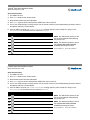
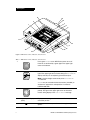
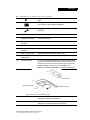
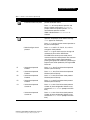
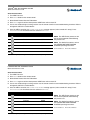
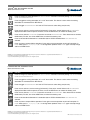
Button
Function
Press to change any shock decision to NO SHOCK ADVISED. Function is active only during PUSH ANALYZE and
STAND CLEAR, ANALYZING NOW.
Press to toggle the training electrodes “on” or “off” the manikin. This feature is active when the training
electrodes are connected to the AED Trainer.
Press to toggle MOTION DETECTED “on” and “off.” This feature is active during analysis only.
Press once to activate a service warning (red wrench). Press twice: wrench flashes and CALL SERVICE is
displayed and device will not operate. To clear, turn off the AED Trainer, or remove the battery pack.
Press once to activate LOW BATTERY. Press twice to activate REPLACE BATTERY. Press three times to simulate
failed battery. To clear, turn off the AED Trainer, or remove the battery pack.
Press to simulate device detection of a shockable rhythm. CPSS is disabled when AUTO ANALYZE 2 is
selected.
Press any time to suspend device operation. Press again to resume operation at point of interruption. In
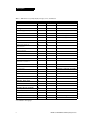
PAUSE mode, press F1, F2, F3, F4, C1, or C2 to change shock protocol. Press PAUSE again to accept change
and turn off AED Trainer.
LIFEPAK is a registered trademark of Medtronic Emergency Response Systems, Inc. Medtronic is a registered trademark of Medtronic, Inc.
Specifications are subject to change without notice.
© 2002-2007 Medtronic Emergency Response Systems, Inc. All rights reserved.
MIN 3012699-004 / CAT. 26500-001008
LIFEPAK® 500T AED TRAINING SYSTEM
Quick Start Reference Card
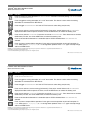
Button
Function
Press to change any shock decision to NO SHOCK ADVISED. Function is active only during PUSH ANALYZE and
STAND CLEAR, ANALYZING NOW.
Press to toggle the training electrodes “on” or “off” the manikin. This feature is active when the training
electrodes are connected to the AED Trainer.
Press to toggle MOTION DETECTED “on” and “off.” This feature is active during analysis only.
Press once to activate a service warning (red wrench). Press twice: wrench flashes and CALL SERVICE is
displayed and device will not operate. To clear, turn off the AED Trainer, or remove the battery pack.
Press once to activate LOW BATTERY. Press twice to activate REPLACE BATTERY. Press three times to simulate
failed battery. To clear, turn off the AED Trainer, or remove the battery pack.
Press to simulate device detection of a shockable rhythm. CPSS is disabled when AUTO ANALYZE 2 is
selected.
Press any time to suspend device operation. Press again to resume operation at point of interruption. In
PAUSE mode, press F1, F2, F3, F4, C1, or C2 to change shock protocol. Press PAUSE again to accept change
and turn off AED Trainer.
LIFEPAK is a registered trademark of Medtronic Emergency Response Systems, Inc. Medtronic is a registered trademark of Medtronic, Inc.
Specifications are subject to change without notice.
© 2002-2007 Medtronic Emergency Response Systems, Inc. All rights reserved.
MIN 3012699-004 / CAT. 26500-001008