1
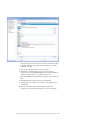
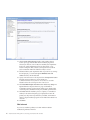
4. Click the Collection tab.
5. From the Formulas pane, expand the following group:
AP > Specific > Alcatel > 5620 SAM > Bulk > Equipment >
InterfaceAdditionalStats > timeCaptured
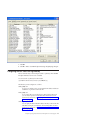
6. Right-click timeCaptured, select Apply as filter, and click Refresh. The
metrics are displayed in the pane for the timeCaptured filter.
7. Right-click within the pane and click Select All. All the metrics are selected.
8. Right-click within the pane and click Remove Selection.
9. Again, from the Formulas pane, expand the InterfaceStats > timeCaptured
group.
10. Repeat steps 6 – 8 to remove the linking for timeCaptured metric.
11. Click Save.
12. Click File > Exit.
After the linking is removed, you can now remove the metrics.
To remove metrics, follow these steps:
1. From the Tivoli Netcool Performance Manager DataMart GUI, click File >
Selectors > Formula Selector.
2. From the Formulas pane, expand the following group:
AP > Specific > Alcatel > 5620 SAM > Bulk > Equipment >
InterfaceAdditionalStats
The metrics are displayed in the right pane.
3. Right-click the timeCaptured metric and click Delete. The timeCaptured metric
is deleted.
4. Similarly, select InterfaceStats from the Formulas pane. The metrics are
displayed in the right pane.
5. Right-click the timeCaptured metric and click Delete. The timeCaptured metric
is deleted.
6. Click Edit > Apply.
7. Click File > Close.
Complete the upgrade procedure by following these steps:
Procedure
1. Stop the DataChannel:
a. Start a terminal emulator on the DataChannel server.
b. Run the dccmd command to stop all the DataChannel applications:
$ dccmd stop all
c. Run the following command to find the process identifiers (pids) that are
associated with the DataChannel visual processes:
$ findvisual
d. Run the following commands to stop each DataChannel visual process:
$
$
$
$
kill
kill
kill
kill
-9
-9
-9
-9
<cnsw_pid>
<logw_pid>
<amgrw_pid>
<cmgrw_pid>
2. Run the following commands to remove the files:
v /opt/proviso/datachannel/bin
rm –rf *_visual
Chapter 8. Upgrading the technology pack
55