1
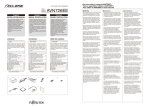
♦ System connection example /
Ejemplo de conexión del sistema /
Exemple de connexion du système
English
2) CD5030 + EXTERNAL EQUIPMENT (MP3 PLAYER, etc.)
Tip
L SIDE
TO THE RCA OUTPUT CONNECTORS
OF AN EXTERNAL EQUIPMENTS
• Install and connect all of the peripheral units before
connecting them to the main unit.
• Do not remove any of the protective caps (RCA, etc.) unless
the connectors are in use.
• Be sure to wrap the connection wires with tape (PVC tape)
to insulate them.
NO CONNECTION (Do not remove cap)
R SIDE
15
NO CONNECTION (Do not remove cap)
AUX105
(sold separately)
1
TO USB DEVICE
TO THE RCA
OUTPUT
CONNECTORS OF
AN EXTERNAL
EQUIPMENTS
1) CD5030 + iPC-109 + CH3083 + MEI-100 + Power Amplifier
NO CONNECTION (Do not remove cap)
L SIDE
13P
R SIDE
ANTENNA PLUG
16P
Red
TO ACC (Power Supply)
White
MEI-100 (sold separately)
Yellow
NO CONNECTION (Do not remove cap)
TO BATTERY+12V
(Permanent Supply)
15
White/Black
TO BATTERY+12V (Permanent Supply)
L SIDE
Blue
TO POWER ANTENNA RELAY (Supply)
TO SIGNAL INPUT OF AUXLIARY
POWER AMPLIFIER
NO CONNECTION
(Do not remove cap)
Orange/White
Gray/Black
TO HEAD LIGHT SWITCH (Illumination (+) )
iPC-109
(sold separately)
Blue/White
TO TURN-ON WIRE (Amplifiers, etc.)
FRONT
SPEAKERS
Gray
Green
To iPod
1
Black
Green/Black
TO GROUND
ANTENNA PLUG
13P
NO CONNECTION
(Do not remove cap)
REAR
Purple
16P
Yellow
TO BATTERY+12V
(Permanent Supply)
SPEAKERS
White
White/Black
13P
Gray
Gray/Black
Purple/Black
INSULATE EACH WIRE WITH NONE
CONDUCTING TAPE SUCH AS
ELECTRICAL TAPE OR ANOTHER
INSULATING METHOD
2
Brown
2P
Green
TO GROUND
INTERCONNECTING
WIRES
(supplied with CH3083)
Red
TO ACC (Power Supply)
CH3083
(sold separately)
TO HEAD LIGHT SWITCH
(Illumination (+) )
TO TURN-ON WIRE
(Amplifiers, etc.)
Green/Black
Blue
TO POWER ANTENNA
RELAY (Supply)
Purple
Orange/White
Purple/Black
Blue/White
Black
TO STEERING REMOTE CONTROL
Brown/Black
INSULATE EACH WIRE WITH NONE
CONDUCTING TAPE SUCH AS
ELECTRICAL TAPE OR ANOTHER
INSULATING METHOD
3) CD5030 + HDR109 + CH3083 + Power Amplifier
Brown
Brown/Black
TO STEERING REMOTE CONTROL
NO CONNECTION
(Do not remove cap)
TO GROUND
2
Tip
• iPod
is a trademark of Apple Inc., registered in U.S. and other countries.
• iPod is for legal or right holder-authorized copying only. Don’t steal music.
• "Made for iPod" means that an electronic accessory has been designed to connect specifically to iPod and has
been certified by the developer to meet Apple performance standards.
• Apple is not responsible for the operation of this device or its compliance with safety and regulatory standards.
TO BATTERY+12V
(Permanent Supply)
TO GROUND
HDR109 or HDR105
(sold separately)
ANTENNA PLUG
2P
NO CONNECTION (Do not remove cap)
15
TO SIGNAL INPUT OF AUXLIARY
POWER AMPLIFIER
1
TO USB DEVICE
ANTENNA EXTENSION WIRE
13P
13P
13P
16P
White
NO CONNECTION
(Do not remove cap)
Yellow
TO BATTERY+12V
(Permanent Supply)
White/Black
Gray
13P
Gray/Black
2P
TO GROUND
INTERCONNECTING WIRES
(supplied with CH3083)
CH3083
(sold separately)
INSULATE EACH WIRE WITH NONE
CONDUCTING TAPE SUCH AS
ELECTRICAL TAPE OR ANOTHER
INSULATING METHOD
Green
Red
TO ACC (Power Supply)
TO HEAD LIGHT SWITCH (Illumination (+) )
Green/Black
Blue
TO POWER ANTENNA RELAY (Supply)
Purple
Orange/White
INSULATE EACH WIRE WITH NONE
CONDUCTING TAPE SUCH AS
ELECTRICAL TAPE OR ANOTHER
INSULATING METHOD
Purple/Black
TO TURN-ON WIRE (Amplifiers, etc.) Blue/White
Black
Brown
Brown/Black
TO GROUND
2
TO STEERING REMOTE CONTROL