1
Operating in manual mode
Manual mode (non-programmable)—no timers are set and the system is manually turned on
and off via the thermostat. Setup number 160 = 0 (refer to p. 11).
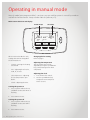
Main screen selections and display
Set temp.
Actual temp.
Set To
20.0 6:05 22.0
PM
Sat
System
Heat
System
When in manual mode the only
settings that can be changed on
the thermostat are:
--
System—turning the heating
on and off.
--
Fan—adjusting the fan to lo,
med, hi, or auto.
--
Set temperature—adjusting
the set temperature up or
down.
--
Clock—adjusting the time.
Turning the system on
1. Press ‘System’ and use the up
and down arrows until ‘Heat’ is
flashing.
2. Press ‘Done’ to save.
Turning the system off
1. Press ‘System’ and use the up
and down arrows until ‘Off’ is
flashing.
2. Press ‘Done’ to save.
6 | iHeat operation guide: 12063-A 01-13
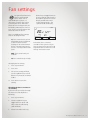
Fan Auto
Lo
Fan
Heat
More
Changing the fan setting
Refer to page 9.
Adjusting the temperature
The set temperature can be
adjusted by using the up and down
keys, and selecting ‘Done’ when
completed.
Adjusting the clock
1. Press ‘More’ then ‘Clock’.
2. Use the up and down keys
to adjust the time and press
‘Done’ to save.