1
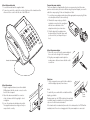
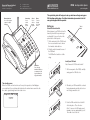
Attach the handset cable
1 Locate the handset and the supplied cable.
2 Connect one end of the cable to the socket at the base of the handset and the
other end to the socket in the left side of the P350 unit.
E
SID
RN
BU
nu
Me
t
lec
Se
S
SM
ter
gis
Re
ox
ilb
Ma
D
r
ea
Cl
ll
Ca
s
me
Na
1
M1
M2
M3
2
4
M5
Attach the antenna
1 Align the supplied antenna (or another suitable
GSM antenna) with the circular connector on the
far left of the rear panel.
2 Attach the antenna and twist the connector
collar clockwise until it is finger-tight - do not
overtighten.
3 In use, the antenna should always be vertical.
The supplied antenna has a hinge so that you
can position it correctly.
3
5
7
M4
Handset cable
EF
te
Mu
6
8
l
dia
Re
9
0
e
fre
nds
Ha
#
Prepare the power adapter
The power adapter is supplied with at least one snap-on plug to suit the mains
power sockets used in your location. Before using the power adapter, you need to
attach the snap-on plug, if it has not already been fitted.
1 Locate the power adapter main body and the appropriate snap-on plug (if it has
not already been fitted to the main body).
2 Orientate the snap-on plug so that its
underside connection slots are aligned
with the two metal blades of the
adapter main body, as shown here:
3 Slide the plug into the adapter main
body and press it firmly into place until
you hear a click (as it snaps into position).
s
es
rel les
Wi odu mens
M y Sie
b
+
Attach the power adapter
1 Attach the connector from the power adapter to
the socket on the far right of the rear panel.
2 Plug the power adapter main body into a
nearby mains outlet and ensure that the outlet
is switch on.
Switch on
1 On the rear panel, press and hold the red button
until the display responds, then release.
Notes
To switch off, press and hold the red button until the
Red
power
display goes blank.
button
During normal use, the P350 should only be switched
on and off using the red button. Use the transit switch
only once the unit has been turned off.
If the transit switch is inadvertently moved to the locked position, the P350 will immediately shut off or enter a charging state if the power adapter is connected.