1
Standard inputs
IN
DMX
OUT
SYNC
OUT1
IN2
1
RS232/422 IN
2
3
USB
10/100 ERR IR
1
2
3
4
5
6
2
3
4
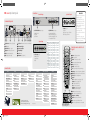
WIFI antenna for wireless IP (optional)
12V 1A output
DMX interface input - output
XLR input for wired projector control
RS232 for serial communication
USB backup custom settings
5
7
8
9
10
11
12
6
7
8
9 10 11
12
10/100 base-T for external control over IP and Art-Net
Ethernet status lights
Projector Status lights
WIFI status lights
IR receive sensor
GSM antenna input (optional)
Optional input
R9864010
5-CABLE INPUT
BARCO
SEL
R/PR
G/Y/VIDEO
B/PB
H/S
V/CR
SYNC
• 5 Cable Input accepts:
RGB HV/YUV HV
Composite video
S-Video
3G : standard SMPTE 425M
HDSDI : standard SMPTE 292M
Dual link : standard SMPTE 372M
SDI : standard SMPTE 259M
Input
R/PR
G/Y/Video
B/PB
H/S
V/CR
RGBHV
R
G
B
H
V
RGBS
R
G
B
S
-
RGSB
R
GS
B
-
-
RGBCV
R
G
B
CV
-
Composite
Video
-
Video
-
-
-
S-Video
-
Y
-
-
C
Component
Video-S
PR/R-Y
Y
PB/B-Y
S
-
Component
Video-SOY
PR/R-Y
YS
PB/B-Y
-
-
17
1
2
alignment
lamps
Projector control
R-Y
Y
B-Y
4
ENTER
6
PAUSE
CV
7
-
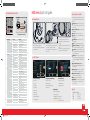
Image Settings
Main Window
Lamp Power
Orientation
Aspect Ratio
PiP Window
Identification
Lens
Serial communication
Diagnosis
Input Locking
Timings
Layout File Services
Z-axis
Warping
Network
Int. Service Patterns
Contrast/Intensity
DMX
Factory Default
Gamma
Buttons
USB Memory
EDID
Internal patterns
Menu Position
Reset Formatter
3D*
Color Space
Local LCD
Refill mode
ScenergiX
Change Language
Save Custom Settings
3D Glasses
Scheduler
Sp. HD Camera Mode
GSM Configuration**
Auto Dim overtemp.
HDX-Quickstartguide3.indd 2
R5905095 Rev. 05
COLOR
BRIGHTN
2
Splash Screen
Printed on FSC certified paper (www.fsc.org)
TINT
6
1
Save Custom Settings
* Only available with optional 3D input
** Only available with optional GSM module
8
4
Convergence
No Signal
7
3
IR control
Time and Date
SHARPN
5
10
6
LENS
SHIFT
LENS
FOCUS
LENS
SHIFT
14
1
2
3
4
5
6
7
8
9
0
RGB
PATTERN
WINDOW
PIP
LENS
STBY
PAUSE
TEXT
AUTO
FN
1
11
CONTR
LENS
ZOOM
9
2
12
TEXT
PHASE
0
Identification
Blanking
LENS
13
O IMA
9
service
Advanced Settings
Native Resolution
Using the remote control or local
keypad
15
EXIT
Fn
Input Selection
Same Zoom/Focus
16
14
9
Image File Services
W
DO
5
Projector Address
Minimum Delay
IP
GE
layout
3
8
image
SYNC
3D SYNC OUT
• Remove the lens before transporting the projector.
• To save lamp lifetime, first
switch the projector to standby
mode and wait until the after
cooling is finished to switch off
the main power.
• Ensure that the projector is operating with clean filters.
• Do not block the ventilation in
and outlets
• Laser light can cause severe
damage to the DMD. This damage
is not covered by warranty.
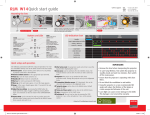
Pattern to display test patterns
RGB to toggle colors
3 Address to enter projector address
4 Lens to open lens adjustments menu
5 Pause to switch to pause
6 Standby to switch to standby
7 Fn to toggle the display to the preview image
8 Auto image to activate the auto image adjustment
9 Digit keys Direct input selection or numeric entries
10 Lens keys to direct lens adjustment
11 Settings
Phase: to adjust phase (analog signals only)
Sharpness: to increase edge detail
Tint: to adjust tint (NTSC only)
Color: to adjust color saturation
Brightness: to adjust the low lights
Contrast: to adjust the high lights
12 Freeze to freeze the current image
13 Text to activate or deactivate the OSD
14 Navigation and Menu keys
15 Window to select the active window
16 PiP to activate selected Picture in Picture
17 Info to activate help information on a menu item
1
Menu structure
INPUT
ERN
GB
MENU
YUV-CV
HDMI
• 3D Input accepts:
3D sync in
Display port 1.1a up to 210 MHz
HDMI 1.4a up to 210 MHz
• 3G/DUAL HDSDI input accepts:
RGB HV/YUV HV
Single DVI
Dual link DVI
ACT
SEL
SYNC
3D SYNC IN DISPLAYPORT
2
• Dual Link DVI-I HDCP input accepts:
WIFI
ETH
ACT PWR LMP SEL
12V /1A
1
OUT2
10/100 BASE-T
REMOTE CTRL
1
SYNC
R9864140
SEL
P
IN1
INPUT
3D INPUT
BARCO
SEL
PATT
SEL
SYNC
R9864000
3G/DUAL HDSDI
SEL
R
DUAL LINK DVI-I HDCP
Communication panel
IMPORTANT:
Optional 3D input
WIN
Connections
AUT
HDX series Quick start guide
5 13 15 8 16
EXIT
MENU
ENTER
7
2
4
18-7-2013 9:15:25
![FLM HD18 [v08]](http://vs1.manualzilla.com/store/data/005664321_1-9e0d84f2b9cac33a4ebfb5904f0dafa1-150x150.png)