1
videoplay “/my video.vob”
To change volume (0 - 100) to 75% when playing back a video or audio use:
videoplay volume 75
audioplay volume 75
To change the videomode use the videomode command. Example:
videomode 1024x768x60p
To display an image, use the imageplay command. Example:
imageplay slide1.bmp
To specify an image mode, use the imageplay command with mode setting. Examples:
imageplay slide1.bmp 0
imageplay slide1.bmp 1
The current version of the BrightSign software does not support “hot swap” of
CompactFlash cards. You must put in the CF card before applying power.
Using SD Cards (HD2000 only)
To list the contents of a CF card, enter any of the following:
dir
dir cf:/
dir ata:/
To list the contents of an SD card, enter:
dir sd:/
To explicitly refer to a card from within a script, use “CF:/” for compact flash cards or
“SD:/” for SD cards.
When an autorun.bas script is run, its current drive is set to the drive containing
autorun.bas, so references to files on the same card do not need the CF:/ or SD:/ prefixes.
Testing Compact Flash Cards
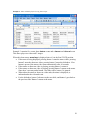
BrightSign works with most CF cards, but is not compatible with all CF cards. You can
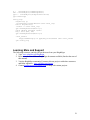
test your card by using the “dir /” shell cmd, and/or using the shell cmd “readperf”.
Examples:
dir /
51