1
9.4 SETTING THE GRINDER FINENESS / FILLING THE BEANS
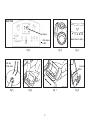
• Select the fineness setting (Fig. 4) by turning the bean container
until the white triangle matches up with one of the five dots in
front of the bean container. The largest dot to the right indicates
the coarsest grind setting.
• For first time use, use the coarsest setting – the largest dot.
• For dark oily beans use the coarsest setting. For light, dry
beans use the finer settings.
g) Strength Setting: the “AROMA” button.
Please note: the CoffeeTEAM lets you set two different “Aroma”
settings: one for immediate use and one for Auto-On use.
The display shows the “middle” bean (default setting). You can
select a lighter or darker bean by pushing the “AROMA” button.
The lighter bean will reduce the grinding time by one second,
the darker bean will increase the grinding time by one second.
The result will be a somewhat milder or stronger coffee.
For Auto-On use: Push and hold the PROG button until the
word “AUTO” is displayed. Keep the PROG button depressed
and then push the AROMA button to make your selection.
Fill the bean container (Fig. 1.6) with beans. Make sure that the
water container lid is closed to prevent beans from spilling into
the water container.
Caution: Check beans for foreign objects (page 6, chapter 4e).
The bean container will hold approximately 150 grams of beans,
good for two full pots of coffee in grinder setting 10.
Note: Never fill the bean container with frozen or coated beans
(chapters 4a and 4d, page 6).
9.2 COFFEE STRENGTH RECOMMENDATION
In setting “10” with “AROMA” set to the dark bean, the machine
will grind for about 40 seconds (producing the maximum amount
of coffee). In setting “2” and “AROMA” set to the light bean, the
machine grinds for about 7 seconds.
9.5 FILLING THE WATER CONTAINER
Open the water container lid (Fig. 1.7) and fill the water container
with the desired amount of fresh, cold water.
Please note: Never fill water above the 10-cup marking. The
water container has an overflow opening in the back.
• For 10 cups of strong coffee we recommend the setting 10 and
the middle bean.
• If the coffee tastes too strong, change the grinder setting to
the number 8 or lower.
• If the coffee is not strong enough, set the aroma setting to the
darker bean. If the coffee is still not strong enough, reduce the
amount of water.
9.6 CHARCOAL WATER FILTRATION
CoffeeTEAM comes with one charcoal cartridge and a charcoal
filter holder. You can brew coffee with or without the water
filtration system.
Note: If you use distilled, spring or bottled water or if your water
has little or no chlorine you may not find a difference in taste in
your coffee when using the water filtration system. However,
most tap water is treated with chlorine. The water filter cartridge
removes up to 82% of the chlorine found in your tap water.
9.3 POWER INTERRUPTION
• If the machine is unplugged or power is interrupted all settings
described in chapters 9.1 and 9.2 must be reset.
• If the machine was set to Auto-On and power was interrupted,
the machine will not brew coffee at the programmed time.
9.