1
• Push and hold the PROG button until the display shows AUTO
and a random number is blinking.
• Keep the PROG button depressed.
• Push and hold the H, then the M button to set Auto-On time.
• Release the PROG button. The display reverts to the actual time.
Important:
• CoffeeTEAM GS (glass carafe): when brewing, always have the
lid in place.
• Let some water brew through the machine without any coffee
as follows.
• Plug in machine and make sure the GoldTone filter and filter
insert are in place.
• Fill the water tank with approx. 20 oz. of water and place the
carafe with lid in the machine.
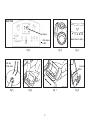
• Push the BREW button, then the ON/OFF button (Fig. 2).
The machine starts processing the water into the carafe.
• After all water has passed through, push the ON/OFF button
again to turn off machine.
• Empty carafe
c) To change the Auto-On Time
• Push and hold the PROG button until the display shows AUTO.
Keep the PROG button depressed.
• Push and hold the H and then the M button to set a new
Auto-On time.
• Release the PROG button. The display reverts to the actual time.
d) Checking the Auto-On Time
• Push and hold the PROG button. The display shows the word
“AUTO” and the Auto-On time.
• Release the PROG button. The display reverts to the actual time.
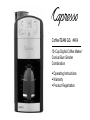
9. PREPARING THE COFFEETEAM
9.1 CLOCK AND GRINDER SETTINGS
Plug in machine. The display shows “0:00” blinking and either
the “BREW” or the “GRIND/BREW” light is illuminated (Fig. 2).
Please note: You must set the actual time before you can operate
the coffee maker.
e) Activating the Auto-On Time
• Push the PROG button briefly. The display shows “AUTO” and
the green Auto-On light illuminates, indicating the Auto-On setting
is active. The machine will show the actual time. At the preprogrammed time the machine starts grinding and brewing (or
brewing only). For details see chapter 10.2 & 11.1.
a) Setting the Actual Time
• The display shows “0:00” blinking
• Push and hold the H button until the actual hour is displayed.
The display will also show AM or PM.
• Push and hold the M button until the minutes are displayed.
The time is now set.
Please note: You must change the clock when the time changes
(Standard time /Daylight Savings time).
f) Grind Volume Setting: the “2-10” button
Please note: the CoffeeTEAM lets you set two different grinder
settings: one for immediate use and one for Auto-On use. For
both uses the default setting is “10”.
For immediate use: Push the “2-10” button repeatedly to select
from 2, 4, 6, 8, 10.
For Auto-On use: Push and hold the PROG button until the
word “AUTO” is displayed. Keep the PROG button depressed
and then push the “2-10” button to select from 2, 4, 6, 8, 10.
b) Setting the Auto-On Time
You can only set the Auto-On Time after the actual time is set.
8.