1
3916067 01.13
5. Startup and Configuration
5.1 General
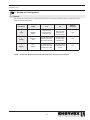
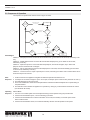
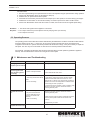
Dip switches are located on the control board to allow the user to specify certain functions of the ADC100. Verify settings using the table below.
ON
DEFAULT
POSITION
DIP SWITCH
NAME
OFF
1
(Left)
MANUAL
RESET
Automatic reset
at power failure or
insufficient draft
2
(Center)
MANUAL
ADJ
Automatic Mode-control
speeds up fan if PDS
opens during operation
Manually adjust
fan speed using
potentiometer
OFF
3
(Right)
PDS
CHECK*
No monitoring to see
if the PDS was in NC
position prior to start
The PDS must be
in NC position prior
to start
ON
Manual reset at
power failure or
insufficient draft
NOTE: Do NOT turn PDS check off unless requested by the factory technical support.
13
OFF